oil GEELY CK 2008 Repair Manual
[x] Cancel search | Manufacturer: GEELY, Model Year: 2008, Model line: CK, Model: GEELY CK 2008Pages: 392, PDF Size: 38.86 MB
Page 154 of 392

147Section 6 Rear BrakeComponents
Repairing1. Remove rear wheel
2. Drain the brake fluid
3. Remove the brake drum
(1) loose the parking brake handle
(2) Remove the cotter pin with a long nose pliers
(3) loose the spindle slot nut
Lower Return Spring
Oil Baffle Plate
Anchor Plate
Brake Bottom Plates
Left Cable Plate
Left Torsion Spring
Adjusting Pawl Shaft
Pin
Left Adjusting
Pawl
Left Adjusting
Plate
Brake Shoe I
Wheel Hub Bearing II
Rear Spindle Cap
Wheel Hub
Bearing I
Stop Washer
Wheel Hub
Bolt
Rear Ring Gear
Rear Brake Drum
Rear Spindle Cover
Brake Shoe I
Shoe Guide
Friction Shoe
Boot
Cup
Piston
Wheel Cylinder
Spring
Piston
BootCup
Parking Brake
Left Swing Arm
Rear Brake
Auto
Adjusting Lever
Adjusting Lever Spring
Return Spring
Page 168 of 392
161Chapter 2 Starting and Charging SystemSection 1 Starting System
(MR479Q MR479QA MR481QA)I. STARTER INSPECTIONNOTICE:
These tests must be done within 5 seconds to avoid burning out the coil.
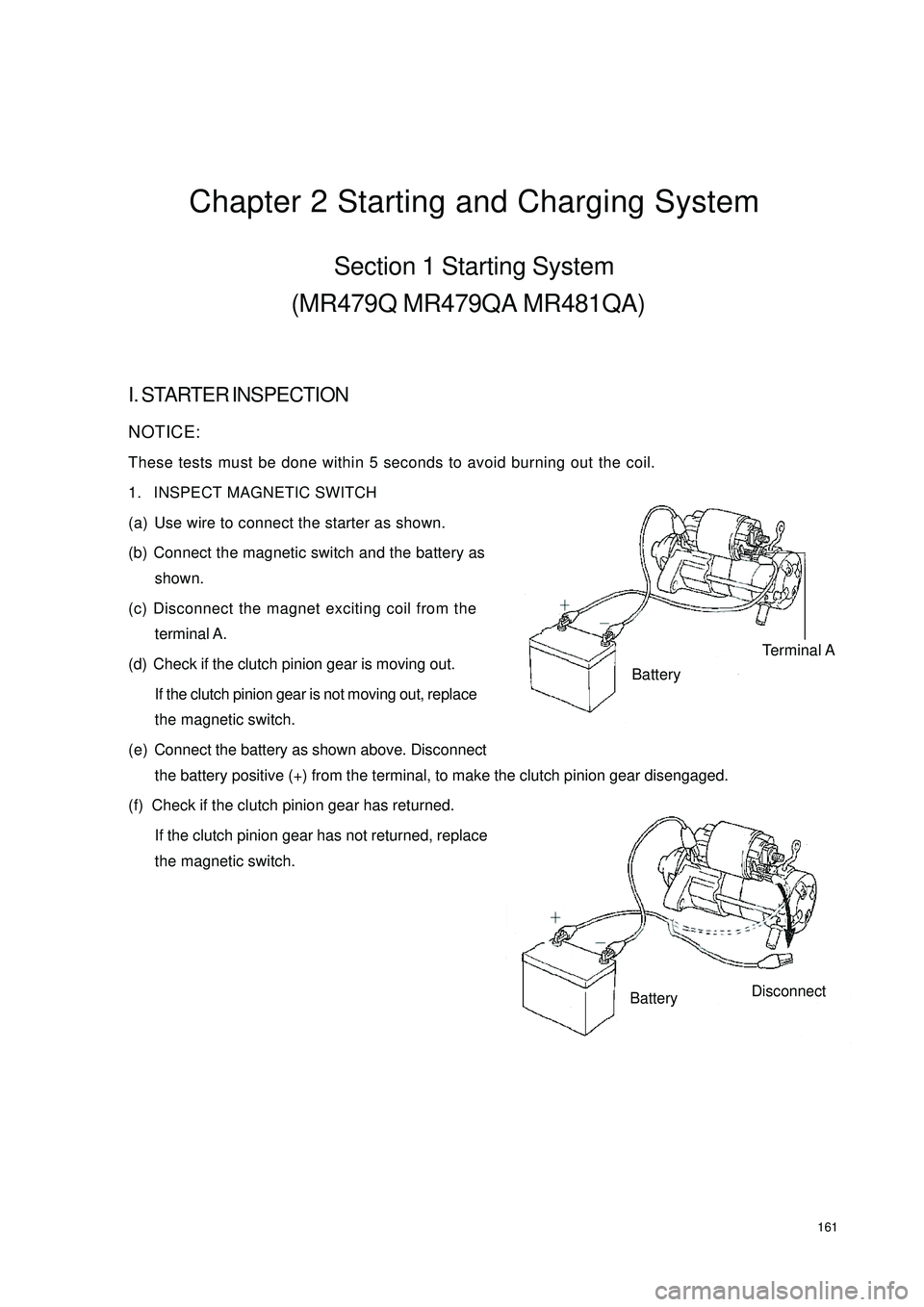
1. INSPECT MAGNETIC SWITCH
(a) Use wire to connect the starter as shown.
(b) Connect the magnetic switch and the battery as
shown.
(c) Disconnect the magnet exciting coil from the
terminal A.
(d) Check if the clutch pinion gear is moving out.
If the clutch pinion gear is not moving out, replace
the magnetic switch.
(e) Connect the battery as shown above. Disconnect
the battery positive (+) from the terminal, to make the clutch pinion gear disengaged.
(f) Check if the clutch pinion gear has returned.
If the clutch pinion gear has not returned, replace
the magnetic switch.Terminal ABatteryBatteryDisconnect
Page 169 of 392
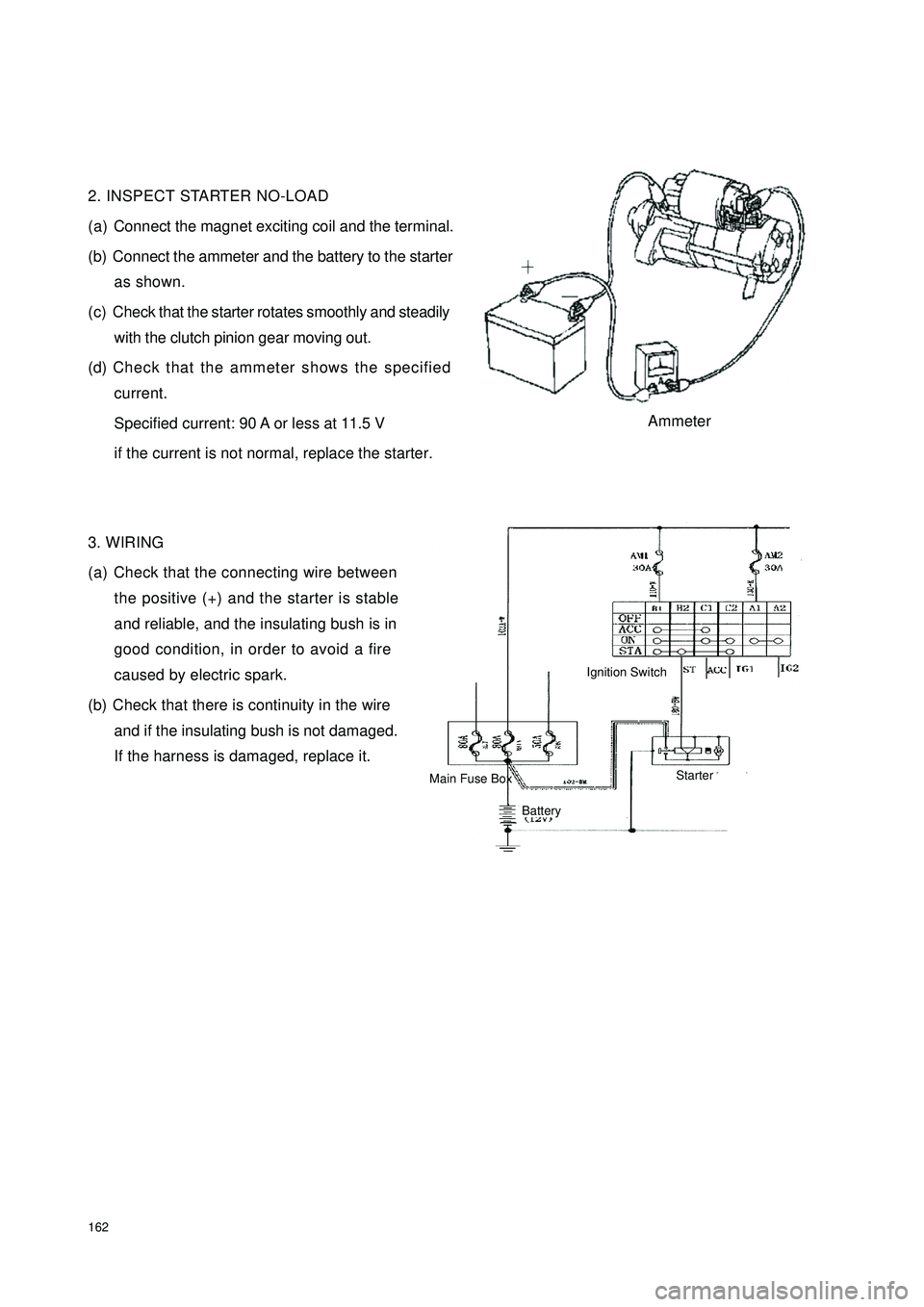
1622. INSPECT STARTER NO-LOAD
(a) Connect the magnet exciting coil and the terminal.
(b) Connect the ammeter and the battery to the starter
as shown.
(c) Check that the starter rotates smoothly and steadily
with the clutch pinion gear moving out.
(d) Check that the ammeter shows the specified
current.
Specified current: 90 A or less at 11.5 V
if the current is not normal, replace the starter.
3. WIRING
(a) Check that the connecting wire between
the positive (+) and the starter is stable
and reliable, and the insulating bush is in
good condition, in order to avoid a fire
caused by electric spark.
(b) Check that there is continuity in the wire
and if the insulating bush is not damaged.
If the harness is damaged, replace it.AmmeterIgnition SwitchBattery Main Fuse BoxStarter
Page 178 of 392

171Chapter 3 Combination Meter SystemSection 1 Circuit Diagram of Combination Meter and Location of
Multi-pin Plug-in TerminalI. CIRCUIT DIAGRAM OF CONBINATION METERSpeed Signal
Ground The Sensor
Revolution SignalWater Temperature SignaFuel Level GaugeTachometer
SpeedometerWater
Temperature Gauge
Feul Level Gauge
OdometerHigh Beam Lamp
Rear Defrost Lamp
Rear Defog Lamp
Backlight
Water Temperature WarningPower Steering
Fuel WarningCharge
Brake Fluid
Oil Pressure
Engine Malfunction
Driver's seat belt
Park Brake
SRS(main)
SRS(sub)
Page 180 of 392

1732. DEFINITION OF MULTIPIN PLUG-IN TERMINALDefinition of Terminal Color of Harness
1Empty
2EPS VG
3Empty
4Empty
5Empty
6Empty
7Empty
8 Combination switch (Position lamp P
9 Speed sensor groun B
10 Speed sensor power sourc RY
11 Speed sensor signal outpu YR
12 Fuel senso B
13 Alte rna tor WR
14 Brake fluid level switc GR
15 Oil pressure switc YG
16 Re a r de frost YB
1 Rear fog lamp Gr
2 Engine ma lfunc tion GY
3 S e a t be lt s w it c h R
4 P owe r sourc e Y
5 Engine coolant temperature senso YW
6 Park switch G
7 Power source groun B
8 Power source groun B
9ABS R
10 SRS (Ma in) RY
11 Engine re volution signa l BBl
12 Live wire (Fire wire) WG
13 High be am la mp + RB
14 Low bea m - RW
15 SRS (Sub) RG
16 Empty Terminal No.
A
B
Page 195 of 392

188Symptom Suspe cte d Area
1. Ha rne ss or connec tor.
2. ABS controlle r or ABS wa rning light driver module
3. C ombina tion me te r a s s e mbly
1. Ha rne ss or connec tor.
2. SRS controller
3. C ombina tion me te r a s s e mbly
1. Ha rne ss or connec tor.
2. SRS controller
3. C ombina tion me te r a s s e mbly
1. Ha rne ss or connec tor.
2. O il pr e s s ur e s w it c h a s s e mbly
3. C ombina tion me te r a s s e mbly
1. Ha rne ss or connec tor.
2. Headlamp light control switch
3. C ombina tion me te r a s s e mbly
1. Ha rne ss or connec tor.
2. Headlamp light control switch
3. C ombina tion me te r a s s e mbly
1. Ha rne ss or connec tor.
2. Ce ntra l c ontrolle r or re a r de fros t sw itc h
3. C ombina tion me te r a s s e mbly
1. Ha rne ss or connec tor.
2. Electric Power Steering controller
3. C ombina tion me te r a s s e mbly
1. Ha rne ss or connec tor.
2. Engine c oola nt te mpe ra ture se nsor
3. C ombina tion me te r a s s e mbly
1. Ha rne ss or connec tor.
2. Se a t belt buckle switch
3. C ombina tion me te r a s s e mbly ABS warning light doe s not light up
SRS wa rning light doe s not light up
SRS (Sub) indic a tor doe s not light up
Oil pre ssure wa rning light does not light
up
Water temperature warning indicator
doe s not light up
Se at be lt wa rning indic a tor doe s not light
up High be a m indica tor does not light up
Re a r fog indica tor does not light up
Re a r defrost indic a tor doe s not light up
EP S wa rning indic ator doe s not light up
Page 198 of 392

191Standard
NOTICE:
Connector should be disconnected when measured.
6. INSPECT WATER TEMPERATURE WARNINGLIGHT
(a) Disconnect the water temperature sensor connector.
(b) Turn the ignition ON, the water temperature warning light should go out.
(c) Ground the terminal B5 of the meter connector, the water temperature warning light should light up.
7. INSPECT OIL PRESSURE WARNING LIGHT
(1) Disconnect the oil pressure sensor connector.
(2) Turn the ignition ON, the oil pressure warning light should go out.
(3) Short connector terminal to the ground with a wire, the oil pressure warning light should light up.
8. INSPECT OIL PRESSURE SENSOR
(1) Disconnect the connector from the oil pressure sensor .
(2) Inspect continuity between its terminal and ground.
Engine is stopped: Continuity
Engine runs: No continuity
9. INSPECT PARK BRAKE WARING LIGHT
(1) Disconnect the connector from the park brake switch.
(2) Turn the ignition ON, the park brake warning light should go out.
(3) Short connector terminal to the ground with a wire, the park brake warning light should light up.Standa rd indic ation Re sista nc e (Ω)
C159.5—169.5
1/2H
53—59
Warning point 26.7—30.7
H 20—24
Page 203 of 392

196Section 2 Replacement and AdjustmentI WIPER MOTOR ASSEMBLY REPLACEMENT1. REMOVE WIPER MOTOR
(a) Disconnect the connector.
(b) Remove the 4 mounting bolts.
(c) Separate the shaft of the motor crankshaft arm and the wiper link with special tools.
2. INSTALL A NEW WIPER MOTOR
(a) Press the shaft of the motor crankshaft arm and the wiper link in its position with special tools.
(b) Lock the 4 bolts in the specified torque.
(c) Connect the connector.
(d) Operate the wiper, make the washer fluid spraying on the windshield, check if the operation of wiper and
its starting position is normal. If not, remove the wiper arm blades assembly and make some proper
adjustment.
Hint: Make the top of the new shaft of the wiper motor crankshaft arm filled with lubricating oil.II. WIPER BLADES REPLACEMENT1. REMOVE BLADES FROM WIPER BLADES ASSEMBLY 1, 2
yRemove blades from wiper blades assembly 1, 2 respectively.
2. INSTALL NEW BLADES
yInstall new blades on wiper blades assembly 1, 2 respectively.4 Mounting Bolts
Page 205 of 392
198Chapter 5 Light SystemSection 1 Survey of Light SystemI. COMPOSITION1. Front combination lamp assembly: turn signal lamp, high beam, low beam, head lamp, front position lamp.
2. Rear combination lamp: turn signal lamp, back-up lamp, rear fog lamp, tail lamp, brake lamp, retro reflector.
3. Front fog lamp
4. Side turn signal lamp
5. High mounted stop lamp
6. Rear trunk lamp
7. License plate lamp
8. Interior dome lamp
9. Rear row reading lamp
10. Door lampshield and bulb assemblyII. NOTES FOR REPAIR1. NOTES WHEN REPAIRING ELECTRICAL EQUIPMENTS
(a) Disconnect the battery ground cable.
2. Notes when replacing a headlamp bulb
(a) Before replacing a halogen bulb, turn the headlamp OFF to make it cool.
(b) When installing a new halogen bulb, do not touch the glass part of the bulb with bare hands.
(c) If there is oil stain on the surface of halogen bulb (headlamp and front fog lamp) when the lamps are
turned ON, its service life will be shortened.
(d) Halogen bulbs (headlamp and front fog lamp) have pressurized gas inside and require special handling.
They can explode if dropped to ground.The glass fragments will splash up.
(e) When replacing, make sure to use the bulbs with the same power, same model.
(f) After the bulb is installed, make the lamp holder tight.
Page 230 of 392
223tion Problems".
5. COMPACT DISC PLAYER
Compact Disc Players (hereinafter referred as CD) use a laser beam pick--up to read the digital signals
recorded on the CD and reproduce analog signals of the music, etc.
HINT:
Never attempt to disassemble or oil any part of the player unit.
Do not insert any object other than a disc into the disc box.
NOTICE:
CD players use an invisible laser beam which could cause hazardous radiation exposure. Be sure
to operate the player correctly as instructed.
6. MAINTENANCE
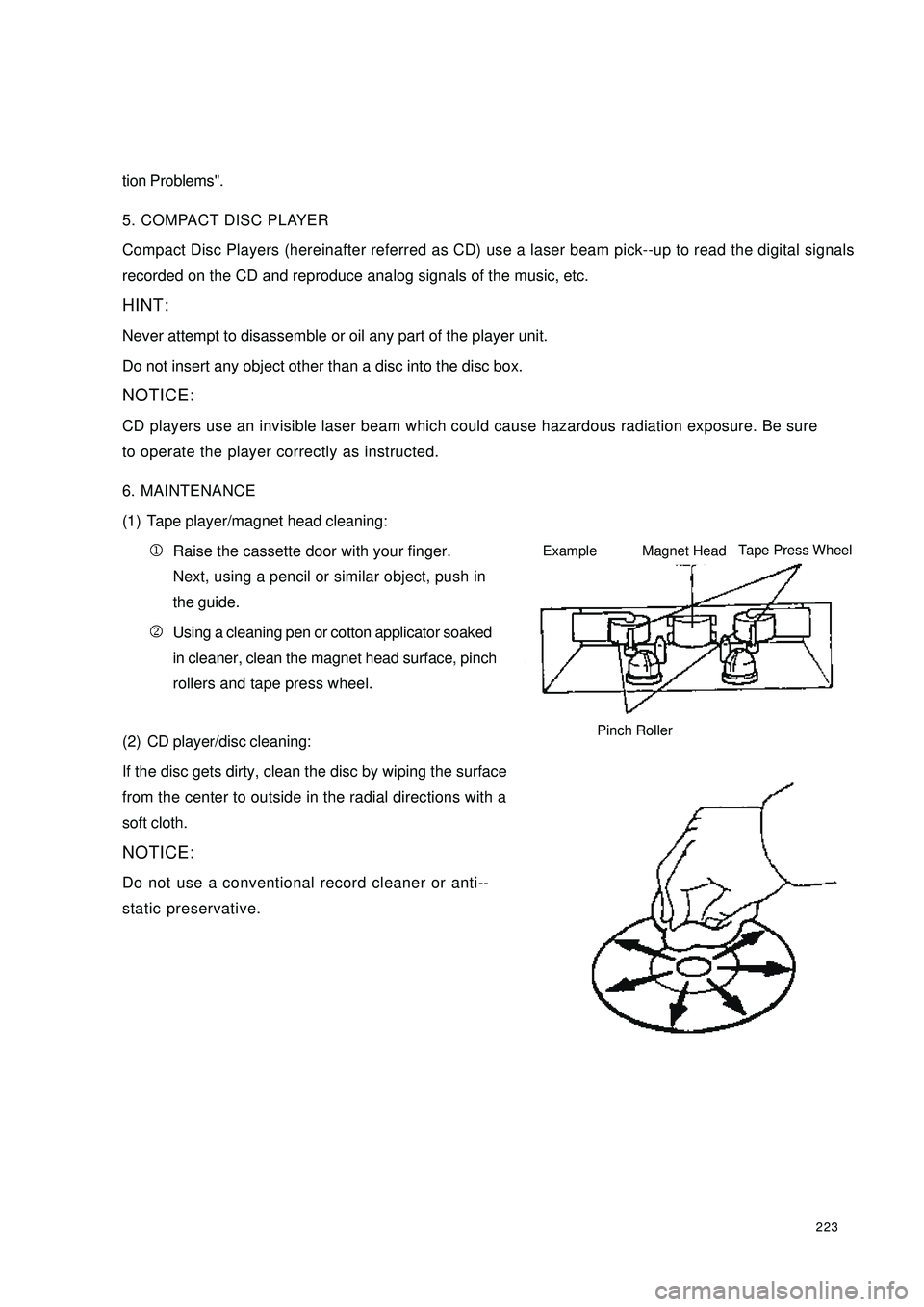
(1) Tape player/magnet head cleaning:
1Raise the cassette door with your finger.
Next, using a pencil or similar object, push in
the guide.
2Using a cleaning pen or cotton applicator soaked
in cleaner, clean the magnet head surface, pinch
rollers and tape press wheel.
(2) CD player/disc cleaning:
If the disc gets dirty, clean the disc by wiping the surface
from the center to outside in the radial directions with a
soft cloth.
NOTICE:
Do not use a conventional record cleaner or anti--
static preservative.ExampleMagnet HeadTape Press WheelPinch Roller