brake light GMC SAVANA 2022 User Guide
[x] Cancel search | Manufacturer: GMC, Model Year: 2022, Model line: SAVANA, Model: GMC SAVANA 2022Pages: 288, PDF Size: 10.66 MB
Page 142 of 288
GMC Savana Owner Manual (GMNA-Localizing-U.S./Canada-15555961) -
2022 - CRC - 4/14/22
Driving and Operating 141
Brakes
Antilock Brake System (ABS)
The Antilock Brake System (ABS) helps
prevent a braking skid and maintain steering
while braking hard.
ABS performs a system check when the
vehicle is first driven. A momentary motor
or clicking noise may be heard while this
test is going on, and the brake pedal may
move slightly. This is normal.
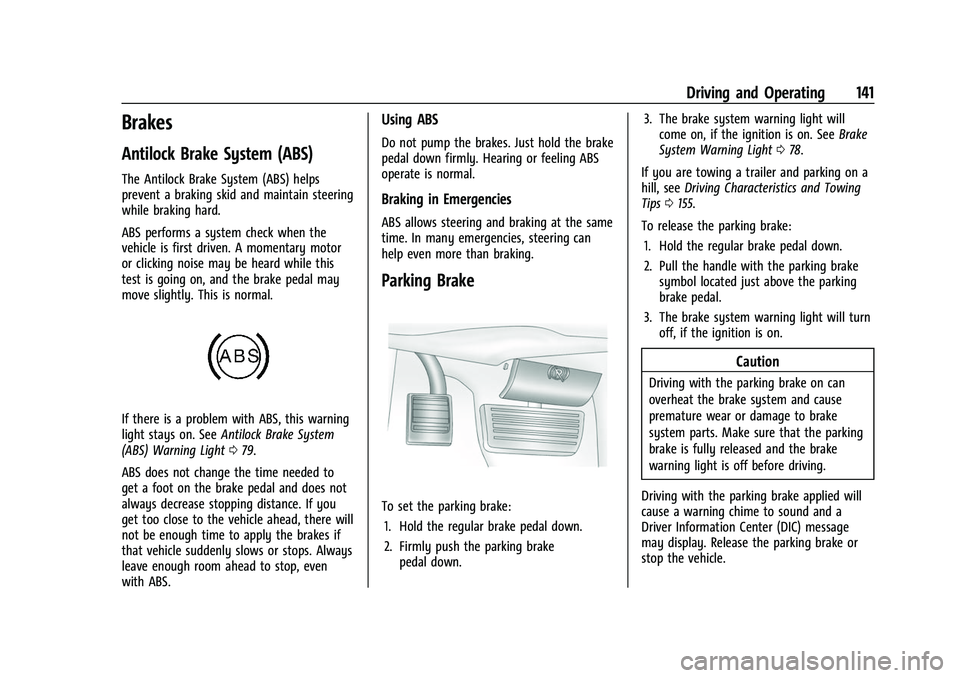
If there is a problem with ABS, this warning
light stays on. SeeAntilock Brake System
(ABS) Warning Light 079.
ABS does not change the time needed to
get a foot on the brake pedal and does not
always decrease stopping distance. If you
get too close to the vehicle ahead, there will
not be enough time to apply the brakes if
that vehicle suddenly slows or stops. Always
leave enough room ahead to stop, even
with ABS.
Using ABS
Do not pump the brakes. Just hold the brake
pedal down firmly. Hearing or feeling ABS
operate is normal.
Braking in Emergencies
ABS allows steering and braking at the same
time. In many emergencies, steering can
help even more than braking.
Parking Brake
To set the parking brake: 1. Hold the regular brake pedal down.
2. Firmly push the parking brake pedal down. 3. The brake system warning light will
come on, if the ignition is on. See Brake
System Warning Light 078.
If you are towing a trailer and parking on a
hill, see Driving Characteristics and Towing
Tips 0155.
To release the parking brake: 1. Hold the regular brake pedal down.
2. Pull the handle with the parking brake symbol located just above the parking
brake pedal.
3. The brake system warning light will turn off, if the ignition is on.
Caution
Driving with the parking brake on can
overheat the brake system and cause
premature wear or damage to brake
system parts. Make sure that the parking
brake is fully released and the brake
warning light is off before driving.
Driving with the parking brake applied will
cause a warning chime to sound and a
Driver Information Center (DIC) message
may display. Release the parking brake or
stop the vehicle.
Page 144 of 288
GMC Savana Owner Manual (GMNA-Localizing-U.S./Canada-15555961) -
2022 - CRC - 4/14/22
Driving and Operating 143
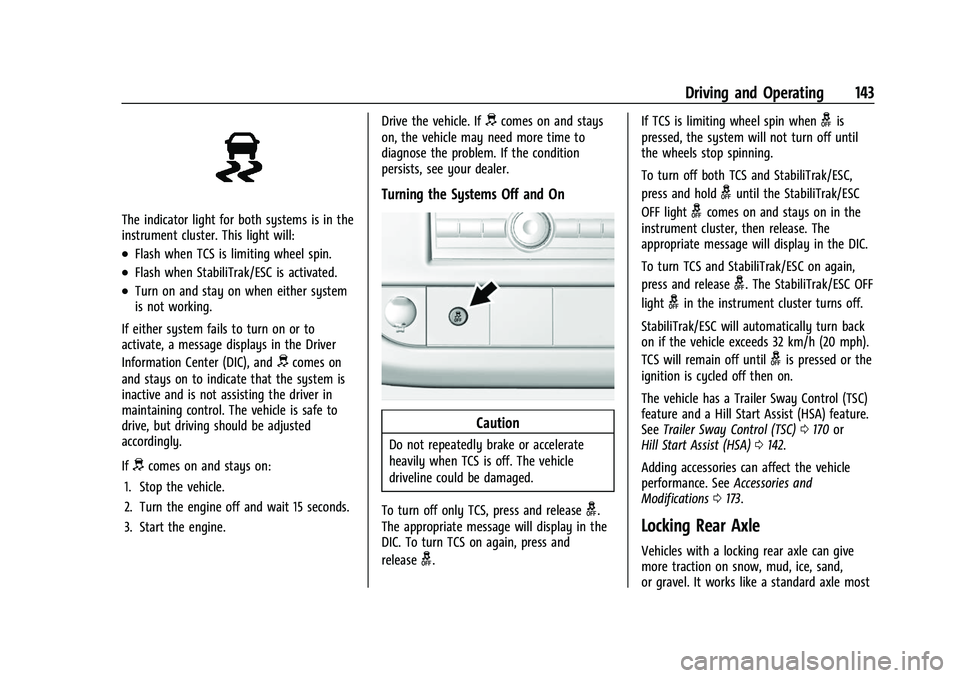
The indicator light for both systems is in the
instrument cluster. This light will:
.Flash when TCS is limiting wheel spin.
.Flash when StabiliTrak/ESC is activated.
.Turn on and stay on when either system
is not working.
If either system fails to turn on or to
activate, a message displays in the Driver
Information Center (DIC), and
dcomes on
and stays on to indicate that the system is
inactive and is not assisting the driver in
maintaining control. The vehicle is safe to
drive, but driving should be adjusted
accordingly.
If
dcomes on and stays on:
1. Stop the vehicle.
2. Turn the engine off and wait 15 seconds.
3. Start the engine. Drive the vehicle. If
dcomes on and stays
on, the vehicle may need more time to
diagnose the problem. If the condition
persists, see your dealer.
Turning the Systems Off and On
Caution
Do not repeatedly brake or accelerate
heavily when TCS is off. The vehicle
driveline could be damaged.
To turn off only TCS, press and release
g.
The appropriate message will display in the
DIC. To turn TCS on again, press and
release
g. If TCS is limiting wheel spin when
gis
pressed, the system will not turn off until
the wheels stop spinning.
To turn off both TCS and StabiliTrak/ESC,
press and hold
guntil the StabiliTrak/ESC
OFF light
gcomes on and stays on in the
instrument cluster, then release. The
appropriate message will display in the DIC.
To turn TCS and StabiliTrak/ESC on again,
press and release
g. The StabiliTrak/ESC OFF
light
gin the instrument cluster turns off.
StabiliTrak/ESC will automatically turn back
on if the vehicle exceeds 32 km/h (20 mph).
TCS will remain off until
gis pressed or the
ignition is cycled off then on.
The vehicle has a Trailer Sway Control (TSC)
feature and a Hill Start Assist (HSA) feature.
See Trailer Sway Control (TSC) 0170 or
Hill Start Assist (HSA) 0142.
Adding accessories can affect the vehicle
performance. See Accessories and
Modifications 0173.
Locking Rear Axle
Vehicles with a locking rear axle can give
more traction on snow, mud, ice, sand,
or gravel. It works like a standard axle most
Page 146 of 288
GMC Savana Owner Manual (GMNA-Localizing-U.S./Canada-15555961) -
2022 - CRC - 4/14/22
Driving and Operating 145
Once the vehicle speed reaches about
40 km/h (25 mph) or more, briefly press
+RES. The vehicle returns to the previous set
speed.
Increasing Speed While Using Cruise Control
If the cruise control system is already
activated:
.Press and hold +RES until the desired
speed is reached, then release it.
.To increase vehicle speed in small
increments, briefly press +RES. For each
press, the vehicle goes about
1 km/h (Metric display) or 1 mph (English
display) faster.
The speedometer reading can be displayed
in either English or metric units. See Driver
Information Center (DIC) 082. The
increment value used depends on the units
displayed.
Reducing Speed While Using Cruise Control
If the cruise control system is already
activated:
.Press and hold SET– until the desired
lower speed is reached, then release it.
.To slow down in small increments, briefly
press SET–. For each press, the vehicle
goes about 1 km/h (Metric display) or
1 mph (English display) slower.
The speedometer reading can be displayed
in either English or metric units. See Driver
Information Center (DIC) 082. The
increment value used depends on the units
displayed.
Passing Another Vehicle While Using Cruise
Control
Use the accelerator pedal to increase the
vehicle speed. When you take your foot off
the pedal, the vehicle will slow down to the
previous set cruise speed. While pressing the
accelerator pedal or shortly following the
release to override cruise control, briefly
pressing SET– will result in cruise set to the
current vehicle speed.
Using Cruise Control on Hills
How well the cruise control works on hills
depends on the vehicle speed, load, and the
steepness of the hills. When going up steep
hills, you might have to step on the
accelerator pedal to maintain the vehicle
speed. When going downhill, you might
have to brake or shift to a lower gear to
keep your speed down. If the brake pedal is applied, cruise control
will disengage.
Ending Cruise Control
There are four ways to end cruise control:
.Step lightly on the brake pedal.
.Press[.
.Shift the transmission to N (Neutral).
.To turn off cruise control, pressI.
Erasing Speed Memory
The cruise control set speed is erased from
memory if
Iis pressed or if the vehicle is
turned off.
Driver Assistance Systems
This vehicle may have features that work
together to help avoid crashes or reduce
crash damage while driving, backing, and
parking. Read this entire section before
using these systems.
{Warning
Do not rely on the Driver Assistance
Systems. These systems do not replace
the need for paying attention and driving
(Continued)
Page 150 of 288

GMC Savana Owner Manual (GMNA-Localizing-U.S./Canada-15555961) -
2022 - CRC - 4/14/22
Driving and Operating 149
Forward Collision Alert (FCA)
System
If equipped, the FCA system may help to
avoid or reduce the harm caused by
front-end crashes. When approaching a
vehicle ahead too quickly, FCA provides a
red flashing alert on the windshield and
rapidly beeps. FCA also lights an amber
visual alert if following another vehicle
much too closely.
FCA detects vehicles within a distance of
approximately 60 m (197 ft) and operates at
speeds above 40 km/h (25 mph).
{Warning
FCA is a warning system and does not
apply the brakes. When approaching a
slower-moving or stopped vehicle ahead
too rapidly, or when following a vehicle
too closely, FCA may not provide a
warning with enough time to help avoid
a crash. It also may not provide any
warning at all. FCA does not warn of
pedestrians, animals, signs, guardrails,
bridges, construction barrels, or other(Continued)
Warning (Continued)
objects. Be ready to take action and
apply the brakes. SeeDefensive Driving
0 121.
FCA can be disabled with the
[button on
the center stack.
Detecting the Vehicle Ahead
FCA warnings will not occur unless the FCA
system detects a vehicle ahead. When a
vehicle is detected, the vehicle ahead
indicator will display green. Vehicles may
not be detected on curves, highway exit
ramps, or hills, due to poor visibility; or if a
vehicle ahead is partially blocked by
pedestrians or other objects. FCA will not
detect another vehicle ahead until it is
completely in the driving lane.
{Warning
FCA does not provide a warning to help
avoid a crash, unless it detects a vehicle.
FCA may not detect a vehicle ahead if
the FCA sensor is blocked by dirt, snow,
or ice, or if the windshield is damaged.
It may also not detect a vehicle on
winding or hilly roads, or in conditions
that can limit visibility such as fog, rain,
or snow, or if the headlamps or
windshield are not cleaned or in proper
condition. Keep the windshield,
headlamps, and FCA sensors clean and in
good repair.
Collision Alert
When your vehicle approaches another
detected vehicle too rapidly, the red FCA
display will flash on the windshield. Also,
eight rapid high-pitched beeps will sound
from the front. When this Collision Alert
Page 151 of 288

GMC Savana Owner Manual (GMNA-Localizing-U.S./Canada-15555961) -
2022 - CRC - 4/14/22
150 Driving and Operating
occurs, the brake system may prepare for
driver braking to occur more rapidly which
can cause a brief, mild deceleration.
Continue to apply the brake pedal as
needed. Cruise control may be disengaged
when the Collision Alert occurs.
Tailgating Alert
The vehicle ahead indicator will display
amber if following a detected vehicle ahead
much too closely.
Selecting the Alert Timing
The Collision Alert button is on the center
stack. Press
[to set the alert timing to
far, medium, near, or off. The first button
press shows the current control setting on
the DIC. Additional button presses will
change this setting. The chosen setting will
remain until it is changed and will affect
both the Collision Alert and the Tailgating
Alert features. The timing of both alerts will
vary based on vehicle speed. The faster the
vehicle speed, the farther away the alert will occur. Consider traffic and weather
conditions when selecting the alert timing.
The range of selectable alert timings may
not be appropriate for all drivers and driving
conditions.
Unnecessary Alerts
FCA may provide unnecessary alerts to
turning vehicles, vehicles in other lanes,
objects that are not vehicles, or shadows.
These alerts are normal operation and the
vehicle does not need service.
Cleaning the System
If the FCA system does not seem to operate
properly, cleaning the outside of the
windshield area in front of the camera
sensor may correct the issue.
Side Blind Zone Alert (SBZA)
If equipped, the Side Blind Zone Alert (SBZA)
system is a lane-changing aid that assists
drivers with avoiding crashes that occur with
moving vehicles in the side blind zone,
or blind spot areas. The SBZA warning
display will light up in the corresponding
outside side mirror and will flash if the turn
signal in corresponding side is on.
{Warning
SBZA does not alert the driver to vehicles
rapidly approaching outside of the side
blind zones, pedestrians, bicyclists,
or animals. It may not provide alerts
when changing lanes under all driving
conditions. Failure to use proper care
when changing lanes may result in injury,
death, or vehicle damage. Before making
a lane change, always check mirrors,
glance over your shoulder, and use the
turn signals.
SBZA Detection Zones
Page 156 of 288
GMC Savana Owner Manual (GMNA-Localizing-U.S./Canada-15555961) -
2022 - CRC - 4/14/22
Driving and Operating 155
Caution
If a new fuel cap is needed, get the right
type of cap from your dealer. The wrong
type of fuel cap may not fit properly,
may turn on the malfunction indicator
lamp, and could damage the fuel system
and emissions system. SeeMalfunction
Indicator Lamp (Check Engine Light) 077.
Filling a Portable Fuel Container
{Warning
Never fill a portable fuel container while
it is in the vehicle. Static electricity
discharge from the container can ignite
the fuel vapor. You or others could be
badly burned and the vehicle could be
damaged. To help avoid injury to you
and others:
.Dispense fuel only into approved
containers.
.Do not fill a container while it is
inside a vehicle, in a vehicle's trunk, in
a pickup bed, or on any surface other
than the ground.
(Continued)
Warning (Continued)
.Bring the fill nozzle in contact with
the inside of the fill opening before
operating the nozzle. Maintain contact
until filling is complete.
.Keep sparks, flames, and smoking
materials away from fuel.
.Avoid using electronic devices while
pumping fuel.
Trailer Towing
General Towing Information
Only use towing equipment that has been
designed for the vehicle. Contact your dealer
or trailering dealer for assistance with
preparing the vehicle to tow a trailer. Read
the entire section before towing a trailer.
To tow a disabled vehicle, see Towing the
Vehicle 0234. To tow the vehicle behind
another vehicle such as a motor home, see
Recreational Vehicle Towing 0235.
Driving Characteristics and
Towing Tips
{Warning
You can lose control when towing a
trailer if the correct equipment is not
used or the vehicle is not driven properly.
For example, if the trailer is too heavy or
the trailer brakes are inadequate for the
load, the vehicle may not stop as
expected. You and others could be
seriously injured. The vehicle may also be
damaged, and the repairs would not be
covered by the vehicle warranty. Pull a
trailer only if all the steps in this section
have been followed. Ask your dealer for
advice and information about towing a
trailer with the vehicle.
Driving with a Trailer
Trailering is different than just driving the
vehicle by itself. Trailering means changes in
handling, acceleration, braking, durability,
and fuel economy. Successful, safe trailering
takes correct equipment, and it has to be
used properly.
Page 169 of 288
GMC Savana Owner Manual (GMNA-Localizing-U.S./Canada-15555961) -
2022 - CRC - 4/14/22
168 Driving and Operating
Tires
.Do not tow a trailer while using a
compact spare tire on the vehicle.
.Tires must be properly inflated to support
loads while towing a trailer. SeeTires
0 204 for instructions on proper tire
inflation.
Safety Chains
Always attach chains between the vehicle
and the trailer, and attach the chains to the
holes on the trailer hitch platform.
Instructions about safety chains may be
provided by the hitch manufacturer or by
the trailer manufacturer.
Cross the safety chains under the tongue of
the trailer to help prevent the tongue from
contacting the road if it becomes separated
from the hitch. Always leave just enough
slack so the combination can turn. Never
allow safety chains to drag on the ground.
Trailer Brakes
Loaded trailers over 675 kg (1,500 lb) must
be equipped with brake systems and with
brakes for each axle. Trailer braking
equipment conforming to Canadian Standards Association (CSA) requirement
CAN3-D313, or its equivalent, is
recommended.
State or local regulations may require the
trailer to have its own braking system if the
loaded weight of the trailer exceeds certain
minimums. These requirements vary from
state to state. Read and follow the
instructions for the trailer brakes so they are
installed, adjusted, and maintained properly.
Never attempt to tap into your vehicle's
hydraulic brake system. If you do, both the
vehicle anti-lock brakes and the trailer
brakes may not function, which could result
in a crash.
Trailer Wiring Harness
Basic Trailer Wiring
If the vehicle is not equipped with a trailer
connector on the rear bumper, a seven-wire
trailering harness is tied to the vehicle’s
frame. The harness requires the installation
of a trailer connector, which is available
through your dealer.
Use only a round, seven-wire connector with
flat blade terminals meeting SAE J2863
specifications for proper electrical
connectivity.The seven-wire harness connector contains
the following trailer circuits:
.Yellow: Stop/Turn Signal Left*
.Dark Green: Stop/Turn Signal Right*
.Brown: Tail/Parking Lamps**
.Light Green: Reverse Lamps**
.Red/Black: Battery Feed
.White: Ground
.Dark Blue: Electric Trailer Brake
* If the vehicle is a cutaway with trailer
provisions, each stop/turn signal has a
15 amp fuse. However, the cutaway lighting
connector will have a 10 amp fuse for each
signal.
**If the vehicle is a cutaway with trailer
provisions, there is a 15 amp fuse for the
trailer park lamps and a 15 amp fuse for the
cutaway rear lighting connector park lamps.
Also, a 10 amp fuse will be shared for trailer
back-up lamps and cutaway rear lighting
connector back-up lamps.
Heavy-Duty Trailer Wiring Harness Package
lf equipped, the trailer wiring harness, with
a seven-pin connector is mounted on the
trailer hitch.
Page 171 of 288
GMC Savana Owner Manual (GMNA-Localizing-U.S./Canada-15555961) -
2022 - CRC - 4/14/22
170 Driving and Operating
Operating the vehicle in Tow/Haul Mode
when lightly loaded or not towing will not
cause damage; however, it is not
recommended and may result in unpleasant
engine and transmission driving
characteristics and reduced fuel economy.
Trailer Sway Control (TSC)
Vehicles with StabiliTrak/Electronic Stability
Control (ESC) have a Trailer Sway Control
(TSC) feature. Trailer sway is unintended
side-to-side motion of a trailer while towing.
If the vehicle is towing a trailer and the TSC
detects that sway is increasing, the vehicle
brakes are selectively applied at each wheel,
to help reduce excessive trailer sway.
If TSC is enabled, the Traction Control
System (TCS)/StabiliTrak/ESC warning light
will flash on the instrument cluster. Reduce
vehicle speed by gradually removing your
foot from the accelerator. If trailer sway
continues, StabiliTrak/ESC can reduce engine
torque to help slow the vehicle. TSC will notfunction if StabiliTrak/ESC is turned off. See
Traction Control/Electronic Stability Control
0
142.
{Warning
Trailer sway can result in a crash and in
serious injury or death, even if the
vehicle is equipped with TSC.
If the trailer begins to sway, reduce
vehicle speed by gradually removing your
foot from the accelerator. Then pull over
to check the trailer and vehicle to help
correct possible causes, including an
improperly or overloaded trailer,
unrestrained cargo, improper trailer hitch
configuration, or improperly inflated or
incorrect vehicle or trailer tires. See
Towing Equipment 0167 for trailer
ratings and hitch setup recommendations.
Trailer Tires
Special Trailer (ST) tires differ from vehicle
tires. Trailer tires are designed with stiff
sidewalls to help prevent sway and to
support heavy loads. These features can
make it difficult to determine if the trailer
tire pressures are low only based on a visual
inspection. Always check all trailer tire pressures before
each trip when the tires are cool. Low trailer
tire pressure is a leading cause of trailer tire
blow-outs.
Trailer tires deteriorate over time. The trailer
tire sidewall will show the week and year
the tire was manufactured. Many trailer tire
manufacturers recommend replacing tires
more than six years old.
Overloading is another leading cause of
trailer tire blow-outs. Never load your trailer
with more weight than the tires are
designed to support. The load rating is
located on the trailer tire sidewall.
Always know the maximum speed rating for
the trailer tires before driving. This may be
significantly lower than the vehicle tire
speed rating. The speed rating may be on
the trailer tire sidewall. If the speed rating is
not shown, the default trailer tire speed
rating is 105 km/h (65 mph).
Page 192 of 288
GMC Savana Owner Manual (GMNA-Localizing-U.S./Canada-15555961) -
2022 - CRC - 4/14/22
Vehicle Care 191
{Warning
If too much brake fluid is added, it can
spill on the engine and burn, if the
engine is hot enough. You or others could
be burned, and the vehicle could be
damaged. Add brake fluid only when
work is done on the brake hydraulic
system.
When the brake fluid falls to a low level,
the brake warning light comes on. See Brake
System Warning Light 078.
Brake fluid absorbs water over time which
degrades the effectiveness of the brake fluid.
Replace brake fluid at the specified intervals
to prevent increased stopping distance. See
Maintenance Schedule 0245.
What to Add
Use only GM approved DOT 4 brake fluid
from a clean, sealed container. See
Recommended Fluids and Lubricants 0251.
{Warning
The wrong or contaminated brake fluid
could result in damage to the brake
system. This could result in the loss of
(Continued)
Warning (Continued)
braking leading to a possible injury.
Always use the proper GM approved
brake fluid.
Caution
If brake fluid is spilled on the vehicle's
painted surfaces, the paint finish can be
damaged. Immediately wash off any
painted surface.
Battery - North America
The original equipment battery is
maintenance free. Do not remove the cap
and do not add fluid.
Refer to the replacement number shown on
the original battery label when a new
battery is needed. SeeEngine Compartment
Overview 0176 for battery location.
{Warning
WARNING: Battery posts, terminals and
related accessories can expose you to
chemicals including lead and lead
compounds, which are known to the
(Continued)
Warning (Continued)
State of California to cause cancer and
birth defects or other reproductive harm.
Wash hands after handling. For more
information go to
www.P65Warnings.ca.gov.
See the warning on the back cover.
Vehicle Storage
{Warning
Batteries have acid that can burn you and
gas that can explode. You can be badly
hurt if you are not careful. Always wear
eye protection. See Jump Starting - North
America 0231 for tips on working around
a battery without getting hurt.
Infrequent Usage: Remove the black,
negative (−) cable from the battery to keep
the battery from running down.
Extended Storage: Remove the black,
negative (−) cable from the battery or use a
battery trickle charger.
Page 215 of 288
GMC Savana Owner Manual (GMNA-Localizing-U.S./Canada-15555961) -
2022 - CRC - 4/14/22
214 Vehicle Care
.The TPMS sensor matching process was
not done or not completed successfully
after rotating the tires. The malfunction
light and the DIC message should go off
after successfully completing the sensor
matching process. See "TPMS Sensor
Matching Process" later in this section.
.One or more TPMS sensors are missing or
damaged. The malfunction light and the
DIC message should go off when the
TPMS sensors are installed and the sensor
matching process is performed
successfully. See your dealer for service.
.Replacement tires or wheels do not match
the original equipment tires or wheels.
Tires and wheels other than those
recommended could prevent the TPMS
from functioning properly. SeeBuying
New Tires 0217.
.Operating electronic devices or being near
facilities using radio wave frequencies
similar to the TPMS could cause the TPMS
sensors to malfunction.
If the TPMS is not functioning properly, it
cannot detect or signal a low tire pressure
condition. See your dealer for service if the
TPMS malfunction light and DIC message
come on and stay on.
TPMS Sensor Matching Process
Each TPMS sensor has a unique
identification code. The identification code
needs to be matched to a new tire/wheel
position after rotating the vehicle’s tires or
replacing one or more of the TPMS sensors.
Also, the TPMS sensor matching process
should be performed after replacing a spare
tire with a road tire containing the TPMS
sensor. The malfunction light and the DIC
message should go off at the next ignition
cycle. The sensors are matched to the tire/
wheel positions, using a TPMS relearn tool,
in the following order: driver side front tire,
passenger side front tire, passenger side rear
tire, and driver side rear. See your dealer for
service or to purchase a relearn tool.
A TPMS relearn tool can also be purchased.
See Tire Pressure Monitor Sensor Activation
Tool at www.gmtoolsandequipment.com or
call 1-800-GM TOOLS (1-800-468-6657).
There are two minutes to match the first
tire/wheel position, and five minutes overall
to match all four tire/wheel positions. If it
takes longer, the matching process stops
and must be restarted.
The TPMS sensor matching process is: 1. Set the parking brake. 2. Turn the ignition on without starting the
vehicle. See Ignition Positions 0130.
3. Press the Remote Keyless Entry (RKE) transmitter's
QandKbuttons at the
same time for approximately
five seconds. The horn sounds twice to
signal the receiver is in relearn mode
and TIRE LEARNING ACTIVE message
displays on the DIC screen.
If the vehicle does not have RKE, press
the Driver Information Center (DIC)
vehicle information button until the
PRESS VTO RELEARN TIRE POSITIONS
message displays. The horn sounds twice
to signal the receiver is in relearn mode
and TIRE LEARNING ACTIVE message
displays on the DIC screen.
4. Start with the driver side front tire.
5. Place the relearn tool against the tire sidewall, near the valve stem. Then press
the button to activate the TPMS sensor.
A horn chirp confirms that the sensor
identification code has been matched to
this tire and wheel position.
6. Proceed to the passenger side front tire, and repeat the procedure in Step 5.
7. Proceed to the passenger side rear tire, and repeat the procedure in Step 5.