remote control GMC SIERRA 2005 User Guide
[x] Cancel search | Manufacturer: GMC, Model Year: 2005, Model line: SIERRA, Model: GMC SIERRA 2005Pages: 574, PDF Size: 2.95 MB
Page 288 of 574
Rear Seat Audio (RSA)
This feature allows rear seat passengers to listen to any
of the sources: radio, cassette tapes, CDs, or DVDs.
However, the rear seat passengers can only control the
sources that the front seat passengers are not
listening to. For example, rear seat passengers may
listen to and control cassette tapes, CDs, or DVDs
through the headphones while the driver listens to the
radio through the front speakers. The rear seat
passengers have control of the volume for each set of
headphones.
The front seat audio controls always have priority over
the RSA controls. If the front seat passengers switch the
source for the main radio to a remote source, the RSA will
not be able to control the source. You can operate the
rear seat audio when the main radio is off.
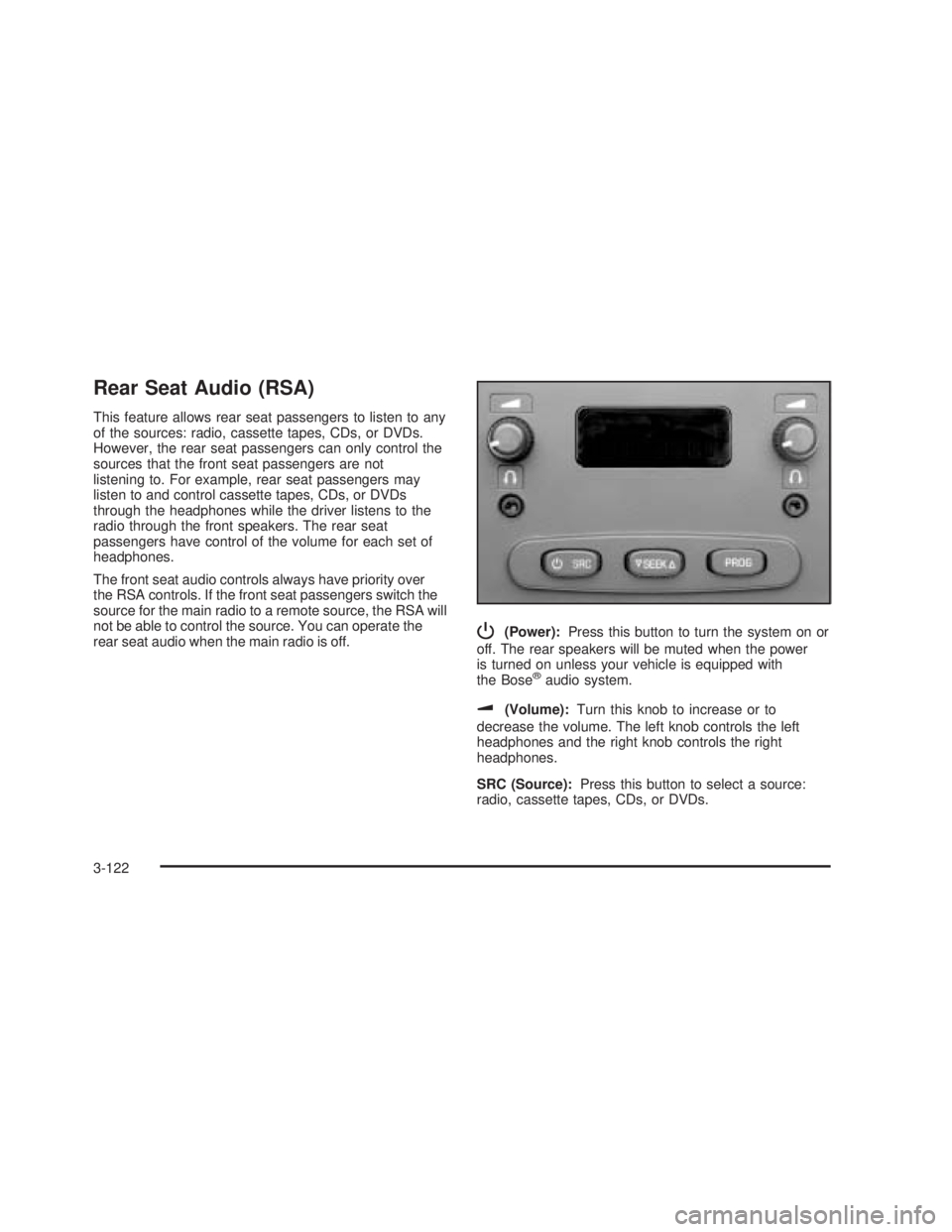
P(Power):Press this button to turn the system on or
off. The rear speakers will be muted when the power
is turned on unless your vehicle is equipped with
the Bose
®audio system.
u(Volume):Turn this knob to increase or to
decrease the volume. The left knob controls the left
headphones and the right knob controls the right
headphones.
SRC (Source):Press this button to select a source:
radio, cassette tapes, CDs, or DVDs.
3-122
Page 318 of 574
Traveling to Remote Areas
It makes sense to plan your trip, especially when going
to a remote area. Know the terrain and plan your
route. You are much less likely to get bad surprises.
Get accurate maps of trails and terrain. Try to learn of
any blocked or closed roads.
It is also a good idea to travel with at least one other
vehicle. If something happens to one of them, the other
can help quickly.
Does your vehicle have a winch? If so, be sure to read
the winch instructions. In a remote area, a winch
can be handy if you get stuck. But you will want to know
how to use it properly.
Getting Familiar with Off-Road Driving
It is a good idea to practice in an area that is safe
and close to home before you go into the wilderness.
Off-road driving does require some new and different
driving skills. Here is what we mean.
Tune your senses to different kinds of signals. Your
eyes, for example, need to constantly sweep the terrain
for unexpected obstacles. Your ears need to listen
for unusual tire or engine sounds. With your arms,
hands, feet and body, you will need to respond to
vibrations and vehicle bounce.Controlling your vehicle is the key to successful off-road
driving. One of the best ways to control your vehicle
is to control your speed. Here are some things to keep
in mind. At higher speeds:
you approach things faster and you have less time
to scan the terrain for obstacles.
you have less time to react.
you have more vehicle bounce when you drive over
obstacles.
you will need more distance for braking, especially
since you are on an unpaved surface.
{CAUTION:
When you are driving off-road, bouncing and
quick changes in direction can easily throw
you out of position. This could cause you to
lose control and crash. So, whether you’re
driving on or off the road, you and your
passengers should wear safety belts.
4-24
Page 570 of 574
Passing.........................................................4-17
Passlock®......................................................2-21
Power
Accessory Outlets........................................3-19
Door Locks.................................................. 2-9
Electrical System.......................................5-122
Lumbar Controls........................................... 1-5
Retained Accessory (RAP)............................2-23
Seat............................................................ 1-4
Steering Fluid.............................................5-46
Windows....................................................2-17
Programmable Automatic Door Locks.................2-10
Programming the HomeLink
®Transmitter...........2-67
Q
QUADRASTEER™..........................................4-14
Questions and Answers About Safety Belts.........1-15
R
Radios..........................................................3-69
AM-FM Radio.............................................3-70
Care of Your Cassette Tape Player...............3-125
Care of Your CD and DVD Player................3-126
Care of Your CDs and DVDs.......................3-126
Radio with Cassette and CD.........................3-83
Radio with CD............................................3-73
Radio with Six-Disc CD................................3-98Radios (cont.)
Rear Seat Audio........................................3-122
Setting the Time for Radios with Radio
Data Systems (RDS)................................3-70
Setting the Time for Radios without Radio
Data Systems (RDS)................................3-69
Theft-Deterrent..........................................3-123
Understanding Reception............................3-125
Rear Axle......................................................5-58
Locking......................................................4-11
Rear Door Security Locks................................2-13
Rear Doors....................................................2-14
Rear Safety Belt Comfort Guides......................1-30
Rear Seat Audio (RSA)..................................3-122
Rear Seat Entertainment System.....................3-111
Rear Seat Operation.................................1-9, 1-10
Rear Seat Passengers, Safety Belts..................1-27
Rearview Mirror, Automatic Dimming with
Compass and Temperature Display................2-58
Rearview Mirror, Automatic Dimming with OnStar
®,
Compass and Temperature Display..................2-55
Rearview Mirrors.............................................2-55
Reclining Seatbacks.......................................... 1-6
Recommended Fluids and Lubricants.................6-14
Recovery Hooks.............................................4-49
Recreational Vehicle Towing.............................4-62
Remote Keyless Entry System............................ 2-4
Remote Keyless Entry System, Operation............ 2-5
Removing the Flat Tire and Installing
the Spare Tire.............................................5-97
10