change time GMC TERRAIN 2010 Owner's Manual
[x] Cancel search | Manufacturer: GMC, Model Year: 2010, Model line: TERRAIN, Model: GMC TERRAIN 2010Pages: 16, PDF Size: 0.29 MB
Page 4 of 16
4
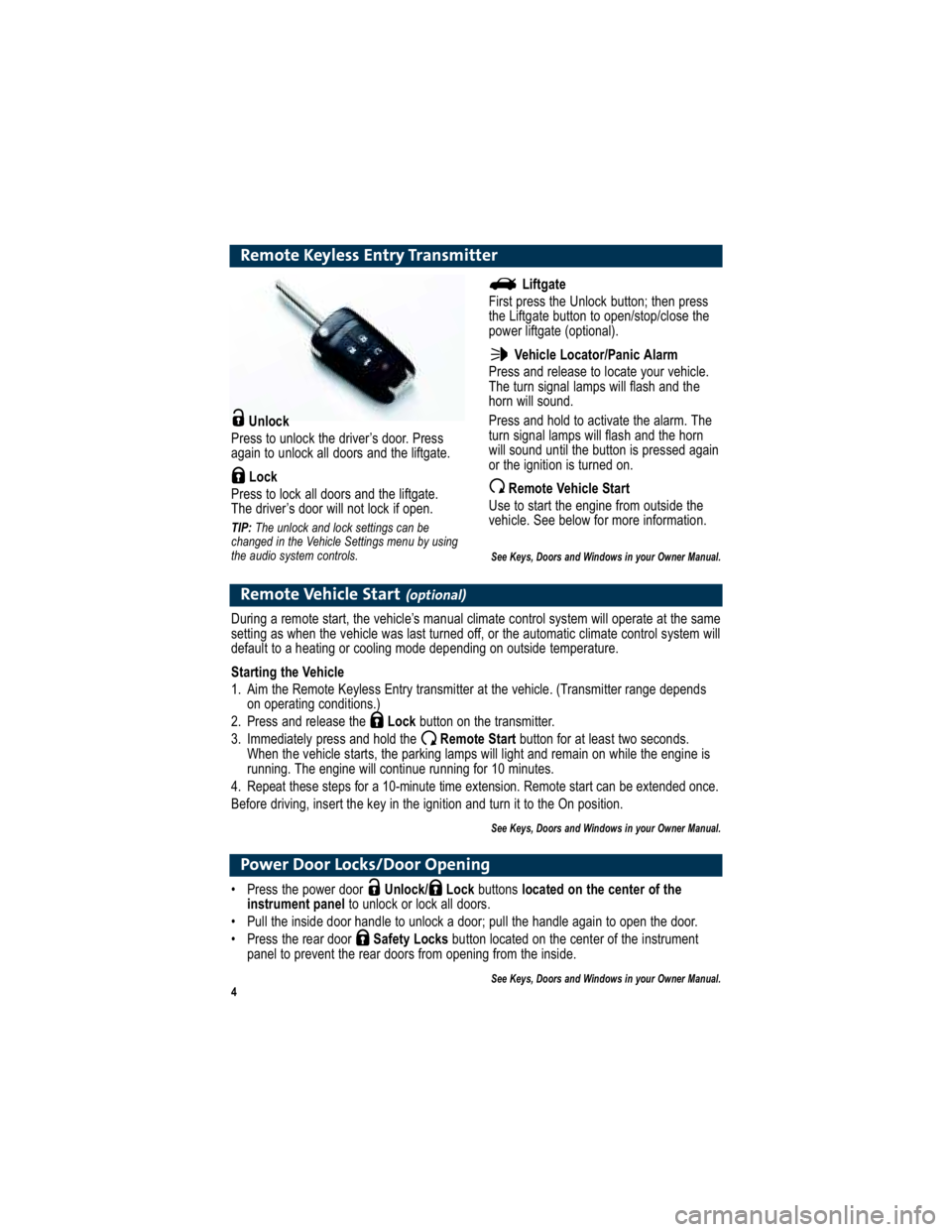
Remote Keyless Entry Transmitter
Unlock
Press to unlock the driver’s door. Press
again to unlock all doors and the liftgate.
Lock
Press to lock all doors and the liftgate.
The driver’s door will not lock if open.
TIP: The unlock and lock settings can be
changed in the Vehicle Settings menu by using
the audio system controls.
Remote Vehicle Start(optional)
During a remote start, the vehicle’s manual climate control sy stem will operate at the same
setting as when the vehicle was last turned off, or the automa tic climate control system will
default to a heating or cooling mode depending on outside temperature.
Starting the Vehicle
1. Aim the Remote Keyless Entry transmitter at the vehicle. (Trans mitter range depends
on operating conditions.)
2. Press and release the Lockbutton on the transmitter.
3. Immediately press and hold the Remote Start button for at least two seconds.
When the vehicle starts, the parking lamps will light and rem ain on while the engine is
running. The engine will continue running for 10 minutes.
4. Repeat these steps for a 10-minute time extension . Remote start can be extended once.
Before driving, insert the key in the ignition and turn it to the On position.
See Keys, Doors and Windows in your Owner Manual.
Liftgate
First press the Unlock button; then press
the Liftgate button to open/stop/close the
power liftgate (optional).
Vehicle Locator/Panic Alarm
Press and release to locate your vehicle.
The turn signal lamps will flash and the
horn will sound.
Press and hold to activate the alarm. The
turn signal lamps will flash and the horn
will sound until the button is pressed again
or the ignition is turned on.
Remote Vehicle Start
Use to start the engine from outside the
vehicle. See below for more information.
See Keys, Doors and Windows in your Owner Manual.
Power Door Locks/Door Opening
Press the power door Unlock/ Lock buttons located on the center of the
instrument panel to unlock or lock all doors.
Pull the inside door handle to unlock a door; pull the h andle again to open the door.
Press the rear door Safety Locksbutton located on the center of the instrument
panel to prevent the rear doors from opening from the inside.
See Keys, Doors and Windows in your Owner Manual.
Page 9 of 16
9
Audio System
Note:Avoid extended searching for specific items or configuring s ystem settings while driving.
Setting the Time
1. Turn on the radio.
2. Press the Clockbutton. Or press the CONFIGbutton and turn the MENU/SELECT
knob to highlight Time and Date Settings; press the knob to select it.
3. Turn the MENU/SELECT knob to highlight the desired time or date item; press the
knob to select it.
4. Turn the MENU/SELECT knob to change the value; press the knob to confirm the
set value.
5. Press the BACKbutton to exit each menu.
Storing Favorite Stations
Radio stations from all bands (AM, FM or XM) can be stored in any order on up to six
pages of favorites.
1. Tune in the desired radio station.
2. Press the FAVbutton to display the page where the station is to be stored.
3. Press and hold one of the six numeric pushbuttons until a beep sounds.
4. Repeat the steps for each pushbutton on each page.
Portable Audio Devices
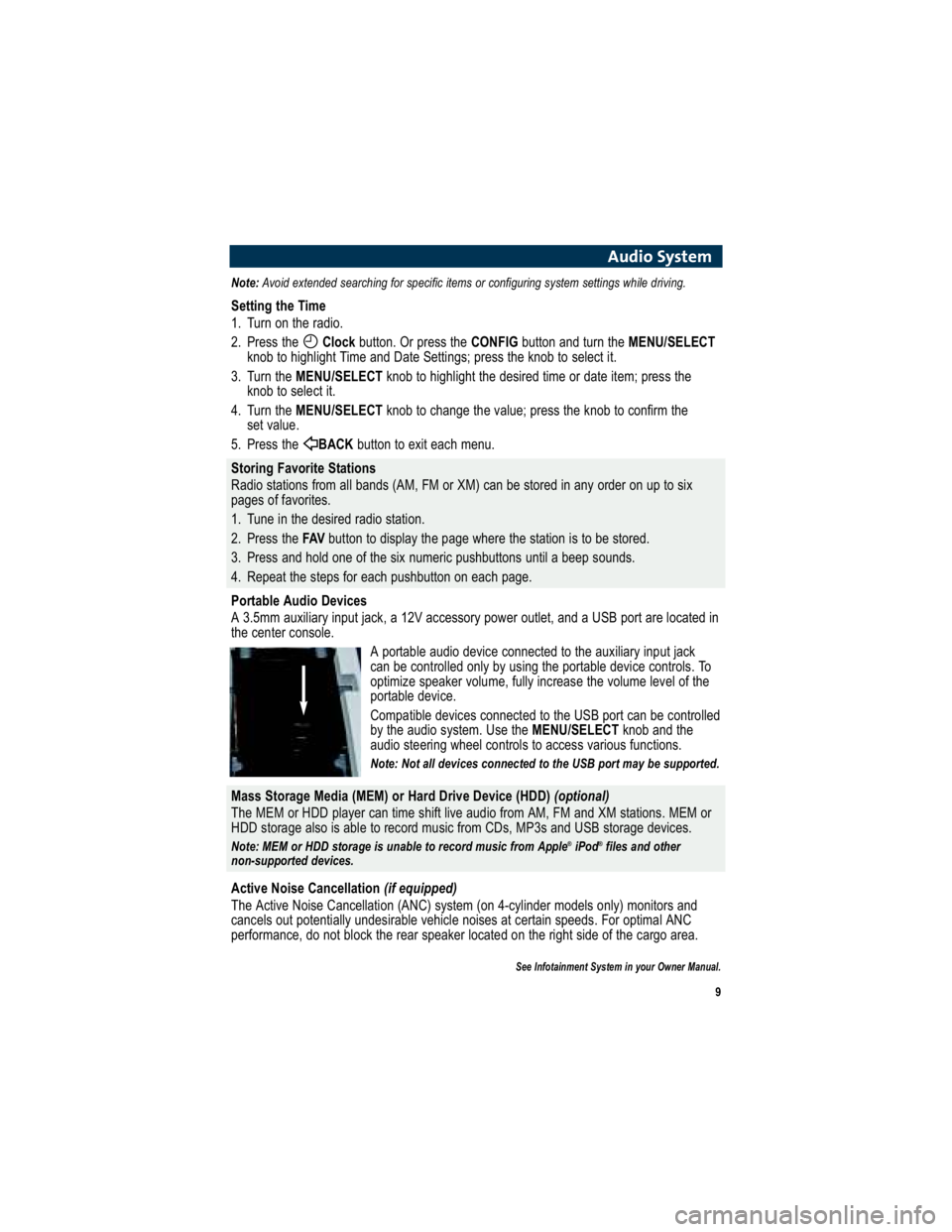
A 3.5mm auxiliary input jack, a 12V accessory power outlet, and a USB port are located in
the center console.
A portable audio device connected to the auxiliary input j ack
can be controlled only by using the portable device control s. To
optimize speaker volume, fully increase the volume level of the
portable device.
Compatible devices connected to the USB port can be contro lled
by the audio system. Use the MENU/SELECTknob and the
audio steering wheel controls to access various functions.
Note: Not all devices connected to the USB port may be supported.
Mass Storage Media (MEM) or Hard Drive Device (HDD) (optional)
The MEM or HDD player can time shift live audio from AM, FM a nd XM stations. MEM or
HDD storage also is able to record music from CDs, MP3s and USB storage devices.
Note: MEM or HDD storage is unable to record music from Apple ®
iPod ®
files and other
non-supported devices.
Active Noise Cancellation (if equipped)
The Active Noise Cancellation (ANC) system (on 4-cylinder mo dels only) monitors and
cancels out potentially undesirable vehicle noises at ce rtain speeds. For optimal ANC
performance, do not block the rear speaker located on the righ t side of the cargo area.
See Infotainment System in your Owner Manual.
Page 12 of 16
12
Driver Information Center
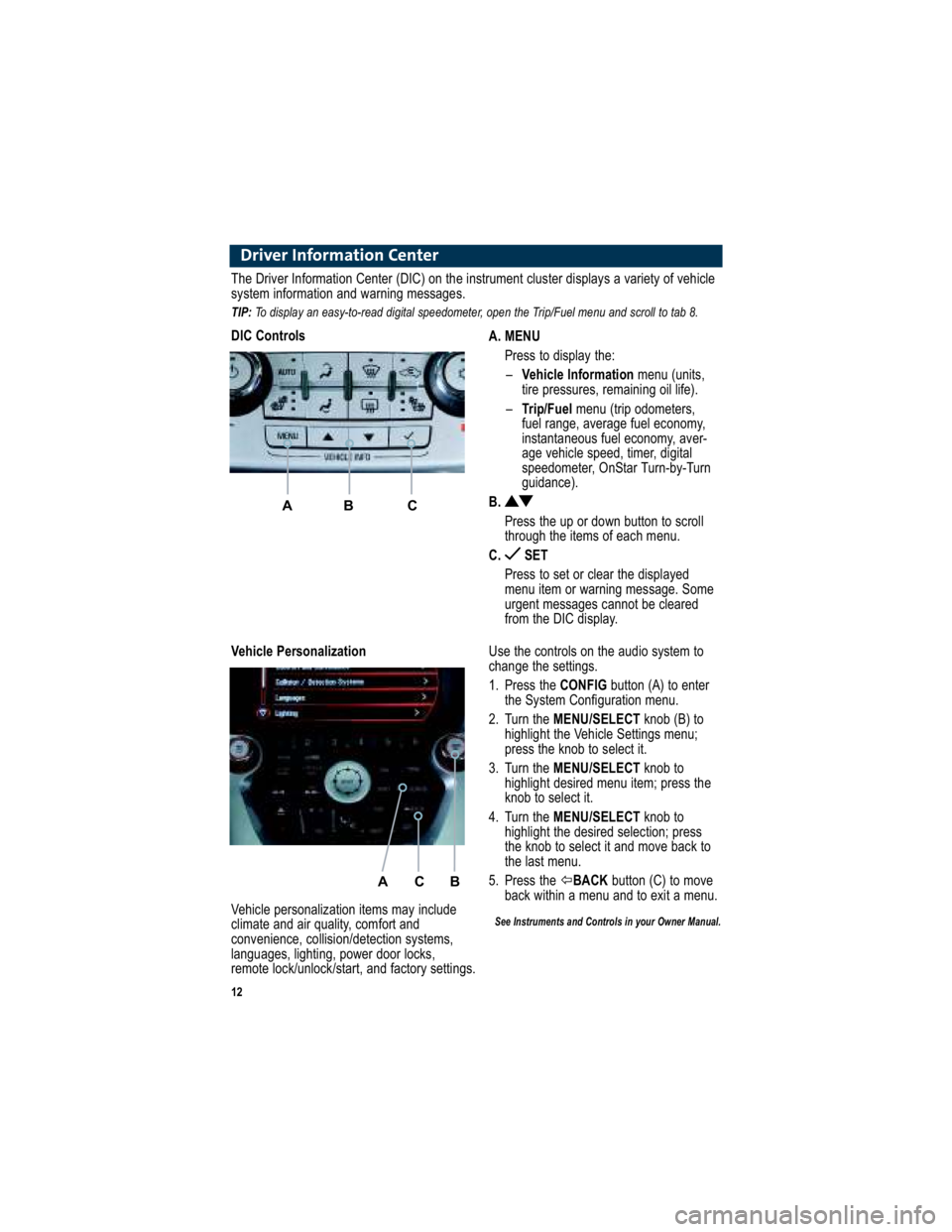
A. MENUPress to display the:– Vehicle Information menu (units,
tire pressures, remaining oil life).
– Trip/Fuel menu (trip odometers,
fuel range, average fuel economy,
instantaneous fuel economy, aver-
age vehicle speed, timer, digital
speedometer, OnStar Turn-by-Turn
guidance).
B.
Press the up or down button to scroll
through the items of each menu.
C. SET
Press to set or clear the displayed
menu item or warning message. Some
urgent messages cannot be cleared
from the DIC display.
The Driver Information Center (DIC) on the instrument cluster display s a variety of vehicle
system information and warning messages.
TIP: To display an easy-to-read digital speedometer, open the Tri p/Fuel menu and scroll to tab 8.
DIC Controls
A B C
Use the controls on the audio system to
change the settings.
1. Press the CONFIGbutton (A) to enter
the System Configuration menu.
2. Turn the MENU/SELECT knob (B) to
highlight the Vehicle Settings menu;
press the knob to select it.
3. Turn the MENU/SELECT knob to
highlight desired menu item; press the
knob to select it.
4. Turn the MENU/SELECT knob to
highlight the desired selection; press
the knob to select it and move back to
the last menu.
5. Press the BACK button (C) to move
back within a menu and to exit a menu.
See Instruments and Controls in your Owner Manual.
Vehicle Personalization
A C B
Vehicle personalization items may include
climate and air quality, comfort and
convenience, collision/detection systems,
languages, lighting, power door locks,
remote lock/unlock/start, and factory settings.
Page 15 of 16
15
Tire Pressure Monitor
The Tire Pressure Monitor alerts you when a significant reducti on in pressure occurs in
one or more of your vehicle’s tires by illuminating the Low Tire Pressurewarning
light on the instrument cluster. The warning light will remain on until the tire pressure is
corrected. Current tire pressures can be displayed using the Driver Information
Center controls. The proper tire pressures for your vehicle are listed on the Tire and
Loading Information label, located below the driver’s door l atch.
You may notice during cooler conditions that the low tire pre ssure warning light will
appear when the vehicle is first started and then turn off as y ou drive. This may be an
early indicator that your tire pressures are getting low and the tires need to be inflated to
the proper pressure.
Note: The Tire Pressure Monitor can alert you about low tire pressure, but it doesn’t replace normal
monthly tire maintenance. It is the driver’s responsibility to maintain correct tire pressures.
See Vehicle Care in your Owner Manual.
Tires
The roof rack cross rails can be secured in four positions al ong the roof rack side rails.
When adjusting the cross rails, slide each cross rail sligh tly back and forth until the lock
pins fully engage the holes. An audible click will be heard.
To help reduce wind noise when not in use, move the front cross rail to the forwardmost
position and the rear cross rail to the rearwardmost position.
See Storage in your Owner Manual.
Roof Rack Cross Rails (optional)
The Oil Life System calculates engine oil life based on vehicle use and illuminates the
Change Engine Oil light in the instrument cluster when it’s necessary to change
the engine oil and filter. The Oil Life System should be res et to 100% only following an
oil change.
Resetting the Oil Life System:
1. Turn the ignition to the On position, but do not start the eng ine.
2. Fully press and release the accelerator pedal slowly three times within five seconds.
3. Turn off the ignition.
See Vehicle Care in your Owner Manual.
Engine Oil Life System
Recreational towing means towing the vehicle behind anoth er vehicle. Your vehicle can be
towed from the front with all wheels on the ground (dinghy towi ng). See your Owner
Manual for the proper towing procedure.
See Vehicle Care in your Owner Manual.
Recreational Vehicle Towing
Page 16 of 16
16
Roadside Assistance
1-800-GMC-8782 TTY Users: 1-888-889-2438
(1-800-462-8782)
As the owner of a new GMC, you are automatically enrolled i n the GMC Roadside Assistance
program. This value-added service is intended to provide you with peace of mind as you drive
in the city or travel the open road.
GMC’s Roadside Assistance toll-free number is staffed by a team of technically trained advisors
who are available 24 hours a day, 365 days a year, to pro vide minor repair information or make
arrangements to tow your vehicle to the nearest GMC dealer.
GMC will provide the following services for 5 years/100,000 miles at no expense to you:
Fuel delivery
Lockout service (identification required)
Tow to nearest dealer for warranty service
Flat tire assistance
Jump starts
When calling, please provide the following information to the advisor:
Location of the vehicle
Telephone number and your location
Vehicle model, year and color
Vehicle mileage
Vehicle Identification Number (VIN)
Vehicle license plate number
Roadside Assistance and OnStar
If you have a current OnStar subscription, press the OnStar button and the vehicle will send
your current GPS location to an OnStar Advisor who will spea k to you, assess your problem,
contact Roadside Assistance and relay your exact location so you will get the help you need.
GMC Owner Center
The GMC Owner Center, a complimentary service for GMC owners, is a one-stop resource
designed to enhance your GMC ownership experience. Exclu sive member benefits include
online service reminders, vehicle maintenance tips, online owner manual, special privileges and
more. Sign up today at www.gmownercenter.com/gmc .
20935767
20935767
Certain restrictions, precautions and safety procedures apply to your vehicle. Please read your Owner Manual
for complete instructions. All information contained herein is based on the latest information available at the time
of printing and is subject to change without notice. Copyrigh t 2009 by GM Corp. All rights reserved.
Always demand genuine GM Parts