warning light GMC TERRAIN 2010 Owner's Guide
[x] Cancel search | Manufacturer: GMC, Model Year: 2010, Model line: TERRAIN, Model: GMC TERRAIN 2010Pages: 410, PDF Size: 2.55 MB
Page 115 of 410

Instruments and Controls 4-23
Engine Oil Pressure Light
{WARNING
Do not keep driving if the oil
pressure is low. The engine can
become so hot that it catches fire.
Someone could be burned. Check
the oil as soon as possible and
have the vehicle serviced.
Notice: Lack of proper engine oil
maintenance can damage the
engine. The repairs would not be
covered by the vehicle warranty.
Always follow the maintenance
schedule in this manual for
changing engine oil.
The oil pressure light should come
on briefly as the engine is started.
If it does not come on have the
vehicle serviced by your dealer/
retailer.
If the light comes on and stays on, it
means that oil is not flowing through
the engine properly. The vehicle
could be low on oil and might have
some other system problem. See
your dealer/retailer.
Fuel Economy Light
For vehicles with the fuel economy
mode light, it comes on when the
eco (economy) switch, located on
the center console near the shifter,
is pressed. For vehicles with a
Driver Information Center (DIC) an
ECO Mode On message displays.
See Fuel System Messages
on
page 4‑32for more information.
Press the switch again to turn
off the light and exit the fuel
saver mode.
Page 116 of 410

4-24 Instruments and Controls
Low Fuel Warning Light
United States Shown, CanadaSimilar
This light comes on for a
few seconds when the ignition
is turned on as a check to indicate
it is working. If it does not come on,
have it fixed.
The low fuel warning light is a circle
located on the fuel gauge. This light
comes on and a chime sounds
periodically when the vehicle is low
on fuel. The light goes off when fuel
is added to the fuel tank.
For vehicles with a Driver
Information Center (DIC), see
Fuel System Messages
on
page 4‑32for more information.
Security Light
This light comes on if there is a
problem with the security system,
or if the vehicle has been
tampered with.
For more information, see Vehicle
Security on page 1‑13.
High-Beam on Light
The high-beam on light comes on
when the high-beam headlamps are
in use.
See Headlamp High/Low-Beam
Changer
on page 5‑2for more
information.
Page 117 of 410
Instruments and Controls 4-25
Fog Lamp Light
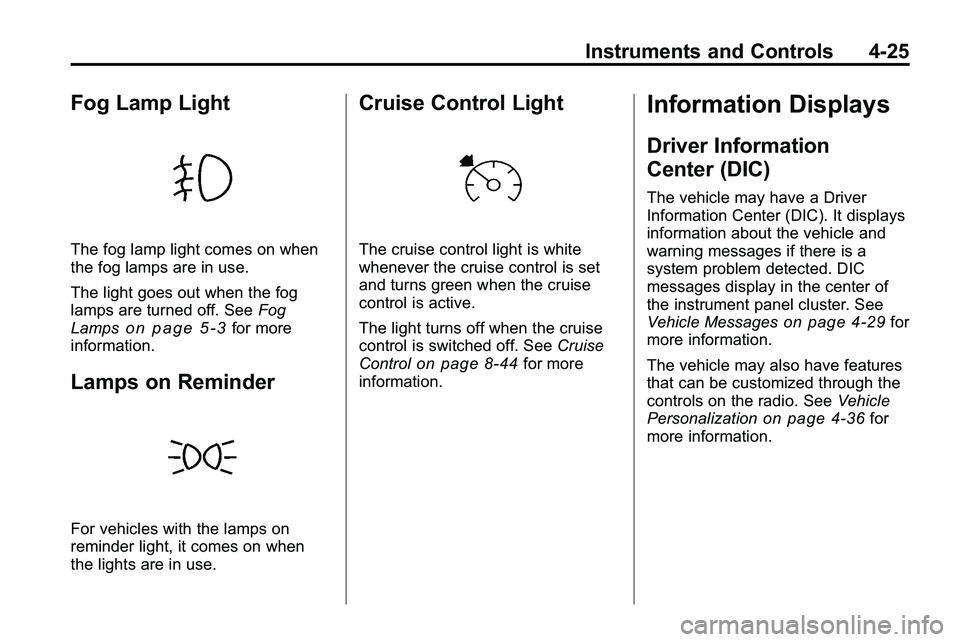
The fog lamp light comes on when
the fog lamps are in use.
The light goes out when the fog
lamps are turned off. SeeFog
Lamps
on page 5‑3for more
information.
Lamps on Reminder
For vehicles with the lamps on
reminder light, it comes on when
the lights are in use.
Cruise Control Light
The cruise control light is white
whenever the cruise control is set
and turns green when the cruise
control is active.
The light turns off when the cruise
control is switched off. See Cruise
Control
on page 8‑44for more
information.
Information Displays
Driver Information
Center (DIC)
The vehicle may have a Driver
Information Center (DIC). It displays
information about the vehicle and
warning messages if there is a
system problem detected. DIC
messages display in the center of
the instrument panel cluster. See
Vehicle Messages
on page 4‑29for
more information.
The vehicle may also have features
that can be customized through the
controls on the radio. See Vehicle
Personalization
on page 4‑36for
more information.
Page 125 of 410
Instruments and Controls 4-33
Key and Lock Messages
Replace Battery In Remote Key
This message displays when the
battery in the Remote Keyless Entry
(RKE) transmitter needs to be
replaced.
Transport Mode On
This message displays when the
ignition is held in START for
15 seconds. The battery light may
also be flashing when this message
is displayed. To turn this message
off, start the vehicle and hold the
key in the START position for
15 seconds.
Object Detection System
Messages
Park Assist Off
This message is displayed when the
park assist system has been turned
off. SeeUltrasonic Parking Assist
on page 8‑47.
Service Park Assist
This message is displayed if there is
a problem with the park assist
system. Take the vehicle to your
dealer/retailer for service.
Ride Control System
Messages
All Wheel Drive Off
If your vehicle has the All-Wheel
Drive (AWD) system, this message
displays when the rear drive system
is overheating. This message turns
off when the rear drive system cools
down. If the warning message stays
on for a while, you need to reset the
warning message. To reset the
warning message, turn the ignition
off and then back on again. If the
message stays on, see your dealer/
retailer right away. See All-Wheel
Drive
on page 8‑38for more
information.
Service All Wheel Drive
If your vehicle has the All-Wheel
Drive (AWD) system, this message
displays if a problem occurs with
this system. If this message
appears, stop as soon as possible
and turn off the vehicle. Restart the
vehicle and check for the message
on the DIC display. If the message
is still displayed or appears again
when you begin driving, the AWD
system needs service. See your
dealer/retailer.
Service Traction Control
This message displays when there
is a problem with the Traction
Control System (TCS). When this
message is displayed, the system
will not limit wheel spin. Adjust your
driving accordingly. See your dealer/
retailer for service.
Page 127 of 410
Instruments and Controls 4-35
Tire Messages
Service Tire Monitor System
This message displays if there is a
problem with the Tire Pressure
Monitor System (TPMS). SeeTire
Pressure Monitor Operation
on
page 9‑55for more information.
Tire Learning Active
This message displays when the
system is learning new tires. See
Tire Pressure Monitor Operation
on
page 9‑55for more information.
Tire Low Add Air To Tire
On vehicles with the Tire Pressure
Monitor System (TPMS), this
message displays when the
pressure in one or more of the
vehicle's tires is low.
This message also displays “Left
Front”, “Right Front”, “Left Rear”,
or “Right Rear” to indicate the
location of the low tire. The low tire pressure warning light
will also come on. See
Tire
Pressure Light on page 4‑22.
If a tire pressure message appears
on the DIC, stop as soon as you
can. Inflate the tires by adding air
until the tire pressure is equal to the
values shown on the Tire Loading
Information label. See Tires
on
page 9‑45, Vehicle Load Limitson
page 8‑22, and Tire Pressureon
page 9‑52.
You can receive more than one tire
pressure message at a time. To
read the other messages that may
have been sent at the same time,
press the set/reset button. The DIC
also shows the tire pressure values.
See Driver Information Center (DIC)
on page 4‑25.
Transmission Messages
Service Transmission
This message displays if there is a
problem with the transmission. See
your dealer/retailer.
Shift To Park
This message displays when the
transmission needs to be shifted to
P (Park). This may appear when
attempting to remove the key from
the ignition if the vehicle is not in
P (Park).
Transmission Hot –Idle
Engine
This message displays and a chime
sounds if the transmission fluid in
the vehicle gets hot. Driving with the
transmission fluid temperature high
can cause damage to the vehicle.
Stop the vehicle and let it idle to
allow the transmission to cool. This
message clears when the fluid
temperature reaches a safe level.
Page 135 of 410
Lighting 5-1
Lighting
Exterior Lighting
Exterior Lamp Controls . . . . . . . . 5-1
Headlamp High/Low-BeamChanger . . . . . . . . . . . . . . . . . . . . . 5-2
Flash-to-Pass . . . . . . . . . . . . . . . . . 5-2
Daytime Running Lamps (DRL) . . . . . . . . . . . . . . . . 5-2
Hazard Warning Flashers . . . . . 5-3
Turn and Lane-Change Signals . . . . . . . . . . . . . . . . . . . . . . 5-3
Fog Lamps . . . . . . . . . . . . . . . . . . . . 5-3
Interior Lighting
Instrument Panel Illumination Control . . . . . . . . . . . . . . . . . . . . . . 5-4
Dome Lamps . . . . . . . . . . . . . . . . . 5-4
Reading Lamps . . . . . . . . . . . . . . . 5-4
Lighting Features
Entry Lighting . . . . . . . . . . . . . . . . . 5-4
Exterior Lighting
Exterior Lamp Controls
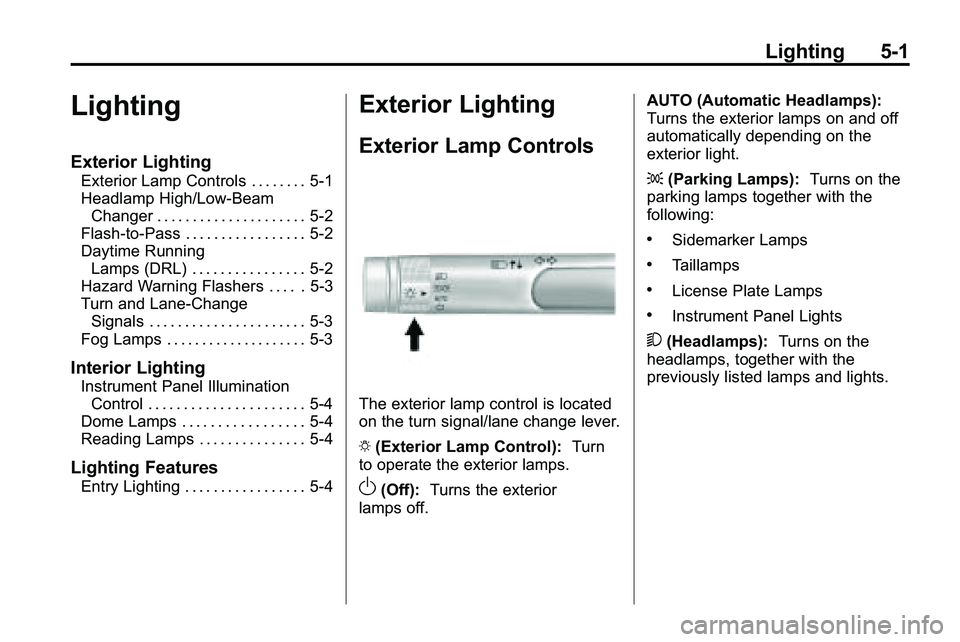
The exterior lamp control is located
on the turn signal/lane change lever.
O (Exterior Lamp Control): Turn
to operate the exterior lamps.
O(Off): Turns the exterior
lamps off. AUTO (Automatic Headlamps):
Turns the exterior lamps on and off
automatically depending on the
exterior light.
;
(Parking Lamps): Turns on the
parking lamps together with the
following:
.Sidemarker Lamps
.Taillamps
.License Plate Lamps
.Instrument Panel Lights
5 (Headlamps): Turns on the
headlamps, together with the
previously listed lamps and lights.
Page 137 of 410

Lighting 5-3
Hazard Warning Flashers
|
(Hazard Warning Flasher):
Press this button, located on the
center of the instrument panel, to
make the front and rear turn signal
lamps flash on and off. This warns
others that you are having trouble.
Press
|again to turn the
flashers off.
Turn and Lane-Change
Signals
An arrow on the instrument panel
cluster will flash in the direction of
the turn or lane change. Move the lever all the way up or
down to signal a turn.
Raise or lower the lever until the
arrow starts to flash to signal a lane
change. Hold it there until the lane
change is complete.
The lever returns to its starting
position when it is released.
If after signaling a turn or a lane
change the arrows flash rapidly or
do not come on, a signal bulb may
be burned out.
Have the bulbs replaced. If the bulb
is not burned out, check the fuse,
see
Fuses
on page 9‑38for more
information.
Fog Lamps
The fog lamps control is located on
the turn/lane change lever.
Use the fog lamps for better vision
in foggy or misty conditions.
# (Fog Lamps): Turn the fog lamp
band on the lever to
#and release
it, to turn the fog lamps on or off.
The band will return to its original
position.
The parking lamps or low‐beam
headlamps must be on to use the
fog lamps.
The fog lamps will go off whenever
the high-beam headlamps are
turned on. When the high‐beam
headlamps are turned off, the fog
lamps will come on again.
Some localities have laws that
require the headlamps to be on
along with the fog lamps.
Page 212 of 410
8-4 Driving and Operating
Medical research shows that
alcohol in a person's system
can make crash injuries worse,
especially injuries to the brain,
spinal cord, or heart. This means
that when anyone who has been
drinking—driver or passenger —is
in a crash, that person's chance of
being killed or permanently disabled
is higher than if the person had not
been drinking.
Control of a Vehicle
The following three systems
help to control the vehicle while
driving —brakes, steering, and
accelerator. At times, as when
driving on snow or ice, it is easy to
ask more of those control systems
than the tires and road can provide.
Meaning, you can lose control of the
vehicle. See StabiliTrak System
on
page 8‑42.
Adding non‐dealer/non‐retailer
accessories can affect vehicle
performance. See Accessories
and Modifications on page 9‑3.
Braking
See Brake System Warning Lighton page 4‑19.
Braking action involves perception
time and reaction time. Deciding
to push the brake pedal is
perception time. Actually doing
it is reaction time.
Average reaction time is about
three‐fourths of a second. But that is
only an average. It might be less
with one driver and as long as two
or three seconds or more with
another. Age, physical condition,
alertness, coordination, and
eyesight all play a part. So do
alcohol, drugs, and frustration. But
even in three‐fourths of a second,
a vehicle moving at 100 km/h
(60 mph) travels 20 m (66 ft). That
could be a lot of distance in an
emergency, so keeping enough
space between the vehicle and
others is important. And, of course, actual stopping
distances vary greatly with the
surface of the road, whether it is
pavement or gravel; the condition of
the road, whether it is wet, dry,
or icy; tire tread; the condition of the
brakes; the weight of the vehicle;
and the amount of brake force
applied.
Avoid needless heavy
braking. Some people drive
in spurts
—heavy acceleration
followed by heavy braking —rather
than keeping pace with traffic. This
is a mistake. The brakes might not
have time to cool between hard
stops. The brakes will wear out
much faster with a lot of heavy
braking. Keeping pace with the
traffic and allowing realistic following
distances eliminates a lot of
unnecessary braking. That means
better braking and longer brake life.
Page 220 of 410
8-12 Driving and Operating
Off-roading requires a different kind
of alertness from driving on paved
roads and highways. There are no
road signs, posted speed limits,
or signal lights. Use good judgment
about what is safe and what is not.
Driving on Hills
Off-road driving often takes you up,
down, or across a hill. Driving safely
on hills requires good judgment and
an understanding of what the
vehicle can and cannot do. There
are some hills that simply cannot be
driven, no matter how well built the
vehicle.
{WARNING
Many hills are simply too steep
for any vehicle. If you drive up
them, you will stall. If you drive
down them, you cannot control
your speed. If you drive across(Continued)
WARNING (Continued)
them, you will roll over. You could
be seriously injured or killed.
If you have any doubt about the
steepness, do not drive the hill.
Approaching a Hill
When you approach a hill, decide if
it is too steep to climb, descend,
or cross. Steepness can be hard to
judge. On a very small hill, for
example, there may be a smooth,
constant incline with only a small
change in elevation where you can
easily see all the way to the top. On
a large hill, the incline may get
steeper as you near the top, but you
might not see this because the crest
of the hill is hidden by bushes,
grass, or shrubs. Consider this as you approach a hill:
.Is there a constant incline,
or does the hill get sharply
steeper in places?
.Is there good traction on the
hillside, or will the surface cause
tire slipping?
.Is there a straight path up or
down the hill so you will not
have to make turning
maneuvers?
.Are there obstructions on the hill
that can block your path, such
as boulders, trees, logs, or ruts?
.What is beyond the hill? Is there
a cliff, an embankment, a
drop-off, a fence? Get out and
walk the hill if you do not know.
It is the smart way to find out.
.Is the hill simply too rough?
Steep hills often have ruts,
gullies, troughs, and exposed
rocks because they are more
susceptible to the effects of
erosion.
Page 222 of 410
8-14 Driving and Operating
.While backing down the hill, put
your left hand on the steering
wheel at the 12 o'clock position
so you can tell if the wheels are
straight and can maneuver as
you back down. It is best to back
down the hill with the wheels
straight rather than in the left or
right direction. Turning the wheel
too far to the left or right will
increase the possibility of a
rollover.
Things not to do if the vehicle stalls,
or is about to stall, when going up
a hill:
.Never attempt to prevent a stall
by shifting into N (Neutral) to
rev-up the engine and regain
forward momentum. This will not
work. The vehicle can roll
backward very quickly and could
go out of control.
.Never try to turn around if about
to stall when going up a hill.
If the hill is steep enough to stall
the vehicle, it is steep enough to
cause it to roll over. If you
cannot make it up the hill, back
straight down the hill.
If, after stalling, you try to back
down the hill and decide you just
cannot do it, set the parking brake,
put your transmission in P (Park),
and turn off the engine. Leave the
vehicle and go get some help. Exit
on the uphill side and stay clear of
the path the vehicle would take if it
rolled downhill.
Driving Downhill
When off-roading takes you
downhill, consider:
.How steep is the downhill? Will I
be able to maintain vehicle
control?
.What is the surface like?
Smooth? Rough? Slippery?
Hard-packed dirt? Gravel?
.Are there hidden surface
obstacles? Ruts? Logs?
Boulders?
.What is at the bottom of the hill?
Is there a hidden creek bank or
even a river bottom with large
rocks?
If you decide you can go down a hill
safely, try to keep the vehicle
headed straight down. Use a low
gear so engine drag can help the
brakes so they do not have to do all
the work. Descend slowly, keeping
the vehicle under control at all
times.
{WARNING
Heavy braking when going down
a hill can cause your brakes to
overheat and fade. This could
cause loss of control and a
serious accident. Apply the
brakes lightly when descending a
hill and use a low gear to keep
vehicle speed under control.