wheel GMC YUKON 2003 Owner's Guide
[x] Cancel search | Manufacturer: GMC, Model Year: 2003, Model line: YUKON, Model: GMC YUKON 2003Pages: 520, PDF Size: 2.92 MB
Page 129 of 520
Shifting Into Park (P)
{CAUTION:
It can be dangerous to get out of your vehicle
if the shift lever is not fully in PARK (P) with
the parking brakefirmly set. Your vehicle can
roll. If you have left the engine running, the
vehicle can move suddenly. You or others
could be injured. To be sure your vehicle won’t
move, even when you’re on fairly level ground,
use the steps that follow. With four-wheel
drive, if your transfer case is in NEUTRAL,
your vehicle will be free to roll, even if your
shift lever is in PARK (P). So, be sure the
transfer case is in a drive gear—not in
NEUTRAL. If you’re pulling a trailer, see
“Towing a Trailer”in the Index.
1. Hold the brake pedal down with your right foot and
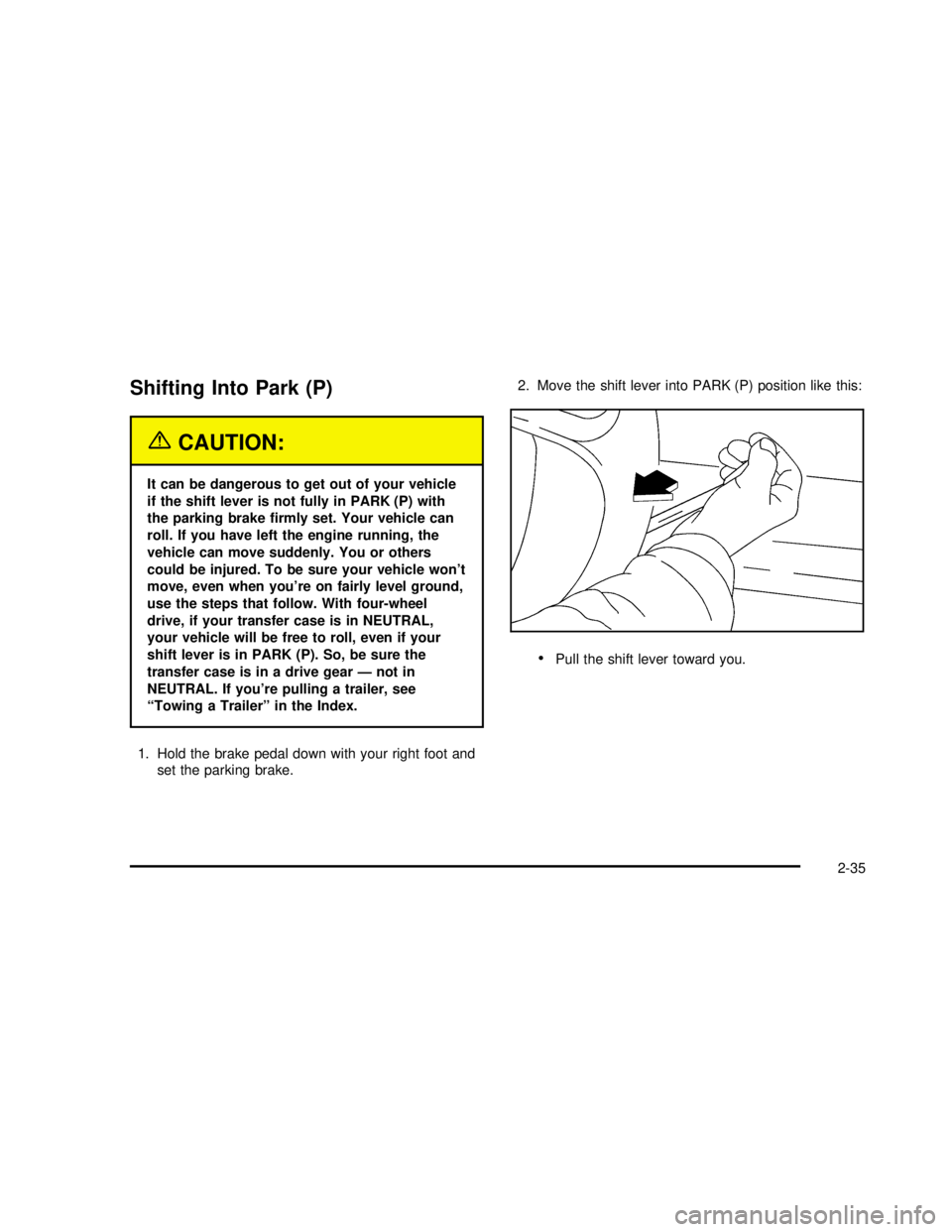
set the parking brake.2. Move the shift lever into PARK (P) position like this:
Pull the shift lever toward you.
2-35
2003 - Yukon/Yukon XL
Page 130 of 520

Move the lever up as far as it will go.
3. Be sure the transfer case is in a drive gear–not in
NEUTRAL (N).
4. Turn the ignition key to LOCK.
5. Remove the key and take it with you. If you can
leave your vehicle with the ignition key in your
hand, your vehicle is in PARK (P).
Leaving Your Vehicle With the Engine
Running
{CAUTION:
It can be dangerous to leave your vehicle
with the engine running. Your vehicle could
move suddenly if the shift lever is not fully in
PARK (P) with the parking brakefirmly set.
If you have four-wheel drive and your transfer
case is in NEUTRAL, your vehicle will be free to
roll, even if your shift lever is in PARK (P). So be
sure the transfer case is in a drive
gear -- not in NEUTRAL.
And, if you leave the vehicle with the engine
running, it could overheat and even catchfire.
You or others could be injured. Don’t leave your
vehicle with the engine running unless you
have to.
2-36
2003 - Yukon/Yukon XL
Page 133 of 520
Running Your Engine While You
Are Parked
It’s better not to park with the engine running. But if you
ever have to, here are some things to know.
{CAUTION:
Idling the engine with the climate control
system off could allow dangerous exhaust into
your vehicle. See the earlier Caution under
“Engine Exhaust.”
Also, idling in a closed-in place can let deadly
carbon monoxide (CO) into your vehicle even if
the fan is at the highest setting. One place this
can happen is a garage. Exhaust—with
CO—can come in easily. NEVER park in a
garage with the engine running.
Another closed-in place can be a blizzard. See
“Winter Driving”in the Index.
{CAUTION:
It can be dangerous to get out of your vehicle
if the shift lever is not fully in PARK (P) with
the parking brakefirmly set. Your vehicle can
roll. Don’t leave your vehicle when the engine
is running unless you have to. If you’ve left the
engine running, the vehicle can move
suddenly. You or others could be injured. To
be sure your vehicle won’t move, even when
you’re on fairly level ground, always set your
parking brake and move the shift lever to
PARK (P).
{CAUTION:
Four-wheel drive vehicles with the transfer
case in NEUTRAL will allow the vehicle to roll,
even if your shift lever is in PARK (P). So, be
sure the transfer case is in a drive gear—not
in NEUTRAL. Always set your parking brake.
2-39
2003 - Yukon/Yukon XL
Page 143 of 520

A complete OnStar®user’s guide and the terms and
conditions of the OnStar®Subscription Service
Agreement are included in your OnStar®-equipped
vehicle’s glove box literature. For more information, visit
www.onstar.com, contact OnStar
®at 1−888−4−ONSTAR
(1−888−466−7827), or press the blue OnStar®button to
speak to an OnStar®advisor 24 hours a day, 7 days
a week.
OnStar®Services
OnStar®provides a number of service plans to closely
meet your needs. Some of the services currently
provided by OnStar
®are:
Automatic Notication of Air Bag Deployment
Emergency Services
Roadside Assistance Stolen Vehicle Tracking
AccidentAssist
Remote Door Unlock
Remote Diagnostics
Online and Personal Concierge Services
Route Support
RideAssist
Information and Convenience Services
OnStar®Personal Calling
With OnStar®Personal Calling, you have a safer way to
stay connected while driving. It’s a hands-free wireless
phone that’s integrated into your vehicle. You can place
calls nationwide using voice-activated dialing with no
contracts, no roaming charges and no access fees. To
nd out more about OnStar
®Personal Calling, refer
to the OnStar®owner’s guide in your vehicle’s glove
box, or call OnStar®at 1−888−4−ONSTAR
(1−888−466−7827).
OnStar®Virtual Advisor
With OnStar®Virtual Advisor you can listen to your
favorite news, entertainment and information topics,
such as traffic and weather reports, stock quotes
and sports scores. You listen to your e-mail through
your vehicle’s speakers, and reply with your hands on
the wheel and your eyes on the road.
A completed Subscription Service Agreement is required
prior to delivery of OnStar
®services and prepaid
calling minutes are also required for OnStar®Personal
Calling and OnStar®Virtual Advisor use. Terms and
conditions of the Subscription Service Agreement can be
found at www.onstar.com.
2-49
2003 - Yukon/Yukon XL
Page 144 of 520
OnStar®Steering Wheel Controls
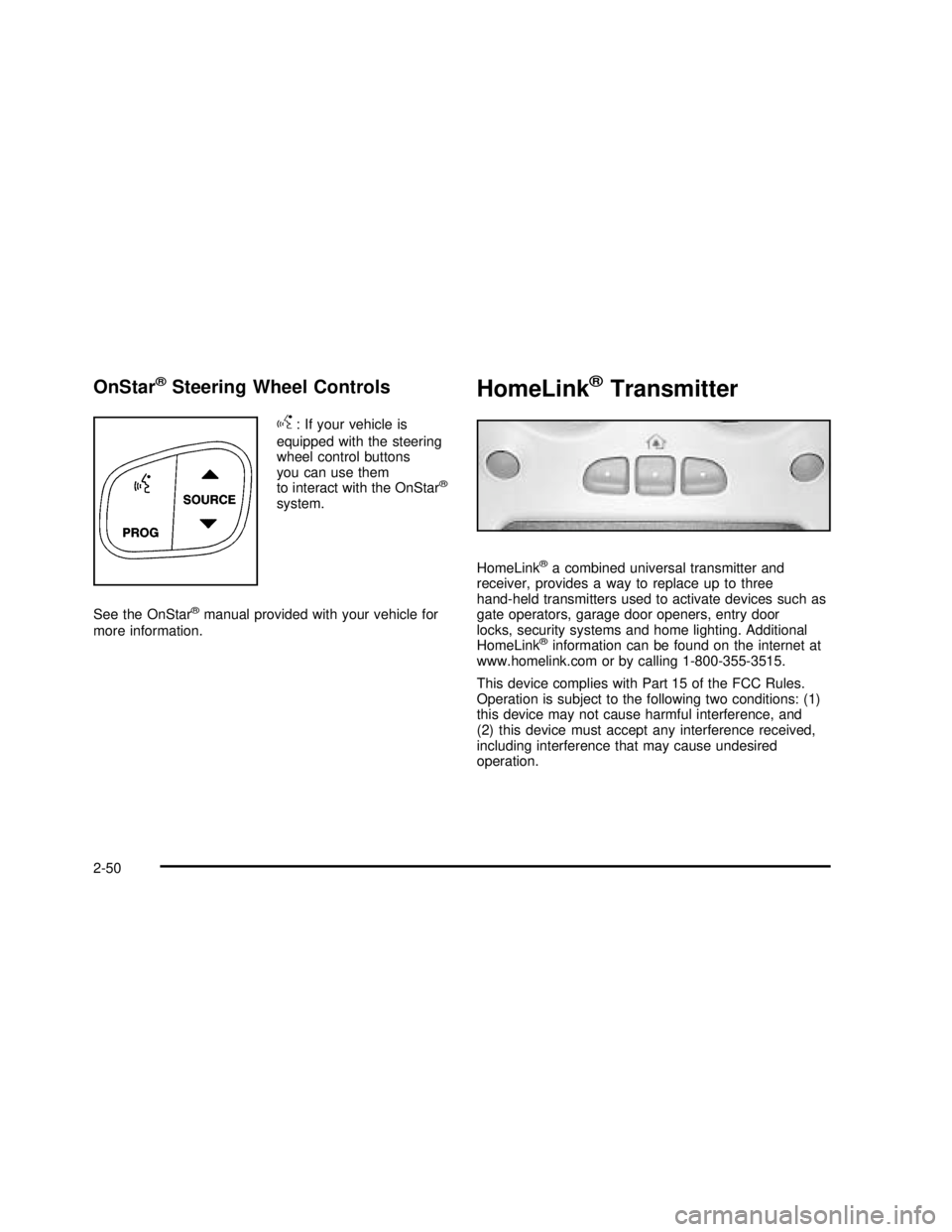
g
: If your vehicle is
equipped with the steering
wheel control buttons
you can use them
to interact with the OnStar
®
system.
See the OnStar
®manual provided with your vehicle for
more information.
HomeLink®Transmitter
HomeLink®a combined universal transmitter and
receiver, provides a way to replace up to three
hand-held transmitters used to activate devices such as
gate operators, garage door openers, entry door
locks, security systems and home lighting. Additional
HomeLink
®information can be found on the internet at
www.homelink.com or by calling 1-800-355-3515.
This device complies with Part 15 of the FCC Rules.
Operation is subject to the following two conditions: (1)
this device may not cause harmful interference, and
(2) this device must accept any interference received,
including interference that may cause undesired
operation.
2-50
2003 - Yukon/Yukon XL
Page 149 of 520

Luggage Carrier
If you have the luggage carrier, you can load things on
top of your vehicle.
The luggage carrier has slats and siderails attached to
the roof and crossrails which can be moved back
and forth to help secure cargo. Tie the load to the
siderails or siderail supports.
Notice:Loading cargo that weighs more than
200 lbs. (91 kg) on the luggage carrier may damage
your vehicle. When you carry large things, never
let them hang over the rear or the sides of your
vehicle. Load your cargo so that it rests on the slats
and does not scratch or damage the vehicle. Put
the cargo against the side rails and fasten it
securely to the luggage carrier. Put the main weight
as far forward as you can.
Don’t exceed the maximum vehicle capacity when
loading your vehicle. For more information on vehicle
capacity and loading, see″Loading Your Vehicle″.
To prevent damage or loss of cargo as you’re leaving,
check now and then to make sure the luggage and
cargo are still securely fastened.Be sure the cargo is properly loaded.If small heavy objects are placed on the roof, place
the load in the area over the rear wheels (behind
the rear side door on Suburban/Yukon XL Models).
If you need to, cut a piece of 3/8 inch plywood to
t inside the crossrails and siderails to spread
the load. If plywood is used, tie it to the siderail
supports.
Tie the load to the crossrails or the siderail supports.
Use the crossrails only to keep the load from sliding.
To move the crossrails, pull out on the latch release
handle at each end. Slide the crossrail to the desired
position balancing the force side to side. Push the
release handle back into the latched position and
slide the crossrail back and forth slightly to be sure
the latch snaps securely into place.
If you need to carry long items, move the crossrails
as far apart as they will go. Tie the load to the
crossrails and the siderails or siderail supports. Also
tie the load to the bumpers. Do not tie the load so
tightly that the crossrails or siderails are damaged.
After moving a crossrail, be sure it is securely locked
into the siderail.
2-55
2003 - Yukon/Yukon XL
Page 155 of 520

Instrument Panel Overview...............................3-4
Hazard Warning Flashers................................3-6
Other Warning Devices...................................3-7
Horn .............................................................3-7
Tilt Wheel.....................................................3-7
Turn Signal/Multifunction Lever.........................3-8
Exterior Lamps.............................................3-14
Interior Lamps..............................................3-18
Accessory Power Outlets...............................3-20
Ashtrays and Cigarette Lighter........................3-21
Climate Controls............................................3-21
Climate Control System.................................3-21
Dual Climate Control System..........................3-22
Dual Automatic Climate Control System...........3-26
Rear Air Conditioning System.........................3-32
Rear Air Conditioning and Heating System.......3-33
Rear Air Conditioning and Heating System and
Electronic Climate Controls.........................3-35
Warning Lights, Gages and Indicators.............3-37
Instrument Panel Cluster................................3-38
Speedometer and Odometer...........................3-39Tachometer.................................................3-39
Safety Belt Reminder Light.............................3-39
Air Bag Readiness Light................................3-40
Passenger Air Bag Status Indicator.................3-40
Battery Warning Light....................................3-42
Voltmeter Gage............................................3-43
Brake System Warning Light..........................3-43
Anti-Lock Brake System Warning Light
.............3-44
Traction Off Light
..........................................3-45
Engine Coolant Temperature Gage
..................3-46
Transmission Temperature Gage
.....................3-46
Malfunction Indicator Lamp
.............................3-48
Oil Pressure Gage
........................................3-51
Cruise Control Light
......................................3-52
Tow/Haul Mode Light
....................................3-52
Fuel Gage
...................................................3-52
Low Fuel Warning Light
.................................3-53
Driver Information Center (DIC)
.......................3-53
DIC Operation and Displays
...........................3-54
DIC Warnings and Messages
.........................3-64
Section 3 Instrument Panel
3-1
2003 - Yukon/Yukon XL
Page 156 of 520

Audio System(s).............................................3-71
Setting the Time for Radios without Radio
Data Systems (RDS)..................................3-71
Setting the Time for Radios with Radio Data
Systems (RDS).........................................3-72
AM-FM Radio...............................................3-72
Radio with CD..............................................3-75
Radio with Cassette and CD..........................3-85
Radio with Six-Disc CD.................................3-98
Rear Seat Entertainment System...................3-111
Rear Seat Audio (RSA)................................3-120
Theft-Deterrent Feature................................3-122Audio Steering Wheel Controls
......................3-122
DVD Distortion
............................................3-123
Understanding Radio Reception
....................3-123
Care of Your Cassette Tape Player
...............3-124
Care of Your CDs and DVDs
........................3-125
Care of Your CD and DVD Player
.................3-125
Cleaning the Video Screen
...........................3-125
Fixed Mast Antenna
....................................3-125
XM™ Satellite Radio Antenna System
(United States Only)
.................................3-126
Chime Level Adjustment
...............................3-126
Section 3 Instrument Panel
3-2
2003 - Yukon/Yukon XL
Page 159 of 520

A. Dome Lamp Override Button
B. Lamp Controls
C. Air Outlets
D. Automatic Transfer Case/Stabilitrak
®Mode Button
(AWD Vehicles)/Traction Assist System (TAS)
E. Turn Signal/Multifunction Lever
F. Instrument Panel Cluster
G. Shift Lever
H. Tow/Haul Selector Button (If Equipped)
I. Audio System
J. Comfort Control SystemK. Instrument Panel Fuse Block
L. Hood Release
M. Steering Wheel Control Buttons (If Equipped)
N. Center Instrument Panel Utility Block
O. Tilt Wheel Lever
P. Parking Brake Release
Q. Lighter and Accessory Power Outlets
R. Storage Area (If Equipped)
S. Ashtray
T. Glovebox
3-5
2003 - Yukon/Yukon XL
Page 161 of 520
Other Warning Devices
If you carry reflective triangles, you can use them to
warn others. Set one up at the side of the road about
300 feet (100 m) behind your vehicle.
Horn
To sound the horn, press the center pad on the steering
wheel.
Tilt Wheel
If your vehicle is equipped with a tilt wheel, it will allow
you to adjust the steering wheel before you drive.
You can raise it to the highest level to give your legs
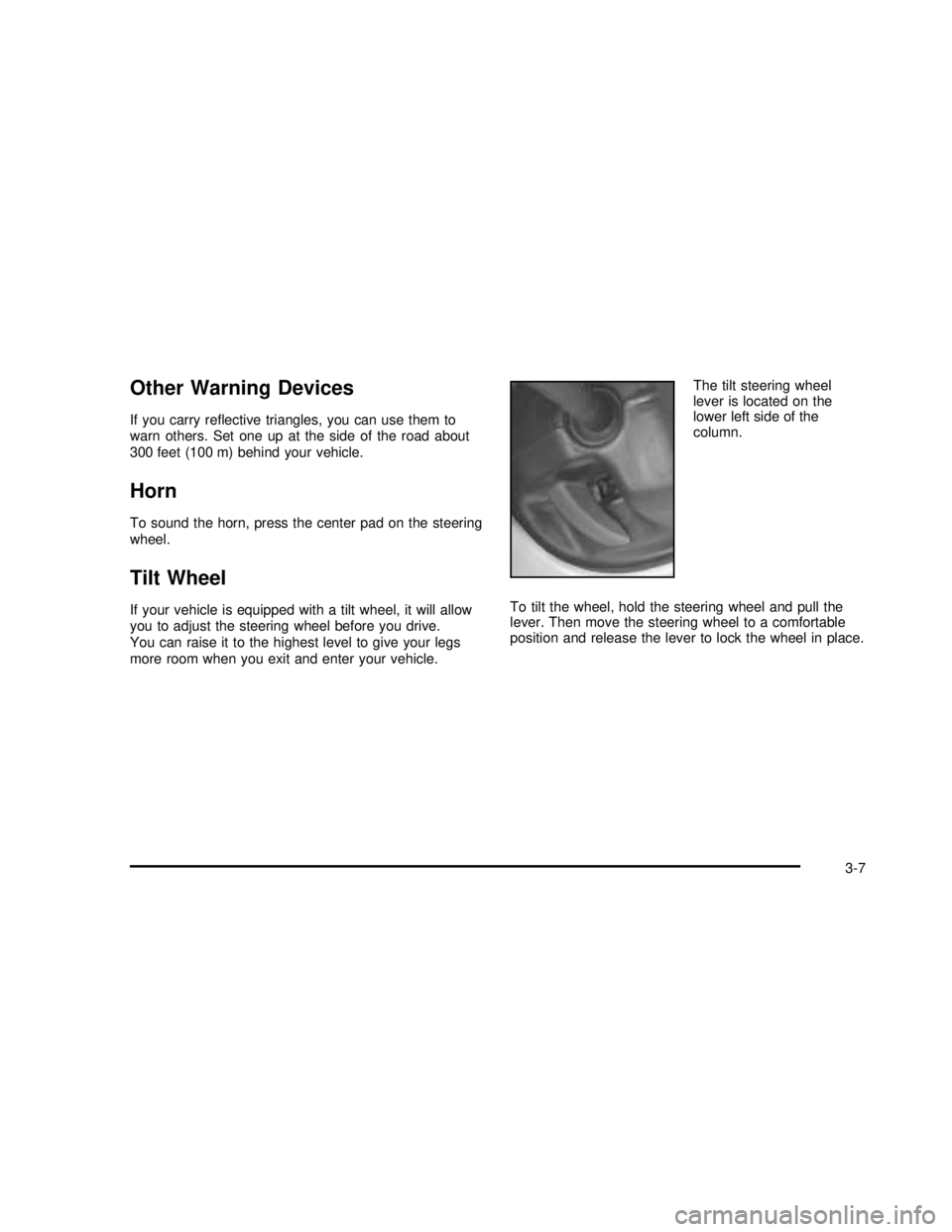
more room when you exit and enter your vehicle.The tilt steering wheel
lever is located on the
lower left side of the
column.
To tilt the wheel, hold the steering wheel and pull the
lever. Then move the steering wheel to a comfortable
position and release the lever to lock the wheel in place.
3-7
2003 - Yukon/Yukon XL