Cd player GREAT WALL FLORID 2008 User Guide
[x] Cancel search | Manufacturer: GREAT WALL, Model Year: 2008, Model line: FLORID, Model: GREAT WALL FLORID 2008Pages: 281, PDF Size: 43.97 MB
Page 206 of 281
Downloaded from www.Manualslib.com manuals search engine 199Electrical Accessories
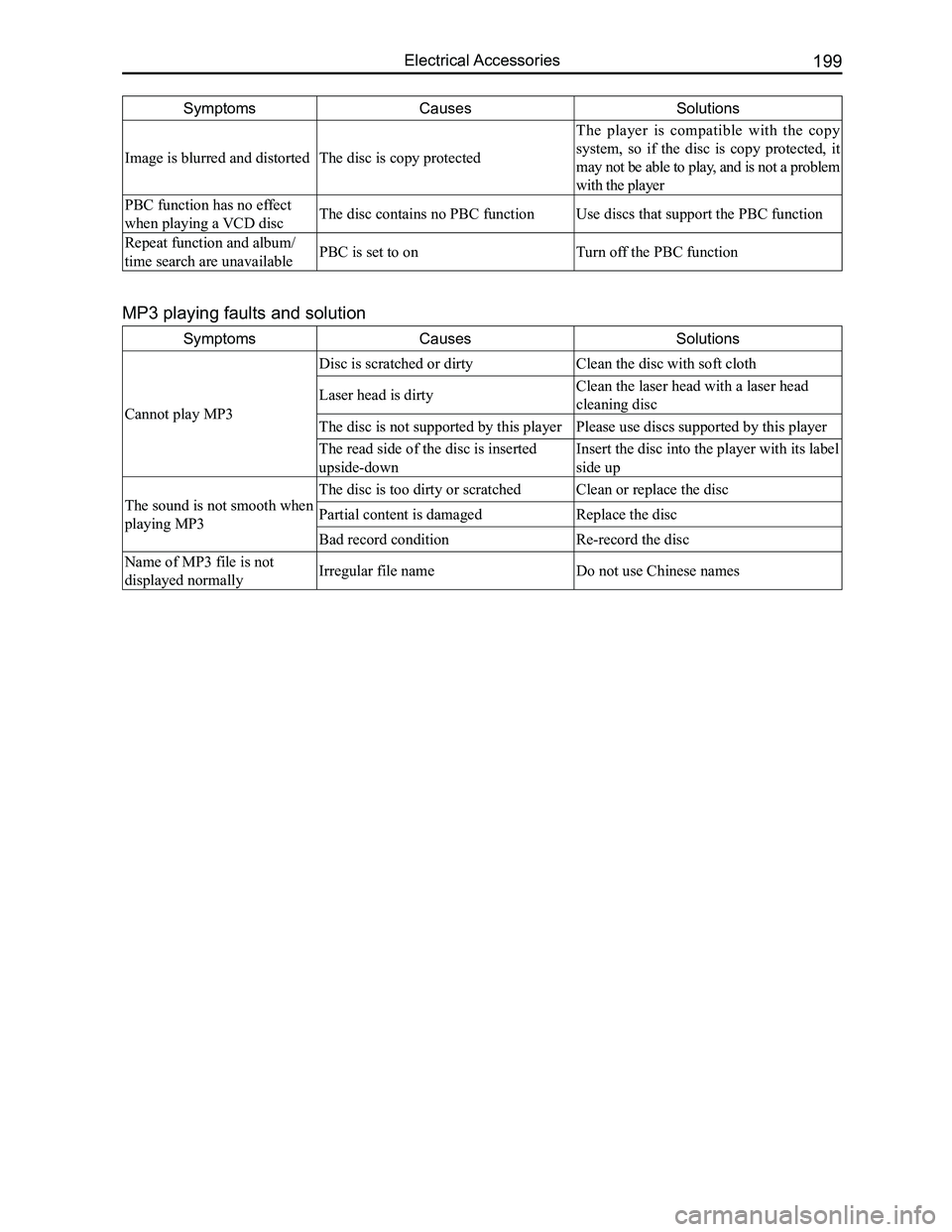
SymptomsCausesSolutions
Image is blurred and distortedThe disc is copy protected
The player is compatible with the copy
system, so if the disc is copy protected, it
may not be able to play, and is not a problem
with the player
PBC function has no effect
when playing a VCD discThe disc contains no PBC functionUse discs that support the PBC function
Repeat function and album/
time search are unavailablePBC is set to onTurn off the PBC function
SymptomsCausesSolutions
Cannot play MP3
Disc is scratched or dirty Clean the disc with soft cloth
Laser head is dirtyClean the laser head with a laser head
cleaning disc
The disc is not supported by this playerPlease use discs supported by this player
The read side of the disc is inserted
upside-down
Insert the disc into the player with its label
side up
The sound is not smooth when
playing MP3
The disc is too dirty or scratchedClean or replace the disc
Partial content is damagedReplace the disc
Bad record conditionRe-record the disc
Name of MP3 file is not
displayed normallyIrregular file nameDo not use Chinese names
MP3 playing faults and solution
Page 208 of 281
Downloaded from www.Manualslib.com manuals search engine 201Electrical Accessories
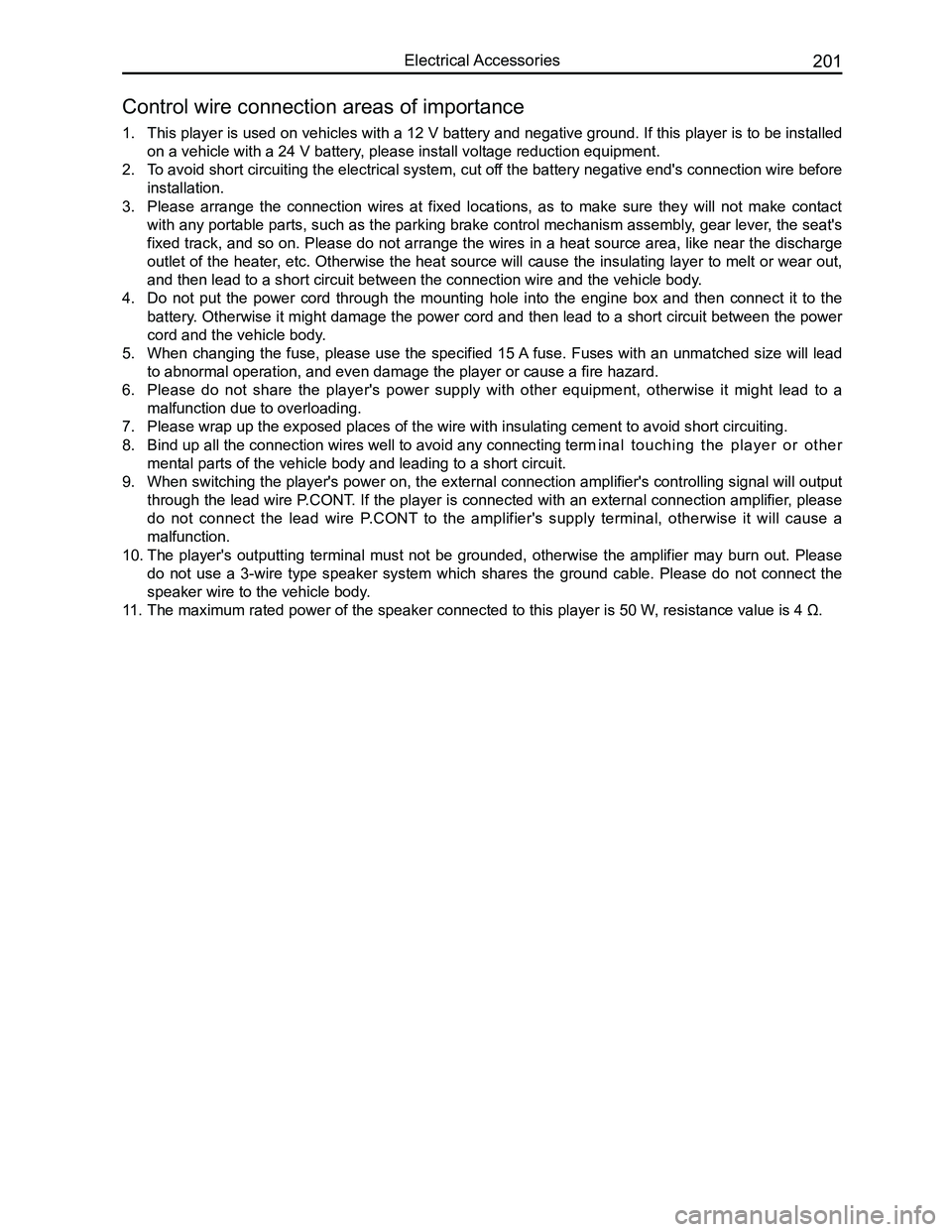
1. This player is used on vehicles with a 12 V battery and negative ground. If this player is to be installed
on a vehicle with a 24 V battery, please install voltage reduction equipment.
2. To avoid short circuiting the electrical system, cut off the battery negative end's connection wire before
installation.
3. Please arrange the connection wires at fixed locations, as to make sure they will not make contact
with any portable parts, such as the parking brake control mechanism assembly, gear lever, the seat's
fixed track, and so on. Please do not arrange the wires in a heat source area, like near the discharge
outlet of the heater, etc. Otherwise the heat source will cause the insulating layer to melt or wear out,
and then lead to a short circuit between the connection wire and the veh\
icle body.
4. Do not put the power cord through the mounting hole into the engine box and then connect it to the
battery. Otherwise it might damage the power cord and then lead to a short circuit between the power
cord and the vehicle body.
5. When changing the fuse, please use the specified 15 A fuse. Fuses with an unmatched size will lead
to abnormal operation, and even damage the player or cause a fire hazard\
.
6. Please do not share the player's power supply with other equipment, otherwise it might lead to a
malfunction due to overloading.
7. Please wrap up the exposed places of the wire with insulating cement to \
avoid short circuiting.
8. Bind up all the connection wires well to avoid any connecting term inal touching the player or other
mental parts of the vehicle body and leading to a short circuit.
9. When switching the player's power on, the external connection amplifier's controlling signal will output
through the lead wire P.CONT. If the player is connected with an external connection amplifier, please
do not connect the lead wire P.CONT to the amplifier's supply terminal, otherwise it will cause a
malfunction.
10. The player's outputting terminal must not be grounded, otherwise the amplifier may burn out. Please
do not use a 3-wire type speaker system which shares the ground cable. Please do not connect the
speaker wire to the vehicle body.
11. The maximum rated power of the speaker connected to this player is 50 W , resistance value is 4 Ω.
Control wire connection areas of importance
Page 250 of 281
Downloaded from www.Manualslib.com manuals search engine 243Vehicle Body
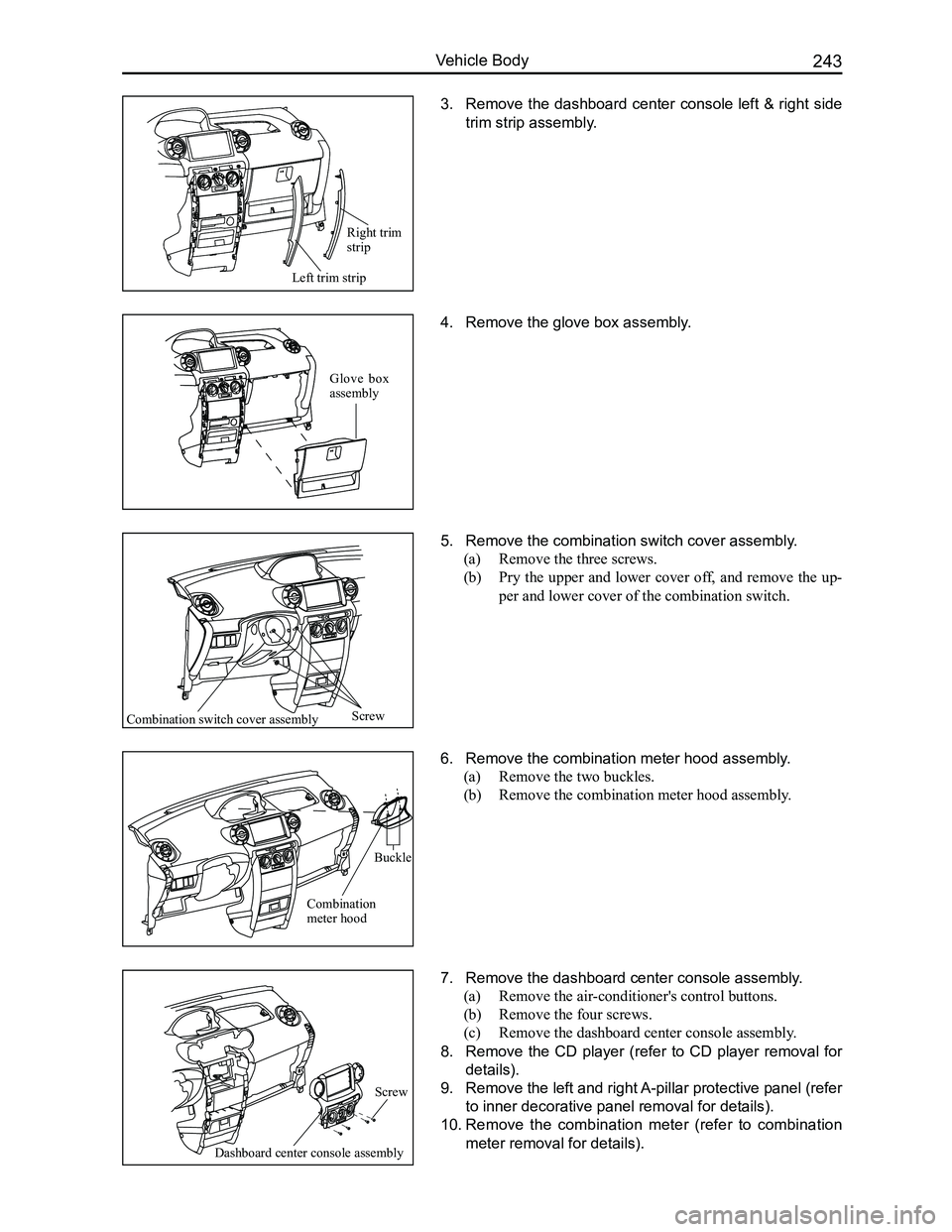
3. Remove the dashboard center console left & right side
trim strip assembly.
4. Remove the glove box assembly.
5. Remove the combination switch cover assembly.
(a) Remove the three screws.
(b) Pry the upper and lower cover off, and remove the up-
per and lower cover of the combination switch.
6. Remove the combination meter hood assembly.
(a) Remove the two buckles.
(b) Remove the combination meter hood assembly.
7. Remove the dashboard center console assembly.
(a) Remove the air-conditioner's control buttons.
(b) Remove the four screws.
(c) Remove the dashboard center console assembly.
8. Remove the CD player (refer to CD player removal for
details).
9. Remove the left and right A-pillar protective panel (refer
to inner decorative panel removal for details).
10. Remove the combination meter (refer to combination
meter removal for details).
Left trim strip
Screw
Buckle
Glove box assembly
Right trim strip
Combination switch cover assembly
Combination meter hood
Dashboard center console assembly
Screw