Lash HONDA ACCORD 2014 9.G User Guide
[x] Cancel search | Manufacturer: HONDA, Model Year: 2014, Model line: ACCORD, Model: HONDA ACCORD 2014 9.GPages: 595
Page 127 of 595
126
uuSecurity System uSecurity System Alarm
Controls
■
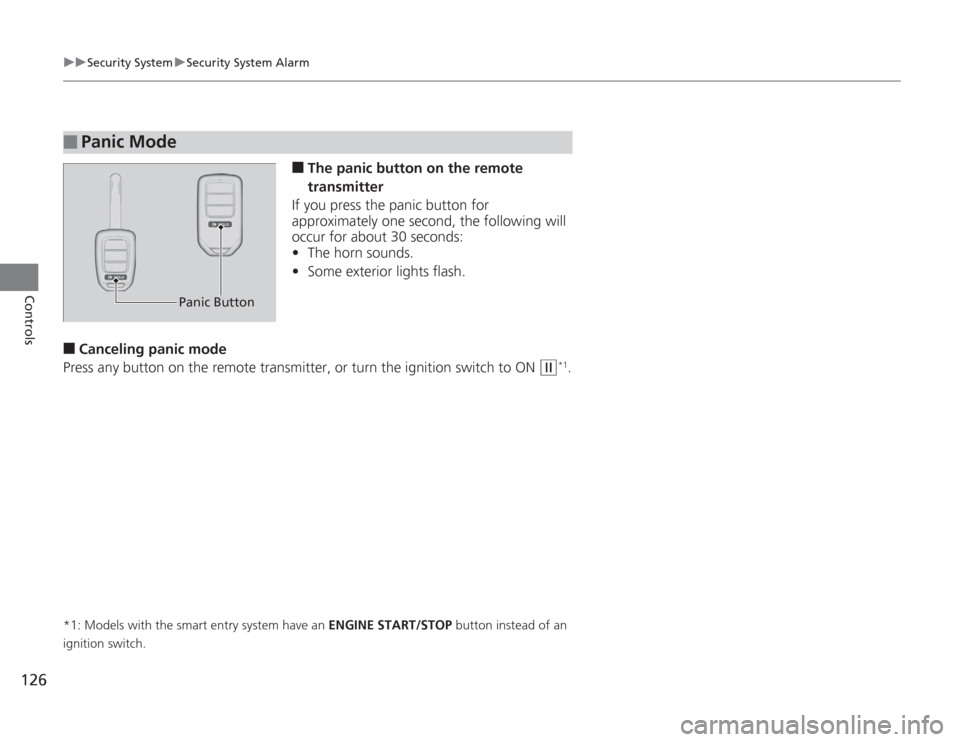
The panic button on the remote
transmitter
If you press the panic button for
approximately one second, the following will
occur for about 30 seconds:
• The horn sounds.
• Some exterior lights flash.
■
Canceling panic mode
Press any button on the remote transmitter, or turn the ignition switch to ON
(w
*1.
*1: Models with the smart entry system have an ENGINE START/STOP button instead of an
ignition switch.■
Panic Mode
Panic Button
Page 137 of 595
136
uuOperating the Switches Around the Steering Wheel uTurn Signals
Controls
Turn Signals
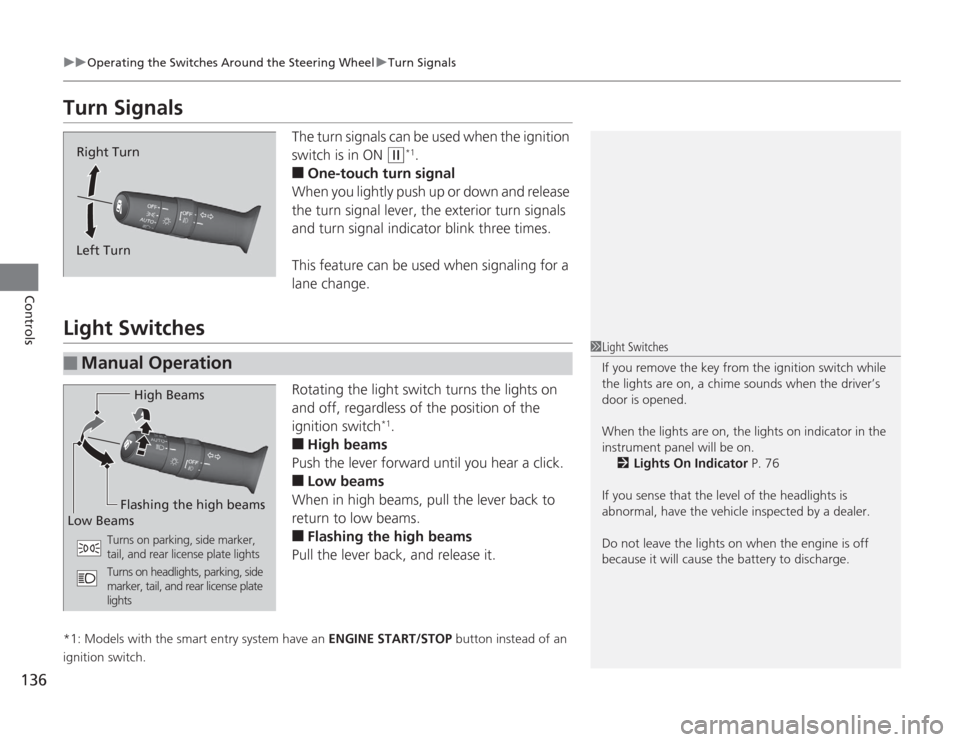
The turn signals can be used when the ignition
switch is in ON
(w
*1.
■
One-touch turn signal
When you lightly push up or down and release
the turn signal lever, the exterior turn signals
and turn signal indicator blink three times.
This feature can be used when signaling for a
lane change.
Light Switches
Rotating the light switch turns the lights on
and off, regardless of the position of the
ignition switch
*1.
■
High beams
Push the lever forward until you hear a click.
■
Low beams
When in high beams, pull the lever back to
return to low beams.
■
Flashing the high beams
Pull the lever back, and release it.
*1: Models with the smart entry system have an ENGINE START/STOP button instead of an
ignition switch.
Right Turn
Left Turn
■
Manual Operation
1 Light Switches
If you remove the key from the ignition switch while
the lights are on, a chime sounds when the driver’s
door is opened.
When the lights are on, the lights on indicator in the
instrument panel will be on. 2 Lights On Indicator P. 76
If you sense that the level of the headlights is
abnormal, have the vehicle inspected by a dealer.
Do not leave the lights on when the engine is off
because it will cause the battery to discharge.
High Beams
Flashing the high beams
Low Beams
Turns on parking, side marker,
tail, and rear license plate lights
Turns on headlights, parking, side
marker, tail, and rear license plate
lights
Page 152 of 595
Continued
151
uuAdjusting the Seats uAdjusting the Seat Positions
Controls
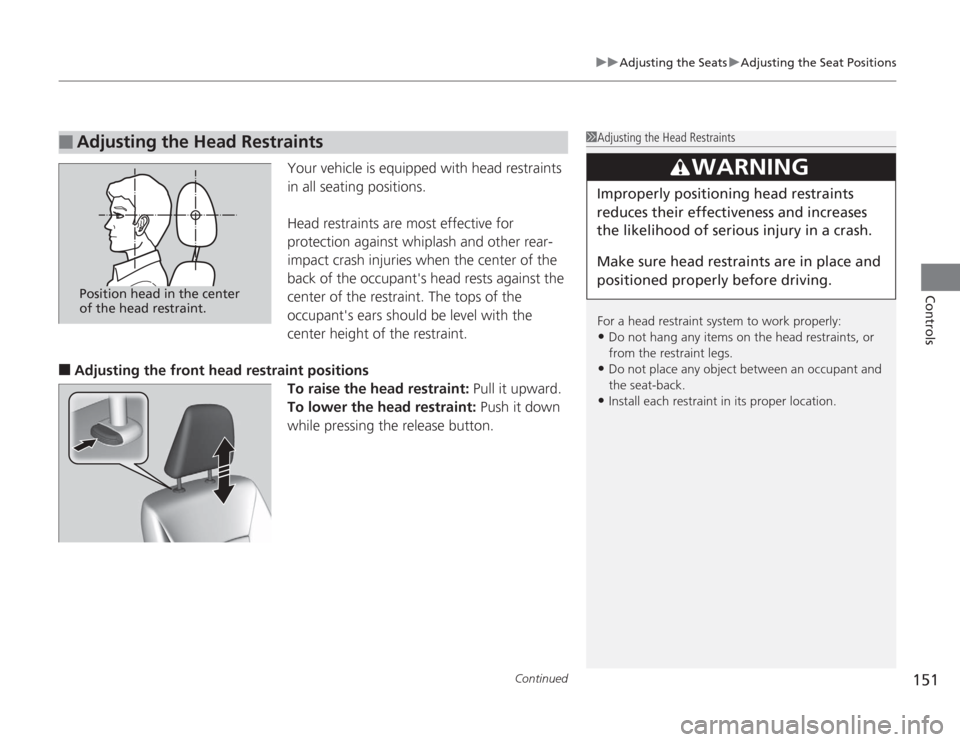
Your vehicle is equipped with head restraints
in all seating positions.
Head restraints are most effective for
protection against whiplash and other rear-
impact crash injuries when the center of the
back of the occupant's head rests against the
center of the restraint. The tops of the
occupant's ears should be level with the
center height of the restraint.
■
Adjusting the front head restraint positions To raise the head restraint: Pull it upward.
To lower the head restraint: Push it down
while pressing the release button.
■
Adjusting the Head Restraints
1 Adjusting the Head Restraints
For a head restraint system to work properly:•Do not hang any items on the head restraints, or
from the restraint legs.•Do not place any object between an occupant and
the seat-back.•Install each restraint in its proper location.
3
WARNING
Improperly positioning head restraints
reduces their effectiveness and increases
the likelihood of serious injury in a crash.
Make sure head restraints are in place and
positioned properly before driving.
Position head in the center
of the head restraint.
Page 174 of 595
173
Features
This chapter describes how to operate technology features.
Audio SystemUSB Port .......................................... 175
Auxiliary Input Jack .......................... 176
Audio System Theft Protection
*....... 177
Region Setting ................................. 178
Audio Remote Controls .................... 179
Audio System Basic Operation ...... 180
Audio/Information Screen ................ 181
Display Setup ................................... 186
Playing AM/FM Radio ....................... 187
Playing a CD .................................... 190
Playing an iPod ®............................... 193
Playing Internet Radio ...................... 196
Playing a USB Flash Drive ................. 198
Playing Bluetooth ® Audio ................. 201
Models with one display
Audio System Basic Operation ...... 203
Audio with Touch Screen ................. 204
Audio/Information Screen ................ 207
Display Setup ................................... 213
Playing AM/FM Radio ....................... 214
Playing XM ® Radio ........................... 218
Playing a CD .................................... 221
Playing an iPod® ............................... 224
Playing Internet Radio ...................... 228
Playing a USB Flash Drive ................. 231
Playing Bluetooth ® Audio................. 234
Audio System Basic Operation ...... 236
Audio with Touch Screen ................. 237
Audio/Information Screen ................ 239Models with two displaysModels with navigation system
Display Setup ................................... 244
Voice Control Operation .................. 245
Playing AM/FM Radio....................... 253
Playing XM ® Radio ........................... 257
Playing a CD .................................... 260Playing Hard Disc Drive (HDD) Audio..... 263Playing an iPod ®.............................. 273
Playing Internet Radio ...................... 281
Playing a USB Flash Drive ................. 284
Playing Bluetooth ® Audio ................ 287
Audio Error Messages ...................... 289
General Information on the Audio System
.....295
Customized Features........................ 299
HomeLink ® Universal Transceiver
*.. 337
Bluetooth® HandsFreeLink ®..... 339 , 376
Compass
*.......................................... 414
* Not available on all models
Page 175 of 595
174Features
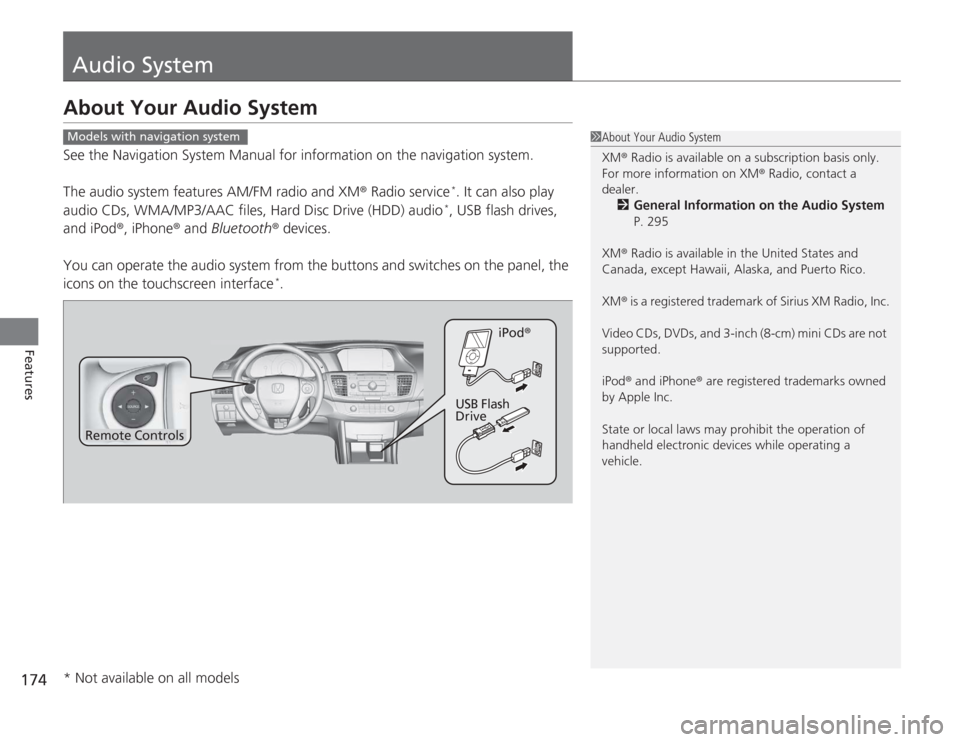
Audio SystemAbout Your Audio SystemSee the Navigation System Manual for information on the navigation system.
The audio system features AM/FM radio and XM® Radio service
*. It can also play
audio CDs, WMA/MP3/AAC files, Hard Disc Drive (HDD) audio*, USB flash drives,
and iPod®, iPhone ® and Bluetooth ® devices.
You can operate the audio system from the buttons and switches on the panel, the
icons on the touchscreen interface
*.
1 About Your Audio System
XM ® Radio is available on a subscription basis only.
For more information on XM® Radio, contact a
dealer.
2 General Information on the Audio System
P. 295
XM ® Radio is available in the United States and
Canada, except Hawaii, Alaska, and Puerto Rico.
XM ® is a registered trademark of Sirius XM Radio, Inc.
Video CDs, DVDs, and 3-inch (8-cm) mini CDs are not
supported.
iPod ® and iPhone ® are registered trademarks owned
by Apple Inc.
State or local laws may prohibit the operation of
handheld electronic devices while operating a
vehicle.
Models with navigation system
Remote Controls iPod
®
USB Flash
Drive
* Not available on all models
Page 176 of 595
175
uuAudio System uUSB Port
Features
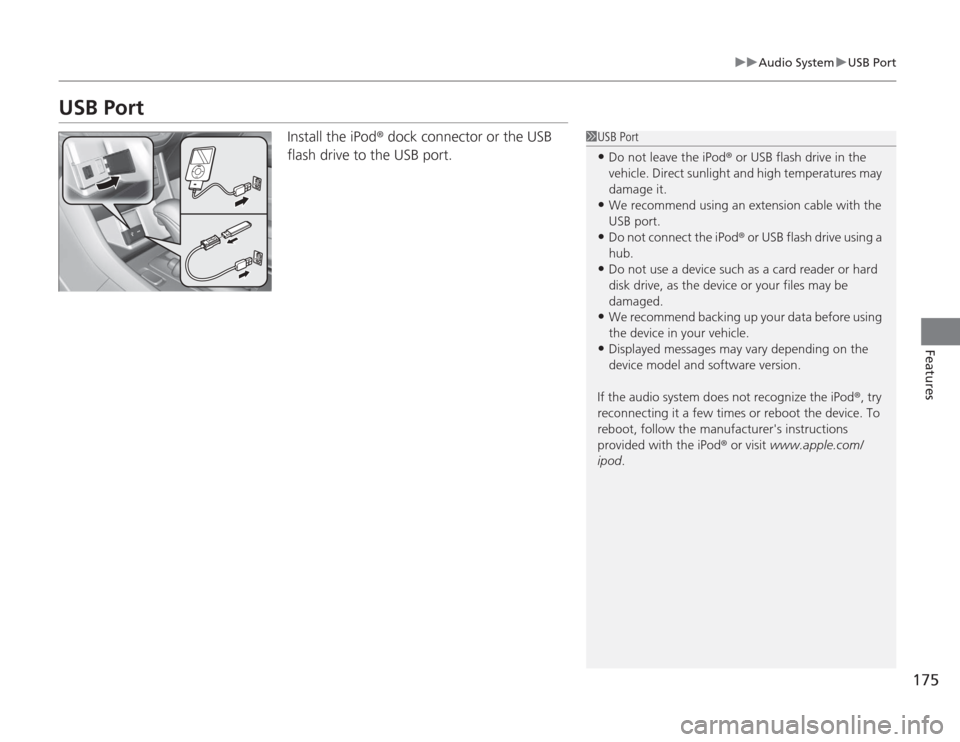
USB Port
Install the iPod ® dock connector or the USB
flash drive to the USB port.
1 USB Port•Do not leave the iPod ® or USB flash drive in the
vehicle. Direct sunlight and high temperatures may
damage it.•We recommend using an extension cable with the
USB port.•Do not connect the iPod ® or USB flash drive using a
hub.•Do not use a device such as a card reader or hard
disk drive, as the device or your files may be
damaged.•We recommend backing up your data before using
the device in your vehicle.•Displayed messages may vary depending on the
device model and software version.
If the audio system does not recognize the iPod ®, try
reconnecting it a few times or reboot the device. To
reboot, follow the manufacturer's instructions
provided with the iPod ® or visit www.apple.com/
ipod .
Page 180 of 595
179
uuAudio System uAudio Remote Controls
Features
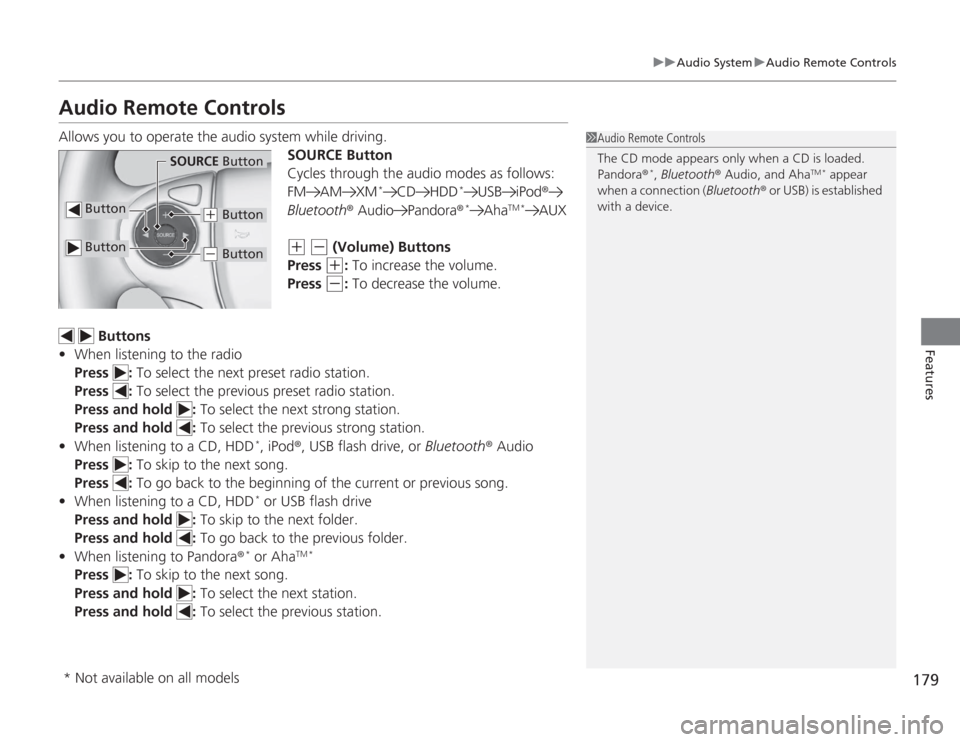
Audio Remote ControlsAllows you to operate the audio system while driving.
SOURCE Button
Cycles through the audio modes as follows:
FM AM XM
*
CD HDD
*
USB iPod®
Bluetooth ® Audio Pandora ®
*
Aha
TM *
AUX
(+
(-
(Volume) Buttons
Press (+
: To increase the volume.
Press
(-
: To decrease the volume.
Buttons
• When listening to the radio
Press : To select the next preset radio station.
Press : To select the previous preset radio station.
Press and hold : To select the next strong station.
Press and hold : To select the previous strong station.
• When listening to a CD, HDD
*, iPod ®, USB flash drive, or Bluetooth® Audio
Press : To skip to the next song.
Press : To go back to the beginning of the current or previous song.
• When listening to a CD, HDD* or USB flash drive
Press and hold : To skip to the next folder.
Press and hold : To go back to the previous folder.
• When listening to Pandora®
* or Aha
TM *
Press : To skip to the next song.
Press and hold : To select the next station.
Press and hold : To select the previous station.
1Audio Remote Controls
The CD mode appears only when a CD is loaded.
Pandora ®
*, Bluetooth ® Audio, and Aha
TM *
appear
when a connection ( Bluetooth® or USB) is established
with a device.
Button
SOURCE Button
Button
(+
Button
(-
Button
* Not available on all models
Page 184 of 595
Continued
183
uuAudio System Basic Operation uAudio/Information Screen
Features
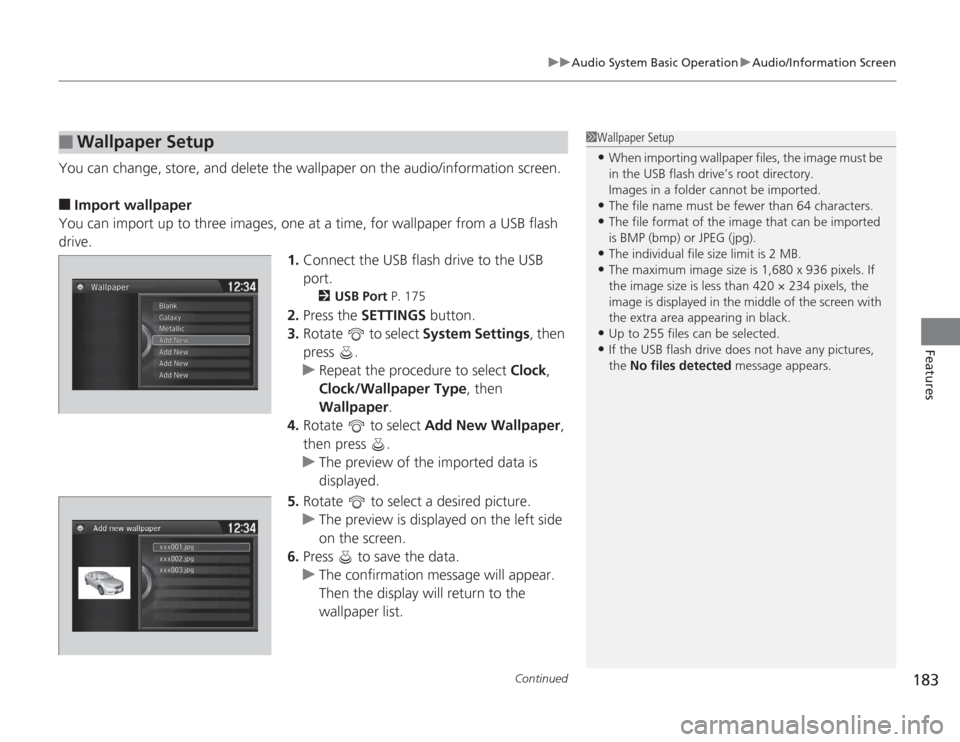
You can change, store, and delete the wallpaper on the audio/information screen.■
Import wallpaper
You can import up to three images, one at a time, for wallpaper from a USB flash
drive. 1.Connect the USB flash drive to the USB
port.
2 USB Port P. 175
2.Press the SETTINGS button.
3. Rotate to select System Settings, then
press .
u Repeat the procedure to select Clock,
Clock/Wallpaper Type , then
Wallpaper .
4. Rotate to select Add New Wallpaper ,
then press .
u The preview of the imported data is
displayed.
5. Rotate to select a desired picture.
u The preview is displayed on the left side
on the screen.
6. Press to save the data.
u The confirmation message will appear.
Then the display will return to the
wallpaper list.
■
Wallpaper Setup
1Wallpaper Setup•When importing wallpaper files, the image must be
in the USB flash drive’s root directory.
Images in a folder cannot be imported.•The file name must be fewer than 64 characters.•The file format of the image that can be imported
is BMP (bmp) or JPEG (jpg).•The individual file size limit is 2 MB.•The maximum image size is 1,680 x 936 pixels. If
the image size is less than 420 × 234 pixels, the
image is displayed in the middle of the screen with
the extra area appearing in black.•Up to 255 files can be selected.•If the USB flash drive does not have any pictures,
the No files detected message appears.
Page 195 of 595
uuAudio System Basic Operation uPlaying an iPod ®
194Features
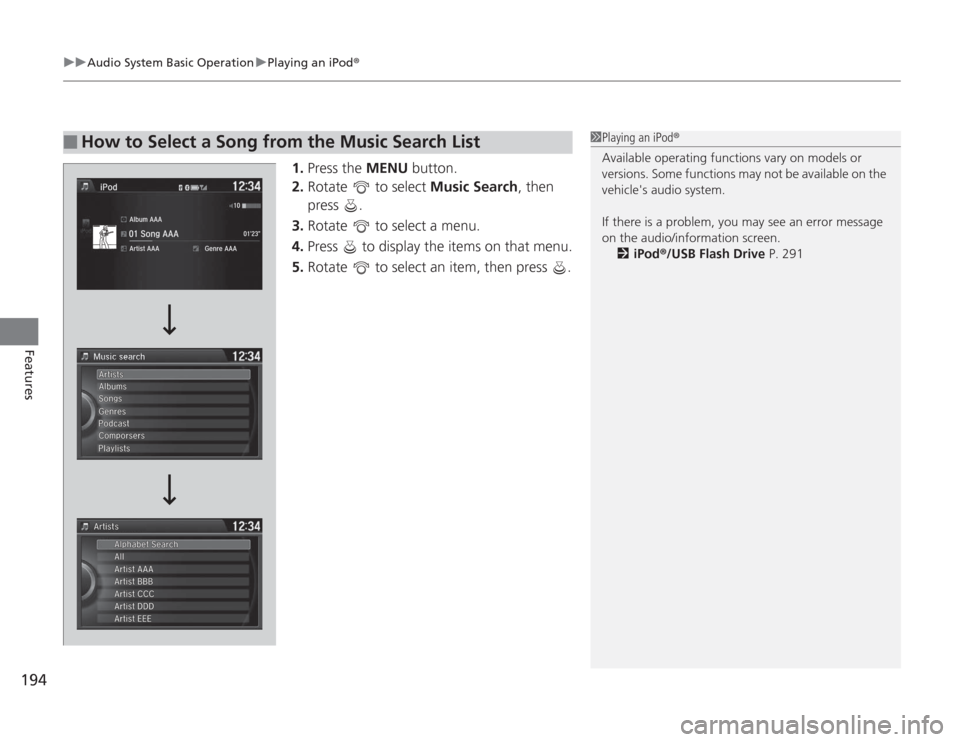
1.Press the MENU button.
2. Rotate to select Music Search, then
press .
3. Rotate to select a menu.
4. Press to display the items on that menu.
5. Rotate to select an item, then press .
■
How to Select a Song from the Music Search List
1Playing an iPod®
Available operating functions vary on models or
versions. Some functions may not be available on the
vehicle's audio system.
If there is a problem, you may see an error message
on the audio/information screen.
2 iPod ®/USB Flash Drive P. 291
Page 199 of 595
198
uuAudio System Basic Operation uPlaying a USB Flash Drive
Features
Playing a USB Flash DriveYour audio system reads and plays sound files on a USB flash drive in either MP3,
WMA or AAC
*1 format.
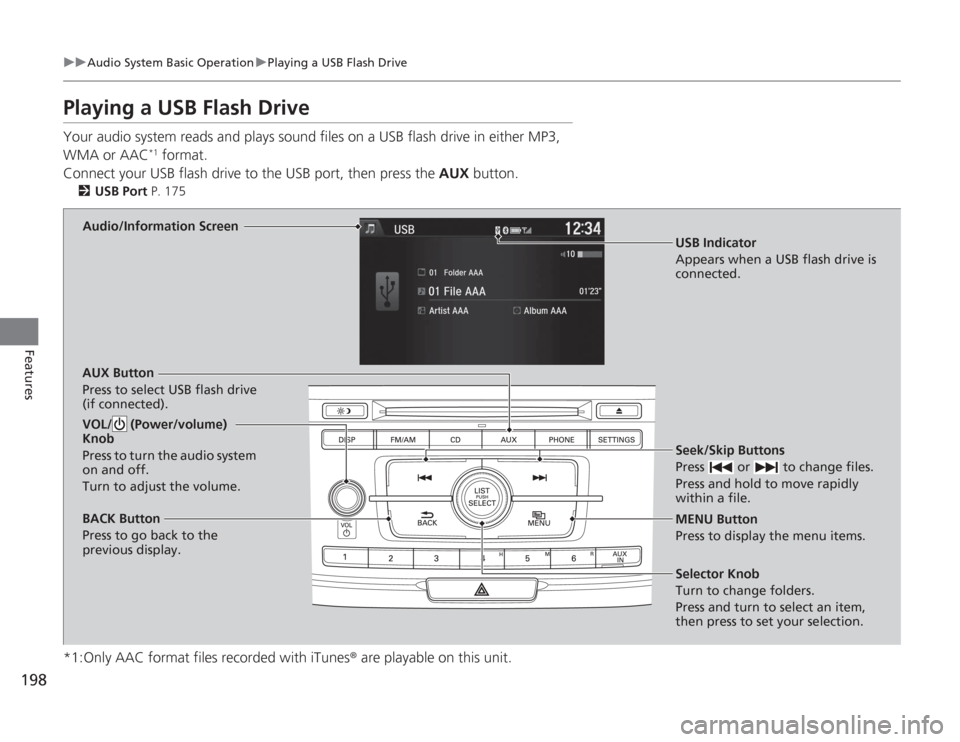
Connect your USB flash driv e to the USB port, then press the AUX button.
2USB Port P. 175
*1:Only AAC format files recorded with iTunes ® are playable on this unit.
Audio/Information Screen
AUX Button
Press to select USB flash drive
(if connected). Seek/Skip Buttons
Press or to change files.
Press and hold to move rapidly
within a file.
MENU Button
Press to display the menu items.
Selector Knob
Turn to change folders.
Press and turn to select an item,
then press to set your selection.
VOL/ (Power/volume)
Knob
Press to turn the audio system
on and off.
Turn to adjust the volume.BACK Button
Press to go back to the
previous display.
USB Indicator
Appears when a USB flash drive is
connected.