ECO mode HONDA ACCORD COUPE 2001 CF / 6.G User Guide
[x] Cancel search | Manufacturer: HONDA, Model Year: 2001, Model line: ACCORD COUPE, Model: HONDA ACCORD COUPE 2001 CF / 6.GPages: 372, PDF Size: 6.1 MB
Page 68 of 372
Controls Near the Steering Wheel
In intermittent, the wipers operate
every few seconds. The sweep
interval will change slightly with speed; getting shorter as you drive
faster. In low speed and high speed,
the wipers run continuously.
On all models except DX
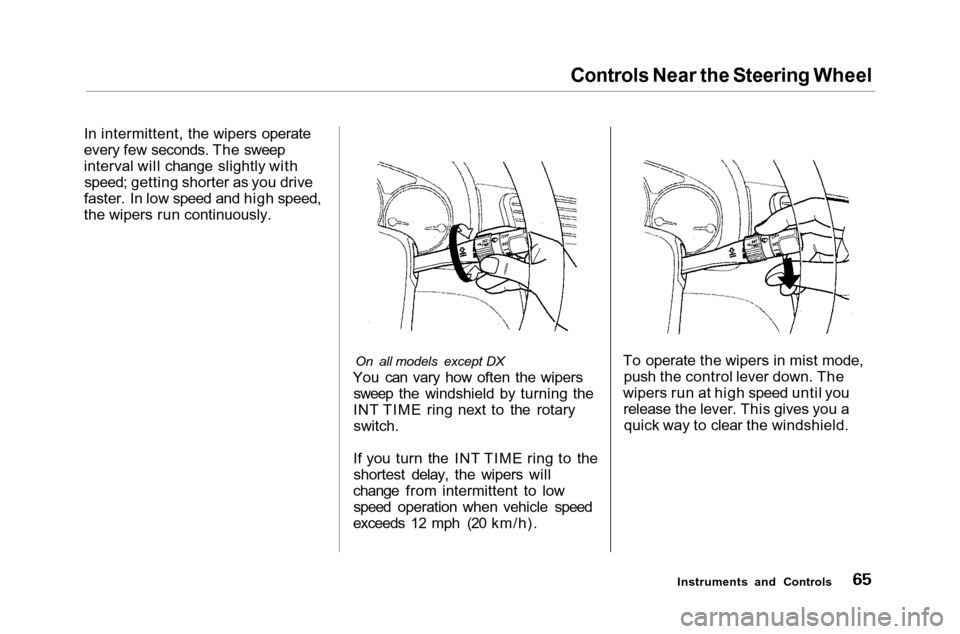
You can vary how often the wipers sweep the windshield by turning the
INT TIME ring next to the rotary switch.
If you turn the INT TIME ring to the shortest delay, the wipers will
change from intermittent to low speed operation when vehicle speed
exceeds 12 mph (20 km/h). To operate the wipers in mist mode,
push the control lever down. The
wipers run at high speed until you release the lever. This gives you aquick way to clear the windshield.
Instruments and Controls
Page 71 of 372
Steering Wheel Controls
Cruise Control
Except for DX model in the U.S.
Cruise control allows you to maintain
a set speed above 25 mph (40 km/h)
without keeping your foot on the accelerator pedal. It should be used
for cruising on straight, open
highways. It is not recommended for conditions such as city driving,
winding roads, slippery roads, heavy rain, or bad weather. You shouldhave full control of the car under
those conditions.
Using the Cruise Control
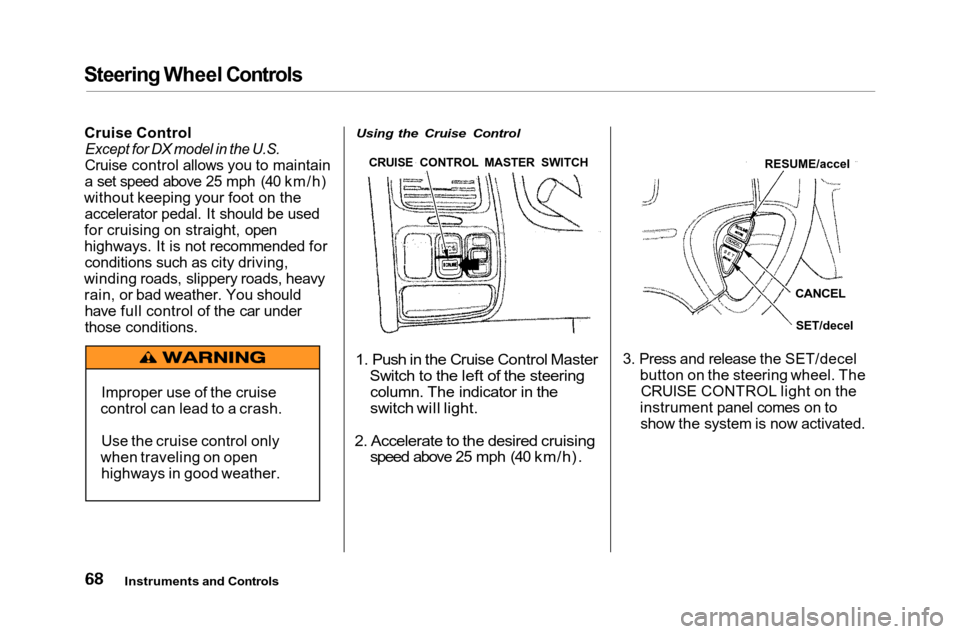
1. Push in the Cruise Control Master
Switch to the left of the steering
column. The indicator in the
switch will light.
2. Accelerate to the desired cruising
speed above 25 mph (40 km/h).
3. Press and release the SET/decel
button on the steering wheel. TheCRUISE CONTROL light on the
instrument panel comes on to show the system is now activated.
Instruments and Controls
Improper use of the cruise
control can lead to a crash.
Use the cruise control only
when traveling on open highways in good weather. RESUME/accel
CANCEL
SET/decel
CRUISE CONTROL MASTER SWITCH
Page 79 of 372
Keys and Locks
Lockout Prevention
If you forget and leave the key in the
ignition switch, Lockout Prevention
will not allow you to lock the driver's door. With the driver's door open
and the key in the ignition, both
master door lock switches aredisabled. However, if the driver's
door is not open, the master door
lock switches are not disabled. Pushing the switch down on the
open passenger's door will lock all
doors. If you try to lock an open
driver's door by pushing in the lock
tab, the tabs on all doors pop out. Pushing in the lock tab on the
passenger's door only locks that door.
Remote Transmitter
On EX and EX-V6 models
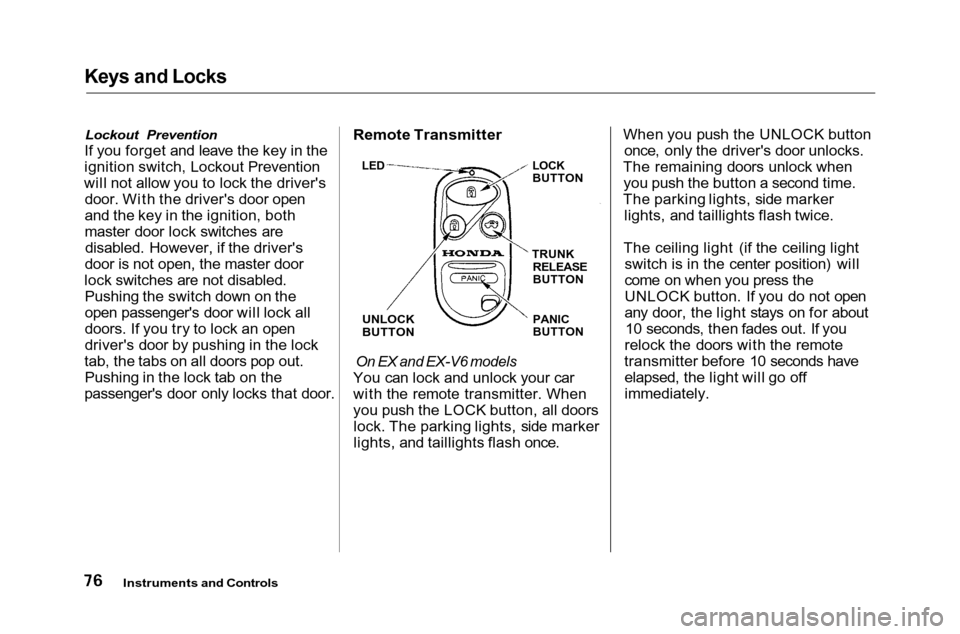
You can lock and unlock your car
with the remote transmitter. When
you push the LOCK button, all doors lock. The parking lights, side marker
lights, and taillights flash once. When you push the UNLOCK button
once, only the driver's door unlocks.
The remaining doors unlock when you push the button a second time.
The parking lights, side marker lights, and taillights flash twice.
The ceiling light (if the ceiling light switch is in the center position) will
come on when you press the
UNLOCK button. If you do not open
any door, the light stays on for about10 seconds, then fades out. If you
relock the doors with the remote
transmitter before 10 seconds have elapsed, the light will go off
immediately.
Instruments and Controls
LED
LOCK
BUTTON
TRUNK
RELEASE
BUTTON
PANIC
BUTTON
UNLOCK
BUTTON
Page 80 of 372
Keys and Locks
You cannot lock or unlock the doors with the remote transmitter if anydoor is not fully closed or the key is
in the ignition switch.
If you unlock the doors with the
remote transmitter, but do not open any of the doors within 20 seconds,
the doors automatically relock and
the security system sets.
When you push the LOCK button a second time within 5 seconds after
you have locked the doors, the horn
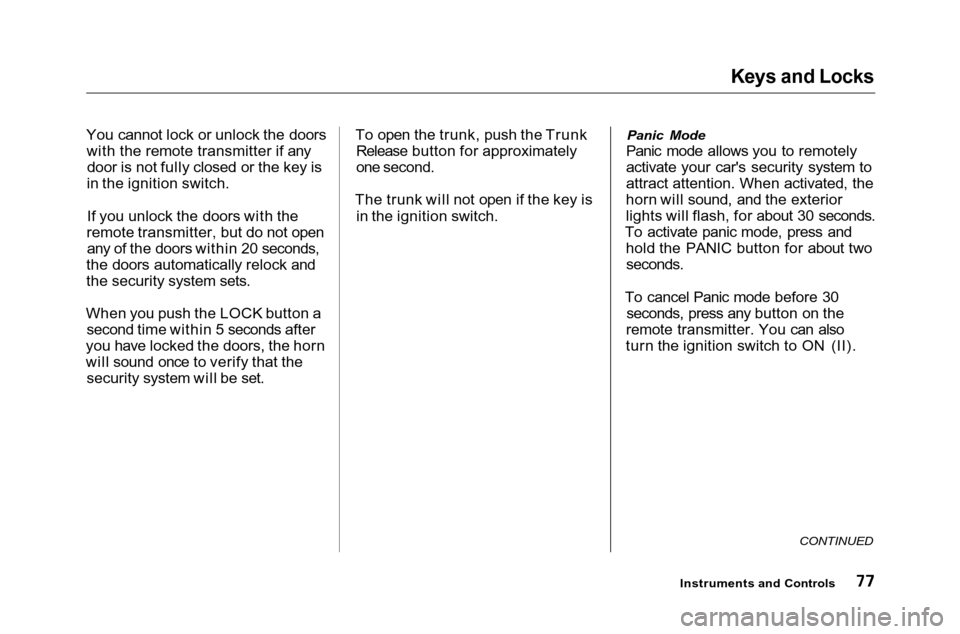
will sound once to verify that the security system will be set. To open the trunk, push the Trunk
Release button for approximately
one second.
The trunk will not open if the key is in the ignition switch.
Panic Mode
Panic mode allows you to remotely
activate your car's security system to
attract attention. When activated, the
horn will sound, and the exterior
lights will flash, for about 30 seconds.
To activate panic mode, press and hold the PANIC button for about two
seconds.
To cancel Panic mode before 30 seconds, press any button on the
remote transmitter. You can also
turn the ignition switch to ON (II).
CONTINUED
Instruments and Controls
Page 86 of 372
HomeLink Universal Transmitter
On all V6 models
The HomeLink Universal
Transmitter built into your car can be programmed to operate remotely-controlled devices around your home,such as garage doors, lighting, or
home security systems. It can replace up to three remote
transmitters.
Customer Assistance
If you have problems with training
the HomeLink Universal
Transmitter, or would like
information on home products that
can be operated by the transmitter,
call (800) 355-3515. On the Internet,
go to www.homelink.jci.com. Important Safety Precautions
Always refer to the operating instructions and safety information
that came with your garage dooropener or other equipment you
intend to operate with the HomeLink Universal Transmitter. If you do not
have this information, you should contact the manufacturer of the
equipment.
While training or using the transmitter, make sure you have aclear view of the garage door or gate,
and that no one will be injured by its
movement.
General Information
If you are training the transmitter tooperate a garage door or gate, it is
recommended that you unplug the
motor for that device during training. Repeatedly pressing the remote
control button could burn out the
motor. The HomeLink transmitter stores
the code in a permanent memory.
There should be no need to retrain the transmitter if your car's battery
goes dead or is disconnected.
If your garage door opener was
manufactured before April 1982, you
may not be able to program the
HomeLink Universal Transmitter to
operate it. Garage door openers
manufactured before that date do
not have a safety feature that causes
them to stop and reverse if an
obstacle is detected during closing,
increasing the risk of injury. If you
have questions, call (800) 355-3515.
Instruments and Controls
Page 110 of 372
Interior Lights
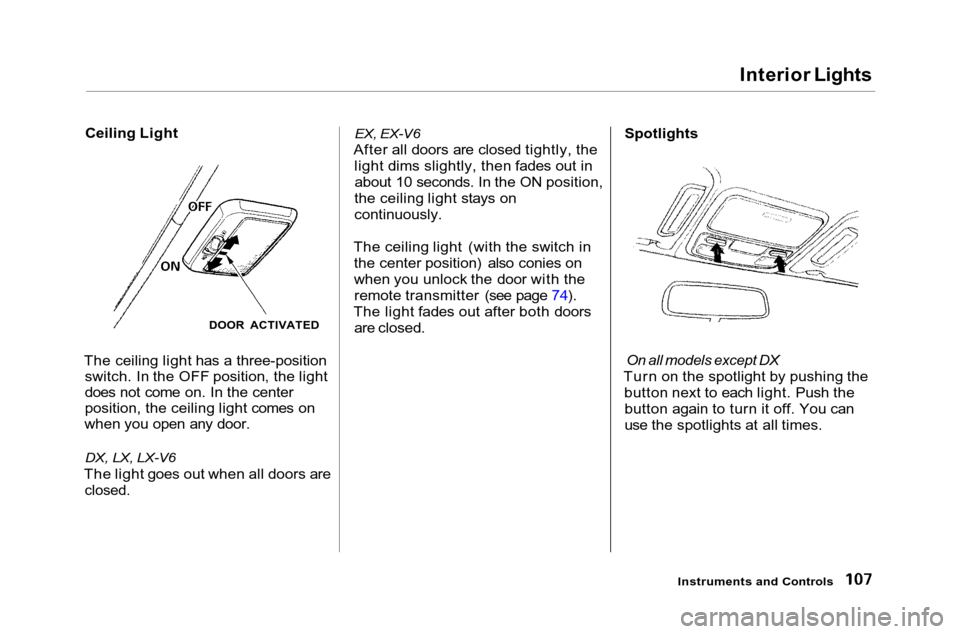
Ceiling Light
The ceiling light has a three-position switch. In the OFF position, the light
does not come on. In the center
position, the ceiling light comes on
when you open any door.
DX, LX, LX-V6
The light goes out when all doors are
closed.
EX, EX-V6
After all doors are closed tightly, the light dims slightly, then fades out inabout 10 seconds. In the ON position,
the ceiling light stays on
continuously.
The ceiling light (with the switch in the center position) also conies on
when you unlock the door with theremote transmitter (see page 74).
The light fades out after both doors are closed.
Spotlights
On all models except DX
Turn on the spotlight by pushing the button next to each light. Push thebutton again to turn it off. You can
use the spotlights at all times.
Instruments and Controls
DOOR ACTIVATED
Page 111 of 372
Interior Lights
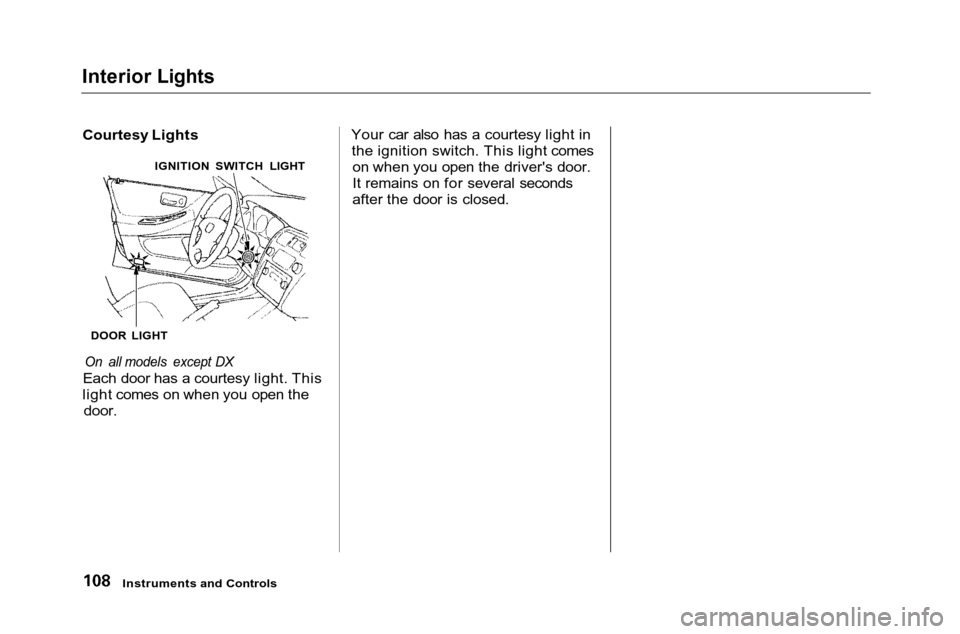
Courtesy Lights
On all models except DX
Each door has a courtesy light. This
light comes on when you open the
door.
Your car also has a courtesy light in
the ignition switch. This light comes on when you open the driver's door.
It remains on for several seconds
after the door is closed.
Instruments and Controls
DOOR LIGHT
IGNITION SWITCH LIGHT
Page 119 of 372
Heating and Cooling
To remove exterior frost or ice from the windshield and side windowsafter the car has been sitting out in
cold weather:
1. Start the engine. 2. Select
When you select the
system automatically switches to
Fresh Air mode and turns on the
A/C.
3. Switch the fan and temperature controls to maximum.
To rapidly remove exterior frost or ice from the windshield (on very colddays), first select the Recirculation
mode. Once the windshield is clear,select the Fresh Air mode to avoid
fogging the windows. These settings direct all the air flow
to the defroster vents at the base of
the windshield and the side windowdefroster vents. The air flow will get
warmer and clear the windows faster as the engine warms up. You can
close the side vents with the dial
underneath each vent. This will send more warm air to the windshielddefroster vents.
For safety, make sure you have a
clear view through all the windows
before driving away. To Turn Everything Off
To shut off the system temporarily,turn the fan speed and temperaturecontrol dials all the way to the left.
You should shut the system completely off only for the first few
minutes of driving in cold weather,
until the engine coolant warms upenough to operate the heater. Keep
the fan on at all other times so stale
air does not build up in the interior.
Comfort and Convenience Features
Page 133 of 372
Audio System
Operating the Cassette PlayerTurn the audio system ON. Make
sure the tape opening on the cassette
is facing to the right, then insert the
cassette most of the way into the slot.
The system will pull it in the rest of
the way, and begin to play.
The tape direction indicator will light to show you which side of the cassette is playing. The indicates
the side you inserted facing upward is now playing. If you want to play
the other side, press the PROG
button.
Dolby B noise reduction turns on
when you insert a cassette. If the
tape was not recorded with Dolby B noise reduction, turn it off by pressing the button. When the system reaches the end of
the tape, it will automatically reversedirection and play the other side. If
you want to remove the cassette from the drive, press the EJECTbutton.
Tape Search Functions With a cassette playing, you can use the FF, REW, SKIP, or REPEAT
function to find a desired program.
FF/REW — Fast Forward and Re-
wind move the tape rapidly. To re-
wind the tape, push the REW button.
You will see REW in the display. To fast forward the tape, push the FFbutton. You will see FF displayed.Press the PLAY button to take thesystem out of rewind or fast forward.
If the system reaches the end of the
tape while in fast forward or rewind, it automatically stops that function,
reverses direction, and begins to play. SKIP — The Skip Function allows
you to find the beginning of a song or passage. To find the beginning of
the song or passage currently
playing, push the SKIP switch down.
You will see REW flashing in the display as the tape rewinds. To find
the beginning of the next song, push
the SKIP switch up. You will see FF
flashing in the display as the tape
fast forwards. When the system finds the beginning of a song or
passage, it goes back to PLAY mode.
Comfort and Convenience Features
Page 143 of 372
Audio System
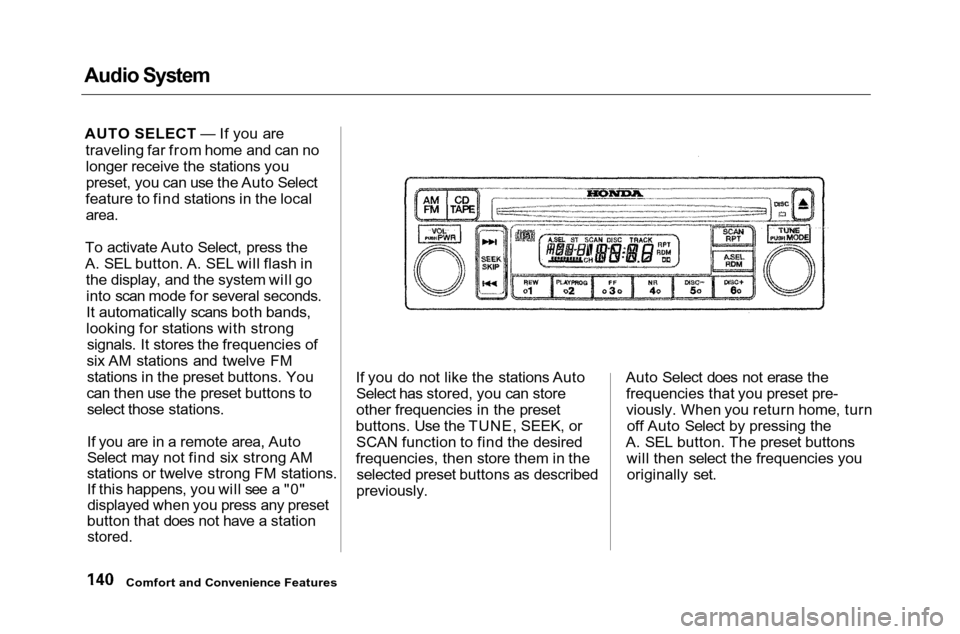
AUTO SELECT — If you are
traveling far from home and can no
longer receive the stations you
preset, you can use the Auto Select
feature to find stations in the local
area.
To activate Auto Select, press the
A. SEL button. A. SEL will flash in the display, and the system will gointo scan mode for several seconds.
It automatically scans both bands,
looking for stations with strong signals. It stores the frequencies of
six AM stations and twelve FM stations in the preset buttons. You
can then use the preset buttons to select those stations.
If you are in a remote area, Auto
Select may not find six strong AM
stations or twelve strong FM stations.
If this happens, you will see a "0"displayed when you press any preset
button that does not have a station
stored.
If you do not like the stations Auto
Select has stored, you can store
other frequencies in the preset
buttons. Use the TUNE, SEEK, or SCAN function to find the desired
frequencies, then store them in the selected preset buttons as described
previously. Auto Select does not erase the
frequencies that you preset pre-
viously. When you return home, turn off Auto Select by pressing the
A. SEL button. The preset buttons will then select the frequencies youoriginally set.
Comfort and Convenience Features