reset HONDA ACCORD COUPE 2001 CF / 6.G Owner's Guide
[x] Cancel search | Manufacturer: HONDA, Model Year: 2001, Model line: ACCORD COUPE, Model: HONDA ACCORD COUPE 2001 CF / 6.GPages: 372, PDF Size: 6.1 MB
Page 362 of 372
Audio System
You can use any of four methods to
find radio stations on the selected
band: TUNE, SEEK, SCAN or the
Preset buttons.
TUNE — Use the TUNE knob to
tune the radio to a desired frequency.
Turn the knob clockwise to tune to a
higher frequency, or
counterclockwise to tune to a lower
frequency.
SEEK — The SEEK function
searches the band for a station with
a strong signal. To activate it, press
either SEEK button or then
release it. Depending on which
SEEK button you press, the system
scans upward or downward from the
current frequency. It stops when it
finds a station with a strong signal.
SCAN — The SCAN function
samples all the stations with strong
signals on the selected band. To
activate it, press the SCAN button,
then release it. The system will scan
up the band for a station with a
strong signal. When it finds one, it
will stop and play that station for
approximately five seconds. If you do
nothing, the system will then scan
for the next strong station and play
that for five seconds. When it plays a
station that you want to continue
listening to, press the SCAN button
again.
Preset — You can store the
frequencies of your favorite radio
stations in the six preset buttons.
Each button will store one frequency
on the AM band, and two
frequencies on the FM band.
To store a frequency:
1. Select the desired band, AM or
FM. FM1 and FM2 let you store
two frequencies with each Preset
button.
2. Use the TUNE or SEEK function
to tune the radio to a desired
station.
3. Pick the Preset button you want
for that station. Press the button
and hold it until you hear a beep.
4. Repeat steps 1 to 3 to store a total
of six stations on AM and twelve
on FM.
Once a station's frequency is stored,
simply press and release the proper
preset button to tune to it.
The preset frequencies will be lost if
your vehicle's battery goes dead, is
disconnected, or the radio fuse is
removed.
CONTINUED
Comfort and Convenience Features
C
Page 363 of 372
Audio System
AUTO SELECT — If you are
traveling far from home and can no
longer receive the stations you
preset, you can use the Auto Select
feature to find stations in the local
area.
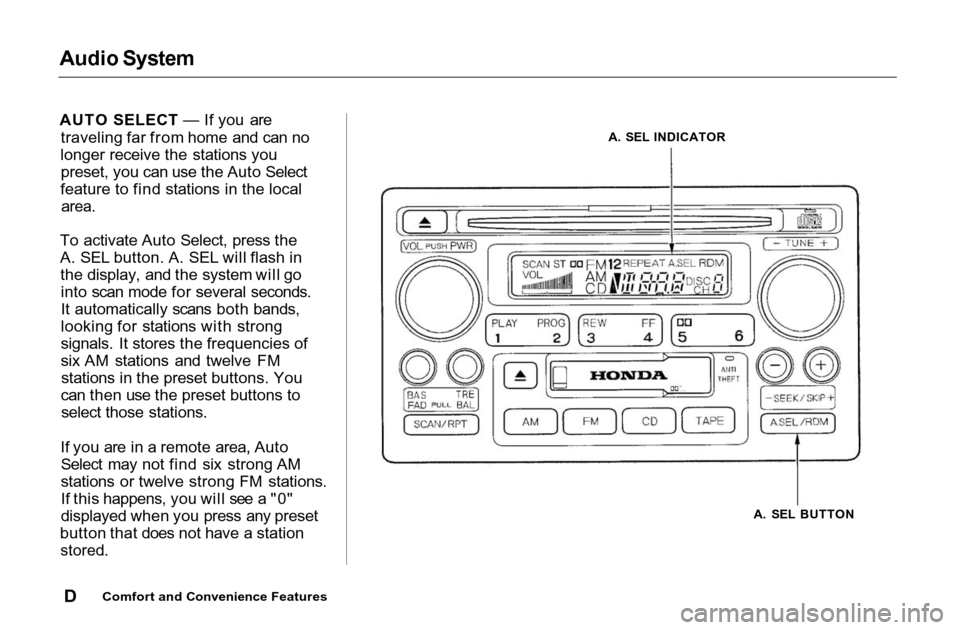
To activate Auto Select, press the
A. SEL button. A. SEL will flash in
the display, and the system will go
into scan mode for several seconds.
It automatically scans both bands,
looking for stations with strong
signals. It stores the frequencies of
six AM stations and twelve FM
stations in the preset buttons. You
can then use the preset buttons to
select those stations.
If you are in a remote area, Auto
Select may not find six strong AM
stations or twelve strong FM stations.
If this happens, you will see a "0"
displayed when you press any preset
button that does not have a station
stored.
Comfort and Convenience Features
A. SEL BUTTON
A. SEL INDICATOR
D
Page 364 of 372
Audio System
If you do not like the stations Auto
Select has stored, you can store
other frequencies in the preset
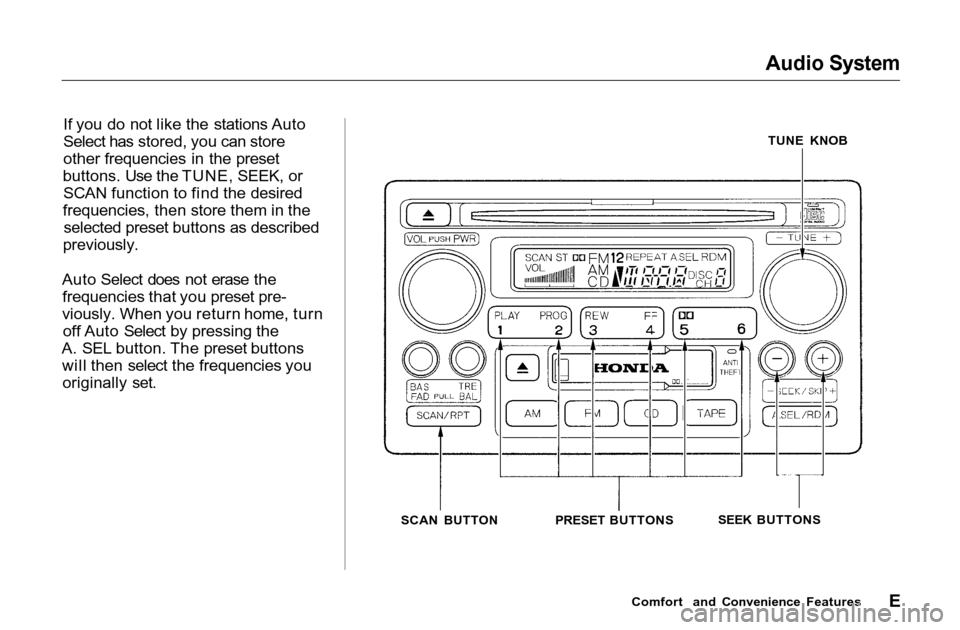
buttons. Use the TUNE, SEEK, or
SCAN function to find the desired
frequencies, then store them in the
selected preset buttons as described
previously.
Auto Select does not erase the
frequencies that you preset pre-
viously. When you return home, turn
off Auto Select by pressing the
A. SEL button. The preset buttons
will then select the frequencies you
originally set.
TUNE KNOB
SCAN BUTTONPRESET BUTTONSSEEK BUTTONS
Comfort and Convenience Features
E