clock HONDA ACCORD HYBRID 2019 Owner's Guide
[x] Cancel search | Manufacturer: HONDA, Model Year: 2019, Model line: ACCORD HYBRID, Model: HONDA ACCORD HYBRID 2019Pages: 727, PDF Size: 24.78 MB
Page 374 of 727
372 uu Customized Features u
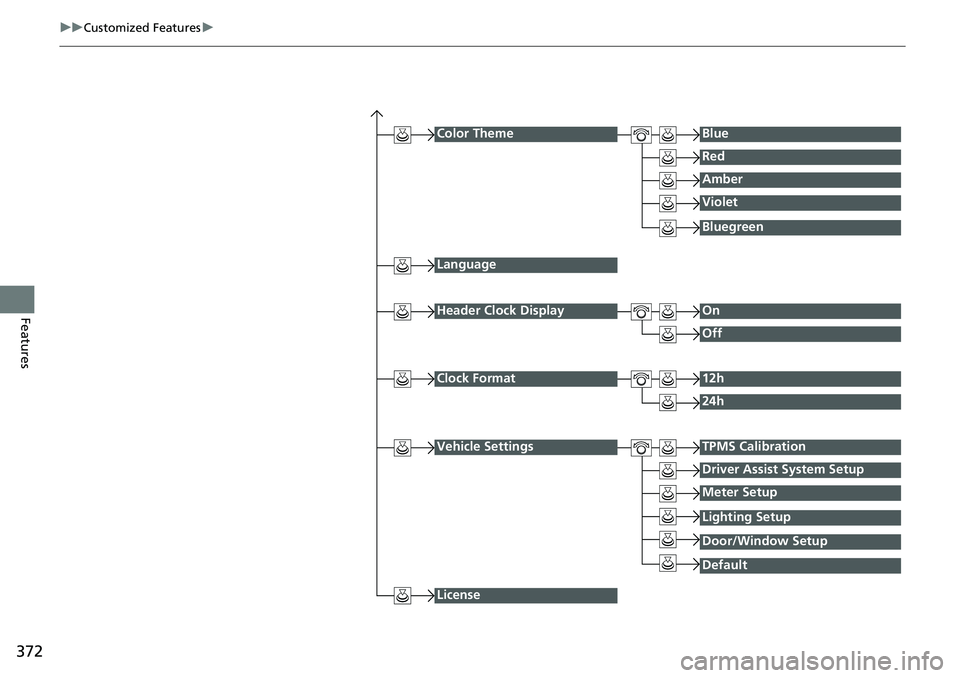
Features Color Theme Blue
Red
Amber
Violet
Language
Clock Format 12h
24h
License Bluegreen
Header Clock Display On
Off
Vehicle Settings TPMS Calibration
Driver Assist System Setup
Meter Setup
DefaultLighting Setup
Door/Window Setup
Page 376 of 727
374 uu Customized Features u
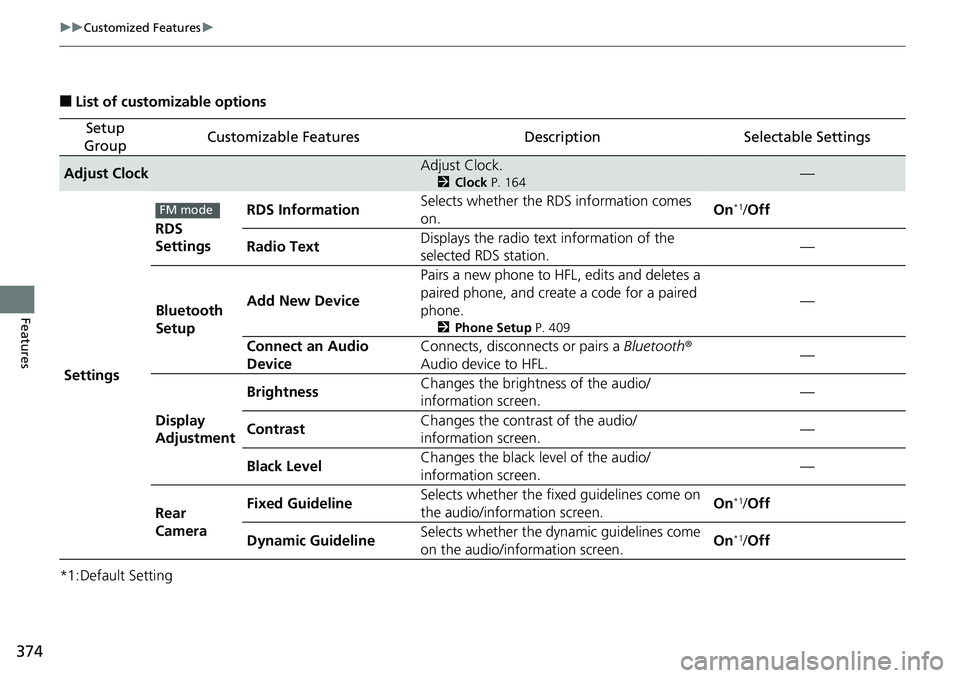
Features ■ List of customizable options
*1:Default Setting Setup
Group Customizable Features Description Selectable Settings
Adjust Clock Adjust Clock. 2 Clock P. 164
—
Settings RDS
Settings RDS Information Selects whether the RDS information comes
on. On *1
/ Off
Radio Text Displays the radio text information of the
selected RDS station. —
Bluetooth
Setup Add New Device Pairs a new phone to HFL, edits and deletes a
paired phone, and create a code for a paired
phone. 2 Phone Setup P. 409
—
Connect an Audio
Device Connects, disconnects or pairs a Bluetooth ®
Audio device to HFL. —
Display
Adjustment Brightness Changes the brightness of the audio/
information screen. —
Contrast Changes the contrast of the audio/
information screen. —
Black Level Changes the black level of the audio/
information screen. —
Rear
Camera Fixed Guideline Selects whether the fixed guidelines come on
the audio/information screen. On *1
/ Off
Dynamic Guideline Selects whether the dy namic guidelines come
on the audio/information screen. On *1
/ OffFM mode
Page 377 of 727
375 uu Customized Features u
Continued
Features
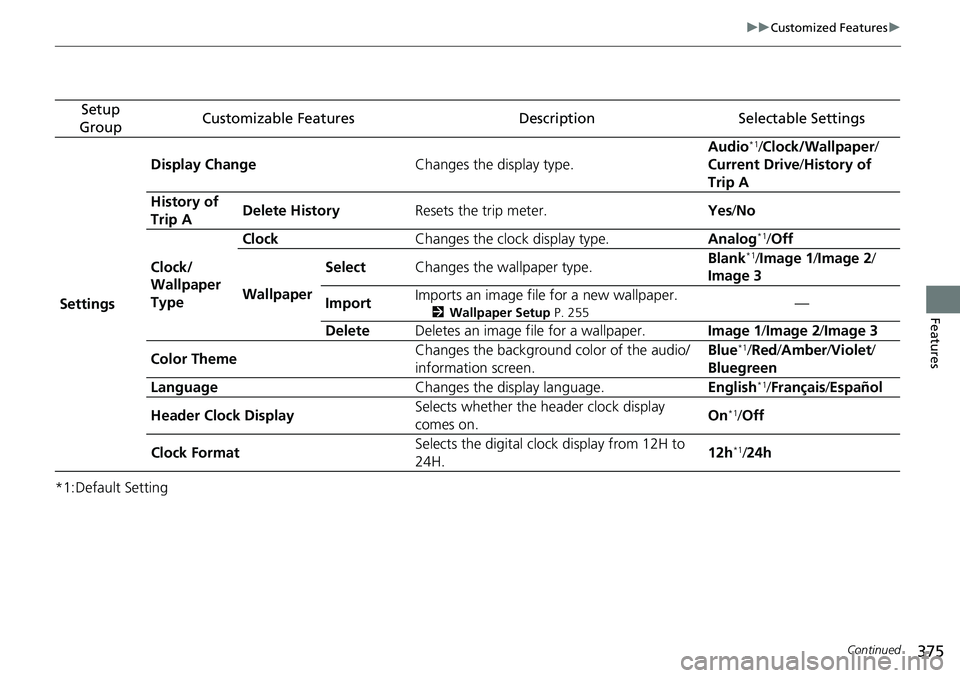
*1:Default Setting Setup
Group Customizable Features Description Selectable Settings
Settings Display Change Changes the display type. Audio *1
/ Clock/Wallpaper /
Current Drive / History of
Trip A
History of
Trip A Delete History Resets the trip meter. Yes / No
Clock/
Wallpaper
Type Clock Changes the clock display type. Analog *1
/ Off
Wallpaper Select Changes the wallpaper type. Blank *1
/ Image 1 / Image 2 /
Image 3
Import Imports an image file for a new wallpaper. 2 Wallpaper Setup P. 255
—
Delete Deletes an image file for a wallpaper. Image 1 / Image 2 / Image 3
Color Theme Changes the background color of the audio/
information screen. Blue *1
/ Red / Amber / Violet /
Bluegreen
Language Changes the display language. English *1
/ Français / Español
Header Clock Display Selects whether the header clock display
comes on. On *1
/ Off
Clock Format Selects the digital clock display from 12H to
24H. 12h *1
/ 24h
Page 390 of 727
388 uu Customized Features u
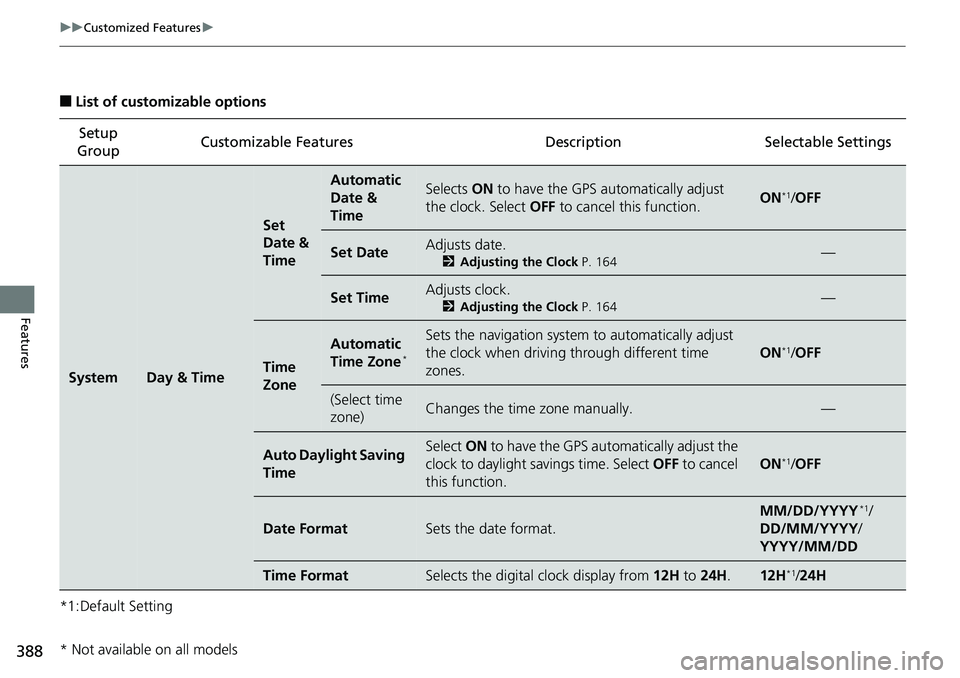
Features ■ List of customizable options
*1:Default Setting Setup
Group Customizable Features Description Selectable Settings
System Day & Time Set
Date &
Time Automatic
Date &
Time Selects ON to have the GPS automatically adjust
the clock. Select OFF to cancel this function. ON *1
/ OFF
Set Date Adjusts date. 2 Adjusting the Clock P. 164
—
Set Time Adjusts clock. 2 Adjusting the Clock P. 164
—
Time
Zone Automatic
Time Zone *
Sets the navigation system to automatically adjust
the clock when driving through different time
zones. ON *1
/ OFF
(Select time
zone) Changes the time zone manually. —
Auto Daylight Saving
Time Select ON to have the GPS automatically adjust the
clock to daylight savings time. Select OFF to cancel
this function. ON *1
/ OFF
Date Format Sets the date format. MM/DD/YYYY *1
/
DD/MM/YYYY /
YYYY/MM/DD
Time Format Selects the digital clock display from 12H to 24H . 12H *1
/ 24H
* Not available on all models
Page 500 of 727
uu When Driving u Tire Pressure Monitoring System (TPMS)
498
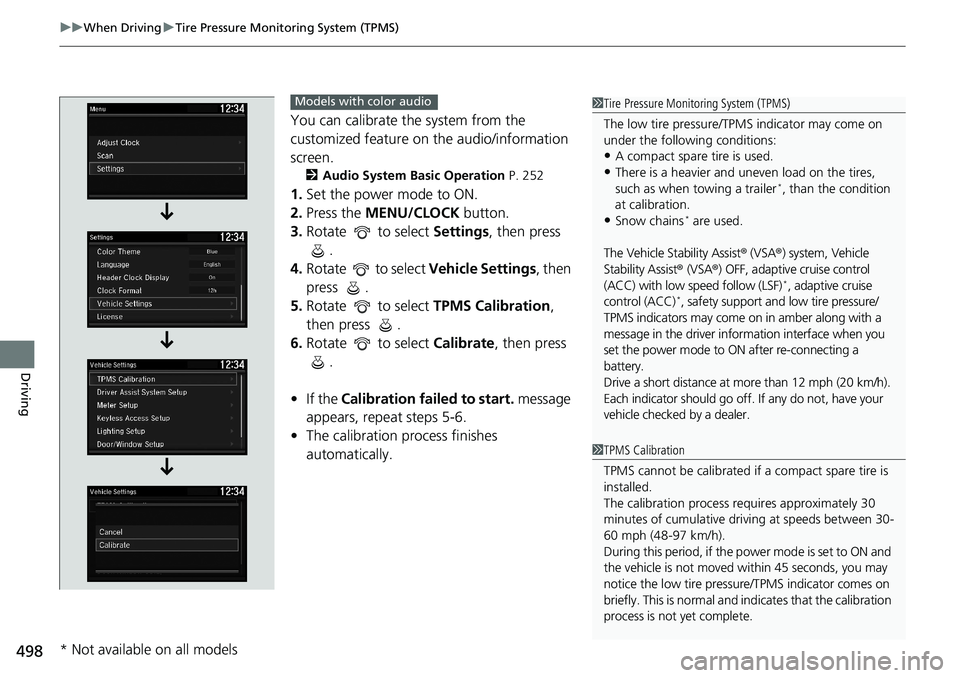
Driving You can calibrate the system from the
customized feature on the audio/information
screen. 2 Audio System Basic Operation P. 252
1. Set the power mode to ON.
2. Press the MENU/CLOCK button.
3. Rotate to select Settings , then press
.
4. Rotate to select Vehicle Settings , then
press .
5. Rotate to select TPMS Calibration ,
then press .
6. Rotate to select Calibrate , then press
.
• If the Calibration failed to start. message
appears, repeat steps 5-6.
• The calibration pr ocess finishes
automatically. 1 Tire Pressure Monitoring System (TPMS)
The low tire pressure/TPMS indicator may come on
under the following conditions:
• A compact spare tire is used.
• There is a heavier and une ven load on the tires,
such as when towing a trailer *
, than the condition
at calibration.
• Snow chains *
are used.
The Vehicle Stability Assist ® (VSA ® ) system, Vehicle
Stability Assist ® (VSA ® ) OFF, adaptive cruise control
(ACC) with low speed follow (LSF) *
, adaptive cruise
control (ACC) *
, safety support and low tire pressure/
TPMS indicators may come on in amber along with a
message in the driver info rmation interface when you
set the power mode to ON after re-connecting a
battery.
Drive a short distance at mo re than 12 mph (20 km/h).
Each indicator should go off. If any do not, have your
vehicle checked by a dealer.
1 TPMS Calibration
TPMS cannot be calib rated if a compact spare tire is
installed.
The calibration process requires approximately 30
minutes of cumulative driv ing at speeds between 30-
60 mph (48-97 km/h).
During this period, if the pow er mode is set to ON and
the vehicle is not moved wi thin 45 seconds, you may
notice the low tire pressu re/TPMS indicator comes on
briefly. This is normal and indicates that the calibration
process is not yet complete.Models with color audio
* Not available on all models
Page 623 of 727
621uu Maintenance Under the Hood u Changing the Engine Oil and Oil Filter
Continued
Maintenance
Changing the Engine Oil and Oil FilterYou must change the engine oil and oil fi lter regularly in order to maintain the
engine’s lubrication. The engine may be damaged if they are not changed regularly.
Change the oil and filter in accordance with the mainte nance message on the driver
information interface.
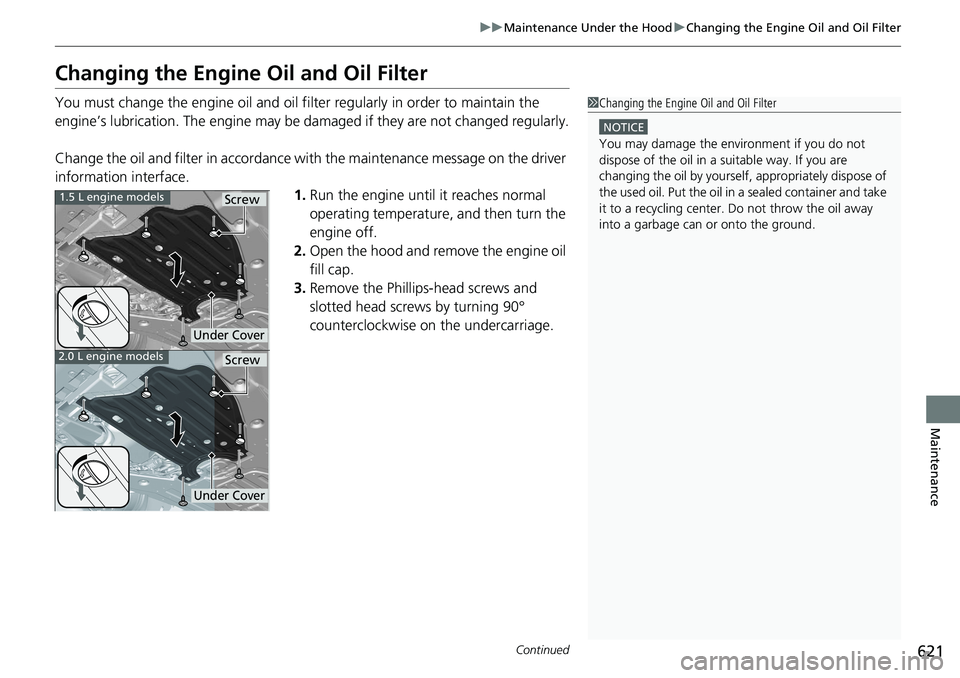
1. Run the engine until it reaches normal
operating temperature, and then turn the
engine off.
2. Open the hood and remove the engine oil
fill cap.
3. Remove the Phillips-head screws and
slotted head screws by turning 90°
counterclockwise on the undercarriage. 1 Changing the Engine Oil and Oil Filter NOTICE
You may damage the environment if you do not
dispose of the oil in a suitable way. If you are
changing the oil by yourself , appropriately dispose of
the used oil. Put the oil in a sealed container and take
it to a recycling center. Do not throw the oil away
into a garbage can or onto the ground.1.5 L engine models
2.0 L engine models
Under Cover Screw
Under Cover Screw
Page 628 of 727
uu Maintenance Under the Hood u Engine Coolant
626
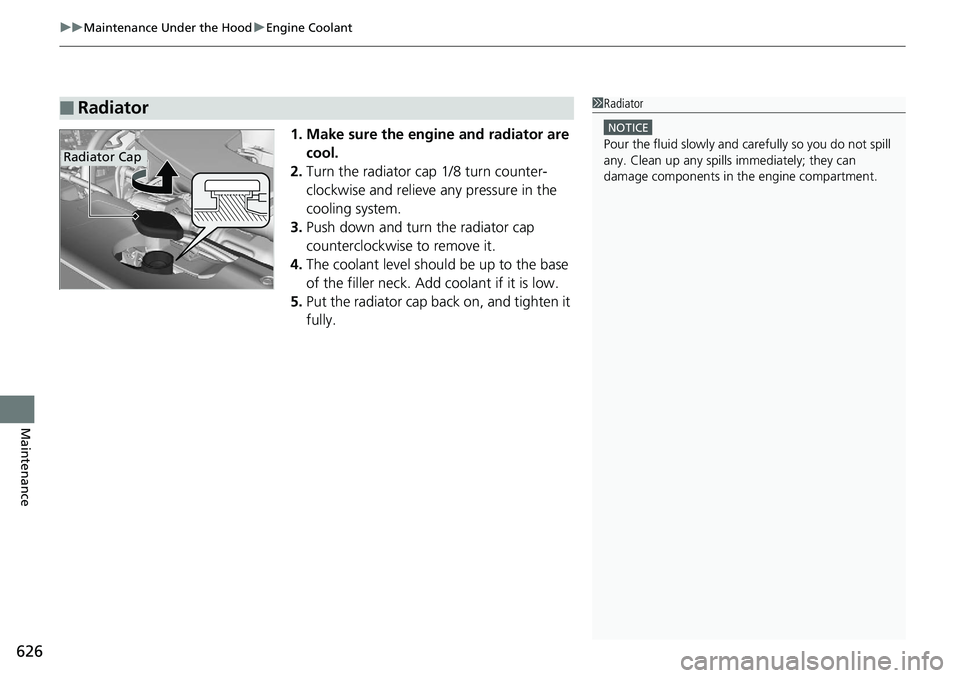
Maintenance 1. Make sure the engine and radiator are
cool.
2. Turn the radiator cap 1/8 turn counter-
clockwise and relieve any pressure in the
cooling system.
3. Push down and turn the radiator cap
counterclockwise to remove it.
4. The coolant level should be up to the base
of the filler neck. Add coolant if it is low.
5. Put the radiator cap back on, and tighten it
fully.■ Radiator 1 Radiator NOTICE
Pour the fluid slowly and ca refully so you do not spill
any. Clean up any spills immediately; they can
damage components in the engine compartment.Radiator Cap
Page 634 of 727
uu Replacing Light Bulbs u Headlight Bulbs
632
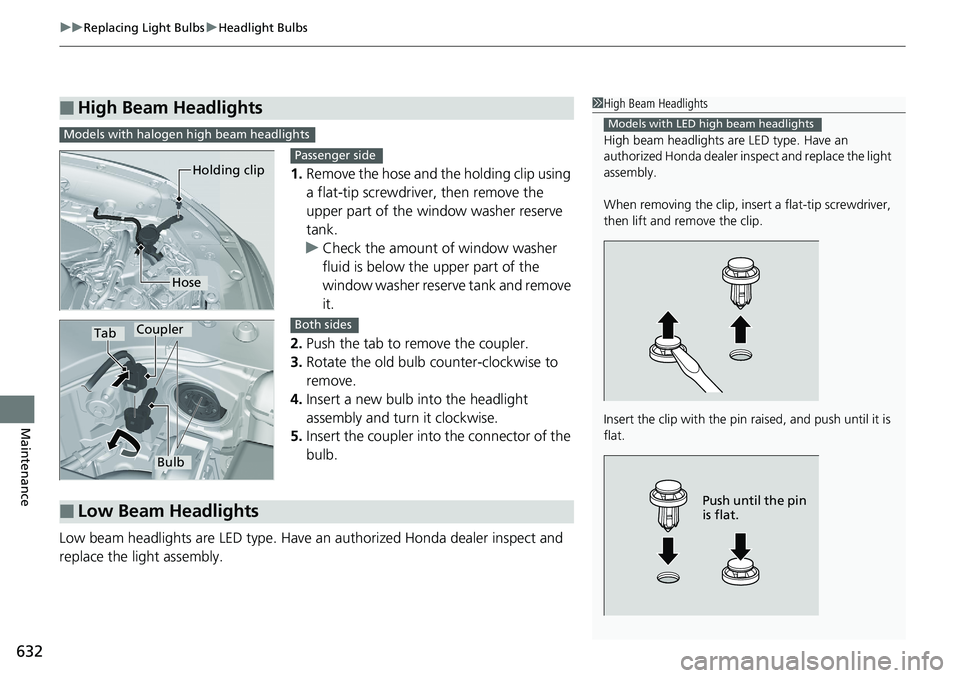
Maintenance 1. Remove the hose and the holding clip using
a flat-tip screwdriver, then remove the
upper part of the window washer reserve
tank.
u Check the amount of window washer
fluid is below the upper part of the
window washer reserve tank and remove
it.
2. Push the tab to remove the coupler.
3. Rotate the old bulb counter-clockwise to
remove.
4. Insert a new bulb into the headlight
assembly and turn it clockwise.
5. Insert the coupler into the connector of the
bulb.
Low beam headlights are LED type. Have an authorized Honda dealer inspect and
replace the light assembly.■ High Beam Headlights 1 High Beam Headlights
High beam headlights ar e LED type. Have an
authorized Honda dealer in spect and replace the light
assembly.
When removing the clip, insert a flat-tip screwdriver,
then lift and remove the clip.
Insert the clip with the pin raised, and push until it is
flat. Models with LED high beam headlights
Push until the pin
is flat.Models with halogen high beam headlights
Holding clip
Hose Passenger side
Tab Coupler
Bulb Both sides
■ Low Beam Headlights
Page 637 of 727
635uu Replacing Light Bulbs u Brake, Taillight, Rear Side Marker Lights and Rear Turn Signal Light Bulbs
Maintenance
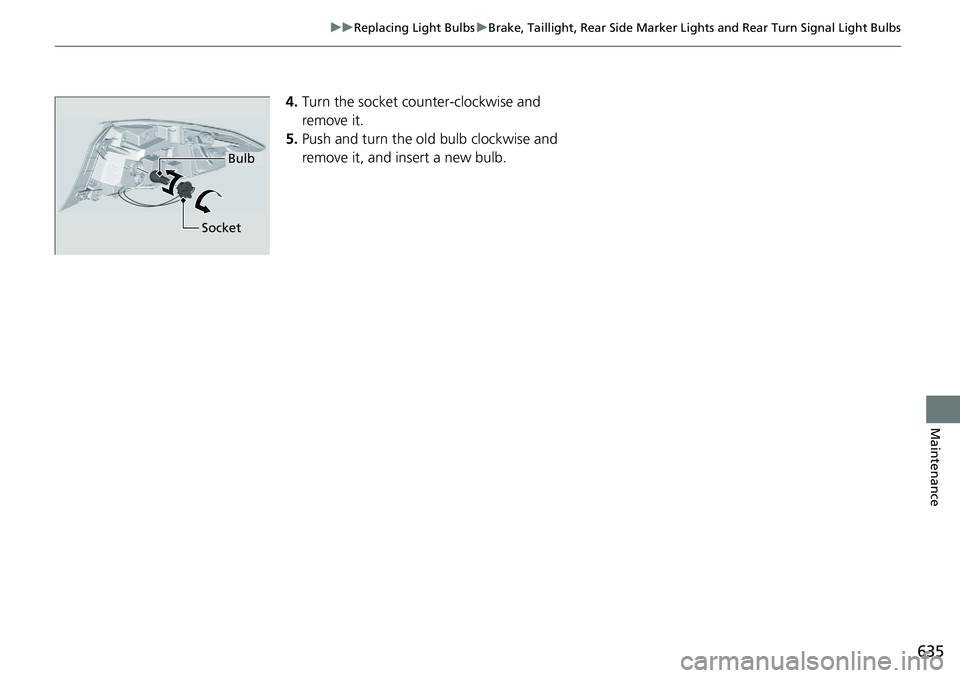
4. Turn the socket co unter-clockwise and
remove it.
5. Push and turn the ol d bulb clockwise and
remove it, and insert a new bulb.Bulb
Socket
Page 638 of 727
636 uu Replacing Light Bulbs u Taillight, Brake Light *
and Back-Up Light Bulbs
Maintenance Taillight, Brake Light *
and Back-Up Light BulbsWhen replacing, use the following bulbs.
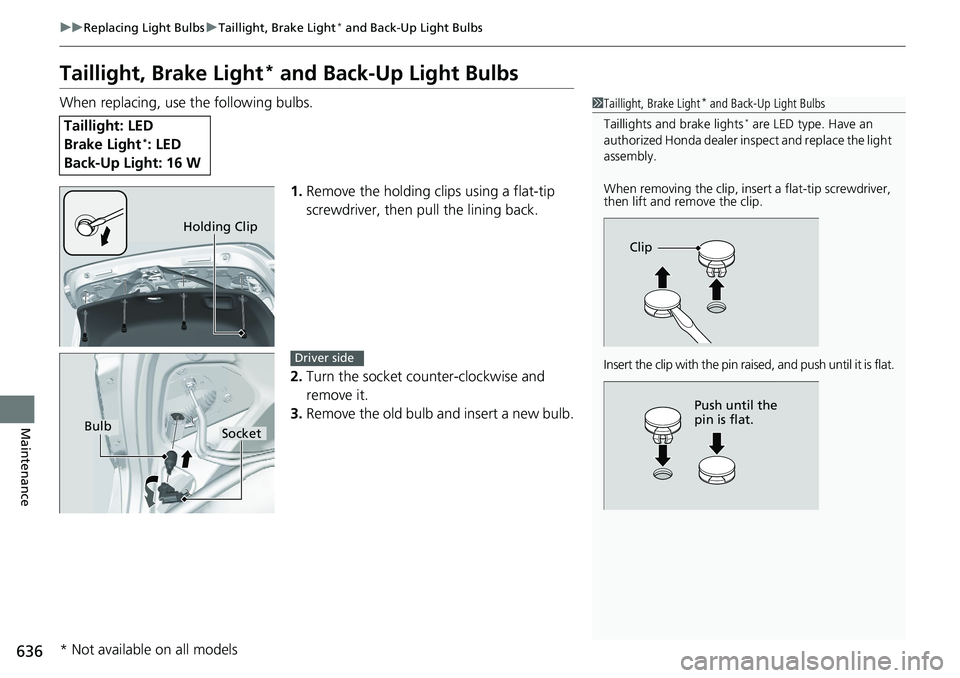
1. Remove the holding clips using a flat-tip
screwdriver, then pull the lining back.
2. Turn the socket counter-clockwise and
remove it.
3. Remove the old bulb and insert a new bulb.Taillight: LED
Brake Light *
: LED
Back-Up Light: 16 W 1 Taillight, Brake Light *
and Back-Up Light Bulbs
Taillights and brake lights *
are LED type. Have an
authorized Honda dealer in spect and replace the light
assembly.
When removing the clip, insert a flat-tip screwdriver,
then lift and remove the clip.
Insert the clip with the pin rais ed, and push until it is flat.Clip
Push until the
pin is flat.Holding Clip
Bulb
Socket Driver side
* Not available on all models