warning HONDA ACCORD SEDAN 2016 (in English) Owner's Guide
[x] Cancel search | Manufacturer: HONDA, Model Year: 2016, Model line: ACCORD SEDAN, Model: HONDA ACCORD SEDAN 2016Pages: 609, PDF Size: 36.38 MB
Page 100 of 609
99
uuGauges and Displays uMulti-Information Display*
Continued
Instrument Panel
Multi-Information Display*
The multi-information display shows the odometer, trip meter, outside temperature
indicator, and other gauges.
It also displays important messages such as warnings and other helpful information.
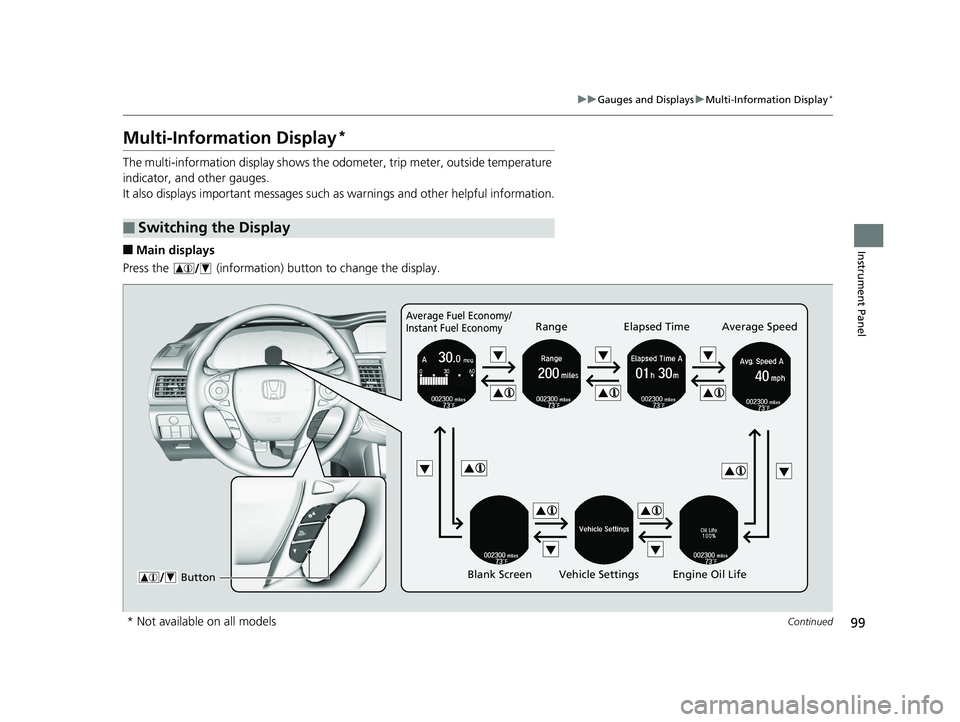
■Main displays
Press the (information) button to change the display.
■Switching the Display
Average Fuel Economy/
Instant Fuel EconomyRange Elapsed Time Average Speed
Blank Screen Vehicle Settings Engine Oil Life
Button
* Not available on all models
16 US ACCORD 4D (KA KC KL)-31T2A6300.book 99 ページ 2015年9月25日 金曜日 午前10時38分
Page 105 of 609
104
uuGauges and Displays uMulti-Information Display*
Instrument Panel
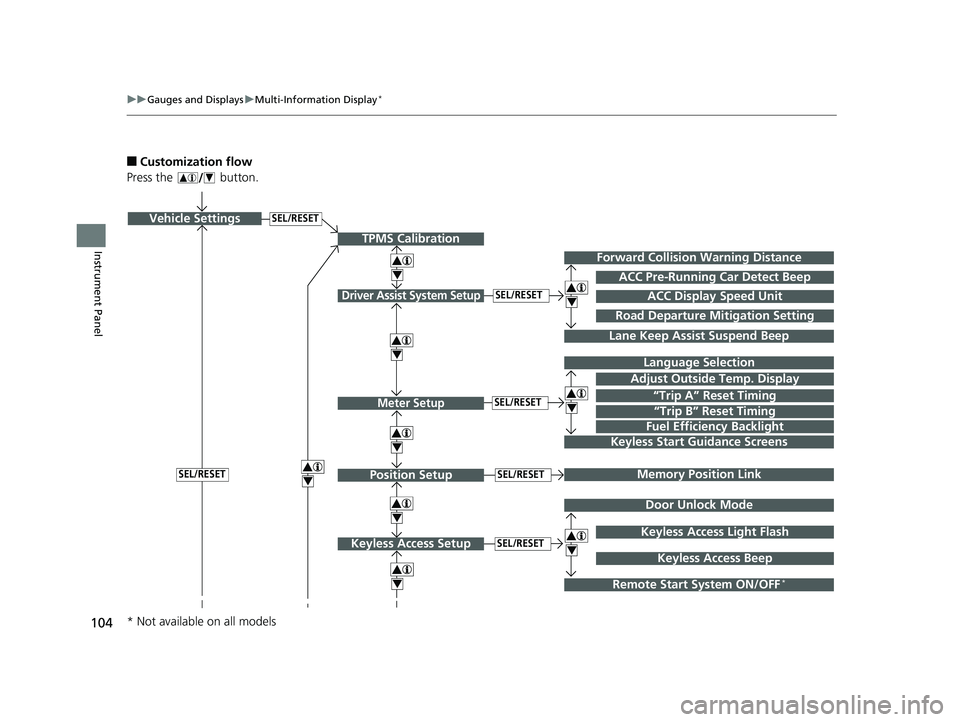
■Customization flow
Press the button.
SEL/RESETVehicle Settings
“Trip A” Reset Timing
Language Selection
Adjust Outside Temp. Display
Memory Position Link
Door Unlock Mode
Keyless Access Light Flash
4
4
4
4
TPMS Calibration
Driver Assist System Setup
Meter Setup
Position Setup
Keyless Access Setup
SEL/RESET
SEL/RESET
SEL/RESET
SEL/RESET
“Trip B” Reset Timing
Fuel Efficiency Backlight
4
ACC Pre-Running Car Detect Beep
ACC Display Speed Unit
4Keyless Start Guidance Screens
SEL/RESET
Keyless Access Beep
Forward Collision Warning Distance
4
4
4
Lane Keep Assist Suspend Beep
Road Departure Mi tigation Setting
Remote Start System ON/OFF*
* Not available on all models
16 US ACCORD 4D (KA KC KL)-31T2A6300.book 104 ページ 2015年9月25日 金曜日 午前10時38分
Page 107 of 609
106
uuGauges and Displays uMulti-Information Display*
Instrument Panel
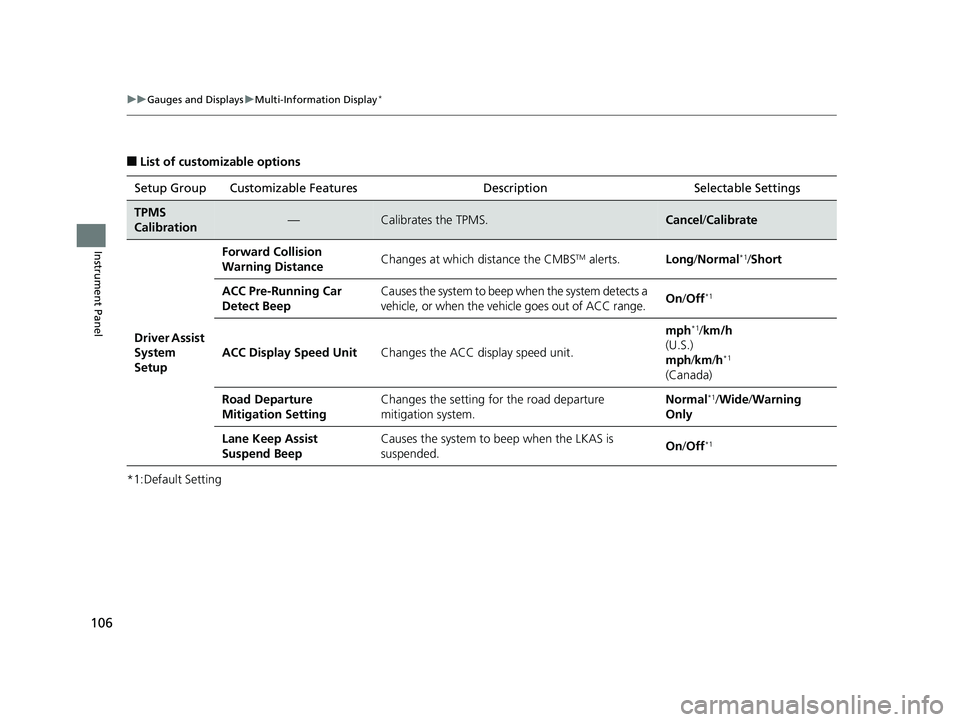
■List of customizable options
*1:Default Setting Setup Group Customizable Features Description Selectable Settings
TPMS
Calibration—Calibrates the TPMS.Cancel
/Calibrate
Driver Assist
System
Setup
Forward Collision
Warning DistanceChanges at which distance the CMBSTM alerts.Long /Normal*1/Short
ACC Pre-Running Car
Detect BeepCauses the system to beep when the system detects a
vehicle, or when the vehi cle goes out of ACC range.On/Off*1
ACC Display Speed UnitChanges the ACC display speed unit.
mph*1/km/h
(U.S.)
mph /km /h
*1
(Canada)
Road Departure
Mitigation Setting Changes the setting for the road departure
mitigation system. Normal
*1/
Wide /Warning
Only
Lane Keep Assist
Suspend Beep Causes the system to beep when the LKAS is
suspended.
On
/Off
*1
16 US ACCORD 4D (KA KC KL)-31T2A6300.book 106 ページ 2015年9月25日 金曜日 午前10時38分
Page 136 of 609
135Continued
Controls
Opening and Closing the Windows
Opening/Closing the Power Windows
The power windows can be opened and clos ed when the ignition switch is in ON
(w*1, using the switches on the doors. The driver's side switches can be used to
open and close all of the windows.
The power window lock button on the driver's side must be switched off (not
pushed in, indicator off) to open and cl ose the windows from anywhere other than
the driver's seat.
When the power window lock button is pushed in, you can only operate the driver's
window. Turn the power window lock butto n on when children are in the vehicle.
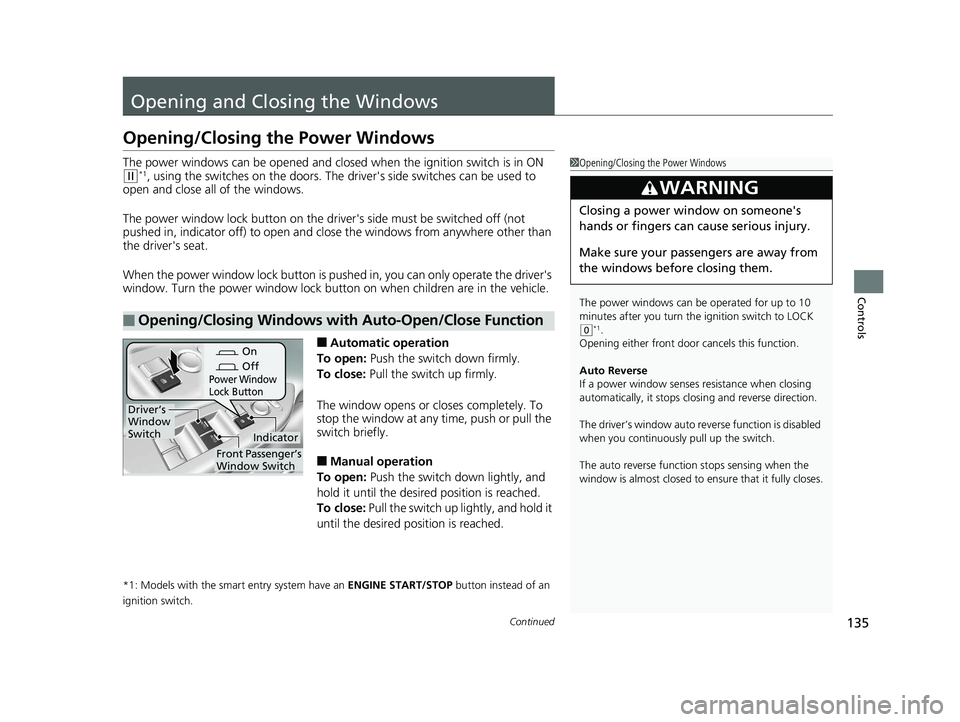
■Automatic operation
To open: Push the switch down firmly.
To close: Pull the switch up firmly.
The window opens or closes completely. To
stop the window at any time, push or pull the
switch briefly.
■Manual operation
To open: Push the switch down lightly, and
hold it until the desired position is reached.
To close: Pull the switch up lightly, and hold it
until the desired position is reached.
*1: Models with the smart entry system have an ENGINE START/STOP button instead of an
ignition switch.
■Opening/Closing Windows with Auto-Open/Close Function
1 Opening/Closing the Power Windows
The power windows can be operated for up to 10
minutes after you turn the ignition switch to LOCK
( 0*1.
Opening either front door cancels this function.
Auto Reverse
If a power window senses resistance when closing
automatically, it stops clos ing and reverse direction.
The driver’s window auto re verse function is disabled
when you continuously pull up the switch.
The auto reverse function stops sensing when the
window is almost closed to en sure that it fully closes.
3WARNING
Closing a power window on someone's
hands or fingers can cause serious injury.
Make sure your passengers are away from
the windows before closing them.
On
Off
Power Window
Lock Button
Indicator
Driver’s
Window
Switch
Front Passenger’s
Window Switch
16 US ACCORD 4D (KA KC KL)-31T2A6300.book 135 ページ 2015年9月25日 金曜日 午前10時38分
Page 139 of 609
138
Controls
Opening and Closing the Moonroof*
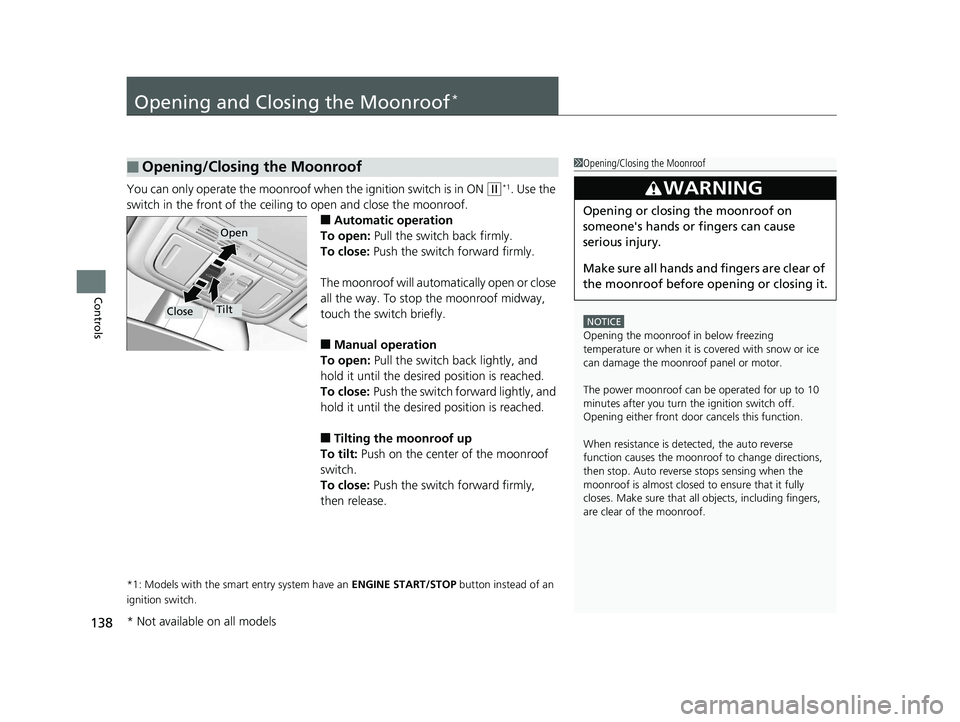
You can only operate the moonroof when the ignition switch is in ON (w*1. Use the
switch in the front of the ceiling to open and close the moonroof.
■Automatic operation
To open: Pull the switch back firmly.
To close: Push the switch forward firmly.
The moonroof will automatically open or close
all the way. To stop the moonroof midway,
touch the switch briefly.
■Manual operation
To open: Pull the switch back lightly, and
hold it until the desired position is reached.
To close: Push the switch fo rward lightly, and
hold it until the desired position is reached.
■Tilting the moonroof up
To tilt: Push on the center of the moonroof
switch.
To close: Push the switch forward firmly,
then release.
*1: Models with the smart entry system have an ENGINE START/STOP button instead of an
ignition switch.
■Opening/Closing the Moonroof1 Opening/Closing the Moonroof
NOTICE
Opening the moonroof in below freezing
temperature or when it is covered with snow or ice
can damage the moonroof panel or motor.
The power moonroof can be operated for up to 10
minutes after you turn the ignition switch off.
Opening either front door cancels this function.
When resistance is detected, the auto reverse
function causes the moonroof to change directions,
then stop. Auto reverse stops sensing when the
moonroof is almost closed to ensure that it fully
closes. Make sure that all objects, including fingers,
are clear of the moonroof.
3WARNING
Opening or closing the moonroof on
someone's hands or fingers can cause
serious injury.
Make sure all hands and fingers are clear of
the moonroof before opening or closing it.
Open
CloseTilt
* Not available on all models
16 US ACCORD 4D (KA KC KL)-31T2A6300.book 138 ページ 2015年9月25日 金曜日 午前10時38分
Page 140 of 609
139
Controls
Operating the Switches Around the Steering Wheel
Ignition Switch*
1Ignition Switch*
You cannot take the key out unless the shift lever is
in
( P.
If you open the driver’s door when the key is in LOCK
( 0 or ACCESSORY (q, a warning buzzer will sound
to remind you to take the key out.
When this happens, the fo llowing messages appear
on the multi-information display:
•In LOCK ( 0: Remove Key From Ignition
•In ACCESSORY (q: Turn Ignition Switch To Lock
(0) Position
If the key won’t turn from LOCK
( 0 to ACCESSORY
(q, turn the key while moving the steering wheel left
and right. The steering wh eel will unlock, allowing
the key to turn.
3WARNING
Removing the key from the ignition switch
while driving locks the steering. This can
cause you to lose control of the vehicle.
Remove the key from the ignition switch
only when parked.
Manual transmission models
Continuously variable transmission (CVT) models
All models
Models with multi-information display
All models
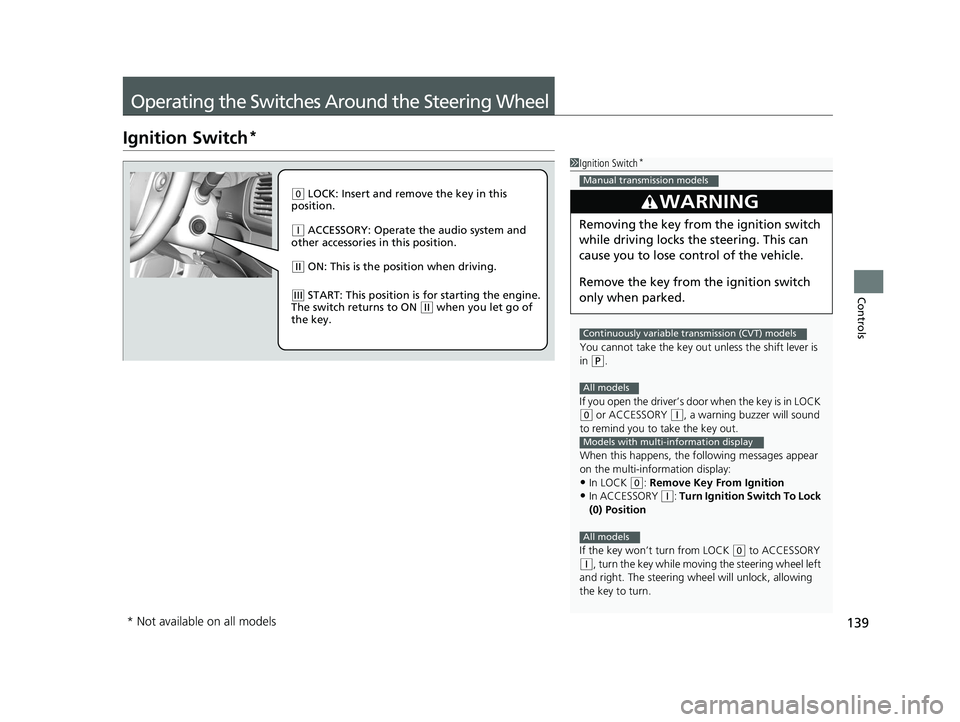
( 0 LOCK: Insert and remove the key in this
position.
( q ACCESSORY: Operate the audio system and
other accessories in this position.
( w ON: This is the position when driving.
(e START: This position is for starting the engine.
The switch returns to ON ( w when you let go of
the key.
* Not available on all models
16 US ACCORD 4D (KA KC KL)-31T2A6300.book 139 ページ 2015年9月25日 金曜日 午前10時38分
Page 142 of 609
Continued141
uuOperating the Switches Around the Steering Wheel uENGINE START/STOP Button*
Controls
If you leave the vehicle for 30 to 60 minutes with the shift lever in (P*1 and the
power mode in ACCESSORY, the vehicle automa tically goes into the mode similar to
VEHICLE OFF (LOCK) to avoid draining the battery.
When in this mode:
The steering wheel does not lock.
You cannot lock or unlock doors with th e remote transmitter or the smart entry
system.
Press the ENGINE START/STOP button to switch the mode to VEHICLE OFF (LOCK).
If you open the driver’s door when the power mode is set to ACCESSORY, a warning
buzzer sounds.
*1: Automatic transmission/CVT models
■Automatic Power Off
■Power Mode Reminder
1 Changing the Power Mode
If the power mode does not change from VEHICLE
OFF to ACCESSORY, press the ENGINE START/STOP
button while moving the st eering wheel left and
right. The steering wheel will unlock, allowing the
mode to change.
Except U.S. automatic transmission/CVT models
Except U.S. automatic transmission/CVT models
All models
16 US ACCORD 4D (KA KC KL)-31T2A6300.book 141 ページ 2015年9月25日 金曜日 午前10時38分
Page 143 of 609
uuOperating the Switches Around the Steering Wheel uENGINE START/STOP Button*
142
Controls
Warning buzzers may sound from inside and/
or outside the vehicle to remind you that the
smart entry remote is out of the vehicle. If the
buzzer continues even after the remote is put
back inside, place it within the system’s
operational range.
■When the power mode is in ON
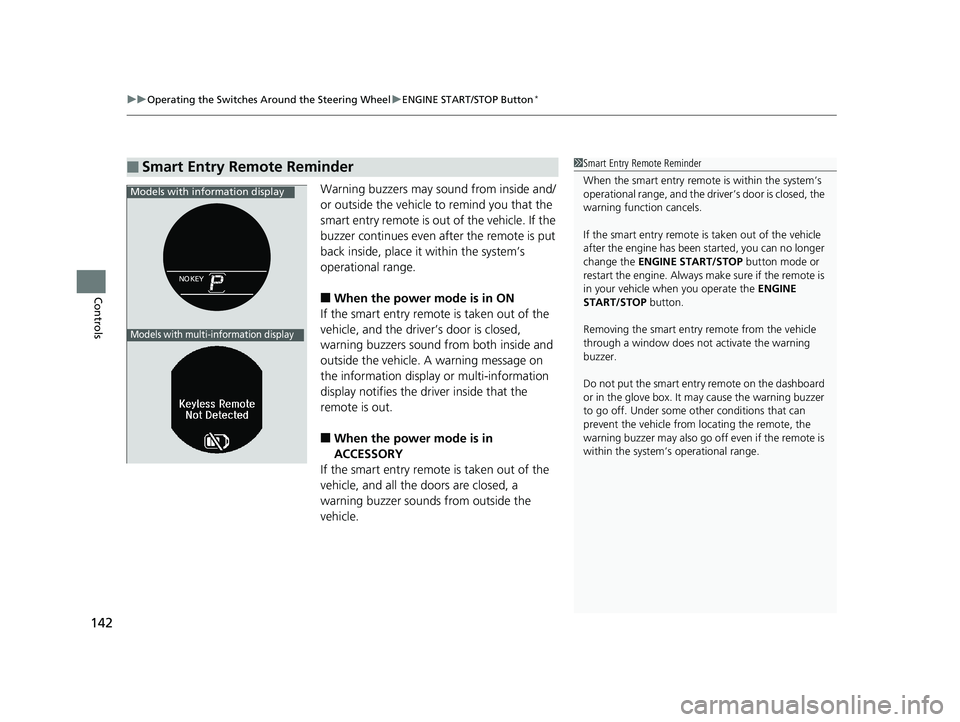
If the smart entry remote is taken out of the
vehicle, and the driver’s door is closed,
warning buzzers sound from both inside and
outside the vehicle. A warning message on
the information display or multi-information
display notifies the driver inside that the
remote is out.
■When the power mode is in
ACCESSORY
If the smart entry remote is taken out of the
vehicle, and all the doors are closed, a
warning buzzer sounds from outside the
vehicle.
■Smart Entry Remote Reminder1 Smart Entry Remote Reminder
When the smart entry remote is within the system’s
operational range, and the driv er’s door is closed, the
warning function cancels.
If the smart entry remote is taken out of the vehicle
after the engine has been started, you can no longer
change the ENGINE START/STOP button mode or
restart the engine. Always make sure if the remote is
in your vehicle when you operate the ENGINE
START/STOP button.
Removing the smart entry remote from the vehicle
through a window does not activate the warning
buzzer.
Do not put the smart entr y remote on the dashboard
or in the glove box. It may cause the warning buzzer
to go off. Under some other conditions that can
prevent the vehicle from locating the remote, the
warning buzzer may al so go off even if the remote is
within the system’s operational range.
Models with info rmation display
Models with multi-information display
16 US ACCORD 4D (KA KC KL)-31T2A6300.book 142 ページ 2015年9月25日 金曜日 午前10時38分
Page 158 of 609
157
uuOperating the Switches Around the Steering Wheel uAdjusting the Steering Wheel
Controls
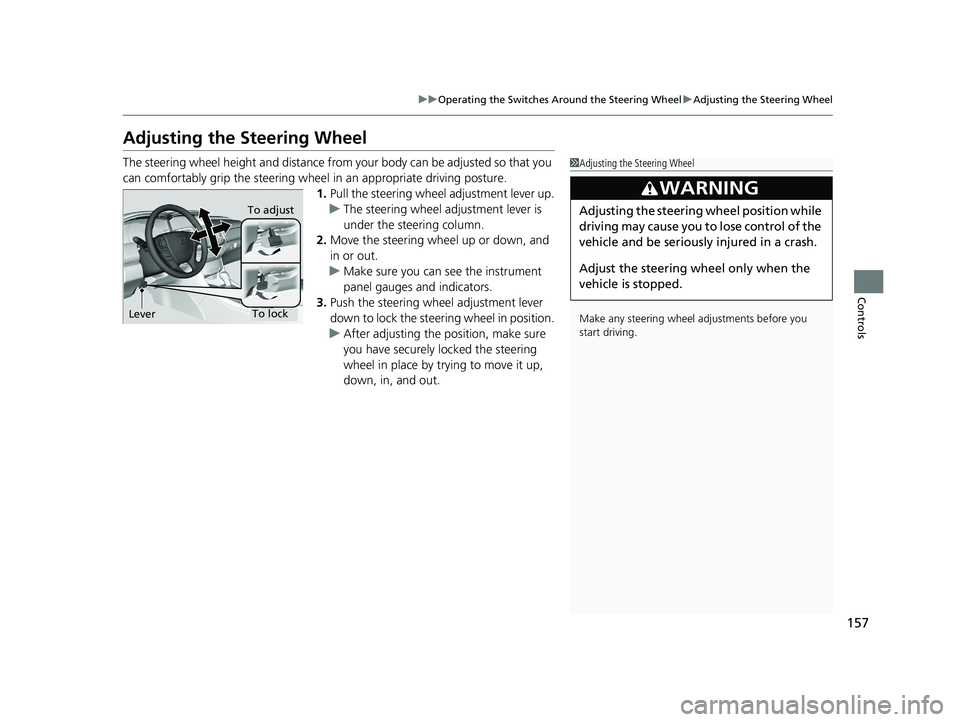
Adjusting the Steering Wheel
The steering wheel height and distance from your body can be adjusted so that you
can comfortably grip the steering wheel in an appropriate driving posture.
1. Pull the steering wheel adjustment lever up.
u The steering wheel adjustment lever is
under the steering column.
2. Move the steering wheel up or down, and
in or out.
u Make sure you can see the instrument
panel gauges and indicators.
3. Push the steering wheel adjustment lever
down to lock the steering wheel in position.
u After adjusting the position, make sure
you have securely locked the steering
wheel in place by trying to move it up,
down, in, and out.1Adjusting the Steering Wheel
Make any steering wheel adjustments before you
start driving.
3WARNING
Adjusting the steering wheel position while
driving may cause you to lose control of the
vehicle and be seriously injured in a crash.
Adjust the steering wheel only when the
vehicle is stopped.To adjust
To lock
Lever
16 US ACCORD 4D (KA KC KL)-31T2A6300.book 157 ページ 2015年9月25日 金曜日 午前10時38分
Page 161 of 609
160
Controls
Adjusting the Seats
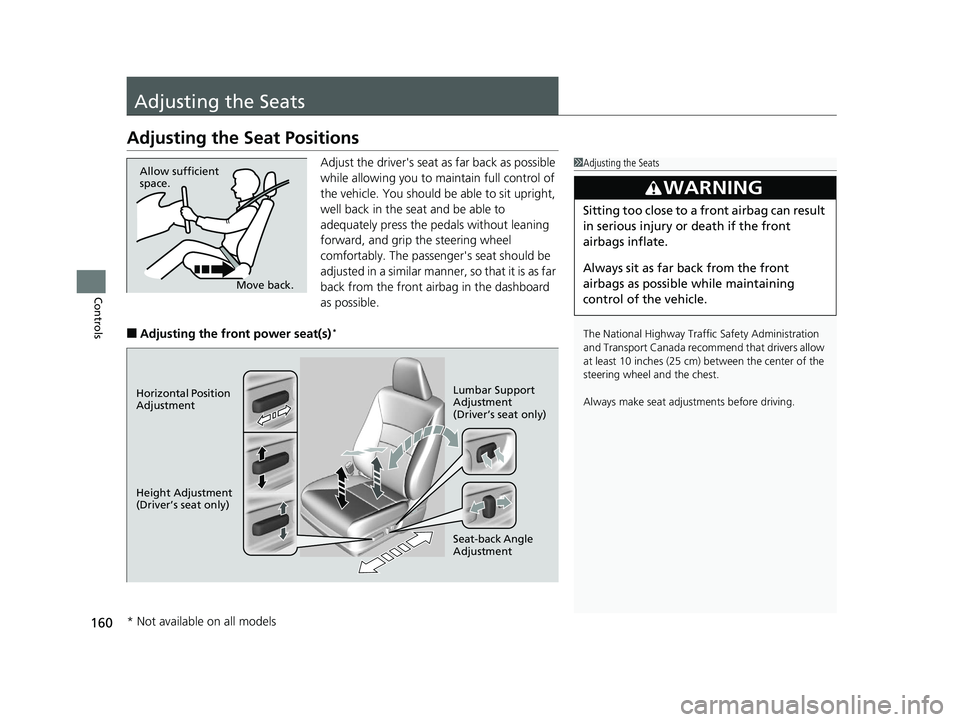
Adjusting the Seat Positions
Adjust the driver's seat as far back as possible
while allowing you to maintain full control of
the vehicle. You should be able to sit upright,
well back in the seat and be able to
adequately press the pedals without leaning
forward, and grip the steering wheel
comfortably. The passenger's seat should be
adjusted in a similar manner, so that it is as far
back from the front airbag in the dashboard
as possible.
■Adjusting the front power seat(s)*
1Adjusting the Seats
The National Highway Traffic Safety Administration
and Transport Cana da recommend that drivers allow
at least 10 inches (25 cm) between the center of the
steering wheel and the chest.
Always make seat adjustments before driving.
3WARNING
Sitting too close to a front airbag can result
in serious injury or death if the front
airbags inflate.
Always sit as far back from the front
airbags as possible while maintaining
control of the vehicle.
Move back.
Allow sufficient
space.
Horizontal Position
Adjustment
Height Adjustment
(Driver’s seat only)
Seat-back Angle
Adjustment Lumbar Support
Adjustment
(Driver’s seat only)
* Not available on all models
16 US ACCORD 4D (KA KC KL)-31T2A6300.book 160 ページ 2015年9月25日 金曜日 午前10時38分