start stop button HONDA ACCORD SEDAN 2019 (in English) Owner's Guide
[x] Cancel search | Manufacturer: HONDA, Model Year: 2019, Model line: ACCORD SEDAN, Model: HONDA ACCORD SEDAN 2019Pages: 727, PDF Size: 34.1 MB
Page 471 of 727
Continued469
uuWhen Driving uStarting the Engine
Driving
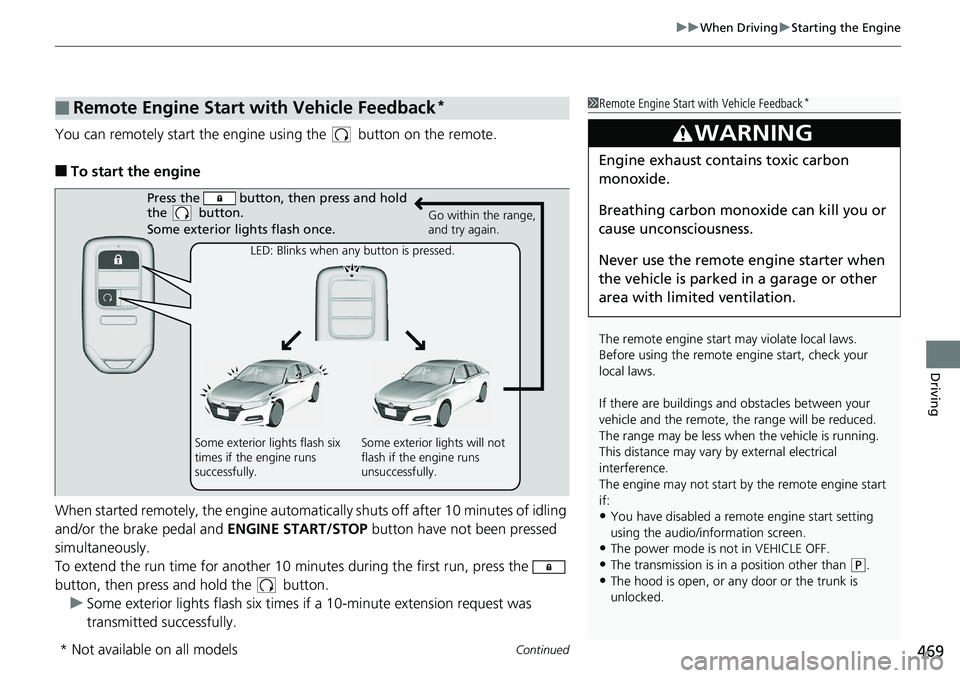
You can remotely start the engine using the button on the remote.
■To start the engine
When started remotely, the engine automati cally shuts off after 10 minutes of idling
and/or the brake pedal and ENGINE START/STOP button have not been pressed
simultaneously.
To extend the run time for another 10 mi nutes during the first run, press the
button, then press an d hold the button.
u Some exterior lights flash six times if a 10-minute extension request was
transmitted successfully.
■Remote Engine Start with Vehicle Feedback*1 Remote Engine Start with Vehicle Feedback*
The remote engine start may violate local laws.
Before using the remote e ngine start, check your
local laws.
If there are buildings an d obstacles between your
vehicle and the remote, th e range will be reduced.
The range may be less when the vehicle is running.
This distance may vary by external electrical
interference.
The engine may not start by the remote engine start
if:
•You have disabled a remo te engine start setting
using the audio/information screen.
•The power mode is not in VEHICLE OFF.•The transmission is in a position other than ( P.
•The hood is open, or any door or the trunk is
unlocked.
3WARNING
Engine exhaust contains toxic carbon
monoxide.
Breathing carbon monoxide can kill you or
cause unconsciousness.
Never use the remote engine starter when
the vehicle is parked in a garage or other
area with limited ventilation.
Press the button, th en press and hold
the button.
Some exterior lights flash once.
Go within the range,
and try again.
LED: Blinks when any button is pressed.
Some exterior lights flash six
times if the engine runs
successfully. Some exterior lights will not
flash if the engine runs
unsuccessfully.
* Not available on all models
Page 472 of 727
uuWhen Driving uStarting the Engine
470
Driving
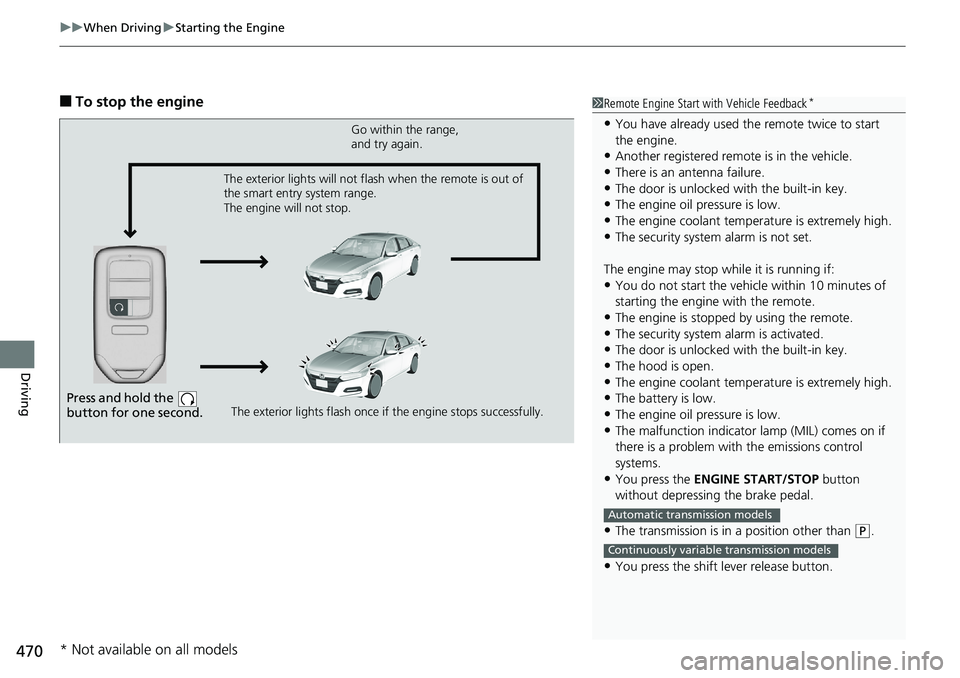
■To stop the engine1Remote Engine Start with Vehicle Feedback*
•You have already used the remote twice to start
the engine.
•Another registered remo te is in the vehicle.
•There is an antenna failure.•The door is unlocked with the built-in key.
•The engine oil pressure is low.
•The engine coolant temper ature is extremely high.•The security system alarm is not set.
The engine may stop whil e it is running if:
•You do not start the vehicl e within 10 minutes of
starting the engine with the remote.
•The engine is stopped by using the remote.•The security system alarm is activated.
•The door is unlocked with the built-in key.
•The hood is open.•The engine coolant temper ature is extremely high.
•The battery is low.
•The engine oil pressure is low.
•The malfunction indicator lamp (MIL) comes on if
there is a problem with the emissions control
systems.
•You press the ENGINE START/STOP button
without depressing the brake pedal.
•The transmission is in a position other than ( P.
•You press the shift lever release button.
Automatic transmission models
Continuously variable transmission models
Press and hold the
button for one second.
Go within the range,
and try again.
The exterior lights flash once if the engine stops successfully.
The exterior lights will not flash when the remote is out of
the smart entry system range.
The engine will not stop.
* Not available on all models
Page 474 of 727
uuWhen Driving uStarting the Engine
472
Driving
1. While depressing the brake pedal, press the ENGINE START/STOP button.
2. Keeping your right foot on the brake pedal, put the transmission into
(D. Select
(R when reversing.
3. With the parking brake applied, release the brake pedal and gently depress the
accelerator pedal.
u Make sure the parking brake indicator (red) goes off.
■Hill start assist system
Hill start assist keeps the brake engaged br iefly to help prevent the vehicle from
rolling on inclines as you move your fo ot from the brake pedal to the accelerator.
Put the transmission into
(D, (S* or (L* when facing uphill, or (R when facing
downhill, then release the brake pedal.
Depress the clutch pedal, a nd put the transmission into
(1 when facing uphill, or (R
when facing downhill, then release the brake pedal.
■Starting to Drive
Automatic transmission/Continuousl y variable transmission models
1Starting to Drive
The engine stops when th e transmission is taken out
of
( P before the ENGINE START/STOP button is
pressed. Follow the step 1 when starting to drive.
You can also release the parking brake by pressing
the electric parking brake sw itch while depressing the
brake pedal.
When facing downhill, you can start your vehicle
more smoothly by manually releasing it with the
electric parking brake switch than by releasing it with
the accelerator pedal.
When the engine was started using the button on the
remote
When the engine was started using the button on the remote
When the engine was started in any case
1 Hill start assist system
Hill start assist may not prevent the vehicle from
rolling downhill on a very steep or slippe ry slope, and
does not operate on small inclines.
Hill start assist is not a replacement for the parking
brake.
Hill start assist will operate even when VSA ® is
switched off.
Automatic transmission/Continuousl y variable transmission models
Manual transmission models
* Not available on all models
Page 480 of 727
![HONDA ACCORD SEDAN 2019 (in English) Owners Guide uuWhen Driving uShifting
478
Driving
■If you want to keep the transmission in (N position [car wash mode]
With the engine running:
1. Press and hold the brake pedal.
2. Press and release the
(N bu](/img/13/34483/w960_34483-479.png "HONDA ACCORD SEDAN 2019 (in English) Owners Guide uuWhen Driving uShifting
478
Driving
■If you want to keep the transmission in (N position [car wash mode]
With the engine running:
1. Press and hold the brake pedal.
2. Press and release the
(N bu")
uuWhen Driving uShifting
478
Driving
■If you want to keep the transmission in (N position [car wash mode]
With the engine running:
1. Press and hold the brake pedal.
2. Press and release the
(N button.
u
(N (Neutral) hold mode will appear on the driver information interface.
3. Press the
(N button again and hold it for two seconds.
u The vehicle will enter car wash mode, wh ich must be used when your vehicle
is pulled through a conveyor type automatic car wash where you or an
attendant do not remain in the vehicle.
If the ENGINE STOP/START button is pressed
after car wash mode has been activated, the
power mode will change to ACCESSORY and
a message will be displayed on the driver
information interface.u For 15 minutes the transmission remains
in
(N with the power mode will remain
in ACCESSORY. After that, the
transmission automatically changes to
(P and the power mode changes to OFF.
u Manually changing to
(P cancels
ACCESSORY mode. The
(P indicator
comes on and the power mode changes
to OFF. You must always put the
transmission into
(P when car wash
mode is no longer needed.
1 If you want to keep the transmission in (N position [car wash
mode]
NOTICE
When transmission is too hot, carwash mode may
not be available. Let the engine idle and cool down
transmission.
To keep the vehicle in
(N position, you can also
follow this procedure:
While the power mode is on, select
( N, and then
within five seconds, press the ENGINE STOP/START
button.
Note that the transmiss ion may not stay in
(N
position while any of the following indicators is on:
•Transmission system indicator.
•Malfunction indicator lamp.•Charging system indicator.
Page 526 of 727
uuHonda Sensing ®u Adaptive Cruise Control (ACC) with Low Speed Follow (LSF)*
524
Driving
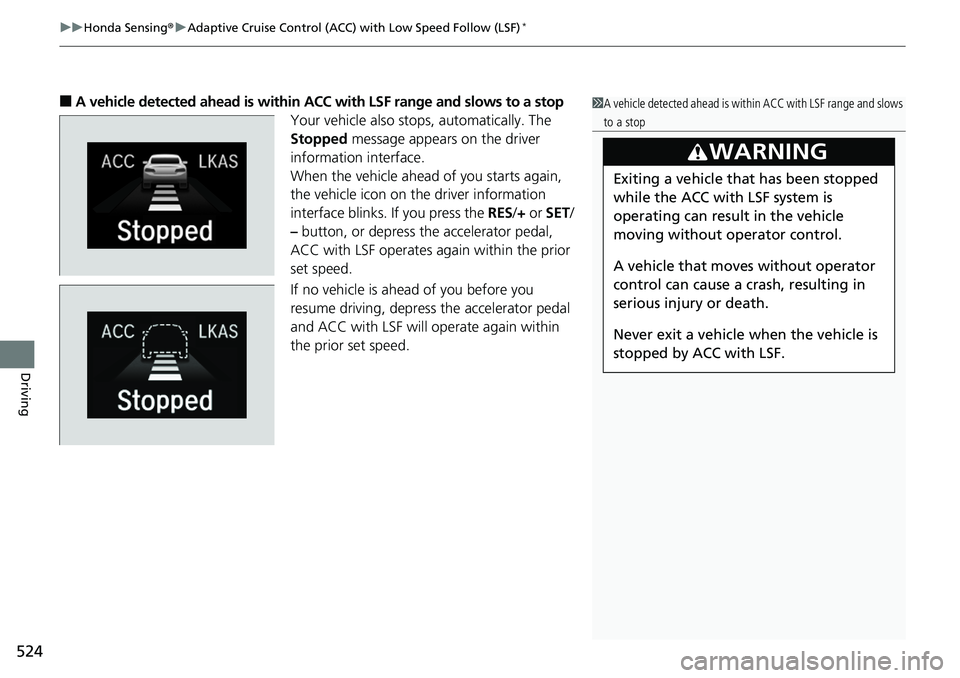
■A vehicle detected ahead is within ACC with LSF range and slows to a stop
Your vehicle also stop s, automatically. The
Stopped message appears on the driver
information interface.
When the vehicle ahead of you starts again,
the vehicle icon on the driver information
interface blinks. If you press the RES/+ or SET/
– button, or depress the accelerator pedal,
ACC with LSF operates again within the prior
set speed.
If no vehicle is ahead of you before you
resume driving, depress the accelerator pedal
and ACC with LSF will operate again within
the prior set speed.1 A vehicle detected ahead is with in ACC with LSF range and slows
to a stop
3WARNING
Exiting a vehicle that has been stopped
while the ACC with LSF system is
operating can result in the vehicle
moving without operator control.
A vehicle that moves without operator
control can cause a crash, resulting in
serious injury or death.
Never exit a vehicle when the vehicle is
stopped by ACC with LSF.
Page 555 of 727
Continued553
uuHonda Sensing ®u Lane Keeping Assist System (LKAS)
Driving
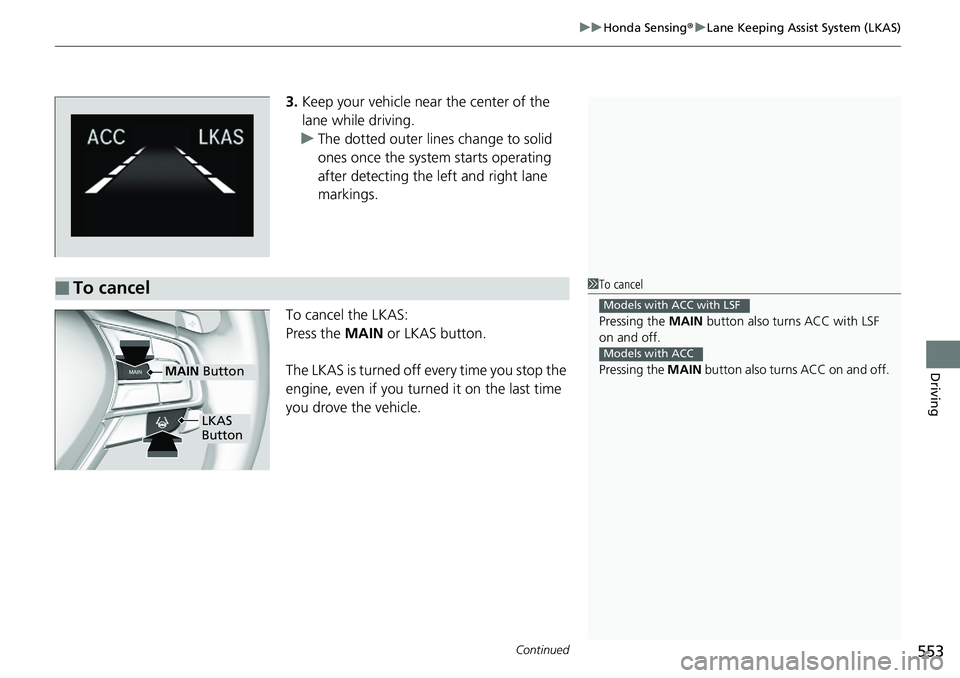
3. Keep your vehicle near the center of the
lane while driving.
u The dotted outer lines change to solid
ones once the system starts operating
after detecting the left and right lane
markings.
To cancel the LKAS:
Press the MAIN or LKAS button.
The LKAS is turned off every time you stop the
engine, even if you turned it on the last time
you drove the vehicle.
■To cancel1 To cancel
Pressing the MAIN button also turns ACC with LSF
on and off.
Pressing the MAIN button also turns ACC on and off.
Models with ACC with LSF
Models with ACC
MAIN Button
LKAS
Button
Page 579 of 727
Continued577
uuBraking uBrake System
Driving
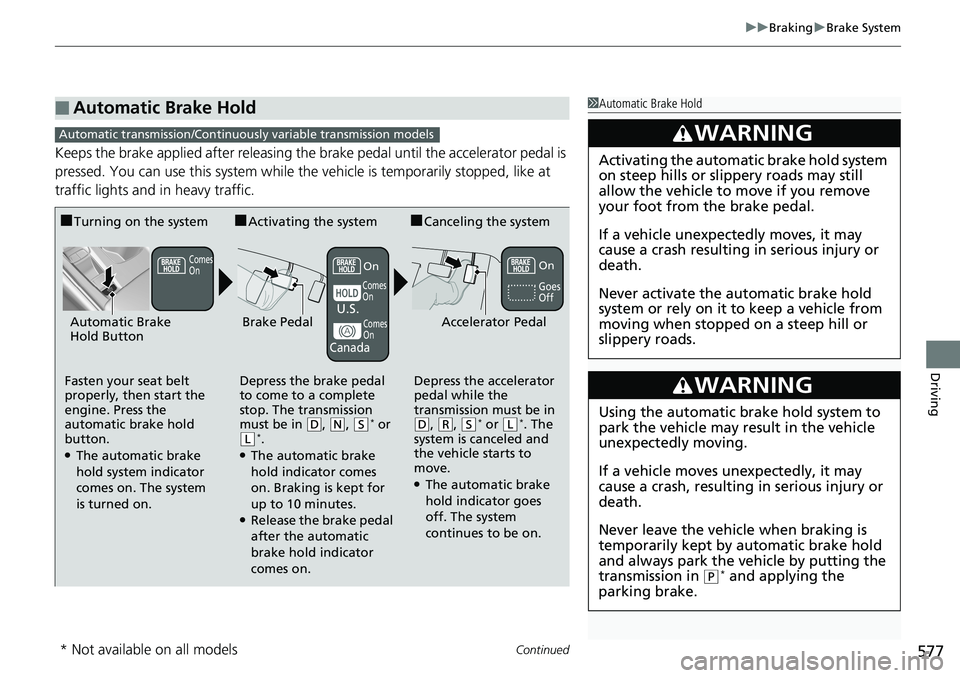
Keeps the brake applied after releasing the brake pedal until the accelerator pedal is
pressed. You can use this system while th e vehicle is temporarily stopped, like at
traffic lights and in heavy traffic.
■Automatic Brake Hold1 Automatic Brake Hold
3WARNING
Activating the automatic brake hold system
on steep hills or slippery roads may still
allow the vehicle to move if you remove
your foot from the brake pedal.
If a vehicle unexpectedly moves, it may
cause a crash resulting in serious injury or
death.
Never activate the automatic brake hold
system or rely on it to keep a vehicle from
moving when stopped on a steep hill or
slippery roads.
3WARNING
Using the automatic brake hold system to
park the vehicle may result in the vehicle
unexpectedly moving.
If a vehicle moves unexpectedly, it may
cause a crash, resulting in serious injury or
death.
Never leave the vehicle when braking is
temporarily kept by automatic brake hold
and always park the vehicle by putting the
transmission in
( P* and applying the
parking brake.
Automatic transmission/Continuousl y variable transmission models
■Turning on the system
Fasten your seat belt
properly, then start the
engine. Press the
automatic brake hold
button.
●The automatic brake
hold system indicator
comes on. The system
is turned on.
■Activating the system
Depress the brake pedal
to come to a complete
stop. The transmission
must be in
( D, (N, (S* or (L*.●The automatic brake
hold indicator comes
on. Braking is kept for
up to 10 minutes.
●Release the brake pedal
after the automatic
brake hold indicator
comes on.
■Canceling the system
Depress the accelerator
pedal while the
transmission must be in
( D, (R, (S* or (L*. The
system is canceled and
the vehicle starts to
move.
●The automatic brake
hold indicator goes
off. The system
continues to be on.
Accelerator PedalBrake PedalAutomatic Brake
Hold Button
Goes
Off
U.S.
Canada
On
On
Comes
On
Comes
On
Comes
On
* Not available on all models
Page 580 of 727
578
uuBraking uBrake System
Driving
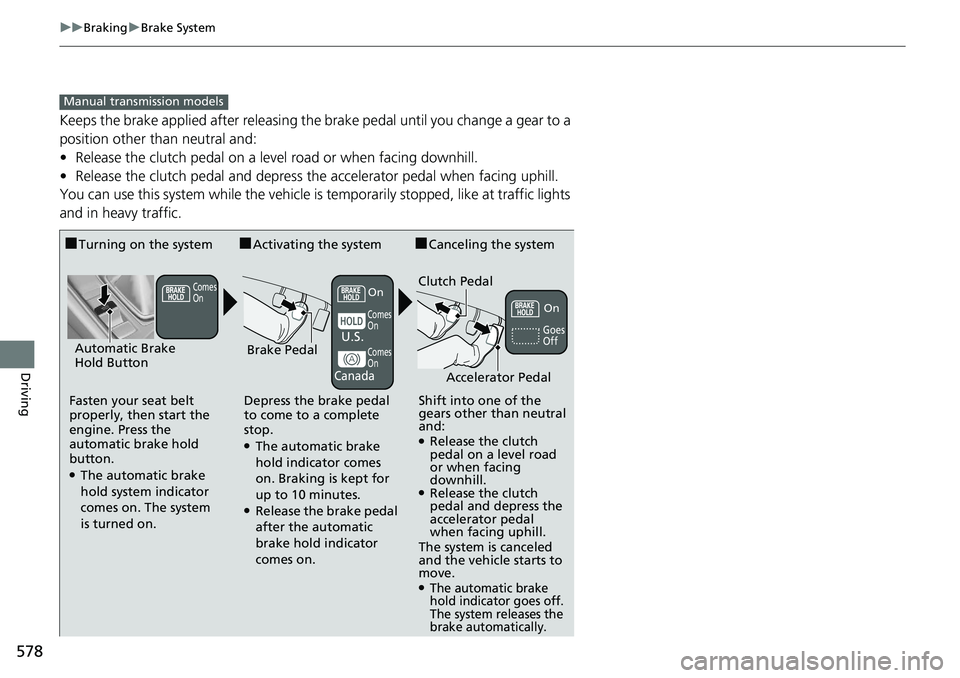
Keeps the brake applied after releasing the brake pedal until you change a gear to a
position other than neutral and:
• Release the clutch pedal on a level road or when facing downhill.
• Release the clutch pedal and depress the accelerator pedal when facing uphill.
You can use this system while the vehicle is temporarily stopped, like at traffic lights
and in heavy traffic.
Manual transmission models
■Turning on the system
Fasten your seat belt
properly, then start the
engine. Press the
automatic brake hold
button.
●The automatic brake
hold system indicator
comes on. The system
is turned on.
■Activating the system
Depress the brake pedal
to come to a complete
stop.
●The automatic brake
hold indicator comes
on. Braking is kept for
up to 10 minutes.
●Release the brake pedal
after the automatic
brake hold indicator
comes on.
■Canceling the system
Shift into one of the
gears other than neutral
and:
●Release the clutch
pedal on a level road
or when facing
downhill.
●Release the clutch
pedal and depress the
accelerator pedal
when facing uphill.
The system is canceled
and the vehicle starts to
move.
●The automatic brake
hold indicator goes off.
The system releases the
brake automatically.
Accelerator Pedal
Brake PedalAutomatic Brake
Hold Button
Goes
OffU.S.
Canada
Clutch PedalComes
OnOn
Comes
OnOn
Comes
On
Page 673 of 727
671
Handling the Unexpected
Engine Does Not Start
Checking the Engine
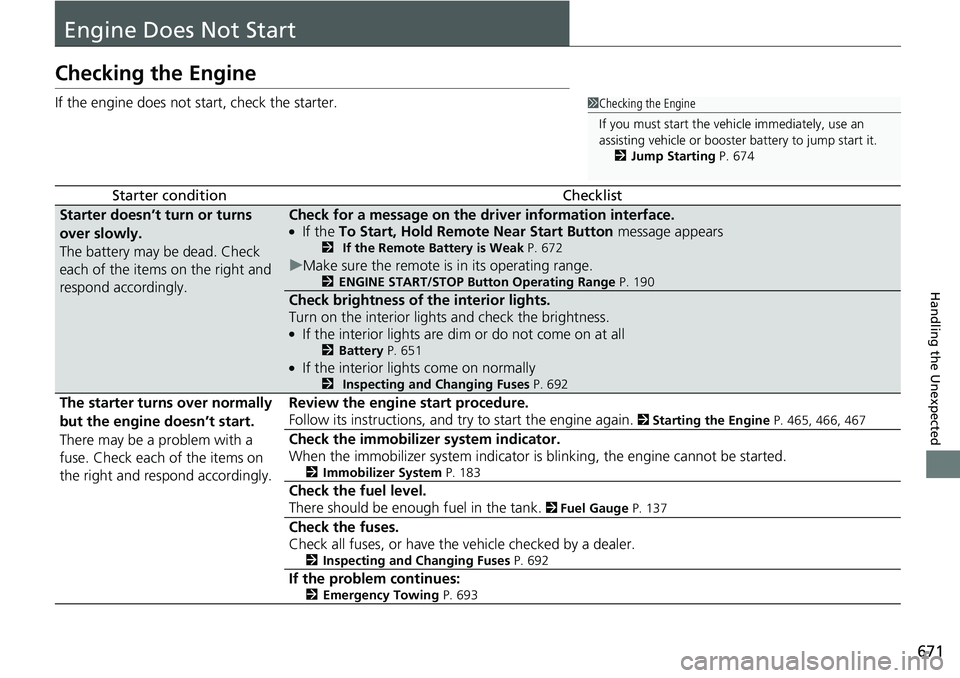
If the engine does not start, check the starter.
Starter conditionChecklist
Starter doesn’t turn or turns
over slowly.
The battery may be dead. Check
each of the items on the right and
respond accordingly.Check for a message on the driver information interface.●If the To Start, Hold Remote Near Start Button message appears2 If the Remote Battery is Weak P. 672
uMake sure the remote is in its operating range.2 ENGINE START/STOP Button Operating Range P. 190
Check brightness of the interior lights.
Turn on the interior lights and check the brightness.
●If the interior lights are dim or do not come on at all2Battery P. 651●If the interior lights come on normally2 Inspecting and Changing Fuses P. 692
The starter turns over normally
but the engine doesn’t start.
There may be a problem with a
fuse. Check each of the items on
the right and respond accordingly. Review the engine start procedure.
Follow its instructions, and try
to start the engine again.
2 Starting the Engine P. 465, 466, 467
Check the immobilizer system indicator.
When the immobilizer system indicator is blinking, the engine cannot be started.
2Immobilizer System P. 183
Check the fuel level.
There should be enough fuel in the tank.
2 Fuel Gauge P. 137
Check the fuses.
Check all fuses, or have the vehicle checked by a dealer.
2Inspecting and Changing Fuses P. 692
If the problem continues:2Emergency Towing P. 693
1Checking the Engine
If you must start the vehi cle immediately, use an
assisting vehicle or booster battery to jump start it.
2 Jump Starting P. 674
Page 674 of 727
672
uuEngine Does Not Start uIf the Remote Battery is Weak
Handling the Unexpected
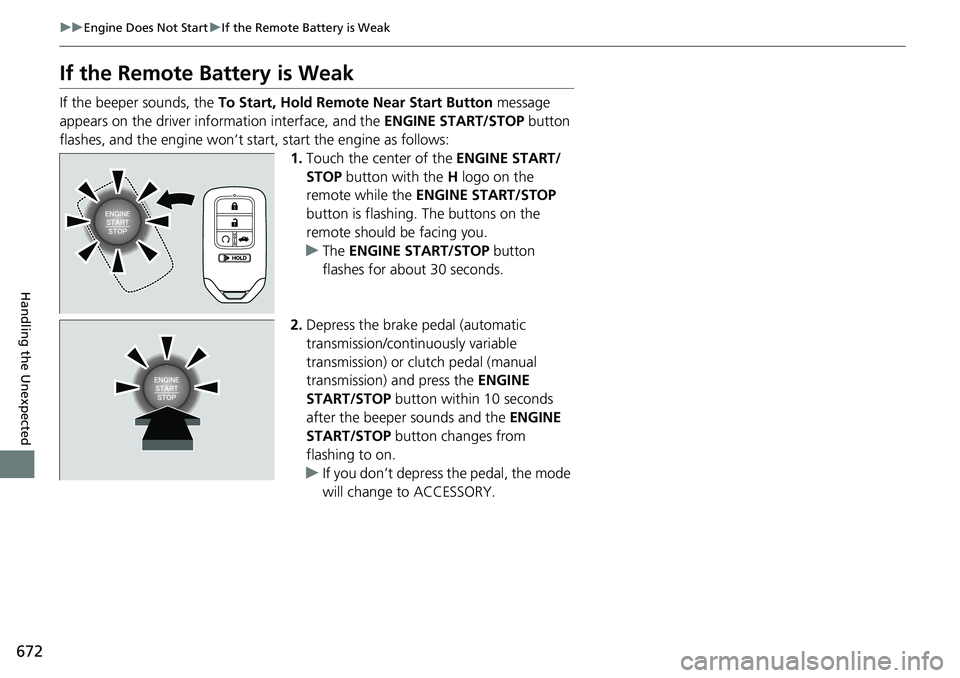
If the Remote Battery is Weak
If the beeper sounds, the To Start, Hold Remote Near Start Button message
appears on the driver information interface, and the ENGINE START/STOP button
flashes, and the engine won’t star t, start the engine as follows:
1.Touch the center of the ENGINE START/
STOP button with the H logo on the
remote while the ENGINE START/STOP
button is flashing. The buttons on the
remote should be facing you.
u The ENGINE START/STOP button
flashes for about 30 seconds.
2. Depress the brake pedal (automatic
transmission/continuously variable
transmission) or clutch pedal (manual
transmission) and press the ENGINE
START/STOP button within 10 seconds
after the beeper sounds and the ENGINE
START/STOP button changes from
flashing to on.
u If you don’t depress the pedal, the mode
will change to ACCESSORY.