brake HONDA ACCORD SEDAN 2020 (in English) User Guide
[x] Cancel search | Manufacturer: HONDA, Model Year: 2020, Model line: ACCORD SEDAN, Model: HONDA ACCORD SEDAN 2020Pages: 728, PDF Size: 34.06 MB
Page 81 of 728
79
uuIndicators u
Continued
Instrument Panel
IndicatorNameOn/BlinkingExplanationMessage
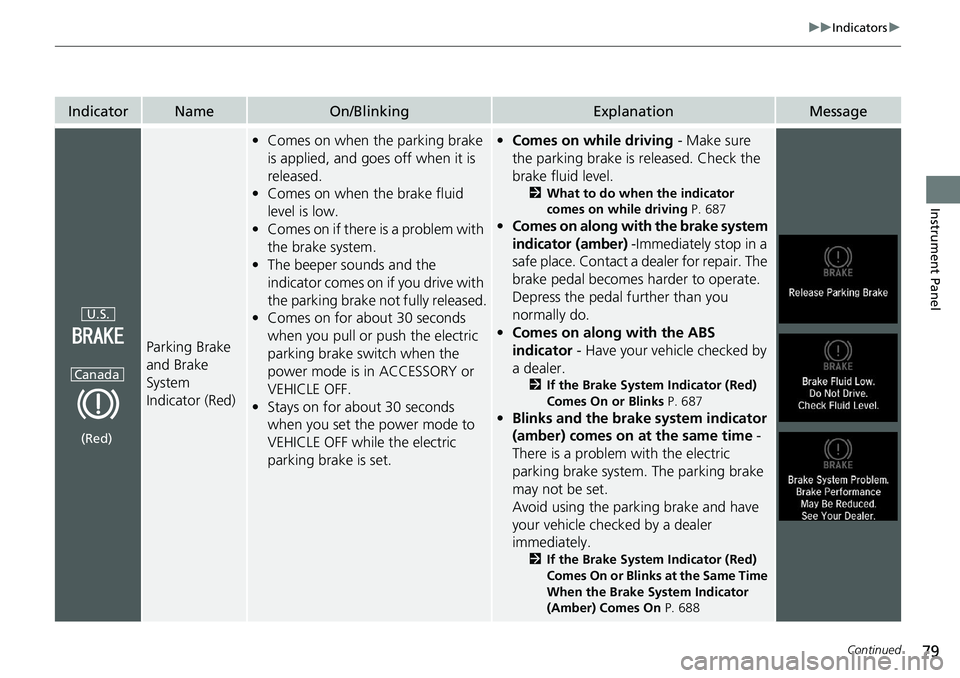
Parking Brake
and Brake
System
Indicator (Red)
•Comes on when the parking brake
is applied, and goes off when it is
released.
• Comes on when the brake fluid
level is low.
• Comes on if there is a problem with
the brake system.
• The beeper sounds and the
indicator comes on if you drive with
the parking brake not fully released.
• Comes on for about 30 seconds
when you pull or push the electric
parking brake switch when the
power mode is in ACCESSORY or
VEHICLE OFF.
• Stays on for about 30 seconds
when you set the power mode to
VEHICLE OFF while the electric
parking brake is set.•Comes on while driving - Make sure
the parking brake is released. Check the
brake fluid level.
2 What to do when the indicator
comes on while driving P. 687
•Comes on along with the brake system
indicator (amber) -Immediately stop in a
safe place. Contact a dealer for repair. The
brake pedal becomes harder to operate.
Depress the pedal further than you
normally do.
• Comes on along with the ABS
indicator - Have your vehicle checked by
a dealer.
2 If the Brake System Indicator (Red)
Comes On or Blinks P. 687
•Blinks and the brake system indicator
(amber) comes on at the same time -
There is a problem with the electric
parking brake system. The parking brake
may not be set.
Avoid using the parking brake and have
your vehicle checked by a dealer
immediately.
2 If the Brake System Indicator (Red)
Comes On or Blinks at the Same Time
When the Brake System Indicator
(Amber) Comes On P. 688
U.S.
Canada
(Red)
Page 82 of 728
80
uuIndicators u
Instrument Panel
IndicatorNameOn/BlinkingExplanationMessage
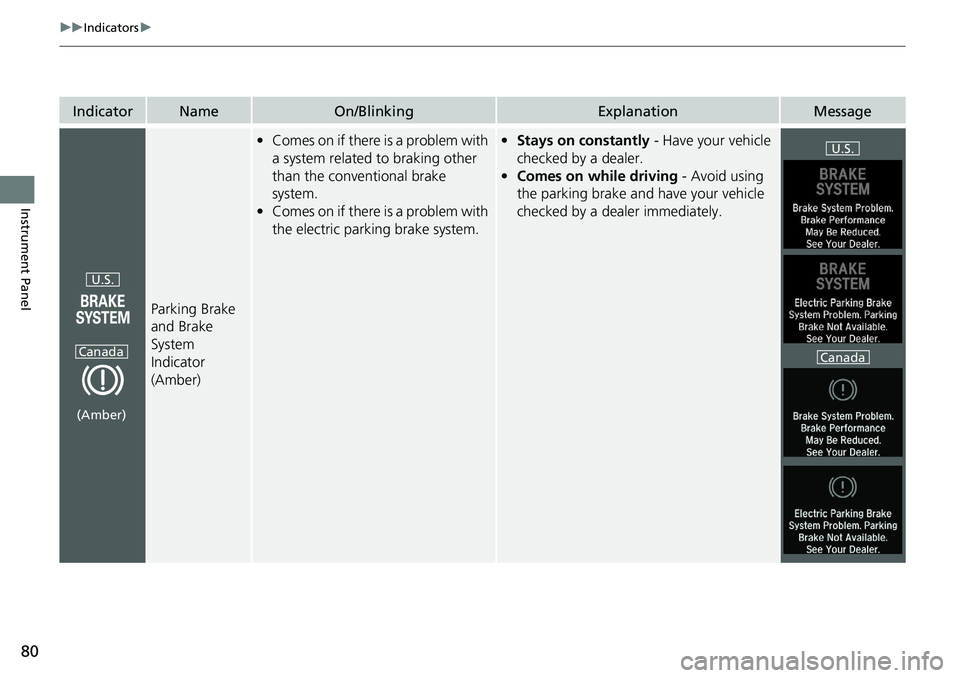
Parking Brake
and Brake
System
Indicator
(Amber)
•Comes on if there is a problem with
a system related to braking other
than the conventional brake
system.
• Comes on if there is a problem with
the electric parking brake system.• Stays on constantly - Have your vehicle
checked by a dealer.
• Comes on while driving - Avoid using
the parking brake and have your vehicle
checked by a dealer immediately.
U.S.
Canada
(Amber)
U.S.
Canada
Page 83 of 728
81
uuIndicators u
Continued
Instrument Panel
IndicatorNameOn/BlinkingExplanationMessage
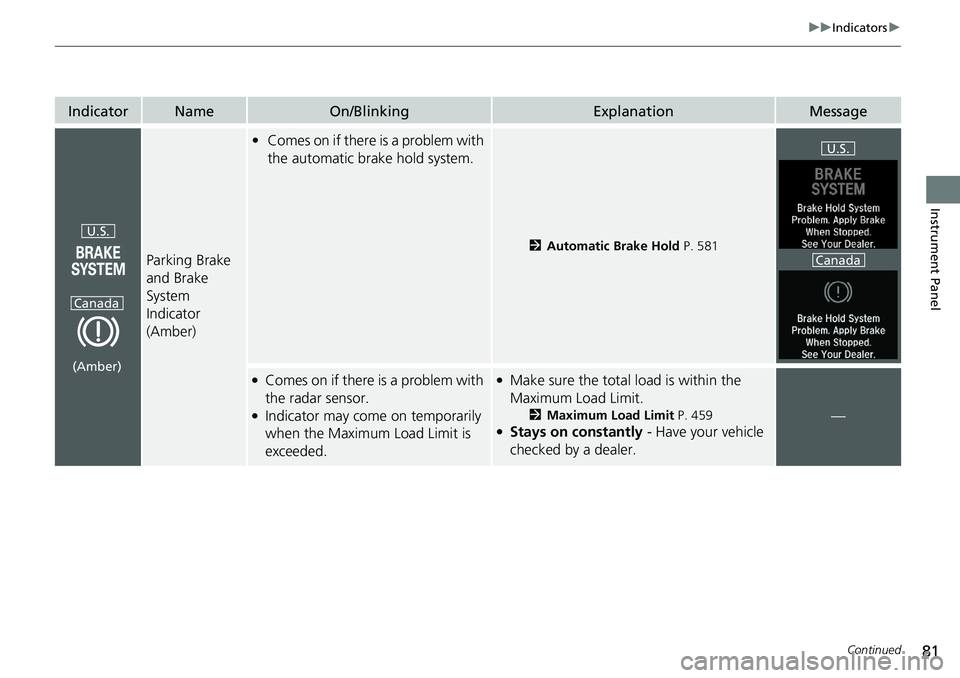
Parking Brake
and Brake
System
Indicator
(Amber)
•Comes on if there is a problem with
the automatic brake hold system.
2 Automatic Brake Hold P. 581
●Comes on if there is a problem with
the radar sensor.
●Indicator may come on temporarily
when the Maximum Load Limit is
exceeded.
●Make sure the total load is within the
Maximum Load Limit.
2Maximum Load Limit P. 459●Stays on constantly - Have your vehicle
checked by a dealer.
—
U.S.
Canada
(Amber)
U.S.
Canada
Page 84 of 728
82
uuIndicators u
Instrument Panel
IndicatorNameOn/BlinkingExplanationMessage
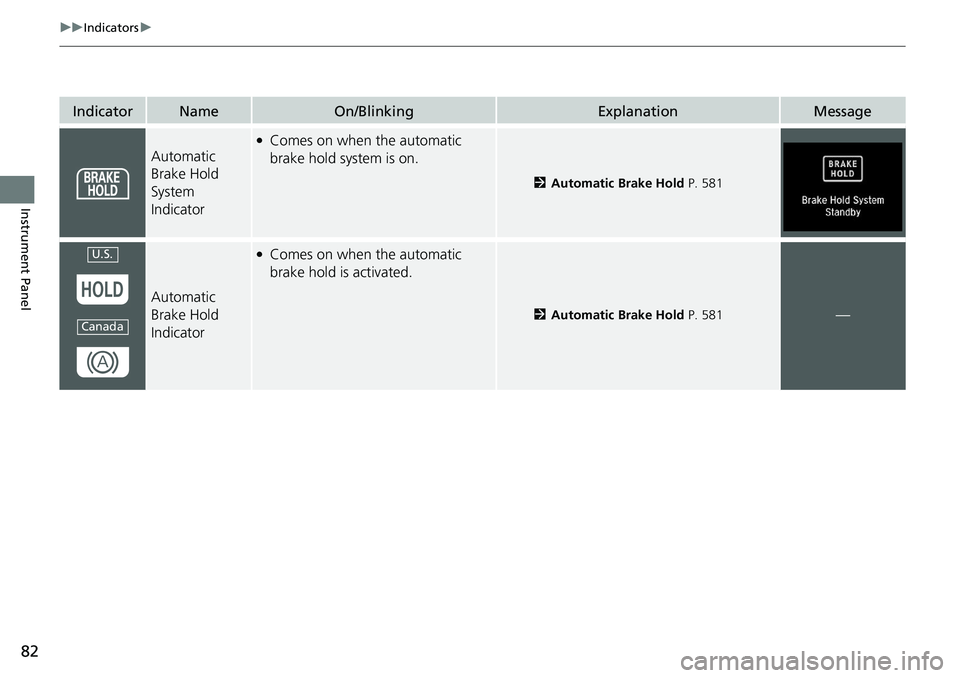
Automatic
Brake Hold
System
Indicator
●Comes on when the automatic
brake hold system is on.
2Automatic Brake Hold P. 581
Automatic
Brake Hold
Indicator
●Comes on when the automatic
brake hold is activated.
2Automatic Brake Hold P. 581—
U.S.
Canada
Page 88 of 728
86
uuIndicators u
Instrument Panel
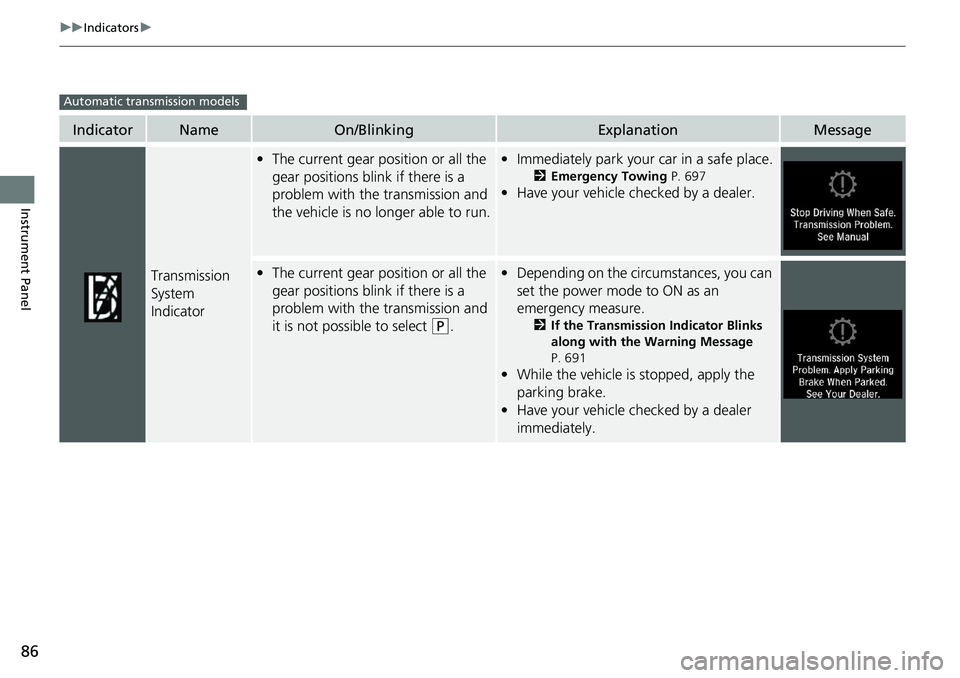
IndicatorNameOn/BlinkingExplanationMessage
Transmission
System
Indicator
•The current gear position or all the
gear positions blink if there is a
problem with the transmission and
the vehicle is no longer able to run.• Immediately park your car in a safe place.
2 Emergency Towing P. 697
•Have your vehicle checked by a dealer.
•The current gear position or all the
gear positions blink if there is a
problem with the transmission and
it is not possible to select
(P.
• Depending on the circumstances, you can
set the power mode to ON as an
emergency measure.
2 If the Transmission Indicator Blinks
along with the Warning Message
P. 691
• While the vehicle is stopped, apply the
parking brake.
• Have your vehicle checked by a dealer
immediately.
Automatic transmission models
Page 92 of 728
90
uuIndicators u
Instrument Panel
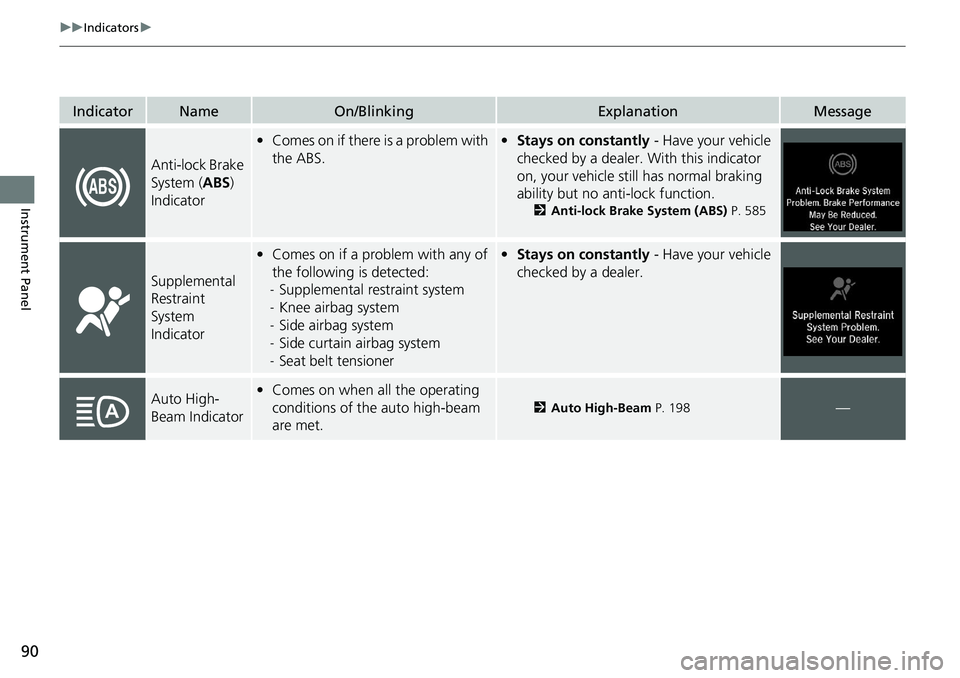
IndicatorNameOn/BlinkingExplanationMessage
Anti-lock Brake
System (ABS)
Indicator
• Comes on if there is a problem with
the ABS.• Stays on constantly - Have your vehicle
checked by a dealer. With this indicator
on, your vehicle still has normal braking
ability but no anti-lock function.
2 Anti-lock Brake System (ABS) P. 585
Supplemental
Restraint
System
Indicator
•Comes on if a problem with any of
the following is detected:
- Supplemental restraint system
- Knee airbag system
- Side airbag system
- Side curtain airbag system
- Seat belt tensioner• Stays on constantly - Have your vehicle
checked by a dealer.
Auto High-
Beam Indicator• Comes on when all the operating
conditions of the auto high-beam
are met.
2 Auto High-Beam P. 198—
Page 93 of 728
91
uuIndicators u
Continued
Instrument Panel
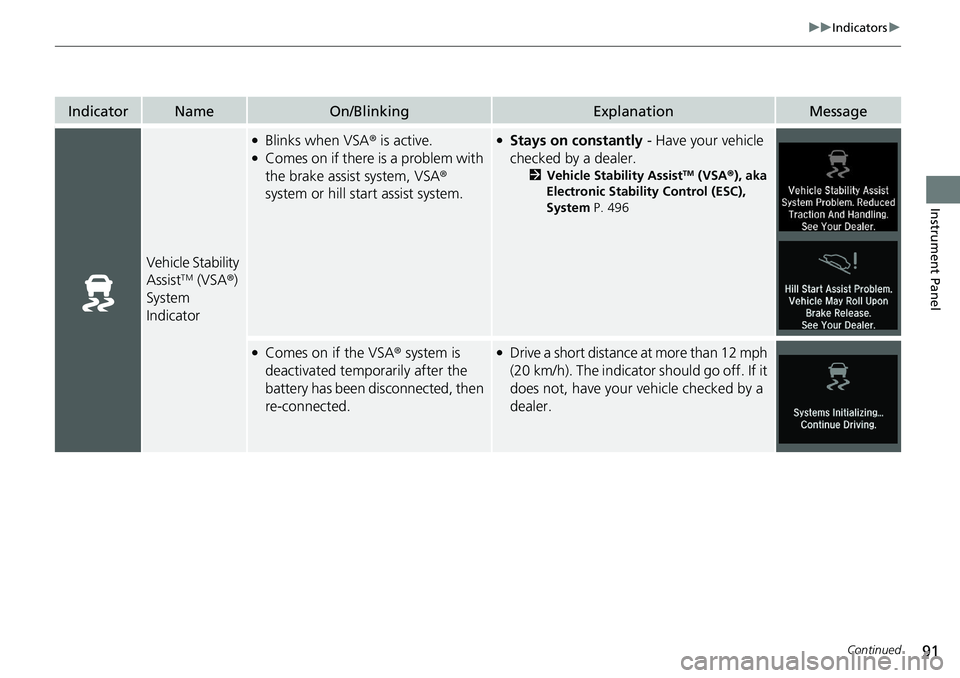
IndicatorNameOn/BlinkingExplanationMessage
Vehicle Stability
AssistTM (VSA®)
System
Indicator
●Blinks when VSA ® is active.●Comes on if there is a problem with
the brake assist system, VSA®
system or hill start assist system.
●Stays on constantly - Have your vehicle
checked by a dealer.
2 Vehicle Stability AssistTM (VSA ®), aka
Electronic Stability Control (ESC),
System P. 496
●Comes on if the VSA ® system is
deactivated temporarily after the
battery has been disconnected, then
re-connected.●Drive a short distance at more than 12 mph
(20 km/h). The indicator should go off. If it
does not, have your vehicle checked by a
dealer.
Page 97 of 728
95
uuIndicators u
Continued
Instrument Panel
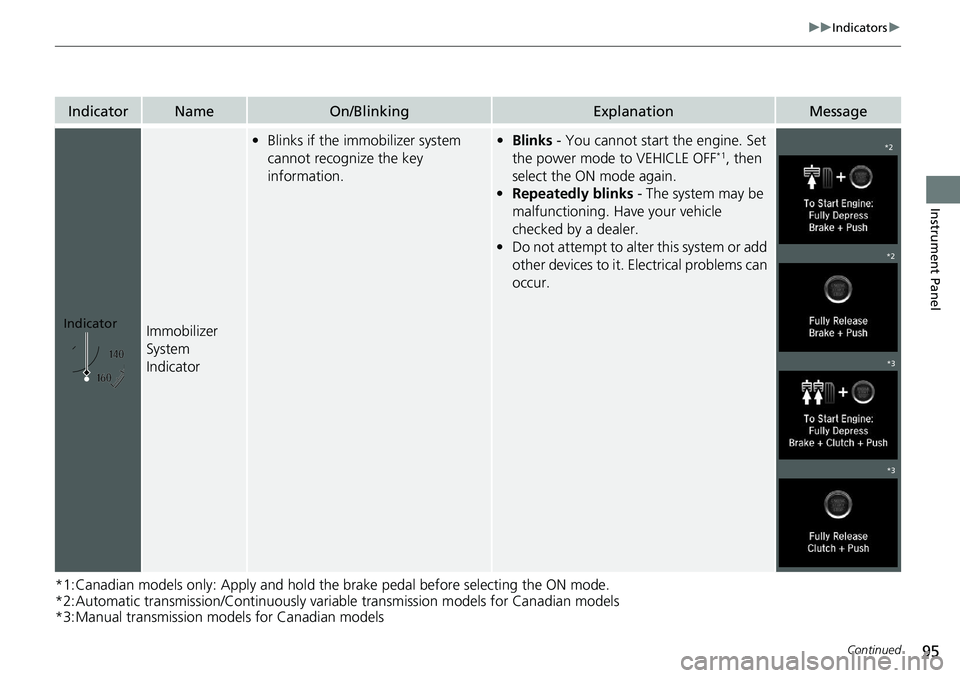
*1:Canadian models only: Apply and hold the brake pedal before selecting the ON mode.
*2:Automatic transmission/Continuously variable transmission models for Canadian models
*3:Manual transmission models for Canadian models
IndicatorNameOn/BlinkingExplanationMessage
Immobilizer
System
Indicator
• Blinks if the immobilizer system
cannot recognize the key
information.•Blinks - You cannot start the engine. Set
the power mode to VEHICLE OFF*1, then
select the ON mode again.
• Repeatedly blinks - The system may be
malfunctioning. Have your vehicle
checked by a dealer.
• Do not attempt to alter this system or add
other devices to it. Electrical problems can
occur.
Indicator
*2
*2
*3
*3
Page 107 of 728
105
uuIndicators uDriver Information Interface Wa rning and Information Messages
Continued
Instrument Panel
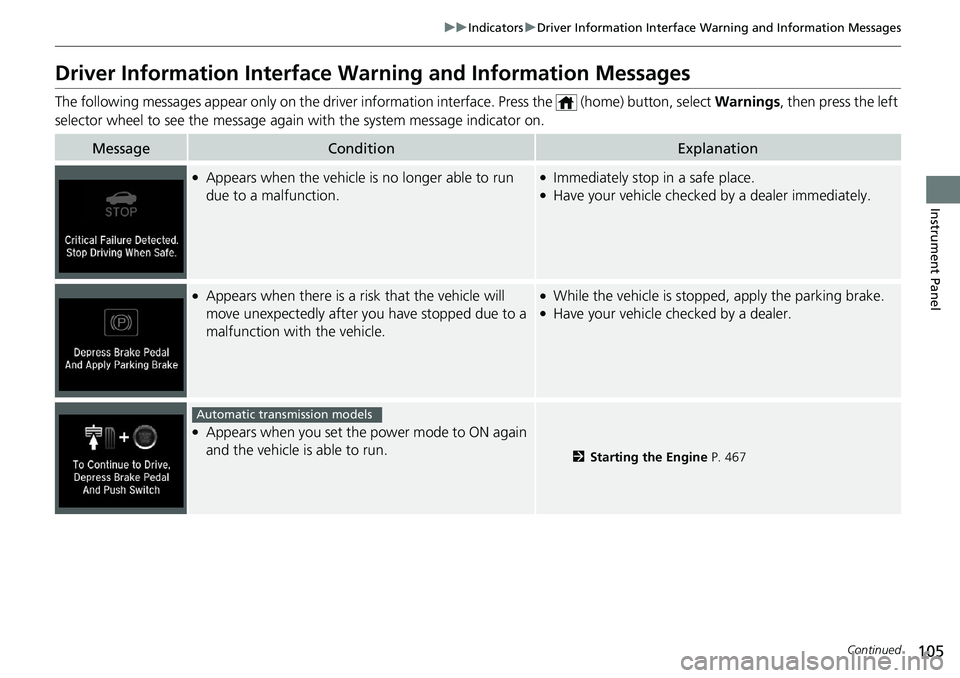
Driver Information Interface Warning and Information Messages
The following messages appear only on the driver info rmation interface. Press the (home) button, select Warnings, then press the left
selector wheel to see the message agai n with the system message indicator on.
MessageConditionExplanation
●Appears when the vehicle is no longer able to run
due to a malfunction.●Immediately stop in a safe place.●Have your vehicle checked by a dealer immediately.
●Appears when there is a ri sk that the vehicle will
move unexpectedly after you have stopped due to a
malfunction with the vehicle.●While the vehicle is stopped, apply the parking brake.●Have your vehicle checked by a dealer.
●Appears when you set the power mode to ON again
and the vehicle is able to run.
2 Starting the Engine P. 467
Automatic transmission models
Page 110 of 728
108
uuIndicators uDriver Information Interface Wa rning and Information Messages
Instrument Panel
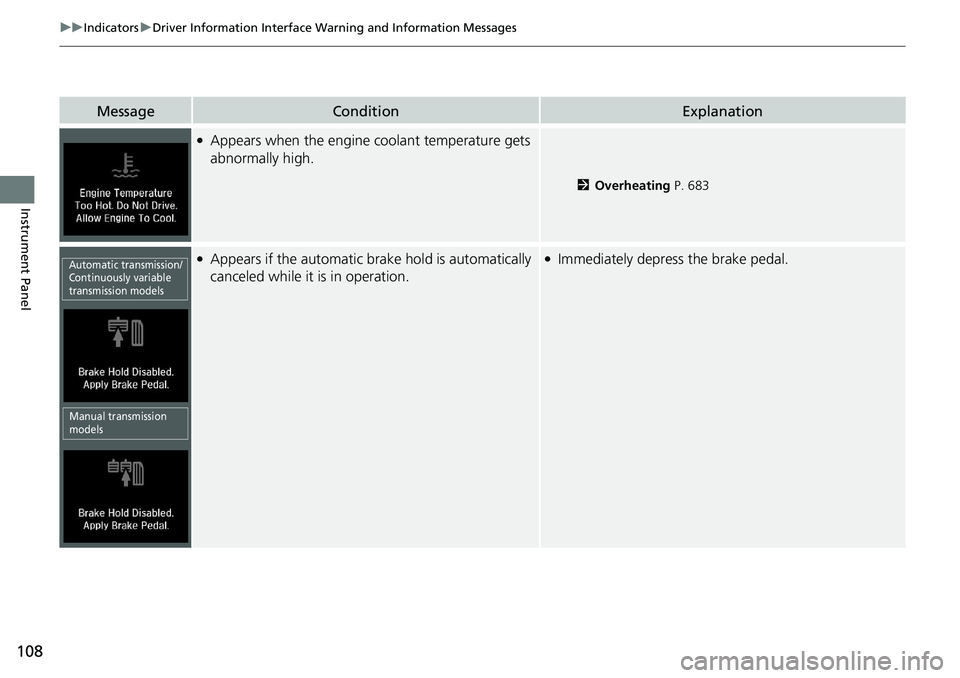
MessageConditionExplanation
●Appears when the engine coolant temperature gets
abnormally high.
2 Overheating P. 683
●Appears if the automatic brake hold is automatically
canceled while it is in operation.●Immediately depress the brake pedal.Automatic transmission/
Continuously variable
transmission models
Manual transmission
models