door lock HONDA CIVIC HYBRID 2015 9.G Quick Guide
[x] Cancel search | Manufacturer: HONDA, Model Year: 2015, Model line: CIVIC HYBRID, Model: HONDA CIVIC HYBRID 2015 9.GPages: 65, PDF Size: 3.32 MB
Page 50 of 65
92 || 93
HANDLING THE UNEXPECTED
HANDLING THE UNEXPECTED
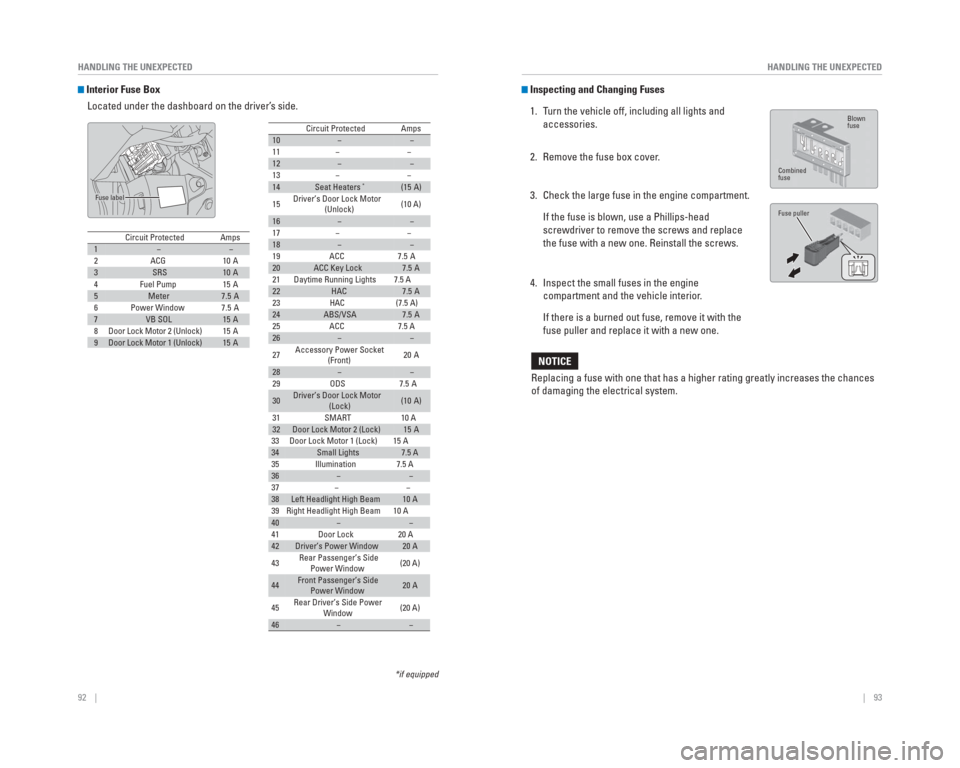
Interior Fuse Box
Located under the dashboard on the driver’s side.
Circuit ProtectedAmps1−−2ACG10 A3SRS10 A4Fuel Pump15 A5Meter7.5 A6Power Window7.5 A7VB SOL15 A8Door Lock Motor 2 (Unlock)15 A9Door Lock Motor 1 (Unlock)15 A
Fuse label
*if equipped
10−−
11 − −
12−−
13 − −
14Seat Heaters*(15 A)
15 Driver’s Door Lock Motor
(Unlock) (10 A)
16−−
17 − −
18−−
19 ACC 7.5 A
20ACC Key Lock7.5 A
21 Daytime Running Lights 7.5 A
22HAC7.5 A
23 HAC (7.5 A)
24ABS/VSA7.5 A
25 ACC 7.5 A
26−−
27 Accessory Power Socket
(Front) 20 A
28−−
29 ODS 7.5 A
30Driver’s Door Lock Motor
(Lock)(10 A)
31 SMART 10 A
32Door Lock Motor 2 (Lock)15 A
Circuit ProtectedAmps
33 Door Lock Motor 1 (Lock) 15 A34Small Lights7.5 A
35 Illumination 7.5 A
36−−
37 − −
38Left Headlight High Beam10 A
39 Right Headlight High Beam 10 A
40−−
41 Door Lock 20 A
42Driver’s Power Window20 A
43 Rear Passenger’s Side
Power Window (20 A)
44Front Passenger’s Side
Power Window20 A
45 Rear Driver’s Side Power
Window (20 A)
46−−
Inspecting and Changing Fuses
1. Turn the vehicle off, including all lights and accessories.
2. Remove the fuse box cover.
3. Check the large fuse in the engine compartment.
If the fuse is blown, use a Phillips-head screwdriver to remove the screws and replace
the fuse with a new one. Reinstall the screws.
4. Inspect the small fuses in the engine compartment and the vehicle interior.
If there is a burned out fuse, remove it with the fuse puller and replace it with a new one.
Replacing a fuse with one that has a higher rating greatly increases the\
chances
of damaging the electrical system.
NOTICE
Blown
fuse
Combined
fuse
Fuse puller
Page 55 of 65

102 || 103
MAINTENANCE
MAINTENANCE
Changing Wiper Blades
If the wiper blades leave streaks across the windshield, try cleaning th\
em fi rst with a
paper towel or soft cloth and wiper fl uid. If the wiper blade rubber has deteriorated,
you should change the wiper blades.
1. Lift the driver side wiper arm fi rst, then the
passenger side.
2. Place a cloth on the edge of the lock tab. Push the lock tab up with a fl at-tip screwdriver.
3. Slide the blade from the wiper arm.
4. Slide the wiper blade out from its holder by pulling the tabbed end out.
5. Remove the retainers from the rubber blade that has been removed, and mount to a new rubber
blade. Correctly align the rubber protrusion and the
retainer grooves.
6. Slide the new wiper blade onto the holder from the bottom end. The tab on the holder should fi t in the
indent of the wiper blade.
7. Slide the wiper blade onto the wiper arm, then push down the lock tab.
8. Lower the passenger side wiper arm fi rst, then the driver side.
Avoid dropping the wiper arm, as it may damage the windshield.
NOTICE
End cap at
the bottom
Holder
Holder Cap
Lock tab
Blade
To p Blade
Retainer
Indent
Ta b
Tire Information
To safely operate your vehicle, your tires must be of the proper type and\
size, in good
condition with adequate tread, and properly infl ated.
Inflation Guidelines • Properly infl ated tires provide the best combination of handling, tread life, and comfort. Refer to the driver’s doorjamb label or the specifi cations (see page
111) for the specifi ed pressure.
• Underinfl ated tires wear unevenly, adversely affect handling and fuel economy, and are more likely to fail from overheating.
• Overinfl ated tires make your vehicle ride harshly, are more prone to road hazards, and wear unevenly.
• Every day before you drive, look at each of the tires. If one looks lowe\
r than the others, check the pressure with a tire gauge.
• Measure the air pressure when tires are cold. This means the vehicle has\
been parked for at least 3 hours, or driven less than 1 mile (1.6 km). If n\
ecessary, add
or release air until the specifi ed pressure is reached, and then calibrate the
system (see page 86). If checked when hot, tire pressure can be as muc\
h as
4–6 psi (30–40 kPa, 0.3–0.5 kgf/cm
2) higher than checked when cold.
• At least once a month or before long trips, use a gauge to measure the p\
ressure in all tires, including the spare*. Even tires in good condition can los\
e 1–2 psi
(10–20 kPa, 0.1–0.2 kgf/cm
2) per month.
Inspection Guidelines
Every time you infl ate the tires, check for the following:
• Any damage to tires, including bumps, bulges, cuts, splits, or cracks in\
the side or tread. Remove any foreign objects and inspect for air leaks. Replace \
tires if
you see fabric or cord.
• Uneven or excessive tread wear. Have a dealer check the wheel alignment.
• Cracks or other damage around the valve stems.
Wear Indicators The groove where the wear indicator is located is
1/16 inch (1.6 mm) shallower than elsewhere on the
tire. If the tread has worn so low that the indicator is
exposed, replace the tire. Worn out tires have poor
traction on wet roads.
Example of a wear
indicator mark
*if equipped
Page 60 of 65
112 || 113
CUSTOMER INFORMATION
CUSTOMER INFORMATION
Learn about information specifi c to you as a Honda customer and how to get help.
Frequently Asked Questions/ Troubleshooting
Below are some frequently asked questions and troubleshooting items that\
you may
have about the vehicle.
Q: How do I set the vehicle clock?
A: For vehicles without navigation, see page 39. For vehicles with navigati\
on, the
time is automatically set using GPS signals.
Q: Why doesn’t the vehicle start when I press the ENGINE START/STOP button?
A: The brake pedal must be pressed to start the engine.
Q: What is the AUTO setting on my headlight lever?
A: When in the AUTO position, the vehicle’s exterior lights will automatically turn
on or off depending on the ambient lighting.
Q: Why won’t the driver’s door unlock when I grab the door handle, even though
the keyless access remote is within range?
A: If you pull the handle too quickly, the system may not have time to confi rm the
door is unlocked. Wait to hear a beep to confi rm the door is unlocked. If you are
wearing gloves, the system may be slow to respond.
Q: After my battery was disconnected or went dead, the audio system is aski\
ng for
a code. Where do I nd this?
A: In most cases, you do not need to enter a code. Turn on the vehicle and the
audio system, and press and hold the power button until the system react\
ivates.
Q: Why can’t I operate Pandora
® through the audio system?
A: Audio may be streaming through Bluetooth
® Audio. Make sure Pandora mode
is selected and the phone cable is properly connected to the USB adapter\
cable (if using). Some phones may prompt you to “Allow” a connec\
tion.
Q: Is my phone compatible with Bluetooth features?
A: Visit handsfreelink.com (U.S.) or www.handsfreelink.ca (Canada) to
check phone compatibility for Bluetooth
® Audio, Bluetooth® HandsFreeLink®,
and SMS text messaging.
Q: Every time I press the Talk button, the system gives me voice prompts. Can I turn
these off?*
A: From the Home screen, select SETTINGS. Select System, then select Voice
Prompt. Select Off.
CUSTOMER INFORMATION
*if equipped
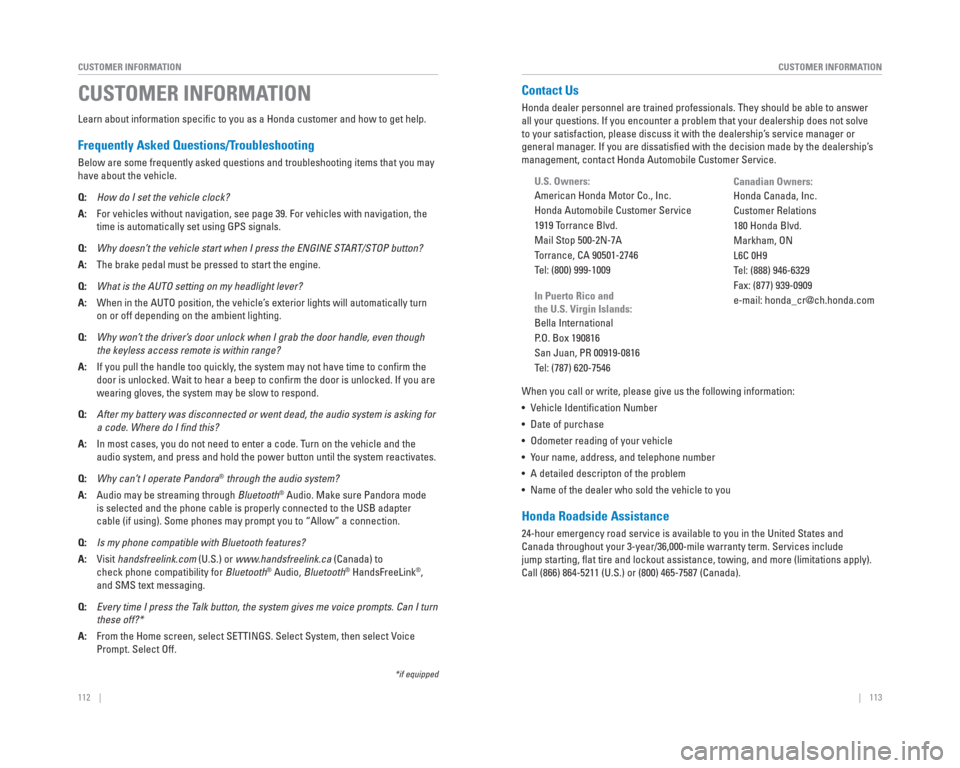
Contact Us
Honda dealer personnel are trained professionals. They should be able to\
answer
all your questions. If you encounter a problem that your dealership does\
not solve
to your satisfaction, please discuss it with the dealership’s service manager or
general manager. If you are dissatisfi ed with the decision made by the dealership’s
management, contact Honda Automobile Customer Service.
U.S. Owners:
American Honda Motor Co., Inc.
Honda Automobile Customer Service
1919 Torrance Blvd.
Mail Stop 500-2N-7A
Torrance, CA 90501-2746
Tel: (800) 999-1009
In Puerto Rico and
the U.S. Virgin Islands:
Bella International
P.O. Box 190816
San Juan, PR 00919-0816
Tel: (787) 620-7546
When you call or write, please give us the following information:
• Vehicle Identifi cation Number
• Date of purchase
• Odometer reading of your vehicle
• Your name, address, and telephone number
• A detailed descripton of the problem
• Name of the dealer who sold the vehicle to you
Honda Roadside Assistance
24-hour emergency road service is available to you in the United States \
and
Canada throughout your 3-year/36,000-mile warranty term. Services includ\
e
jump starting, fl at tire and lockout assistance, towing, and more (limitations apply).
Call (866) 864-5211 (U.S.) or (800) 465-7587 (Canada). Canadian Owners:
Honda Canada, Inc.
Customer Relations
180 Honda Blvd.
Markham, ON
L6C 0H9
Tel: (888) 946-6329
Fax: (877) 939-0909
e-mail: [email protected]
Page 64 of 65
120 || 121
INDEX
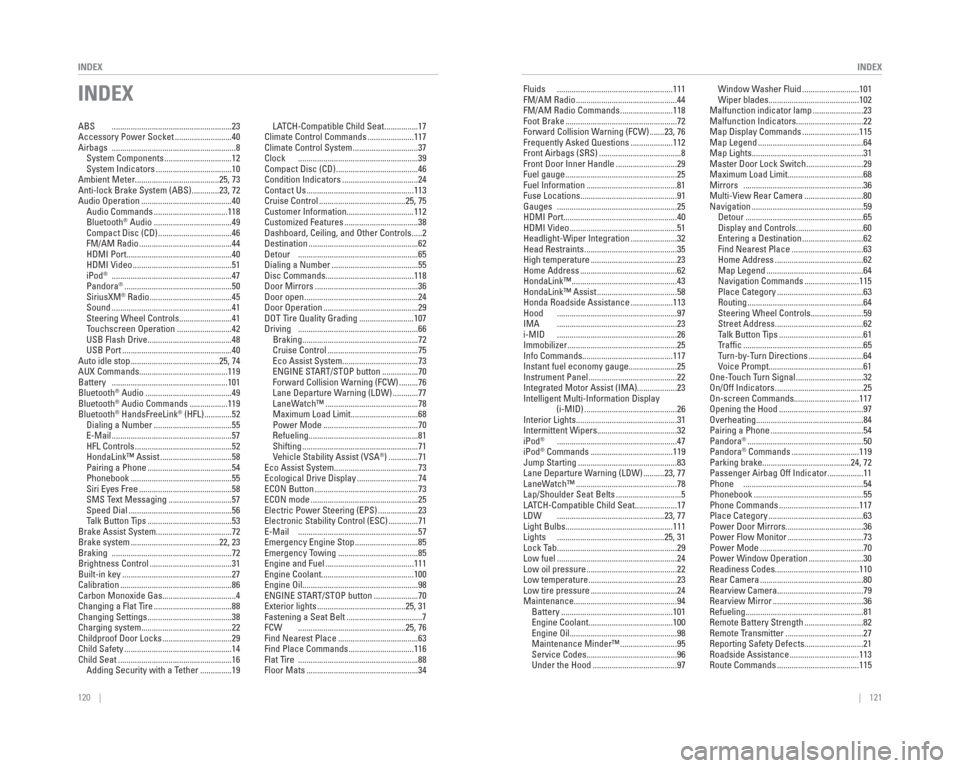
INDEX
INDEX
ABS .........................................................23
Accessory Power Socket ...........................40
Airbags ...........................................................8
System Components ................................12
System Indicators ....................................10
Ambient Meter........................................25, 73
Anti-lock Brake System (ABS) .............23, 72
Audio Operation ...........................................40 Audio Commands ...................................118
Bluetooth
® Audio .....................................49
Compact Disc (CD) ...................................46
FM/AM Radio ............................................44
HDMI Port ..................................................40
HDMI Video ...............................................51
iPod
® .........................................................47
Pandora® ...................................................50
SiriusXM® Radio .......................................45
Sound .........................................................41
Steering Wheel Controls .........................41
Touchscreen Operation ..........................42
USB Flash Drive ........................................48
USB Port ....................................................40
Auto idle stop ..........................................25, 74
AUX Commands..........................................119
Battery .......................................................101
Bluetooth
® Audio .........................................49
Bluetooth® Audio Commands ..................119
Bluetooth® HandsFreeLink® (HFL) .............52
Dialing a Number .....................................55
E-Mail .........................................................57
HFL Controls ..............................................52
HondaLink™ Assist ..................................58
Pairing a Phone ........................................54
Phonebook ................................................55
Siri Eyes Free ............................................58
SMS Text Messaging ..............................57
Speed Dial .................................................56
Talk Button Tips ........................................53
Brake Assist System....................................72
Brake system ..........................................22, 23
Braking .........................................................72
Brightness Control .......................................31
Built-in key ....................................................27
Calibration .....................................................86
Carbon Monoxide Gas...................................4
Changing a Flat Tire .....................................88
Changing Settings ........................................38
Charging system...........................................22
Childproof Door Locks .................................29
Child Safety ...................................................14
Child Seat ......................................................16 Adding Security with a Tether ...............19 LATCH-Compatible Child Seat ................17
Climate Control Commands ......................117
Climate Control System ...............................37
Clock .........................................................39
Compact Disc (CD) .......................................46
Condition Indicators ....................................24
Contact Us ...................................................113
Cruise Control .........................................25, 75
Customer Information................................112
Customized Features ...................................38
Dashboard, Ceiling, and Other Controls .....2
Destination ....................................................62
Detour .........................................................65
Dialing a Number .........................................55
Disc Commands..........................................118
Door Mirrors .................................................36
Door open ......................................................24
Door Operation .............................................29
DOT Tire Quality Grading ..........................107
Driving .........................................................66 Braking .......................................................72
Cruise Control ...........................................75
Eco Assist System ....................................73
ENGINE START/STOP button .................70
Forward Collision Warning (FCW) .........76
Lane Departure Warning (LDW) ............77
LaneWatch™ ............................................78
Maximum Load Limit ................................68
Power Mode .............................................70
Refueling ....................................................81
Shifting .......................................................71
Vehicle Stability Assist (VSA
®) ..............71
Eco Assist System........................................73
Ecological Drive Display .............................74
ECON Button .................................................73
ECON mode ...................................................25
Electric Power Steering (EPS) ...................23
Electronic Stability Control (ESC) ..............71
E-Mail .........................................................57
Emergency Engine Stop ..............................85
Emergency Towing ......................................85
Engine and Fuel ..........................................111
Engine Coolant............................................100
Engine Oil.......................................................98
ENGINE START/STOP button .....................70
Exterior lights ..........................................25, 31
Fastening a Seat Belt ....................................7
FCW ...................................................25, 76
Find Nearest Place ......................................63
Find Place Commands ...............................116
Flat Tire .........................................................88
Floor Mats .....................................................34 Fluids .......................................................111
FM/AM Radio ................................................44
FM/AM Radio Commands .........................118
Foot Brake .....................................................72
Forward Collision Warning (FCW) .......23, 76
Frequently Asked Questions ....................112
Front Airbags (SRS) .......................................8
Front Door Inner Handle .............................29
Fuel gauge .....................................................25
Fuel Information ...........................................81
Fuse Locations..............................................91
Gauges .........................................................25
HDMI Port......................................................40
HDMI Video ...................................................51
Headlight-Wiper Integration ......................32
Head Restraints ............................................35
High temperature .........................................23
Home Address ..............................................62
HondaLink™ ..................................................43
HondaLink™ Assist ......................................58
Honda Roadside Assistance ....................113
Hood .........................................................97
IMA .........................................................23
i-MID .........................................................26
Immobilizer ....................................................25
Info Commands...........................................117
Instant fuel economy gauge.......................25
Instrument Panel ..........................................22
Integrated Motor Assist (IMA)...................23
Intelligent Multi-Information Display
(i-MID) ............................................26
Interior Lights................................................31
Intermittent Wipers......................................32
iPod
® .........................................................47
iPod® Commands .......................................119
Jump Starting ...............................................83
Lane Departure Warning (LDW) ..........23, 77
LaneWatch™ ................................................78
Lap/Shoulder Seat Belts ...............................5
LATCH-Compatible Child Seat ....................17
LDW ...................................................23, 77
Light Bulbs...................................................111
Lights ...................................................25, 31
Lock Tab .........................................................29
Low fuel .........................................................24
Low oil pressure ...........................................22
Low temperature ..........................................23
Low tire pressure .........................................24
Maintenance.................................................94 Battery .....................................................101
Engine Coolant ........................................100
Engine Oil ...................................................98
Maintenance Minder™ ...........................95
Service Codes ...........................................96
Under the Hood ........................................97 Window Washer Fluid ...........................101
Wiper blades ...........................................102
Malfunction indicator lamp ........................23
Malfunction Indicators................................22
Map Display Commands ...........................115
Map Legend ..................................................64
Map Lights.....................................................31
Master Door Lock Switch ...........................29
Maximum Load Limit....................................68
Mirrors .........................................................36
Multi-View Rear Camera ............................80
Navigation .....................................................59 Detour ........................................................65
Display and Controls ................................60
Entering a Destination .............................62
Find Nearest Place ..................................63
Home Address ..........................................62
Map Legend ..............................................64
Navigation Commands ..........................115
Place Category .........................................63
Routing .......................................................64
Steering Wheel Controls .........................59
Street Address ..........................................62
Talk Button Tips ........................................61
Traffi c .........................................................65
Turn-by-Turn Directions ..........................64
Voice Prompt.............................................61
One-Touch Turn Signal ................................32
On/Off Indicators ..........................................25
On-screen Commands...............................117
Opening the Hood ........................................97
Overheating...................................................84
Pairing a Phone ............................................54
Pandora
® .......................................................50
Pandora® Commands ................................119
Parking brake..........................................24, 72
Passenger Airbag Off Indicator .................11
Phone .........................................................54
Phonebook ....................................................55
Phone Commands ......................................117
Place Category .............................................63
Power Door Mirrors.....................................36
Power Flow Monitor ....................................73
Power Mode .................................................70
Power Window Operation ..........................30
Readiness Codes........................................110
Rear Camera .................................................80
Rearview Camera.........................................79
Rearview Mirror ...........................................36
Refueling........................................................81
Remote Battery Strength ............................82
Remote Transmitter .....................................27
Reporting Safety Defects............................21
Roadside Assistance .................................113
Route Commands .......................................115