bluetooth HONDA CLARITY FUEL CELL 2017 Owner's Manual (in English)
[x] Cancel search | Manufacturer: HONDA, Model Year: 2017, Model line: CLARITY FUEL CELL, Model: HONDA CLARITY FUEL CELL 2017Pages: 527, PDF Size: 17.62 MB
Page 5 of 527
Contents
Child Safety P. 68Safety Labels P. 81
Opening and Closing the Trunk P. 143 Security System P. 146 Opening and Closing the Windows P. 149
Adjusting the Mirrors P. 167 Adjusting the Seats P. 169
Climate Control System P. 185
Audio Error Messages P. 273 General Information on the Audio System P. 277
Bluetooth® HandsFreeLink ® P. 312
When Driving P. 352 Braking P. 404Parking Your Vehicle P. 419
Fuel Economy P. 425
Maintenance Under the Hood P. 435 Replacing Light Bulbs P. 441
Checking and Maintaining Tires P. 446 12-Volt Battery P. 455 Remote Transmitter Care P. 456
Accessories and Modifications P. 463
Power System Won’t Start P. 479 Jump Starting P. 482 Overheating P. 485
Fuses P. 494 Emergency Towing P. 502
When You Cannot Open the Trunk P. 504
Devices that Emit Radio Waves P. 509 Reporting Safety Defects P. 510
Customer Service Information P. 514
Quick Reference GuideP. 4
Safe DrivingP. 41
Instrument PanelP. 83
ControlsP. 129
FeaturesP. 193
DrivingP. 345
MaintenanceP. 427
Handling the UnexpectedP. 465
InformationP. 505
IndexP. 516
17 CLARITY FCV PPO-31TRT6000.book 3 ページ 2016年10月27日 木曜日 午後3時11分
Page 7 of 527
5
Quick Reference Guide
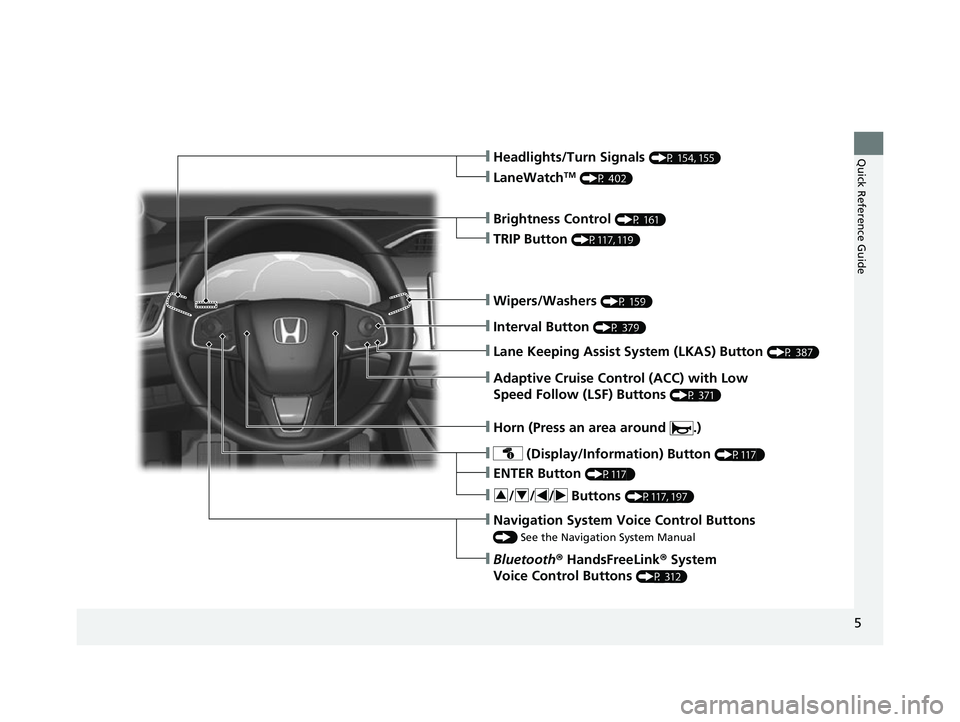
❙Wipers/Washers (P 159)
❙Headlights/Turn Signals (P 154, 155)
❙Brightness Control (P 161)
❙LaneWatchTM (P 402)
❙TRIP Button (P117, 119)
❙Interval Button (P 379)
❙Lane Keeping Assist System (LKAS) Button (P 387)
❙Adaptive Cruise Control (ACC) with Low
Speed Follow (LSF) Buttons
(P 371)
❙ (Display/Information) Button (P117 )
❙/ // Buttons (P117, 197)34
❙ENTER Button (P117 )
❙Navigation System Voice Control Buttons
() See the Navigation System Manual
❙Bluetooth® HandsFreeLink ® System
Voice Control Buttons
(P 312)
❙Horn (Press an area around .)
17 CLARITY FCV PPO-31TRT6000.book 5 ページ 2016年10月27日 木曜日 午後3時11分
Page 31 of 527
Quick Reference Guide
29
Features (P 193)
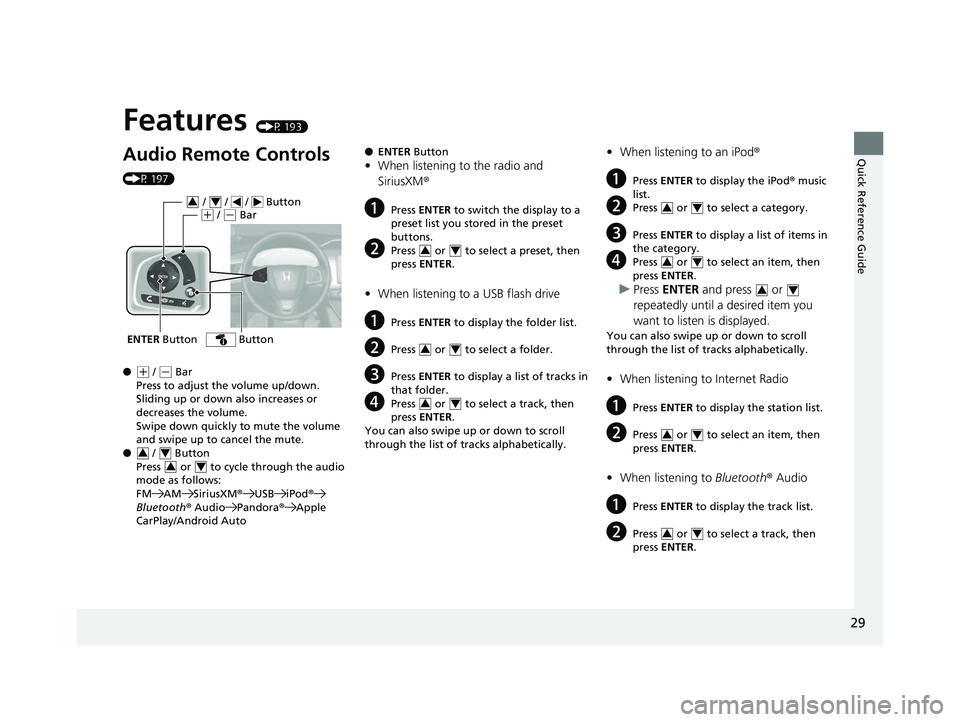
Audio Remote Controls
(P 197)
●
(+ / (- Bar
Press to adjust the volume up/down.
Sliding up or down also increases or
decreases the volume.
Swipe down quickly to mute the volume
and swipe up to cancel the mute.
● / Button
Press or to cycl e through the audio
mode as follows:
FM AM SiriusXM ®USB iPod ®
Bluetooth ® Audio Pandora ®Apple
CarPlay/Android Auto
ENTER Button
/ / / Button34(+ / (- Bar
Button
34
34
● ENTER Button
•When listening to the radio and
SiriusXM ®
aPress ENTER to switch the display to a
preset list you stored in the preset
buttons.
bPress or to select a preset, then
press ENTER .
•When listening to a USB flash drive
aPress ENTER to display the folder list.
bPress or to select a folder.
cPress ENTER to display a list of tracks in
that folder.
dPress or to select a track, then
press ENTER .
You can also swipe up or down to scroll
through the list of tracks alphabetically.
34
34
34
• When listening to an iPod ®
aPress ENTER to display the iPod ® music
list.
bPress or to select a category.
cPress ENTER to display a list of items in
the category.
dPress or to select an item, then
press ENTER .
uPress ENTER and press or
repeatedly until a desired item you
want to listen is displayed.
You can also swipe up or down to scroll
through the list of tracks alphabetically.
• When listening to Internet Radio
aPress ENTER to display the station list.
bPress or to select an item, then
press ENTER .
•When listening to Bluetooth® Audio
aPress ENTER to display the track list.
bPress or to select a track, then
press ENTER .
34
34
34
34
34
17 CLARITY FCV PPO-31TRT6000.book 29 ページ 2016年10月27日 木曜日 午後3時 11分
Page 123 of 527
121
uuGauges and Displays uDriver Information Interface
Continued
Instrument Panel
Shows the Maintenance MinderTM.
2 Maintenance MinderTM P. 431
Shows the current audio information.
2Audio System Basic Operation P. 200
Shows the current mail information.
2Bluetooth ® HandsFreeLink ® P. 312
Shows the current phone information.
2 Bluetooth ® HandsFreeLink ® P. 312
■Maintenance MinderTM
■Audio
■Mail
■Phone
17 CLARITY FCV PPO-31TRT6000.book 121 ページ 2016年10月27日 木曜日 午後3 時11分
Page 195 of 527
193
Features
This chapter describes how to operate technology features.
Audio SystemAbout Your Audio System ................ 194
USB Ports ......................................... 195
Audio System Theft Protection ......... 196
Audio Remote Controls .................... 197
Audio System Basic Operation ........ 200
Audio/Information Screen ................ 201
Adjusting the Sound ........................ 225
Display Setup ................................... 226
Voice Control Operation .................. 228
Playing AM/FM Radio ....................... 232
Playing SiriusXM ® Radio ................... 236 Playing an iPod ................................ 244
Song By VoiceTM (SBV) ...................... 247
Playing Pandora ®............................. 251
Playing a USB Flash Drive ................. 253
Playing Bluetooth ® Audio................. 256
HondaLink ®..................................... 258
Wi-Fi Connection ............................. 263
Siri Eyes Free .................................... 265
Apple CarPlay .................................. 266
Android Auto................................... 269
Audio Error Messages ...................... 273
General Information on the Audio
System
............................................. 277
Customized Features............................284
HomeLink® Universal Transceiver.......309
Bluetooth ® HandsFreeLink® ............. 312
17 CLARITY FCV PPO-31TRT6000.book 193 ページ 2016年10月27日 木曜日 午後3 時11分
Page 196 of 527
194
Features
Audio System
About Your Audio System
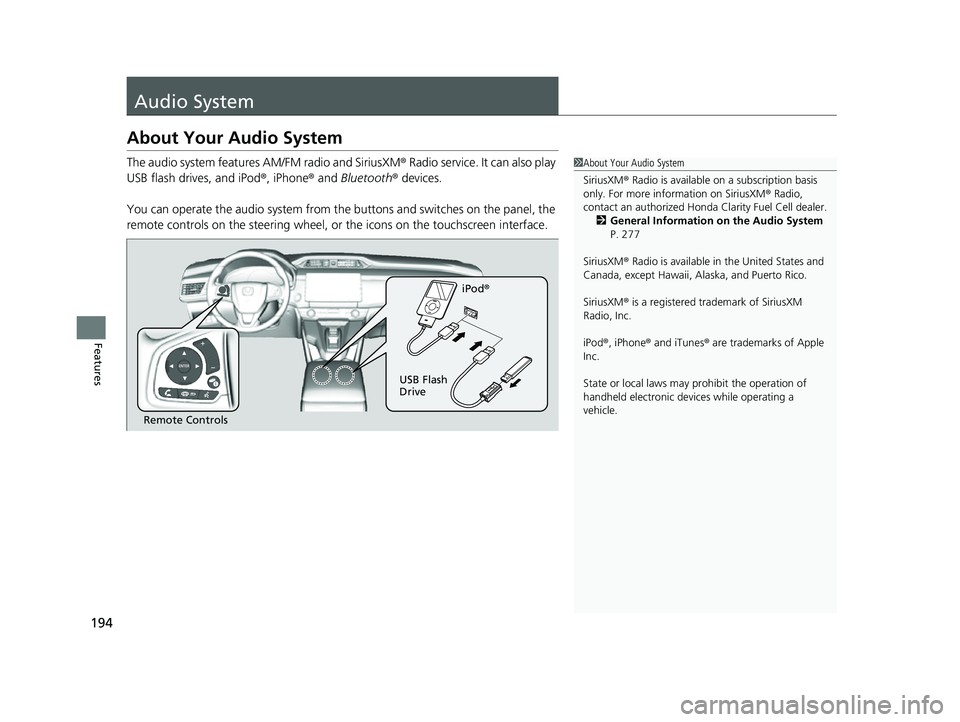
The audio system features AM/FM radio and SiriusXM® Radio service. It can also play
USB flash drives, and iPod ®, iPhone® and Bluetooth® devices.
You can operate the audio system from the buttons and switches on the panel, the
remote controls on the steering wheel, or the icons on the touchscreen interface.1About Your Audio System
SiriusXM ® Radio is available on a subscription basis
only. For more information on SiriusXM ® Radio,
contact an authorized Honda Clarity Fuel Cell dealer.
2 General Information on the Audio System
P. 277
SiriusXM ® Radio is available in the United States and
Canada, except Ha waii, Alaska, and Puerto Rico.
SiriusXM ® is a registered trademark of SiriusXM
Radio, Inc.
iPod ®, iPhone ® and iTunes ® are trademarks of Apple
Inc.
State or local laws may pr ohibit the operation of
handheld electronic devi ces while operating a
vehicle.
Remote Controls iPod
®
USB Flash
Drive
17 CLARITY FCV PPO-31TRT6000.book 194 ページ 2016年10月27日 木曜日 午後3 時11分
Page 199 of 527
197
uuAudio System uAudio Remote Controls
Continued
Features
Audio Remote Controls
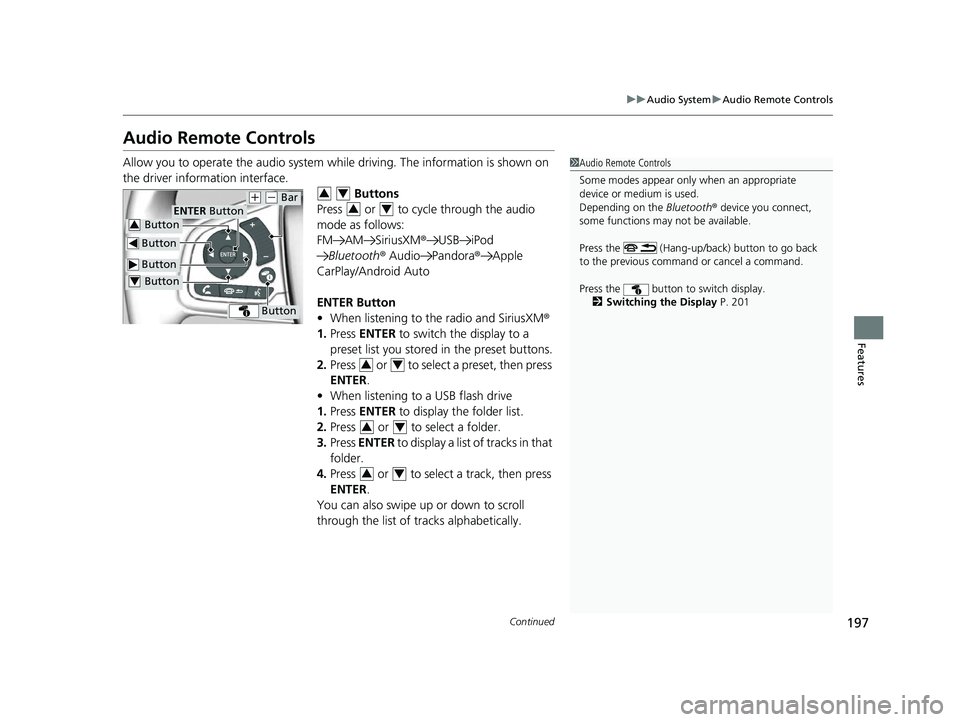
Allow you to operate the audio system whil e driving. The information is shown on
the driver information interface. Buttons
Press or to cycle through the audio
mode as follows:
FM AM SiriusXM ®USB iPod
Bluetooth ® Audio Pandora ®Apple
CarPlay/Android Auto
ENTER Button
• When listening to the radio and SiriusXM ®
1. Press ENTER to switch the display to a
preset list you stored in the preset buttons.
2. Press or to select a preset, then press
ENTER .
• When listening to a USB flash drive
1. Press ENTER to display the folder list.
2. Press or to select a folder.
3. Press ENTER to display a list of tracks in that
folder.
4. Press or to select a track, then press
ENTER .
You can also swipe up or down to scroll
through the list of tracks alphabetically.1Audio Remote Controls
Some modes appear only when an appropriate
device or medium is used.
Depending on the Bluetooth® device you connect,
some functions may not be available.
Press the (Hang-up/back) button to go back
to the previous command or cancel a command.
Press the button to switch display. 2 Switching the Display P. 201
Button
ENTER Button
Button
(+ (- Bar
Button
Button3
Button4
34
34
34
34
34
17 CLARITY FCV PPO-31TRT6000.book 197 ページ 2016年10月27日 木曜日 午後3 時11分
Page 200 of 527
198
uuAudio System uAudio Remote Controls
Features
• When listening to an iPod
1. Press ENTER to display the iPod music list.
2. Press or to select a category.
3. Press ENTER to display a list of items in the
category.
4. Press or to select an item, then press
ENTER .
u Press ENTER and press or
repeatedly until the desired mode you
want to listen to is displayed.
u You can also swipe up or down to scroll
through the list of tracks alphabetically.
• When listening to Internet Radio
1. Press ENTER to display the station list.
2. Press or to select an item, then press
ENTER .
• When listening to Bluetooth®Audio
1. Press ENTER to display the track list.
2. Press or to select a track, then press
ENTER .
34
34
34
34
34
17 CLARITY FCV PPO-31TRT6000.book 198 ページ 2016年10月27日 木曜日 午後3 時11分
Page 201 of 527
199
uuAudio System uAudio Remote Controls
Features
(+ (- (Volume) Bar
Press
(+: To increase the volume.
Press
(-: To decrease the volume.
Slide your finger up or down to increase or decrease the volume, respectively.
Swipe down quickly to mute the volume and swipe up to cancel the mute.
Buttons
• When listening to the radio
Press : To select the next preset radio station.
Press : To select the previous preset radio station.
Press and hold : To select the next strong station.
Press and hold : To select the previous strong station.
• When listening to an iPod, USB flash drive, or Bluetooth® Audio
Press : To skip to the next song.
Press : To go back to the beginning of the current or previous song.
• When listening to a USB flash drive
Press and hold : To skip to the next folder.
Press and hold : To go back to the previous folder.
• When listening to Internet radio
Press : To skip to the next track.
Press and hold : To select the next station.
Press and hold : To select the previous station.
17 CLARITY FCV PPO-31TRT6000.book 199 ページ 2016年10月27日 木曜日 午後3 時11分
Page 204 of 527
202
uuAudio System Basic Operation uAudio/Information Screen
Features
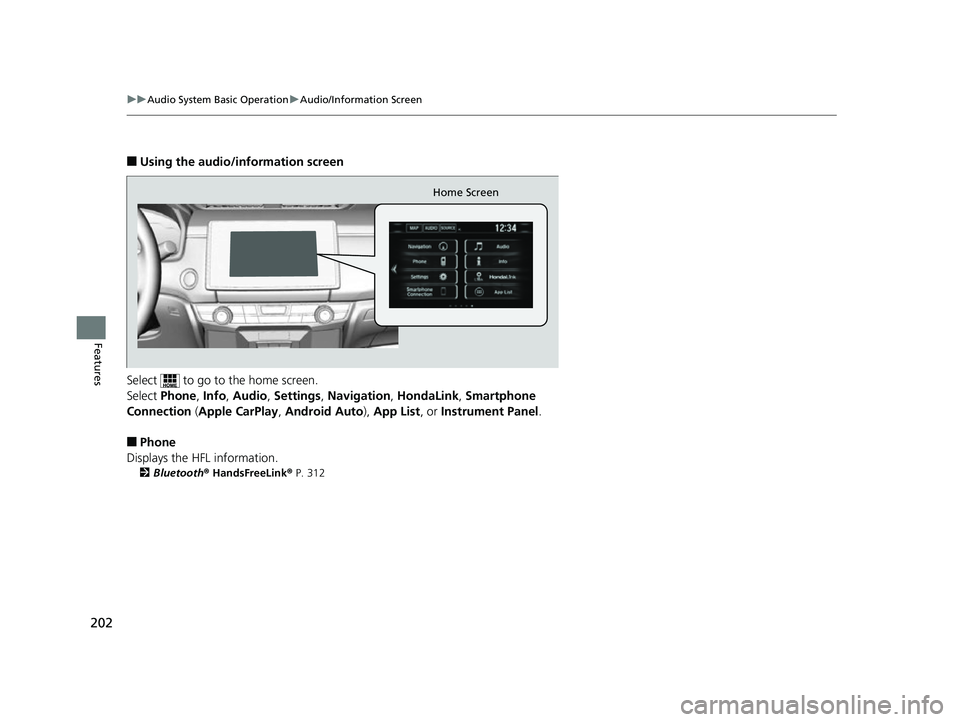
■Using the audio/information screen
Select to go to the home screen.
Select Phone, Info, Audio , Settings , Navigation , HondaLink, Smartphone
Connection ( Apple CarPlay , Android Auto ), App List, or Instrument Panel .
■Phone
Displays the HFL information.
2 Bluetooth® HandsFreeLink ® P. 312
Home Screen
17 CLARITY FCV PPO-31TRT6000.book 202 ページ 2016年10月27日 木曜日 午後3 時11分