display HONDA CLARITY FUEL CELL 2021 (in English) Service Manual
[x] Cancel search | Manufacturer: HONDA, Model Year: 2021, Model line: CLARITY FUEL CELL, Model: HONDA CLARITY FUEL CELL 2021Pages: 555, PDF Size: 28.21 MB
Page 221 of 555
Continued219
uuAudio System Basic Operation uAudio/Information Screen
Features
■Select wallpaper
1. Select Settings .
2. Select Clock.
3. Select Clock/Wallpaper Type , then open the Wallpaper tab.
u The screen changes to the wallpaper list.
4. Select a desired wallpaper.
u The preview is displayed on the left side on the screen.
u The pop-up menu appears on the screen.
5. Select Set.
u The display will return to the wallpaper list.
■To view wallpaper once it is set
1. Select .
2. Select Info.
3. Select .
4. Select Clock/Wallpaper .
■Delete wallpaper
1. Select Settings .
2. Select Clock.
3. Select Clock/Wallpaper Type , then open the Wallpaper tab.
u The screen changes to the wallpaper list.
4. Select a wallpaper that you want to delete.
u The preview is displayed on the left side on the screen.
u The pop-up menu appears on the screen.
5. Select Delete .
u A confirmation message appears on the screen.
6. Select Yes to delete completely.
u The display will return to the wallpaper list.
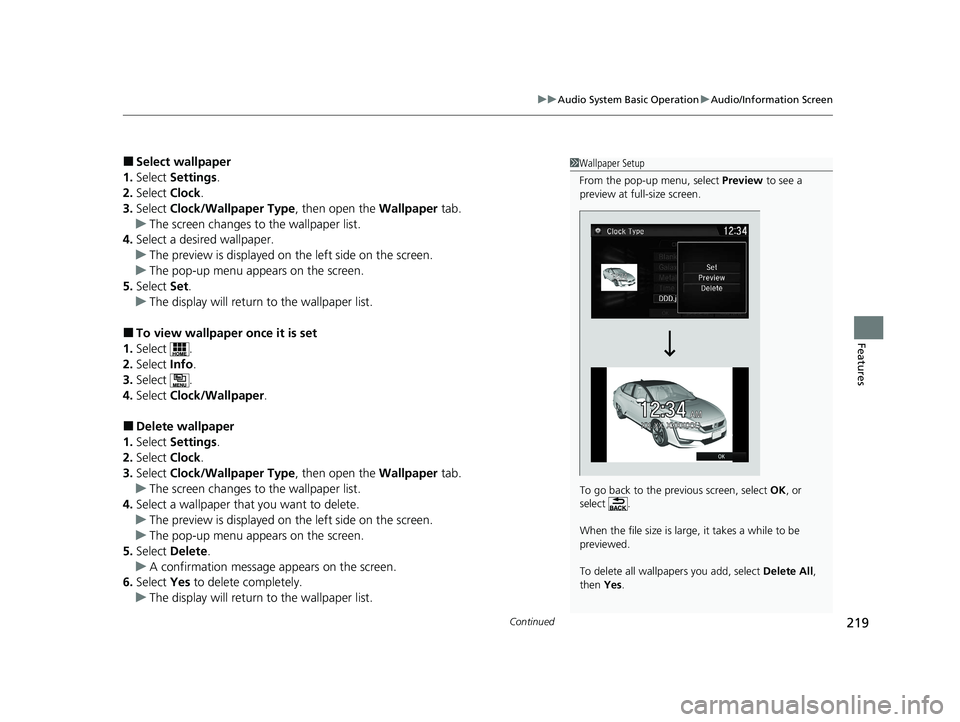
1Wallpaper Setup
From the pop-up menu, select Preview to see a
preview at full-size screen.
To go back to the previous screen, select OK, or
select .
When the file size is large, it takes a while to be
previewed.
To delete all wallpapers you add, select Delete All,
then Yes.
21 CLARITY FCV CSS-31TRT6400_02.book 219 ページ 2020年9月25日 金曜日 午 後3時15分
Page 223 of 555
Continued221
uuAudio System Basic Operation uAudio/Information Screen
Features
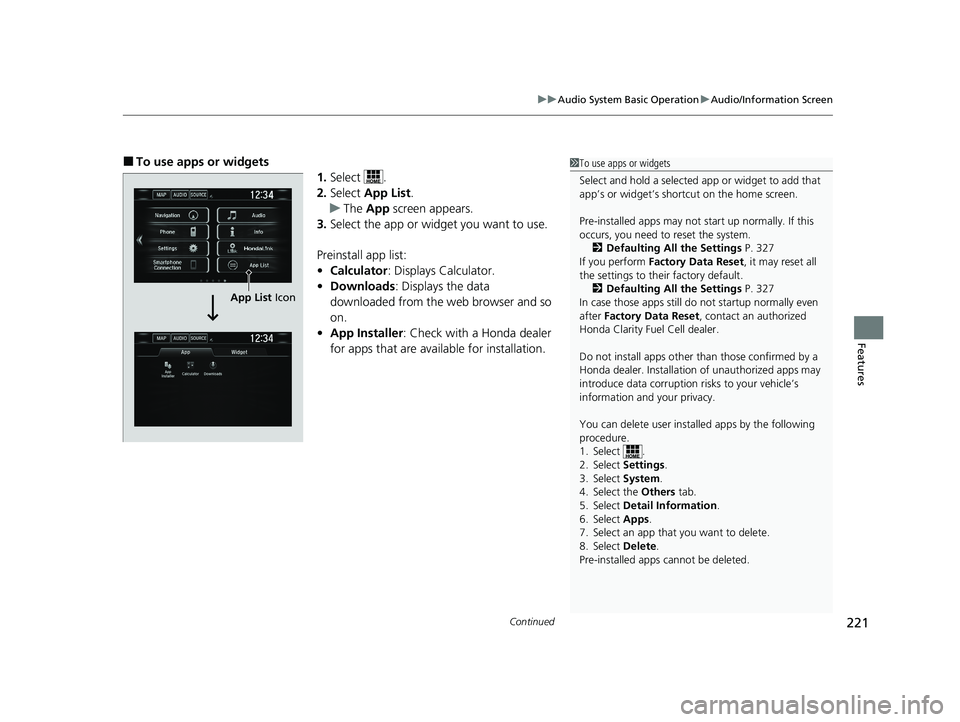
■To use apps or widgets
1.Select .
2. Select App List .
u The App screen appears.
3. Select the app or widget you want to use.
Preinstall app list:
• Calculator : Displays Calculator.
• Downloads : Displays the data
downloaded from the web browser and so
on.
• App Installer : Check with a Honda dealer
for apps that are avai lable for installation.1To use apps or widgets
Select and hold a selected app or widget to add that
app’s or widget’s shortcut on the home screen.
Pre-installed apps may not start up normally. If this
occurs, you need to reset the system.
2 Defaulting All the Settings P. 327
If you perform Factory Data Reset , it may reset all
the settings to their factory default.
2 Defaulting All the Settings P. 327
In case those apps still do not startup normally even
after Factory Data Reset , contact an authorized
Honda Clarity Fuel Cell dealer.
Do not install apps other than those confirmed by a
Honda dealer. Installation of unauthorized apps may
introduce data corruption risks to your vehicle’s
information and your privacy.
You can delete user installed apps by the following
procedure.
1. Select .
2. Select Settings .
3. Select System .
4. Select the Others tab.
5. Select Detail Information .
6. Select Apps .
7. Select an app that you want to delete.
8. Select Delete .
Pre-installed apps cannot be deleted.
App List Icon
21 CLARITY FCV CSS-31TRT6400_02.book 221 ページ 2020年9月25日 金曜日 午 後3時15分
Page 232 of 555
uuAudio System Basic Operation uAudio/Information Screen
230
Features
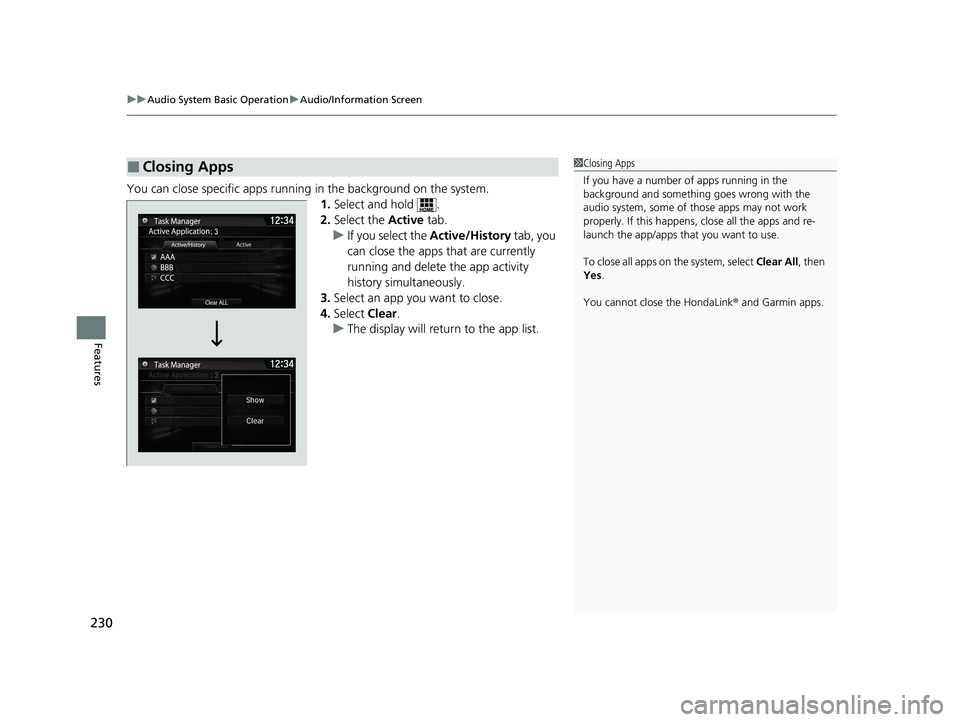
You can close specific apps running in the background on the system.
1.Select and hold .
2. Select the Active tab.
u If you select the Active/History tab, you
can close the apps that are currently
running and delete the app activity
history simultaneously.
3. Select an app you want to close.
4. Select Clear.
u The display will return to the app list.
■Closing Apps1Closing Apps
If you have a number of apps running in the
background and somethi ng goes wrong with the
audio system, some of t hose apps may not work
properly. If this happens, close all the apps and re-
launch the app/apps that you want to use.
To close all apps on the system, select Clear All, then
Yes .
You cannot close the HondaLink ® and Garmin apps.
21 CLARITY FCV CSS-31TRT6400_02.book 230 ページ 2020年9月25日 金曜日 午 後3時15分
Page 234 of 555
232
uuAudio System Basic Operation uDisplay Setup
Features
Display Setup
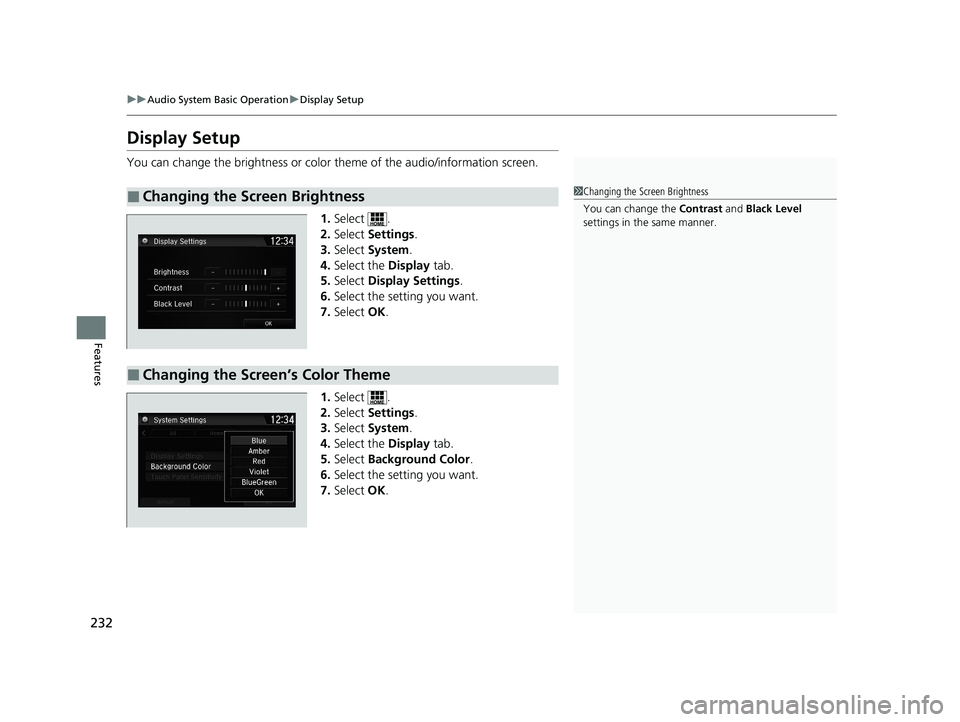
You can change the brightness or color theme of the audio/information screen.
1. Select .
2. Select Settings .
3. Select System .
4. Select the Display tab.
5. Select Display Settings .
6. Select the setting you want.
7. Select OK.
1. Select .
2. Select Settings .
3. Select System .
4. Select the Display tab.
5. Select Background Color .
6. Select the setting you want.
7. Select OK.
■Changing the Screen Brightness1Changing the Screen Brightness
You can change the Contrast and Black Level
settings in the same manner.
■Changing the Screen’s Color Theme
21 CLARITY FCV CSS-31TRT6400_02.book 232 ページ 2020年9月25日 金曜日 午 後3時15分
Page 235 of 555
233
uuAudio System Basic Operation uDisplay Setup
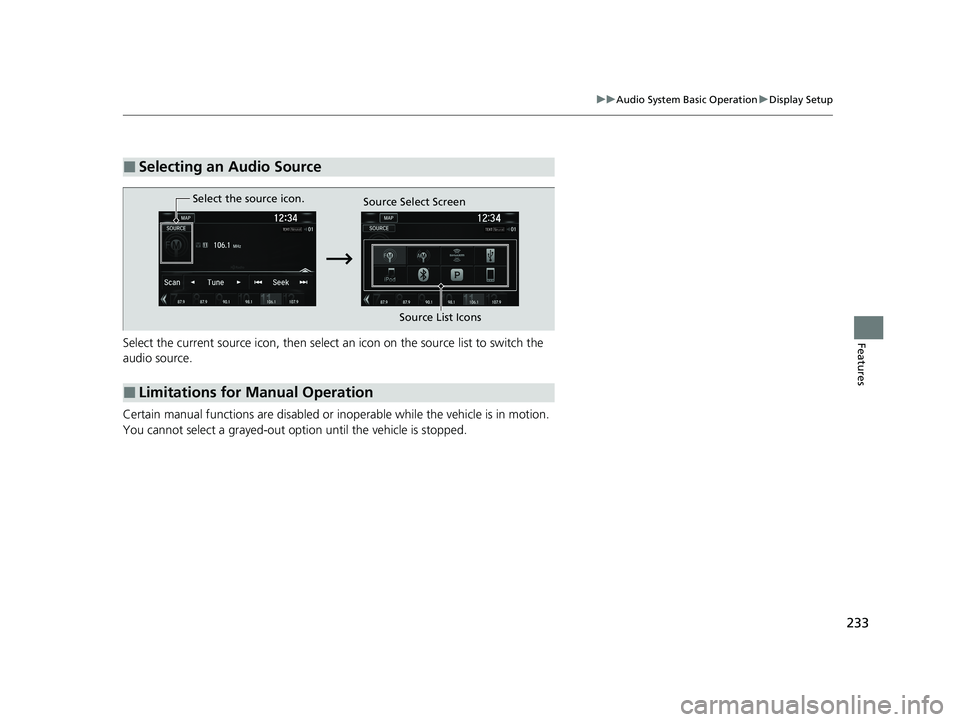
FeaturesSelect the current source icon, then select an icon on the source list to switch the
audio source.
Certain manual functions are disabled or inoperable while the vehicle is in motion.
You cannot select a grayed-out option until the vehicle is stopped.
■Selecting an Audio Source
■Limitations for Manual Operation
Select the source icon. Source Select Screen
Source List Icons
21 CLARITY FCV CSS-31TRT6400_02.book 233 ページ 2020年9月25日 金曜日 午 後3時15分
Page 239 of 555
237
uuAudio System Basic Operation uVoice Control Operation
Features
When On Screen Commands is selected,
the explanation scr een is displayed.
The system accepts th ese commands on the
Music Search screen.
■Using Song By Voice
Song By VoiceTM is a feature that allows you
to select music from yo ur iPod or USB device
using Voice Commands. To activate this
mode, you must push the talk switch and
say: “ Music search ”.
■Song By Voice Commands
• What am I listening to?
• Who am I listening to?
• Who is this?
• What’s playing?
• Who’s playing?
• What album is this?
■On Screen Commands
■Music Search Commands
■Play Commands
• Play artist
• Play track/song
• Play album
• Play genre/category
• Play playlist
• Play composer
■List Commands
• List artist
• List album
• List genre/category
• List playlist
• List composer
• What time is it?
• What is today’s date?
■General Commands
•Climate Control On*1
•Climate Control Off*1
•Fan speed <1-7>
• Temperature max heat
• Temperature max cool
• Temperature <57-87> degrees
• Defrost On
*1
•Defrost Off*1
•Air conditioner On*1
•Air conditioner Off*1
•More
• Climate Control Automatic
• Vent
• Dash and floor
• Fan speed up
• Fan speed down
• Floor vents
• Floor and Defrost
• Temperature up
• Temperature down
*1: These commands toggle the function
on and off, so the command may not match
your intended action.
■Climate Control Commands
21 CLARITY FCV CSS-31TRT6400_02.book 237 ページ 2020年9月25日 金曜日 午 後3時15分
Page 240 of 555
238
uuAudio System Basic Operation uPlaying AM/FM Radio
Features
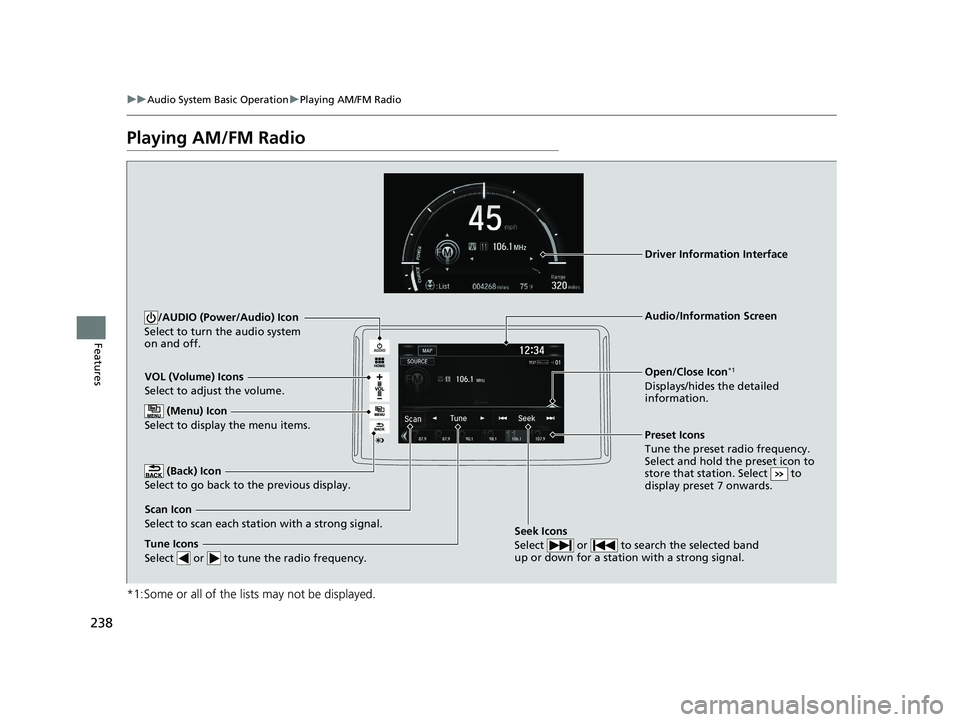
Playing AM/FM Radio
*1:Some or all of the lists may not be displayed.
VOL (Volume) Icons
Select to adjust the volume.
(Back) Icon
Select to go back to the previous display.
/AUDIO (Power/Audio) Icon
Select to turn the audio system
on and off.
Open/Close Icon*1
Displays/hides the detailed
information.
(Menu) Icon
Select to display the menu items.
Tune Icons
Select or to tune the radio frequency.
Audio/Information Screen
Scan Icon
Select to scan each station with a strong signal. Preset Icons
Tune the preset radio frequency.
Select and hold the preset icon to
store that station. Select to
display preset 7 onwards.
Driver Information Interface
Seek Icons
Select or to search the selected band
up or down for a station with a strong signal.
21 CLARITY FCV CSS-31TRT6400_02.book 238 ページ 2020年9月25日 金曜日 午
後3時15分
Page 241 of 555
Continued239
uuAudio System Basic Operation uPlaying AM/FM Radio
Features
To store a station:
1. Tune to the selected station.
2. Select and hold the preset number for the station you want to store.
You can also store a preset station by the following procedure.
1. Tune to the selected station.
2. Select the open/close icon to display a list.
3. Select the Preset tab.
4. Select and hold the preset number for the station you want to store.
Lists the strongest stations on the selected band.
1. Select the open/close icon to display a list.
2. Select the Station List tab.
3. Select the station.
■Manual update
Updates your available st ation list at any time.
1. Select the open/close icon to display a list.
2. Select the Station List tab.
3. Select Refresh .
■Preset Memory
■Station List
1Playing AM/FM Radio
The ST indicator appears on the display indicating
stereo FM broadcasts.
Stereo reproduction in AM is not available.
Switching the Audio Mode
Press the or button on the steering wheel or
select SOURCE on the screen.
2 Audio Remote Controls P. 203
You can store 6 AM stations and 12 FM stations into
preset memory.
HD Radio Technology manufactured under license
from iBiquity Digital Cor poration. U.S. and Foreign
Patents. HD Radio
TM and the HD, HD Radio, and
“Arc” logos are proprietary trademarks of iBiquity
Digital Corp.
34
21 CLARITY FCV CSS-31TRT6400_02.book 239 ページ 2020年9月25日 金曜日 午 後3時15分
Page 242 of 555
uuAudio System Basic Operation uPlaying AM/FM Radio
240
Features
Samples each of the strongest stations on the selected band for 10 seconds. To turn
off scan, select Cancel or .
Displays the subchannel list when an HD Radio
TM station is selected while listening to
an FM station.
1. Select .
2. Select HD Radio Subchannel .
3. Select the channel number.
Provides text data information related to your selected RDS-capable FM station.
■To find an RDS station from Station List
1. Select the open/close icon to display a list while listening to an FM station.
2. Select the Station List tab.
3. Select the station.
■Manual update
Updates your available station list at any time.
1. Select the open/close icon to display a list while listening to an FM station.
2. Select the Station List tab.
3. Select Refresh .
■Scan
■HD Subchannel
■Radio Data System (RDS)1Radio Data System (RDS)
When you select an RDS-capable FM station, the RDS
automatically turns on, and the frequency display
changes to the station name. However, when the
signals of that station become weak, the display
changes from the statio n name to the frequency.
21 CLARITY FCV CSS-31TRT6400_02.book 240 ページ 2020年9月25日 金曜日 午 後3時15分
Page 243 of 555
241
uuAudio System Basic Operation uPlaying AM/FM Radio
Features
■Radio text
Displays the radio text informat ion of the selected RDS station.
1. Select .
2. Select View Radio Text .
■Scan
Samples each of the strongest stations on the selected band for 10 seconds.
To turn off scan, select Cancel or .
21 CLARITY FCV CSS-31TRT6400_02.book 241 ページ 2020年9月25日 金曜日 午 後3時15分