carplay HONDA CR-V 2017 RM1, RM3, RM4 / 4.G Owners Manual
[x] Cancel search | Manufacturer: HONDA, Model Year: 2017, Model line: CR-V, Model: HONDA CR-V 2017 RM1, RM3, RM4 / 4.GPages: 657
Page 228 of 657
227
Features
This chapter describes how to operate technology features.
Audio SystemAbout Your Audio System ................ 228
USB Port(s) ....................................... 229
Audio System Theft Protection ......... 230
Audio Remote Controls .................... 231
Audio System Basic Operation Audio/Information Screen ................ 236
Adjusting the Sound ........................ 240
Display Setup ................................... 241
Playing AM/FM Radio ....................... 242
Playing an iPod ................................ 244
Playing Pandora ®.............................. 247
Playing a USB Flash Drive ................. 249
Models with color audio system
Playing Bluetooth ® Audio................. 252
Siri ® Eyes Free .................................. 255
Audio System Basic Operation Audio/Information Screen ................ 257
Adjusting the Sound ........................ 278
Display Setup ................................... 279
Voice Control Operation .................. 281
Playing AM/FM Radio ....................... 285
Playing SiriusXM ® Radio
*................. 289
Playing an iPod ................................ 296
Song By Voice
TM (SBV) ...................... 299
Playing Pandora ®*............................ 303
Playing a USB Flash Drive ................. 305
Models with Display Audio
Playing Bluetooth ® Audio ................ 308
HondaLink ®..................................... 310
Wi-Fi Connection ............................. 315
Siri ® Eyes Free .................................. 317
Apple CarPlay
TM............................... 318
Android AutoTM............................... 321
Audio Error Messages ...................... 325
General Information on the Audio System ............................................. 330
Customized Features ........................ 335
HomeLink ® Universal Transceiver
*.. 368
Bluetooth ® HandsFreeLink® ..... 371, 394
Compass
*.......................................... 428
* Not available on all models
17 CR-V-31TLA6000.book 227 ページ 2016年10月11日 火曜日 午後6時37分
Page 230 of 657
229
uuAudio System uUSB Port(s)
Features
USB Port(s)
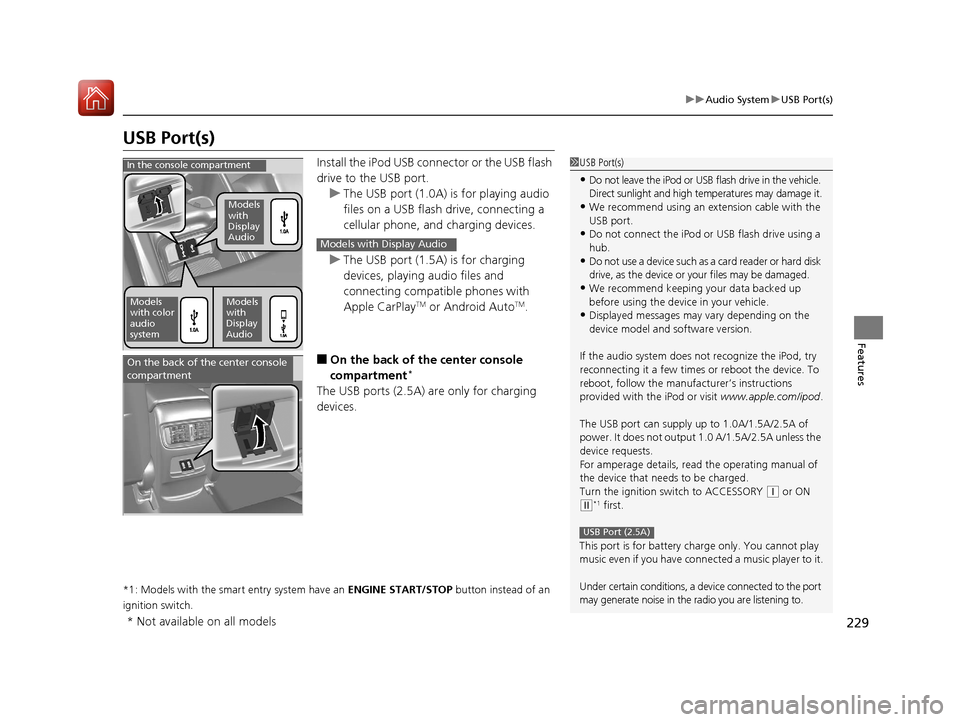
Install the iPod USB connector or the USB flash
drive to the USB port.
u The USB port (1.0A) is for playing audio
files on a USB flash drive, connecting a
cellular phone, and charging devices.
u The USB port (1.5A) is for charging
devices, playing audio files and
connecting compatib le phones with
Apple CarPlay
TM or Android AutoTM.
■On the back of the center console
compartment*
The USB ports (2.5A) are only for charging
devices.
*1: Models with the smart entry system have an ENGINE START/STOP button instead of an
ignition switch.
1 USB Port(s)
•Do not leave the iPod or USB flash drive in the vehicle.
Direct sunlight and high te mperatures may damage it.
•We recommend using an extension cable with the
USB port.
•Do not connect the iPod or USB flash drive using a
hub.
•Do not use a device such as a card reader or hard disk
drive, as the device or your files may be damaged.
•We recommend keeping y our data backed up
before using the device in your vehicle.
•Displayed messages may vary depending on the
device model and software version.
If the audio system does not recognize the iPod, try
reconnecting it a few times or reboot the device. To
reboot, follow the manufac turer’s instructions
provided with the iPod or visit www.apple.com/ipod.
The USB port can supply up to 1.0A/1.5A/2.5A of
power. It does not output 1.0 A/1.5A/2.5A unless the
device requests.
For amperage details, read the operating manual of
the device that ne eds to be charged.
Turn the ignition switch to ACCESSORY
( q or ON
(w*1 first.
This port is for battery charge only. You cannot play
music even if you have conne cted a music player to it.
Under certain conditions, a de vice connected to the port
may generate noise in the radio you are listening to.
USB Port (2.5A)
In the console compartment
Models
with
Display
Audio
Models
with color
audio
systemModels
with
Display
Audio
Models with Display Audio
On the back of the center console
compartment
* Not available on all models
17 CR-V-31TLA6000.book 229 ページ 2016年10月11日 火曜日 午後6時37分
Page 259 of 657
uuAudio System Basic Operation uAudio/Information Screen
258
Features
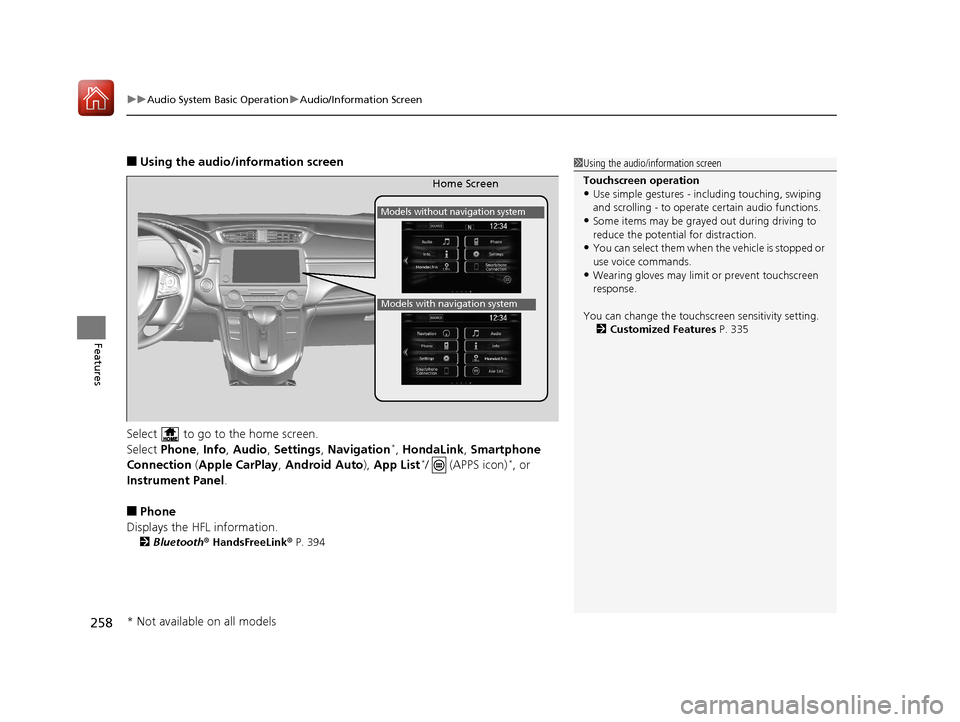
■Using the audio/information screen
Select to go to the home screen.
Select Phone, Info, Audio , Settings , Navigation
*, HondaLink , Smartphone
Connection ( Apple CarPlay , Android Auto ), App List*/ (APPS icon)*, or
Instrument Panel.
■Phone
Displays the HFL information.
2 Bluetooth® HandsFreeLink ® P. 394
1 Using the audio/in formation screen
Touchscreen operation
•Use simple gestures - in cluding touching, swiping
and scrolling - to operate certain audio functions.
•Some items may be grayed out during driving to
reduce the potential for distraction.
•You can select them when the vehicle is stopped or
use voice commands.
•Wearing gloves may limit or prevent touchscreen
response.
You can change the touchs creen sensitivity setting.
2 Customized Features P. 335
Home Screen
Models without navigation system
Models with navigation system
* Not available on all models
17 CR-V-31TLA6000.book 258 ページ 2016年10月11日 火曜日 午後6時37分
Page 261 of 657
260
uuAudio System Basic Operation uAudio/Information Screen
Features
■HondaLink
Connects with your smartphone*1 to play personalized music, information, and
social media streams.
2 HondaLink® P. 310
■Smartphone Connection
Displays the Apple CarPlayTM or Android AutoTM.
2 Apple CarPlayTM P. 318
2 Android AutoTM P. 321
■App List ( )
Adds or removes apps or widgets on the home screen.
2 Home Screen P. 268
■Instrument Panel
Selects from three customizable settings for the driver information interface.
*1: Available on specific phones only. Check handsfreelink.honda.com for U.S. and
www.handsfreelink.ca for Canada for compatible phones and hondalink.com for U.S. and
honda.ca/hondalink for Canada for feature details.
17 CR-V-31TLA6000.book 260 ページ 2016年10月11日 火曜日 午後6時37分
Page 283 of 657
282
uuAudio System Basic Operation uVoice Control Operation
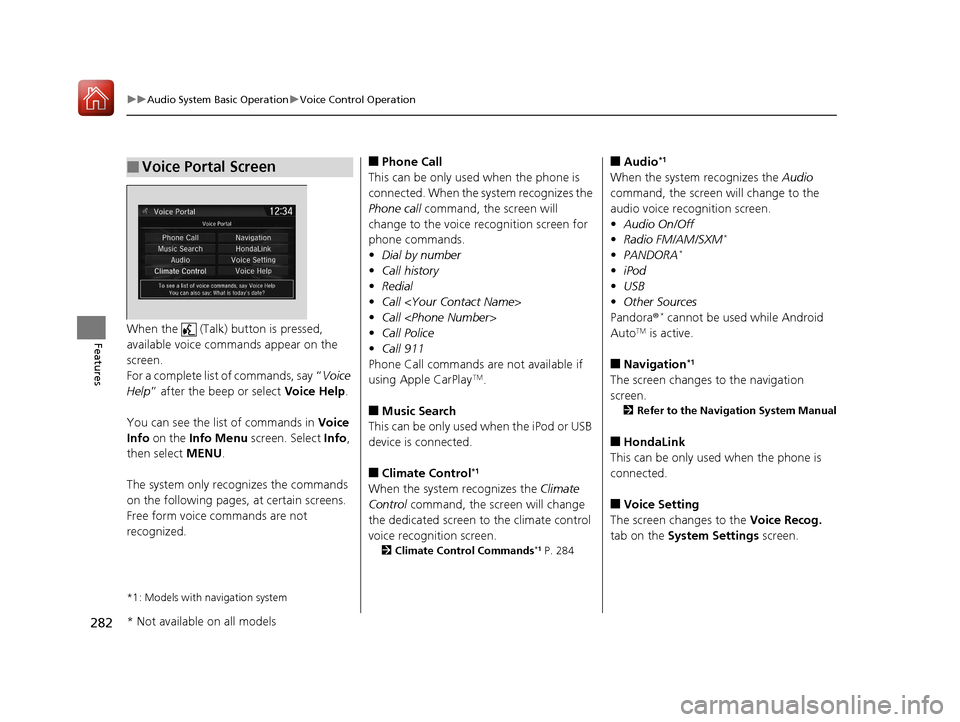
FeaturesWhen the (Talk) button is pressed,
available voice commands appear on the
screen.
For a complete list of commands, say “ Voice
Help ” after the beep or select Voice Help.
You can see the list of commands in Voice
Info on the Info Menu screen. Select Info,
then select MENU.
The system only reco gnizes the commands
on the following pages, at certain screens.
Free form voice commands are not
recognized.
*1: Models with navigation system
■Voice Portal Screen■Phone Call
This can be only used when the phone is
connected. When the sy stem recognizes the
Phone call command, the screen will
change to the voice recognition screen for
phone commands.
• Dial by number
• Call history
• Redial
• Call
• Call
• Call Police
• Call 911
Phone Call commands are not available if
using Apple CarPlay
TM.
■Music Search
This can be only used when the iPod or USB
device is connected.
■Climate Control*1
When the system recognizes the Climate
Control command, the screen will change
the dedicated screen to the climate control
voice recognition screen.
2 Climate Control Commands*1 P. 284
■Audio*1
When the system recognizes the Audio
command, the screen will change to the
audio voice recognition screen.
• Audio On/Off
• Radio FM/AM/SXM
*
•PANDORA*
•iPod
• USB
• Other Sources
Pandora ®
* cannot be used while Android
AutoTM is active.
■Navigation*1
The screen changes to the navigation
screen.
2 Refer to the Navigation System Manual
■HondaLink
This can be only used when the phone is
connected.
■Voice Setting
The screen changes to the Voice Recog.
tab on the System Settings screen.
* Not available on all models
17 CR-V-31TLA6000.book 282 ページ 2016年10月11日 火曜日 午後6時37分
Page 298 of 657
Continued297
uuAudio System Basic Operation uPlaying an iPod
Features
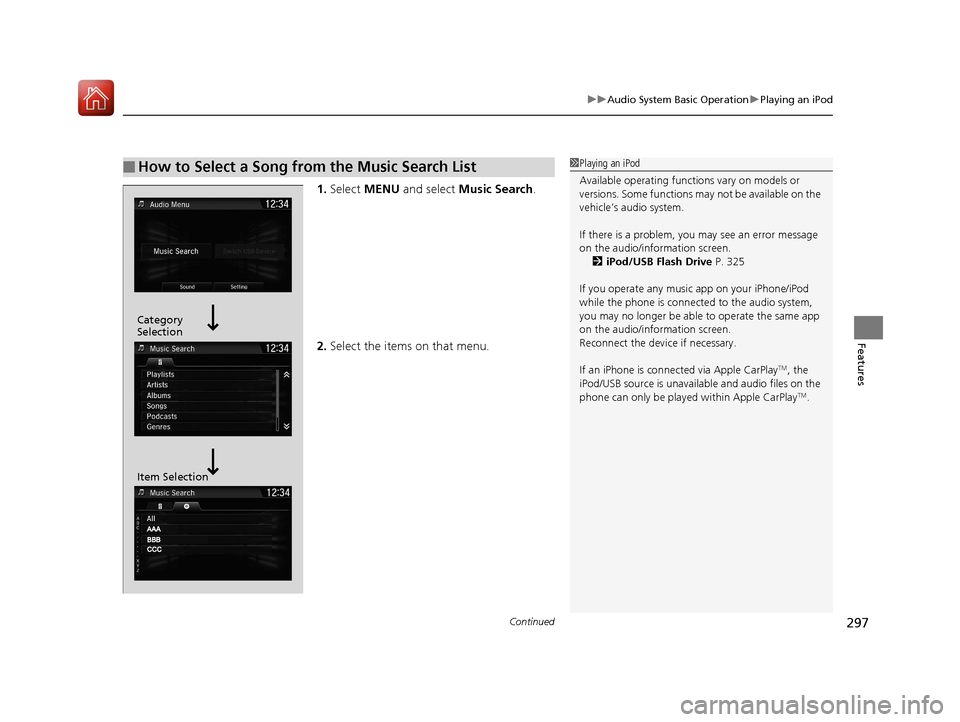
1. Select MENU and select Music Search .
2. Select the items on that menu.
■How to Select a Song from the Music Search List1Playing an iPod
Available operating functi ons vary on models or
versions. Some functions ma y not be available on the
vehicle’s audio system.
If there is a problem, you may see an error message
on the audio/information screen. 2 iPod/USB Flash Drive P. 325
If you operate any musi c app on your iPhone/iPod
while the phone is connected to the audio system,
you may no longer be able to operate the same app
on the audio/information screen.
Reconnect the devi ce if necessary.
If an iPhone is connect ed via Apple CarPlay
TM, the
iPod/USB source is unavailab le and audio files on the
phone can only be played within Apple CarPlay
TM.
Category
Selection
Item Selection
17 CR-V-31TLA6000.book 297 ページ 2016年10月11日 火曜日 午後6時37分
Page 301 of 657
uuAudio System Basic Operation uSong By VoiceTM (SBV)
300
Features
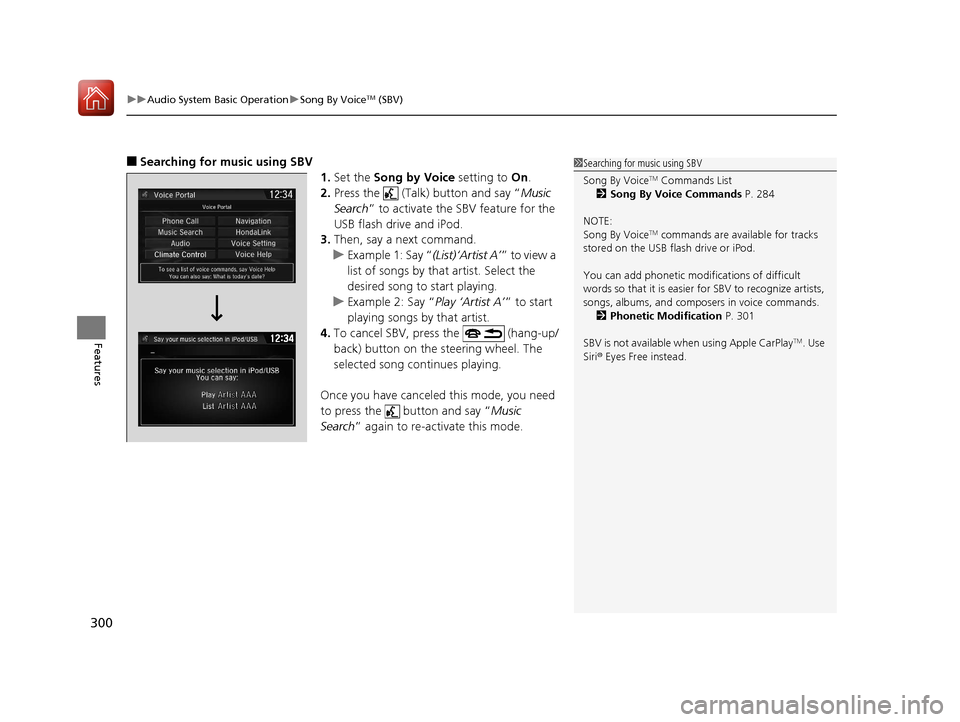
■Searching for music using SBV
1.Set the Song by Voice setting to On.
2. Press the (Talk) button and say “ Music
Search ” to activate the SBV feature for the
USB flash drive and iPod.
3. Then, say a next command.
u Example 1: Say “ (List)‘Artist A’” to view a
list of songs by that artist. Select the
desired song to start playing.
u Example 2: Say “ Play ‘Artist A’” to start
playing songs by that artist.
4. To cancel SBV, pr ess the (hang-up/
back) button on the steering wheel. The
selected song continues playing.
Once you have canceled this mode, you need
to press the button and say “ Music
Search ” again to re-activate this mode.1Searching for music using SBV
Song By Voice
TM Commands List
2 Song By Voice Commands P. 284
NOTE:
Song By Voice
TM commands are available for tracks
stored on the USB flash drive or iPod.
You can add phonetic modi fications of difficult
words so that it is easier for SBV to recognize artists,
songs, albums, and composers in voice commands. 2 Phonetic Modification P. 301
SBV is not available wh en using Apple CarPlay
TM. Use
Siri ® Eyes Free instead.
17 CR-V-31TLA6000.book 300 ページ 2016年10月11日 火曜日 午後6時37分
Page 309 of 657
308
uuAudio System Basic Operation uPlaying Bluetooth ® Audio
Features
Playing Bluetooth® Audio
Your audio system allows you to listen to music from your Bluetooth-compatible
phone.
This function is available when the phone is paired and connected to the vehicle’s
Bluetooth ® HandsFreeLink ® (HFL) system.
2 Phone Setup P. 402
*1:Depending on the Bluetooth® device you connect, some or all of the lists may not
be displayed.
1 Playing Bluetooth ® Audio
Not all Bluetooth -enabled phones with streaming
audio capabilities are compatible.
To check if your phone is compatible, visit
http://www.handsfr eelink.com/Honda/.
It may be illegal to pe rform some data device
functions while driving.
Only one phone can be used with HFL at a time.
When there are more than two paired phones in the
vehicle, the first paired phone the system finds is
automatically connected.
The connected phone for Bluetooth® Audio can be
different.
If more than one phone is paired to the HFL system,
there may be a delay before the system begins to
play.
In some cases, the name of the artist, album, or track
may not appear correctly.
Some functions may not be available on some
devices.
If a phone is currently c onnected via Apple CarPlay
TM
or Android AutoTM, Bluetooth ® Audio from that
phone is unavailable. However, a second previously
paired phone can stream Bluetooth® Audio by
selecting Connect from the Bluetooth Device
List screen.
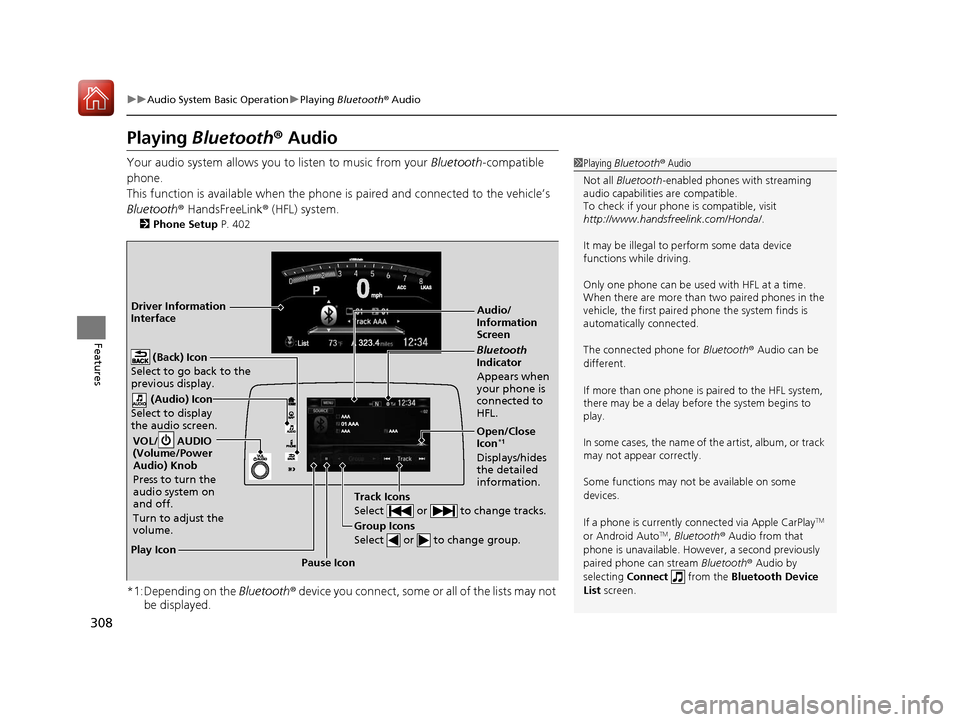
Audio/
Information
Screen
VOL/ AUDIO
(Volume/Power
Audio) Knob
Press to turn the
audio system on
and off.
Turn to adjust the
volume.
(Back) Icon
Select to go back to the
previous display.
(Audio) Icon
Select to display
the audio screen.
Group Icons
Select or to change group.
Pause Icon
Play Icon
Bluetooth
Indicator
Appears when
your phone is
connected to
HFL.
Track Icons
Select or to change tracks.
Open/Close
Icon*1
Displays/hides
the detailed
information.
Driver Information
Interface
17 CR-V-31TLA6000.book 308 ページ 2016年10月11日 火曜日 午後6時37分
Page 311 of 657
310
uuAudio System Basic Operation uHondaLink ®
Features
HondaLink ®
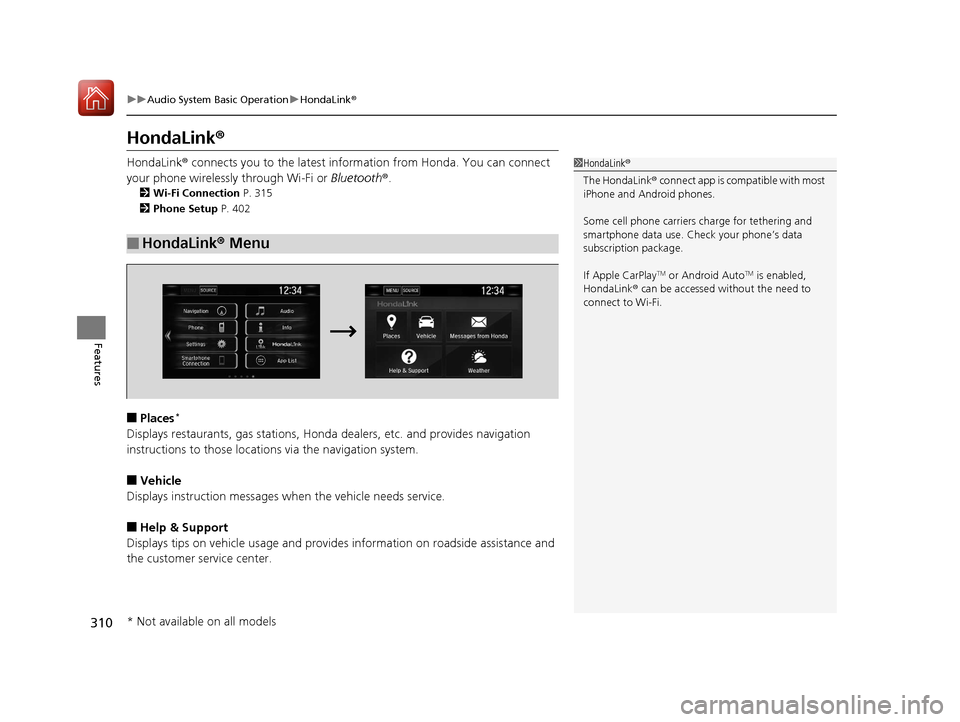
HondaLink® connects you to the latest information from Honda. You can connect
your phone wirelessly through Wi-Fi or Bluetooth®.
2Wi-Fi Connection P. 315
2 Phone Setup P. 402
■Places*
Displays restaurants, gas stations, Honda dealers, etc. and provides navigation
instructions to those locations via the navigation system.
■Vehicle
Displays instruction messages wh en the vehicle needs service.
■Help & Support
Displays tips on vehicle us age and provides information on roadside assistance and
the customer service center.
■HondaLink® Menu
1HondaLink ®
The HondaLink ® connect app is compatible with most
iPhone and Android phones.
Some cell phone carriers charge for tethering and
smartphone data use. Check your phone’s data
subscription package.
If Apple CarPlay
TM or Android AutoTM is enabled,
HondaLink ® can be accessed without the need to
connect to Wi-Fi.
* Not available on all models
17 CR-V-31TLA6000.book 310 ページ 2016年10月11日 火曜日 午後6時37分
Page 319 of 657
318
uuAudio System Basic Operation uApple CarPlayTM
Features
Apple CarPlayTM
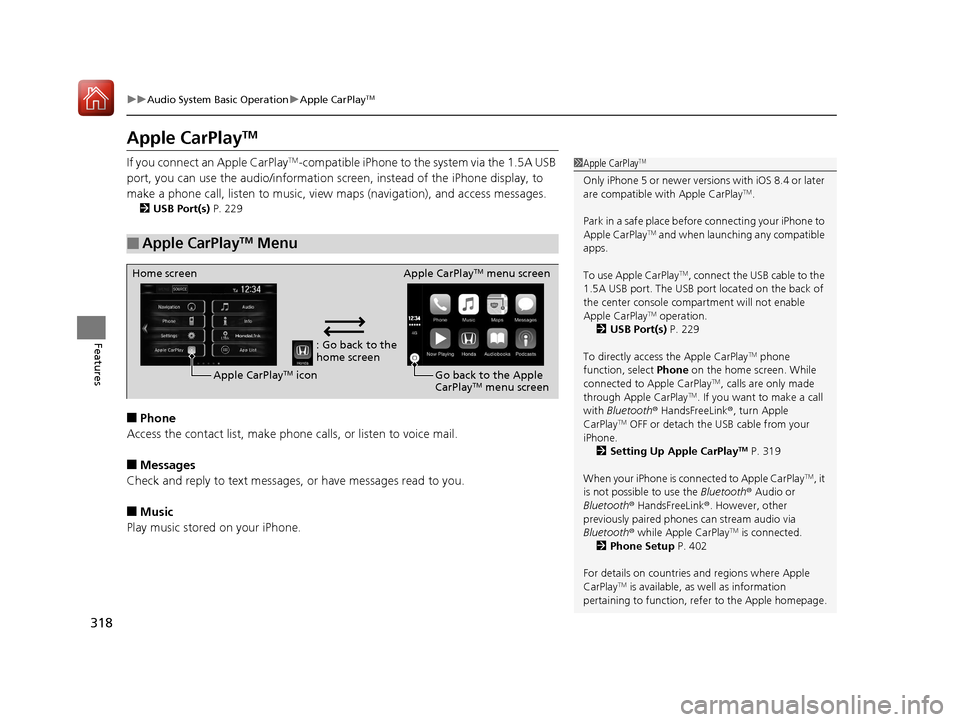
If you connect an Apple CarPlayTM-compatible iPhone to the system via the 1.5A USB
port, you can use the audio/information scr een, instead of the iPhone display, to
make a phone call, listen to music, view maps (navigation), and access messages.
2USB Port(s) P. 229
■Phone
Access the contact list, make phone calls, or listen to voice mail.
■Messages
Check and reply to text messages, or have messages read to you.
■Music
Play music stored on your iPhone.
■Apple CarPlayTM Menu
1Apple CarPlayTM
Only iPhone 5 or newer versi ons with iOS 8.4 or later
are compatible with Apple CarPlayTM.
Park in a safe place before connecting your iPhone to
Apple CarPlay
TM and when launching any compatible
apps.
To use Apple CarPlay
TM, connect the USB cable to the
1.5A USB port. The USB port located on the back of
the center console compartment will not enable
Apple CarPlay
TM operation.
2 USB Port(s) P. 229
To directly access the Apple CarPlay
TM phone
function, select Phone on the home screen. While
connected to Apple CarPlay
TM, calls are only made
through Apple CarPlayTM. If you want to make a call
with Bluetooth ® HandsFreeLink ®, turn Apple
CarPlay
TM OFF or detach the USB cable from your
iPhone.
2 Setting Up Apple CarPlay
TM P. 319
When your iPhone is connected to Apple CarPlay
TM, it
is not possible to use the Bluetooth® Audio or
Bluetooth ® HandsFreeLink ®. However, other
previously paired phones can stream audio via
Bluetooth ® while Apple CarPlay
TM is connected.
2 Phone Setup P. 402
For details on c ountries and regions where Apple
CarPlay
TM is available, as well as information
pertaining to function, refer to the Apple homepage.
: Go back to the
home screen
Home screen
Apple CarPlay
TM icon Apple CarPlay
TM menu screen
Go back to the Apple
CarPlay
TM menu screen
17 CR-V-31TLA6000.book 318 ページ 2016年10月11日 火曜日 午後6時37分