park assist HONDA CR-V 2017 RM1, RM3, RM4 / 4.G Owners Manual
[x] Cancel search | Manufacturer: HONDA, Model Year: 2017, Model line: CR-V, Model: HONDA CR-V 2017 RM1, RM3, RM4 / 4.GPages: 657
Page 12 of 657
11
Quick Reference Guide
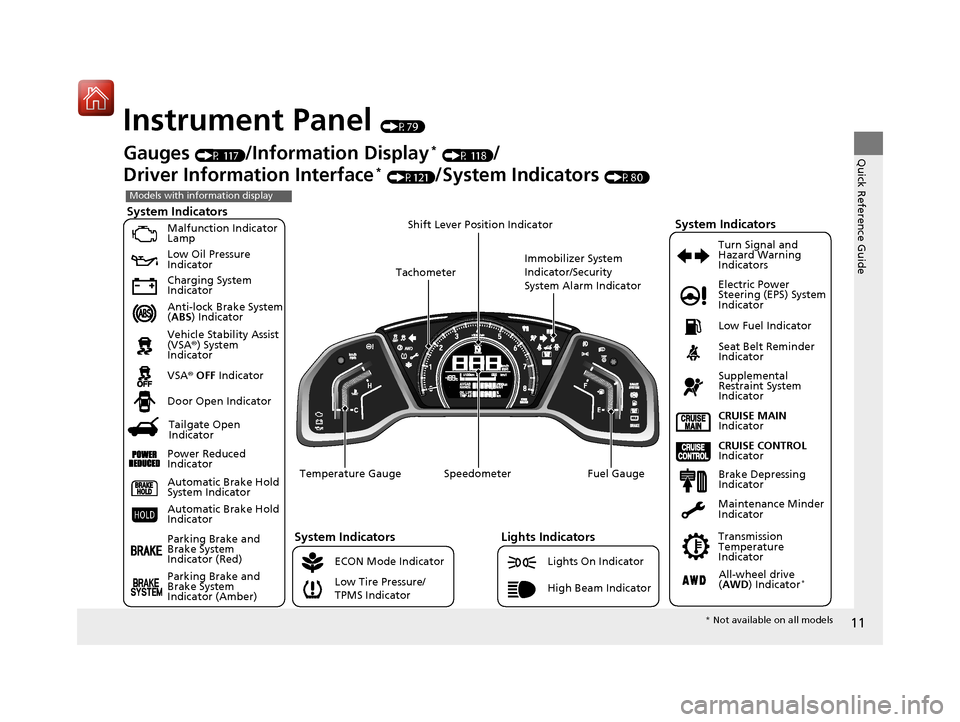
Instrument Panel (P79)
System Indicators
Malfunction Indicator
Lamp
Low Oil Pressure
Indicator
Charging System
Indicator
Anti-lock Brake System
(ABS ) Indicator
Vehicle Stability Assist
(VSA ®) System
Indicator
VSA ® OFF Indicator
Low Tire Pressure/
TPMS Indicator Electric Power
Steering (EPS) System
Indicator
Lights Indicators
Lights On Indicator
High Beam Indicator
Seat Belt Reminder
Indicator
System Indicators
CRUISE CONTROL
Indicator
Parking Brake and
Brake System
Indicator (Red) Supplemental
Restraint System
Indicator
Door Open Indicator
CRUISE MAIN
Indicator
Immobilizer System
Indicator/Security
System Alarm Indicator
Speedometer Fuel Gauge
Tachometer
Shift Lever Position Indicator
Low Fuel Indicator
Gauges (P 117)/Information Display* (P 118)/
Driver Information Interface
* (P121)/System Indicators (P80)
ECON Mode Indicator Turn Signal and
Hazard Warning
Indicators
Maintenance Minder
Indicator
Transmission
Temperature
Indicator
Models with information display
Parking Brake and
Brake System
Indicator (Amber)
System Indicators
Automatic Brake Hold
System Indicator
Automatic Brake Hold
Indicator
Temperature Gauge
Brake Depressing
Indicator
Tailgate Open
Indicator
Power Reduced
Indicator
All-wheel drive
( AWD ) Indicator*
* Not available on all models
17 CR-V-31TLA6000.book 11 ページ 2016年10月11日 火曜日 午後6時37分
Page 13 of 657
12
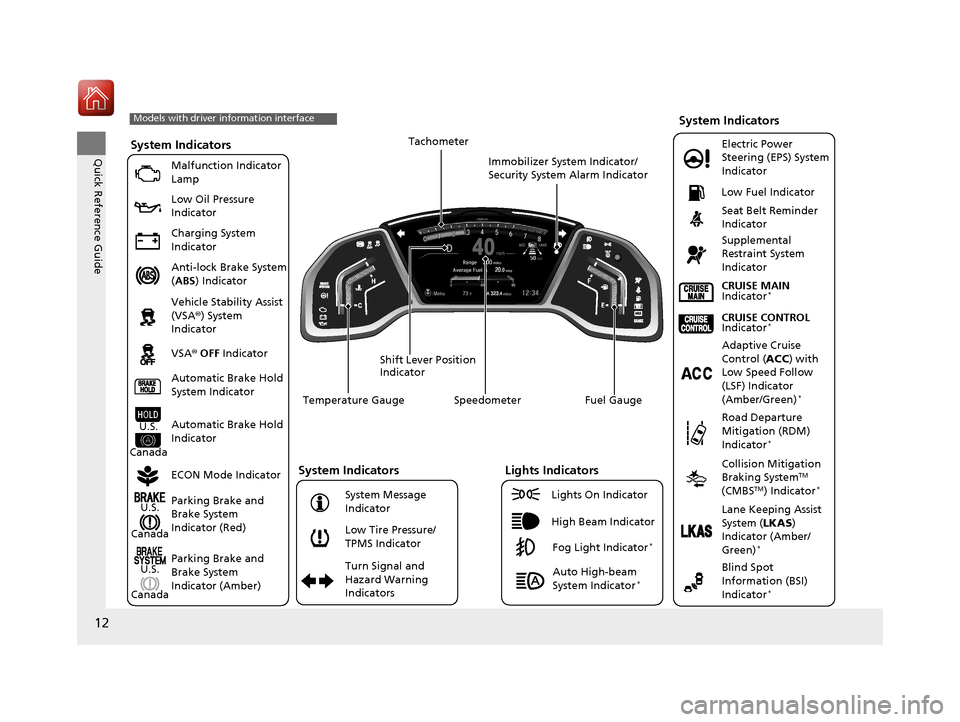
Quick Reference GuideSystem Indicators
Malfunction Indicator
Lamp
Low Oil Pressure
Indicator
Charging System
Indicator
Anti-lock Brake System
(ABS ) Indicator
Vehicle Stability Assist
(VSA ®) System
Indicator
VSA ® OFF Indicator
Low Tire Pressure/
TPMS Indicator Electric Power
Steering (EPS) System
Indicator
Seat Belt Reminder
Indicator
System Indicators
Parking Brake and
Brake System
Indicator (Red)
Supplemental
Restraint System
Indicator
Speedometer Fuel Gauge
Shift Lever Position
Indicator Immobilizer System Indicator/
Security System Alarm Indicator
Low Fuel Indicator
ECON Mode Indicator Turn Signal and
Hazard Warning
Indicators
Models with driver information interface
Parking Brake and
Brake System
Indicator (Amber)
System Indicators
U.S.
Canada
U.S.
Canada Automatic Brake Hold
System Indicator
Automatic Brake Hold
IndicatorU.S.
Canada Temperature Gauge
Lights Indicators
Lights On Indicator
High Beam Indicator
Fog Light Indicator*
Adaptive Cruise
Control (
ACC) with
Low Speed Follow
(LSF) Indicator
(Amber/Green)
*
System Message
Indicator Collision Mitigation
Braking System
TM
(CMBSTM) Indicator*
Road Departure
Mitigation (RDM)
Indicator
*
Lane Keeping Assist
System ( LKAS)
Indicator (Amber/
Green)
*
Tachometer
Auto High-beam
System Indicator*
CRUISE CONTROL
Indicator*
CRUISE MAIN
Indicator*
Blind Spot
Information (BSI)
Indicator
*
17 CR-V-31TLA6000.book 12 ページ 2016年10月11日 火曜日 午後6時37分
Page 432 of 657
431
Driving
This chapter discusses driving, refueling, and information on items such as accessories.
Before Driving................................... 432
Towing a Trailer Towing Preparation .......................... 437
Driving Safely with a Trailer .............. 440
Towing Your Vehicle ........................ 441
Off-Highway Driving Guidelines
General Information ......................... 442
Important Safety Precautions............ 442
Avoiding Trouble ............................. 443
When Driving
Starting the Engine .......................... 444
Starting the Engine .......................... 446
Precautions While Driving................. 451
Models without smart entry system
Models with smart entry system
Continuously Variable Transmission... 452
Shifting ............................................ 453
ECON Button ................................... 455
Cruise Control
*............................... 456
Front Sensor Camera*..................... 463
Adaptive Cruise Control (ACC) with Low
Speed Follow (LSF)
*....................... 465Road Departure Mitigation (RDM) System*..................................... 480Lane Keeping Assist System (LKAS)*.. 484Vehicle Stability Assist (VSA®), aka Electronic
Stability Control (ESC), System............. 492
LaneWatchTM*.................................. 498
Real Time AWD with Intelligent Control System
TM*...................................... 500
Tire Pressure Monitoring System (TPMS) ... 501Tire Pressure Monitoring System (TPMS) - Required Federal Explanation ......... 504
Braking Brake System ................................... 506
Anti-lock Brake System (ABS) ........... 512
Brake Assist System ......................... 513
Collision Mitigation Braking System
TM
(CMBSTM)*..................................... 514
Parking Your Vehicle When Stopped ................................ 524
Multi-View Rear Camera .................. 529
Refueling ........................................... 531
Fuel Economy and CO
2 Emissions .... 534
Turbo Engine Vehicle*...................... 535
* Not available on all models
17 CR-V-31TLA6000.book 431 ページ 2016年10月11日 火曜日 午後6時37分
Page 446 of 657
445
uuWhen Driving uStarting the Engine
Driving
1. Keeping your right foot on the br ake pedal, put the shift lever in (D. Select (R
when reversing.
2. With the parking brake applied, release the brake pedal and gently depress the
accelerator pedal.
u Make sure the parking brake indicator goes off.
2 Parking Brake P. 506
■Hill start assist system
Hill start assist keeps the brake engaged br iefly to help prevent the vehicle from
rolling on inclines as you move your foot from the brake pedal to the accelerator.
Move the shift lever to
(D, (S, or (L when facing uphill, or (R when facing
downhill, then release the brake pedal.
■Starting to Drive1 Starting the Engine
The immobilizer system pr otects your vehicle from
theft. If an improperly code d key (or other device) is
used, the engine's fuel system is disabled.
2 Immobilizer System P. 158
You can also release the parking brake by pressing
the electric parking brake sw itch while depressing the
brake pedal. When facing downhill, you can start
your vehicle more smoothly by manually releasing it
with the electric parki ng brake switch than by
releasing it with th e accelerator pedal.
1Hill start assist system
Hill start assist may not prevent the vehicle from
rolling downhill on a very steep or slippe ry slope, and
does not operate on small inclines.
Hill start assist is not a replacement for the parking
brake.
Hill start assist will operate even when VSA ® is
switched off.
17 CR-V-31TLA6000.book 445 ページ 2016年10月11日 火曜日 午後6時37分
Page 451 of 657
uuWhen Driving uStarting the Engine
450
Driving
1. Depress the brake pedal and press the ENGINE START/STOP button
simultaneously.
2. Put the shift lever in
(D. Select (R when reversing.
3. With the parking brake is applied, releas e the brake pedal and gently depress the
accelerator pedal.
u Make sure the parking brake indicator goes off.
4. Gradually release the brake pedal and gently depress the accelerator pedal to pull
away.
■Hill start assist system
Hill start assist keeps the brake engaged br iefly to help prevent the vehicle from
rolling on inclines as you move your fo ot from the brake pedal to the accelerator.
Move the shift lever to
(D, (S, or (L when facing uphill, or (R when facing
downhill, then release the brake pedal.
■Starting to Drive1 Starting to Drive
The engine stops when the sh ift lever is moved out of
(P before the ENGINE START/STOP button is
pressed. Follow step 1 when starting to drive.
You can also release the parking brake by pressing
the electric parking brake sw itch while depressing the
brake pedal. When facing downhill, you can start
your vehicle more smoothly by manually releasing it
with the electric parki ng brake switch than by
releasing it with th e accelerator pedal.
When the engine was started using the button*
on the smart entry remoteWhen the engine was started using the button* on the smart entry remote
When the engine was started in any case
1 Hill start assist system
Hill start assist may not prevent the vehicle from
rolling downhill on a very steep or slippe ry slope, and
does not operate on small inclines.
Hill start assist is not a replacement for the parking
brake.
Hill start assist will operate even when VSA ® is
switched off.
* Not available on all models
17 CR-V-31TLA6000.book 450 ページ 2016年10月11日 火曜日 午後6時37分
Page 465 of 657
uuWhen Driving uFront Sensor Camera*
464
Driving
1Front Sensor Camera*
Do not place an object on the top of the instrument
panel. It may reflect onto the windshield and prevent
the system from detecting lane lines properly.
If the Some Driver Assist Systems Cannot
Operate:Camera Temperature Too High :
message appears:
•Use the climate control system to cool down the
interior and, if necessary, also use defroster mode
with the air flow directed toward the camera.
•Start driving the vehicle to lower the windshield
temperature, which cool s down the area around
the camera.
If the Some Driver Assist Systems Cannot
Operate:Clean Front Windshield : message
appears:
•Park your vehicle in a sa fe place, and clean the
windshield. If the message does not disappear after
you have cleaned the winds hield and driven for a
while, have your vehicle checked by a dealer.
* Not available on all models
17 CR-V-31TLA6000.book 464 ページ 2016年10月11日 火曜日 午後6時37分
Page 467 of 657
uuWhen Driving uAdaptive Cruise Control (ACC) with Low Speed Follow (LSF)*
466
Driving
■How to activate the system1Adaptive Cruise Control (ACC) with Low Speed Follow (LSF)*
When the MAIN button is pressed, both ACC with
LSF and the Lane Keeping Assist System (LKAS) are
either turned on or off.
ACC with LSF may not work properly under certain
conditions. 2 ACC with LSF Conditions and Limitations
P. 471
When not using ACC with LSF: Turn off adaptive
cruise by pressing the MAIN button. This also will
turn off the Lane Keeping Assist System (LKAS).
Do not use ACC with LSF under the following
conditions:
•On roads with heavy traf fic or while driving in
continuous stop and go traffic.
•On roads with sharp turns.
•On roads with steep downhill sections, as the set
vehicle speed can be exceeded by coasting. In such
cases, ACC with LSF will not apply the brakes to
maintain the set speed.
•On roads with toll collection facilities or other
objects between lanes of traffic, or in parking
areas, or faci lities with driv e through access.
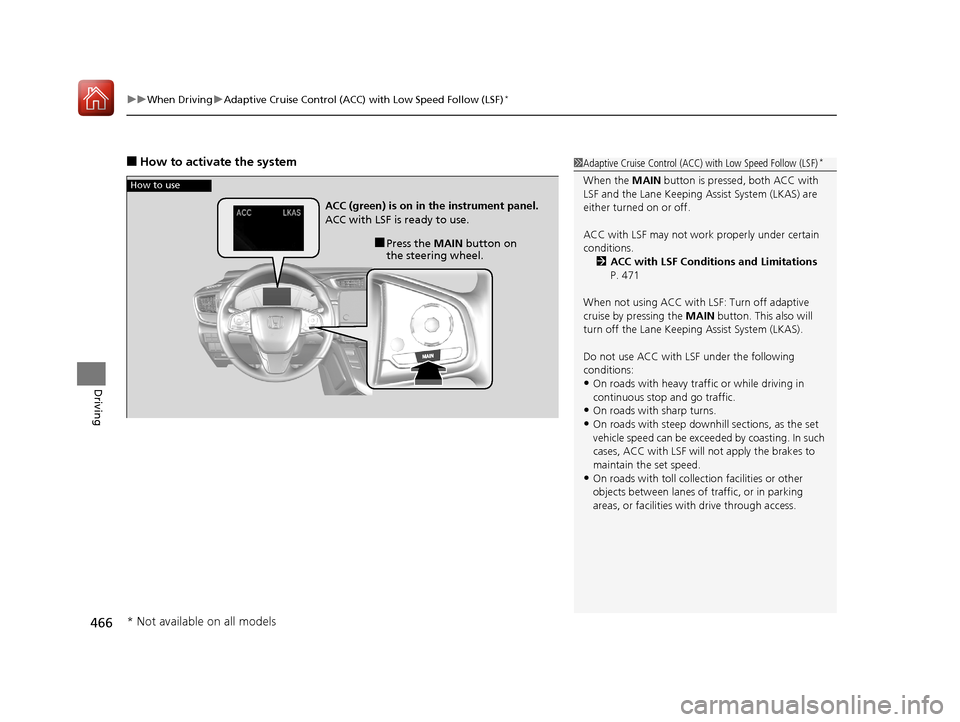
How to use
■Press the MAIN button on
the steering wheel.
ACC (green) is on in the instrument panel.
ACC with LSF is ready to use.
* Not available on all models
17 CR-V-31TLA6000.book 466 ページ 2016年10月11日 火曜日 午後6時37分
Page 496 of 657
495
uuWhen Driving uBlind spot information (BSI) System*
Continued
Driving
Blind spot informa tion (BSI) System*
Is designed to detect vehicles in specified alert zones adjacent to your vehicle,
particularly in harder to see areas commonly known as “blind spots.”
When the system detects vehicles approach ing from behind in adjacent lanes, the
appropriate indicator comes on for a few seconds, providing assistance when you
change lanes.
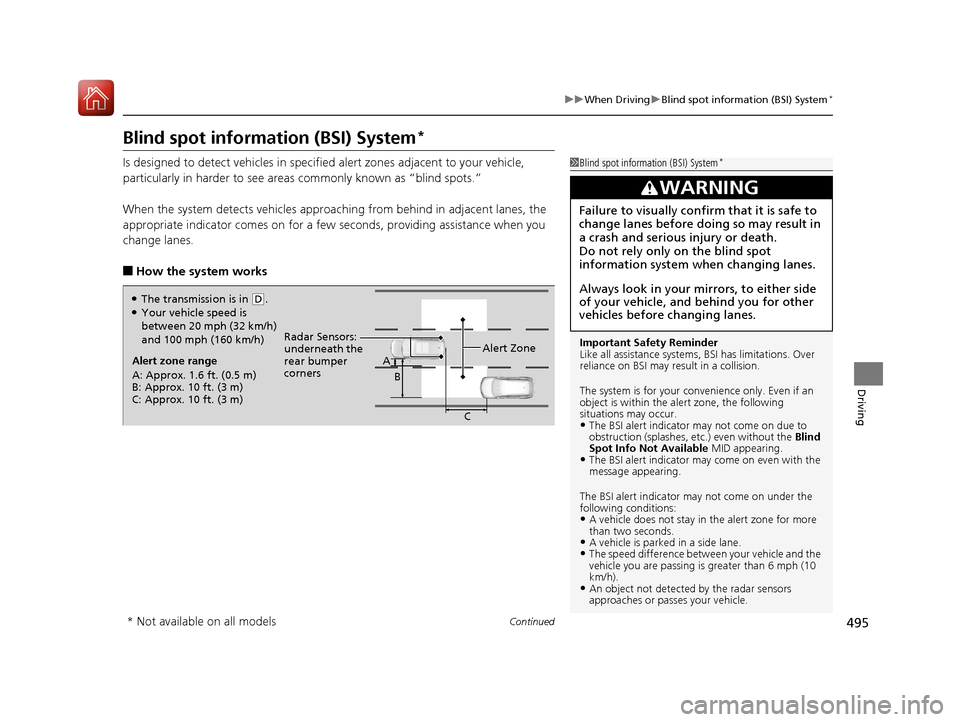
■How the system works
1 Blind spot inform ation (BSI) System*
Important Safety Reminder
Like all assistance systems, BSI has limitations. Over
reliance on BSI may re sult in a collision.
The system is for your convenience only. Even if an
object is within the alert zone, the following
situations may occur.
•The BSI alert indicator may not come on due to
obstruction (splashes, et c.) even without the Blind
Spot Info Not Available MID appearing.
•The BSI alert indicator may come on even with the
message appearing.
The BSI alert i ndicator may not come on under the
following conditions:
•A vehicle does not stay in the alert zone for more
than two seconds.
•A vehicle is parked in a side lane.•The speed difference betw een your vehicle and the
vehicle you are passing is greater than 6 mph (10
km/h).
•An object not detected by the radar sensors
approaches or passes your vehicle.
3WARNING
Failure to visually confirm that it is safe to
change lanes before doing so may result in
a crash and serious injury or death.
Do not rely only on the blind spot
information system wh en changing lanes.
Always look in your mirrors, to either side
of your vehicle, and behind you for other
vehicles before changing lanes.
Alert zone range
A: Approx. 1.6 ft. (0.5 m)
B: Approx. 10 ft. (3 m)
C: Approx. 10 ft. (3 m) Radar Sensors:
underneath the
rear bumper
corners
Alert ZoneA
B
C
●The transmission is in (D.●Your vehicle speed is
between 20 mph (32 km/h)
and 100 mph (160 km/h)
* Not available on all models
17 CR-V-31TLA6000.book 495 ページ 2016年10月11日 火曜日 午後6時37分
Page 624 of 657
623
uuIndicator, Coming On/Blinking uIf the Electric Power Steering (EPS) System Indicator Comes On
Handling the Unexpected
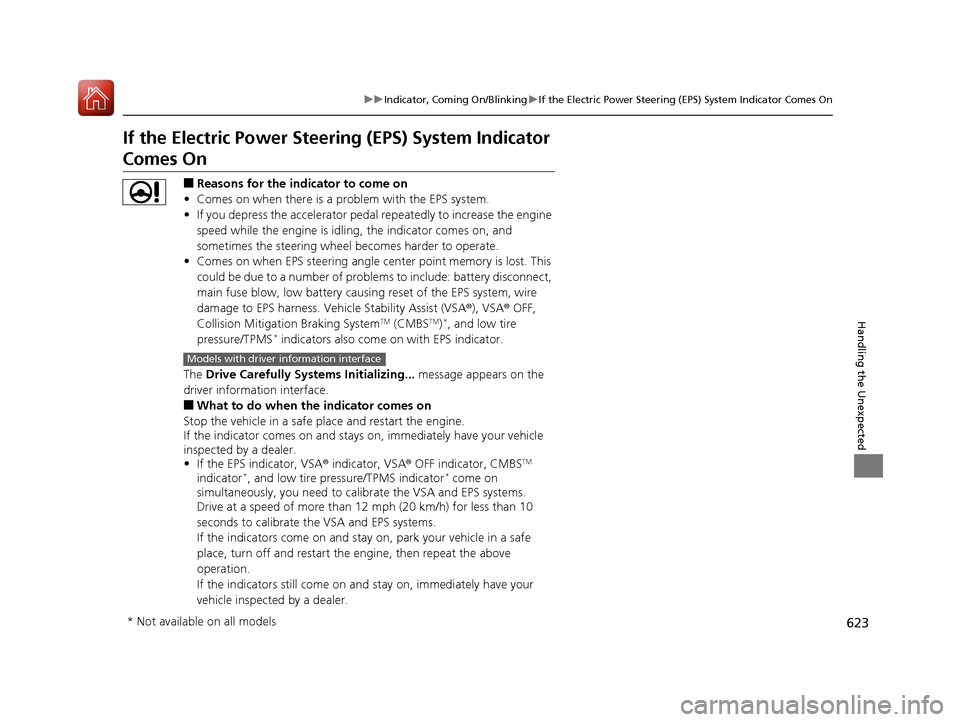
If the Electric Power Steeri ng (EPS) System Indicator
Comes On
■Reasons for the indicator to come on
• Comes on when there is a problem with the EPS system.
• If you depress the accelerator pedal repeatedly to increase the engine
speed while the engine is idling, the indicator comes on, and
sometimes the steering wheel becomes harder to operate.
• Comes on when EPS steering angle center point memory is lost. This
could be due to a number of problems to include: battery disconnect,
main fuse blow, low battery causing reset of the EPS system, wire
damage to EPS harness. Vehicle Stability Assist (VSA ®), VSA® OFF,
Collision Mitigation Braking System
TM (CMBSTM)*, and low tire
pressure/TPMS* indicators also come on with EPS indicator.
The Drive Carefully Systems Initializing... message appears on the
driver information interface.
■What to do when th e indicator comes on
Stop the vehicle in a safe place and restart the engine.
If the indicator comes on and stays on, immediately have your vehicle
inspected by a dealer.
• If the EPS indicator, VSA ® indicator, VSA® OFF indicator, CMBS
TM
indicator*, and low tire pressure/TPMS indicator* come on
simultaneously, you need to ca librate the VSA and EPS systems.
Drive at a speed of more than 12 mph (20 km/h) for less than 10
seconds to calibrate the VSA and EPS systems.
If the indicators come on and stay on, park your vehicle in a safe
place, turn off and restart the engine, then repeat the above
operation.
If the indicators still come on an d stay on, immediately have your
vehicle inspected by a dealer.
Models with driver information interface
* Not available on all models
17 CR-V-31TLA6000.book 623 ページ 2016年10月11日 火曜日 午後6時37分
Page 649 of 657
648
Index
Auto Door Locking/Unlocking................. 146
Auto High-Beam System .......................... 178
Automatic Brake Hold .............................. 510
Indicator ............................................ 82, 510
Automatic Intermittent Wipers ............... 183
Automatic Lighting .................................. 175
Average Fuel Economy ..................... 119, 124
Average Speed .......................................... 124
AWD (All-Wheel Drive) ............................ 500
B
Battery....................................................... 588
Charging System Indicator ................. 83, 619
Jump Starting .......................................... 611
Maintenance (Checking the Battery) ........ 588
Maintenance (Replacing).......................... 590
Belts (Seat) .................................................. 40
Beverage Holders ...................................... 210
Blind spot information (BSI) System ........ 495
Bluetooth ® Audio ............................. 252, 308
Bluetooth ® HandsFreeLink ®............. 371, 394
Booster Seats (For Children) ....................... 75
Brake System ............................................. 506
Anti-lock Brake System (ABS) ................... 512
Automatic Brake Hold.............................. 510
Brake Assist System ................................. 513
Fluid ........................................................ 566
Foot Brake ............................................... 509
Indicator (Red) ........................... 80, 621, 622
Parking Brake .......................................... 506 Brightness Control
(Instrument Panel).... 185
Bulb Replacement .................................... 568
Brake/Taillight, Rear Turn Signal Light and
Rear Side Marker Lights ......................... 572
Fog Lights ............................................... 570
Front Turn Signal/ Front Side Marker Lights .................................................... 572
Headlights ............................................... 568
High-Mount Brake Light .......................... 574
Parking/Daytime Running Lights .............. 572
Rear License Plate Light ........................... 574
Side Turn Signal/Emergency Indicator Lights .................................................... 572
Taillight and Back-Up Lights .................... 573
Bulb Specifications ................................... 634
C
Carbon Monoxide Gas ............................... 76
Cargo Hook ............................................... 215
Carrying Cargo ................................. 433, 435
Certification Label .................................... 636
Changing Bulbs ........................................ 568
Charging System Indicator ................. 83, 619
Child Safety ................................................. 63
Childproof Door Locks............................. 145
Child Seat .................................................... 63
Booster Seats ............................................ 75
Child Seat for Infants................................. 65
Child Seat for Small Children ..................... 66 Installing a Child Seat
with a Lap/Shoulder
Seat Belt ................................................. 71
Larger Children ......................................... 74
Rear-facing Child Seat............................... 65
Selecting a Child Seat ............................... 67
Childproof Door Locks ............................. 145
Cleaning the Exterior ............................... 595
Cleaning the Interior ............................... 593
Climate Control System ........................... 221
Changing the Mode................................ 221
Defrosting the Windshield and
Windows .............................................. 222
Dust and Pollen Filter .............................. 592
Recirculation/Fresh Air Mode................... 222
Sensors ................................................... 225
Synchronized Mode ................................ 224
Using Automatic Climate Control............ 221
Clock ......................................................... 132
CMBSTM (Collision Mitigation Braking
SystemTM) ................................................ 514
Coat Hook ................................................ 214
Collision Mitigation Braking System
TM
(CMBSTM) ................................................. 514
Compact Spare Tire .......................... 601, 635
Compass .................................................... 428
Continuously Variable Transmission ....... 452
Creeping................................................. 452
Fluid ....................................................... 565
Kickdown ............................................... 452
Operating the Shift Lever .................. 23, 454
Shift Lever Does Not Move ...................... 614
17 CR-V-31TLA6000.book 648 ページ 2016年10月11日 火曜日 午後6時37分