tailgate HONDA ODYSSEY 1999 User Guide
[x] Cancel search | Manufacturer: HONDA, Model Year: 1999, Model line: ODYSSEY, Model: HONDA ODYSSEY 1999Pages: 343, PDF Size: 3.73 MB
Page 84 of 343
Keys and Locks
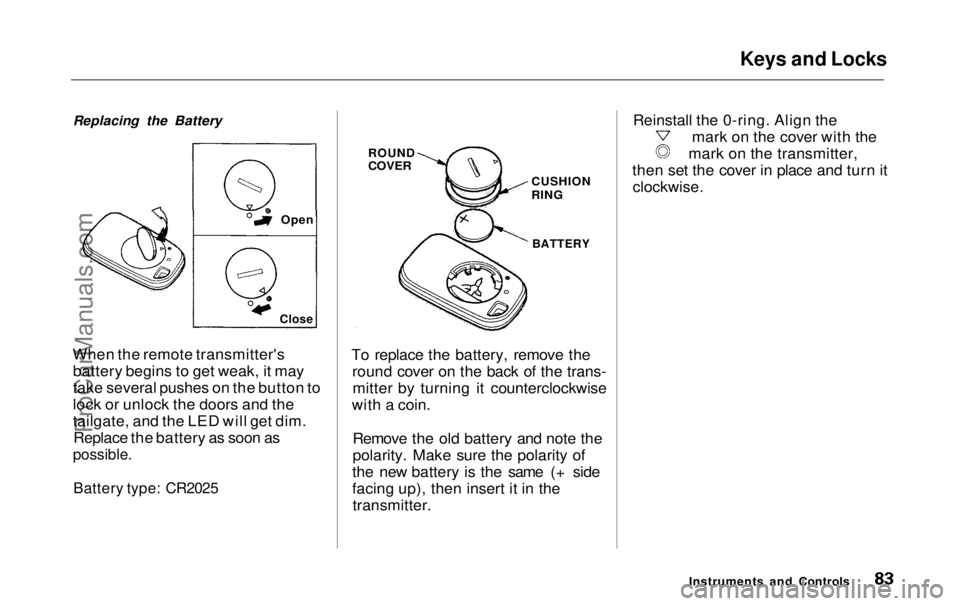
Replacing the Battery
When the remote transmitter's battery begins to get weak, it may
take several pushes on the button to
lock or unlock the doors and the
tailgate, and the LED will get dim.Replace the battery as soon as
possible.
Battery type: CR2025
To replace the battery, remove the
round cover on the back of the trans-mitter by turning it counterclockwise
with a coin.
Remove the old battery and note the
polarity. Make sure the polarity of
the new battery is the same (+ side
facing up), then insert it in the transmitter. Reinstall the 0-ring. Align the mark on the cover with the
mark on the transmitter,
then set the cover in place and turn it clockwise.
Instruments and Controls
Close
Open
ROUND
COVER
CUSHION
RING
BATTERYProCarManuals.comMain Menu Table of Contents s t
Page 86 of 343
Keys and Locks
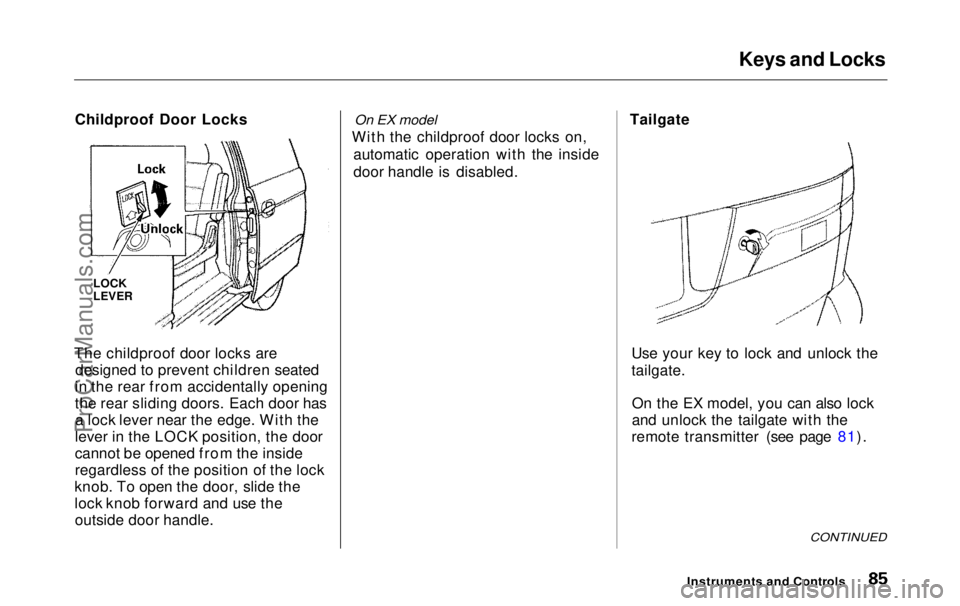
Childproof Door Locks
The childproof door locks are designed to prevent children seated
in the rear from accidentally opening
the rear sliding doors. Each door has a lock lever near the edge. With the
lever in the LOCK position, the door
cannot be opened from the inside
regardless of the position of the lock
knob. To open the door, slide the
lock knob forward and use the outside door handle.
On EX model
With the childproof door locks on, automatic operation with the inside
door handle is disabled. Tailgate
Use your key to lock and unlock the
tailgate.On the EX model, you can also lock
and unlock the tailgate with the
remote transmitter (see page 81).
CONTINUED
Instruments and Controls
LOCK
LEVERProCarManuals.comMain Menu Table of Contents s t
Page 87 of 343
Keys and Locks
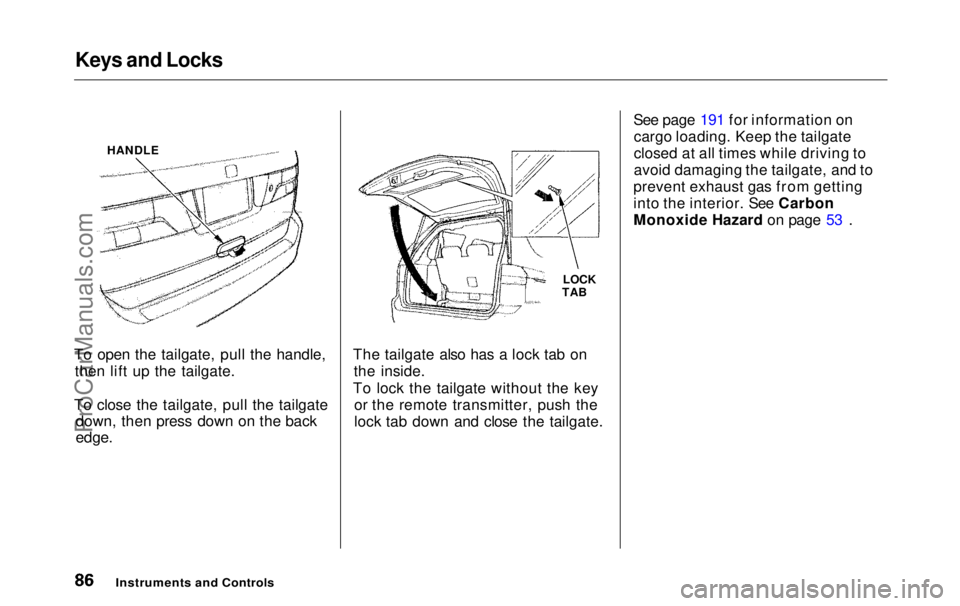
To open the tailgate, pull the handle, then lift up the tailgate.
To close the tailgate, pull the tailgate down, then press down on the back
edge.
The tailgate also has a lock tab on
the inside.
To lock the tailgate without the key or the remote transmitter, push the
lock tab down and close the tailgate. See page 191 for information on
cargo loading. Keep the tailgate
closed at all times while driving to
avoid damaging the tailgate, and to
prevent exhaust gas from getting
into the interior. See Carbon
Monoxide Hazard on page 53 .
Instruments an d
Controls
LOCK
TAB
HANDLEProCarManuals.comMain Menu Table of Contents s t
Page 102 of 343
Seats
To change the seat-back angle of the front seats, pull up on the lever onthe outside of the seat bottom.
To change the seat-back angle of the bucket seats in the second row, pull
forward on the lever on the outside of the seat-back.
To adjust the seat-back angle of the bench seat in the second row, pull upon the lever on the side of the seat-
back. Move the seat-back to the desired position and release the lever.
Let the seat-back latch in the new
position.
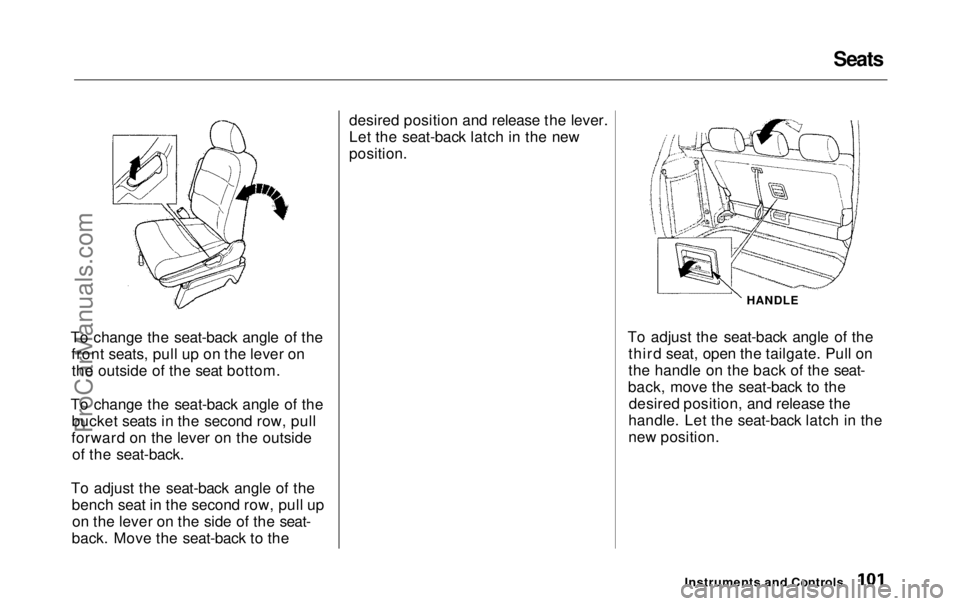
To adjust the seat-back angle of thethird seat, open the tailgate. Pull on
the handle on the back of the seat-
back, move the seat-back to the desired position, and release the
handle. Let the seat-back latch in the
new position.
Instruments and Controls
HANDLEProCarManuals.comMain Menu Table of Contents s t
Page 126 of 343
Interior Lights
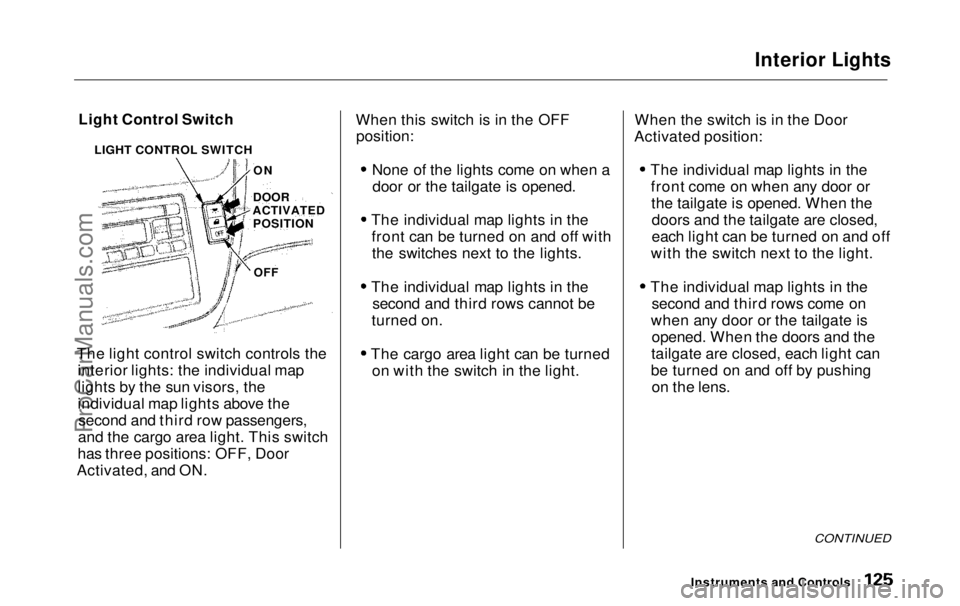
Light Control Switch
The light control switch controls the interior lights: the individual map
lights by the sun visors, the
individual map lights above thesecond and third row passengers,
and the cargo area light. This switch
has three positions: OFF, Door
Activated, and ON. When this switch is in the OFF
position:
None of the lights come on when adoor or the tailgate is opened.
The individual map lights in the front can be turned on and off withthe switches next to the lights.
The individual map lights in the second and third rows cannot be
turned on.
The cargo area light can be turned on with the switch in the light. When the switch is in the Door
Activated position:
The individual map lights in thefront come on when any door orthe tailgate is opened. When thedoors and the tailgate are closed,
each light can be turned on and off
with the switch next to the light.
The individual map lights in the second and third rows come on
when any door or the tailgate is opened. When the doors and the
tailgate are closed, each light can
be turned on and off by pushing on the lens.
CONTINUED
Instruments and Controls
LIGHT CONTROL SWITCH
ON
DOOR
ACTIVATED POSITION
OFFProCarManuals.comMain Menu Table of Contents s t
Page 127 of 343
Interior Lights
The cargo area light comes onwhen any door or the tailgate isopened if the switch in the light is
in the door activated (center)
position. When the doors and the
tailgate are closed, it can be turned
on with the switch in the light. When the switch is in the ON
position:
All the individual map lights comeon and stay on as long as theswitch remains in the ON position.
The cargo area light comes on and stays on if the switch in the light is
in the door activated (center)
position.
On EX model
The lights go out about six seconds after all the doors and the tailgate
are closed.
With the light control switch in the Door Activated position, all the
individual map lights and the cargo
area light (with the switch in the
center position) come on when you
unlock the door with the remote
transmitter (see page 81 ).
With any door or the tailgate leftopen, the lights stay on about threeminutes, then go out.
Instruments and ControlsProCarManuals.comMain Menu Table of Contents s t
Page 128 of 343
Interior Lights
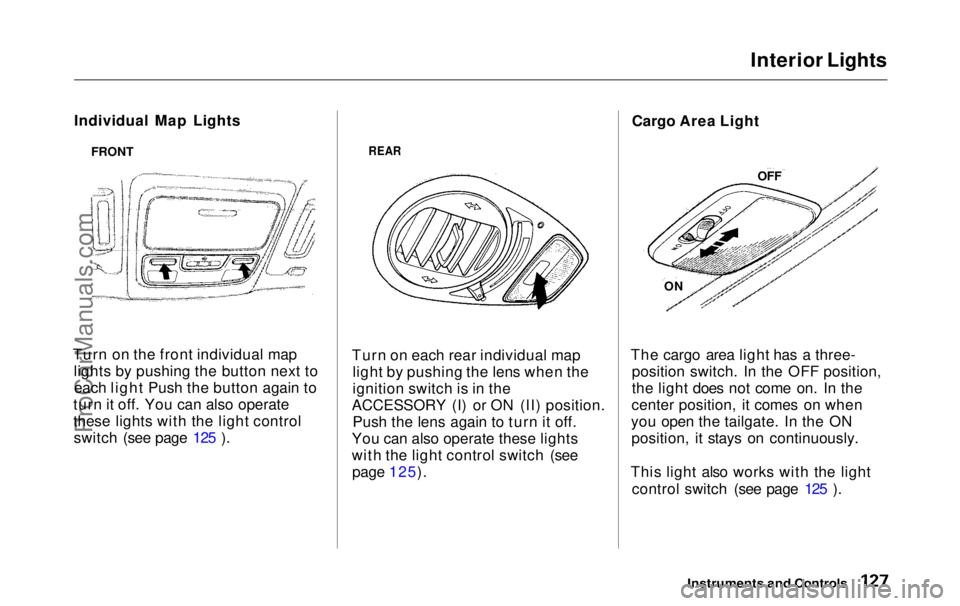
Individual Map Lights
Turn on the front individual map lights by pushing the button next toeach light Push the button again to
turn it off. You can also operate
these lights with the light control switch (see page 125 ).
REAR
Turn on each rear individual map light by pushing the lens when the
ignition switch is in the
ACCESSORY (I) or ON (II) position. Push the lens again to turn it off.
You can also operate these lights
with the light control switch (see page 125). Cargo Area Light
The cargo area light has a three- position switch. In the OFF position,
the light does not come on. In the
center position, it comes on when
you open the tailgate. In the ON position, it stays on continuously.
This light also works with the light control switch (see page 125 ).
Instruments and Controls
FRONT
OFF
ONProCarManuals.comMain Menu Table of Contents s t
Page 194 of 343
Carrying Cargo
Carrying Cargo in the Cargo Area
or on a Roof Rack
Distribute cargo evenly on the
floor of the cargo area, placing the
heaviest items on the bottom andas far forward as possible. Tiedown items that could be thrown
about the vehicle during a crash or
sudden stop.
If you carry large items that
prevent you from closing the
tailgate, exhaust gas can enter the
passenger area. To avoid the
possibility of carbon monoxide
poisoning, follow the instructions on page 53 . If you can carry any items on a
roof rack, be sure the total weight of the rack and the items does not
exceed the maximum allowable
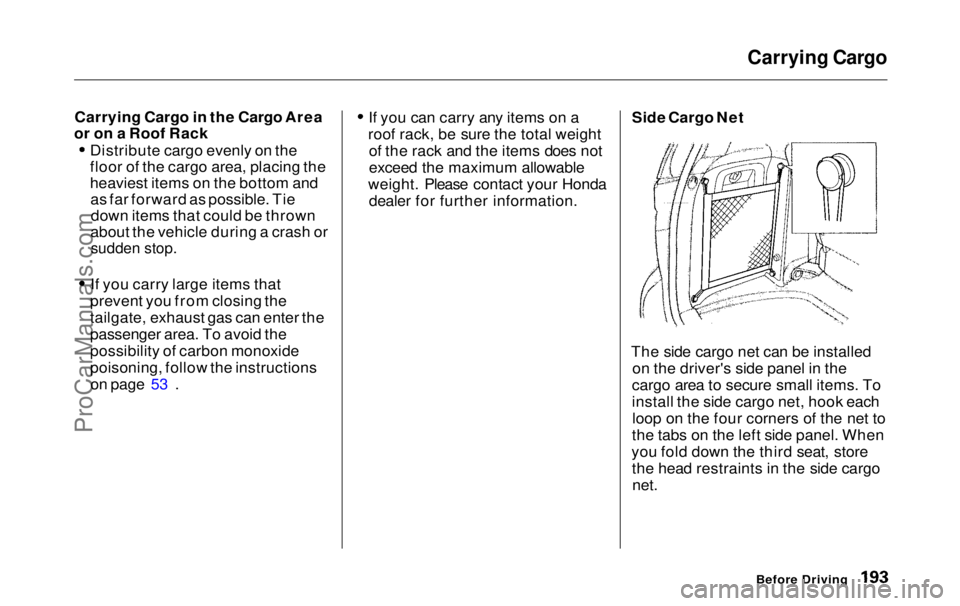
weight. Please contact your Honda dealer for further information. Side Cargo Net
The side cargo net can be installed on the driver's side panel in the
cargo area to secure small items. To
install the side cargo net, hook each loop on the four corners of the net to
the tabs on the left side panel. When
you fold down the third seat, store the head restraints in the side cargo
net.
Before DrivingProCarManuals.comMain Menu Table of Contents s t
Page 195 of 343
Carrying Cargo
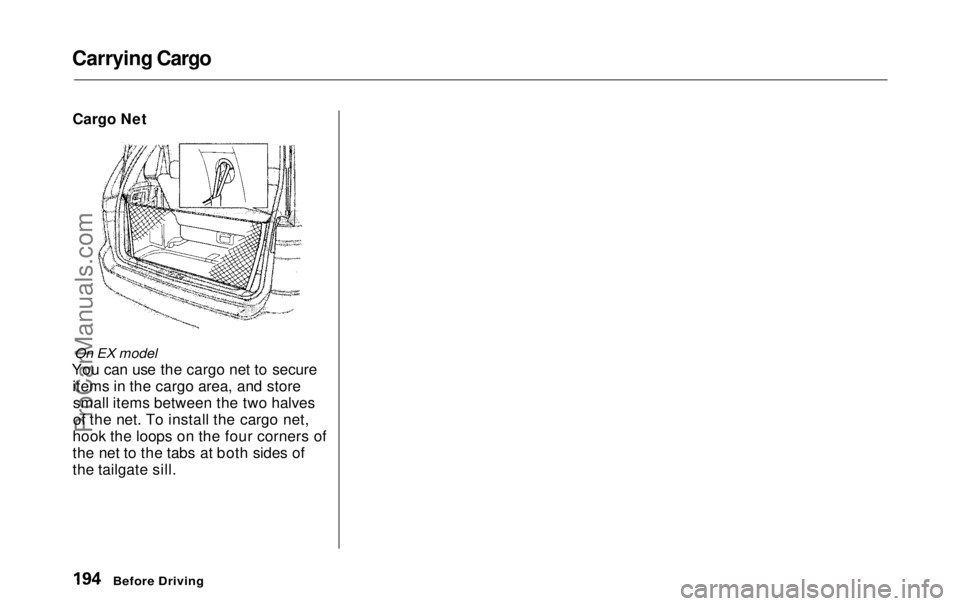
Cargo Net
On EX model
You can use the cargo net to secure items in the cargo area, and storesmall items between the two halves
of the net. To install the cargo net,
hook the loops on the four corners of
the net to the tabs at both sides of
the tailgate sill.
Before DrivingProCarManuals.comMain Menu Table of Contents s t
Page 197 of 343
Preparing to Drive
You should do the following checks and adjustments every day before
you drive your vehicle.
1. Make sure all windows, mirrors, and outside lights are clean and
unobstructed. Remove frost, snow, or ice.
2. Check that the hood and tailgate are fully closed.
3. Visually check the tires. If a tire looks low, use a gauge to check its
pressure.
4. Check that any items you may be carrying with you inside are storedproperly or fastened downsecurely. 5. Check the adjustment of the seat
(see page 100).
6. Check the adjustment of the inside and outside mirrors (see
page 115).
7. Check the adjustment of the steering wheel (see page 72 ).
8. Make sure the doors and tailgate are securely closed and locked.
9. Fasten your seat belt. Check that your passengers have fastenedtheir seat belts (see page 15). 10.Turn the ignition switch ON (II).
Check the indicator lights in the
instrument panel.
11.Start the engine (see page 197). 12. Check the gauges and indicator lights in the instrument panel (seepage 57).
DrivingProCarManuals.comMain Menu Table of Contents s t