navigation HONDA RIDGELINE 2018 (in English) Owner's Guide
[x] Cancel search | Manufacturer: HONDA, Model Year: 2018, Model line: RIDGELINE, Model: HONDA RIDGELINE 2018Pages: 623, PDF Size: 25.85 MB
Page 308 of 623
306
uuGeneral Information on the Audio System uHonda App License Agreement
Features
5. Unauthorized Use and Abuse. You are responsible for ensuring your (and any authorized third parties’) use of the SOFTWARE and
SERVICES remains in compliance with this AGREEMENT and all other applicable HONDA TERMS and PROVIDER TERMS. You acknowledge
and agree that any use of the SOFTWARE or SERVICES occurring th rough your VEHICLE will be deemed your actions and that HONDA an d
PROVIDERS may rely upon such actions. You agree to immediately notify us if you susp ect fraudulent or abusive activity involving the
SOFTWARE or SERVICES. If you so notify us or if we otherwise suspect fraudulent or abusive activity, you agree to cooperate with us in any
fraud investigation and to use any fraud prevention measures we pres cribe. Your failure to immediately notify us or cooperate to use such
measures will result in your liability for all fraudulent us age or abusive activity associated with your VEHICLE.
6. SOFTWARE Updates.
The SOFTWARE and SERVICES may be updated when your VEHICLE is serviced by a DEALER or remotely, over-the-
air, by HONDA from time to time; such update s may occur with or without further notice or your future consent. The SOFTWARE may be
updated at HONDA’s discretion and for any pu rpose including, without limitation, to patch or otherwise improve the SOFTWARE or
SERVICES functionality, se curity, or stability. All updates to the SOFTWARE and SERVICES are su bject to this AGREEMENT and any other
applicable HONDA TERMS and PROVIDER TERMS.
7. Uninstalling, Removing, and Replacing the SOFTWARE.
Replacing SOFTWARE or HONDA SERVICES with software or firmware not
provided and installed by HONDA or a DEALER will render all representations and warranties for the SOFTWARE, HONDA SERVICES, an d
VEHICLE functionality reliant upon the SOFTWARE or HONDA SERVICES null and void.
D. SOFTWARE Operationa l Notices and Warnings
1. Vehicle Geolocation Information.
You acknowledge that your VEHICLE may be equi pped with certain traffic and map features. The
traffic feature will automatically collect an d transmit, through GPS technology, your Ve hicle’s current location (longitude and latitude),
travel direction and speed (“VEHICLE GEOLOCATION INFORMAT ION”) to HONDA and PROVIDERS. The VEHICLE GEOLOCATION
INFORMATION is used by HONDA and PROVIDERS to provide traffic and navigation-related information to you, but may also be used to
provide other SERVICES or offers to you. HONDA will not use such VEHICLE GEOLOCATION INFORMATION for its own marketing efforts,
or provide such information to unaffiliated third parties for their own purposes, without your express consent.
Page 309 of 623
307
uuGeneral Information on the Audio System uHonda App License Agreement
Continued
Features
2. Potential Map Inaccuracy and Route Safety. Maps used by this system may be inaccurate because of changes in roads, traffic controls,
routing, or driving conditions. Always use good judgment and co mmon sense when following suggested routes. Do not follow the ro ute
suggestions if doing so would result in an unsafe or illegal driv ing maneuver, if you would be placed in an unsafe situation, or if you would
be directed into an area that you consider unsafe. Do not rely on any navigation featur es included in the system to route you to emergency
services. Not all emergency services such as police, fire stations, hospitals, or clinics are likely to be contained in the map database for such
navigation features. Ask local authorities or an emergency services operator for such locations and routes. The driver is ultimately
responsible for the safe operation of the vehicle and therefore, must evaluate whether it is safe to follow the suggested directions. Any
navigation features are pr ovided only as an aid. Make your driving decisions based on your obse rvations of local conditions and existing
traffic regulations. Navigation features are not a substitute for your personal judgment. Any route suggestions made by the SOFTWARE or
SERVICES should never replace any local traffic regulations or your personal judgment or knowledge of safe driving practices.
3. Speech Recognition:
You acknowledge and understand that HONDA and PROV IDERS may record, retain, and use voices commands
when you use the speech recognition componen ts of the SOFTWARE or SERVICES. You and all VEHICLE operators and passengers (a)
consent to the recording and retention of voice commands in support of providing sp eech recognition components and (b) release HONDA
and PROVIDERS from all claims, liabilities, and losses that may result from any use of such recorded voice commands. Recognition errors
are inherent in speech recognition. It is your responsibility to monitor any speech recognition functions included in the syste m and address
any errors. Neither HONDA nor PROVIDERS will be liable for any damages arising out of errors in the speech recognition process.
4. Distraction Hazards.
Navigation features may require manual (non-verbal) input or setup. Attempting to perform such set-up or insert
data while driving can seriously distract your attention and co uld cause a crash or other serious consequences; the ability to undertake such
interactions may also be limited by state or local law, which laws you are responsibl e to know and follow. Even occasional shor t scans of
the screen may be hazardous if your attent ion has been diverted away from your driving at a critical time. Pull over and stop the vehicle in
a safe and legal manner before attempting to access a function of the system requiring prolonged attention. Do not raise the vo lume
excessively. Keep the volume at a level where you can still hear outside traffic and emergency signals while driving. Driving while unable
to hear these sounds could result in a crash.
Page 310 of 623
308
uuGeneral Information on the Audio System uHonda App License Agreement
Features
E. Information Collection and Storage
1. Information Collection , Use, Transmission and Storage of Data. Consent to Use of Data:
You agree that HONDA and PROVIDERS may
collect and use your information gathered in any manner as part of product support services related to the SOFTWARE or related services.
HONDA may share such information with third parties, including, without limitation, PROVIDERS, th ird party software and services
suppliers, their affiliates and/or their desi gnated agents, solely to improve their products or to provide services or technolo gies to you.
HONDA, third party software and systems supp liers, their affiliates and/or their designated agent may disclose this information to others,
but not in a form that pe rsonally identifies you.
2. Information Storage.
Depending on the type of multimedia system you have in your VEHICLE, certain information may be stored for ease
of use of the SOFTWARE including, without limitation, search hi story, location history in certain applications, previous and saved
destinations, map locations within certain applicat ions, and device numbers and contact information.
(a) Vehicle Health Information.
Your VEHICLE may remotely trans mit information regarding the status and health of your VEHICLE
(“VEHICLE INFORMATION”) to HONDA without notification to you. VEHICLE INFORMATION may contain VEHICLE maintenance and
malfunction status that is derived from VEHICLE diagnostic data and includes, but is not limited to, status of powered doors and windows,
battery life data, battery charging data, VEHICLE speed, coolant temperat ure, air compressor revolution, output power, warning codes,
diagnostic trouble codes, fuel injection volume, and engine rotati ons per minute. VEHICLE HEALTH INFORMATION may be used by HONDA
for research and development, to deliver HO NDA SERVICES and information to you, and to contact you, and is retained only for a period
of time necessary to fulfill these goals.
(b) VEHICLE Geolocation Data (non-navigation/map based).
If you opt-in to geolocation-based SERVICES, your vehicle’s geolocation data
(latitude and longitude) will be automatically se nt from your VEHICLE to HONDA and PROVIDERS.
(c) You understand that the inputting or uploading of information to your VEHICLE’s multimedia system or the SOFTWARE or SERVICES is
at your own risk and that HONDA is not responsible for unauthorized access to or use of any personal or other information. All information
uploaded to the SOFTWARE and SERVICES may be stored on your VEHI CLES’s multimedia system and you understand that the security and
safety of your VEHICLE’s multimedia system is your sole responsibility.
Page 334 of 623
332
uuCustomized Features u
Features
■List of customizable options
*1:Default Setting Setup
Group Customizable Features Description Selectable Settings
System
Display
Display
Settings
BrightnessChanges the brightness of
the audio/information
screen.—
ContrastChanges the contrast of th e audio/information screen.—
Black LevelChanges the black level of the audio/information
screen.—
Background ColorChanges the background color of the audio/
information screen.Blue*1/Amber /Red /
Violet
Sound/
Beep
Guidance VolumeChanges the sound volume.
Adjusts the guidance volume of the navigation system.1 ~6*1~11
Text Message VolumeChanges the text/e-mail message reading volume.1~6*1~11
Voice Recog. VolumeChanges the volume of the voice prompt.1~6*1~11
Beep VolumeChanges the beep volume.Off*1/1 /2 /3
Page 336 of 623
334
uuCustomized Features u
Features
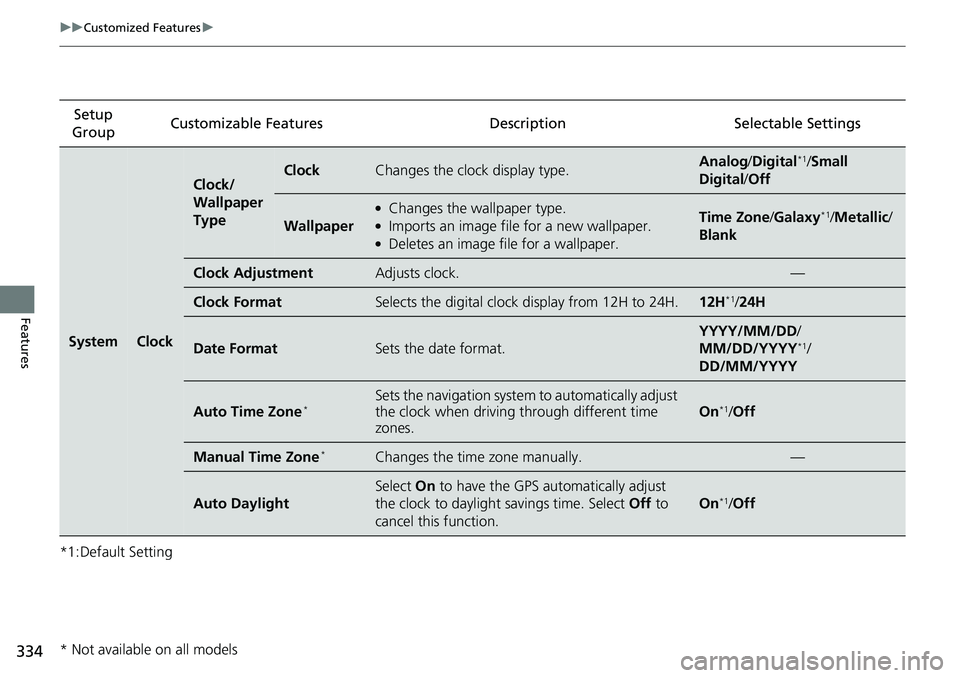
*1:Default SettingSetup
Group Customizable Features Descri
ption Selectable Settings
SystemClock
Clock/
Wallpaper
TypeClockChanges the clock display type.Analog/Digital*1/Small
Digital /Off
Wallpaper
●Changes the wallpaper type.●Imports an image file for a new wallpaper.●Deletes an image file for a wallpaper.
Time Zone /Galaxy*1/Metallic /
Blank
Clock AdjustmentAdjusts clock.—
Clock FormatSelects the digital clock display from 12H to 24H.12H*1/ 24H
Date FormatSets the date format.
YYYY/MM/DD/
MM/DD/YYYY*1/
DD/MM/YYYY
Auto Time Zone*Sets the navigation system to automatically adjust
the clock when driving through different time
zones.
On*1/ Off
Manual Time Zone*Changes the time zone manually.—
Auto Daylight
Select On to have the GPS automatically adjust
the clock to daylight savings time. Select Off to
cancel this function.
On*1/ Off
* Not available on all models
Page 556 of 623
554
Maintenance
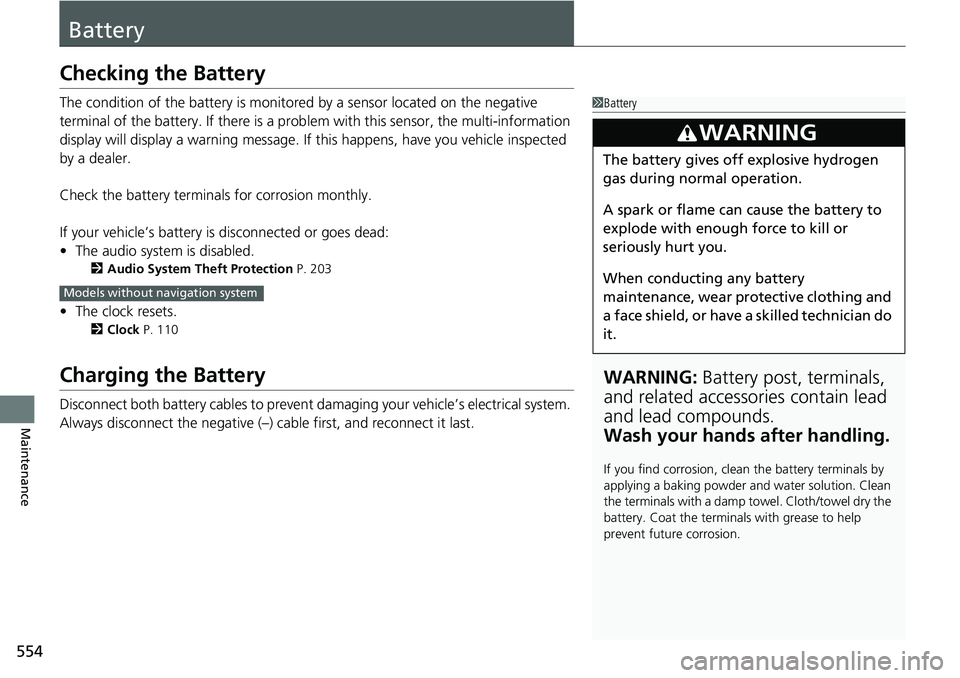
Battery
Checking the Battery
The condition of the battery is monitored by a sensor located on the negative
terminal of the battery. If there is a prob lem with this sensor, the multi-information
display will display a warning message. If this happens, have you vehicle inspected
by a dealer.
Check the battery termin als for corrosion monthly.
If your vehicle’s battery is disconnected or goes dead:
• The audio system is disabled.
2 Audio System Theft Protection P. 203
•The clock resets.
2 Clock P. 110
Charging the Battery
Disconnect both battery cables to prevent da maging your vehicle’s electrical system.
Always disconnect the negative (–) cable first, and reconnect it last.
1 Battery
WARNING: Battery post, terminals,
and related accessories contain lead
and lead compounds.
Wash your hands after handling.
If you find corrosion, clea n the battery terminals by
applying a baking powder a nd water solution. Clean
the terminals with a damp towel. Cloth/towel dry the
battery. Coat the terminals with grease to help
prevent future corrosion.
3WARNING
The battery gives off explosive hydrogen
gas during normal operation.
A spark or flame can cause the battery to
explode with enough force to kill or
seriously hurt you.
When conducting any battery
maintenance, wear prot ective clothing and
a face shield, or have a skilled technician do
it.
Models without navigation system