oil pressure HONDA RIDGELINE 2018 Owner's Manual (in English)
[x] Cancel search | Manufacturer: HONDA, Model Year: 2018, Model line: RIDGELINE, Model: HONDA RIDGELINE 2018Pages: 623, PDF Size: 25.85 MB
Page 13 of 623
11
Quick Reference Guide
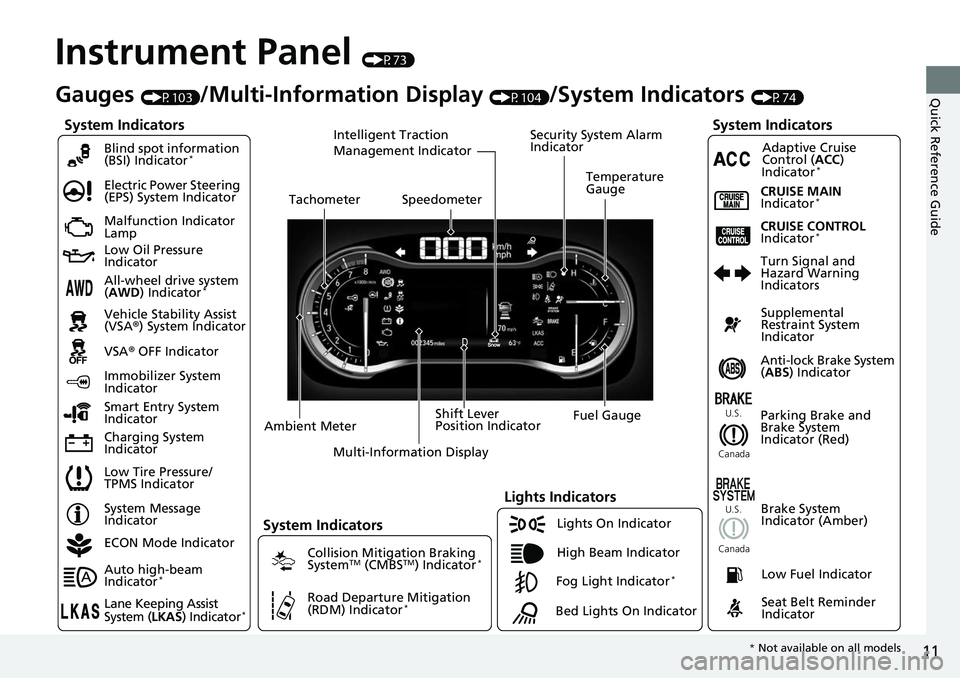
Instrument Panel (P73)
System Indicators
Malfunction Indicator
Lamp
Low Oil Pressure
Indicator
Charging System
IndicatorAnti-lock Brake System
(
ABS ) Indicator
Vehicle Stability Assist
(VSA®
) System Indicator
VSA ® OFF Indicator
Electric Power Steering
(EPS) System Indicator
Lights Indicators
Lights On Indicator
High Beam Indicator
Immobilizer System
Indicator
Seat Belt Reminder
Indicator
System Indicators
System Message
IndicatorParking Brake and
Brake System
Indicator (Red)Supplemental
Restraint System
Indicator
Low Fuel Indicator
Gauges (P103)/Multi-Information Display (P104)/System Indicators (P74)
Low Tire Pressure/
TPMS Indicator Turn Signal and
Hazard Warning
Indicators
Smart Entry System
Indicator Ambient Meter Shift Lever
Position Indicator
Fuel Gauge
Tachometer
Temperature
Gauge
Speedometer
Multi-Information Display
Brake System
Indicator (Amber)
All-wheel drive system
(AWD ) Indicator*
Blind spot information
(BSI) Indicator*
System Indicators
Collision Mitigation Braking
SystemTM (CMBSTM) Indicator*
Road Departure Mitigation
(RDM) Indicator*
Security System Alarm
Indicator
U.S.
Canada U.S.
Canada
Fog Light Indicator*
ECON Mode Indicator
Auto high-beam
Indicator
*
Lane Keeping Assist
System ( LKAS) Indicator*
CRUISE MAIN
Indicator*
CRUISE CONTROL
Indicator*
Adaptive Cruise
Control (ACC )
Indicator
*
Intelligent Traction
Management Indicator
Bed Lights On Indicator
* Not available on all models
Page 25 of 623
23
Quick Reference Guide
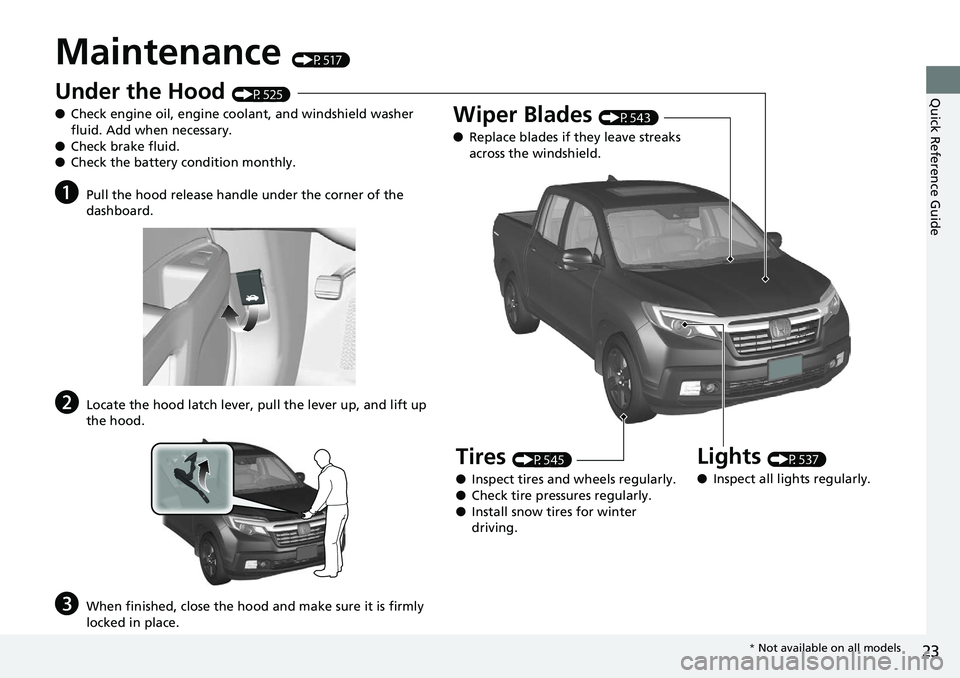
Maintenance (P517)
Under the Hood (P525)
● Check engine oil, engine coolant, and windshield washer
fluid. Add when necessary.
● Check brake fluid.
● Check the battery condition monthly.
aPull the hood release handle under the corner of the
dashboard.
bLocate the hood latch lever, pull the lever up, and lift up
the hood.
cWhen finished, close the hood and make sure it is firmly
locked in place.
Lights (P537)
● Inspect all lights regularly.
Wiper Blades (P543)
● Replace blades if they leave streaks
across the windshield.
Tires (P545)
● Inspect tires and wheels regularly.
● Check tire pressures regularly.
● Install snow tires for winter
driving.
* Not available on all models
Page 77 of 623
75
uuIndicators u
Continued
Instrument Panel
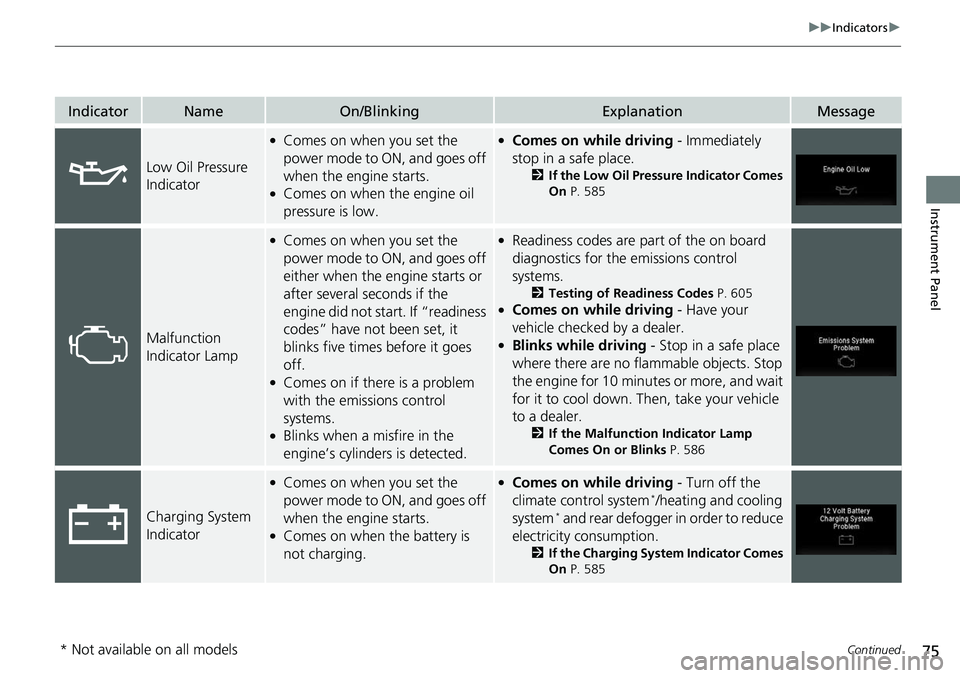
IndicatorNameOn/BlinkingExplanationMessage
Low Oil Pressure
Indicator
●Comes on when you set the
power mode to ON, and goes off
when the engine starts.
●Comes on when the engine oil
pressure is low.
●Comes on while driving - Immediately
stop in a safe place.
2 If the Low Oil Pressure Indicator Comes
On P. 585
Malfunction
Indicator Lamp
●Comes on when you set the
power mode to ON, and goes off
either when the engine starts or
after several seconds if the
engine did not start. If “readiness
codes” have not been set, it
blinks five times before it goes
off.
●Comes on if there is a problem
with the emissions control
systems.
●Blinks when a misfire in the
engine’s cylinders is detected.
●Readiness codes are part of the on board
diagnostics for the emissions control
systems.
2 Testing of Readiness Codes P. 605●Comes on while driving - Have your
vehicle checked by a dealer.
●Blinks while driving - Stop in a safe place
where there are no flammable objects. Stop
the engine for 10 minutes or more, and wait
for it to cool down. Then, take your vehicle
to a dealer.
2 If the Malfunction Indicator Lamp
Comes On or Blinks P. 586
Charging System
Indicator
●Comes on when you set the
power mode to ON, and goes off
when the engine starts.
●Comes on when the battery is
not charging.
●Comes on while driving - Turn off the
climate control system*/heating and cooling
system* and rear defogger in order to reduce
electricity consumption.
2 If the Charging System Indicator Comes
On P. 585
* Not available on all models
Page 106 of 623
104
uuGauges and Multi-Information Display uMulti-Information Display
Instrument Panel
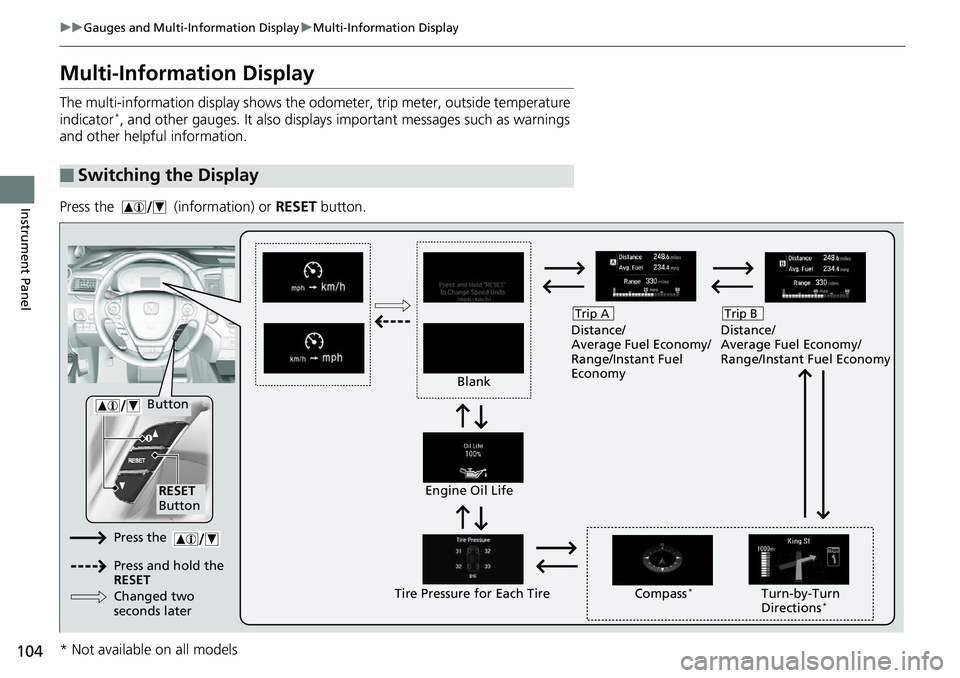
Multi-Information Display
The multi-information display shows the od ometer, trip meter, outside temperature
indicator*, and other gauges. It also displays important messages such as warnings
and other helpful information.
Press the (information) or RESET button.
■Switching the Display
Blank Distance/
Average Fuel Economy/
Range/Instant Fuel
Economy
Trip A
Tire Pressure for Each TireEngine Oil Life
Turn-by-Turn
Directions*
RESET
Button Compass
*
Button
Distance/
Average Fuel Economy/
Range/Instant Fuel Economy
Trip B
Press the
Press and hold the
RESET
Changed two
seconds later
* Not available on all models
Page 437 of 623
Continued435
uuWhen Driving uStarting the Engine
Driving
■To start the engine
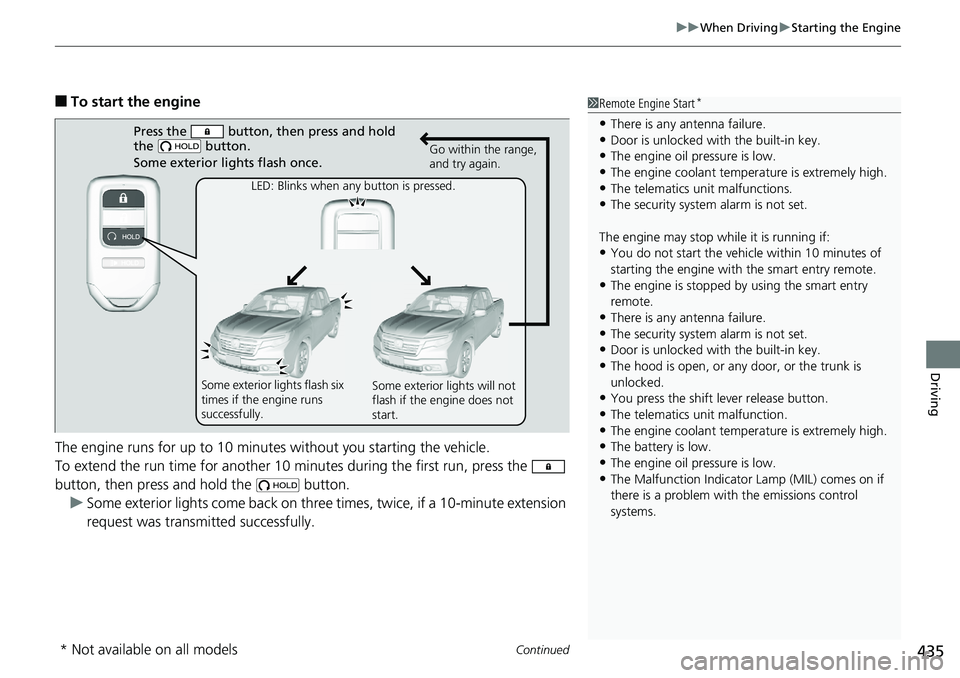
The engine runs for up to 10 minutes without you starting the vehicle.
To extend the run time for another 10 minutes during the first run, press the
button, then press an d hold the button.
u Some exterior lights come back on three times, twice, if a 10-minute extension
request was transmitted successfully.1Remote Engine Start*
•There is any antenna failure.•Door is unlocked with the built-in key.
•The engine oil pressure is low.
•The engine coolant temper ature is extremely high.•The telematics unit malfunctions.
•The security system alarm is not set.
The engine may stop whil e it is running if:
•You do not start the vehicl e within 10 minutes of
starting the engine with the smart entry remote.
•The engine is stopped by using the smart entry
remote.
•There is any antenna failure.•The security system alarm is not set.
•Door is unlocked with the built-in key.
•The hood is open, or any door, or the trunk is
unlocked.
•You press the shift lever release button.
•The telematics unit malfunction.
•The engine coolant temper ature is extremely high.•The battery is low.
•The engine oil pressure is low.
•The Malfunction Indicator Lamp (MIL) comes on if
there is a problem with the emissions control
systems.
Press the button, then press and hold
the button.
Some exterior lights flash once.
LED: Blinks when any button is pressed. Go within the range,
and try again.
Some exterior lights flash six
times if the engine runs
successfully. Some exterior lights will not
flash if the engine does not
start.
* Not available on all models
Page 517 of 623
515
Driving
Fuel Economy and CO2 Emissions
Improving Fuel Economy and Reducing CO2
Emissions
Achieving fuel economy and reducing CO2 emissions is dependent on several
factors, including driving conditions, load weight, idling time, driving habits, and
vehicle condition. Depending on these and other factors, you may not achieve the
rated fuel economy of this vehicle.
You can optimize your fuel economy with proper maintenance of your vehicle.
Always maintain your vehicle in accordance with the messages displayed on the
multi-information display.
• Use the recommended viscosity engine oil, displaying the API Certification Seal.
• Maintain the specified tire pressure.
• Do not load the vehicle with excess cargo.
• Keep your vehicle clean. A buildup of snow or mud on your vehicle’s underside
adds weight and increases wind resistance.
■Maintenance and Fuel Economy
1Improving Fuel Economy and Reducing CO2 Emissions
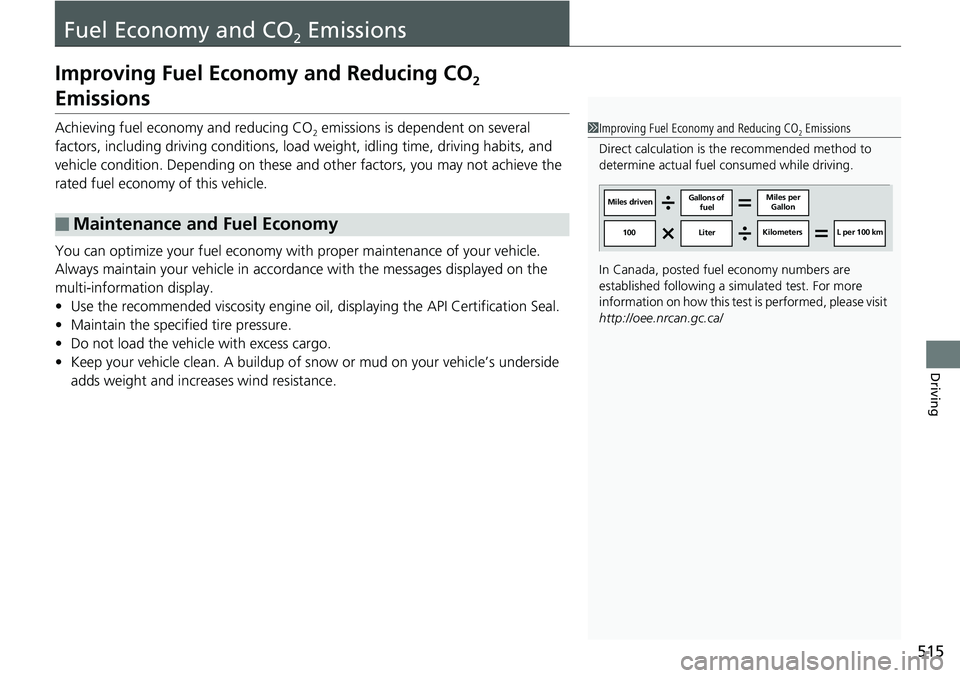
Direct calculation is the recommended method to
determine actual fuel consumed while driving.
In Canada, posted fuel economy numbers are
established following a simulated test. For more
information on how this test is performed, please visit
http://oee.nrcan.gc.ca/
Miles driven Gallons of
fuel Miles per
Gallon
100 LiterKilometers L per 100 km
Page 520 of 623
518
Maintenance
Before Performing Maintenance
Inspection and Maintenance
For your safety, perform all listed inspections and maintenance to keep your vehicle
in good condition. If you become aware of any abnormality (noise, smell, insufficient
brake fluid, oil residue on the ground, etc.), have your vehicle inspected by a dealer.
(Note, however, that service at a dealer is not mandatory to keep your warranties in
effect.)
■Daily inspections
Perform inspections before long distance trips, when washing the vehicle, or when
refueling.
■Periodic inspections
• Check the automatic transmission fluid level monthly.
2 Automatic Transmission Fluid P. 535
•Check the brake fluid level monthly.
2 Checking the Brake Fluid P. 536
•Check the tire pressure monthly. Examin e the tread for wear and foreign objects.
2Checking and Maintaining Tires P. 545
•Check the operation of the exterior lights monthly.
2Replacing Light Bulbs P. 537
•Check the condition of the wiper bl ades at least every six months.
2Checking and Maintaining Wiper Blades P. 543
■Types of Inspection and Maintenance
1Inspection and Maintenance
Maintenance, replacement, or repair of
emissions control devices and systems may be
done by any automotive repair establishment or
individuals using parts that are “certified” to
EPA standards.
According to state and fede ral regulations, failure to
perform maintenance on the maintenance main
items marked with # will not void your emissions
warranties. However, all maintenance services should
be performed in accordan ce with the intervals
indicated by the mult i-information display.
2 Maintenance Service Items P. 523
If you want to perform complex maintenance tasks
that require more skills a nd tools, you can purchase a
subscription to the Service Express website at
www.techinfo.honda.com .
2 Authorized Manuals P. 609
If you want to perform ma intenance yourself, make
sure that you have the necessary tools and skills first.
After performing ma intenance, update the records in
the separate maintenance booklet.
U.S. models
Page 534 of 623
uuMaintenance Under the Hood uChanging the Engine Oil and Oil Filter
532
Maintenance
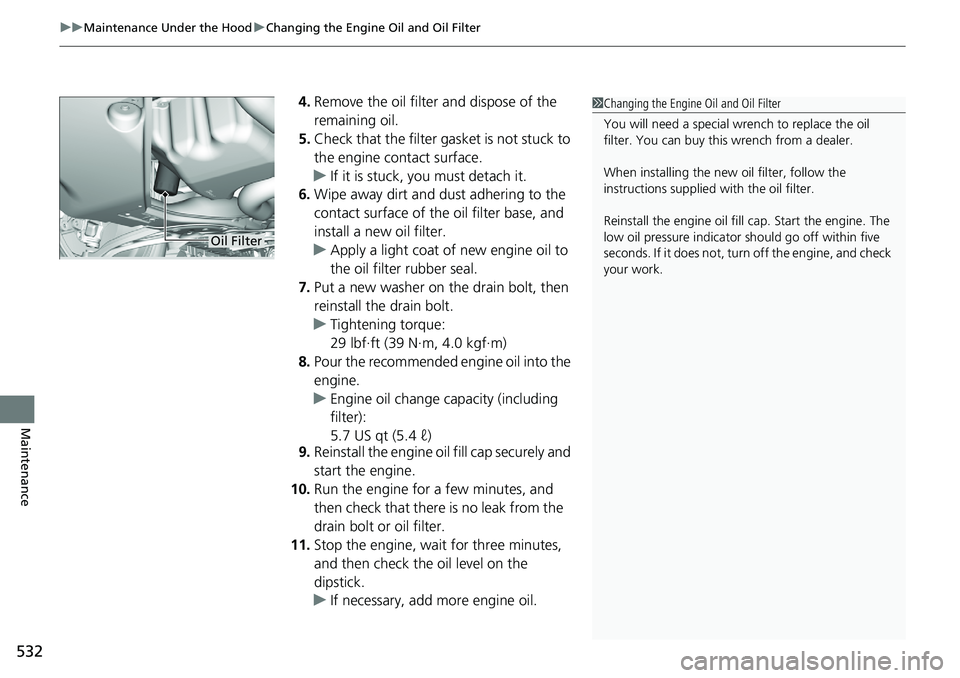
4. Remove the oil filter and dispose of the
remaining oil.
5. Check that the filter ga sket is not stuck to
the engine contact surface.
u If it is stuck, you must detach it.
6. Wipe away dirt and dust adhering to the
contact surface of the oil filter base, and
install a new oil filter.
u Apply a light coat of new engine oil to
the oil filter rubber seal.
7. Put a new washer on the drain bolt, then
reinstall the drain bolt.
u Tightening torque:
29 lbf∙ft (39 N∙m, 4.0 kgf∙m)
8. Pour the recommended engine oil into the
engine.
u Engine oil change capacity (including
filter):
5.7 US qt (5.4 ℓ)
9. Reinstall the engine oil fill cap securely and
start the engine.
10. Run the engine for a few minutes, and
then check that there is no leak from the
drain bolt or oil filter.
11. Stop the engine, wait for three minutes,
and then check the oil level on the
dipstick.
u If necessary, add more engine oil.1Changing the Engine Oil and Oil Filter
You will need a special wrench to replace the oil
filter. You can buy this wrench from a dealer.
When installing the new oil filter, follow the
instructions supplied with the oil filter.
Reinstall the engine oil fill cap. Start the engine. The
low oil pressure indicator should go off within five
seconds. If it does not, turn off the engine, and check
your work.
Oil Filter
Page 567 of 623
565
Handling the Unexpected
This chapter explains how to handle unexpected troubles.
ToolsTypes of Tools .................................. 566
If a Tire Goes Flat Changing a Flat Tire ......................... 567
Engine Does Not Start Checking the Engine ........................ 576
If the Smart Entry Remote Battery is Weak .......................................... 577
Emergency Engine Stop ................... 578
Jump Starting .................................... 579
Shift Lever Does Not Move .............. 582Overheating
How to Handle Overheating............. 583
Indicator, Coming On/Blinking
If the Low Oil Pressure Indicator Comes On ............................................. 585
If the Charging System Indicator Comes
On ................................................. 585
If the Malfunction Indicator Lamp Comes On or Blinks ................................... 586
If the Brake System Indicator (Red) Comes On .................................................... 587
If the Electric Power Steering (EPS) System
Indicator Comes On ........................... 587 If the Low Tire Pressure/Tire Pressure
Monitoring System (TPMS) Indicator Comes
On or Blinks........................................ 588
Fuses
Fuse Locations ................................. 589
Inspecting and Changing Fuses ........ 593
Emergency Towing ........................... 594
When You Cannot Unlock the Fuel Fill Door ................................................. 595
Refueling
Refueling From a Portable Fuel Container ................................... 596
Page 587 of 623
585
Handling the Unexpected
Indicator, Coming On/Blinking
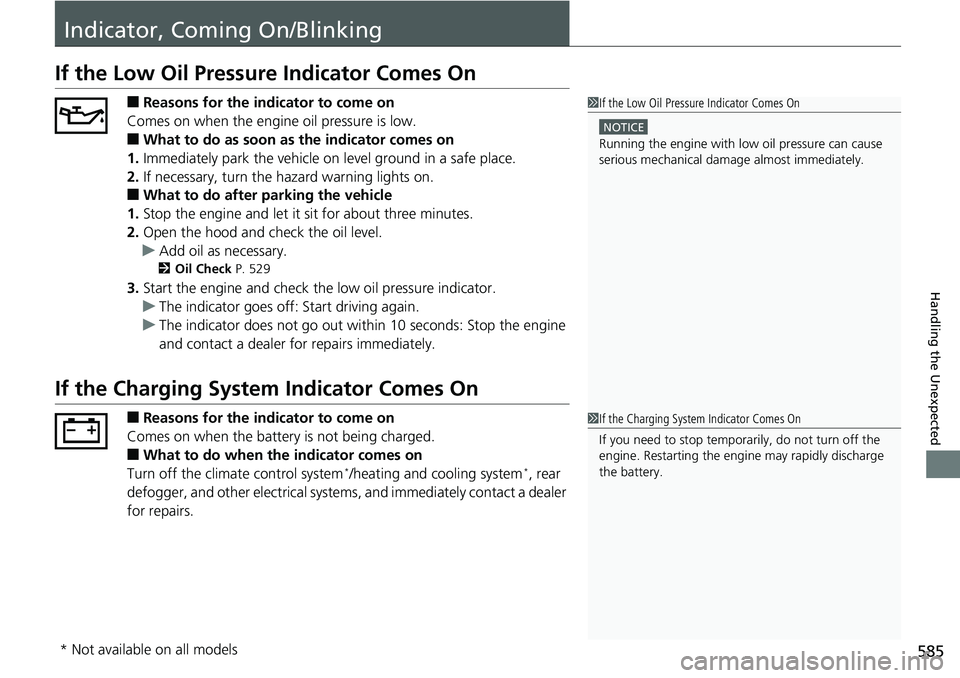
If the Low Oil Pressure Indicator Comes On
■Reasons for the indicator to come on
Comes on when the engine oil pressure is low.
■What to do as soon as the indicator comes on
1. Immediately park the vehicle on level ground in a safe place.
2. If necessary, turn the hazard warning lights on.
■What to do after parking the vehicle
1. Stop the engine and let it sit for about three minutes.
2. Open the hood and check the oil level.
u Add oil as necessary.
2 Oil Check P. 529
3.Start the engine and check th e low oil pressure indicator.
u The indicator goes off: Start driving again.
u The indicator does not go out within 10 seconds: Stop the engine
and contact a dealer for repairs immediately.
If the Charging System Indicator Comes On
■Reasons for the indicator to come on
Comes on when the battery is not being charged.
■What to do when th e indicator comes on
Turn off the climate control system*/heating and cooling system*, rear
defogger, and other electrical system s, and immediately contact a dealer
for repairs.
1 If the Low Oil Pressure Indicator Comes On
NOTICE
Running the engine with low oil pressure can cause
serious mechanical damage almost immediately.
1If the Charging System Indicator Comes On
If you need to stop temporarily, do not turn off the
engine. Restarting the engi ne may rapidly discharge
the battery.
* Not available on all models