reset Hyundai Accent 2008 Owner's Manual
[x] Cancel search | Manufacturer: HYUNDAI, Model Year: 2008, Model line: Accent, Model: Hyundai Accent 2008Pages: 273, PDF Size: 9.36 MB
Page 84 of 273
1FEATURES OF YOUR HYUNDAI72
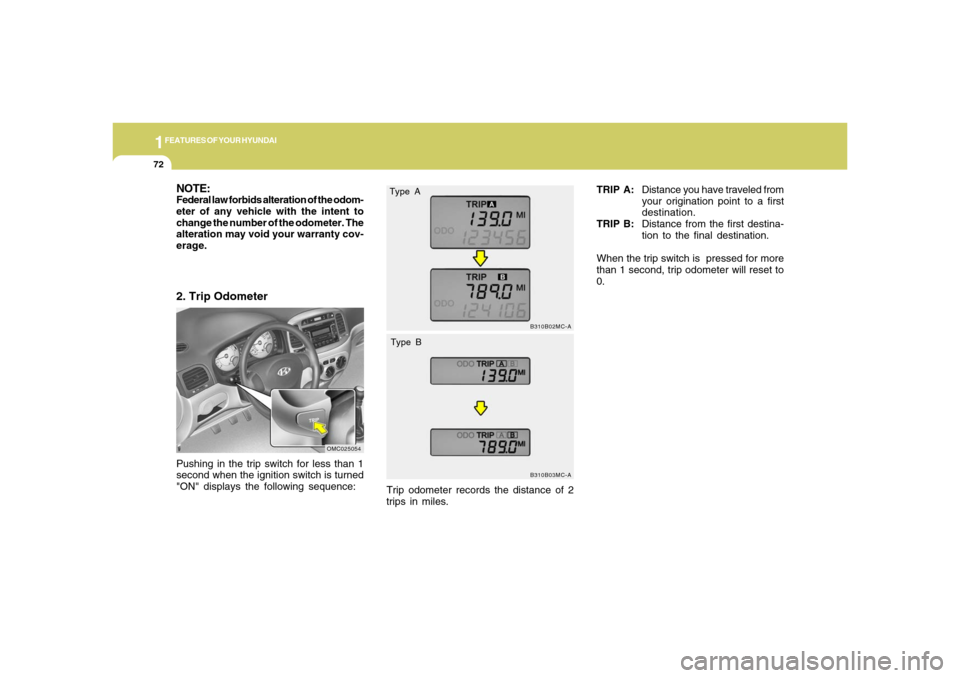
Pushing in the trip switch for less than 1
second when the ignition switch is turned
"ON" displays the following sequence:2. Trip Odometer
OMC025054
B310B02MC-AB310B03MC-A
TRIP A:Distance you have traveled from
your origination point to a first
destination.
TRIP B:Distance from the first destina-
tion to the final destination.
When the trip switch is pressed for more
than 1 second, trip odometer will reset to
0.
NOTE:Federal law forbids alteration of the odom-
eter of any vehicle with the intent to
change the number of the odometer. The
alteration may void your warranty cov-
erage.
Type A
Type BTrip odometer records the distance of 2
trips in miles.
Page 85 of 273
1
FEATURES OF YOUR HYUNDAI
731
FEATURES OF YOUR HYUNDAI
73
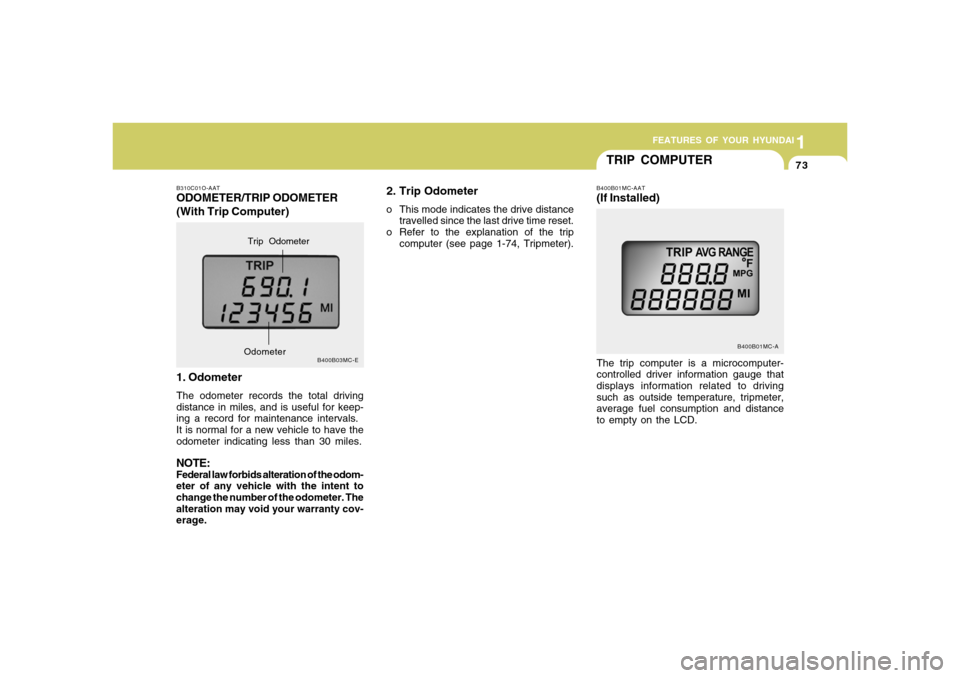
2. Trip Odometero This mode indicates the drive distance
travelled since the last drive time reset.
o Refer to the explanation of the trip
computer (see page 1-74, Tripmeter).
B310C01O-AATODOMETER/TRIP ODOMETER
(With Trip Computer)
1. OdometerThe odometer records the total driving
distance in miles, and is useful for keep-
ing a record for maintenance intervals.
It is normal for a new vehicle to have the
odometer indicating less than 30 miles.NOTE:Federal law forbids alteration of the odom-
eter of any vehicle with the intent to
change the number of the odometer. The
alteration may void your warranty cov-
erage.
B400B03MC-E
Trip Odometer
Odometer
TRIP COMPUTER
B400B01MC-A
The trip computer is a microcomputer-
controlled driver information gauge that
displays information related to driving
such as outside temperature, tripmeter,
average fuel consumption and distance
to empty on the LCD.B400B01MC-AAT(If Installed)
Page 86 of 273
1FEATURES OF YOUR HYUNDAI74
OUTSIDE TEMPERATURE
TRIPMETER
AVERAGE FUEL CONSUMPTION
DISTANCE TO EMPTY
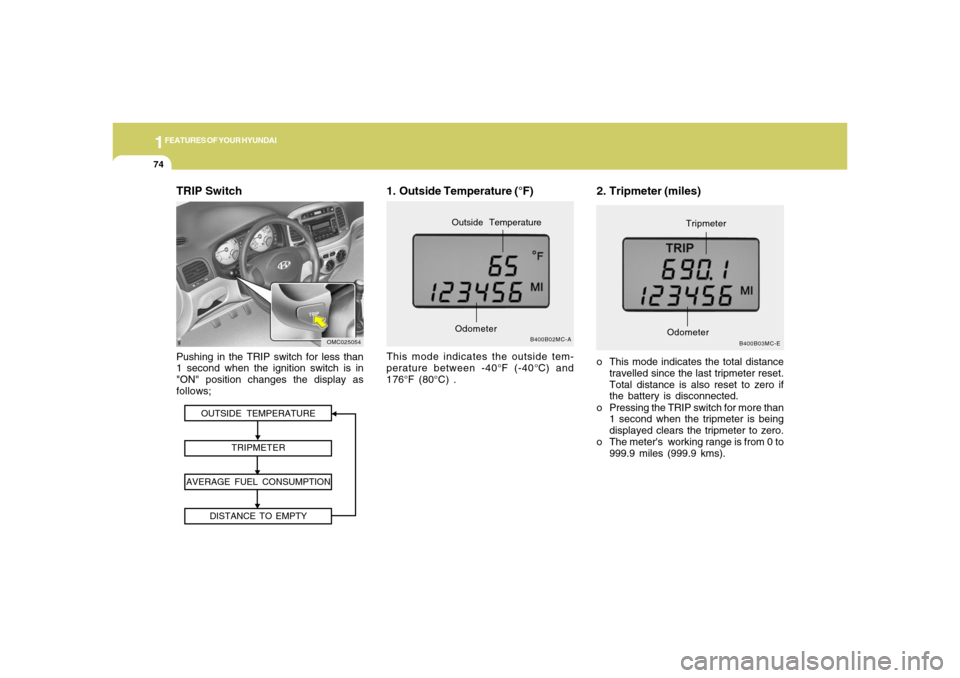
TRIP SwitchPushing in the TRIP switch for less than
1 second when the ignition switch is in
"ON" position changes the display as
follows;
OMC025054
2. Tripmeter (miles)o This mode indicates the total distance
travelled since the last tripmeter reset.
Total distance is also reset to zero if
the battery is disconnected.
o Pressing the TRIP switch for more than
1 second when the tripmeter is being
displayed clears the tripmeter to zero.
o The meter's working range is from 0 to
999.9 miles (999.9 kms).
B400B03MC-E
OdometerTripmeter
1. Outside Temperature (°F)This mode indicates the outside tem-
perature between -40°F (-40°C) and
176°F (80°C) .
B400B02MC-A
OdometerOutside Temperature
Page 87 of 273
1
FEATURES OF YOUR HYUNDAI
751
FEATURES OF YOUR HYUNDAI
75
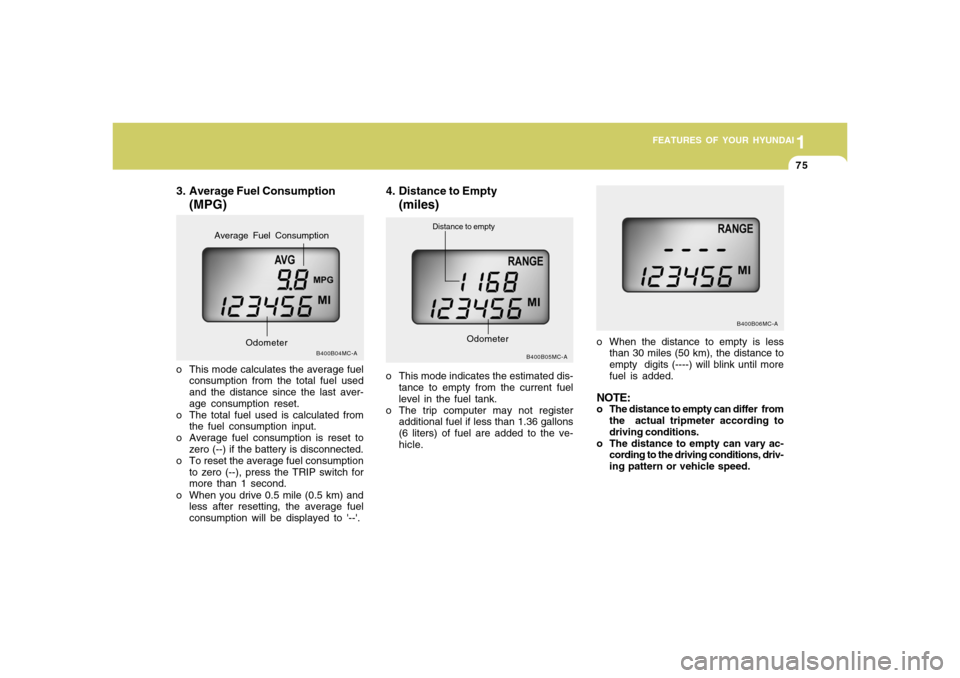
3. Average Fuel Consumption
(MPG)
B400B04MC-A
o This mode calculates the average fuel
consumption from the total fuel used
and the distance since the last aver-
age consumption reset.
o The total fuel used is calculated from
the fuel consumption input.
o Average fuel consumption is reset to
zero (--) if the battery is disconnected.
o To reset the average fuel consumption
to zero (--), press the TRIP switch for
more than 1 second.
o When you drive 0.5 mile (0.5 km) and
less after resetting, the average fuel
consumption will be displayed to '--'.
Odometer
Average Fuel Consumption
4. Distance to Empty
(miles)
o This mode indicates the estimated dis-
tance to empty from the current fuel
level in the fuel tank.
o The trip computer may not register
additional fuel if less than 1.36 gallons
(6 liters) of fuel are added to the ve-
hicle.
B400B05MC-A
Distance to empty
Odometer
o When the distance to empty is less
than 30 miles (50 km), the distance to
empty digits (----) will blink until more
fuel is added.NOTE:o The distance to empty can differ from
the actual tripmeter according to
driving conditions.
o The distance to empty can vary ac-
cording to the driving conditions, driv-
ing pattern or vehicle speed.
B400B06MC-A
Page 95 of 273
1
FEATURES OF YOUR HYUNDAI
831
FEATURES OF YOUR HYUNDAI
83
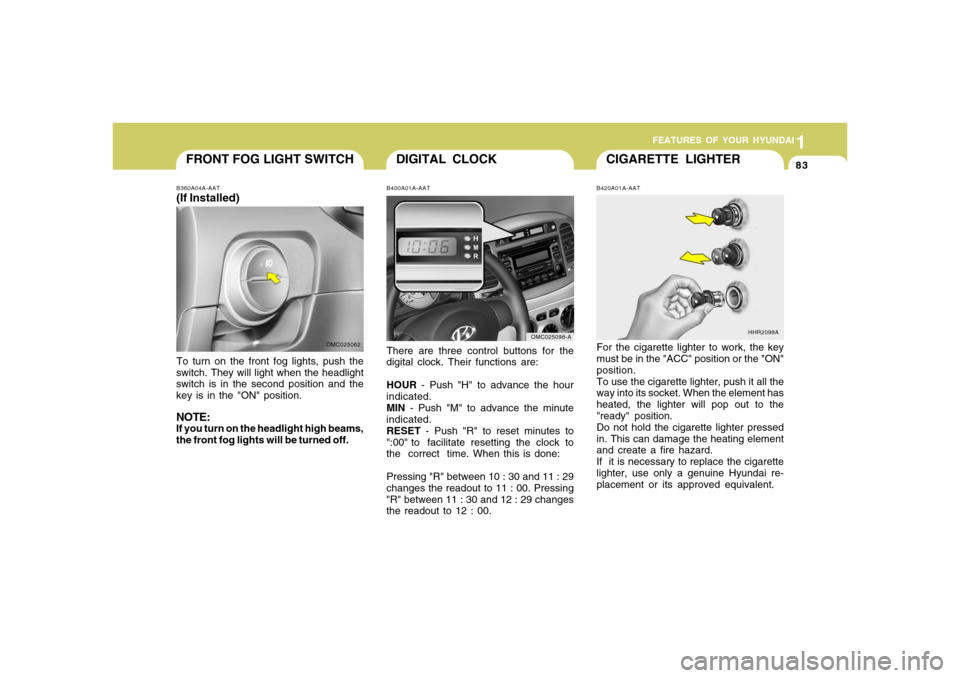
CIGARETTE LIGHTER
DIGITAL CLOCK
B420A01A-AATFor the cigarette lighter to work, the key
must be in the "ACC" position or the "ON"
position.
To use the cigarette lighter, push it all the
way into its socket. When the element has
heated, the lighter will pop out to the
"ready" position.
Do not hold the cigarette lighter pressed
in. This can damage the heating element
and create a fire hazard.
If it is necessary to replace the cigarette
lighter, use only a genuine Hyundai re-
placement or its approved equivalent.
HHR2098A
B400A01A-AATThere are three control buttons for the
digital clock. Their functions are:
HOUR - Push "H" to advance the hour
indicated.
MIN - Push "M" to advance the minute
indicated.
RESET - Push "R" to reset minutes to
":00" to facilitate resetting the clock to
the correct time. When this is done:
Pressing "R" between 10 : 30 and 11 : 29
changes the readout to 11 : 00. Pressing
"R" between 11 : 30 and 12 : 29 changes
the readout to 12 : 00.
OMC025098-A
FRONT FOG LIGHT SWITCHB360A04A-AAT(If Installed)To turn on the front fog lights, push the
switch. They will light when the headlight
switch is in the second position and the
key is in the "ON" position.NOTE:If you turn on the headlight high beams,
the front fog lights will be turned off.
OMC025062
Page 100 of 273
1FEATURES OF YOUR HYUNDAI88
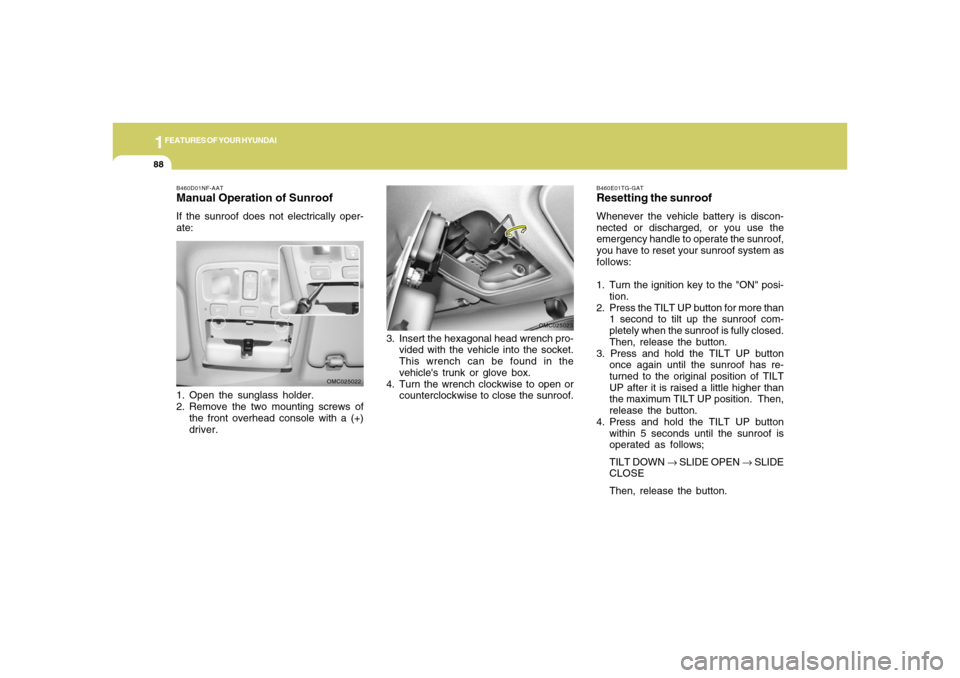
B460D01NF-AATManual Operation of SunroofIf the sunroof does not electrically oper-
ate:
1. Open the sunglass holder.
2. Remove the two mounting screws of
the front overhead console with a (+)
driver.
OMC025022B460E01TG-GAT
Resetting the sunroofWhenever the vehicle battery is discon-
nected or discharged, or you use the
emergency handle to operate the sunroof,
you have to reset your sunroof system as
follows:
1. Turn the ignition key to the "ON" posi-
tion.
2. Press the TILT UP button for more than
1 second to tilt up the sunroof com-
pletely when the sunroof is fully closed.
Then, release the button.
3. Press and hold the TILT UP button
once again until the sunroof has re-
turned to the original position of TILT
UP after it is raised a little higher than
the maximum TILT UP position. Then,
release the button.
4. Press and hold the TILT UP button
within 5 seconds until the sunroof is
operated as follows;
TILT DOWN → SLIDE OPEN → SLIDE
CLOSE
Then, release the button.
3. Insert the hexagonal head wrench pro-
vided with the vehicle into the socket.
This wrench can be found in the
vehicle's trunk or glove box.
4. Turn the wrench clockwise to open or
counterclockwise to close the sunroof.
OMC025023
Page 101 of 273
1
FEATURES OF YOUR HYUNDAI
891
FEATURES OF YOUR HYUNDAI
89
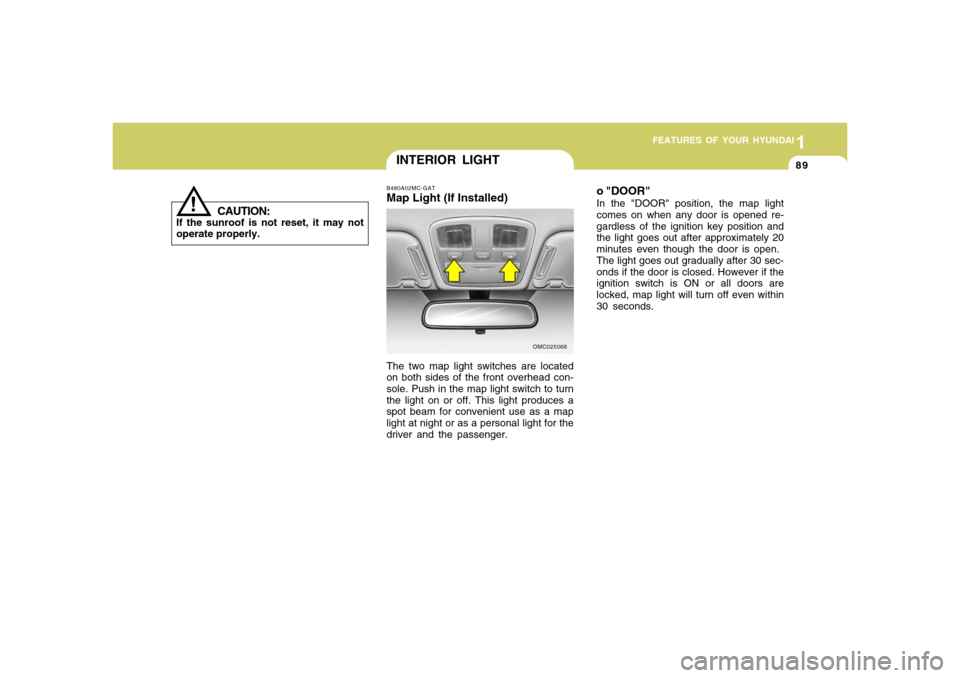
INTERIOR LIGHTB480A02MC-GATMap Light (If Installed)The two map light switches are located
on both sides of the front overhead con-
sole. Push in the map light switch to turn
the light on or off. This light produces a
spot beam for convenient use as a map
light at night or as a personal light for the
driver and the passenger.
OMC025068
o "DOOR"In the "DOOR" position, the map light
comes on when any door is opened re-
gardless of the ignition key position and
the light goes out after approximately 20
minutes even though the door is open.
The light goes out gradually after 30 sec-
onds if the door is closed. However if the
ignition switch is ON or all doors are
locked, map light will turn off even within
30 seconds.
!
CAUTION:
If the sunroof is not reset, it may not
operate properly.
Page 134 of 273
1FEATURES OF YOUR HYUNDAI
122
AUDIO SYSTEM
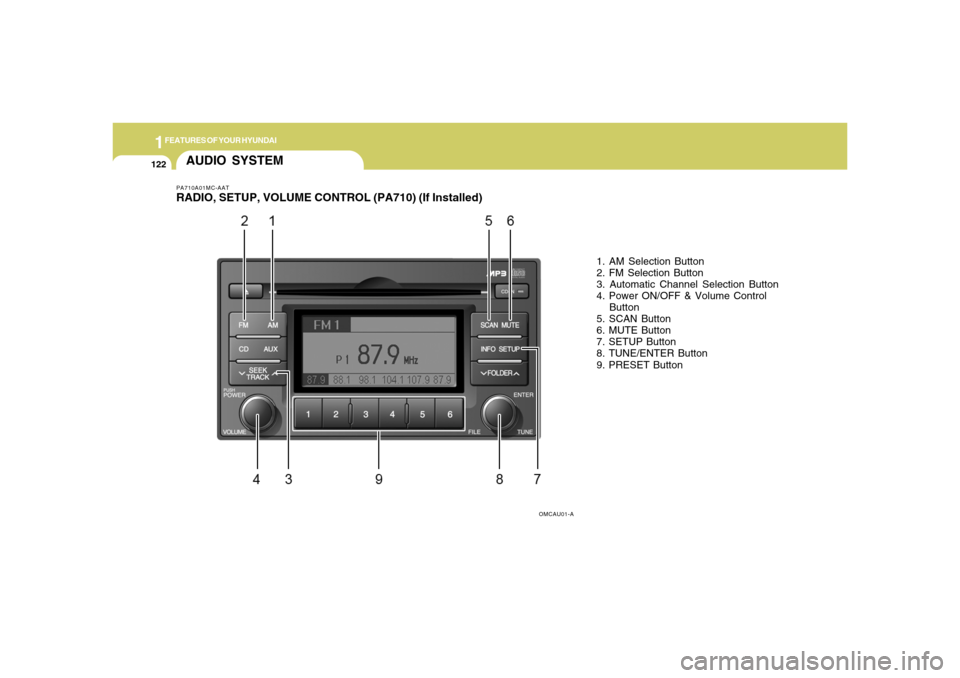
1. AM Selection Button
2. FM Selection Button
3. Automatic Channel Selection Button
4. Power ON/OFF & Volume Control
Button
5. SCAN Button
6. MUTE Button
7. SETUP Button
8. TUNE/ENTER Button
9. PRESET Button
OMCAU01-A
PA710A01MC-AATRADIO, SETUP, VOLUME CONTROL (PA710) (If Installed)
Page 135 of 273

1
FEATURES OF YOUR HYUNDAI
123123
PA710B01MC-AAT1. AM Selection ButtonTurns to AM mode, and toggles in the
order of AM1➟AM2➟···➟AM1···when the
button is pressed each time.2. FM Selection ButtonTurns to FM mode and toggles FM1 and
FM2 when the button is pressed each
time.3. Automatic Channel Selection But-
tono When the [SEEK
] button is pressed,
it reduces the band frequency by
200khz to automatically select chan-
nel. Stops at the previous frequency if
no channel is found.
o When the [SEEK ] button is pressed,
it increases the band frequency by
50khz to automatically select channel.
Stops at the previous frequency if no
channel is found.
4. Power ON/OFF & Volume Control
ButtonTurns on/off the set when the IGNITION
SWITCH is on ACC or ON. If the button is
turned to the right, it increases the vol-
ume and left, decreases the volume.5. SCAN ButtonIf this button is pressed, the frequencies
will become increased and receive the
corresponding broadcasts.
This function will play the frequencies for
10 seconds each and find other broad-
casts as the frequency increases.
Press the button again when desiring to
continue listening to the currently playing
broadcast.6. MUTE ButtonPress to temporarily cut off the sound.
7. SETUP ButtonPress this button to turn to the SCROLL
and AUDIO adjustment mode.
If no action is taken for 5 seconds after
pressing the button, it will return to the
play mode.(After entering SETUP mode,
move between items using the left, right
and PUSH functions of the TUNE button.)8. TUNE/ENTER ButtonTurn this button clockwise by one notch to
increase frequency by 0.05Mhz from cur-
rent frequency.
Turn this button counterclockwise by one
notch to decrease frequency by 0.05Mhz
from current frequency.
Press this button while holding SETUP
button to activate / inactivate the item to.
Select SETUP item using left and right
function of the Tune button.9. PRESET ButtonPush [1]~[6] buttons less than 0.8 second
to play the channel saved in each button.
Push PRESET button for 0.8 second or
longer to save current channel to the
respective button with a beep.
Page 139 of 273

1
FEATURES OF YOUR HYUNDAI
127127
7. Information Display ButtonDisplays the information of the current
CD TRACK in the order of DISC TITLE
➟DISC ARTIST➟TRACK TITLE➟ TRACK
ARTIST➟TOTAL TRACK➟ Play Screen
➟DISC TITLE➟···.(not displayed if the in-
formation is not available on the DISC.)8. TUNE/ENTER ButtonTurn this button clockwise to display
songs after current song.
Also, turn this button counterclockwise to
display songs before current song.
To listen to the displayed song, press the
button to skip to the song and play.9. RANDOM Play ButtonTurns on/off the randomization of the play
list of files in the currently played DISC.
To cancel the mode, press the key once
again.
10. REPEAT ButtonRepeats current song when the button is
pressed for less than 0.8 second.
Repeats current folder when the button is
pressed for 0.8 second or longer. (If there
is no folder, entire disc will be repeated.)11. SCAN Play ButtonPlays first 10 seconds of each song in the
DISC. To cancel the mode, press the key
once again.12. FOLDER ButtonFolder up/down operation
o Folder is moved up or down from cur-
rently playing and folder name be-
comes displayed.
o Press enter key to play the selected
folder.
o If the enter key is not pressed within 5
seconds, then the previous folder name
will be displayed again.
NOTE:o To assure proper operation of the
unit, keep the vehicle interior tem-
perature within a normal range by
using the vehicle's air conditioning
or heating system.
o When replacing the fuse, replace it
with a fuse having the correct capac-
ity.
o All stored bookmarks are all erased
when the car battery is disconnected
or power to the vehicle is lost. If this
occurs, the bookmarks will have to
be reset.
o This equipment is designed to be
used only in a 12 volt DC battery
system with negative ground.
o This unit is made of precision parts.
Do not attempt to disassemble or
adjust any parts.
o When driving your vehicle, be sure to
keep the volume of the unit set low
enough to allow you to hear sounds
coming from the outside.
o Do not expose this equipment (in-
cluding the speakers and CD) to water
or excessive moisture.