Jack HYUNDAI I30 2014 Owners Manual
[x] Cancel search | Manufacturer: HYUNDAI, Model Year: 2014, Model line: I30, Model: HYUNDAI I30 2014Pages: 635, PDF Size: 40.66 MB
Page 195 of 635
4 117
Features of your vehicle
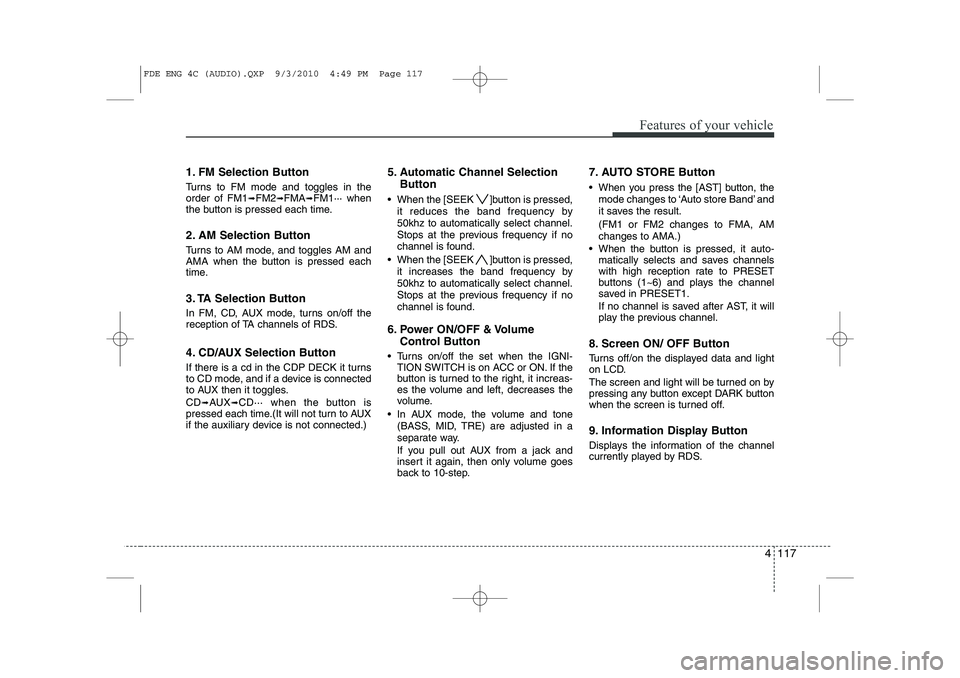
1. FM Selection Button
Turns to FM mode and toggles in the order of FM1➟FM2 ➟FMA ➟FM1··· when
the button is pressed each time.
2. AM Selection Button
Turns to AM mode, and toggles AM and
AMA when the button is pressed each
time.
3. TA Selection Button
In FM, CD, AUX mode, turns on/off the
reception of TA channels of RDS.
4. CD/AUX Selection Button
If there is a cd in the CDP DECK it turns
to CD mode, and if a device is connected
to AUX then it toggles. CD ➟
AUX ➟CD··· when the button is
pressed each time.(It will not turn to AUX
if the auxiliary device is not connected.) 5. Automatic Channel Selection
Button
When the [SEEK ]button is pressed, it reduces the band frequency by 50khz to automatically select channel.
Stops at the previous frequency if no
channel is found.
When the [SEEK ]button is pressed, it increases the band frequency by50khz to automatically select channel.
Stops at the previous frequency if no
channel is found.
6. Power ON/OFF & Volume Control Button
Turns on/off the set when the IGNI- TION SWITCH is on ACC or ON. If the
button is turned to the right, it increas-
es the volume and left, decreases the
volume.
In AUX mode, the volume and tone (BASS, MID, TRE) are adjusted in a
separate way.
If you pull out AUX from a jack and
insert it again, then only volume goes
back to 10-step. 7. AUTO STORE Button
When you press the [AST] button, the
mode changes to ‘Auto store Band’ and
it saves the result. (FM1 or FM2 changes to FMA, AM changes to AMA.)
When the button is pressed, it auto- matically selects and saves channels
with high reception rate to PRESET
buttons (1~6) and plays the channel
saved in PRESET1.
If no channel is saved after AST, it will
play the previous channel.
8. Screen ON/ OFF Button
Turns off/on the displayed data and light
on LCD.
The screen and light will be turned on by
pressing any button except DARK button
when the screen is turned off.
9. Information Display Button
Displays the information of the channel
currently played by RDS.
FDE ENG 4C (AUDIO).QXP 9/3/2010 4:49 PM Page 117
Page 202 of 635
Features of your vehicle
124
4
(Continued)
If USB device is divided by logical drives, only the music files on thehighest-priority drive are recog-nized by car audio.
Devices such as MP3 Player/ Cellular phone/Digital camerathose are not recognizable bystandard USB I/F can be unrecog-
nizable.
USB devices other than standard- ized goods (METAL COVER TYPEUSB) can be unrecognizable.
USB flash memory reader (such as CF, SD, microSD, etc.) or exter-nal-HDD type devices can be unrecognizable.
Music files protected by DRM (DIGITAL RIGHTS MANAGEMENT)
are not recognizalbe.
The data in the USB memory may lost while using this AUDIO, It isrecommeded to back up impor-tant data on a personal.
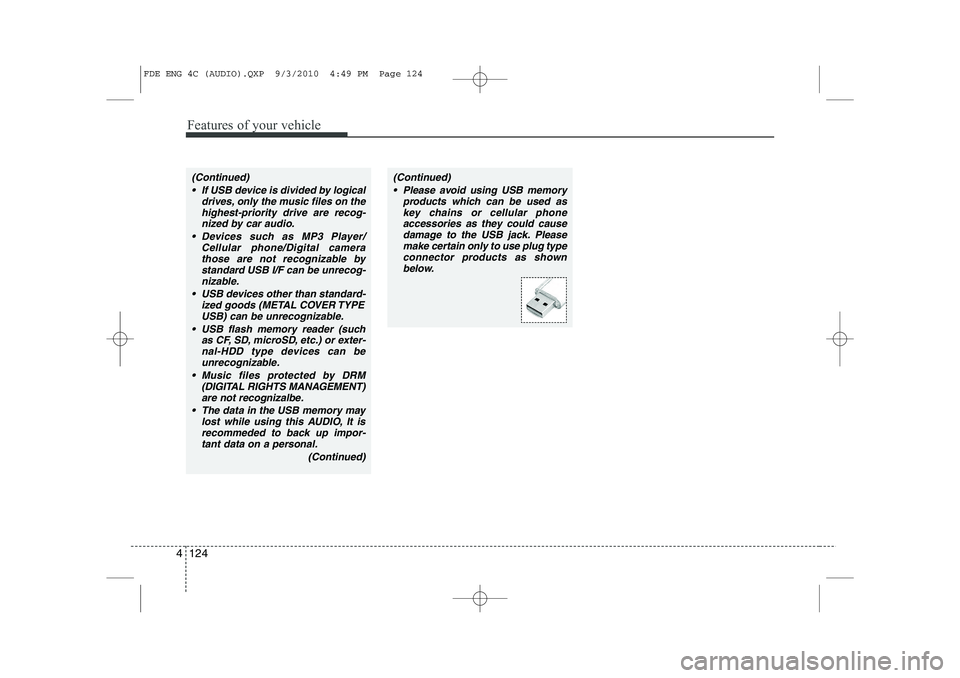
(Continued)(Continued) Please avoid using USB memory products which can be used askey chains or cellular phoneaccessories as they could cause
damage to the USB jack. Pleasemake certain only to use plug type connector products as shown
below.
FDE ENG 4C (AUDIO).QXP 9/3/2010 4:49 PM Page 124
Page 207 of 635
4 129
Features of your vehicle
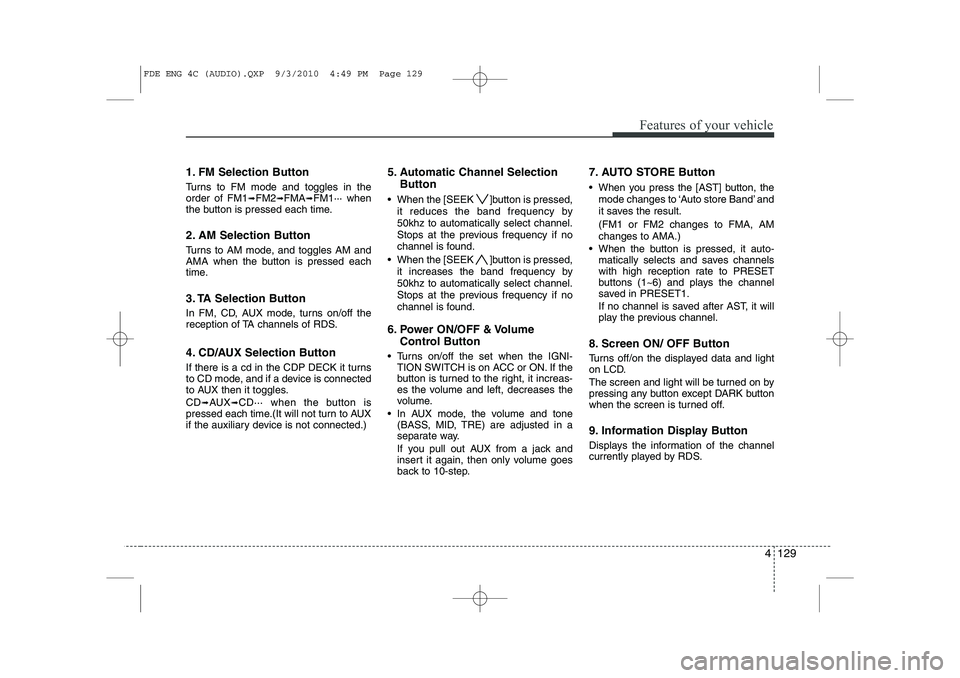
1. FM Selection Button
Turns to FM mode and toggles in the order of FM1➟FM2 ➟FMA ➟FM1··· when
the button is pressed each time.
2. AM Selection Button
Turns to AM mode, and toggles AM and
AMA when the button is pressed each
time.
3. TA Selection Button
In FM, CD, AUX mode, turns on/off the
reception of TA channels of RDS.
4. CD/AUX Selection Button
If there is a cd in the CDP DECK it turns
to CD mode, and if a device is connected
to AUX then it toggles. CD ➟
AUX ➟CD··· when the button is
pressed each time.(It will not turn to AUX
if the auxiliary device is not connected.) 5. Automatic Channel Selection
Button
When the [SEEK ]button is pressed, it reduces the band frequency by 50khz to automatically select channel.
Stops at the previous frequency if no
channel is found.
When the [SEEK ]button is pressed, it increases the band frequency by50khz to automatically select channel.
Stops at the previous frequency if no
channel is found.
6. Power ON/OFF & Volume Control Button
Turns on/off the set when the IGNI- TION SWITCH is on ACC or ON. If the
button is turned to the right, it increas-
es the volume and left, decreases the
volume.
In AUX mode, the volume and tone (BASS, MID, TRE) are adjusted in a
separate way.
If you pull out AUX from a jack and
insert it again, then only volume goes
back to 10-step. 7. AUTO STORE Button
When you press the [AST] button, the
mode changes to ‘Auto store Band’ and
it saves the result. (FM1 or FM2 changes to FMA, AM changes to AMA.)
When the button is pressed, it auto- matically selects and saves channels
with high reception rate to PRESET
buttons (1~6) and plays the channel
saved in PRESET1.
If no channel is saved after AST, it will
play the previous channel.
8. Screen ON/ OFF Button
Turns off/on the displayed data and light
on LCD.
The screen and light will be turned on by
pressing any button except DARK button
when the screen is turned off.
9. Information Display Button
Displays the information of the channel
currently played by RDS.
FDE ENG 4C (AUDIO).QXP 9/3/2010 4:49 PM Page 129
Page 215 of 635
4 137
Features of your vehicle
(Continued) If USB device is divided by logical drives, only the music files on thehighest-priority drive are recog-nized by car audio.
Devices such as MP3 Player/ Cellular phone/Digital camerathose are not recognizable bystandard USB I/F can be unrecog-
nizable.
USB devices other than standard- ized goods (METAL COVER TYPEUSB) can be unrecognizable.
USB flash memory reader (such as CF, SD, microSD, etc.) or exter-nal-HDD type devices can be unrecognizable.
Music files protected by DRM (DIGITAL RIGHTS MANAGEMENT)
are not recognizalbe.
The data in the USB memory may lost while using this AUDIO, It isrecommeded to back up impor- tant data on a personal.
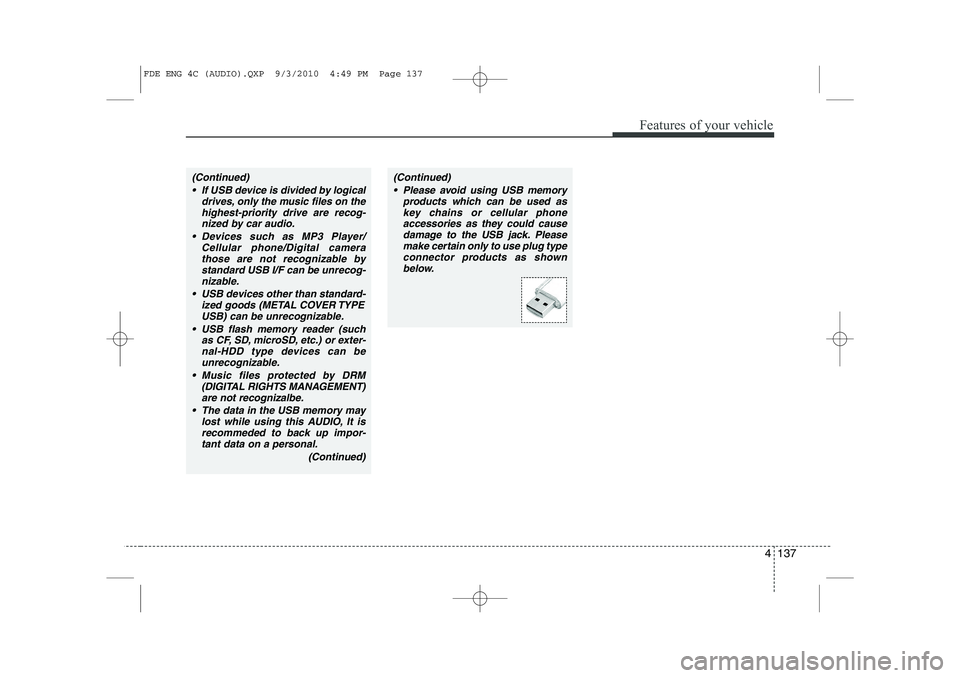
(Continued)(Continued) Please avoid using USB memory products which can be used askey chains or cellular phoneaccessories as they could cause
damage to the USB jack. Pleasemake certain only to use plug type connector products as shown
below.
FDE ENG 4C (AUDIO).QXP 9/3/2010 4:49 PM Page 137
Page 220 of 635
Features of your vehicle
142
4
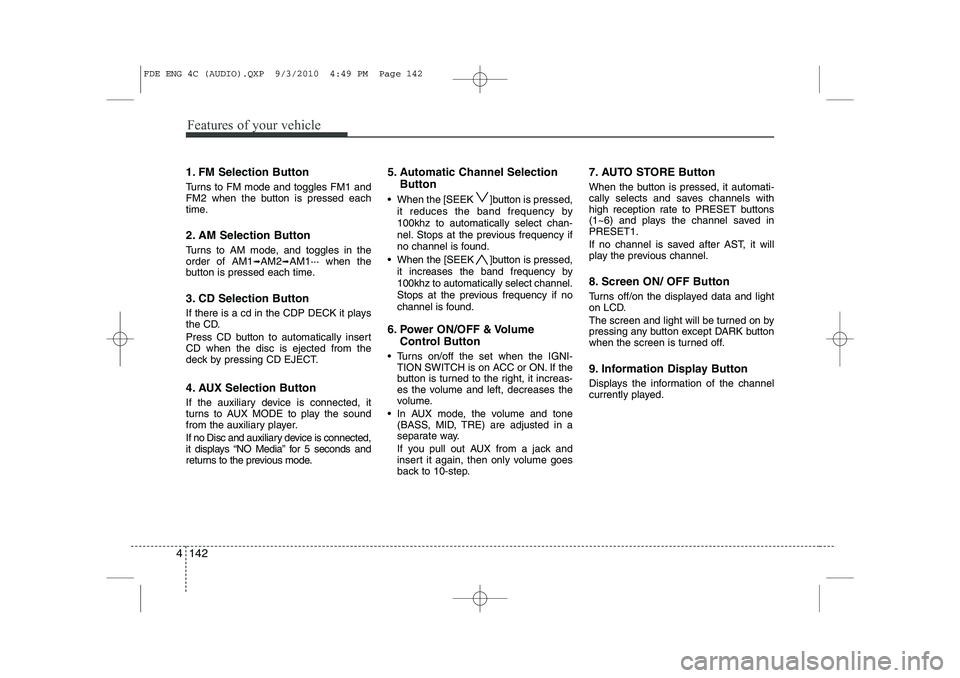
1. FM Selection Button
Turns to FM mode and toggles FM1 and
FM2 when the button is pressed each
time.
2. AM Selection Button
Turns to AM mode, and toggles in the order of AM1 ➟AM2 ➟AM1··· when the
button is pressed each time.
3. CD Selection Button
If there is a cd in the CDP DECK it plays
the CD.
Press CD button to automatically insert CD when the disc is ejected from the
deck by pressing CD EJECT.
4. AUX Selection Button
If the auxiliary device is connected, it
turns to AUX MODE to play the sound
from the auxiliary player.
If no Disc and auxiliary device is connected,
it displays “NO Media” for 5 seconds and
returns to the previous mode. 5. Automatic Channel Selection
Button
When the [SEEK ]button is pressed, it reduces the band frequency by 100khz to automatically select chan-
nel. Stops at the previous frequency if
no channel is found.
When the [SEEK ]button is pressed, it increases the band frequency by100khz to automatically select channel.
Stops at the previous frequency if no
channel is found.
6. Power ON/OFF & Volume Control Button
Turns on/off the set when the IGNI- TION SWITCH is on ACC or ON. If the
button is turned to the right, it increas-
es the volume and left, decreases the
volume.
In AUX mode, the volume and tone (BASS, MID, TRE) are adjusted in a
separate way.
If you pull out AUX from a jack and
insert it again, then only volume goes
back to 10-step. 7. AUTO STORE Button
When the button is pressed, it automati-
cally selects and saves channels with
high reception rate to PRESET buttons
(1~6) and plays the channel saved inPRESET1.
If no channel is saved after AST, it will
play the previous channel.
8. Screen ON/ OFF Button
Turns off/on the displayed data and light
on LCD.
The screen and light will be turned on by
pressing any button except DARK button
when the screen is turned off.
9. Information Display Button
Displays the information of the channel
currently played.
FDE ENG 4C (AUDIO).QXP 9/3/2010 4:49 PM Page 142
Page 227 of 635
4 149
Features of your vehicle
(Continued) If USB device is divided by logical drives, only the music files on thehighest-priority drive are recog-nized by car audio.
Devices such as MP3 Player/ Cellular phone/Digital camerathose are not recognizable bystandard USB I/F can be unrecog-
nizable.
USB devices other than standard- ized goods (METAL COVER TYPEUSB) can be unrecognizable.
USB flash memory reader (such as CF, SD, microSD, etc.) or exter-nal-HDD type devices can be unrecognizable.
Music files protected by DRM (DIGITAL RIGHTS MANAGEMENT)
are not recognizalbe.
The data in the USB memory may lost while using this AUDIO, It isrecommeded to back up impor-tant data on a personal.
(Continued)(Continued) Please avoid using USB memory products which can be used askey chains or cellular phoneaccessories as they could cause
damage to the USB jack. Pleasemake certain only to use plug type connector products as shown
below.
FDE ENG 4C (AUDIO).QXP 9/3/2010 4:49 PM Page 149
Page 232 of 635
Features of your vehicle
154
4
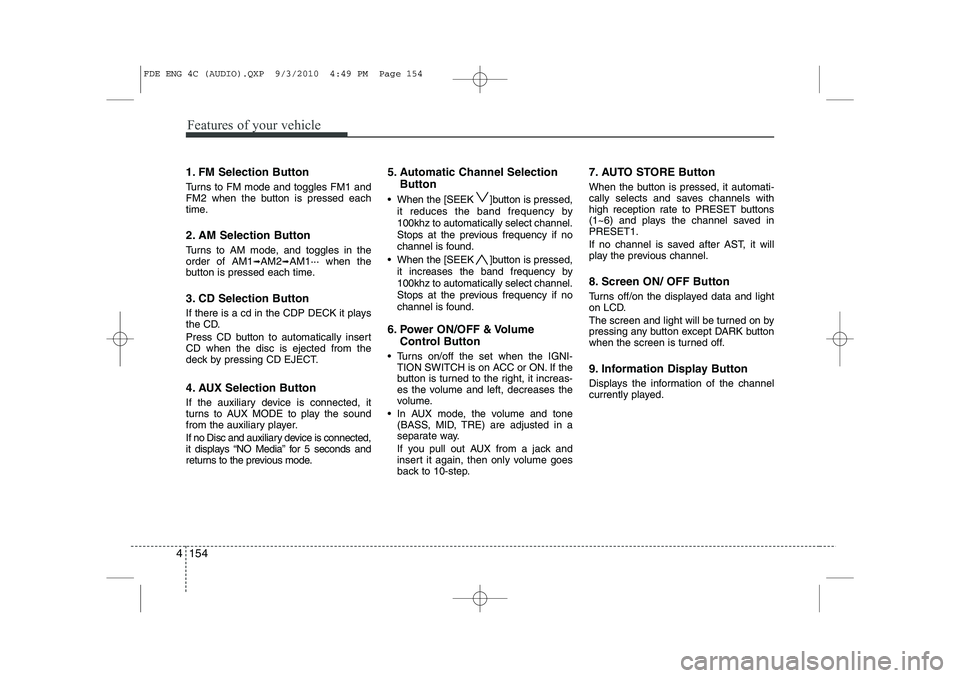
1. FM Selection Button
Turns to FM mode and toggles FM1 and
FM2 when the button is pressed each
time.
2. AM Selection Button
Turns to AM mode, and toggles in the order of AM1 ➟AM2 ➟AM1··· when the
button is pressed each time.
3. CD Selection Button
If there is a cd in the CDP DECK it plays
the CD.
Press CD button to automatically insert CD when the disc is ejected from the
deck by pressing CD EJECT.
4. AUX Selection Button
If the auxiliary device is connected, it
turns to AUX MODE to play the sound
from the auxiliary player.
If no Disc and auxiliary device is connected,
it displays “NO Media” for 5 seconds and
returns to the previous mode. 5. Automatic Channel Selection
Button
When the [SEEK ]button is pressed, it reduces the band frequency by 100khz to automatically select channel.
Stops at the previous frequency if no
channel is found.
When the [SEEK ]button is pressed, it increases the band frequency by100khz to automatically select channel.
Stops at the previous frequency if no
channel is found.
6. Power ON/OFF & Volume Control Button
Turns on/off the set when the IGNI- TION SWITCH is on ACC or ON. If the
button is turned to the right, it increas-
es the volume and left, decreases the
volume.
In AUX mode, the volume and tone (BASS, MID, TRE) are adjusted in a
separate way.
If you pull out AUX from a jack and
insert it again, then only volume goes
back to 10-step. 7. AUTO STORE Button
When the button is pressed, it automati-
cally selects and saves channels with
high reception rate to PRESET buttons
(1~6) and plays the channel saved inPRESET1.
If no channel is saved after AST, it will
play the previous channel.
8. Screen ON/ OFF Button
Turns off/on the displayed data and light
on LCD.
The screen and light will be turned on by
pressing any button except DARK button
when the screen is turned off.
9. Information Display Button
Displays the information of the channel
currently played.
FDE ENG 4C (AUDIO).QXP 9/3/2010 4:49 PM Page 154
Page 240 of 635
Features of your vehicle
162
4
(Continued)
If USB device is divided by logical drives, only the music files on thehighest-priority drive are recog-nized by car audio.
Devices such as MP3 Player/ Cellular phone/Digital camerathose are not recognizable bystandard USB I/F can be unrecog-
nizable.
USB devices other than standard- ized goods (METAL COVER TYPEUSB) can be unrecognizable.
USB flash memory reader (such as CF, SD, microSD, etc.) or exter-nal-HDD type devices can be unrecognizable.
Music files protected by DRM (DIGITAL RIGHTS MANAGEMENT)
are not recognizalbe.
The data in the USB memory may lost while using this AUDIO, It isrecommeded to back up impor- tant data on a personal.
(Continued)(Continued) Please avoid using USB memory products which can be used askey chains or cellular phoneaccessories as they could cause
damage to the USB jack. Pleasemake certain only to use plug type connector products as shown
below.
FDE ENG 4C (AUDIO).QXP 9/3/2010 4:49 PM Page 162
Page 274 of 635
531
Driving your vehicle
E100000AFD
Your vehicle's fuel economy depends
mainly on your style of driving, where you
drive and when you drive.
Each of these factors affects how many
miles (kilometers) you can get from a gal-
lon (liter) of fuel. To operate your vehicle
as economically as possible, use the fol-
lowing driving suggestions to help save
money in both fuel and repairs:
Drive smoothly. Accelerate at a moder-ate rate. Don't make "jack-rabbit" starts or full-throttle shifts and maintain a
steady cruising speed. Don't race
between stoplights. Try to adjust your
speed to that of the other traffic so you
don't have to change speeds unneces-
sarily. Avoid heavy traffic whenever
possible. Always maintain a safe dis-
tance from other vehicles so you can
avoid unnecessary braking. This also
reduces brake wear.
Drive at a moderate speed. The faster you drive, the more fuel your car uses.
Driving at a moderate speed, especial-
ly on the highway, is one of the most
effective ways to reduce fuel consump-tion. Don't "ride" the brake or clutch pedal.
This can increase fuel consumption
and also increase wear on these com-
ponents. In addition, driving with your
foot resting on the brake pedal may
cause the brakes to overheat, which
reduces their effectiveness and may
lead to more serious consequences.
Take care of your tires. Keep them inflated to the recommended pressure.
Incorrect inflation, either too much or
too little, results in unnecessary tire
wear. Check the tire pressures at leastonce a month.
Be sure that the wheels are aligned correctly. Improper alignment can
result from hitting curbs or driving too
fast over irregular surfaces. Poor align-
ment causes faster tire wear and may
also result in other problems as well as
greater fuel consumption.
Keep your car in good condition. For better fuel economy and reduced
maintenance costs, maintain your carin accordance with the maintenance
schedule in Section 7. If you drive your
car in severe conditions, more frequentmaintenance is required (see Section
7 for details). Keep your car clean. For maximum
service, your vehicle should be kept
clean and free of corrosive materials. It
is especially important that mud, dirt,
ice, etc. not be allowed to accumulate
on the underside of the car. This extra
weight can result in increased fuel con-
sumption and also contribute to corro-sion.
Travel lightly. Don't carry unnecessary weight in your car. Weight reduces fuel
economy.
Don't let the engine idle longer than necessary. If you are waiting (and not
in traffic), turn off your engine and
restart only when you're ready to go.
Remember, your vehicle does not require extended warm-up. After the
engine has started, allow the engine to
run for 10 to 20 seconds prior to plac-
ing the vehicle in gear. In very cold
weather, however, give your engine a
slightly longer warm-up period.
Don't "lug" or "over-rev" the engine. Lugging is driving too slowly in toohigh a gear resulting in the engine
bucking. If this happens, shift to a lower
gear. Over-revving is racing the engine
beyond its safe limit. This can be avoid-
ed by shifting at the recommended
speeds.
ECONOMICAL OPERATION
Page 304 of 635
What to do in an emergency
12
6
IF YOU HAVE A FLAT TIRE
F070100AFD
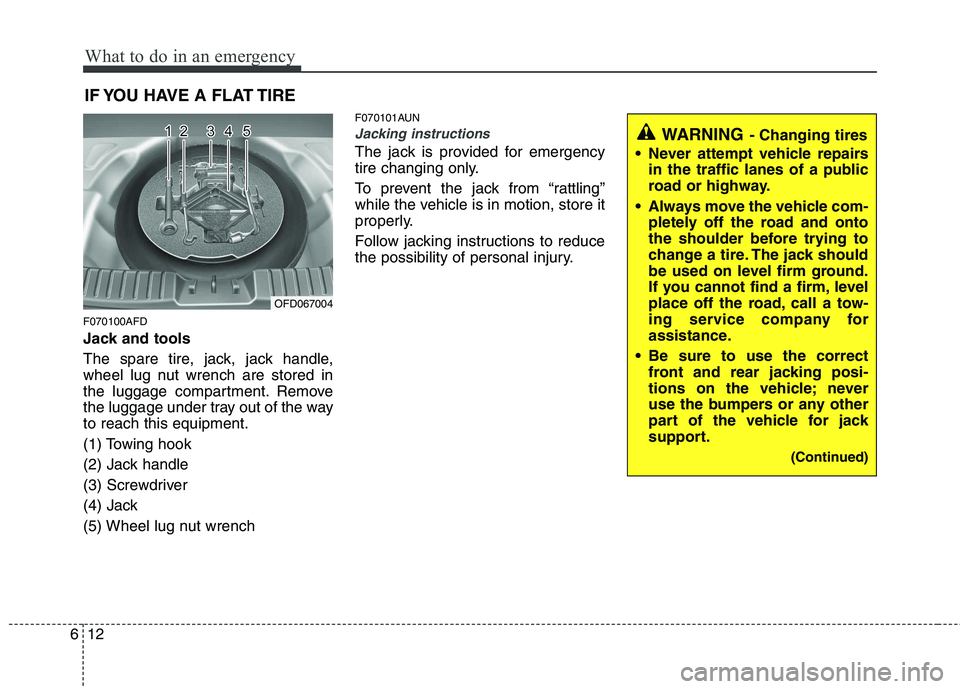
Jack and tools
The spare tire, jack, jack handle,
wheel lug nut wrench are stored in
the luggage compartment. Remove
the luggage under tray out of the wayto reach this equipment.
(1) Towing hook
(2) Jack handle
(3) Screwdriver
(4) Jack
(5) Wheel lug nut wrench F070101AUN
Jacking instructions
The jack is provided for emergency
tire changing only.
To prevent the jack from “rattling”
while the vehicle is in motion, store it
properly.
Follow jacking instructions to reduce
the possibility of personal injury.
OFD067004
WARNING
- Changing tires
Never attempt vehicle repairs in the traffic lanes of a public
road or highway.
Always move the vehicle com- pletely off the road and onto
the shoulder before trying to
change a tire. The jack should
be used on level firm ground.
If you cannot find a firm, level
place off the road, call a tow-
ing service company for
assistance.
Be sure to use the correct front and rear jacking posi-
tions on the vehicle; never
use the bumpers or any other
part of the vehicle for jack
support.
(Continued)