ECU Hyundai Ioniq Electric 2018 Owner's Guide
[x] Cancel search | Manufacturer: HYUNDAI, Model Year: 2018, Model line: Ioniq Electric, Model: Hyundai Ioniq Electric 2018Pages: 541, PDF Size: 19.83 MB
Page 132 of 541
3-47
Convenient features of your vehicle
3
Closing the hood
1. Before closing the hood, check thefollowing:
ment must be correctly installed.
bustible material must be
removed from the motor com-
partment.
2. Lower the hood halfway (lifted approximately 12 inches (30 cm)
from the closed position) and push
down to securely lock in place.
Then double check to be sure the
hood is secure. If the hood can
slightly be raised, it is not secure-
ly locked. Open it again and close
it with more force.
Before closing the hood,
ensure all obstructions are
removed from around hood
opening.
Always double check to be
sure that the hood is firmly
latched before driving away.
Check there is no hood open
warning light or message dis-
played on the instrument clus-
ter. Driving with the hood
opened may cause a total loss
of visibility, which might
result in an accident.
Do not move the vehicle with
the hood in the raised posi-
tion, as vision is obstructed,
which might result in an acci-
dent, and the hood could fall
or be damaged.
WARNING
Grasp the support rod in the
area wrapped in rubber. The
rubber will help prevent you
from being burned by hot
metal when the parts in the
motor compartment is hot.
The support rod must be
inserted completely into the
hole provided whenever you
inspect the motor compart-
ment. This will prevent the
hood from falling and possi-
bly injuring you.
WARNING
Page 133 of 541
3-48
Convenient features of your vehicle
Liftgate
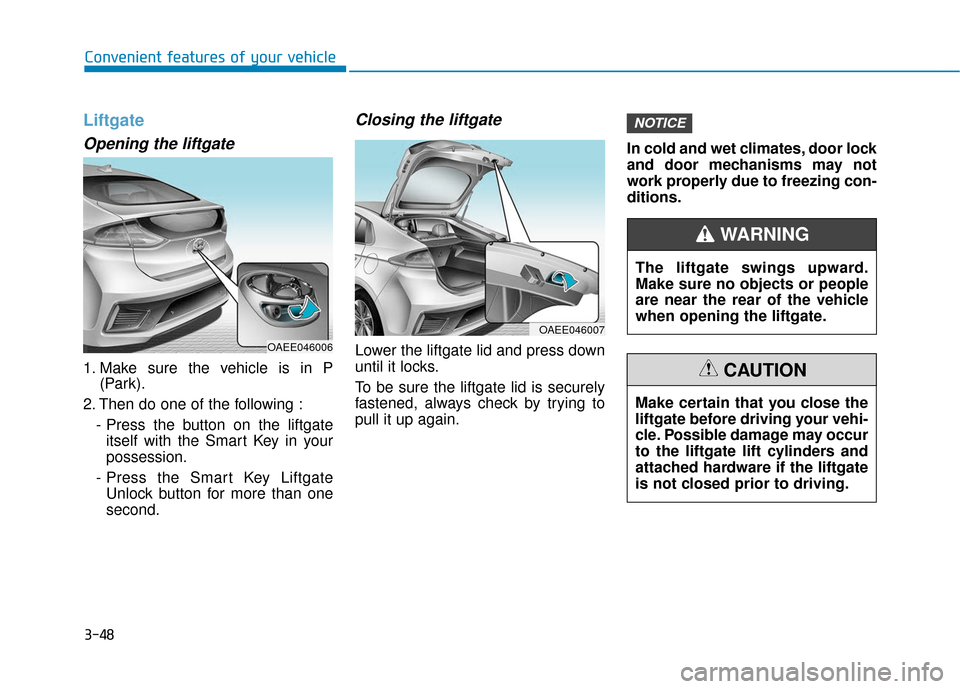
Opening the liftgate
1. Make sure the vehicle is in P(Park).
2. Then do one of the following : - Press the button on the liftgateitself with the Smart Key in your
possession.
- Press the Smart Key Liftgate Unlock button for more than one
second.
Closing the liftgate
Lower the liftgate lid and press down
until it locks.
To be sure the liftgate lid is securely
fastened, always check by trying to
pull it up again. In cold and wet climates, door lock
and door mechanisms may not
work properly due to freezing con-
ditions.
NOTICE
OAEE046007
The liftgate swings upward.
Make sure no objects or people
are near the rear of the vehicle
when opening the liftgate.
WARNING
Make certain that you close the
liftgate before driving your vehi-
cle. Possible damage may occur
to the liftgate lift cylinders and
attached hardware if the liftgate
is not closed prior to driving.
CAUTION
OAEE046006
Page 135 of 541
3-50
Convenient features of your vehicle
Charging Door
Opening the charging door
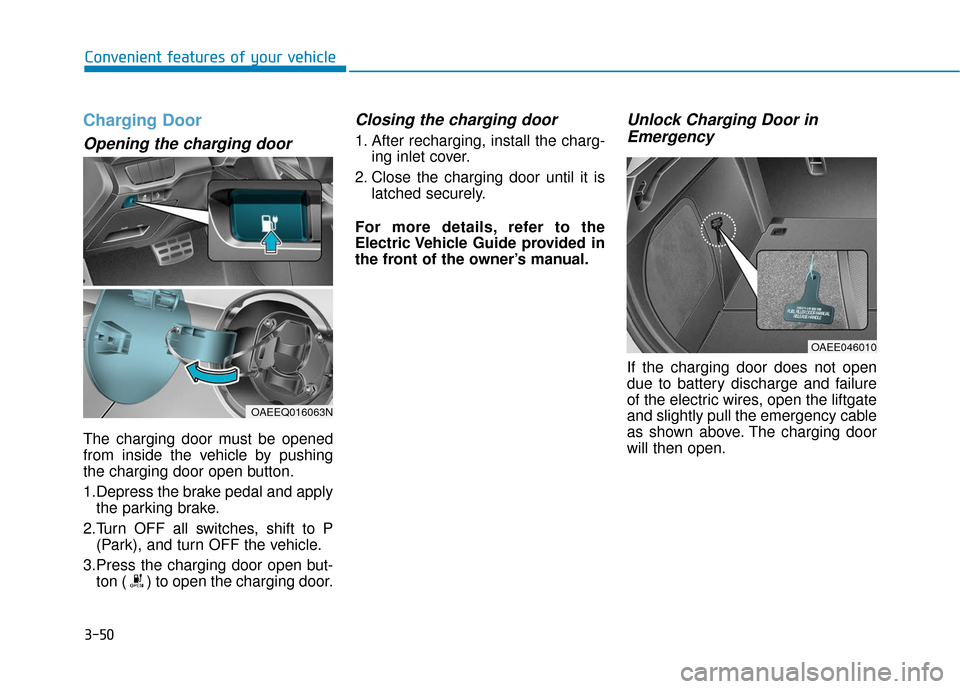
The charging door must be opened
from inside the vehicle by pushing
the charging door open button.
1.Depress the brake pedal and applythe parking brake.
2.Turn OFF all switches, shift to P (Park), and turn OFF the vehicle.
3.Press the charging door open but- ton ( ) to open the charging door.
Closing the charging door
1. After recharging, install the charg- ing inlet cover.
2. Close the charging door until it is latched securely.
For more details, refer to the
Electric Vehicle Guide provided in
the front of the owner’s manual.
Unlock Charging Door in Emergency
If the charging door does not open
due to battery discharge and failure
of the electric wires, open the liftgate
and slightly pull the emergency cable
as shown above. The charging door
will then open.
OAEE046010
OAEEQ016063N
Page 185 of 541
3-100
Convenient features of your vehicle
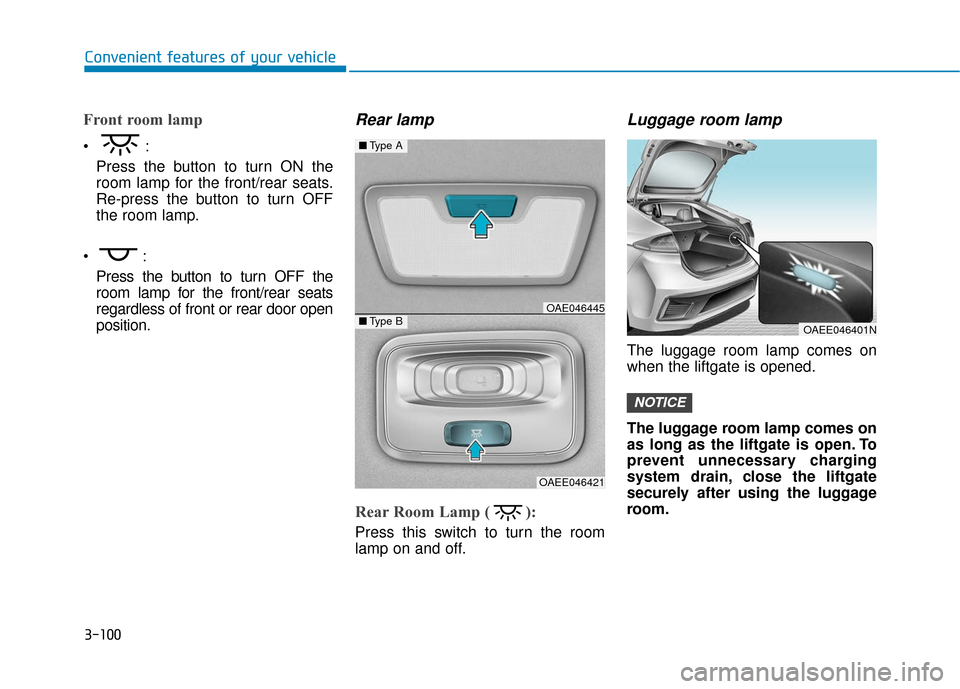
Front room lamp
Press the button to turn ON the
room lamp for the front/rear seats.
Re-press the button to turn OFF
the room lamp.
Press the button to turn OFF the
room lamp for the front/rear seats
regardless of front or rear door open
position.
Rear lamp
Rear Room Lamp ( ):
Press this switch to turn the room
lamp on and off.
Luggage room lamp
The luggage room lamp comes on
when the liftgate is opened.
The luggage room lamp comes on
as long as the liftgate is open. To
prevent unnecessary charging
system drain, close the liftgate
securely after using the luggage
room.
NOTICE
■ Type A
■Type BOAE046445
OAEE046421
OAEE046401N
Page 208 of 541
3-123
Convenient features of your vehicle
3
Automatic Ventilation
(if equipped)
When the POWER button is in the
ON position or when the vehicle is in
the ready ( ) mode and tempera-
ture is below 59°F (15°C) with the
recirculated air position selected
more than five minutes, the air intake
position will automatically change to
the outside (fresh) air position.
To cancel or reset the Automatic
Ventilation
When the air conditioning system is
on, select Face Level mode,
press the recirculated air position
button for three seconds.To avoid possible theft, do not
leave valuables in the storage
compartments.
Center Console Storage
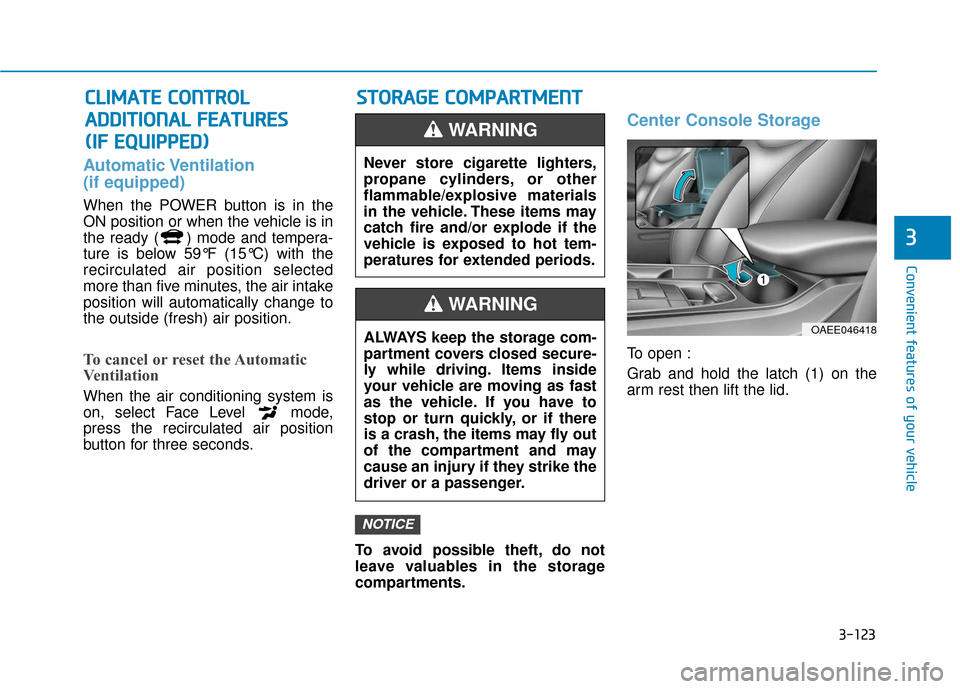
To open :
Grab and hold the latch (1) on the
arm rest then lift the lid.
NOTICE
C
CL
LI
IM
M A
AT
TE
E
C
C O
O N
NT
TR
R O
O L
L
A
A D
DD
DI
IT
T I
IO
O N
NA
AL
L
F
F E
E A
A T
TU
U R
RE
ES
S
(
( I
IF
F
E
E Q
Q U
UI
IP
P P
PE
ED
D )
) S
S
T
T O
O R
RA
A G
G E
E
C
C O
O M
M P
PA
A R
RT
TM
M E
EN
N T
T
Never store cigarette lighters,
propane cylinders, or other
flammable/explosive materials
in the vehicle. These items may
catch fire and/or explode if the
vehicle is exposed to hot tem-
peratures for extended periods.
WARNING
ALWAYS keep the storage com-
partment covers closed secure-
ly while driving. Items inside
your vehicle are moving as fast
as the vehicle. If you have to
stop or turn quickly, or if there
is a crash, the items may fly out
of the compartment and may
cause an injury if they strike the
driver or a passenger.
WARNING
OAEE046418
Page 210 of 541
3-125
Convenient features of your vehicle
3
Multi Box
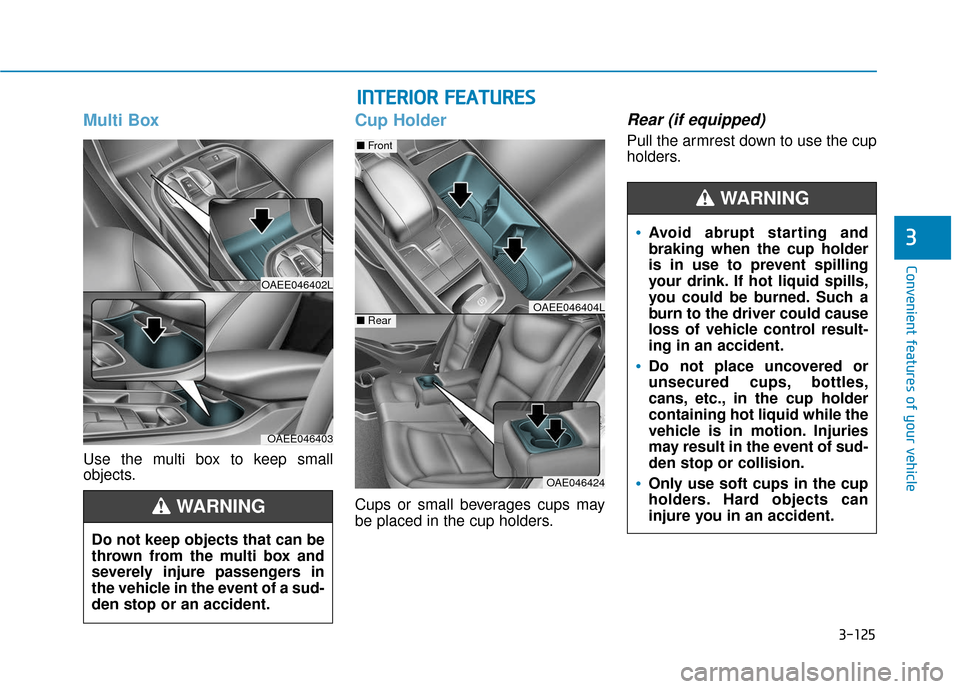
Use the multi box to keep small
objects.
Cup Holder
Cups or small beverages cups may
be placed in the cup holders.
Rear (if equipped)
Pull the armrest down to use the cup
holders.
OAEE046402L
OAEE046403
Do not keep objects that can be
thrown from the multi box and
severely injure passengers in
the vehicle in the event of a sud-
den stop or an accident.
WARNING
I IN
N T
TE
ER
R I
IO
O R
R
F
F E
E A
A T
TU
U R
RE
ES
S
OAE046424
■ Front
■RearOAEE046404L
Avoid abrupt starting and
braking when the cup holder
is in use to prevent spilling
your drink. If hot liquid spills,
you could be burned. Such a
burn to the driver could cause
loss of vehicle control result-
ing in an accident.
Do not place uncovered or
unsecured cups, bottles,
cans, etc., in the cup holder
containing hot liquid while the
vehicle is in motion. Injuries
may result in the event of sud-
den stop or collision.
Only use soft cups in the cup
holders. Hard objects can
injure you in an accident.
WARNING
Page 211 of 541
3-126
Convenient features of your vehicle
Keep your drinks sealed while driving to prevent spilling your
drink. If liquid spills, it may get
into the vehicle's electrical/elec-
tronic system and damage elec-
trical/electronic parts.
When cleaning spilled liquids, do not dry the cup holder at high
temperature. This may damage
the cup holder.
Sunvisor
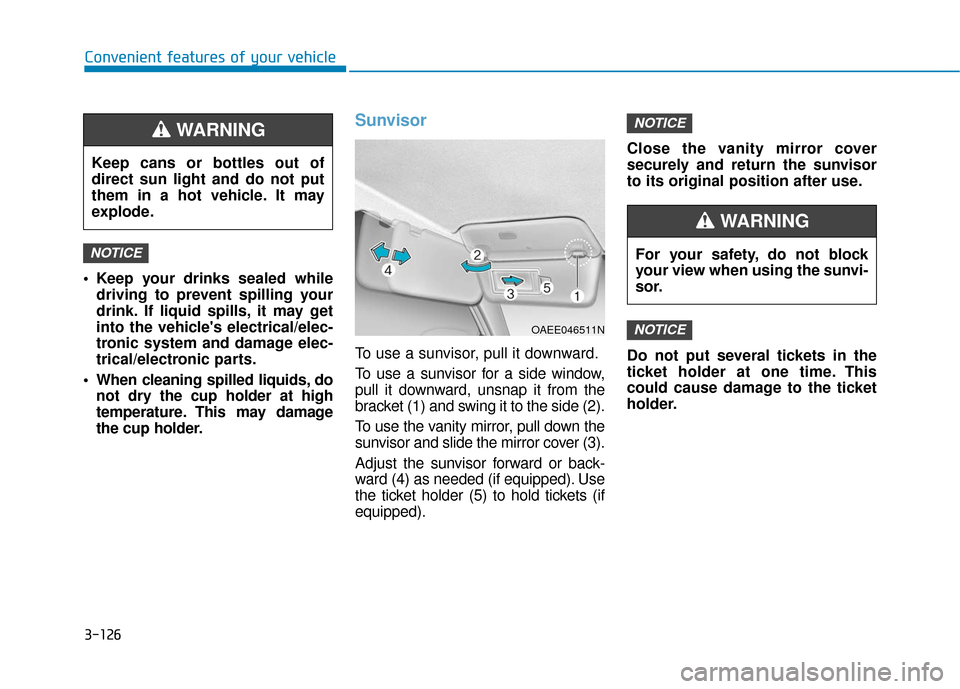
To use a sunvisor, pull it downward.
To use a sunvisor for a side window,
pull it downward, unsnap it from the
bracket (1) and swing it to the side (2).
To use the vanity mirror, pull down the
sunvisor and slide the mirror cover (3).
Adjust the sunvisor forward or back-
ward (4) as needed (if equipped). Use
the ticket holder (5) to hold tickets (if
equipped). Close the vanity mirror cover
securely and return the sunvisor
to its original position after use.
Do not put several tickets in the
ticket holder at one time. This
could cause damage to the ticket
holder.
NOTICE
NOTICE
NOTICE
Keep cans or bottles out of
direct sun light and do not put
them in a hot vehicle. It may
explode.
WARNING
OAEE046511N
For your safety, do not block
your view when using the sunvi-
sor.
WARNING
Page 216 of 541
3-131
Convenient features of your vehicle
Cargo Security Screen
(if equipped)
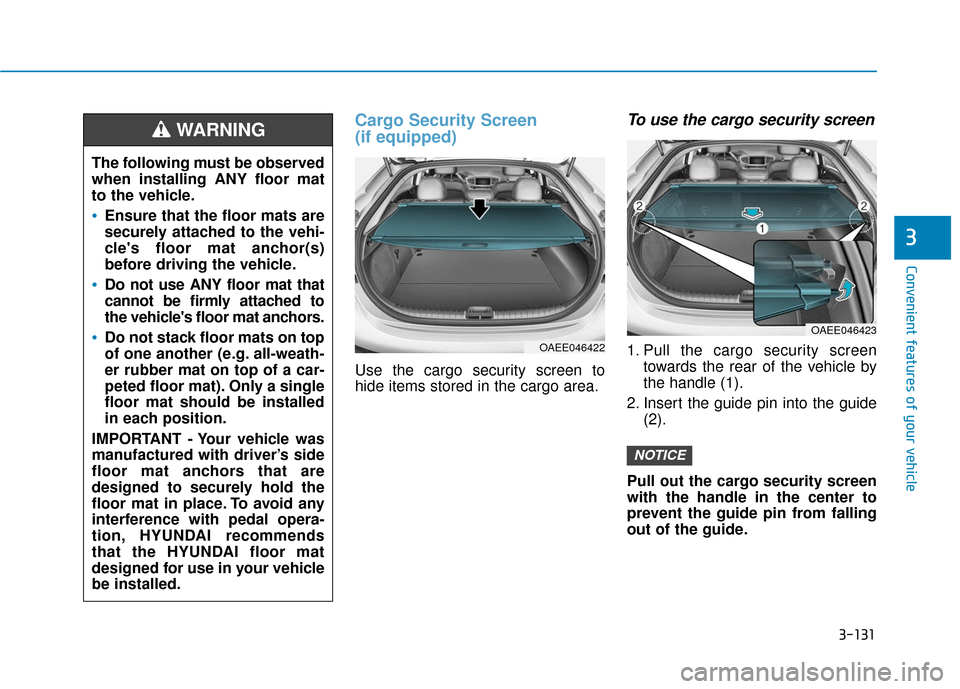
Use the cargo security screen to
hide items stored in the cargo area.
To use the cargo security screen
1. Pull the cargo security screentowards the rear of the vehicle by
the handle (1).
2. Insert the guide pin into the guide (2).
Pull out the cargo security screen
with the handle in the center to
prevent the guide pin from falling
out of the guide.
NOTICE
3
The following must be observed
when installing ANY floor mat
to the vehicle.
Ensure that the floor mats are
securely attached to the vehi-
cle's floor mat anchor(s)
before driving the vehicle.
Do not use ANY floor mat that
cannot be firmly attached to
the vehicle's floor mat anchors.
Do not stack floor mats on top
of one another (e.g. all-weath-
er rubber mat on top of a car-
peted floor mat). Only a single
floor mat should be installed
in each position.
IMPORTANT - Your vehicle was
manufactured with driver’s side
floor mat anchors that are
designed to securely hold the
floor mat in place. To avoid any
interference with pedal opera-
tion, HYUNDAI recommends
that the HYUNDAI floor mat
designed for use in your vehicle
be installed.
WARNING
OAEE046422
OAEE046423
Page 217 of 541
3-132
Convenient features of your vehicle
When the cargo security screenis not in use:
1. Pull the cargo security screen
backward and up to release it from
the guides.
2. The cargo security screen will automatically slide back in.
The cargo security screen may
not automatically slide back in if
the cargo security screen is not
fully pulled out. Fully pull it out
and then let go.
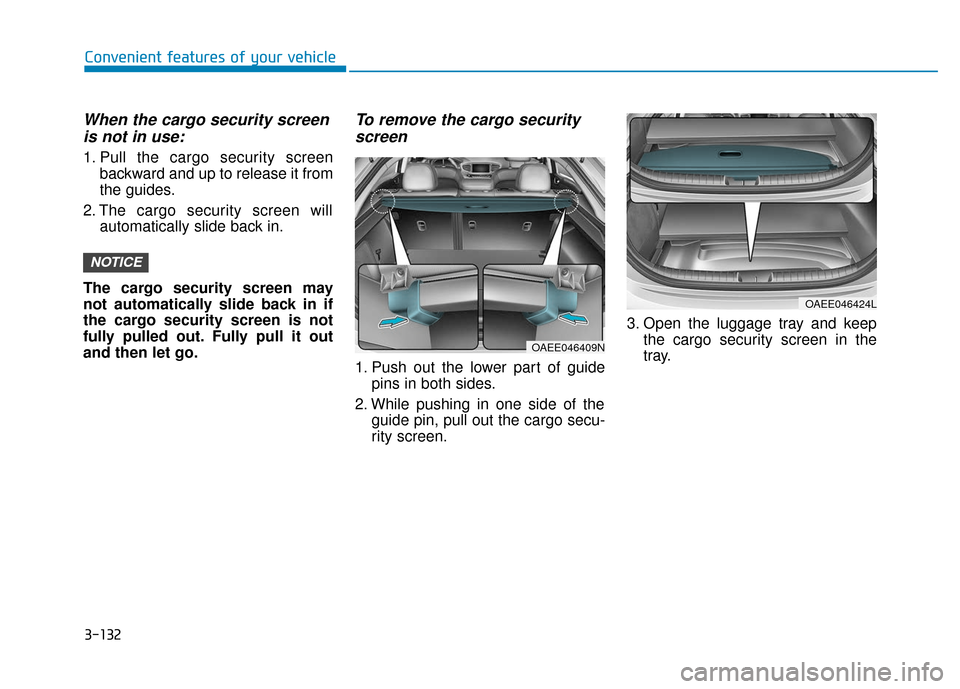
To remove the cargo security screen
1. Push out the lower part of guide
pins in both sides.
2. While pushing in one side of the guide pin, pull out the cargo secu-
rity screen. 3. Open the luggage tray and keep
the cargo security screen in the
tray.
NOTICE
OAEE046424L
OAEE046409N
Page 243 of 541
![Hyundai Ioniq Electric 2018 Owners Guide 4-26
Multimedia System
Repeat play
Select[Repeat] to enable or disable
‘Repeat category’, ‘Repeat current
song’.
Repeat category: Repeat all songs in the current category.
Repeat current son](/img/35/14904/w960_14904-242.png "Hyundai Ioniq Electric 2018 Owners Guide 4-26
Multimedia System
Repeat play
Select[Repeat] to enable or disable
‘Repeat category’, ‘Repeat current
song’.
Repeat category: Repeat all songs in the current category.
Repeat current son")
4-26
Multimedia System
Repeat play
Select[Repeat] to enable or disable
‘Repeat category’, ‘Repeat current
song’.
Repeat category: Repeat all songs in the current category.
Repeat current song: The cur- rently playing song is repeated.
Shuffle play
Select [Shuffle] to enable/disable
‘Shuffle category’ play.
Shuffle category: Songs withinthe current category are played in
random order.
Menu
Select [Menu], and select the desired
function.
Information: Detailed info on thecurrently playing song is displayed.
Sound Settings: Audio sound set- tings can be changed.
When other music programs are
running
When songs saved on your iPod®
are playing through a separate music
app, the following screen is dis-
played.
(1) Play/Pause: Pause or play music
.
(2) Play iPod Files: Play m usic saved
on your iPod®.
(3) Album Image: View playback info
.
Information
Operation cannot be carried out cor-
rectly due to iPod®application mal-
function.
Play iPod Files
Select [Play iPod Files] to play songs saved on your iPod®.
If there are no songs saved on your
iPod
®, the [Play iPod Files] is dis-
abled.
i