window Hyundai Ioniq Hybrid 2017 User Guide
[x] Cancel search | Manufacturer: HYUNDAI, Model Year: 2017, Model line: Ioniq Hybrid, Model: Hyundai Ioniq Hybrid 2017Pages: 553, PDF Size: 59.51 MB
Page 110 of 553
3-8Information
The door handle button will only
operate when the smart key is within
0.7~1 m (28~40 in.) from the outside
door handle.
Even though you press the outside
door handle button, the doors will not
lock and the chime will sound for
three seconds if any of the following
occur:
The Smart Key is in the vehicle.
The Engine Start/Stop button is in ACC or ON position.
Any door except the tailgate is open.
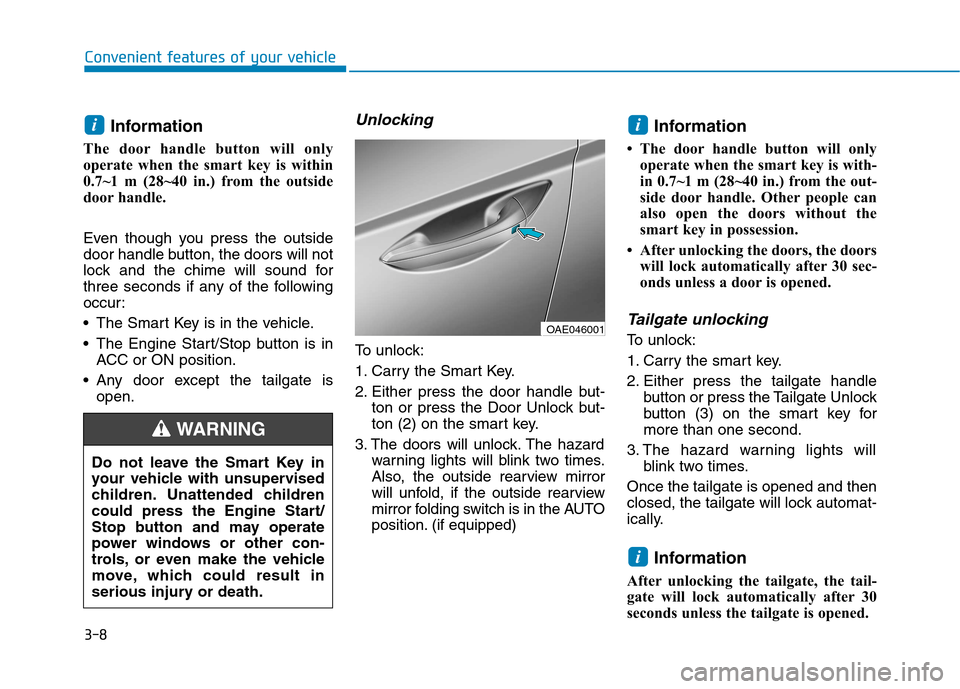
Unlocking
To unlock:
1. Carry the Smart Key.
2. Either press the door handle but- ton or press the Door Unlock but-
ton (2) on the smart key.
3. The doors will unlock. The hazard warning lights will blink two times.
Also, the outside rearview mirror
will unfold, if the outside rearview
mirror folding switch is in the AUTO
position. (if equipped) Information
The door handle button will only operate when the smart key is with-
in 0.7~1 m (28~40 in.) from the out-
side door handle. Other people can
also open the doors without the
smart key in possession.
After unlocking the doors, the doors will lock automatically after 30 sec-
onds unless a door is opened.
Tailgate unlocking
To unlock:
1. Carry the smart key.
2. Either press the tailgate handle button or press the Tailgate Unlock
button (3) on the smart key formore than one second.
3. The hazard warning lights will blink two times.
Once the tailgate is opened and then
closed, the tailgate will lock automat-
ically.
Information
After unlocking the tailgate, the tail-
gate will lock automatically after 30
seconds unless the tailgate is opened.
i
ii
Convenient features of your vehicle
Do not leave the Smart Key in
your vehicle with unsupervised
children. Unattended children
could press the Engine Start/
Stop button and may operate
power windows or other con-
trols, or even make the vehicle
move, which could result in
serious injury or death.
WARNING
OAE046001
Page 116 of 553
3-14
Convenient features of your vehicle
Operating door locks from
inside the vehicle
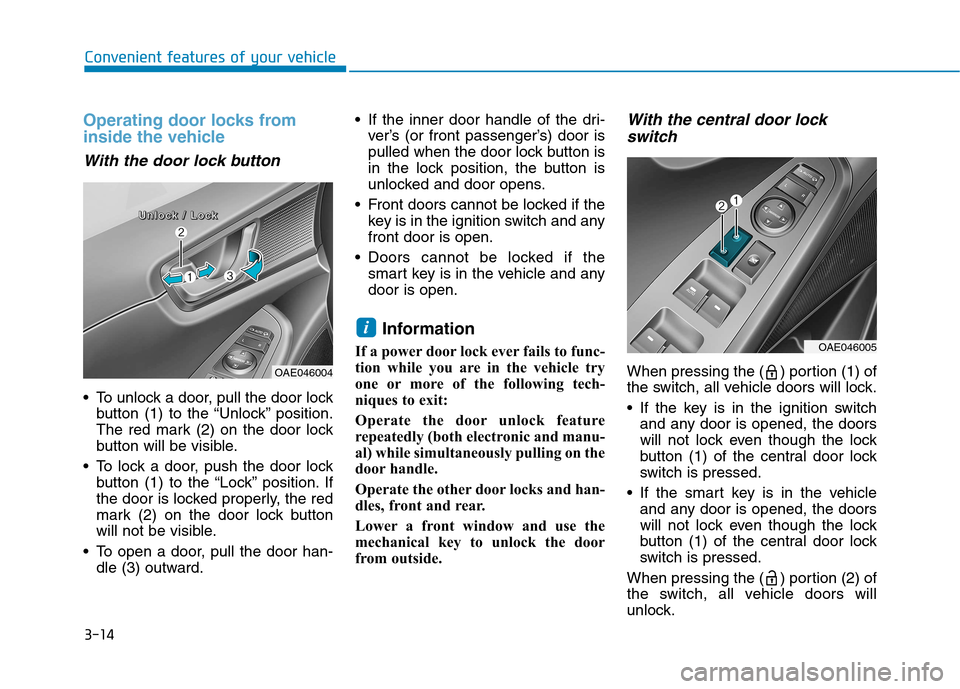
With the door lock button
To unlock a door, pull the door lockbutton (1) to the “Unlock” position.
The red mark (2) on the door lock
button will be visible.
To lock a door, push the door lock button (1) to the “Lock” position. If
the door is locked properly, the red
mark (2) on the door lock button
will not be visible.
To open a door, pull the door han- dle (3) outward. If the inner door handle of the dri-
ver’s (or front passenger’s) door is
pulled when the door lock button is
in the lock position, the button is
unlocked and door opens.
Front doors cannot be locked if the key is in the ignition switch and anyfront door is open.
Doors cannot be locked if the smart key is in the vehicle and anydoor is open.
Information
If a power door lock ever fails to func-
tion while you are in the vehicle try
one or more of the following tech-
niques to exit:
Operate the door unlock feature
repeatedly (both electronic and manu-
al) while simultaneously pulling on the
door handle.
Operate the other door locks and han-
dles, front and rear.
Lower a front window and use the
mechanical key to unlock the door
from outside.
With the central door lock switch
When pressing the ( ) portion (1) of
the switch, all vehicle doors will lock.
If the key is in the ignition switch and any door is opened, the doors
will not lock even though the lock
button (1) of the central door lock
switch is pressed.
If the smart key is in the vehicle and any door is opened, the doors
will not lock even though the lock
button (1) of the central door lock
switch is pressed.
When pressing the ( ) portion (2) of
the switch, all vehicle doors will
unlock.
i
OAE046005
OAE046004
UUUUnnnnlllloooocccckkkk //// LLLLoooocccckkkk
Page 117 of 553
3-15
Convenient features of your vehicle
3
The doors should always be
fully closed and locked while
the vehicle is in motion. If the
doors are unlocked, the risk of
being thrown from the vehicle ina crash is increased.
WARNING
Do not leave children or animals
unattended in your vehicle. An
enclosed vehicle can become
extremely hot, causing death or
serious injury to unattended
children or animals who cannot
escape the vehicle. Children
might operate features of the
vehicle that could injure them,
or they could encounter other
harm, possibly from someone
gaining entry to the vehicle.
WARNING
Always secure your vehicle
Leaving your vehicle unlocked increases the potential risk to
you or others from someone
hiding in your vehicle.
To secure your vehicle, while
depressing the brake, move the
shift lever to the P (Park) posi-
tion, engage the parking brake,
and place the ignition switch in
the LOCK/OFF position, close
all windows, lock all doors, and
always take the key with you.
WARNING
Opening a door when something
is approaching may cause dam-
age or injury. Be careful when
opening doors and watch for
vehicles, motorcycles, bicycles
or pedestrians approaching the
vehicle in the path of the door.
WARNING
Page 124 of 553
3-22
Convenient features of your vehicle
Information
The heated steering wheel will turn off
automatically approximately 30 min-
utes after the heated steering wheel is
turned on.
When the engine is turned off during
the engine and the heated steering
wheel is on, the timer function of heat-
ed steering wheel will be reset.
To reuse heated steering wheel, press
button again.
Do not install any cover or acces-
sory on the steering wheel. This
cover or accessory could cause
damage to the heated steeringwheel system.Horn
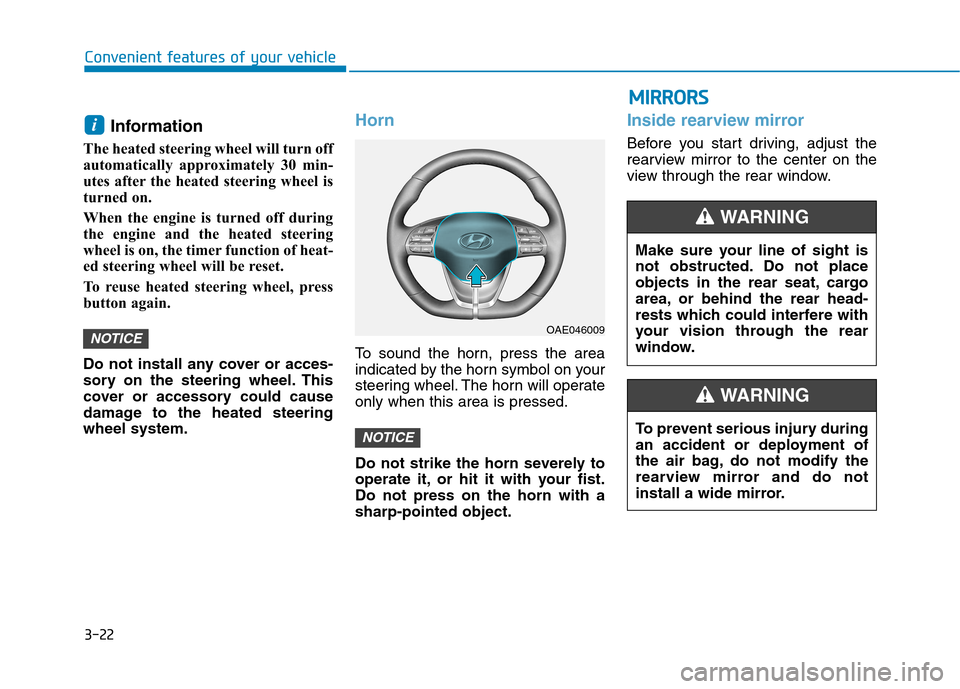
To sound the horn, press the area
indicated by the horn symbol on your
steering wheel. The horn will operateonly when this area is pressed.
Do not strike the horn severely to
operate it, or hit it with your fist.Do not press on the horn with asharp-pointed object.
Inside rearview mirror
Before you start driving, adjust the
rearview mirror to the center on the
view through the rear window.
NOTICE
NOTICE
i
OAE046009
MM IIRR RR OO RRSS
Make sure your line of sight is
not obstructed. Do not place
objects in the rear seat, cargo
area, or behind the rear head-
rests which could interfere with
your vision through the rear
window.
WARNING
To prevent serious injury during
an accident or deployment of
the air bag, do not modify the
rearview mirror and do not
install a wide mirror.
WARNING
Page 129 of 553
3-27
Convenient features of your vehicle
3
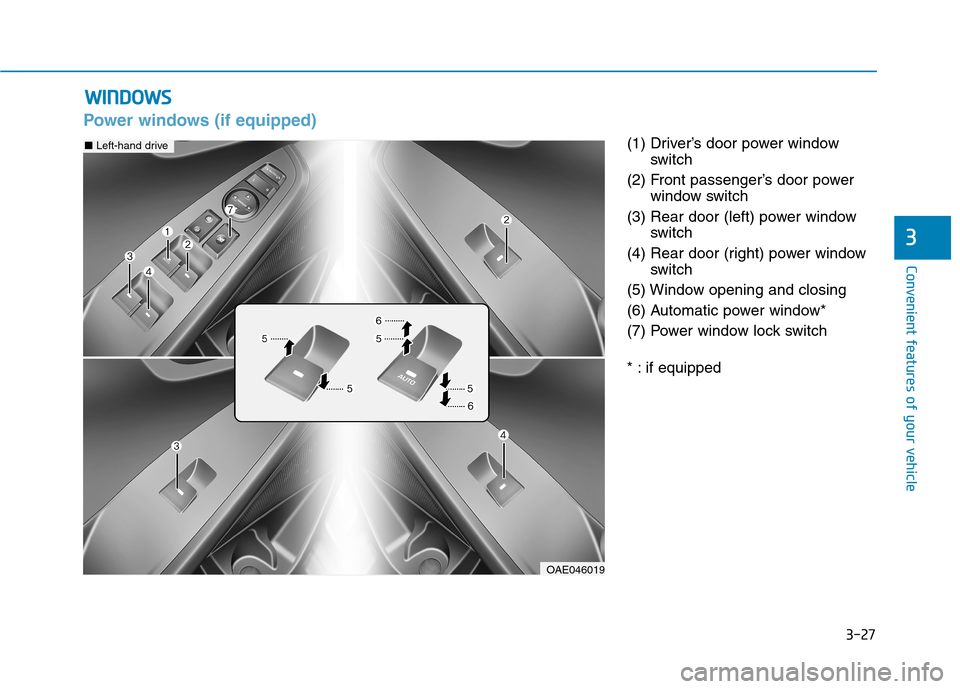
Power windows (if equipped)
(1) Driver’s door power windowswitch
(2) Front passenger’s door power window switch
(3) Rear door (left) power window switch
(4) Rear door (right) power window switch
(5) Window opening and closing
(6) Automatic power window*
(7) Power window lock switch
* : if equipped
WW IINN DDOO WW SS
OAE046019
■Left-hand drive
Page 130 of 553
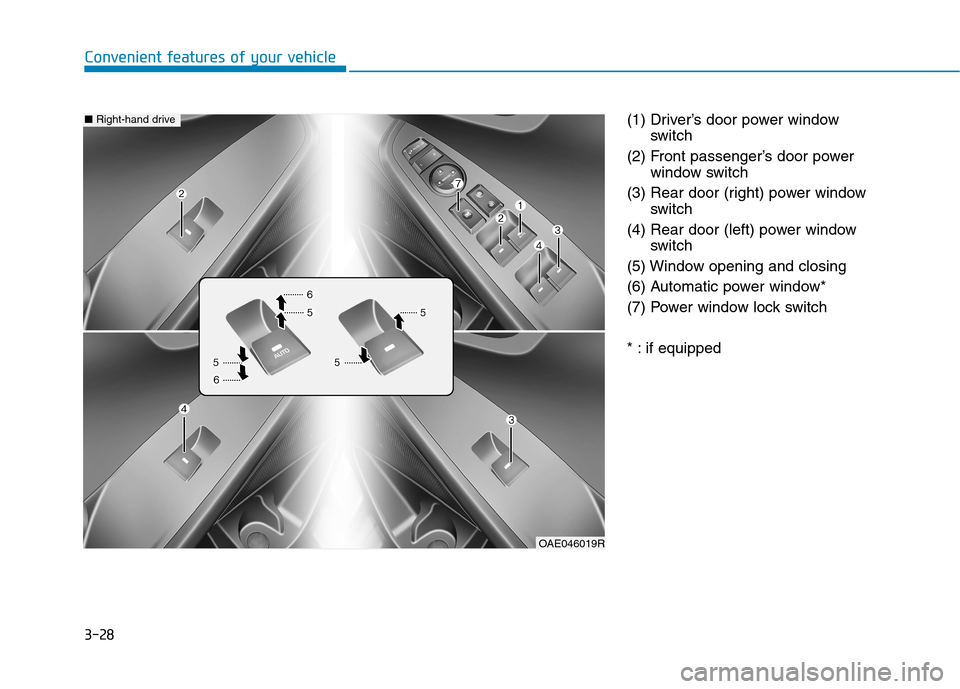
3-28
Convenient features of your vehicle
(1) Driver’s door power windowswitch
(2) Front passenger’s door power window switch
(3) Rear door (right) power window switch
(4) Rear door (left) power window switch
(5) Window opening and closing
(6) Automatic power window*
(7) Power window lock switch
* : if equipped
OAE046019R
■ Right-hand drive
Page 131 of 553
3-29
Convenient features of your vehicle
3
The ignition switch must be in the ON
position to be able to raise or lower
the windows. Each door has a Power
Window switch to control that door's
window. The driver has a Power
Window Lock switch which can block
the operation of passenger windows.
The power windows will operate for
approximately 30 seconds after the
ignition switch is placed in the ACC
or OFF position. However, if the front
doors are opened, the Power
Windows cannot be operated even
within the 30 second period.Information
In cold and wet climates, power win- dows may not work properly due to
freezing conditions.
While driving with the rear win- dows down or with the sunroof (if
equipped) opened (or partially
opened), your vehicle may demon-
strate a wind buffeting or pulsation
noise. This noise is normal and can
be reduced or eliminated by taking
the following actions. If the noise
occurs with one or both of the rear
windows down, partially lower both
front windows approximately one
inch. If you experience the noise
with the sunroof open, slightly close
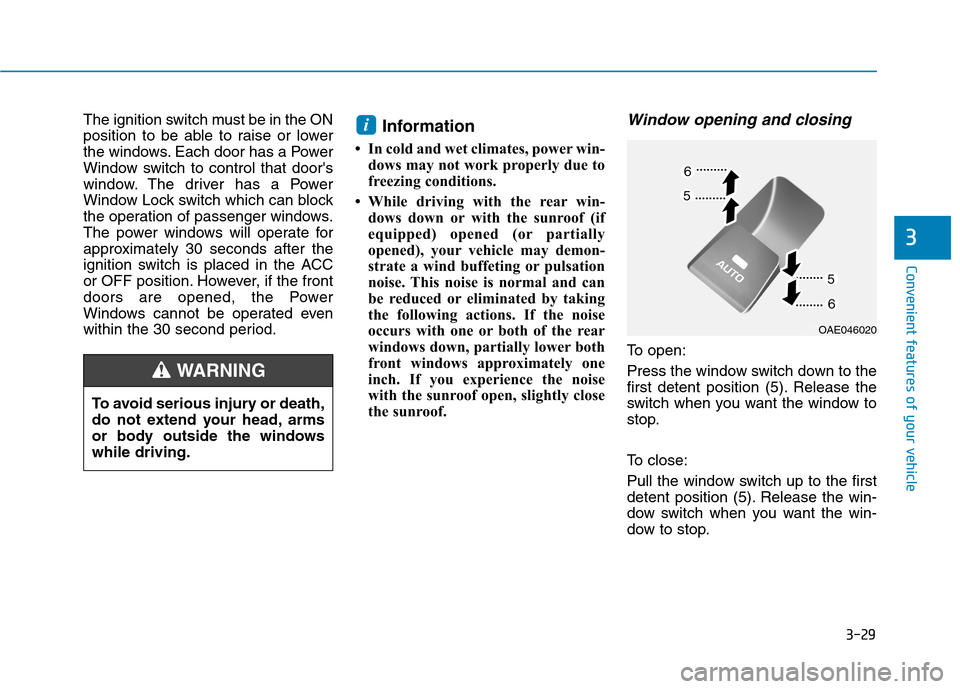
the sunroof.Window opening and closing
To open:
Press the window switch down to the
first detent position (5). Release the
switch when you want the window to
stop.
To close:
Pull the window switch up to the first
detent position (5). Release the win-
dow switch when you want the win-
dow to stop.
i
To avoid serious injury or death,
do not extend your head, arms
or body outside the windowswhile driving.
WARNING
OAE046020
Page 132 of 553
3-30
Convenient features of your vehicle
Auto down window (if equipped)
Pressing the power window switch
momentarily to the second detent
position (6) completely lowers the
window even when the switch is
released. To stop the window at the
desired position while the window is
in operation, pull up or press down
and release the switch.
Auto up/down window (if equipped)
Pressing or pulling up the power win-
dow switch momentarily to the sec-ond detent position (6) completely
lowers or lifts the window even when
the switch is released. To stop the
window at the desired position while
the window is in operation, pull up or
press down and release the switch.
To reset the power windows
If the power windows do not operate
normally, the automatic power win-
dow system must be reset as follows:
1. Place the ignition switch to the ON position.
2. Close the window and continue pulling up on the power window
switch for at least one second.
If the power windows do not operate
properly after resetting, it is recom-
mended that the system be checked
by an authorized HYUNDAI dealer.
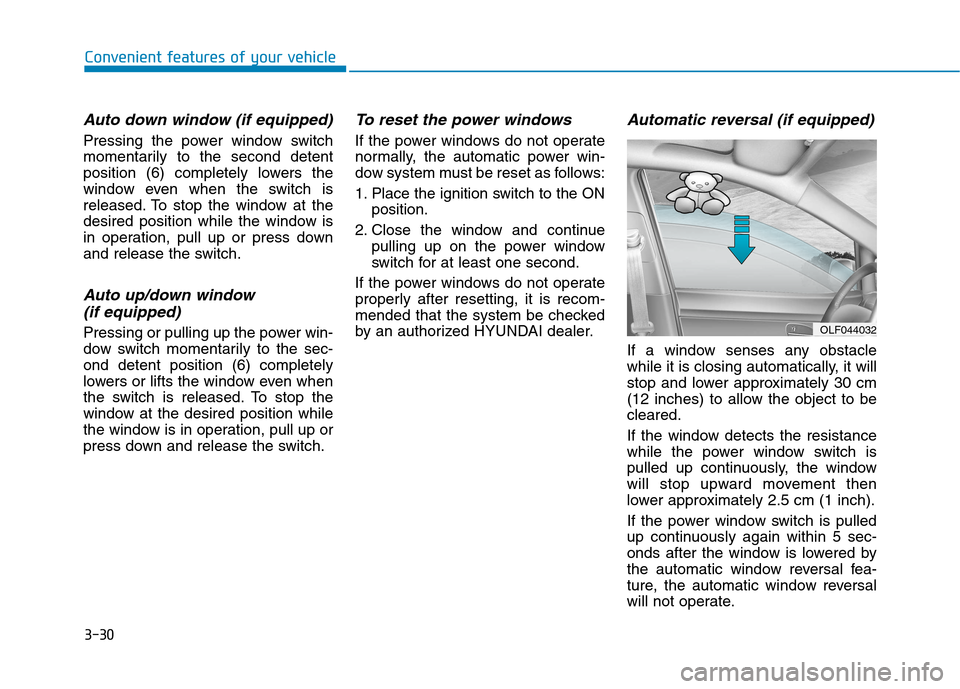
Automatic reversal (if equipped)
If a window senses any obstacle
while it is closing automatically, it will
stop and lower approximately 30 cm
(12 inches) to allow the object to becleared.
If the window detects the resistance
while the power window switch is
pulled up continuously, the window
will stop upward movement then
lower approximately 2.5 cm (1 inch).
If the power window switch is pulled
up continuously again within 5 sec-
onds after the window is lowered by
the automatic window reversal fea-
ture, the automatic window reversal
will not operate.
OLF044032
Page 133 of 553
3-31
Convenient features of your vehicle
3
Information
The automatic reverse feature is only
active when the “Auto Up” feature is
used by fully pulling up the switch to
the second detent.Power window lock switch
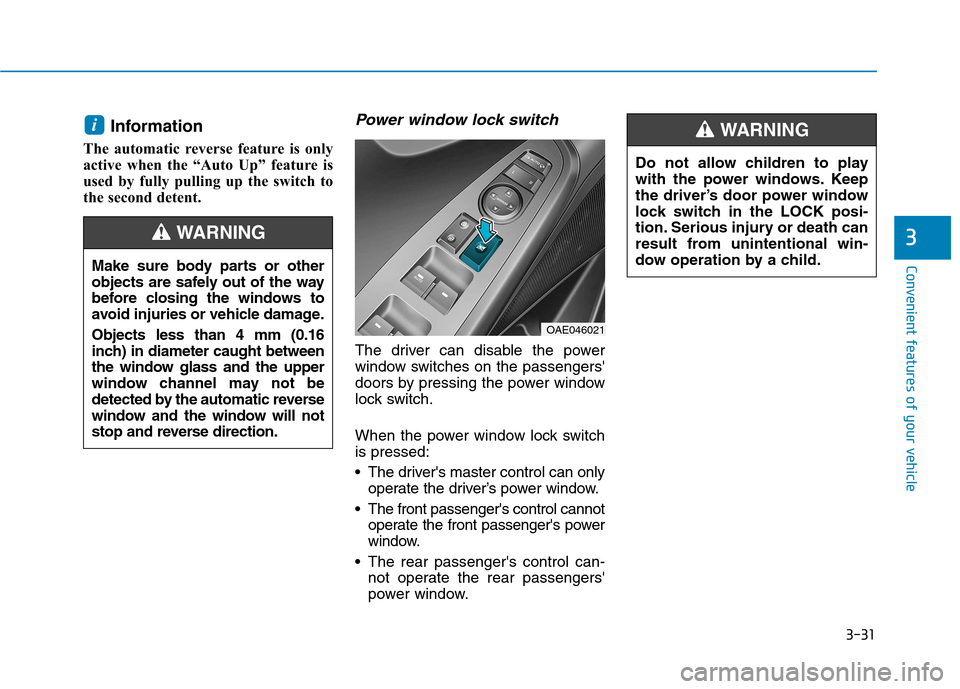
The driver can disable the power
window switches on the passengers'
doors by pressing the power window
lock switch.
When the power window lock switch is pressed:
The driver's master control can only operate the driver’s power window.
The front passenger's control cannot operate the front passenger's power
window.
The rear passenger's control can- not operate the rear passengers'
power window.
i
Make sure body parts or other
objects are safely out of the way
before closing the windows to
avoid injuries or vehicle damage. Objects less than 4 mm (0.16
inch) in diameter caught between
the window glass and the upper
window channel may not be
detected by the automatic reverse
window and the window will not
stop and reverse direction.
WARNING
Do not allow children to play
with the power windows. Keep
the driver’s door power window
lock switch in the LOCK posi-
tion. Serious injury or death can
result from unintentional win-
dow operation by a child.
WARNING
OAE046021
Page 134 of 553
3-32
Convenient features of your vehicle
To prevent possible damage tothe power window system, do
not open or close two windows
or more at the same time. This
will also ensure the longevity of
the fuse.
Never try to operate the main switch on the driver's door and
the individual door window
switch in opposite directions at
the same time. If this is done, the
window will stop and cannot be
opened or closed.
NOTICE
NEVER leave the keys in your
vehicle with unsupervised
children, when the engine isrunning.
NEVER leave any child unat-
tended in the vehicle. Even
very young children may inad-
vertently cause the vehicle to
move, entangle themselves in
the windows, or otherwise
injure themselves or others.
Always double check to make
sure all arms, hands, headand other obstructions are
safely out of the way before
closing a window.
Do not allow children to play
with the power windows. Keep
the driver’s door power window
lock switch in the LOCK posi-
tion (pressed). Serious injury
can result from unintentional
window operation by the child.
Do not extend your head,
arms or body outside the win-
dows while driving.
WARNING