power steering Hyundai Ioniq Hybrid 2017 Owner's Manual
[x] Cancel search | Manufacturer: HYUNDAI, Model Year: 2017, Model line: Ioniq Hybrid, Model: Hyundai Ioniq Hybrid 2017Pages: 553, PDF Size: 59.51 MB
Page 11 of 553
1-4
Your vehicle at a glanceI
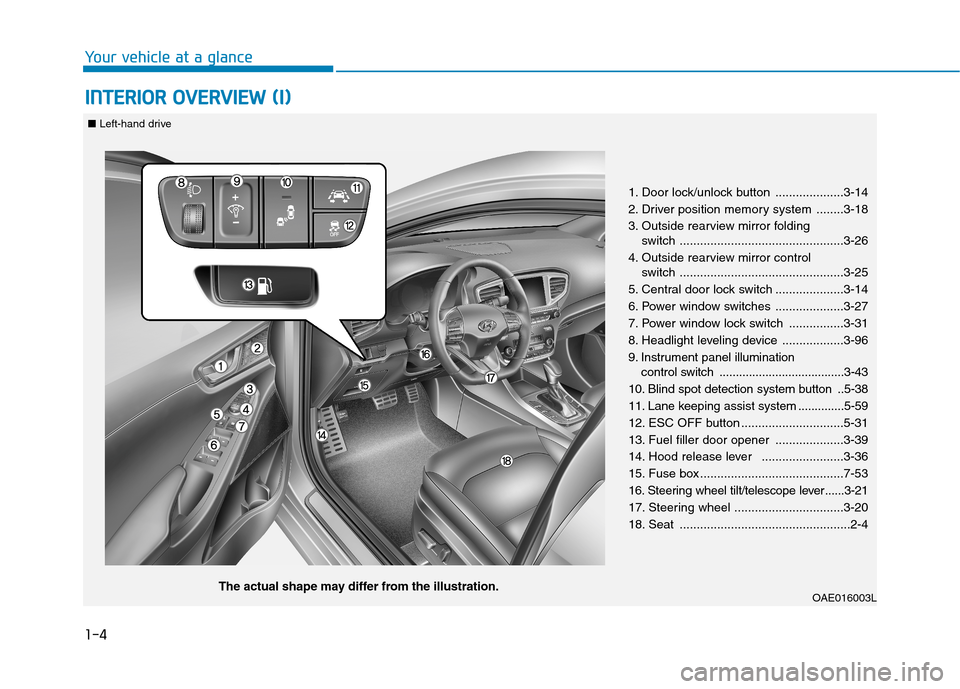
I NN TTEERR IIOO RR OO VVEERR VV IIEE WW (( II))
1. Door lock/unlock button ....................3-14
2. Driver position memory system ........3-18
3. Outside rearview mirror folding
switch ................................................3-26
4. Outside rearview mirror control switch ................................................3-25
5. Central door lock switch ....................3-14
6. Power window switches ....................3-27
7. Power window lock switch ................3-31
8. Headlight leveling device ..................3-96
9. Instrument panel illumination control switch ......................................3-43
10. Blind spot detection system button ..5-38
11. Lane keeping assist system ..............5-59
12. ESC OFF button ..............................5-31
13. Fuel filler door opener ....................3-39
14. Hood release lever ........................3-36
15. Fuse box ..........................................7-53
16. Steering wheel tilt/telescope lever ......3-21
17. Steering wheel ................................3-20
18. Seat ..................................................2-4
OAE016003L
The actual shape may differ from the illustration.
■
Left-hand drive
Page 12 of 553
1-5
Your vehicle at a glance
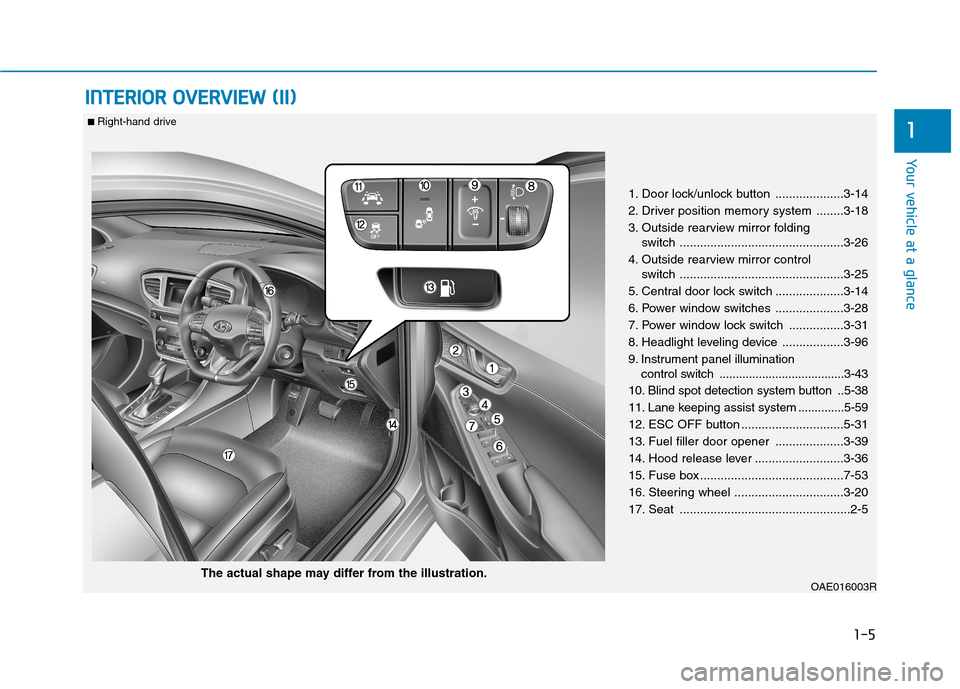
IINN TTEERR IIOO RR OO VVEERR VV IIEE WW (( IIII))
1
1. Door lock/unlock button ....................3-14
2. Driver position memory system ........3-18
3. Outside rearview mirror folding
switch ................................................3-26
4. Outside rearview mirror control switch ................................................3-25
5. Central door lock switch ....................3-14
6. Power window switches ....................3-28
7. Power window lock switch ................3-31
8. Headlight leveling device ..................3-96
9. Instrument panel illumination control switch ......................................3-43
10. Blind spot detection system button ..5-38
11. Lane keeping assist system ..............5-59
12. ESC OFF button ..............................5-31
13. Fuel filler door opener ....................3-39
14. Hood release lever ..........................3-36
15. Fuse box ..........................................7-53
16. Steering wheel ................................3-20
17. Seat ..................................................2-5
OAE016003R
■ Right-hand drive
The actual shape may differ from the illustration.
Page 13 of 553
1-6
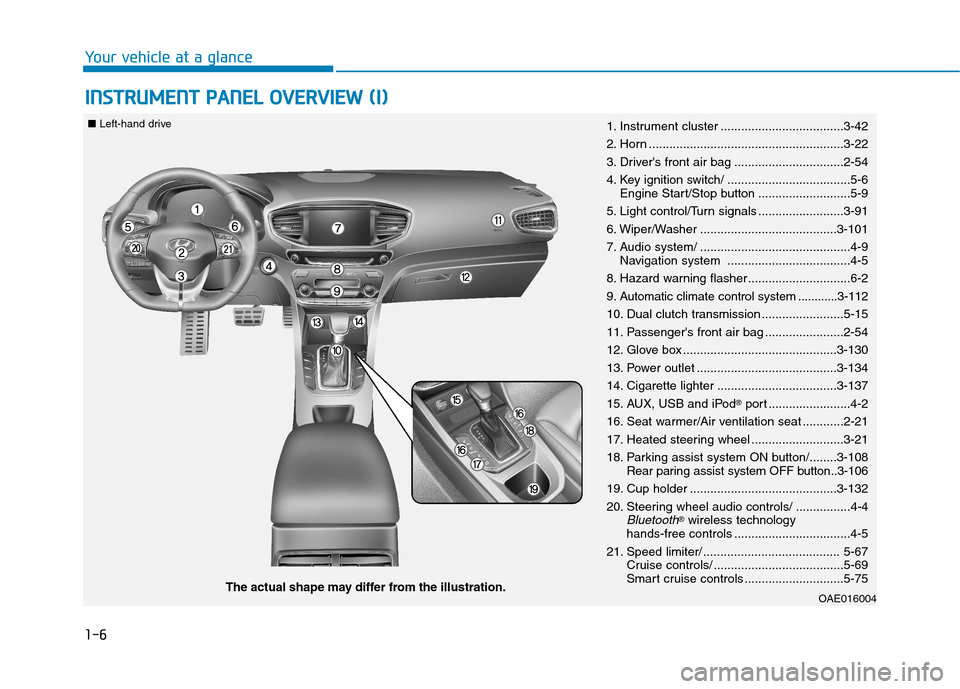
IINN SSTT RR UU MM EENN TT PP AA NN EELL OO VVEERR VV IIEE WW (( II))
Your vehicle at a glance
OAE016004The actual shape may differ from the illustration.
■
Left-hand drive
1. Instrument cluster ....................................3-42
2. Horn .........................................................3-22
3. Driver's front air bag ................................2-54
4. Key ignition switch/ ....................................5-6
Engine Start/Stop button ...........................5-9
5. Light control/Turn signals .........................3-91
6. Wiper/Washer ........................................3-101
7. Audio system/ ............................................4-9 Navigation system ....................................4-5
8. Hazard warning flasher ..............................6-2
9. Automatic climate control system ............3-112
10. Dual clutch transmission ........................5-15
11. Passenger's front air bag .......................2-54
12. Glove box .............................................3-130
13. Power outlet .........................................3-134
14. Cigarette lighter ...................................3-137
15. AUX, USB and iPod ®
port ........................4-2
16. Seat warmer/Air ventilation seat ............2-21
17. Heated steering wheel ...........................3-21
18. Parking assist system ON button/........3-108 Rear paring assist system OFF button..3-106
19. Cup holder ...........................................3-132
20. Steering wheel audio controls/ ................4-4
Bluetooth® wireless technology
hands-free controls ..................................4-5
21. Speed limiter/ ........................................ 5-67 Cruise controls/ ......................................5-69
Smart cruise controls .............................5-75
Page 14 of 553
1-7
Your vehicle at a glance
1
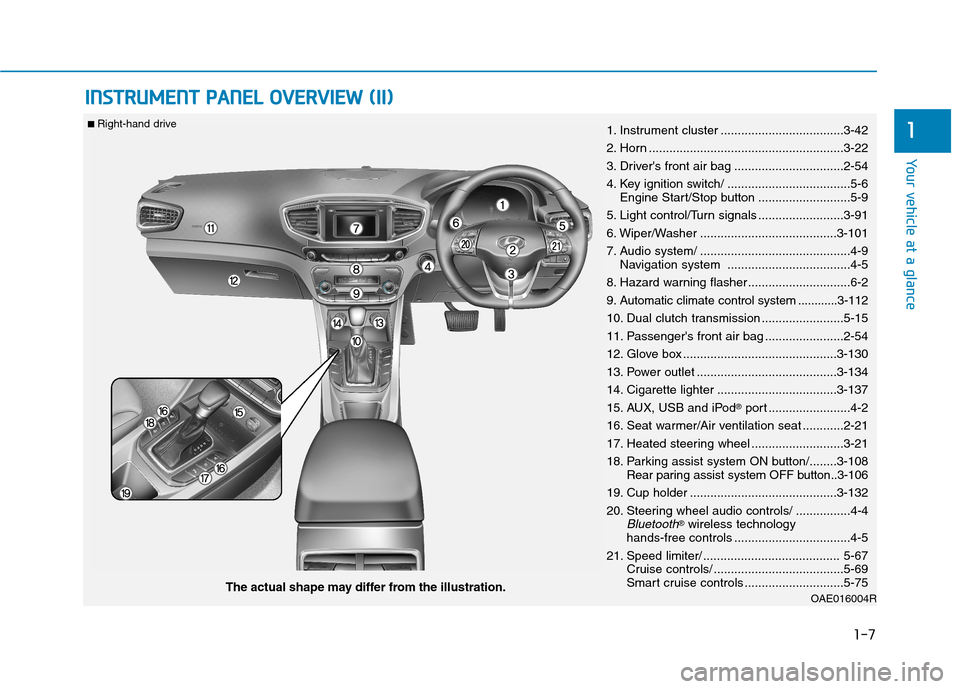
IINN SSTT RR UU MM EENN TT PP AA NN EELL OO VVEERR VV IIEE WW (( IIII))
OAE016004RThe actual shape may differ from the illustration.
■
Right-hand drive
1. Instrument cluster ....................................3-42
2. Horn .........................................................3-22
3. Driver's front air bag ................................2-54
4. Key ignition switch/ ....................................5-6
Engine Start/Stop button ...........................5-9
5. Light control/Turn signals .........................3-91
6. Wiper/Washer ........................................3-101
7. Audio system/ ............................................4-9 Navigation system ....................................4-5
8. Hazard warning flasher ..............................6-2
9. Automatic climate control system ............3-112
10. Dual clutch transmission ........................5-15
11. Passenger's front air bag .......................2-54
12. Glove box .............................................3-130
13. Power outlet .........................................3-134
14. Cigarette lighter ...................................3-137
15. AUX, USB and iPod ®
port ........................4-2
16. Seat warmer/Air ventilation seat ............2-21
17. Heated steering wheel ...........................3-21
18. Parking assist system ON button/........3-108 Rear paring assist system OFF button..3-106
19. Cup holder ...........................................3-132
20. Steering wheel audio controls/ ................4-4
Bluetooth® wireless technology
hands-free controls ..................................4-5
21. Speed limiter/ ........................................ 5-67 Cruise controls/ ......................................5-69
Smart cruise controls .............................5-75
Page 40 of 553
2-10
Safety system of your vehicle
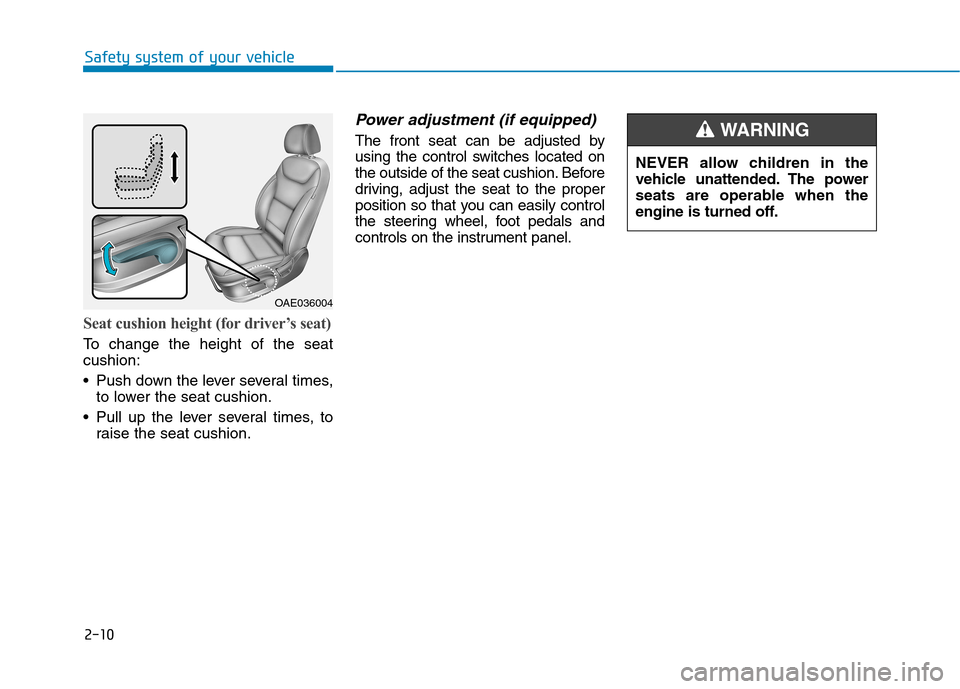
Seat cushion height (for driver’s seat)
To change the height of the seat cushion:
• Push down the lever several times,to lower the seat cushion.
Pull up the lever several times, to raise the seat cushion.
Power adjustment (if equipped)
The front seat can be adjusted by
using the control switches located on
the outside of the seat cushion. Before
driving, adjust the seat to the proper
position so that you can easily control
the steering wheel, foot pedals and
controls on the instrument panel.
OAE036004 NEVER allow children in the
vehicle unattended. The power
seats are operable when the
engine is turned off.
WARNING
Page 103 of 553
Convenient features of your vehicle
Accessing your vehicle .........................................3-4Remote key .......................................................................3-4
Smart key ...........................................................................3-7
Immobilizer system ........................................................3-11
Door locks .............................................................3-12 Operating door locks from outside the vehicle .....3-12
Operating door locks from inside the vehicle ........3-14
Auto door lock/unlock features ................................3-16
Child-protector rear door locks ..................................3-16
Theft-alarm system.............................................3-17
Driver position memory system ........................3-18 Storing memory positions .............................................3-18
Easy access function ....................................................3-19
Steering wheel......................................................3-20 Electric power steering (EPS) ......................................3-20
Tilt steering / Telescope steering...............................3-21
Heated steering wheel ...................................................3-21
Horn ....................................................................................3-22
Mirrors ...................................................................3-22 Inside rearview mirror....................................................3-22
Outside rearview mirror ..............................................3-24 Windows ................................................................3-27
Power windows ..............................................................3-27
Sunroof..................................................................3-33 Sunroof opening and closing .......................................3-33
Sliding the sunroof .........................................................3-33
Tilting the sunroof ..........................................................3-34
Sunshade ...........................................................................3-35
Resetting the sunroof ....................................................3-35
Exterior features .................................................3-36 Hood ...................................................................................3-36
Tailgate...............................................................................3-38
Fuel filler door .................................................................3-39
Instrument cluster................................................3-42 Instrument cluster control ............................................3-43
Gauges and meters .........................................................3-44
Warning and indicator lights ........................................3-50
LCD display messages ..................................................3-62
LCD display ..........................................................3-71 LCD display control.........................................................3-71
LCD modes (for cluster type A) ..................................3-72
LCD modes (for cluster type B)...................................3-79
Trip computer .......................................................3-86
3
Page 122 of 553
3-20
Electric power steering (EPS)
The system assists you with steering
the vehicle. If the engine is off or if
the power steering system becomes
inoperative, the vehicle may still be
steered, but it will require increased
steering effort.
Also, the steering effort becomes
heavier as the vehicle’s speedincreases and becomes lighter as
the vehicle’s speed decreases for
better control of the steering wheel.
Should you notice any change in the
effort required to steer during normal
vehicle operation, we recommend
that the system be checked by an
authorized HYUNDAI dealer.
If the Electric Power SteeringSystem does not operate nor-
mally, the warning light ( ) will
illuminate or blink on the instru-
ment cluster. The steering wheel
may become difficult to control
or operate. Take your vehicle to
an authorized HYUNDAI dealer
and have the system checked as
soon as possible.
(Continued)(Continued)
When abnormality is detected in
the electric power steering sys-
tem, to prevent a deadly acci-
dent, the steering assist function
will stop. At this time, the warn-
ing light turns on or blinks on
the cluster. The steering wheel
may become difficult to control
or operate. Have your vehicle
checked immediately, after mov-
ing the vehicle to a safe zone.
Information
The following symptoms may occur
during normal vehicle operation:
The steering effort may be high immediately after placing the igni-
tion switch or the Engine Start/Stop
button in the ON position.
This happens as the system per-
forms the EPS system diagnostics.
When the diagnostics is completed,
the steering wheel will return to its
normal condition.
(Continued)(Continued)
A click noise may be heard from the
EPS relay after the ignition switch is
placed to the ON or LOCK/OFF
position (Without Smart key system).
A click noise may be heard from the
EPS relay after the Engine Start/Stop
button is in the ON or OFF position.
(With Smart key system)
Motor noise may be heard when the vehicle is at a stop or at a low driv-
ing speed.
When you operate the steering wheel in low temperature, abnormal
noise may occur. If temperature
rises, the noise will disappear. This
is a normal condition.
When the vehicle is stationary, if you turn the steering wheel all the
way to the left or right continuously,
the steering wheel effort increases.
This is not a system malfunction. As
time passes, the steering wheel
effort will return to its normal con-
dition.
i
NOTICE
SSTT EEEERR IINN GG WW HHEEEELL
Convenient features of your vehicle
Page 155 of 553
3-53
Convenient features of your vehicle
3
Electronic Brake ForceDistribution (EBD)
System Warning Light
These two warning lights illuminate
at the same time while driving:
When the ABS and regular brake system may not work normally.
In this case, we recommend that
you have the vehicle inspected by
an authorized HYUNDAI dealer. Information
- Electronic
Brake Force Distribution
(EBD) System Warning Light
When the ABS Warning Light is on or
both ABS and Parking Brake & Brake
Fluid Warning Lights are on, the
speedometer, odometer, or tripmeter
may not work. Also, the EPS Warning
Light may illuminate and the steering
effort may increase or decrease.
In this case, we recommend you have
the vehicle inspected by an authorized
HYUNDAI dealer as soon as possible.
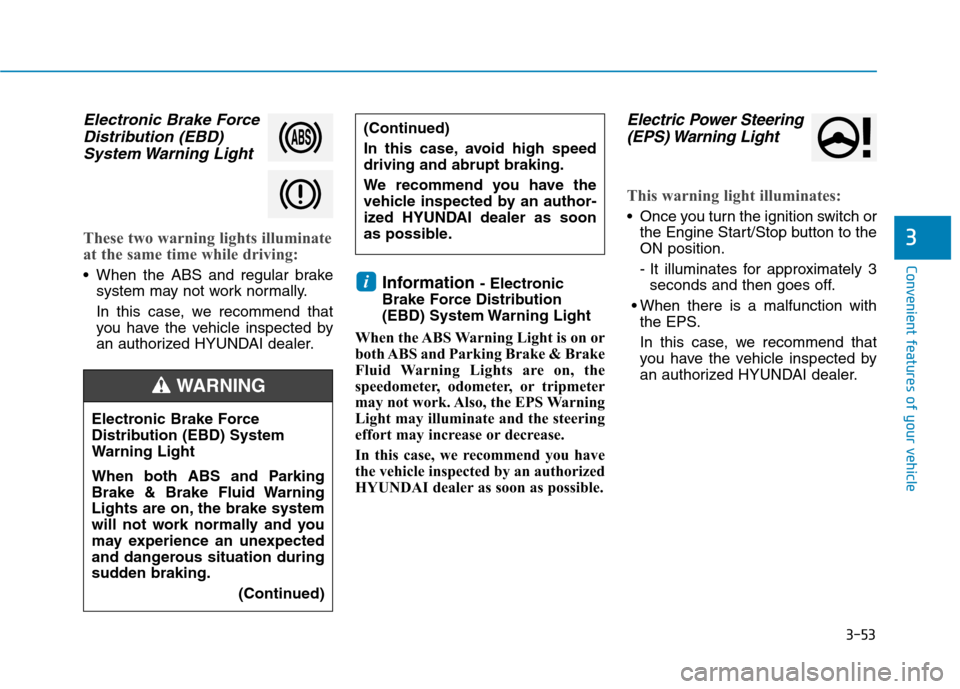
Electric Power Steering (EPS) Warning Light
This warning light illuminates:
Once you turn the ignition switch or the Engine Start/Stop button to the ON position.
- It illuminates for approximately 3seconds and then goes off.
When there is a malfunction with the EPS.
In this case, we recommend that
you have the vehicle inspected by
an authorized HYUNDAI dealer.
i
Electronic Brake Force
Distribution (EBD) System
Warning Light
When both ABS and Parking
Brake & Brake Fluid Warning
Lights are on, the brake system
will not work normally and you
may experience an unexpected
and dangerous situation during
sudden braking.
(Continued)
WARNING
(Continued)
In this case, avoid high speed driving and abrupt braking.
We recommend you have the
vehicle inspected by an author-
ized HYUNDAI dealer as soon
as possible.
Page 189 of 553
3-87
Convenient features of your vehicle
3
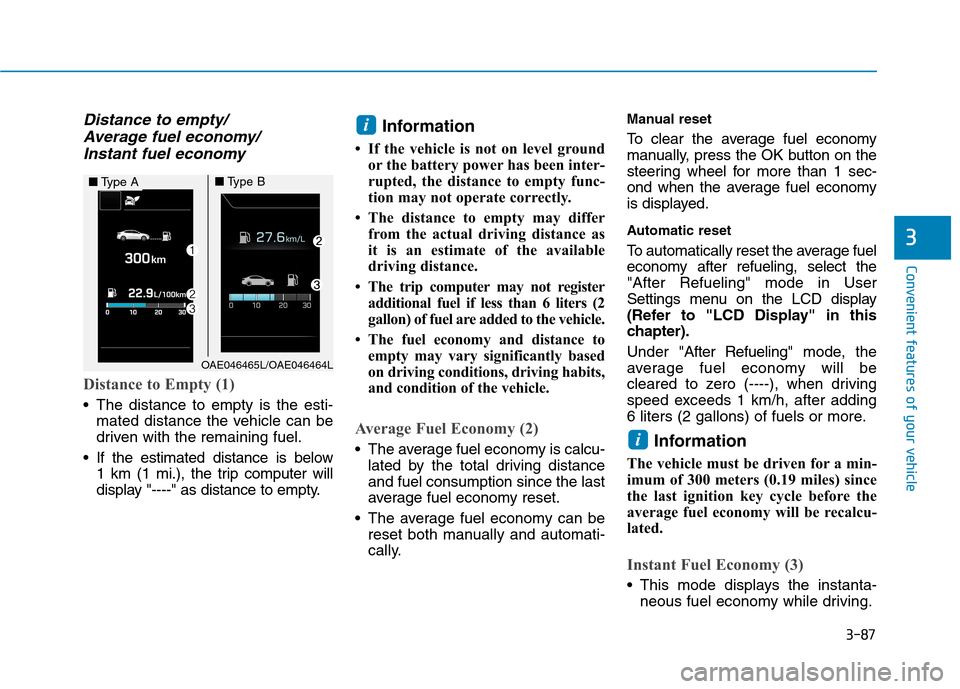
Distance to empty/Average fuel economy/
Instant fuel economy
Distance to Empty (1)
The distance to empty is the esti- mated distance the vehicle can be
driven with the remaining fuel.
If the estimated distance is below 1 km (1 mi.), the trip computer will
display "----" as distance to empty. Information
If the vehicle is not on level ground or the battery power has been inter-
rupted, the distance to empty func-
tion may not operate correctly.
The distance to empty may differ from the actual driving distance as
it is an estimate of the available
driving distance.
The trip computer may not register additional fuel if less than 6 liters (2
gallon) of fuel are added to the vehicle.
The fuel economy and distance to empty may vary significantly based
on driving conditions, driving habits,
and condition of the vehicle.
Average Fuel Economy (2)
The average fuel economy is calcu-lated by the total driving distance and fuel consumption since the last
average fuel economy reset.
The average fuel economy can be reset both manually and automati-
cally. Manual reset
To clear the average fuel economy
manually, press the OK button on the
steering wheel for more than 1 sec-
ond when the average fuel economy
is displayed.
Automatic reset
To automatically reset the average fuel
economy after refueling, select the"After Refueling" mode in User
Settings menu on the LCD display
(Refer to "LCD Display" in this
chapter). Under "
After Refueling" mode, the
average fuel economy will be
cleared to zero (----), when driving
speed exceeds 1 km/h, after adding
6 liters (2 gallons) of fuels or more.
Information
The vehicle must be driven for a min-
imum of 300 meters (0.19 miles) since
the last ignition key cycle before the
average fuel economy will be recalcu-
lated.
Instant Fuel Economy (3)
This mode displays the instanta- neous fuel economy while driving.
i
i
OAE046465L/OAE046464L
■Type A■Type B
Page 275 of 553
4-34
Multimedia System
Some Bluetooth®
devices are sub-
ject to intermittent Bluetooth ®
con-
nection failures. In this case, use
the following method.
1) Turn the Bluetooth ®
function off
on your Bluetooth ®
device ➟
Turn it on and try again.
2) Delete the paired device from both the audio system and Bluetooth ®
device, then pair
again.
3) Power down your Bluetooth ®
device ➟Turn it on and try
again.
4) Completely remove the battery from your Bluetooth ®
device;
reinsert it, reboot, and attemptconnection.
5) Restart the vehicle and reat- tempt connection.Pairing a Bluetooth®device
Information on pairing Bluetooth ®
devices
Pairing refers to the process of pairing Bluetooth ®
cell phones or
devices with the system prior to
connection. This is a necessary
procedure for Bluetooth ®
connec-
tion and usage.
Up to five devices can be paired.
Pairing Bluetooth ®
device is not
allowed while vehicle is moving.
Pairing the first Bluetooth ®
device
Select the [PHONE]button on the
audio system or the [CALL]button
on the steering wheel remote control ➟ Search for the vehicle from the
Bluetooth ®
device, and pair ➟Enter
the passkey on the Bluetooth ®
device or approve passkey ➟
Bluetooth ®
pairing completed.
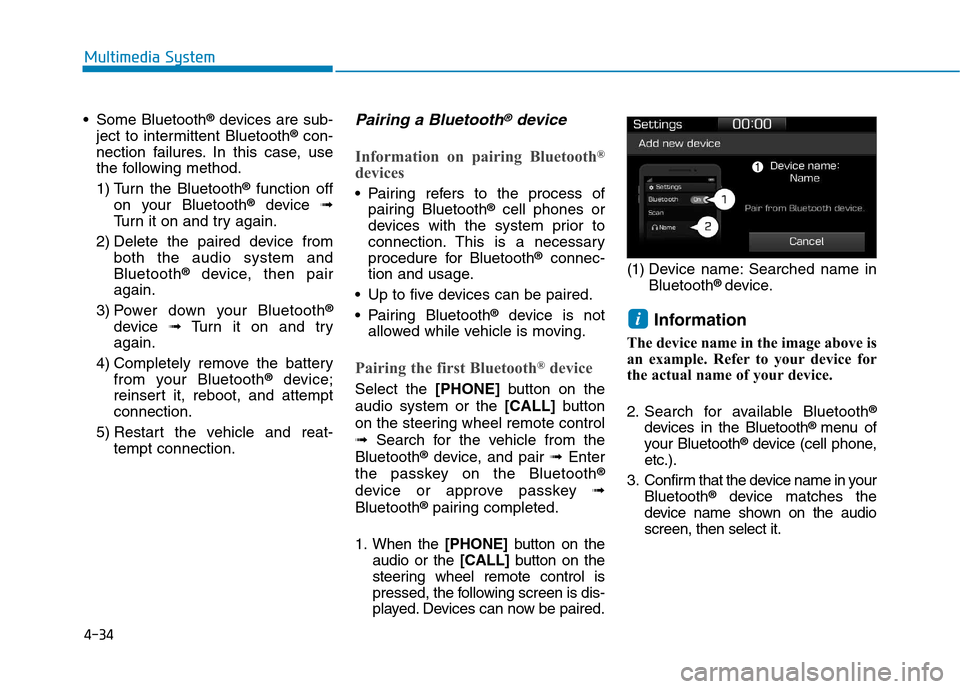
1. When the [PHONE]button on the
audio or the [CALL]button on the
steering wheel remote control is
pressed, the following screen is dis-
played. Devices can now be paired. (1) Device name: Searched name in
Bluetooth ®
device.
Information
The device name in the image above is
an example. Refer to your device for
the actual name of your device.
2. Search for available Bluetooth ®
devices in the Bluetooth ®
menu of
your Bluetooth ®
device (cell phone,
etc.).
3. Confirm that the device name in your Bluetooth ®
device matches the
device name shown on the audio screen, then select it.
i