camera Hyundai Ioniq Hybrid 2018 User Guide
[x] Cancel search | Manufacturer: HYUNDAI, Model Year: 2018, Model line: Ioniq Hybrid, Model: Hyundai Ioniq Hybrid 2018Pages: 642, PDF Size: 16.33 MB
Page 407 of 642
5-60
Driving your vehicle
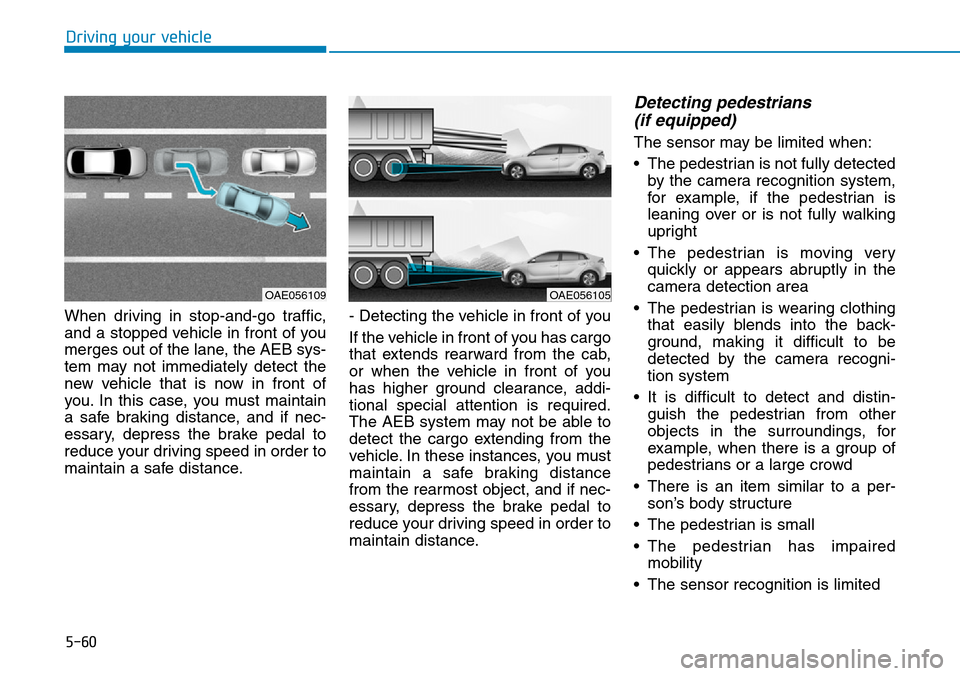
When driving in stop-and-go traffic,
and a stopped vehicle in front of you
merges out of the lane, the AEB sys-
tem may not immediately detect the
new vehicle that is now in front of
you. In this case, you must maintain
a safe braking distance, and if nec-
essary, depress the brake pedal to
reduce your driving speed in order to
maintain a safe distance.- Detecting the vehicle in front of you
If the vehicle in front of you has cargo
that extends rearward from the cab,
or when the vehicle in front of you
has higher ground clearance, addi-
tional special attention is required.
The AEB system may not be able to
detect the cargo extending from the
vehicle. In these instances, you must
maintain a safe braking distance
from the rearmost object, and if nec-
essary, depress the brake pedal to
reduce your driving speed in order to
maintain distance.
Detecting pedestrians
(if equipped)
The sensor may be limited when:
• The pedestrian is not fully detected
by the camera recognition system,
for example, if the pedestrian is
leaning over or is not fully walking
upright
• The pedestrian is moving very
quickly or appears abruptly in the
camera detection area
• The pedestrian is wearing clothing
that easily blends into the back-
ground, making it difficult to be
detected by the camera recogni-
tion system
• It is difficult to detect and distin-
guish the pedestrian from other
objects in the surroundings, for
example, when there is a group of
pedestrians or a large crowd
• There is an item similar to a per-
son’s body structure
• The pedestrian is small
• The pedestrian has impaired
mobility
• The sensor recognition is limited
OAE056109OAE056105
Page 408 of 642
5-61
Driving your vehicle
5
• The radar sensor or camera is
blocked with a foreign object or
debris
• Inclement weather such as heavy
rain or snow obscures the field of
view of the radar sensor or camera
• The outside lighting is too bright
(e.g. when driving in bright sunlight
or in sun glare) or too dark (e.g.
when driving on a dark rural road
at night)
• When light coming from a street
light or an oncoming vehicle is
reflected on a wet road surface
such as a puddle in the road
• The field of view in front is
obstructed by sun glare
• The windshield glass is fogged up;
a clear view of the road is obstruct-
ed
• The adverse road conditions cause
excessive vehicle vibrations while
driving
Information
In some instances, the AEB system
may be cancelled when subjected to
electromagnetic interference.
i
•Do not use the Autonomous
Emergency Braking system
when towing a vehicle.
Application of the AEB sys-
tem while towing may
adversely affect the safety of
your vehicle or the towing
vehicle.
•Use extreme caution when the
vehicle in front of you has
cargo that extends rearward
from the cab, or when the
vehicle in front of you has
higher ground clearance.
•The AEB system is designed
to detect and monitor the
vehicle ahead or detect a
pedestrian in the roadway
through radar signals and
camera recognition. It is not
designed to detect bicycles,
motorcycles, or smaller
wheeled objects such as lug-
gage bags, shopping carts, or
strollers.
(Continued)
(Continued)
•Never try to test the operation
of the AEB system. Doing so
may cause severe injury or
death.
WARNING
When you replace the wind-
shield glass, bumper or
radar/camera, we recommend
that you take your vehicle to an
authorized HYUNDAI dealer and
have the system checked for
calibration.
WARNING
Page 409 of 642
5-62
Driving your vehicle
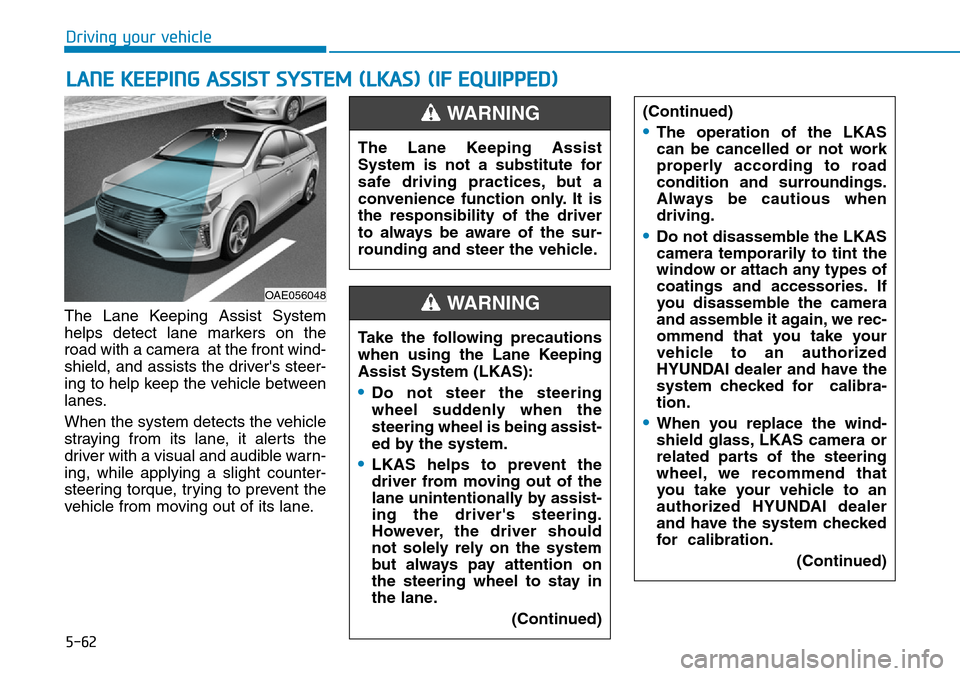
The Lane Keeping Assist System
helps detect lane markers on the
road with a camera at the front wind-
shield, and assists the driver's steer-
ing to help keep the vehicle between
lanes.
When the system detects the vehicle
straying from its lane, it alerts the
driver with a visual and audible warn-
ing, while applying a slight counter-
steering torque, trying to prevent the
vehicle from moving out of its lane.
LANE KEEPING ASSIST SYSTEM (LKAS) (IF EQUIPPED)
OAE056048
The Lane Keeping Assist
System is not a substitute for
safe driving practices, but a
convenience function only. It is
the responsibility of the driver
to always be aware of the sur-
rounding and steer the vehicle.
WARNING
Take the following precautions
when using the Lane Keeping
Assist System (LKAS):
•Do not steer the steering
wheel suddenly when the
steering wheel is being assist-
ed by the system.
•LKAS helps to prevent the
driver from moving out of the
lane unintentionally by assist-
ing the driver's steering.
However, the driver should
not solely rely on the system
but always pay attention on
the steering wheel to stay in
the lane.
(Continued)
WARNING
(Continued)
•The operation of the LKAS
can be cancelled or not work
properly according to road
condition and surroundings.
Always be cautious when
driving.
•Do not disassemble the LKAS
camera temporarily to tint the
window or attach any types of
coatings and accessories. If
you disassemble the camera
and assemble it again, we rec-
ommend that you take your
vehicle to an authorized
HYUNDAI dealer and have the
system checked for calibra-
tion.
•When you replace the wind-
shield glass, LKAS camera or
related parts of the steering
wheel, we recommend that
you take your vehicle to an
authorized HYUNDAI dealer
and have the system checked
for calibration.
(Continued)
Page 410 of 642
5-63
Driving your vehicle
5
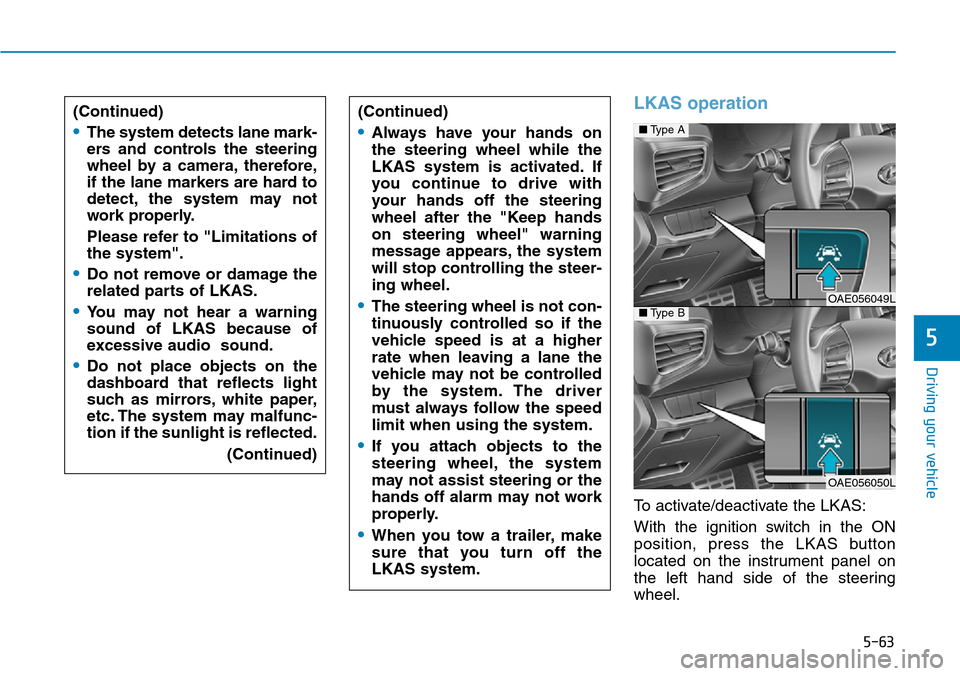
LKAS operation
To activate/deactivate the LKAS:
With the ignition switch in the ON
position, press the LKAS button
located on the instrument panel on
the left hand side of the steering
wheel. (Continued)
•The system detects lane mark-
ers and controls the steering
wheel by a camera, therefore,
if the lane markers are hard to
detect, the system may not
work properly.
Please refer to "Limitations of
the system".
•Do not remove or damage the
related parts of LKAS.
•You may not hear a warning
sound of LKAS because of
excessive audio sound.
•Do not place objects on the
dashboard that reflects light
such as mirrors, white paper,
etc. The system may malfunc-
tion if the sunlight is reflected.
(Continued)
(Continued)
•Always have your hands on
the steering wheel while the
LKAS system is activated. If
you continue to drive with
your hands off the steering
wheel after the "Keep hands
on steering wheel" warning
message appears, the system
will stop controlling the steer-
ing wheel.
•The steering wheel is not con-
tinuously controlled so if the
vehicle speed is at a higher
rate when leaving a lane the
vehicle may not be controlled
by the system. The driver
must always follow the speed
limit when using the system.
•If you attach objects to the
steering wheel, the system
may not assist steering or the
hands off alarm may not work
properly.
•When you tow a trailer, make
sure that you turn off the
LKAS system.
■Type A
OAE056049L■Type B
OAE056050L
Page 414 of 642
5-67
Driving your vehicle
5
Information
• Even though the steering is assisted
by the system, the driver can still
steer to control the steering wheel.
• The steering wheel may feel heavier
when the steering wheel is assisted
by the system than when it is not.
Warning light and message
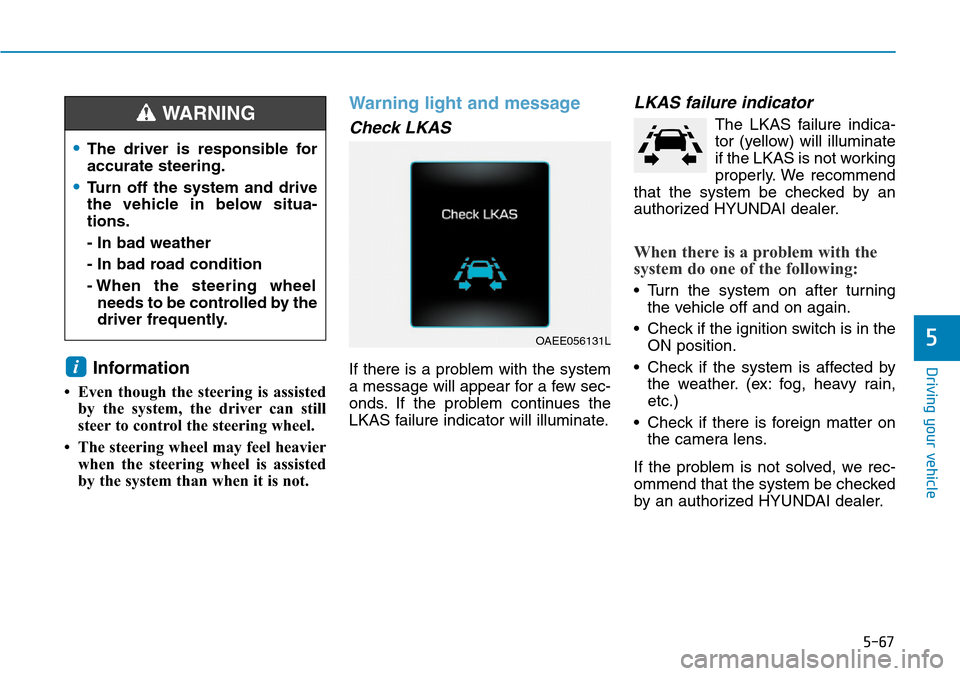
Check LKAS
If there is a problem with the system
a message will appear for a few sec-
onds. If the problem continues the
LKAS failure indicator will illuminate.
LKAS failure indicator
The LKAS failure indica-
tor (yellow) will illuminate
if the LKAS is not working
properly. We recommend
that the system be checked by an
authorized HYUNDAI dealer.
When there is a problem with the
system do one of the following:
• Turn the system on after turning
the vehicle off and on again.
• Check if the ignition switch is in the
ON position.
• Check if the system is affected by
the weather. (ex: fog, heavy rain,
etc.)
• Check if there is foreign matter on
the camera lens.
If the problem is not solved, we rec-
ommend that the system be checked
by an authorized HYUNDAI dealer.
i
OAEE056131L
•The driver is responsible for
accurate steering.
•Turn off the system and drive
the vehicle in below situa-
tions.
- In bad weather
- In bad road condition
- When the steering wheel
needs to be controlled by the
driver frequently.
WARNING
Page 415 of 642
5-68
Driving your vehicle
The LKAS system will not be in the
ENABLED state and the steering
wheel will not be assisted when:
• The turn signal is turned on before
changing a lane. If you change
lanes without the turn signal on,
the steering wheel might be con-
trolled.
• The vehicle is not driven in the mid-
dle of the lane when the system is
turned on or right after changing a
lane.
• ESC (Electronic Stability Control) or
VSM (Vehicle Stability Management)
is activated.
• The vehicle is driven on a sharp
curve.
• Vehicle speed is below 60 km/h (37
mph) and over 180 km/h (112
mph).
• The vehicle makes sharp lane
changes.
• The vehicle brakes suddenly.
• Only one lane marker is detected.
• The lane is very wide or narrow.• There are more than two lane
markers on the road. (e.g. construc-
tion area)
• The vehicle is driven on a steep
incline.
• The steering wheel is turned sud-
denly.
Limitations of the System
The LKAS may operate prematurely
even if the vehicle does not depart
from the intended lane, OR, the
LKAS may not assist your steering or
warn you if the vehicle leaves the
intended lane under the following cir-
cumstances:
When the lane and road condi-
tions are poor
• It is difficult to distinguish the lane
marking from the road surface or
the lane marking is faded or not
clearly marked.
• It is difficult to distinguish the color
of the lane marker from the road.
• There are markings on the road
surface that look like a lane marker
that is inadvertently being detected
by the camera.
• The lane marker is merged or
divided. (e.g. tollgate)
• The lane number increases or
decreases or the lane marker are
crossing complicatedly.
• There are more than two lane
markers on the road in front of you.
Page 416 of 642
5-69
Driving your vehicle
5
• The lane marker is very thick or
thin.
• The lanes ahead are not visible
due to rain, snow, water on the
road, damaged or stained road
surface, or other factors.
• The shadow is on the lane marker
by a median strip, trees, etc.
• The lanes are incomplete or the
area is in a construction zone.
• There are crosswalk signs or other
symbols on the road.
• The lane marker in a tunnel is
stained with oil, etc.
• The lane suddenly disappears
such as at the intersection.When external condition is inter-
vened
• The brightness outside changes
suddenly such as when entering or
exiting a tunnel, or when passing
under a bridge.
• The brightness outside is too low
such as when the headlamps are
not on at night or the vehicle is
going through a tunnel.
• There is a boundary structure in
the roadway such as a concrete
barrier, guardrail and reflector post
that is inadvertently being detected
by the camera.
• When light coming from a street
light or an oncoming vehicle is
reflected on a wet road surface
such as a puddle in the road.
• The field of view in front is
obstructed by sun glare.
• There is not enough distance
between you and the vehicle in
front to be able to detect the lane
marker or the vehicle ahead is driv-
ing on the lane marker.• Driving on a steep grade, over a
hill, or when driving on a curved
road.
• The adverse road conditions cause
excessive vehicle vibrations while
driving.
• The surrounding of the inside rear
view mirror temperature is high
due to direct sunlight, etc.
When front visibility is poor
• The windshield or the LKAS cam-
era lens is blocked with dirt or
debris.
• The windshield glass is fogged up;
a clear view of the road is obstruct-
ed.
• Placing objects on the dashboard,
etc.
• The sensor cannot detect the lane
because of fog, heavy rain or snow.
Page 466 of 642
6-6
The following items may need to be
reset after the battery has been dis-
charged or the battery has been dis-
connected.
See chapter 3 or 4 for:
• Power Windows
• Trip Computer
• Climate Control System
• Clock
• Audio System
• Sunroof
• Driver Position Memory System
External power source using 12V
battery
The use of external power acces-
sories may reduce performance
and function of the vehicle.
Especially, the use of dash cam-
eras may shut off the power of the
vehicle prior to the dash camera's
automatic shut-down.
If the power of the vehicle is shut
off, start the vehicle as explained.
(refer to "Using the 12V Battery
Reset Switch")Jump starting
In the event vehicle still does not
have a functional 12V battery (check
if interior lights will not turn on) then
you can try a jump start to the engine
compartment jumper terminals using
a 12V booster pack or jumper cables
from another vehicle's 12V battery
according to the following instruc-
tions.1. Position the vehicles close enough
that the jumper cables will reach,
but do not allow the vehicles to
touch.
2. Avoid fans or any moving parts in
the engine compartment at all
times, even when the vehicles are
turned off.
3. Turn off all electrical devices such
as radios, lights, air conditioning,
etc. Put the vehicles in P (Park)
and set the parking brake. Turn
both vehicles OFF.
NOTICE
What to do in an emergency
Jump starting can be danger-
ous if done incorrectly. Follow
the jump starting procedure in
this section to avoid serious
injury or damage to your vehi-
cle. If in doubt about how to
properly jump start your vehi-
cle, we strongly recommend
that you have a service techni-
cian or towing service do it for
you.
CAUTION
Page 591 of 642
7-84
Maintenance
APPEARANCE CARE
Exterior care
Exterior general caution
It is very important to follow the label
directions when using any chemical
cleaner or polish. Read all warning
and caution statements that appear
on the label.
High-pressure washing
• When using high-pressure wash-
ers, make sure to maintain suffi-
cient distance from the vehicle.
Insufficient clearance or excessive
pressure can lead to component
damage or water penetration.
• Do not spray the camera, sensors
or its surrounding area directly with
a high pressure washer. Shock
applied from high pressure water
may cause the device to not oper-
ate normally.
• Do not bring the nozzle tip close to
boots (rubber or plastic covers) or
connectors as they may be dam-
aged if they come into contact with
high pressure water.
Finish maintenance
Washing
To help protect your vehicle’s finish
from rust and deterioration, wash it
thoroughly and frequently at least
once a month with lukewarm or cold
water.
If you use your vehicle for off-road
driving, you should wash it after each
off-road trip. Pay special attention to
the removal of any accumulation of
salt, dirt, mud, and other foreign
materials. Make sure the drain holes
in the lower edges of the doors and
rocker panels are kept clear and
clean.
Insects, tar, tree sap, bird droppings,
industrial pollution and similar
deposits can damage your vehicle’s
finish if not removed immediately.
Even prompt washing with plain
water may not completely remove all
these deposits. A mild soap, safe for
use on painted surfaces, should be
used.
After washing, rinse the vehicle thor-
oughly with lukewarm or cold water.
Do not allow soap to dry on the finish.• Do not use strong soap, chemi-
cal detergents or hot water, and
do not wash the vehicle in direct
sunlight or when the body of the
vehicle is warm.
• Be careful when washing the
side windows of your vehicle.
Especially, with high-pressure
water, water may leak through
the windows and wet the interi-
or.
• To prevent damage to the plastic
parts, do not clean with chemi-
cal solvents or strong deter-
gents.
NOTICE
After washing the vehicle, test
the brakes while driving slowly
to see if they have been affected
by water before getting on the
road. If braking performance is
impaired, dry the brakes by
applying them lightly while main-
taining a slow forward speed.
WARNING
Page 632 of 642
I-3
Battery (12 volt, Plug-in hybrid vehicle) .....................7-38
Battery recharging......................................................7-40
Battery cooling duct .....................................................2-24
Battery saver function .................................................3-111
Before driving .................................................................5-4
Blind spot detection (BSD) system ..............................5-40
Bluetooth
®Wireless Technology hands-free ..................4-4
Bottle holder ...............................................................3-147
Brake fluid ....................................................................7-29
Brake system.................................................................5-27
Anti-lock brake system (ABS) ..................................5-31
Disc brakes wear indicator ........................................5-28
Electronic stability control (ESC) .............................5-33
Emergency stop signal (ESS) ....................................5-38
Good braking practices ..............................................5-39
Hill-start assist control (HAC)...................................5-38
Parking brake .............................................................5-28
Power brakes..............................................................5-27
Vehicle stability management (VSM) .......................5-36
Bulb replacement
Daytime running lamp ...............................................7-76
Front position lamp....................................................7-68
Front turn signal lamp ...............................................7-68
Headlamp ...................................................................7-68
Headlamp aiming .......................................................7-72
High mounted stop lamp ...........................................7-82Interior light bulb .......................................................7-82
License plate light bulb .............................................7-82
Rear combination lamp bulb .....................................7-77
Rear fog lamp ............................................................7-82
Side repeater lamp ....................................................7-76
Bulb wattage ...................................................................8-3
Button start/stop, see engine start/stop button................5-9
Camera (Rear view)....................................................3-120
Capacities (Lubricants) ...................................................3-6
Care
Exterior care...............................................................7-84
Interior care................................................................7-89
Tire care .....................................................................7-42
Cellular phone charger................................................3-150
Center console storage................................................3-145
Central door lock switch...............................................3-14
Certification label ...........................................................8-8
Chains
Tire chains................................................................5-100
Checking tire inflation pressure ...................................7-44
Child restraint system (CRS)........................................2-38
Booster seats ..............................................................2-40
Children always in the rear ........................................2-38
Forward-facing child restraint system .......................2-40
Installing a child restraint system (CRS)...................2-41
I
Index
B
C