parking brake Hyundai Ioniq Hybrid 2020 User Guide
[x] Cancel search | Manufacturer: HYUNDAI, Model Year: 2020, Model line: Ioniq Hybrid, Model: Hyundai Ioniq Hybrid 2020Pages: 635, PDF Size: 53.69 MB
Page 192 of 635
3-100
Convenient features of your vehicle
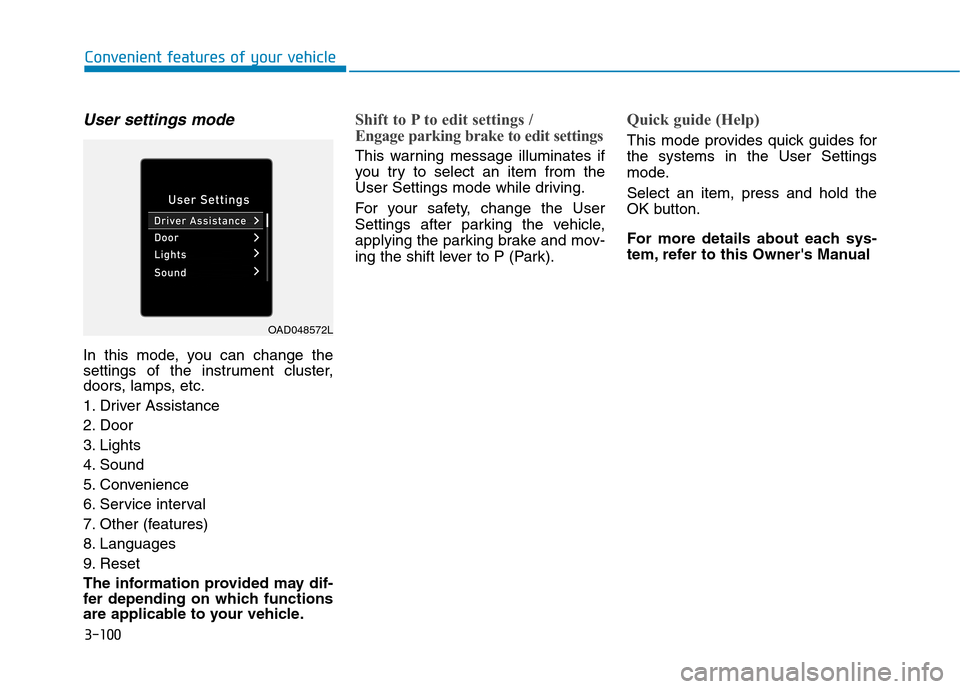
User settings mode
In this mode, you can change the
settings of the instrument cluster,
doors, lamps, etc.
1. Driver Assistance
2. Door
3. Lights
4. Sound
5. Convenience
6. Service interval
7. Other (features)
8. Languages
9. Reset
The information provided may dif-
fer depending on which functions
are applicable to your vehicle.
Shift to P to edit settings /
Engage parking brake to edit settings
This warning message illuminates if
you try to select an item from the
User Settings mode while driving.
For your safety, change the User
Settings after parking the vehicle,
applying the parking brake and mov-
ing the shift lever to P (Park).
Quick guide (Help)
This mode provides quick guides for
the systems in the User Settings
mode.
Select an item, press and hold the
OK button.
For more details about each sys-
tem, refer to this Owner's Manual
OAD048572L
Page 228 of 635
3-136
Convenient features of your vehicle
There is a possibility of Reverse
Parking Distance Warning system
malfunction when:
Driving on uneven road surfaces
such as unpaved roads, gravel,
bumps, or gradient.
Objects generating excessive noise
such as vehicle horns, loud motor-
cycle engines, or truck air brakes
can interfere with the sensor.
Heavy rain or water spray is present.
Wireless transmitters or mobile
phones are present near the sensor.
The sensor is covered with snow.
Any non-factory equipment or
accessories have been installed, or
if the vehicle bumper height or sen-
sor installation has been modified.
Detecting range may decrease
when:
Outside air temperature is extreme-
ly hot or cold.
Undetectable objects smaller than
40 in (100 cm) and narrower than 6
in (14 cm) in diameter.
The following objects may not be
recognized by the sensor:
Sharp or slim objects such as
ropes, chains or small poles.
Objects, which tend to absorb sen-
sor frequency such as clothes,
spongy material or snow. Reverse Parking Distance
Warning system can only sense
objects within the range and
location of the sensors; It can-
not detect objects in other areas
where sensors are not installed.
Also, small or slim objects, such
as poles or objects located
between sensors may not be
detected by the sensors.
Always visually check behind
the vehicle when backing up.
Be sure to inform any drivers of
the vehicle that may be unfamil-
iar with the system regarding
the systems capabilities and
limitations.
NOTICE
Page 232 of 635
3-140
Convenient features of your vehicle
Non-operational conditions of
Forward/Reverse Parking
Distance Warning system
Forward/Reverse Parking Distance
Warning may not operate when:
Moisture is frozen to the sensor. (It
will operate normally when the ice
melts.)
Sensor is covered with foreign mat-
ter, such as snow or water, or the
sensor cover is blocked. (It will
operate normally when the materi-
al is removed or the sensor is no
longer blocked.)
Parking Distance Warning button is
off.
There is a possibility of
Forward/Reverse Parking Distance
Warning system malfunction when:
Driving on uneven road surfaces
such as unpaved roads, gravel,
bumps, or gradient.
Objects generating excessive
noise such as vehicle horns, loud
motorcycle engines, or truck air
brakes can interfere with the sen-
sor.
Heavy rain or water spray is pres-
ent.
Wireless transmitters or mobile
phones present near the sensor.
The sensor is covered with snow
Any non-factory equipment or
accessories have been installed,
or if the vehicle bumper height or
sensor installation has been modi-
fied.
Detecting range may decrease
when:
Outside air temperature is
extremely hot or cold.
The sensor is covered with foreign
matter such as snow or water. (The
sensing range will return to normal
when removed.)
The following objects may not be
recognized by the sensor:
Sharp or slim objects such as
ropes, chains or small poles.
Objects, which tend to absorb sen-
sor frequency such as clothes,
spongy material or snow.
Undetectable objects smaller than
40 in (100 cm) and narrower than
5.5 in (14 cm) in diameter.
Page 267 of 635
Driving your vehicle
5
Before driving.........................................................5-4
Before Entering the Vehicle ...........................................5-4
Before Starting ..................................................................5-4
Engine Start/Stop Button .....................................5-6
Engine Start/Stop Button Positions .............................5-7
Starting the Vehicle ..........................................................5-9
Turning Off the Vehicle .................................................5-11
Dual clutch transmission .....................................5-12
Dual Clutch Transmission Operation ..........................5-12
LCD display for transmission temperature and
warning message.............................................................5-14
Shift Lever Position ........................................................5-16
Parking ...............................................................................5-19
Good Driving Practices .................................................5-20
Paddle shifter .......................................................5-22
Regen B mode..................................................................5-22
Coasting guide .....................................................5-25
Braking system ...................................................5-26
Power Brakes ...................................................................5-26
Disc Brake Wear Indicator ............................................5-27
Parking Brake (foot type) .............................................5-27
Electronic Parking Brake (EPB)...................................5-29
AUTO HOLD ......................................................................5-35
Anti-lock Brake System (ABS) ....................................5-39
Electronic Stability Control (ESC)................................5-41Vehicle Stability Management (VSM).........................5-44
Hill-Start Assist Control (HAC) ....................................5-46
Good Braking Practices ................................................5-46
Forward Collision-Avoidance Assist (FCA)
- Front view camera only ...................................5-47
System setting and activation......................................5-47
FCA Warning Message and Brake Control ...............5-49
FCA sensor (Front view camera) ................................5-52
System malfunction ........................................................5-53
Limitations of the System .............................................5-55
Forward Collision-Avoidance Assist (FCA)
- Sensor fusion ....................................................5-61
System setting and activation......................................5-61
FCA warning message and brake control .................5-63
FCA sensor (Front view camera+ Front radar) .......5-66
System malfunction ........................................................5-68
Limitations of the system .............................................5-70
Lane Keeping Assist (LKA) .................................5-77
LKA operation ..................................................................5-79
Warning light and message ..........................................5-82
Limitations of the System .............................................5-83
LKA system function change .......................................5-85
Blind-spot Collision Warning (BCW) ................5-86
System description .........................................................5-86
System setting and operation ......................................5-87
Page 272 of 635
5-6
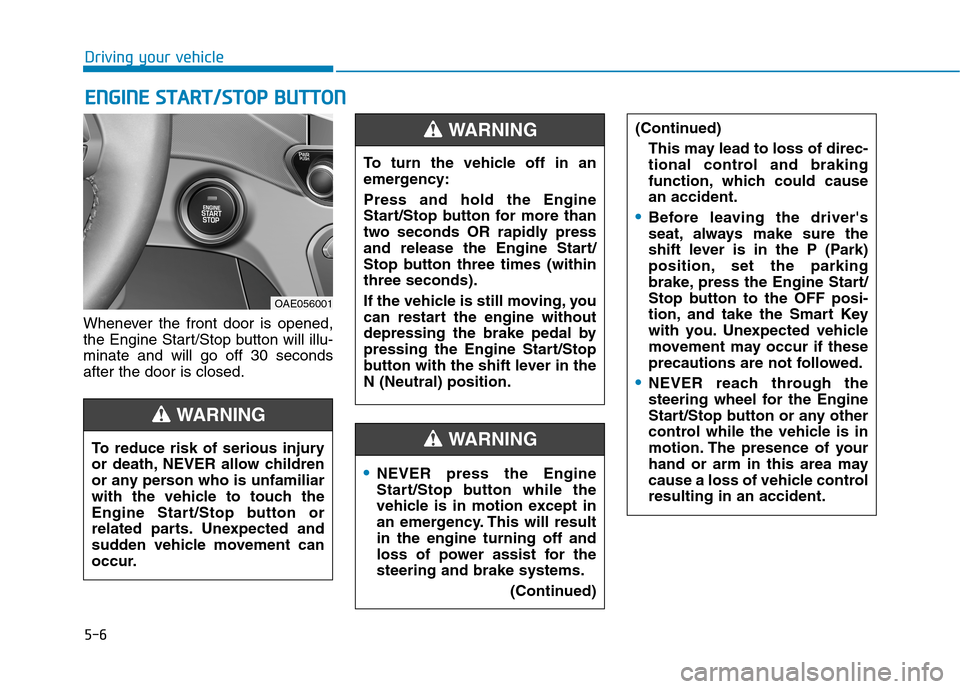
Whenever the front door is opened,
the Engine Start/Stop button will illu-
minate and will go off 30 seconds
after the door is closed.
E EN
NG
GI
IN
NE
E
S
ST
TA
AR
RT
T/
/S
ST
TO
OP
P
B
BU
UT
TT
TO
ON
N
Driving your vehicle
To reduce risk of serious injury
or death, NEVER allow children
or any person who is unfamiliar
with the vehicle to touch the
Engine Start/Stop button or
related parts. Unexpected and
sudden vehicle movement can
occur.
WARNING
OAE056001
NEVER press the Engine
Start/Stop button while the
vehicle is in motion except in
an emergency. This will result
in the engine turning off and
loss of power assist for the
steering and brake systems.
(Continued)
WARNING
To turn the vehicle off in an
emergency:
Press and hold the Engine
Start/Stop button for more than
two seconds OR rapidly press
and release the Engine Start/
Stop button three times (within
three seconds).
If the vehicle is still moving, you
can restart the engine without
depressing the brake pedal by
pressing the Engine Start/Stop
button with the shift lever in the
N (Neutral) position.
WARNING (Continued)
This may lead to loss of direc-
tional control and braking
function, which could cause
an accident.
Before leaving the driver's
seat, always make sure the
shift lever is in the P (Park)
position, set the parking
brake, press the Engine Start/
Stop button to the OFF posi-
tion, and take the Smart Key
with you. Unexpected vehicle
movement may occur if these
precautions are not followed.
NEVER reach through the
steering wheel for the Engine
Start/Stop button or any other
control while the vehicle is in
motion. The presence of your
hand or arm in this area may
cause a loss of vehicle control
resulting in an accident.
Page 275 of 635
5-9
Driving your vehicle
5
Starting the Vehicle
Information
• The vehicle will start by pressing the
Engine Start/Stop button, only when
the smart key is in the vehicle.
• Even if the smart key is in the vehi-
cle, if it is far away from the driver,
the vehicle may not start.
• When the Engine Start/Stop button
is in the ACC or ON position, if any
door is open, the system checks for
the smart key. If the smart key is not
in the vehicle, the " " indicator
will blink and the warning "Key not
in vehicle" will come on and if all
doors are closed, the chime will also
sound for about 5 seconds. Keep the
smart key in the vehicle when in the
ACC position or if the vehicle is in
the ready ( ) mode.1. Always carry the smart key with
you.
2. Make sure the parking brake is
applied.
3. Make sure the shift lever is in P
(Park).
4. Depress the brake pedal.
5. Press the Engine Start/Stop but-
ton. If the vehicle starts, the " "
indicator will come on.
Information
• Do not wait for the engine to warm
up while the vehicle remains station-
ary. Start driving at moderate
engine speeds. (Aggressive accelerat-
ing and decelerating should be
avoided.)
• Always start the vehicle with your
foot on the brake pedal. Do not
depress the accelerator while start-
ing the vehicle. Do not rev the
engine while warming it up.
i
i
Always wear appropriate shoes
when operating your vehicle.
Unsuitable shoes, such as
high heels, ski boots, sandals,
flip-flops, etc., may interfere
with your ability to use the
brake and accelerator pedals.
Do not start the vehicle with the
accelerator pedal depressed.
The vehicle can move and lead
to an accident.
Wait until the engine rpm is
normal. The vehicle may sud-
denly move if the brake pedal
is released when the rpm is
high.
WARNING
Page 277 of 635
5-11
Driving your vehicle
5
Turning Off the Vehicle
1. Depress the brake pedal fully.
2. Shift to P (Park).
3. Apply the parking brake.
4. Press the Engine Start/Stop but-
ton to turn the vehicle off.
5. Make sure the " " indicator
light on the instrument cluster is
turned off.
If the " " indicator light on
the instrument cluster is still
on, the vehicle is not turned off
and can move when the gear is
in any position except P (Park).
CAUTION
Page 278 of 635
5-12
Driving your vehicle
Dual Clutch Transmission
Operation
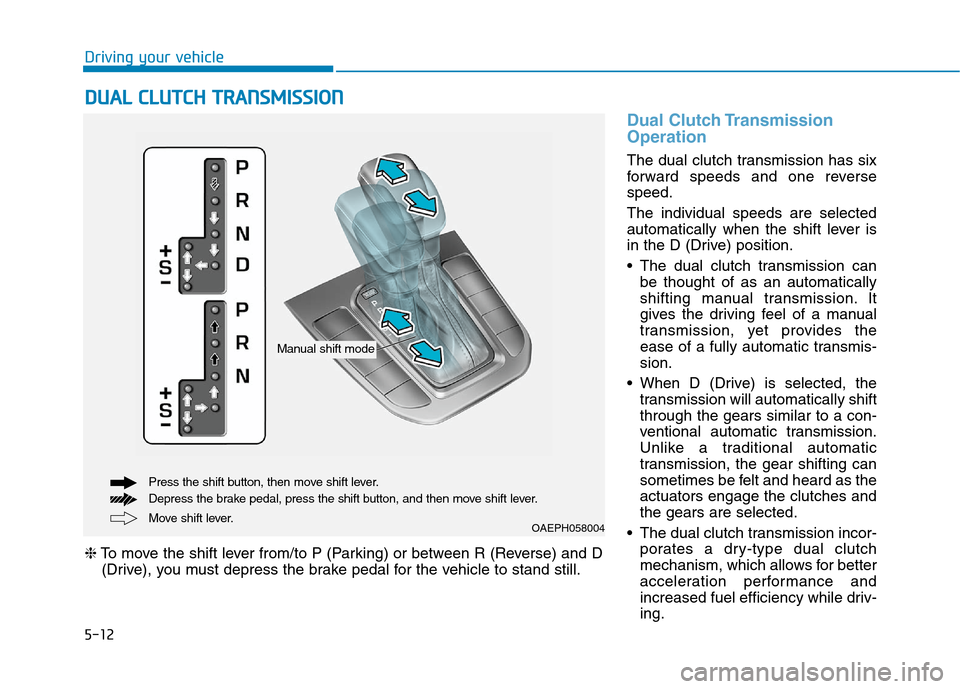
The dual clutch transmission has six
forward speeds and one reverse
speed.
The individual speeds are selected
automatically when the shift lever is
in the D (Drive) position.
The dual clutch transmission can
be thought of as an automatically
shifting manual transmission. It
gives the driving feel of a manual
transmission, yet provides the
ease of a fully automatic transmis-
sion.
When D (Drive) is selected, the
transmission will automatically shift
through the gears similar to a con-
ventional automatic transmission.
Unlike a traditional automatic
transmission, the gear shifting can
sometimes be felt and heard as the
actuators engage the clutches and
the gears are selected.
The dual clutch transmission incor-
porates a dry-type dual clutch
mechanism, which allows for better
acceleration performance and
increased fuel efficiency while driv-
ing.
D DU
UA
AL
L
C
CL
LU
UT
TC
CH
H
T
TR
RA
AN
NS
SM
MI
IS
SS
SI
IO
ON
N
Move shift lever. Press the shift button, then move shift lever.
Depress the brake pedal, press the shift button, and then move shift lever.OAEPH058004
❈To move the shift lever from/to P (Parking) or between R (Reverse) and D
(Drive), you must depress the brake pedal for the vehicle to stand still.
Manual shift mode
Page 279 of 635
5-13
Driving your vehicle
5
But it differs from a conventional
automatic transmission because it
does not incorporate a torque con-
verter. Instead, the transition from
one gear to the next is managed by
clutch slip, especially at lower
speeds.
As a result, shifts are sometimes
more noticeable, and a light vibra-
tion can be felt as the transmission
shaft speed is matched with the
engine shaft speed. This is a nor-
mal condition of the dual clutch
transmission.
The dry-type clutch transfers
torque more directly and provides
a direct-drive feeling which may
feel different from a conventional
automatic transmission. This may
be more noticeable when launch-
ing the vehicle from a stop or when
traveling at low, stop-and-go vehi-
cle speeds.
When rapidly accelerating from a
lower vehicle speed, the engine
rpm may increase dramatically as
a result of clutch slip as the dual
clutch transmission selects the cor-
rect gear. This is a normal condi-
tion. When accelerating from a stop on
an incline, press the accelerator
smoothly and gradually to avoid
any shudder feeling or jerkiness.
When traveling at a lower vehicle
speed, if you release the accelera-
tor pedal quickly, you may feel
engine braking before the trans-
mission changes gears. This
engine braking feeling is similar to
operating a manual transmission at
low speed.
When driving downhill, you may
wish to move the gear shift lever to
Manual Shift mode and downshift
to a lower gear in order to control
your speed without using the brake
pedal excessively.
When you turn the vehicle on and
off, you may hear clicking sounds
as the system goes through a self-
test. This is a normal sound for the
dual clutch transmission.
During the first 1000 miles (1,500
km), you may feel that the vehicle
may not be smooth when acceler-
ating at low speed. During this
break-in period, the shift quality
and performance of your new vehi-
cle is continuously optimized.To reduce the risk of serious
injury or death:
ALWAYS check the surround-
ing areas near your vehicle for
people, especially children,
before shifting a vehicle into
D (Drive) or R (Reverse).
Before leaving the driver's
seat, always make sure the
shift lever is in the P (Park)
position, then set the parking
brake, and place the Engine
Start/Stop button in the OFF
position. Unexpected and
sudden vehicle movement
can occur if these precautions
are not followed.
Do not use aggressive engine
braking (shifting from a high-
er gear to a lower gear) on
slippery roads. This could
cause the tires to slip and may
result in an accident.
WARNING
Page 280 of 635
5-14
Driving your vehicle
Always come to a complete stop
before shifting into D (Drive) or
R (Reverse).
Do not put the shift lever in N
(Neutral) while driving.
To avoid damage to your trans-
mission, do not try to accelerate
in R (Reverse) or any forward
gear position with the brakes
applied.
When stopped on a slope, do
not hold the vehicle with accel-
erator pedal. Use the brake
pedal or the parking brake.
LCD display for transmission
temperature and warning
message
Steep Grade
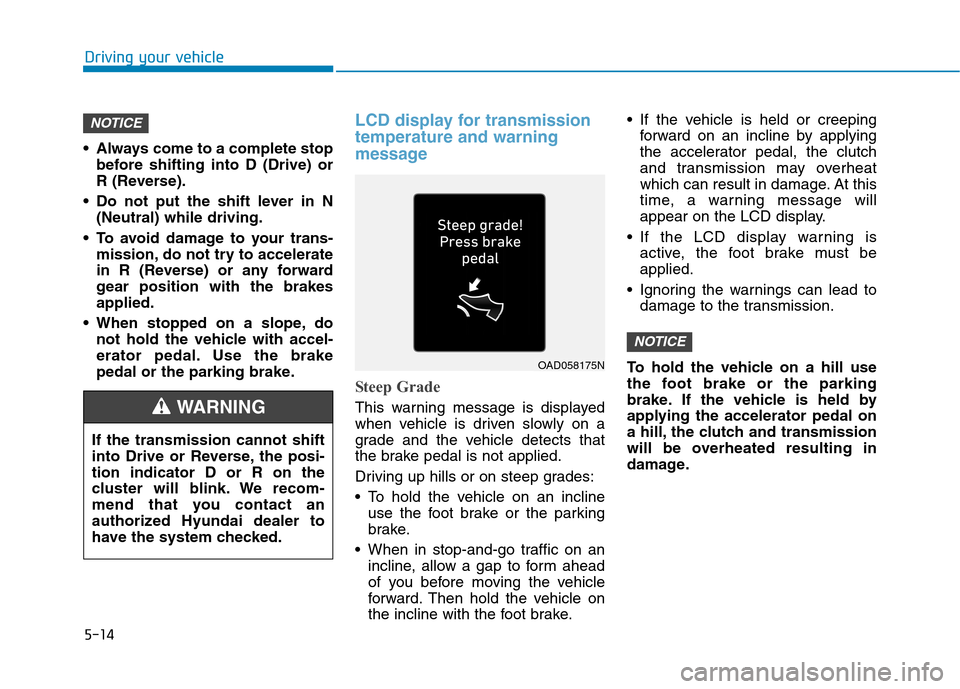
This warning message is displayed
when vehicle is driven slowly on a
grade and the vehicle detects that
the brake pedal is not applied.
Driving up hills or on steep grades:
To hold the vehicle on an incline
use the foot brake or the parking
brake.
When in stop-and-go traffic on an
incline, allow a gap to form ahead
of you before moving the vehicle
forward. Then hold the vehicle on
the incline with the foot brake. If the vehicle is held or creeping
forward on an incline by applying
the accelerator pedal, the clutch
and transmission may overheat
which can result in damage. At this
time, a warning message will
appear on the LCD display.
If the LCD display warning is
active, the foot brake must be
applied.
Ignoring the warnings can lead to
damage to the transmission.
To hold the vehicle on a hill use
the foot brake or the parking
brake. If the vehicle is held by
applying the accelerator pedal on
a hill, the clutch and transmission
will be overheated resulting in
damage.
NOTICE
NOTICE
OAD058175N
If the transmission cannot shift
into Drive or Reverse, the posi-
tion indicator D or R on the
cluster will blink. We recom-
mend that you contact an
authorized Hyundai dealer to
have the system checked.
WARNING