reset Hyundai Ioniq Hybrid 2020 User Guide
[x] Cancel search | Manufacturer: HYUNDAI, Model Year: 2020, Model line: Ioniq Hybrid, Model: Hyundai Ioniq Hybrid 2020Pages: 635, PDF Size: 53.69 MB
Page 200 of 635
3-108
Convenient features of your vehicle
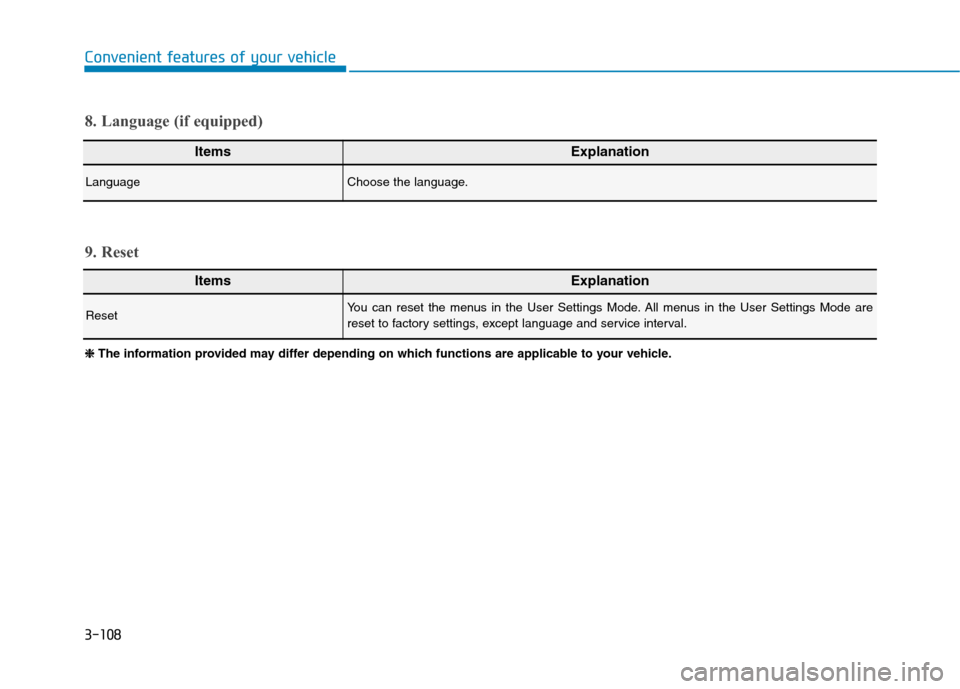
ItemsExplanation
LanguageChoose the language.
8. Language (if equipped)
ItemsExplanation
ResetYou can reset the menus in the User Settings Mode. All menus in the User Settings Mode are
reset to factory settings, except language and service interval.
9. Reset
❈ ❈
The information provided may differ depending on which functions are applicable to your vehicle.
Page 201 of 635
3-109
Convenient features of your vehicle
3
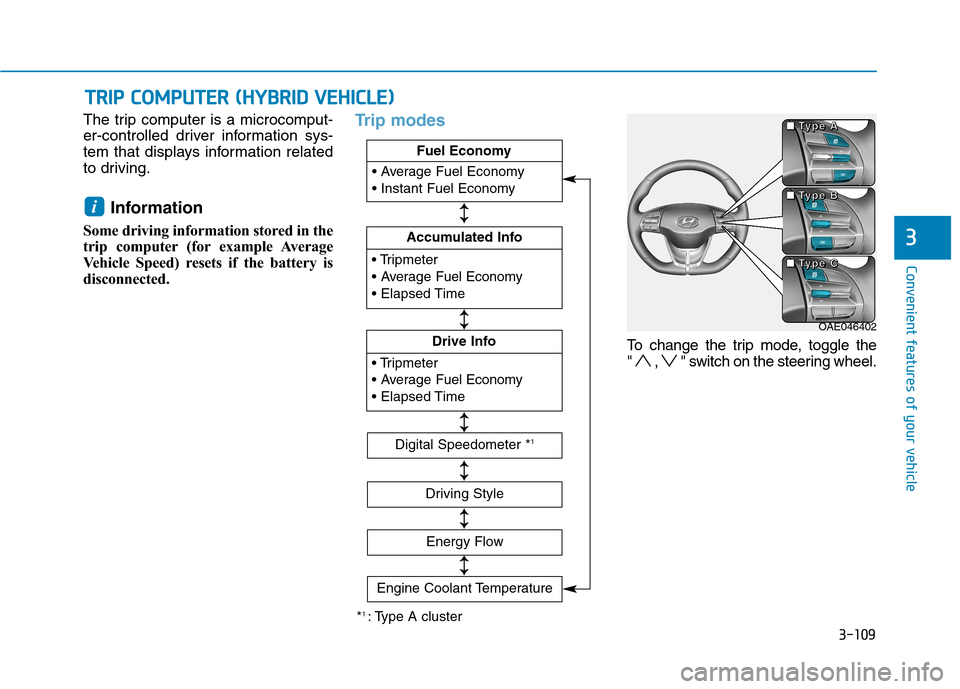
The trip computer is a microcomput-
er-controlled driver information sys-
tem that displays information related
to driving.
Information
Some driving information stored in the
trip computer (for example Average
Vehicle Speed) resets if the battery is
disconnected.
Trip modes
To change the trip mode, toggle the
" , " switch on the steering wheel.
i
T TR
RI
IP
P
C
CO
OM
MP
PU
UT
TE
ER
R
(
(H
HY
YB
BR
RI
ID
D
V
VE
EH
HI
IC
CL
LE
E)
)
OAE046402 ■ ■ ■ ■
T T T T
y y y y
p p p p
e e e e
A A A A
■ ■ ■ ■
T T T T
y y y y
p p p p
e e e e
B B B B
■ ■ ■ ■
T T T T
y y y y
p p p p
e e e e
C C C C
*1 : Type A cluster
Fuel Economy
Accumulated Info
Fuel Economy
Drive Info
Fuel Economy
Digital Speedometer *1
Driving Style
Energy Flow
↕ ↕
↕ ↕
↕ ↕
↕ ↕
↕ ↕
Engine Coolant Temperature
↕
↕
Page 202 of 635
3-110
Convenient features of your vehicle
Fuel economy
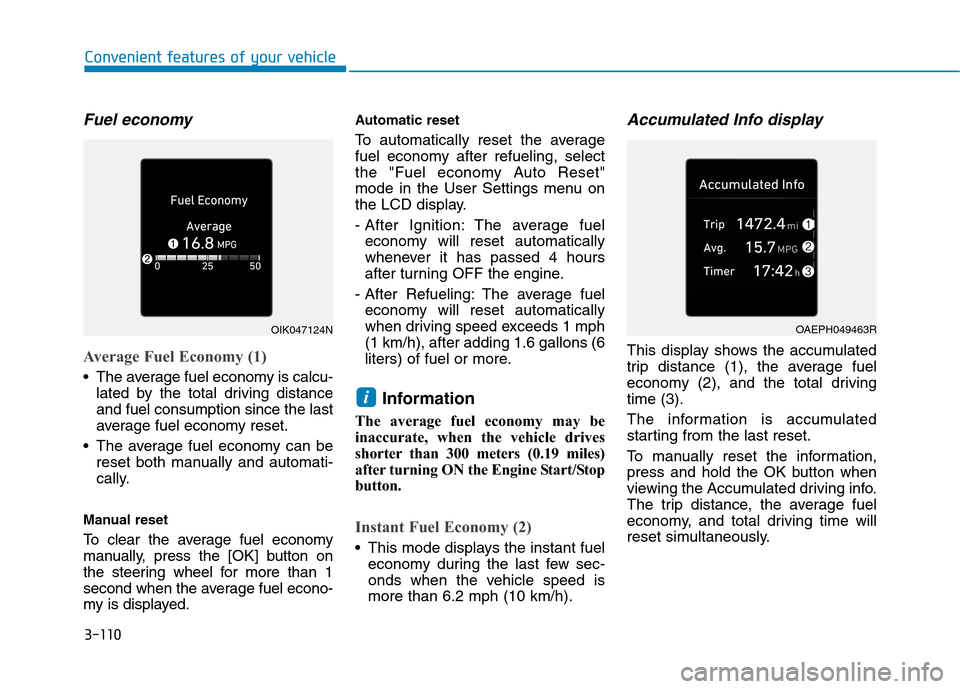
Average Fuel Economy (1)
The average fuel economy is calcu-
lated by the total driving distance
and fuel consumption since the last
average fuel economy reset.
The average fuel economy can be
reset both manually and automati-
cally.
Manual reset
To clear the average fuel economy
manually, press the [OK] button on
the steering wheel for more than 1
second when the average fuel econo-
my is displayed.
Automatic reset
To automatically reset the average
fuel economy after refueling, select
the "Fuel economy Auto Reset"
mode in the User Settings menu on
the LCD display.
- After Ignition: The average fuel
economy will reset automatically
whenever it has passed 4 hours
after turning OFF the engine.
- After Refueling: The average fuel
economy will reset automatically
when driving speed exceeds 1 mph
(1 km/h), after adding 1.6 gallons (6
liters) of fuel or more.
Information
The average fuel economy may be
inaccurate, when the vehicle drives
shorter than 300 meters (0.19 miles)
after turning ON the Engine Start/Stop
button.
Instant Fuel Economy (2)
This mode displays the instant fuel
economy during the last few sec-
onds when the vehicle speed is
more than 6.2 mph (10 km/h).
Accumulated Info display
This display shows the accumulated
trip distance (1), the average fuel
economy (2), and the total driving
time (3).
The information is accumulated
starting from the last reset.
To manually reset the information,
press and hold the OK button when
viewing the Accumulated driving info.
The trip distance, the average fuel
economy, and total driving time will
reset simultaneously.
i
OIK047124NOAEPH049463R
Page 203 of 635
3-111
Convenient features of your vehicle
3
The accumulated driving information
will continue to be counted while the
engine is still running (for example,
when the vehicle is in traffic or
stopped at a stop light).
Information
The vehicle must be driven for a min-
imum of 0.19 miles (300 meters) since
the last ignition key cycle before the
average fuel economy will be recalcu-
lated.
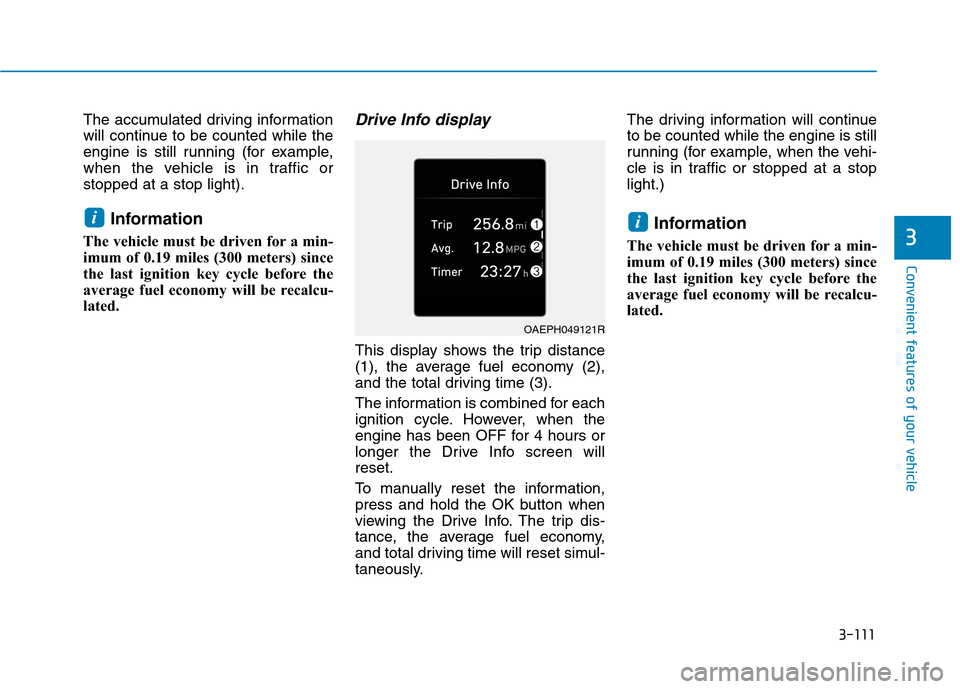
Drive Info display
This display shows the trip distance
(1), the average fuel economy (2),
and the total driving time (3).
The information is combined for each
ignition cycle. However, when the
engine has been OFF for 4 hours or
longer the Drive Info screen will
reset.
To manually reset the information,
press and hold the OK button when
viewing the Drive Info. The trip dis-
tance, the average fuel economy,
and total driving time will reset simul-
taneously.The driving information will continue
to be counted while the engine is still
running (for example, when the vehi-
cle is in traffic or stopped at a stop
light.)
Information
The vehicle must be driven for a min-
imum of 0.19 miles (300 meters) since
the last ignition key cycle before the
average fuel economy will be recalcu-
lated.
ii
OAEPH049121R
Page 206 of 635
3-114
Convenient features of your vehicle
The trip computer is a microcomput-
er-controlled driver information sys-
tem that displays information related
to driving.
Information
Some driving information stored in the
trip computer (for example Average
Vehicle Speed) resets if the battery is
disconnected.
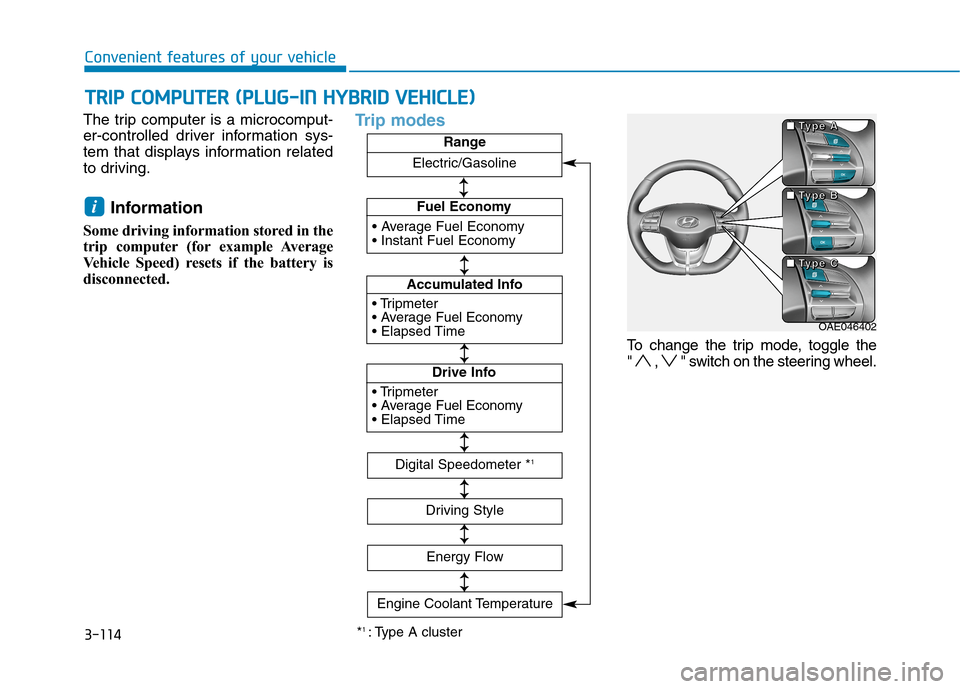
Trip modes
To change the trip mode, toggle the
" , " switch on the steering wheel.
i
T TR
RI
IP
P
C
CO
OM
MP
PU
UT
TE
ER
R
(
(P
PL
LU
UG
G-
-I
IN
N
H
HY
YB
BR
RI
ID
D
V
VE
EH
HI
IC
CL
LE
E)
)
*1 : Type A cluster
Fuel Economy
Accumulated Info
Fuel Economy
Drive Info
Fuel EconomyRange
Digital Speedometer *1
Driving Style
Energy Flow
↕ ↕ ↕ ↕
↕ ↕
↕ ↕
↕ ↕
↕ ↕
Engine Coolant Temperature
Electric/Gasoline
↕
↕
OAE046402 ■ ■ ■ ■
T T T T
y y y y
p p p p
e e e e
A A A A
■ ■ ■ ■
T T T T
y y y y
p p p p
e e e e
B B B B
■ ■ ■ ■
T T T T
y y y y
p p p p
e e e e
C C C C
Page 207 of 635
3-115
Convenient features of your vehicle
3
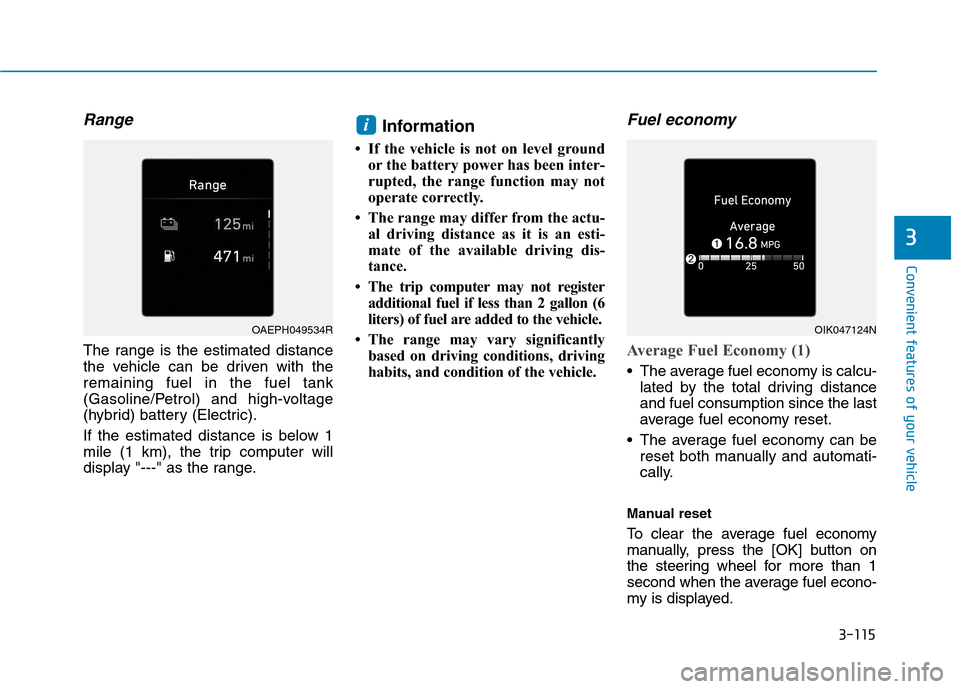
Range
The range is the estimated distance
the vehicle can be driven with the
remaining fuel in the fuel tank
(Gasoline/Petrol) and high-voltage
(hybrid) battery (Electric).
If the estimated distance is below 1
mile (1 km), the trip computer will
display "---" as the range.
Information
• If the vehicle is not on level ground
or the battery power has been inter-
rupted, the range function may not
operate correctly.
• The range may differ from the actu-
al driving distance as it is an esti-
mate of the available driving dis-
tance.
• The trip computer may not register
additional fuel if less than 2 gallon (6
liters) of fuel are added to the vehicle.
• The range may vary significantly
based on driving conditions, driving
habits, and condition of the vehicle.
Fuel economy
Average Fuel Economy (1)
The average fuel economy is calcu-
lated by the total driving distance
and fuel consumption since the last
average fuel economy reset.
The average fuel economy can be
reset both manually and automati-
cally.
Manual reset
To clear the average fuel economy
manually, press the [OK] button on
the steering wheel for more than 1
second when the average fuel econo-
my is displayed.
i
OAEPH049534ROIK047124N
Page 208 of 635
3-116
Convenient features of your vehicle
Automatic reset
To automatically reset the average
fuel economy after refueling, select
the "Fuel economy Auto Reset"
mode in the User Settings menu on
the LCD display.
- After Ignition: The average fuel
economy will reset automatically
whenever it has passed 4 hours
after turning OFF the engine.
- After Refueling: The average fuel
economy will reset automatically
when driving speed exceeds 1 mph
(1 km/h), after adding 1.6 gallons (6
liters) of fuel or more.
Information
The average fuel economy may be
inaccurate, when the vehicle drives
shorter than 0.19 miles (300 meters)
after turning ON the Engine Start/Stop
button.
Instant Fuel Economy (2)
This mode displays the instant fuel
economy during the last few sec-
onds when the vehicle speed is
more than 6.2 mph (10 km/h).
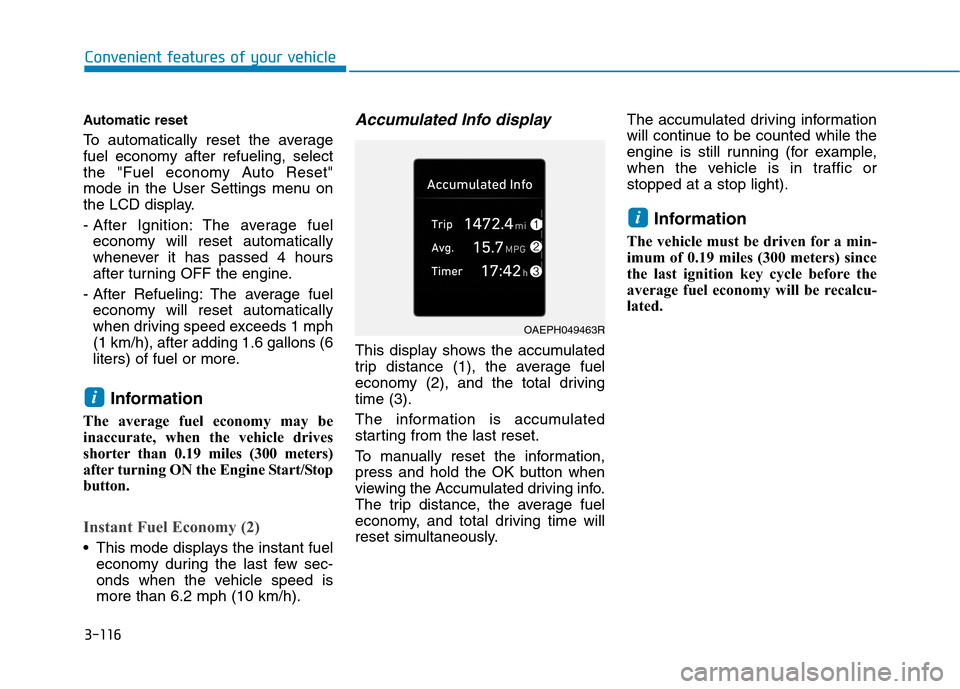
Accumulated Info display
This display shows the accumulated
trip distance (1), the average fuel
economy (2), and the total driving
time (3).
The information is accumulated
starting from the last reset.
To manually reset the information,
press and hold the OK button when
viewing the Accumulated driving info.
The trip distance, the average fuel
economy, and total driving time will
reset simultaneously.The accumulated driving information
will continue to be counted while the
engine is still running (for example,
when the vehicle is in traffic or
stopped at a stop light).
Information
The vehicle must be driven for a min-
imum of 0.19 miles (300 meters) since
the last ignition key cycle before the
average fuel economy will be recalcu-
lated.
i
i
OAEPH049463R
Page 209 of 635
3-117
Convenient features of your vehicle
3
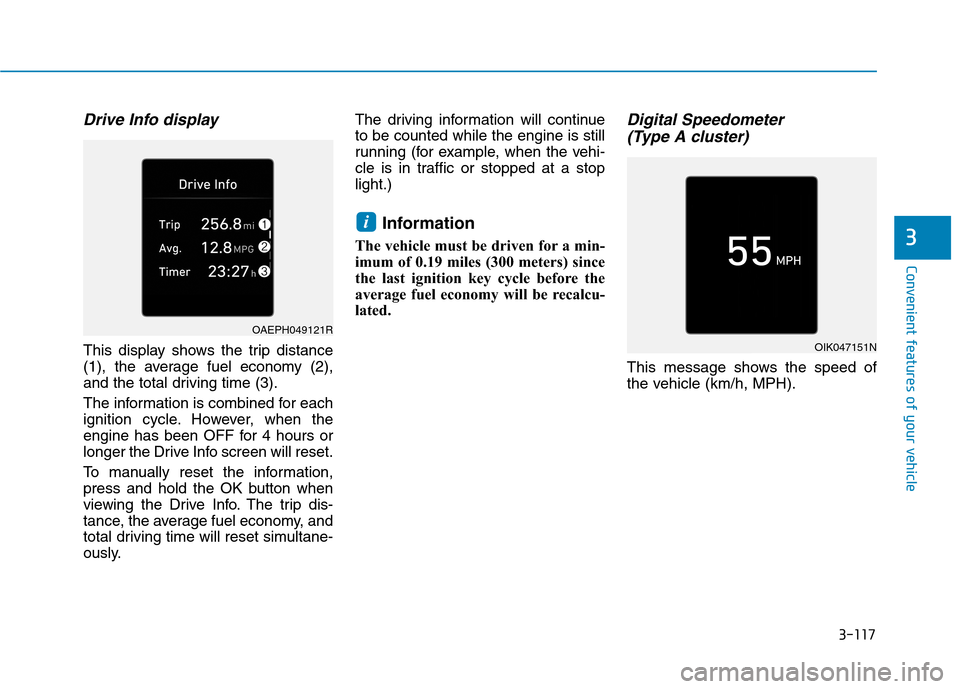
Drive Info display
This display shows the trip distance
(1), the average fuel economy (2),
and the total driving time (3).
The information is combined for each
ignition cycle. However, when the
engine has been OFF for 4 hours or
longer the Drive Info screen will reset.
To manually reset the information,
press and hold the OK button when
viewing the Drive Info. The trip dis-
tance, the average fuel economy, and
total driving time will reset simultane-
ously.The driving information will continue
to be counted while the engine is still
running (for example, when the vehi-
cle is in traffic or stopped at a stop
light.)
Information
The vehicle must be driven for a min-
imum of 0.19 miles (300 meters) since
the last ignition key cycle before the
average fuel economy will be recalcu-
lated.
Digital Speedometer
(Type A cluster)
This message shows the speed of
the vehicle (km/h, MPH).
i
OAEPH049121R
OIK047151N
Page 240 of 635
3-148
Convenient features of your vehicle
Temperature control
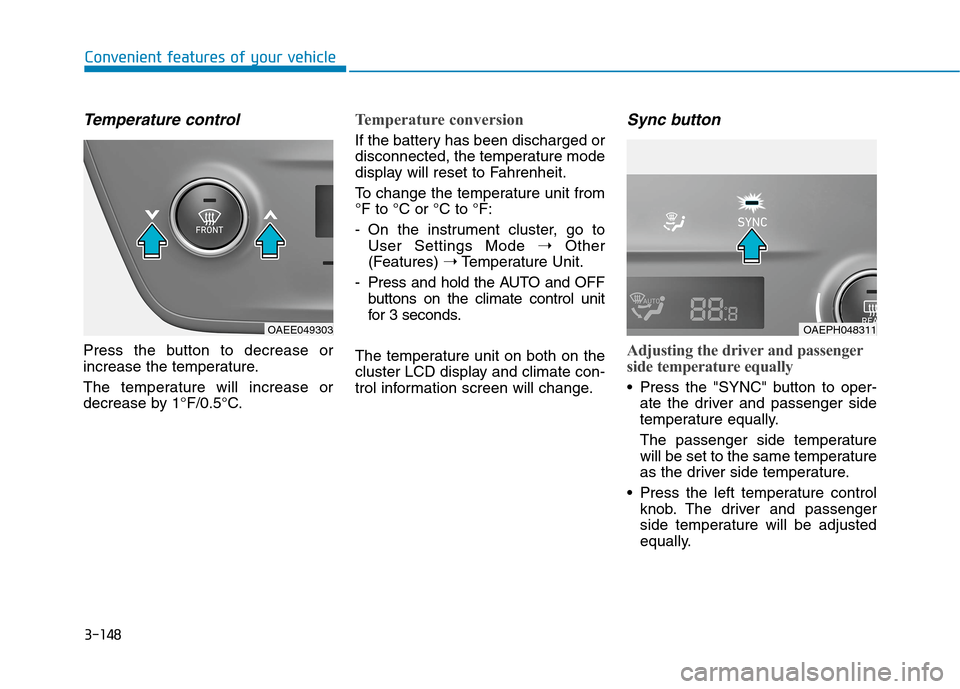
Press the button to decrease or
increase the temperature.
The temperature will increase or
decrease by 1°F/0.5°C.
Temperature conversion
If the battery has been discharged or
disconnected, the temperature mode
display will reset to Fahrenheit.
To change the temperature unit from
°F to °C or °C to °F:
- On the instrument cluster, go to
User Settings Mode ➝Other
(Features) ➝Temperature Unit.
- Press and hold the AUTO and OFF
buttons on the climate control unit
for 3 seconds.
The temperature unit on both on the
cluster LCD display and climate con-
trol information screen will change.
Sync button
Adjusting the driver and passenger
side temperature equally
Press the "SYNC" button to oper-
ate the driver and passenger side
temperature equally.
The passenger side temperature
will be set to the same temperature
as the driver side temperature.
Press the left temperature control
knob. The driver and passenger
side temperature will be adjusted
equally.
OAEPH048311OAEE049303
Page 248 of 635
3-156
Convenient features of your vehicle
To Defrost Outside Windshield
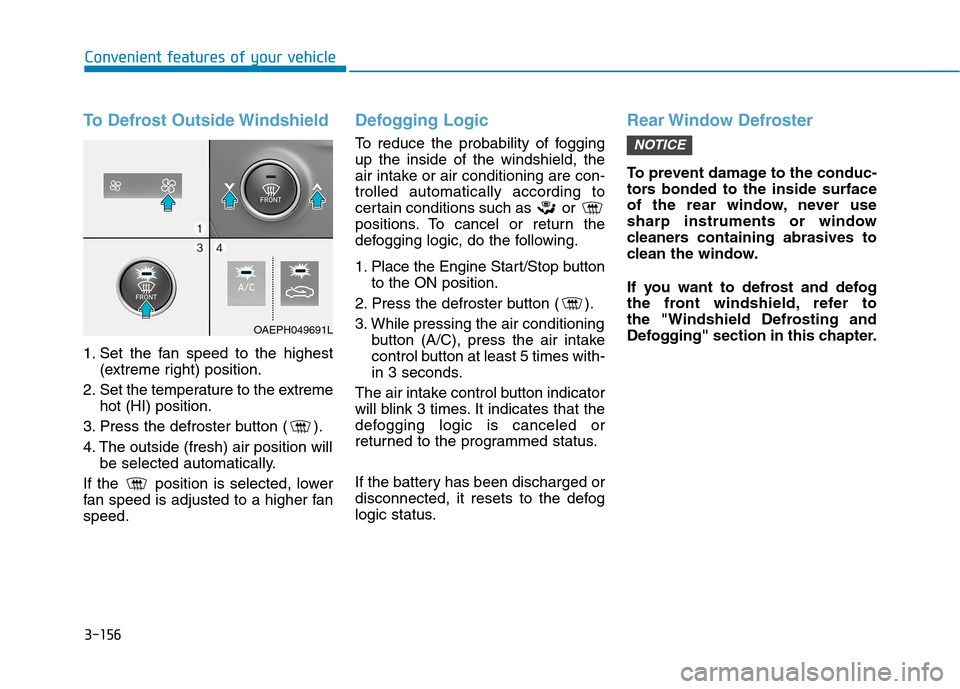
1. Set the fan speed to the highest
(extreme right) position.
2. Set the temperature to the extreme
hot (HI) position.
3. Press the defroster button ( ).
4. The outside (fresh) air position will
be selected automatically.
If the position is selected, lower
fan speed is adjusted to a higher fan
speed.
Defogging Logic
To reduce the probability of fogging
up the inside of the windshield, the
air intake or air conditioning are con-
trolled automatically according to
certain conditions such as or
positions. To cancel or return the
defogging logic, do the following.
1. Place the Engine Start/Stop button
to the ON position.
2. Press the defroster button ( ).
3. While pressing the air conditioning
button (A/C), press the air intake
control button at least 5 times with-
in 3 seconds.
The air intake control button indicator
will blink 3 times. It indicates that the
defogging logic is canceled or
returned to the programmed status.
If the battery has been discharged or
disconnected, it resets to the defog
logic status.
Rear Window Defroster
To prevent damage to the conduc-
tors bonded to the inside surface
of the rear window, never use
sharp instruments or window
cleaners containing abrasives to
clean the window.
If you want to defrost and defog
the front windshield, refer to
the "Windshield Defrosting and
Defogging" section in this chapter.
NOTICE
OAEPH049691L