battery Hyundai Ioniq Hybrid 2020 Owner's Guide
[x] Cancel search | Manufacturer: HYUNDAI, Model Year: 2020, Model line: Ioniq Hybrid, Model: Hyundai Ioniq Hybrid 2020Pages: 635, PDF Size: 53.69 MB
Page 172 of 635
3-80
Convenient features of your vehicle
LCD Display Messages
Shift to P
This message is displayed if you try
to turn off the vehicle with the shift
lever in the N (Neutral) position.
At this time, the Engine Start/Stop
button turns to the ACC position (If
you press the Engine Start/Stop but-
ton once more, it will turn to the ON
position).
Low Key Battery
This message is displayed if the bat-
tery of the smart key is discharged
while changing the Engine Start/
Stop button to the OFF position.
Press START button while turn-
ing wheel
This message is displayed if the
steering wheel does not unlock nor-
mally when the Engine Start/Stop
button is pressed.
You should press the Engine Start/
Stop button while turning the steer-
ing wheel right and left.
Check Steering Wheel Lock
System
This message is displayed if the
steering wheel does not lock normal-
ly while the Engine Start/Stop button
changes to the OFF position.
Press brake pedal to start vehicle
This message is displayed if the
Engine Start/Stop button changes to
the ACC position twice by pressing
the button repeatedly without
depressing the brake pedal.
You can start the vehicle by depress-
ing the brake pedal.
Key not in vehicle
This message is displayed if the
smart key is not in the vehicle when
you press the Engine Start/Stop but-
ton.
When attempting to start the vehicle,
always have the smart key with you.
Key not detected
This message is displayed if the
smart key is not detected when you
press the Engine Start/Stop button.
Press START button again
This message is displayed if you
were unable to start the vehicle when
the Engine Start/Stop button was
pressed.
If this occurs, attempt to start the
engine by pressing the Engine Start/
Stop button again.
If the warning message appears
each time you press the Engine
Start/Stop button, have your vehicle
inspected by an authorized
HYUNDAI dealer.
Page 179 of 635
3-87
Convenient features of your vehicle
3
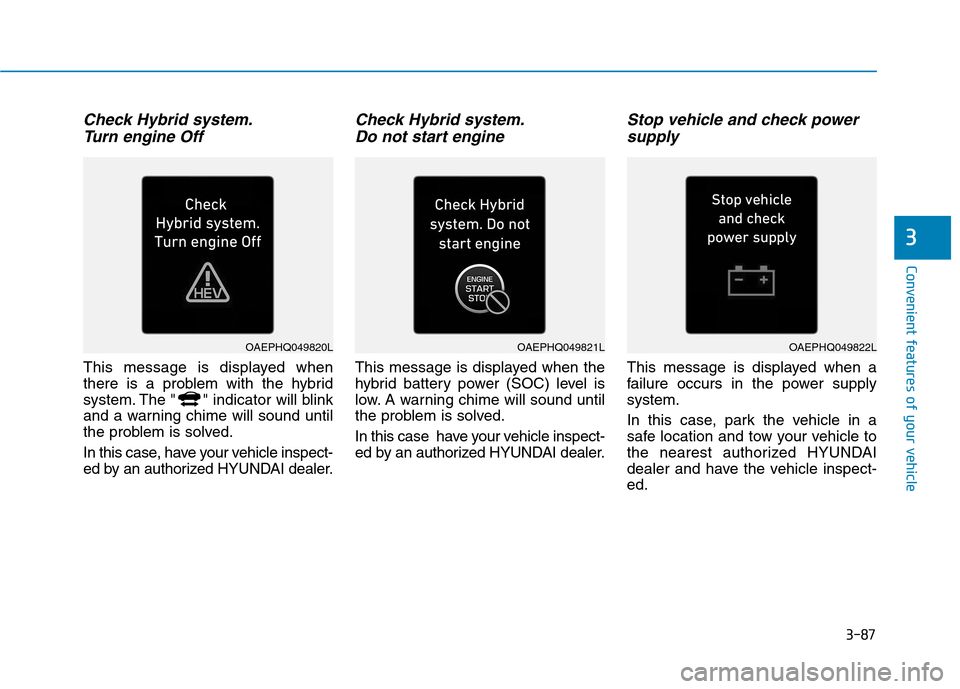
Check Hybrid system.
Turn engine Off
This message is displayed when
there is a problem with the hybrid
system. The " " indicator will blink
and a warning chime will sound until
the problem is solved.
In this case, have your vehicle inspect-
ed by an authorized HYUNDAI dealer.
Check Hybrid system.
Do not start engine
This message is displayed when the
hybrid battery power (SOC) level is
low. A warning chime will sound until
the problem is solved.
In this case have your vehicle inspect-
ed by an authorized HYUNDAI dealer.
Stop vehicle and check power
supply
This message is displayed when a
failure occurs in the power supply
system.
In this case, park the vehicle in a
safe location and tow your vehicle to
the nearest authorized HYUNDAI
dealer and have the vehicle inspect-
ed.
OAEPHQ049821LOAEPHQ049820LOAEPHQ049822L
Page 180 of 635
3-88
Convenient features of your vehicle
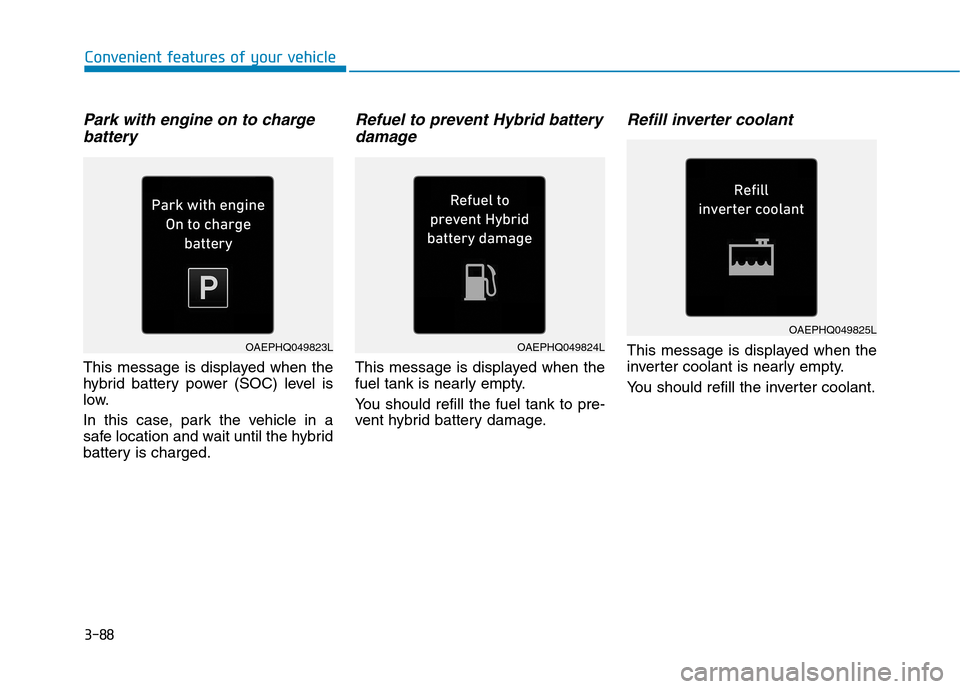
Park with engine on to charge
battery
This message is displayed when the
hybrid battery power (SOC) level is
low.
In this case, park the vehicle in a
safe location and wait until the hybrid
battery is charged.
Refuel to prevent Hybrid battery
damage
This message is displayed when the
fuel tank is nearly empty.
You should refill the fuel tank to pre-
vent hybrid battery damage.
Refill inverter coolant
This message is displayed when the
inverter coolant is nearly empty.
You should refill the inverter coolant.OAEPHQ049824LOAEPHQ049823L
OAEPHQ049825L
Page 183 of 635
3-91
Convenient features of your vehicle
3
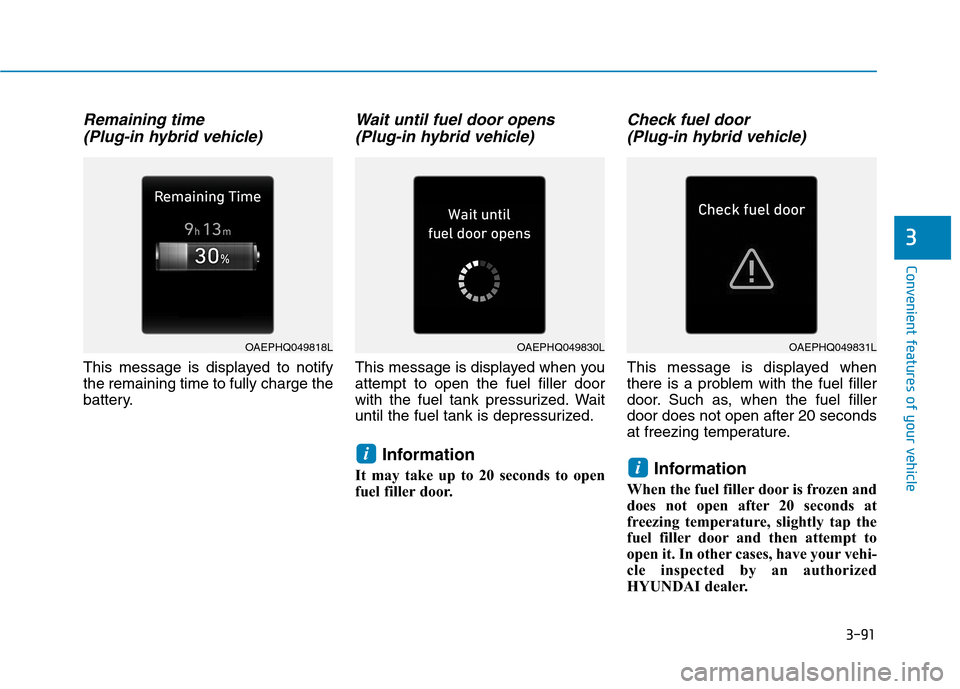
Remaining time
(Plug-in hybrid vehicle)
This message is displayed to notify
the remaining time to fully charge the
battery.
Wait until fuel door opens
(Plug-in hybrid vehicle)
This message is displayed when you
attempt to open the fuel filler door
with the fuel tank pressurized. Wait
until the fuel tank is depressurized.
Information
It may take up to 20 seconds to open
fuel filler door.
Check fuel door
(Plug-in hybrid vehicle)
This message is displayed when
there is a problem with the fuel filler
door. Such as, when the fuel filler
door does not open after 20 seconds
at freezing temperature.
Information
When the fuel filler door is frozen and
does not open after 20 seconds at
freezing temperature, slightly tap the
fuel filler door and then attempt to
open it. In other cases, have your vehi-
cle inspected by an authorized
HYUNDAI dealer.
ii
OAEPHQ049830LOAEPHQ049818LOAEPHQ049831L
Page 185 of 635
3-93
Convenient features of your vehicle
3
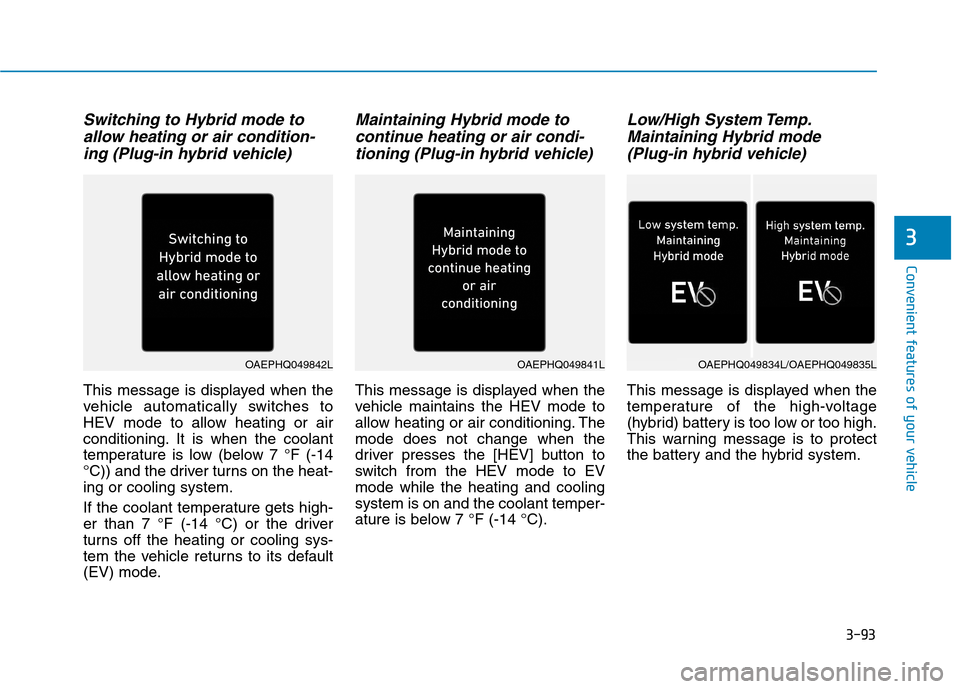
Switching to Hybrid mode to
allow heating or air condition-
ing (Plug-in hybrid vehicle)
This message is displayed when the
vehicle automatically switches to
HEV mode to allow heating or air
conditioning. It is when the coolant
temperature is low (below 7 °F (-14
°C)) and the driver turns on the heat-
ing or cooling system.
If the coolant temperature gets high-
er than 7 °F (-14 °C) or the driver
turns off the heating or cooling sys-
tem the vehicle returns to its default
(EV) mode.
Maintaining Hybrid mode to
continue heating or air condi-
tioning (Plug-in hybrid vehicle)
This message is displayed when the
vehicle maintains the HEV mode to
allow heating or air conditioning. The
mode does not change when the
driver presses the [HEV] button to
switch from the HEV mode to EV
mode while the heating and cooling
system is on and the coolant temper-
ature is below 7 °F (-14 °C).
Low/High System Temp.
Maintaining Hybrid mode
(Plug-in hybrid vehicle)
This message is displayed when the
temperature of the high-voltage
(hybrid) battery is too low or too high.
This warning message is to protect
the battery and the hybrid system.
OAEPHQ049841LOAEPHQ049842LOAEPHQ049834L/OAEPHQ049835L
Page 186 of 635
3-94
Convenient features of your vehicle
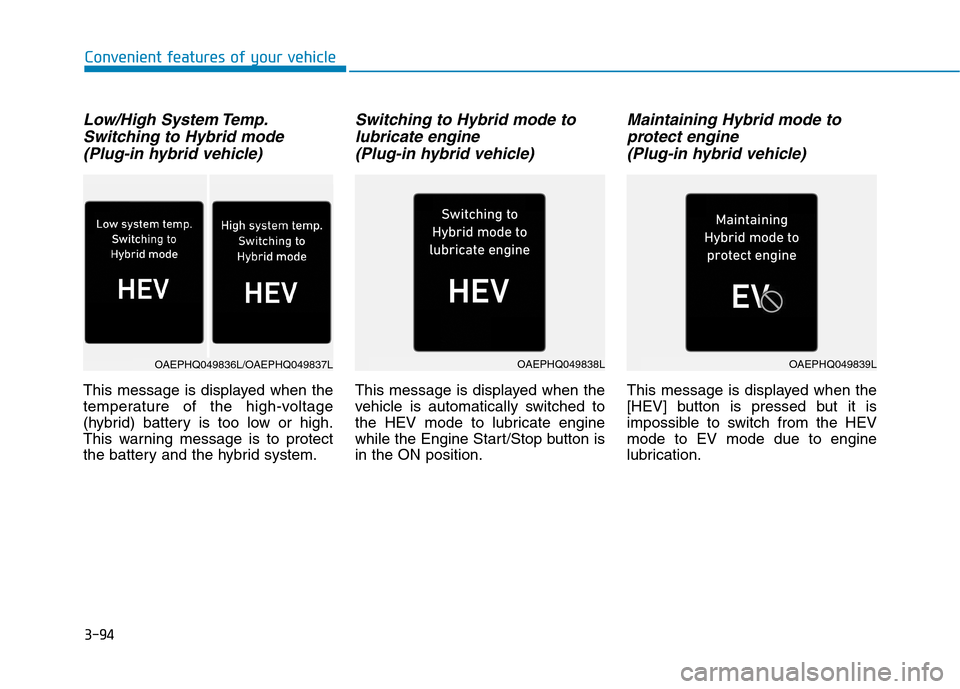
Low/High System Temp.
Switching to Hybrid mode
(Plug-in hybrid vehicle)
This message is displayed when the
temperature of the high-voltage
(hybrid) battery is too low or high.
This warning message is to protect
the battery and the hybrid system.
Switching to Hybrid mode to
lubricate engine
(Plug-in hybrid vehicle)
This message is displayed when the
vehicle is automatically switched to
the HEV mode to lubricate engine
while the Engine Start/Stop button is
in the ON position.
Maintaining Hybrid mode to
protect engine
(Plug-in hybrid vehicle)
This message is displayed when the
[HEV] button is pressed but it is
impossible to switch from the HEV
mode to EV mode due to engine
lubrication.
OAEPHQ049838LOAEPHQ049839LOAEPHQ049836L/OAEPHQ049837L
Page 198 of 635
3-106
Convenient features of your vehicle
ItemsExplanation
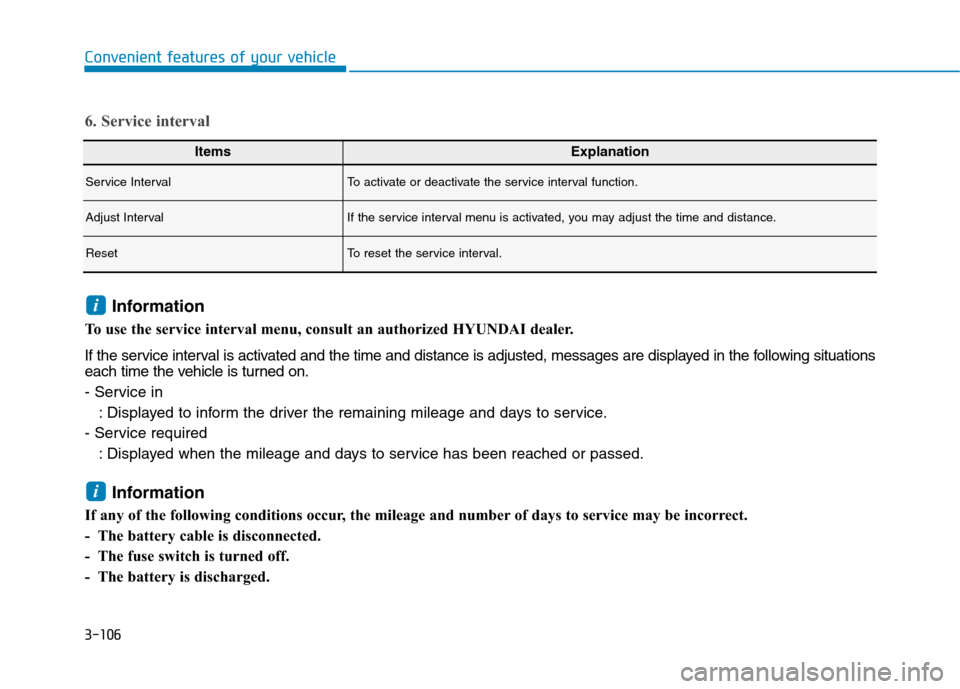
Service IntervalTo activate or deactivate the service interval function.
Adjust IntervalIf the service interval menu is activated, you may adjust the time and distance.
ResetTo reset the service interval.
6. Service interval
Information
To use the service interval menu, consult an authorized HYUNDAI dealer.
If the service interval is activated and the time and distance is adjusted, messages are displayed in the following situations
each time the vehicle is turned on.
- Service in
: Displayed to inform the driver the remaining mileage and days to service.
- Service required
: Displayed when the mileage and days to service has been reached or passed.
Information
If any of the following conditions occur, the mileage and number of days to service may be incorrect.
- The battery cable is disconnected.
- The fuse switch is turned off.
- The battery is discharged.
i
i
Page 199 of 635
3-107
Convenient features of your vehicle
3
ItemsExplanation
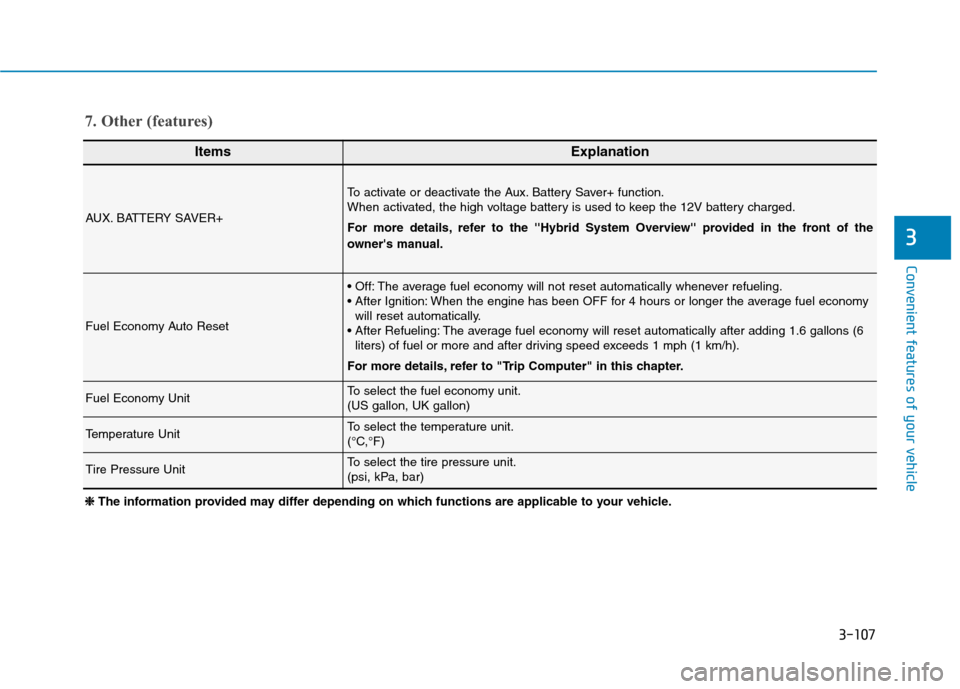
AUX. BATTERY SAVER+
To activate or deactivate the Aux. Battery Saver+ function.
When activated, the high voltage battery is used to keep the 12V battery charged.
For more details, refer to the ''Hybrid System Overview'' provided in the front of the
owner's manual.
Fuel Economy Auto Reset
The average fuel economy will not reset automatically whenever refueling.
When the engine has been OFF for 4 hours or longer the average fuel economy
will reset automatically.
The average fuel economy will reset automatically after adding 1.6 gallons (6
liters) of fuel or more and after driving speed exceeds 1 mph (1 km/h).
For more details, refer to "Trip Computer" in this chapter.
Fuel Economy UnitTo select the fuel economy unit.
(US gallon, UK gallon)
Temperature UnitTo select the temperature unit.
(°C,°F)
Tire Pressure UnitTo select the tire pressure unit.
(psi, kPa, bar)
7. Other (features)
❈ ❈
The information provided may differ depending on which functions are applicable to your vehicle.
Page 201 of 635
3-109
Convenient features of your vehicle
3
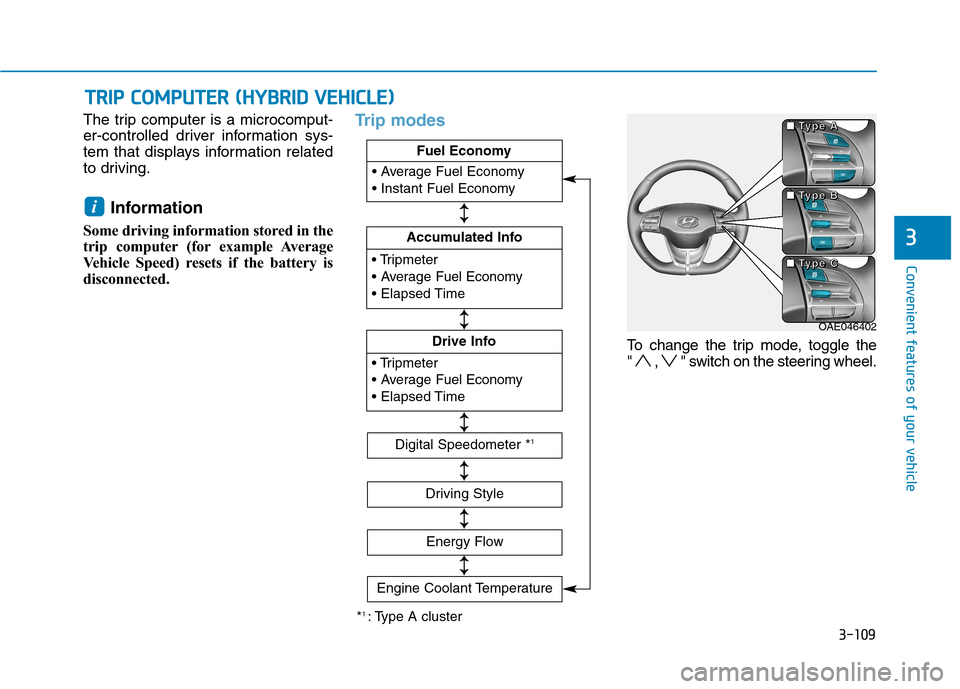
The trip computer is a microcomput-
er-controlled driver information sys-
tem that displays information related
to driving.
Information
Some driving information stored in the
trip computer (for example Average
Vehicle Speed) resets if the battery is
disconnected.
Trip modes
To change the trip mode, toggle the
" , " switch on the steering wheel.
i
T TR
RI
IP
P
C
CO
OM
MP
PU
UT
TE
ER
R
(
(H
HY
YB
BR
RI
ID
D
V
VE
EH
HI
IC
CL
LE
E)
)
OAE046402 ■ ■ ■ ■
T T T T
y y y y
p p p p
e e e e
A A A A
■ ■ ■ ■
T T T T
y y y y
p p p p
e e e e
B B B B
■ ■ ■ ■
T T T T
y y y y
p p p p
e e e e
C C C C
*1 : Type A cluster
Fuel Economy
Accumulated Info
Fuel Economy
Drive Info
Fuel Economy
Digital Speedometer *1
Driving Style
Energy Flow
↕ ↕
↕ ↕
↕ ↕
↕ ↕
↕ ↕
Engine Coolant Temperature
↕
↕
Page 206 of 635
3-114
Convenient features of your vehicle
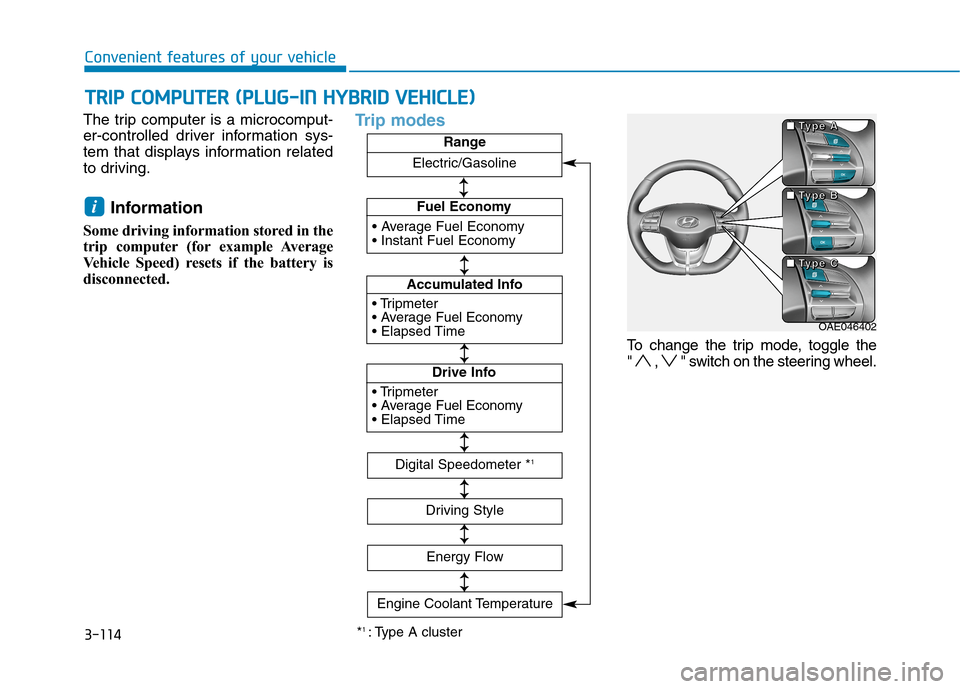
The trip computer is a microcomput-
er-controlled driver information sys-
tem that displays information related
to driving.
Information
Some driving information stored in the
trip computer (for example Average
Vehicle Speed) resets if the battery is
disconnected.
Trip modes
To change the trip mode, toggle the
" , " switch on the steering wheel.
i
T TR
RI
IP
P
C
CO
OM
MP
PU
UT
TE
ER
R
(
(P
PL
LU
UG
G-
-I
IN
N
H
HY
YB
BR
RI
ID
D
V
VE
EH
HI
IC
CL
LE
E)
)
*1 : Type A cluster
Fuel Economy
Accumulated Info
Fuel Economy
Drive Info
Fuel EconomyRange
Digital Speedometer *1
Driving Style
Energy Flow
↕ ↕ ↕ ↕
↕ ↕
↕ ↕
↕ ↕
↕ ↕
Engine Coolant Temperature
Electric/Gasoline
↕
↕
OAE046402 ■ ■ ■ ■
T T T T
y y y y
p p p p
e e e e
A A A A
■ ■ ■ ■
T T T T
y y y y
p p p p
e e e e
B B B B
■ ■ ■ ■
T T T T
y y y y
p p p p
e e e e
C C C C