ad blue Hyundai Ioniq Hybrid 2020 Owner's Manual
[x] Cancel search | Manufacturer: HYUNDAI, Model Year: 2020, Model line: Ioniq Hybrid, Model: Hyundai Ioniq Hybrid 2020Pages: 635, PDF Size: 53.69 MB
Page 16 of 635
I IN
NS
ST
TR
RU
UM
ME
EN
NT
T
P
PA
AN
NE
EL
L
O
OV
VE
ER
RV
VI
IE
EW
W
-
-
H
HY
YB
BR
RI
ID
D
V
VE
EH
HI
IC
CL
LE
E
The actual shape may differ from the illustration.
1-5
Your vehicle at a glance
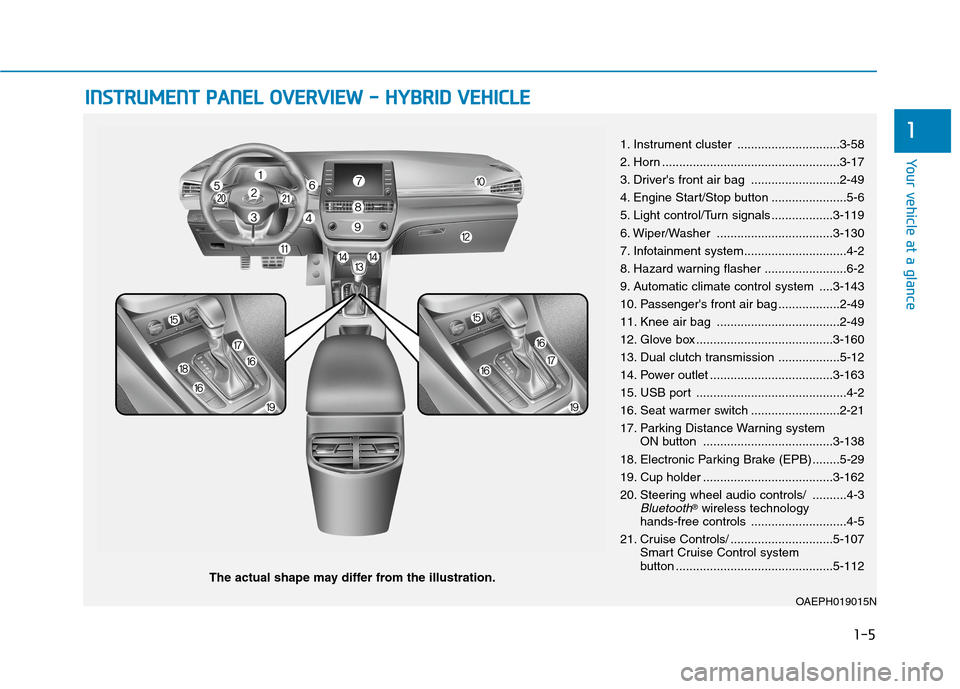
11. Instrument cluster ..............................3-58
2. Horn ....................................................3-17
3. Driver's front air bag ..........................2-49
4. Engine Start/Stop button ......................5-6
5. Light control/Turn signals ..................3-119
6. Wiper/Washer ..................................3-130
7. Infotainment system..............................4-2
8. Hazard warning flasher ........................6-2
9. Automatic climate control system ....3-143
10. Passenger's front air bag ..................2-49
11. Knee air bag ....................................2-49
12. Glove box ........................................3-160
13. Dual clutch transmission ..................5-12
14. Power outlet ....................................3-163
15. USB port ............................................4-2
16. Seat warmer switch ..........................2-21
17. Parking Distance Warning system
ON button ......................................3-138
18. Electronic Parking Brake (EPB) ........5-29
19. Cup holder ......................................3-162
20. Steering wheel audio controls/ ..........4-3
Bluetooth®wireless technology
hands-free controls ............................4-5
21. Cruise Controls/ ..............................5-107
Smart Cruise Control system
button ..............................................5-112
OAEPH019015N
Page 21 of 635
1-10
Your vehicle at a glance
I IN
NS
ST
TR
RU
UM
ME
EN
NT
T
P
PA
AN
NE
EL
L
O
OV
VE
ER
RV
VI
IE
EW
W
-
-
P
PL
LU
UG
G-
-I
IN
N
H
HY
YB
BR
RI
ID
D
V
VE
EH
HI
IC
CL
LE
E
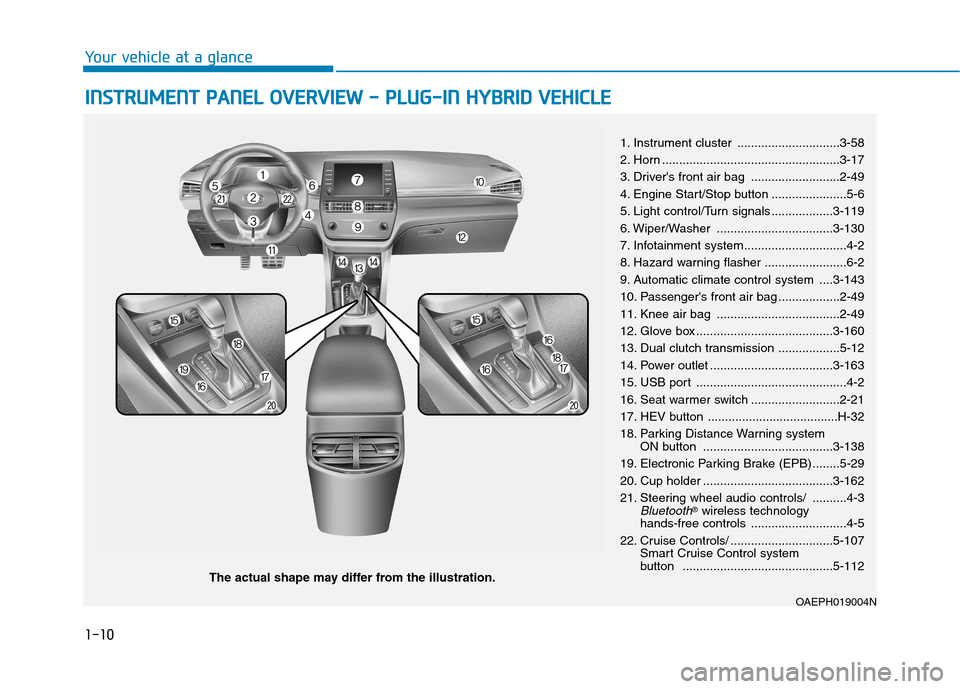
The actual shape may differ from the illustration.1. Instrument cluster ..............................3-58
2. Horn ....................................................3-17
3. Driver's front air bag ..........................2-49
4. Engine Start/Stop button ......................5-6
5. Light control/Turn signals ..................3-119
6. Wiper/Washer ..................................3-130
7. Infotainment system..............................4-2
8. Hazard warning flasher ........................6-2
9. Automatic climate control system ....3-143
10. Passenger's front air bag ..................2-49
11. Knee air bag ....................................2-49
12. Glove box ........................................3-160
13. Dual clutch transmission ..................5-12
14. Power outlet ....................................3-163
15. USB port ............................................4-2
16. Seat warmer switch ..........................2-21
17. HEV button ......................................H-32
18. Parking Distance Warning system
ON button ......................................3-138
19. Electronic Parking Brake (EPB) ........5-29
20. Cup holder ......................................3-162
21. Steering wheel audio controls/ ..........4-3
Bluetooth®wireless technology
hands-free controls ............................4-5
22. Cruise Controls/ ..............................5-107
Smart Cruise Control system
button ............................................5-112
OAEPH019004N
Page 112 of 635
3-20
Convenient features of your vehicle
Blue Link®center (if equipped)
For details, refer to the Blue Link®
Owner's Guide, Navigation Manual
or Audio Manual.
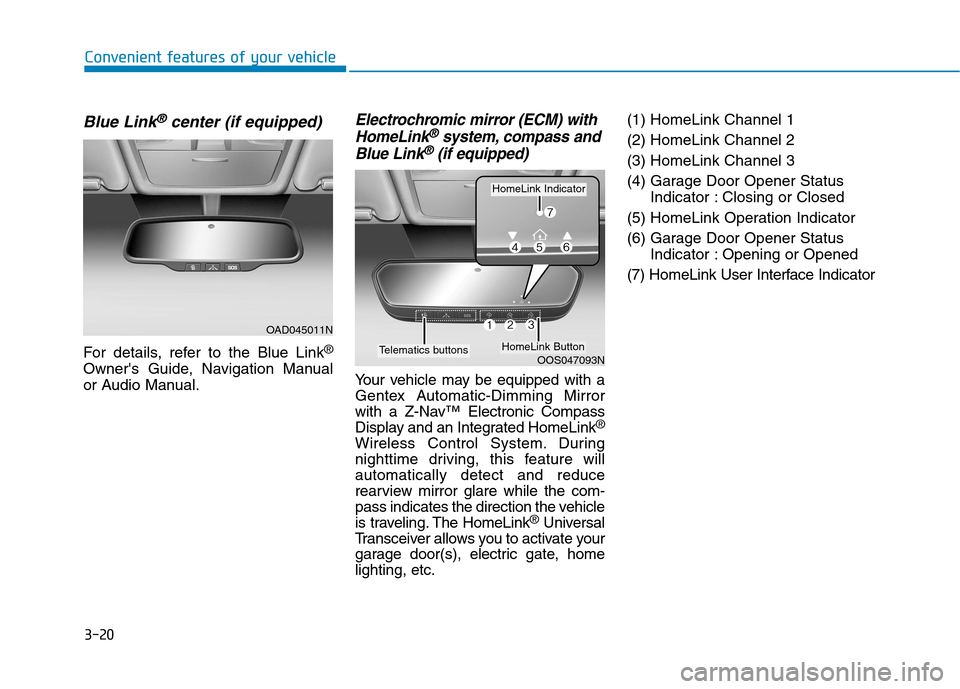
Electrochromic mirror (ECM) with
HomeLink®system, compass and
Blue Link®(if equipped)
Your vehicle may be equipped with a
Gentex Automatic-Dimming Mirror
with a Z-Nav™ Electronic Compass
Display and an Integrated HomeLink
®
Wireless Control System. During
nighttime driving, this feature will
automatically detect and reduce
rearview mirror glare while the com-
pass indicates the direction the vehicle
is traveling. The HomeLink
®Universal
Transceiver allows you to activate your
garage door(s), electric gate, home
lighting, etc.(1) HomeLink Channel 1
(2) HomeLink Channel 2
(3) HomeLink Channel 3
(4) Garage Door Opener Status
Indicator : Closing or Closed
(5) HomeLink Operation Indicator
(6) Garage Door Opener Status
Indicator : Opening or Opened
(7) HomeLink User Interface Indicator
OOS047093N
HomeLink Indicator
HomeLink ButtonTelematics buttons
OAD045011N
Page 262 of 635
Infotainment System
Infotainment System..............................................4-2
USB and iPod®port ..........................................................4-2
Antenna ...............................................................................4-2
Steering Wheel Audio Controls ......................................4-3
Bluetooth®Wireless Technology Hands-Free ...........4-4
Audio/Video/Navigation system ....................................4-5
4
Page 265 of 635
4-4
Infotainment System
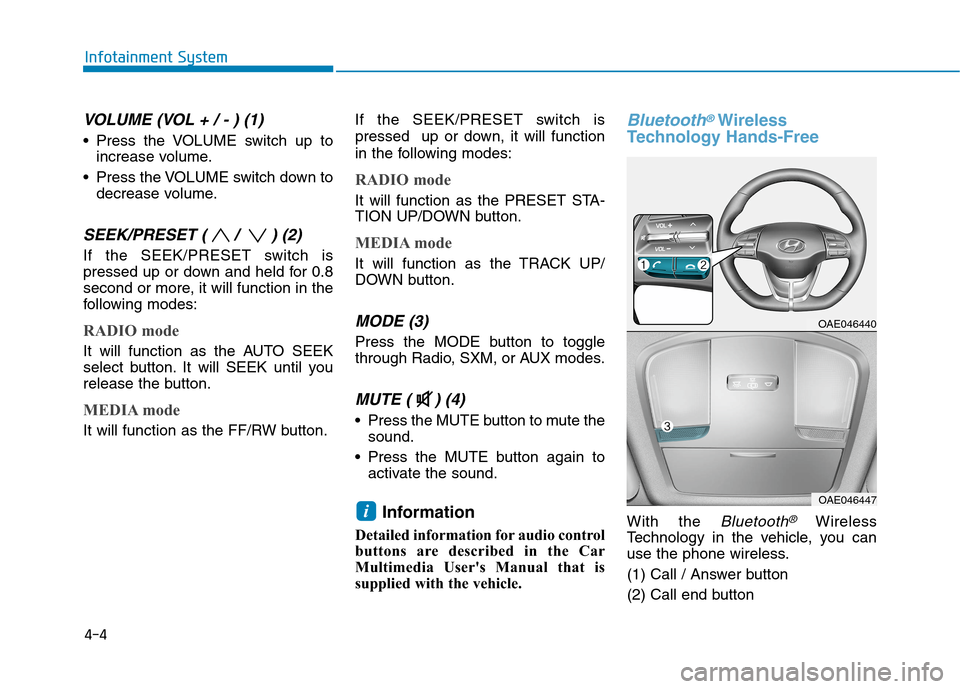
VOLUME (VOL + / - ) (1)
Press the VOLUME switch up to
increase volume.
Press the VOLUME switch down to
decrease volume.
SEEK/PRESET ( / ) (2)
If the SEEK/PRESET switch is
pressed up or down and held for 0.8
second or more, it will function in the
following modes:
RADIO mode
It will function as the AUTO SEEK
select button. It will SEEK until you
release the button.
MEDIA mode
It will function as the FF/RW button.If the SEEK/PRESET switch is
pressed up or down, it will function
in the following modes:
RADIO mode
It will function as the PRESET STA-
TION UP/DOWN button.
MEDIA mode
It will function as the TRACK UP/
DOWN button.
MODE (3)
Press the MODE button to toggle
through Radio, SXM, or AUX modes.
MUTE ( ) (4)
Press the MUTE button to mute the
sound.
Press the MUTE button again to
activate the sound.
Information
Detailed information for audio control
buttons are described in the Car
Multimedia User's Manual that is
supplied with the vehicle.
Bluetooth®Wireless
Technology Hands-Free
With the Bluetooth®Wireless
Technology in the vehicle, you can
use the phone wireless.
(1) Call / Answer button
(2) Call end buttoni
OAE046440
OAE046447
Page 266 of 635
(3) Microphone
Detailed information for the
Bluetooth®
Wireless Technology hands-free is
described in the Car Multimedia
User's Manual.
Audio/Video/Navigation
system (if equipped)
Detailed information for the naviga-
tion system is described in a sepa-
rately supplied manual.
4-5
Infotainment System
4
Page 578 of 635
H7
Scheduled Charging
(if equipped)
You can set-up a charging sched-
ule for your vehicle using the info-
tainment system or BlueLink appli-
cation.
Refer to the infotainment system
manual or the BlueLink manual for
detailed information about setting
scheduled charging.
Scheduled charging can only be
done when using a AC charger or
the portable charger (ICCB: In-
Cable Control Box). When scheduled charging is set
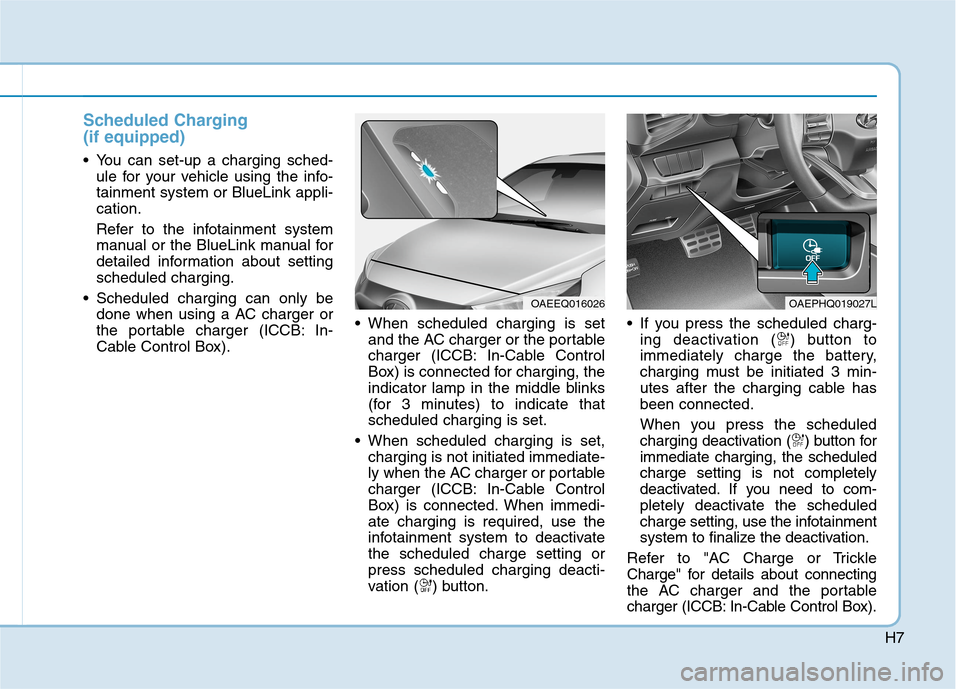
and the AC charger or the portable
charger (ICCB: In-Cable Control
Box) is connected for charging, the
indicator lamp in the middle blinks
(for 3 minutes) to indicate that
scheduled charging is set.
When scheduled charging is set,
charging is not initiated immediate-
ly when the AC charger or portable
charger (ICCB: In-Cable Control
Box) is connected. When immedi-
ate charging is required, use the
infotainment system to deactivate
the scheduled charge setting or
press scheduled charging deacti-
vation ( ) button. If you press the scheduled charg-
ing deactivation ( ) button to
immediately charge the battery,
charging must be initiated 3 min-
utes after the charging cable has
been connected.
When you press the scheduled
charging deactivation ( ) button for
immediate charging, the scheduled
charge setting is not completely
deactivated. If you need to com-
pletely deactivate the scheduled
charge setting, use the infotainment
system to finalize the deactivation.
Refer to "AC Charge or Trickle
Charge" for details about connecting
the AC charger and the portable
charger (ICCB: In-Cable Control Box).
OAEEQ016026OAEPHQ019027L
Page 593 of 635
H22
C CH
HA
AR
RG
GI
IN
NG
G
T
TH
HE
E
P
PL
LU
UG
G-
-I
IN
N
H
HY
YB
BR
RI
ID
D
V
VE
EH
HI
IC
CL
LE
E
(
(C
CO
ON
NT
T.
.)
)
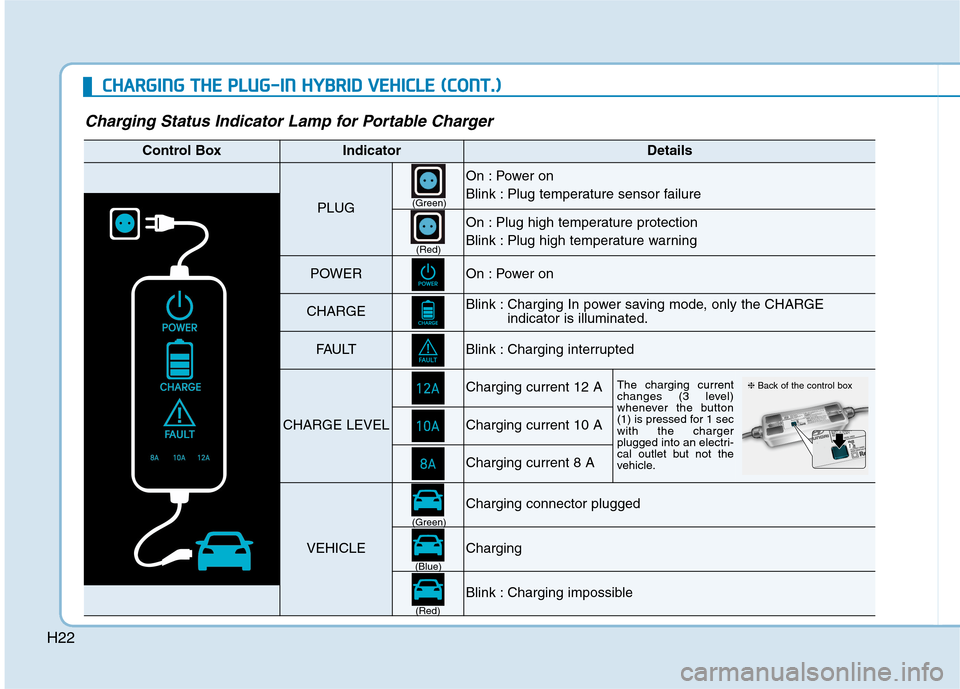
Charging Status Indicator Lamp for Portable Charger
Control BoxIndicatorDetails
PLUG
On : Power on
Blink : Plug temperature sensor failure
On : Plug high temperature protection
Blink : Plug high temperature warning
POWEROn : Power on
CHARGEBlink : Charging In power saving mode, only the CHARGE
indicator is illuminated.
FAU LTBlink : Charging interrupted
CHARGE LEVEL
Charging current 12 AThe charging current
changes (3 level)
whenever the button
(1) is pressed for 1 sec
with the charger
plugged into an electri-
cal outlet but not the
vehicle.
Charging current 10 A
Charging current 8 A
VEHICLE
Charging connector plugged
Charging
Blink : Charging impossible
(Green)
(Green)
(Blue)
(Red)(Red)
❈Back of the control box
Page 631 of 635
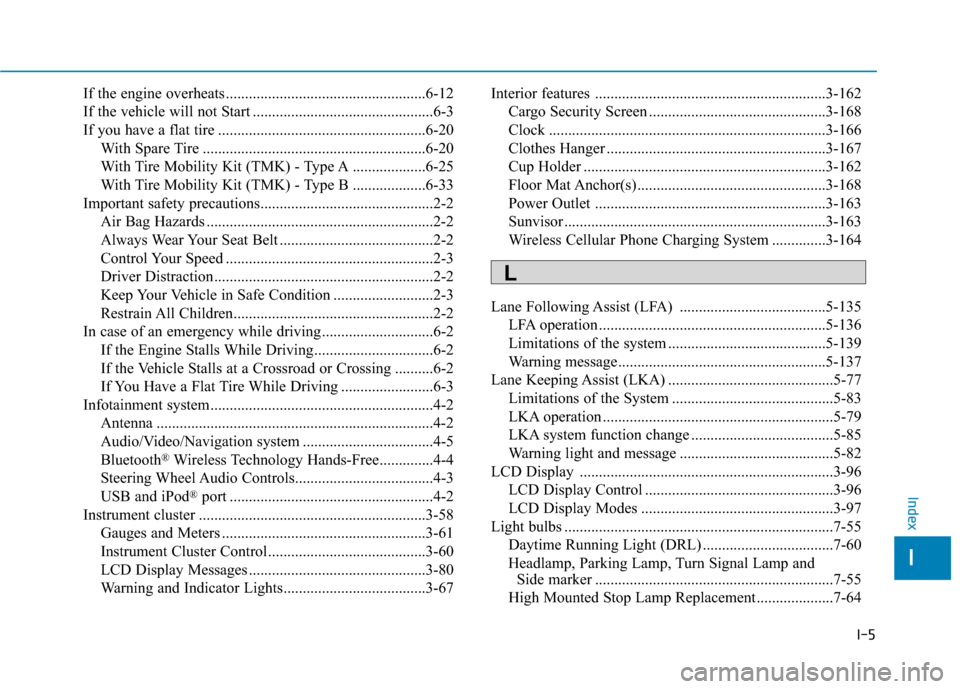
I-5
If the engine overheats ....................................................6-12
If the vehicle will not Start ...............................................6-3
If you have a flat tire ......................................................6-20
With Spare Tire ..........................................................6-20
With Tire Mobility Kit (TMK) - Type A ...................6-25
With Tire Mobility Kit (TMK) - Type B ...................6-33
Important safety precautions.............................................2-2
Air Bag Hazards ...........................................................2-2
Always Wear Your Seat Belt ........................................2-2
Control Your Speed ......................................................2-3
Driver Distraction.........................................................2-2
Keep Your Vehicle in Safe Condition ..........................2-3
Restrain All Children....................................................2-2
In case of an emergency while driving .............................6-2
If the Engine Stalls While Driving...............................6-2
If the Vehicle Stalls at a Crossroad or Crossing ..........6-2
If You Have a Flat Tire While Driving ........................6-3
Infotainment system..........................................................4-2
Antenna ........................................................................4-2
Audio/Video/Navigation system ..................................4-5
Bluetooth
®Wireless Technology Hands-Free..............4-4
Steering Wheel Audio Controls....................................4-3
USB and iPod
®port .....................................................4-2
Instrument cluster ...........................................................3-58
Gauges and Meters .....................................................3-61
Instrument Cluster Control .........................................3-60
LCD Display Messages ..............................................3-80
Warning and Indicator Lights.....................................3-67Interior features ............................................................3-162
Cargo Security Screen ..............................................3-168
Clock ........................................................................3-166
Clothes Hanger .........................................................3-167
Cup Holder ...............................................................3-162
Floor Mat Anchor(s) .................................................3-168
Power Outlet ............................................................3-163
Sunvisor ....................................................................3-163
Wireless Cellular Phone Charging System ..............3-164
Lane Following Assist (LFA) ......................................5-135
LFA operation ...........................................................5-136
Limitations of the system .........................................5-139
Warning message......................................................5-137
Lane Keeping Assist (LKA) ...........................................5-77
Limitations of the System ..........................................5-83
LKA operation ............................................................5-79
LKA system function change .....................................5-85
Warning light and message ........................................5-82
LCD Display ..................................................................3-96
LCD Display Control .................................................3-96
LCD Display Modes ..................................................3-97
Light bulbs ......................................................................7-55
Daytime Running Light (DRL) ..................................7-60
Headlamp, Parking Lamp, Turn Signal Lamp and
Side marker ..............................................................7-55
High Mounted Stop Lamp Replacement....................7-64
I
Index
L