air conditioning HYUNDAI KONA EV 2021 User Guide
[x] Cancel search | Manufacturer: HYUNDAI, Model Year: 2021, Model line: KONA EV, Model: HYUNDAI KONA EV 2021Pages: 478, PDF Size: 32.83 MB
Page 218 of 478
3-134
Convenient features of your vehicle
When the Auto Defogging
System operates, the indi-
cator will illuminate.
If a high amount of humidity is
detected in the vehicle, the Auto
Defogging System will be enabled.
The following steps will be performed
automatically:
Step 1) The A/C button will turn ON.
Step 2) The air intake control will
change to Fresh mode.
Step 3) The mode will be changed to
defrost to direct airflow to the
windshield.
Step 4) The fan speed will be set to
MAX.
If the air conditioning is off or recircu-
lated air position is manually select-
ed while Auto Defogging System is
ON, the Auto Defogging System
Indicator will blink 3 times to signal
that the manual operation has been
canceled.
To cancel the auto defogging system
1. Press the POWER button to the
ON position.
2. Press the front defroster button
over 3 seconds.
3. The front defroster button indicator
will blink 3 times and then ADS
OFF will illuminate on the climate
control information screen when
the auto defogging system is can-
celed.
To reactivate the auto defogging sys-
tem
1. Press the POWER button to the
ON position.
2. Press the front defroster button
over 3 seconds.
3. The front defroster button indicator
will blink 6 times and then ADS OFF
will go out on the climate control
information screen when the auto
defogging system is reactivated.
Information
• When the air conditioning is turned
on by Auto defogging system, if you
try to turn off the air conditioning,
the indicator will blink 3 times and
the air conditioning will not be
turned off.
• To maintain the effectiveness and
efficiency of the Auto Defogging
System, do not select Recirculation
mode while the system is operating.
• When the Auto Defogging System is
operating, the fan speed adjust-
ment button, the temperature
adjustment knob, and the air
intake control button are all dis-
abled.
Do not remove the sensor cover
located on the upper end of the
windshield glass.
Damage to system parts could
occur and may not be covered by
your vehicle warranty.
NOTICE
i
Page 220 of 478
3-136
Convenient features of your vehicle
C CL
LI
IM
MA
AT
TE
E
C
CO
ON
NT
TR
RO
OL
L
A
AD
DD
DI
IT
TI
IO
ON
NA
AL
L
F
FE
EA
AT
TU
UR
RE
ES
S
Cluster ionizer
When the POWER button is in the
ON position, the clean air function
turns on automatically.
Also, the clean air function turns off
automatically, when the POWER but-
ton is in the OFF position.
Automatic Ventilation
(if equipped)
When the POWER button is in the
ON position or when the vehicle is in
the ready ( ) mode and tempera-
ture is below 59°F (15°C) with the
recirculation mode selected more
than three to five minutes, the air
intake position will automatically
change to fresh mode.
To cancel or reset the Automatic
Ventilation
When the air conditioning system is
on, select Face Level mode and
press the recirculation mode button
five times within three seconds while
pressing A/C button.
When the Automatic Ventilation fea-
ture is enabled, the recirculation but-
ton LED indicator will blink 6 times.
When the Automatic Ventilation fea-
ture is disabled, the recirculation but-
ton LED indicator will blink 3 times.
Page 364 of 478
6-5
What to do in an emergency
6
Pb
Information
An inappropriately disposed
battery can be harmful to the
environment and human
health. Dispose of the battery
according to your local law(s)
or regulations.
To prevent damage to your vehi-
cle:
Only use a 12-volt power supply
(battery or jumper system) to
jump start your vehicle.
Do not attempt to jump start
your vehicle by push-starting.
Jump starting procedure
1. Position the vehicles close enough
that the jumper cables will reach,
but do not allow the vehicles to
touch.
2. Avoid fans or any moving parts in
the motor compartment at all
times, even when the vehicles are
turned off.
3. Turn off all electrical devices such
as radios, lights, air conditioning,
etc. Put the vehicles in P (Park)
and set the parking brakes. Turn
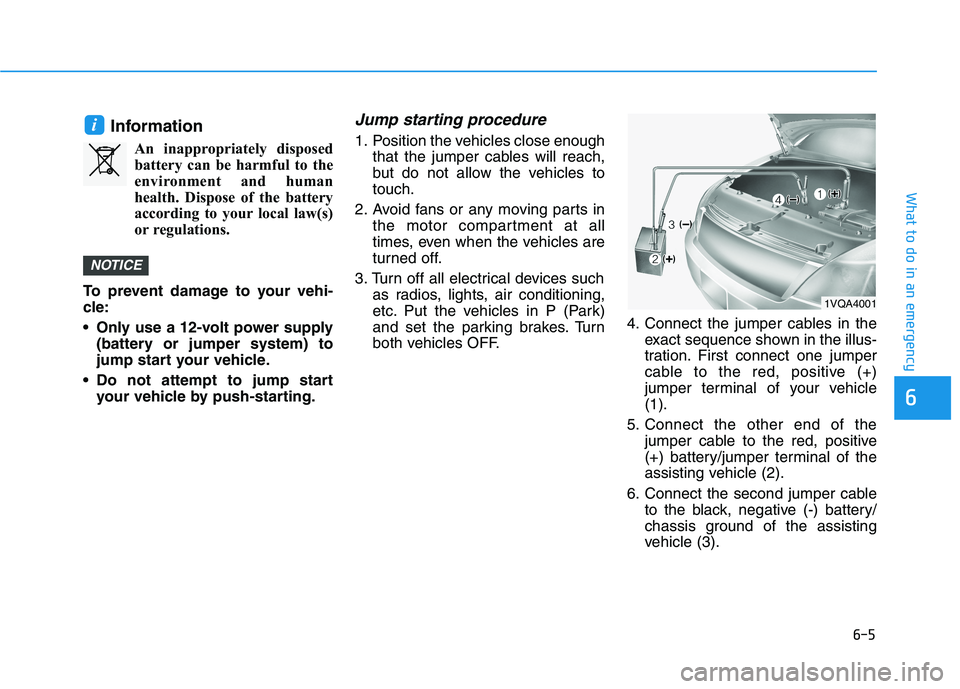
both vehicles OFF.4. Connect the jumper cables in the
exact sequence shown in the illus-
tration. First connect one jumper
cable to the red, positive (+)
jumper terminal of your vehicle
(1).
5. Connect the other end of the
jumper cable to the red, positive
(+) battery/jumper terminal of the
assisting vehicle (2).
6. Connect the second jumper cable
to the black, negative (-) battery/
chassis ground of the assisting
vehicle (3).
NOTICE
i
1VQA4001
Page 388 of 478
7-6
Maintenance
While operating your vehicle:
Check for vibrations in the steering
wheel. Notice if there is any
increased steering effort or loose-
ness in the steering wheel, or
change in its straight-ahead posi-
tion.
Notice if your vehicle constantly
turns slightly or "pulls" to one side
when traveling on smooth, level
road.
When decelerating with your vehi-
cle, listen and check for unusual
sounds, pulling to one side,
increased brake pedal travel or
"hard-to-push" brake pedal.
After driving your vehicle on a
regular basis check the follow-
ing:
Verify that the electronic parking
brake is engaging properly.
After you exit the vehicle check for
any signs of fluid leaks under your
vehicle (note that water dripping
from the air conditioning system is
normal).
At least monthly:
Check coolant level in the coolant
reservoir.
Check the operation of all exterior
lights, including the brake lights,
turn signals and hazard warning
flashers.
Check the inflation pressures of all
four tires and check to see the tire
tread condition and if there are any
signs of abnormal wear or dam-
age.
Check for loose wheel lug nuts.
At least twice a year:
Check radiator, heater and air con-
ditioning hoses for leaks or dam-
age.
Check windshield washer spray
and wiper operation. Clean wiper
blades with clean cloth dampened
with washer fluid.
Check headlamp alignment.
Check the seat belts for wear and
function.
At least once a year:
Clean body and door drain holes.
Lubricate door hinges and hood
hinges.
Lubricate door and hood locks and
latches.
Lubricate door rubber weather
strips.
Lubricate door checker.
Check the air conditioning system.
Inspect and lubricate reduction
gear linkage and controls.
Clean the battery and terminals.
Check the brake fluid level.
Page 391 of 478
7-9
7
Maintenance
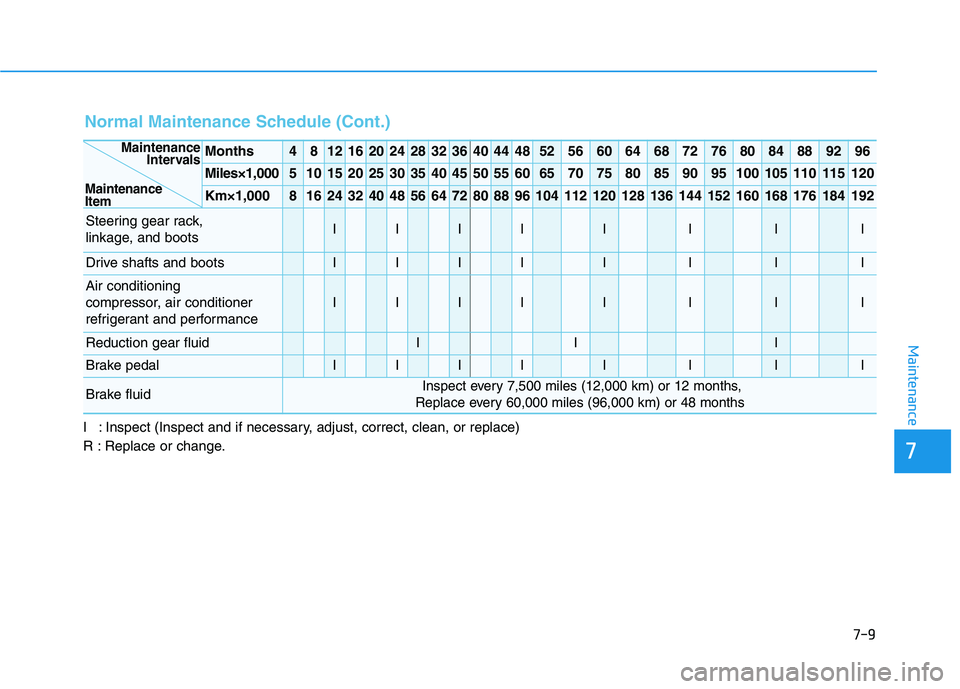
Normal Maintenance Schedule (Cont.)
I : Inspect (Inspect and if necessary, adjust, correct, clean, or replace)
R : Replace or change.
Months4812162024283236404448525660646872768084889296
Miles×1,0005101520253035404550556065707580859095100105110115120
Km×1,00081624324048566472808896104112120128136144152160168176184192
Steering gear rack,
linkage, and bootsIIIIIIII
Drive shafts and bootsIIIIIIII
Air conditioning
compressor, air conditioner
refrigerant and performance
IIIIIIII
Reduction gear fluidIII
Brake pedalIIIIIIII
Brake fluidInspect every 7,500 miles (12,000 km) or 12 months,
Replace every 60,000 miles (96,000 km) or 48 months
Maintenance
Intervals
Maintenance
Item
Page 393 of 478
7-11
7
Maintenance
E EX
XP
PL
LA
AN
NA
AT
TI
IO
ON
N
O
OF
F
S
SC
CH
HE
ED
DU
UL
LE
ED
D
M
MA
AI
IN
NT
TE
EN
NA
AN
NC
CE
E
I
IT
TE
EM
MS
S
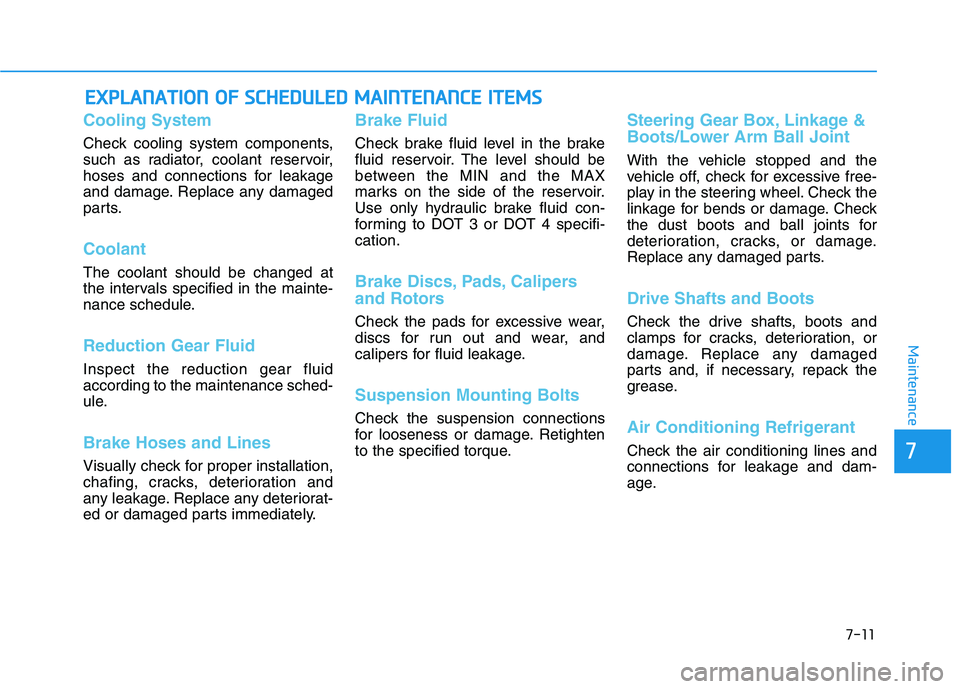
Cooling System
Check cooling system components,
such as radiator, coolant reservoir,
hoses and connections for leakage
and damage. Replace any damaged
parts.
Coolant
The coolant should be changed at
the intervals specified in the mainte-
nance schedule.
Reduction Gear Fluid
Inspect the reduction gear fluid
according to the maintenance sched-
ule.
Brake Hoses and Lines
Visually check for proper installation,
chafing, cracks, deterioration and
any leakage. Replace any deteriorat-
ed or damaged parts immediately.
Brake Fluid
Check brake fluid level in the brake
fluid reservoir. The level should be
between the MIN and the MAX
marks on the side of the reservoir.
Use only hydraulic brake fluid con-
forming to DOT 3 or DOT 4 specifi-
cation.
Brake Discs, Pads, Calipers
and Rotors
Check the pads for excessive wear,
discs for run out and wear, and
calipers for fluid leakage.
Suspension Mounting Bolts
Check the suspension connections
for looseness or damage. Retighten
to the specified torque.
Steering Gear Box, Linkage &
Boots/Lower Arm Ball Joint
With the vehicle stopped and the
vehicle off, check for excessive free-
play in the steering wheel. Check the
linkage for bends or damage. Check
the dust boots and ball joints for
deterioration, cracks, or damage.
Replace any damaged parts.
Drive Shafts and Boots
Check the drive shafts, boots and
clamps for cracks, deterioration, or
damage. Replace any damaged
parts and, if necessary, repack the
grease.
Air Conditioning Refrigerant
Check the air conditioning lines and
connections for leakage and dam-
age.
Page 415 of 478
7-33
7
Maintenance
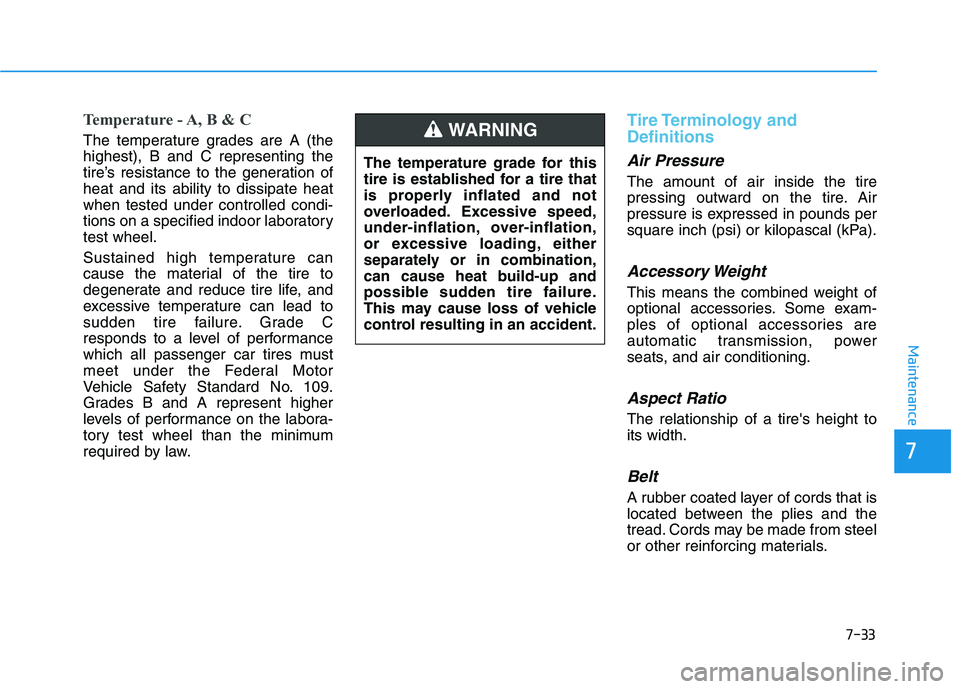
Temperature - A, B & C
The temperature grades are A (the
highest), B and C representing the
tire’s resistance to the generation of
heat and its ability to dissipate heat
when tested under controlled condi-
tions on a specified indoor laboratory
test wheel.
Sustained high temperature can
cause the material of the tire to
degenerate and reduce tire life, and
excessive temperature can lead to
sudden tire failure. Grade C
responds to a level of performance
which all passenger car tires must
meet under the Federal Motor
Vehicle Safety Standard No. 109.
Grades B and A represent higher
levels of performance on the labora-
tory test wheel than the minimum
required by law.
Tire Terminology and
Definitions
Air Pressure
The amount of air inside the tire
pressing outward on the tire. Air
pressure is expressed in pounds per
square inch (psi) or kilopascal (kPa).
Accessory Weight
This means the combined weight of
optional accessories. Some exam-
ples of optional accessories are
automatic transmission, power
seats, and air conditioning.
Aspect Ratio
The relationship of a tire's height to
its width.
Belt
A rubber coated layer of cords that is
located between the plies and the
tread. Cords may be made from steel
or other reinforcing materials. The temperature grade for this
tire is established for a tire that
is properly inflated and not
overloaded. Excessive speed,
under-inflation, over-inflation,
or excessive loading, either
separately or in combination,
can cause heat build-up and
possible sudden tire failure.
This may cause loss of vehicle
control resulting in an accident.
WARNING
Page 433 of 478
7-51
7
Maintenance
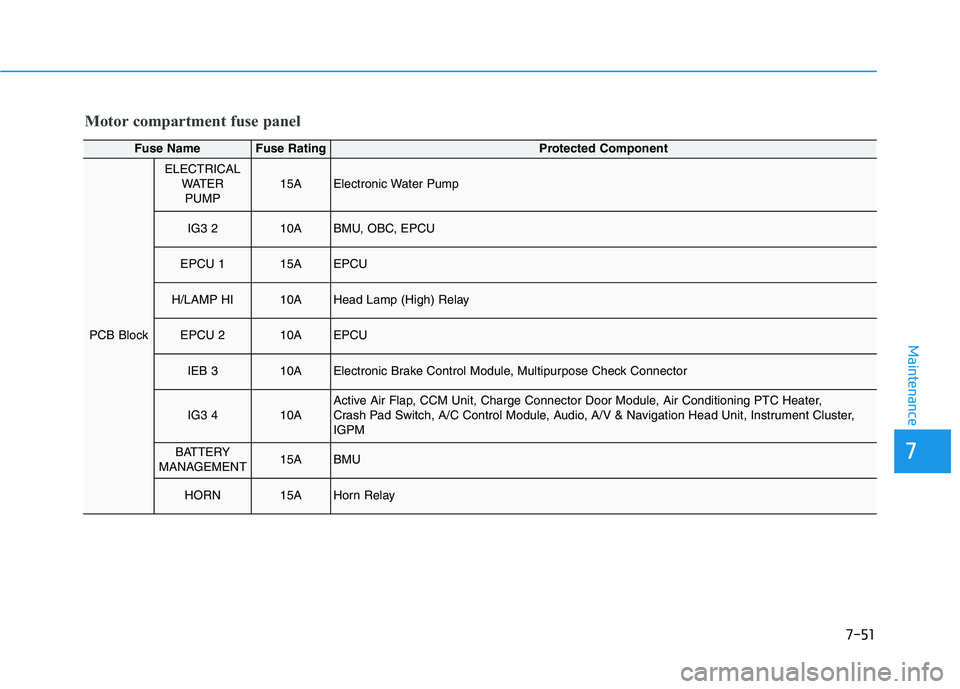
Motor compartment fuse panel
Fuse NameFuse RatingProtected Component
PCB Block
ELECTRICAL
WATER
PUMP15AElectronic Water Pump
IG3 210ABMU, OBC, EPCU
EPCU 115AEPCU
H/LAMP HI10AHead Lamp (High) Relay
EPCU 210AEPCU
IEB 310AElectronic Brake Control Module, Multipurpose Check Connector
IG3 410AActive Air Flap, CCM Unit, Charge Connector Door Module, Air Conditioning PTC Heater,
Crash Pad Switch, A/C Control Module, Audio, A/V & Navigation Head Unit, Instrument Cluster,
IGPM
BATTERY
MANAGEMENT15ABMU
HORN15AHorn Relay
Page 455 of 478
888
Specifications & Consumer information
8
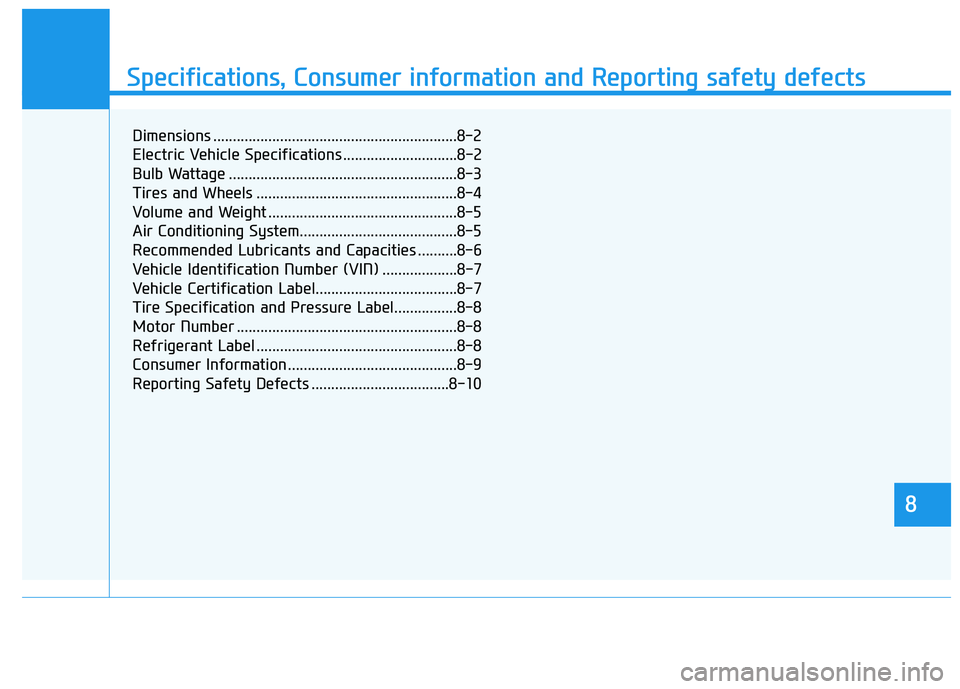
Specifications, Consumer information and Reporting safety defects
8
Dimensions ..............................................................8-2
Electric Vehicle Specifications .............................8-2
Bulb Wattage ..........................................................8-3
Tires and Wheels ...................................................8-4
Volume and Weight ................................................8-5
Air Conditioning System........................................8-5
Recommended Lubricants and Capacities ..........8-6
Vehicle Identification Number (VIN) ...................8-7
Vehicle Certification Label....................................8-7
Tire Specification and Pressure Label................8-8
Motor Number ........................................................8-8
Refrigerant Label ...................................................8-8
Consumer Information ...........................................8-9
Reporting Safety Defects ...................................8-10
Page 466 of 478
I-2
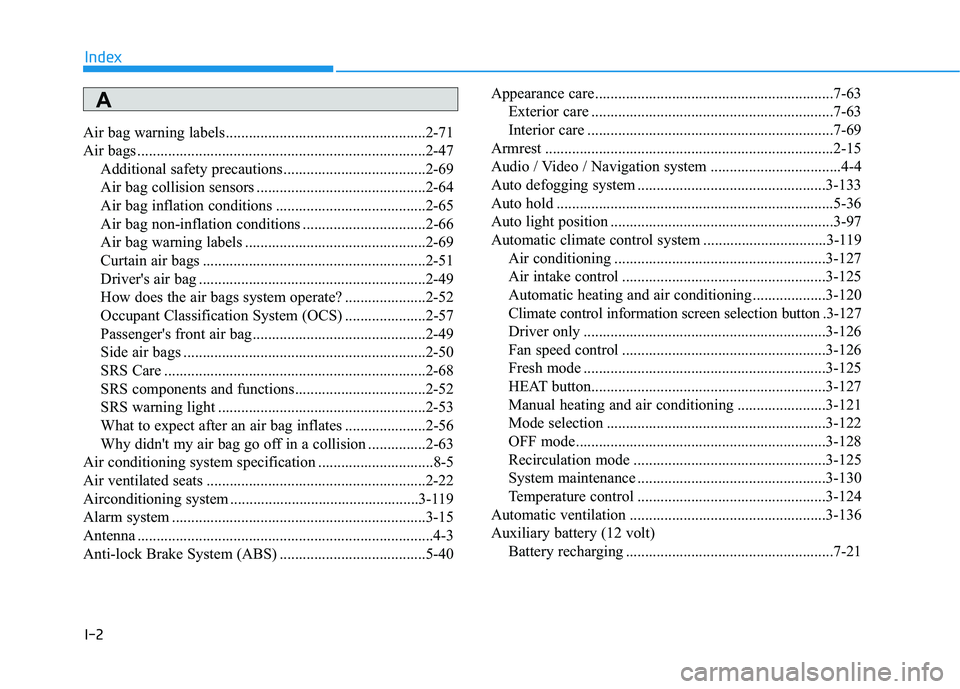
Air bag warning labels ....................................................2-71
Air bags ...........................................................................2-47
Additional safety precautions .....................................2-69
Air bag collision sensors ............................................2-64
Air bag inflation conditions .......................................2-65
Air bag non-inflation conditions ................................2-66
Air bag warning labels ...............................................2-69
Curtain air bags ..........................................................2-51
Driver's air bag ...........................................................2-49
How does the air bags system operate? .....................2-52
Occupant Classification System (OCS) .....................2-57
Passenger's front air bag.............................................2-49
Side air bags ...............................................................2-50
SRS Care ....................................................................2-68
SRS components and functions..................................2-52
SRS warning light ......................................................2-53
What to expect after an air bag inflates .....................2-56
Why didn't my air bag go off in a collision ...............2-63
Air conditioning system specification ..............................8-5
Air ventilated seats .........................................................2-22
Airconditioning system .................................................3-119
Alarm system ..................................................................3-15
Antenna .............................................................................4-3
Anti-lock Brake System (ABS) ......................................5-40Appearance care..............................................................7-63
Exterior care ...............................................................7-63
Interior care ................................................................7-69
Armrest ...........................................................................2-15
Audio / Video / Navigation system ..................................4-4
Auto defogging system .................................................3-133
Auto hold ........................................................................5-36
Auto light position ..........................................................3-97
Automatic climate control system ................................3-119
Air conditioning .......................................................3-127
Air intake control .....................................................3-125
Automatic heating and air conditioning ...................3-120
Climate control information screen selection button .3-127
Driver only ...............................................................3-126
Fan speed control .....................................................3-126
Fresh mode ...............................................................3-125
HEAT button.............................................................3-127
Manual heating and air conditioning .......................3-121
Mode selection .........................................................3-122
OFF mode.................................................................3-128
Recirculation mode ..................................................3-125
System maintenance .................................................3-130
Temperature control .................................................3-124
Automatic ventilation ...................................................3-136
Auxiliary battery (12 volt)
Battery recharging ......................................................7-21
Index
A