rear view mirror HYUNDAI NEXO 2019 User Guide
[x] Cancel search | Manufacturer: HYUNDAI, Model Year: 2019, Model line: Nexo, Model: Hyundai Nexo 2019Pages: 561, PDF Size: 48.42 MB
Page 335 of 561
5-68
Driving your vehicle
System Setting and Activation
System setting
The driver can activate the sys-
tems by placing the power button
to the ON position and by selecting
"Vehicle settings →Driver assis-
tance →Blind-spot safety →Rear
Cross-Traffic Safety" on AVN
screen. The RCCA and RCCW
turn on and get ready to be activat-
ed when 'Rear Cross-Traffic Safety'
is selected.
When the vehicle is turned off then
on again, the systems are always
ready to be activated.
When the system is initially turned
on and when the vehicle is turned
off then on again, the warning light
will illuminate for 3 seconds on the
outer side view mirror.The driver can select the initial warn-
ing activation time in the User
Settings in the AVN screen by select-
ing 'Vehicle settings →Driver
Assistance →Warning Timing'. The
options for the initial Rear Cross-
Traffic Collision Warning includes the
following:
- Normal:
When this condition is selected, the
initial Rear Cross-Traffic Collision
Warning is activated normally. If this
setting feels sensitive, change the
option to 'Later'.
The warning activation time may feel
late if the a vehicle at the side or rear
abruptly accelerates.
- Later:
Select this warning activation time
when the traffic is light and you are
driving in a low speed.
Information
If you change the warning timing, the
warning time of other systems may
change. Always be aware before
changing the warning timing.The driver can select the warning
volume of the Rear Cross-Traffic
Collision Warning in the Vehicle
Settings in the AVN screen by select-
ing 'Vehicle settings →Driver
Assistance →Warning Volume →
High/Medium/ Low'.
For more information refer to the
separately supplied Navigation
manual.
Information
If you change the warning volume, the
warning volume of other systems may
change. Always be aware before
changing the warning volume.
i
i
Page 336 of 561
5-69
Driving your vehicle
5
Operating conditions
To operate:
Go to the 'Vehicle settings →Driver
Assistance →Blind-Spot Safety →
Rear Cross-Traffic Safety' on the
AVN screen. The system will turn on
and standby to activate.
The system will activate when vehi-
cle speed is below 10 mph (16 km/h)
and with the gear in R (Reverse).
* The system will not activate when
the vehicle speed exceeds 10 mph
(16 km/h). The system will activate
again when the speed is below 10
mph (16 km/h).
The system's detecting range is
approximately 1 – 65 ft. (0.5 – 20 m).
An approaching vehicle will be
detected if the vehicle speed is with-
in 5 – 22.5 mph (8 – 36 km/h).
Note that the detecting range may
vary under certain conditions. As
always, use caution and pay close
attention to your surroundings when
backing up your vehicle.
Warning and System Control
Rear Cross-Traffic Collision
Warning (RCCW) system
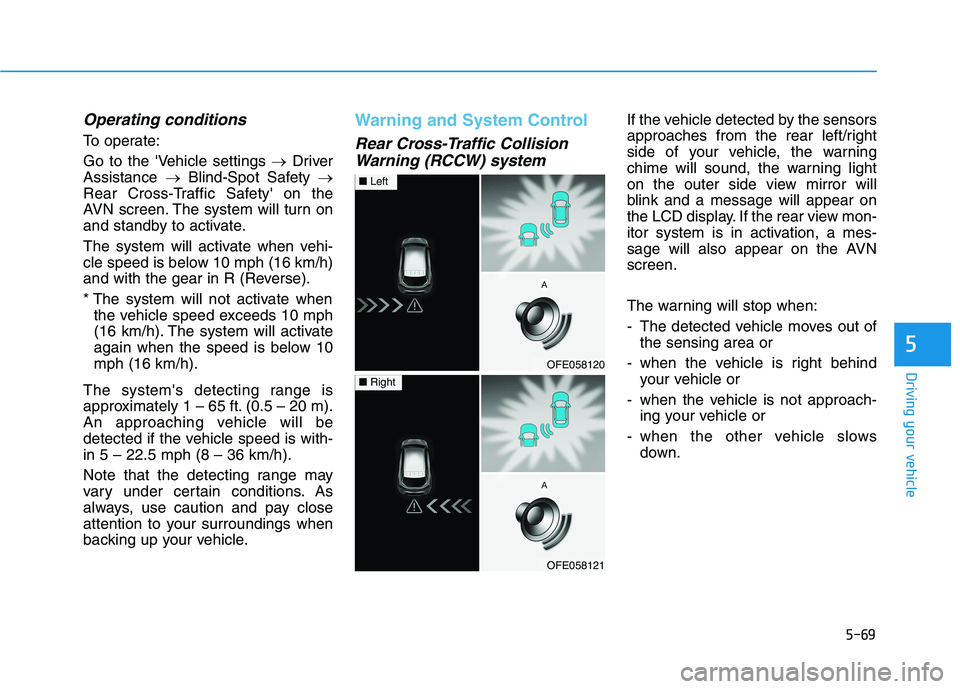
If the vehicle detected by the sensors
approaches from the rear left/right
side of your vehicle, the warning
chime will sound, the warning light
on the outer side view mirror will
blink and a message will appear on
the LCD display. If the rear view mon-
itor system is in activation, a mes-
sage will also appear on the AVN
screen.
The warning will stop when:
- The detected vehicle moves out of
the sensing area or
- when the vehicle is right behind
your vehicle or
- when the vehicle is not approach-
ing your vehicle or
- when the other vehicle slows
down.
OFE058120
■Left
OFE058121
■Right
Page 338 of 561
5-71
Driving your vehicle
5
Detecting Sensor
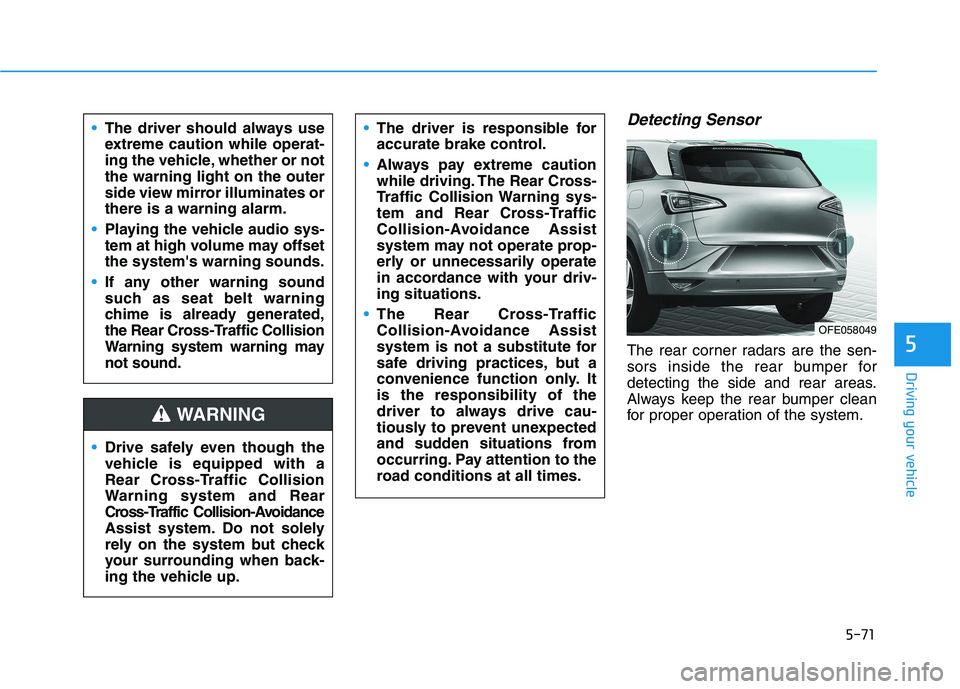
The rear corner radars are the sen-
sors inside the rear bumper for
detecting the side and rear areas.
Always keep the rear bumper clean
for proper operation of the system. The driver should always use
extreme caution while operat-
ing the vehicle, whether or not
the warning light on the outer
side view mirror illuminates or
there is a warning alarm.
Playing the vehicle audio sys-
tem at high volume may offset
the system's warning sounds.
If any other warning sound
such as seat belt warning
chime is already generated,
the Rear Cross-Traffic Collision
Warning system warning may
not sound.
Drive safely even though the
vehicle is equipped with a
Rear Cross-Traffic Collision
Warning system and Rear
Cross-Traffic Collision-Avoidance
Assist system. Do not solely
rely on the system but check
your surrounding when back-
ing the vehicle up.
The driver is responsible for
accurate brake control.
Always pay extreme caution
while driving. The Rear Cross-
Traffic Collision Warning sys-
tem and Rear Cross-Traffic
Collision-Avoidance Assist
system may not operate prop-
erly or unnecessarily operate
in accordance with your driv-
ing situations.
The Rear Cross-Traffic
Collision-Avoidance Assist
system is not a substitute for
safe driving practices, but a
convenience function only. It
is the responsibility of the
driver to always drive cau-
tiously to prevent unexpected
and sudden situations from
occurring. Pay attention to the
road conditions at all times.
WARNING
OFE058049
Page 344 of 561
5-77
Driving your vehicle
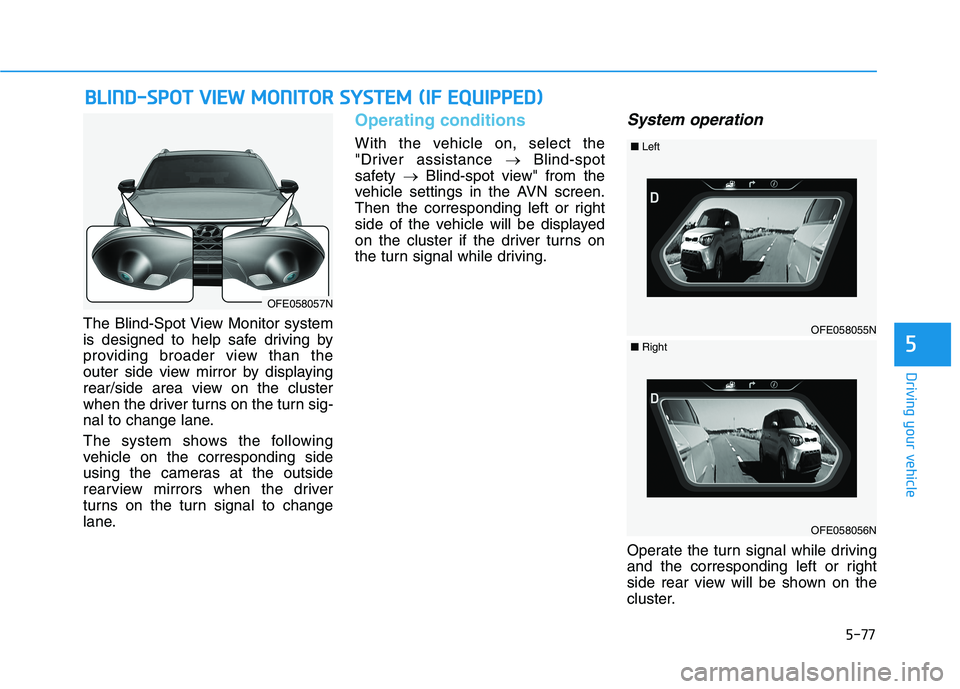
The Blind-Spot View Monitor system
is designed to help safe driving by
providing broader view than the
outer side view mirror by displaying
rear/side area view on the cluster
when the driver turns on the turn sig-
nal to change lane.
The system shows the following
vehicle on the corresponding side
using the cameras at the outside
rearview mirrors when the driver
turns on the turn signal to change
lane.
Operating conditions
With the vehicle on, select the
"Driver assistance →Blind-spot
safety →Blind-spot view" from the
vehicle settings in the AVN screen.
Then the corresponding left or right
side of the vehicle will be displayed
on the cluster if the driver turns on
the turn signal while driving.
System operation
Operate the turn signal while driving
and the corresponding left or right
side rear view will be shown on the
cluster.
B BL
LI
IN
ND
D-
-S
SP
PO
OT
T
V
VI
IE
EW
W
M
MO
ON
NI
IT
TO
OR
R
S
SY
YS
ST
TE
EM
M
(
(I
IF
F
E
EQ
QU
UI
IP
PP
PE
ED
D)
)
5
OFE058057N
OFE058055N
■Left
OFE058056N
■Right
Page 352 of 561
5-85
Driving your vehicle
5
Limitations of the System
The LKA system may operate pre-
maturely even if the vehicle does not
depart from the intended lane, OR,
the LKA system may not warn you if
the vehicle leaves the intended lane
under the following circumstances:
When the lane and road condi-
tions are poor
It is difficult to distinguish the lane
marker from the road because the
lane marker is covered with dust or
sand.
It is difficult to distinguish the color
of the lane marker from the road.
There are markings on the road
surface that look like a lane marker
that is inadvertently being detected
by the camera.
damaged.
The lane marker is merged or
divided. (e.g. tollgate)
The lane number increases or
decreases or the lane marker are
crossing complicatedly.
There are more than two lane
markers on the road in front of you. The lane marker is very thick or
thin.
The lane marker ahead is not visible
due to rain, snow, water on the
road, damaged or stained road sur-
face, or other factors.
The shadow is on the lane marker
by a median strip, trees, guardrail,
noise barriers, etc.
The lane markers are complicated
or a structure substitutes for the
lines such as a construction area.
There are crosswalk signs or other
symbols on the road.
The lane marker in a tunnel is
stained with oil, etc.
The lane suddenly disappears
such as at the intersection.
When external condition is inter-
vened
The brightness outside changes
suddenly such as when entering or
exiting a tunnel, or when passing
under a bridge. The brightness outside is too low
such as when the headlamps are
not on at night or the vehicle is
going through a tunnel.
There is a boundary structure in
the roadway such as a concrete
barrier, guardrail and reflector post
that is inadvertently being detected
by the camera.
When light coming from a street
light or an oncoming vehicle is
reflected on a wet road surface
such as a puddle in the road.
The field of view in front is
obstructed by sun glare.
There is not enough distance
between you and the vehicle in
front to be able to detect the lane
marker or the vehicle ahead is driv-
ing on the lane marker.
Driving on a steep grade, over a
hill, or when driving on a curved
road.
The adverse road conditions cause
excessive vehicle vibrations while
driving.
The surrounding of the inside rear
view mirror temperature is high
due to direct sunlight, etc.
Page 360 of 561
5-93
Driving your vehicle
Driving on a steep grade, over a
hill, or when driving on a curved
road.
The adverse road conditions cause
excessive vehicle vibrations while
driving.
The surrounding of the inside rear
view mirror temperature is high
due to direct sunlight, etc.
When front visibility is poor
The windshield or the camera lens
is blocked with dirt or debris.
The windshield glass is fogged up;
a clear view of the road is obstruct-
ed.
Placing objects on the dashboard,
etc.
The sensor cannot detect the lane
because of fog, heavy rain or snow.
5
Page 477 of 561
7-52
Maintenance
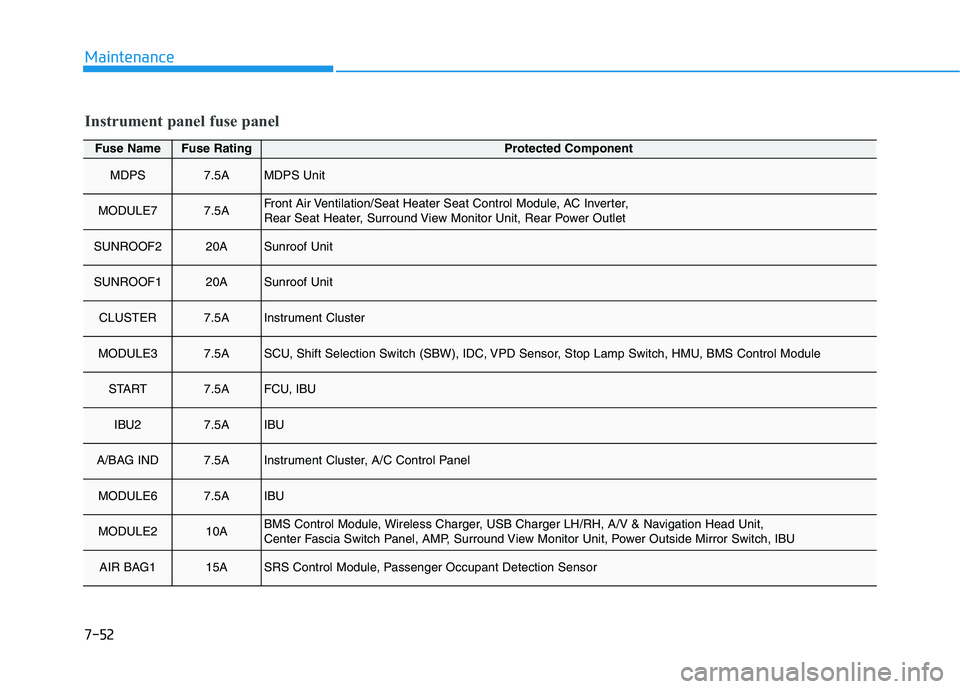
Fuse NameFuse RatingProtected Component
MDPS7.5AMDPS Unit
MODULE77.5AFront Air Ventilation/Seat Heater Seat Control Module, AC Inverter,
Rear Seat Heater, Surround View Monitor Unit, Rear Power Outlet
SUNROOF220ASunroof Unit
SUNROOF120ASunroof Unit
CLUSTER7.5AInstrument Cluster
MODULE37.5ASCU, Shift Selection Switch (SBW), IDC, VPD Sensor, Stop Lamp Switch, HMU, BMS Control Module
START7.5AFCU, IBU
IBU27.5AIBU
A/BAG IND7.5AInstrument Cluster, A/C Control Panel
MODULE67.5AIBU
MODULE210ABMS Control Module, Wireless Charger, USB Charger LH/RH, A/V & Navigation Head Unit,
Center Fascia Switch Panel, AMP, Surround View Monitor Unit, Power Outside Mirror Switch, IBU
AIR BAG115ASRS Control Module, Passenger Occupant Detection Sensor
Instrument panel fuse panel
Page 555 of 561
I-5
Front Seats ........................................................................2-6
Front Windshield Washers ............................................3-102
Front Windshield Wipers ..............................................3-101
Fuel Cell Power Module Compartment ............................1-6
Fuel cell power module compartment ..............................7-3
Fuel Filler Door ..............................................................3-55
Fuel cell stack....................................................................H4
Fuses ...............................................................................7-45
Instrument Panel Fuse Replacement ..........................7-46
Fuel cell power module compartment
Panel Fuse Replacement .........................................7-47
Fuse/Relay Panel Description ....................................7-49
Glove Box .....................................................................3-163
Good Braking Practices ..................................................5-36
Hazard Warning Flasher ...................................................6-2
Head Restraints ...............................................................2-13
Heated Steering Wheel ...................................................3-22
High pressure hydrogen storage tanks ..............................H5
Hill-Start Assist Control (HAC) .....................................5-36
Hood................................................................................3-42
Horn ................................................................................3-21If the 12 Volt Battery is Discharged .................................6-5
Before Jump Starting....................................................6-5
Jump Starting................................................................6-6
If the Vehicle Overheats....................................................6-9
If the Vehicle Will Not Start .............................................6-4
If You Have a Flat Tire (With Tire Mobility Kit)...........6-17
Immobilizer System ..........................................................3-9
Important Safety Precautions............................................2-2
Always Wear Your Seat Belt ........................................2-2
Restrain All Children....................................................2-2
Air Bag Hazards ...........................................................2-2
Driver Distraction.........................................................2-2
Control Your Speed ......................................................2-3
Keep Your Vehicle in Safe Condition ..........................2-3
In Case of an Emergency While Driving .........................6-2
If an accident occurs.....................................................6-2
If a fire occurs ..............................................................6-3
Emergency venting of hydrogen gas ............................6-3
If a submersion in water occurs ...................................6-3
If the vehicle stalls at a crossroad or crossing .............6-3
If you have a flat tire while driving .............................6-4
If the vehicle stalls while driving .................................6-4
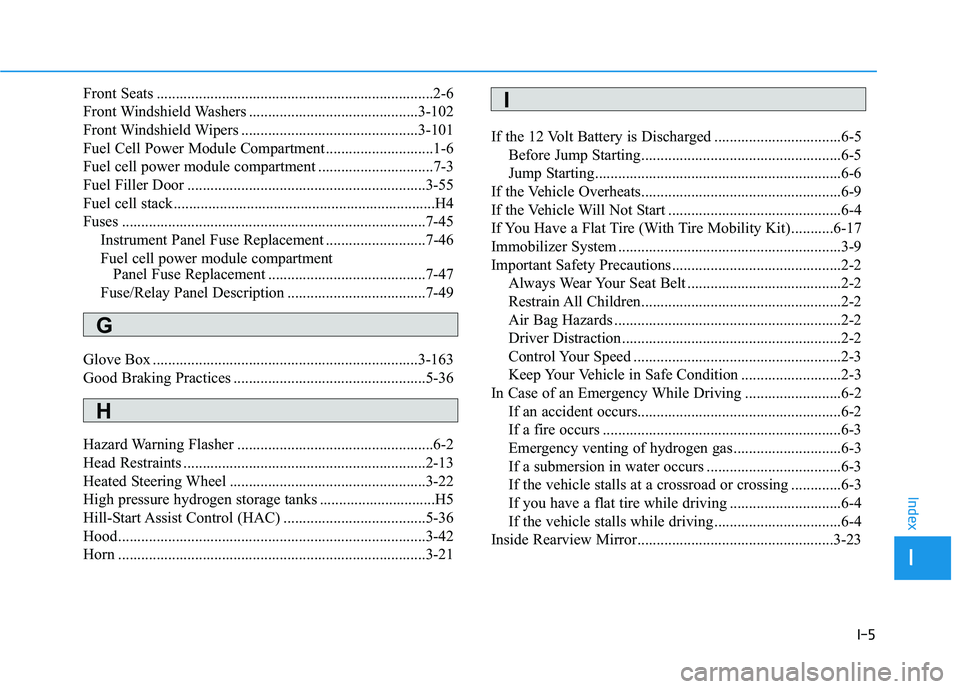
Inside Rearview Mirror...................................................3-23
I
Index
G
H
I
Page 557 of 561
I-7
Lighting ...........................................................................3-89
Exterior Lights............................................................3-89
Welcome System ........................................................3-99
Luggage Net Holder .....................................................3-172
Maintenance services ........................................................7-4
Owner's Responsibility.................................................7-4
Owner Maintenance Precautions..................................7-4
Mirrors ............................................................................3-23
Inside Rearview Mirror ..............................................3-23
Side View Mirrors ......................................................3-31
Motor Number ..................................................................8-8
Multimedia system............................................................4-2
USB and iPod
®port .....................................................4-2
Antenna ........................................................................4-2
Steering wheel audio controls ......................................4-3
Bluetooth
®Wireless Technology..................................4-4
Audio/Video/Navigation system (AVN) ......................4-4
Non-Powered Liftgate.....................................................3-43Occupant Classification System (OCS)..........................2-58
Owner maintenance ..........................................................7-5
Owner maintenance schedule .......................................7-6
Paddle Shifter (Regenerative Braking Control) .............5-17
Parking Distance Warning (Reverse/Forward)
System .......................................................................3-105
Power Brakes ..................................................................5-18
Power Button ....................................................................5-6
POWER Button Positions ............................................5-7
Starting the Vehicle ......................................................5-9
Turning Off the Vehicle..............................................5-10
Power Liftgate.................................................................3-45
Power Outlet .................................................................3-166
Rear Cross-traffic Collision Warning (RCCW)/
Rear Cross-traffic Collision-avoidance Assist
(RCCA)........................................................................5-67
System Description ....................................................5-67
System Setting and Activation ...................................5-68
Warning and System Control .....................................5-69
Limitations of the System ..........................................5-73
I
Index
M
N
O
P
R
Page 558 of 561
I-8
Rear Seats .......................................................................2-10
Rear View Monitor .......................................................3-109
Rear Window Wiper and Washer..................................3-104
Recommended Lubricants and Capacities ........................8-6
Reducing the Risk of a Rollover ..................................5-121
Reduction Gear ...............................................................5-11
Reduction Gear Operation ..........................................5-11
Parking........................................................................5-13
LCD Display Messages ..............................................5-13
Good Driving Practices ..............................................5-16
Refrigerant Label ..............................................................8-8
Remote Smart Parking Assist (RSPA) ..........................3-113
Operating Condition .................................................3-114
Non-operating Condition ..........................................3-115
Limitations of the System ........................................3-116
How the System Works (Smart Parking) .................3-120
How the System Works (Remote Smart Parking)....3-127
How the System Works (Smart Exit) .......................3-131
How the System Works
(Remote Moving Forward/Backward) ..................3-138
Additional Instructions (Messages)..........................3-143
Turn signal Showing Vehicle Status while System
in Activation ..........................................................3-144
Smart Key Showing Vehicle Status while System
in Activation ..........................................................3-145
Link with other Systems ..........................................3-146
Reporting Safety Defects ................................................8-10
Roof Side Rails .............................................................3-176Scheduled maintenance services.......................................7-7
Normal Maintenance Schedule ....................................7-8
Maintenance Under Severe Usage Conditions...........7-10
Seat Belt Restraint System .............................................2-24
Seat Belt Warning Light .................................................2-22
Seat Belts ........................................................................2-21
Seat Belt Safety Precautions ......................................2-21
Seat Belt Warning Light .............................................2-22
Seat Belt Restraint System .........................................2-24
Additional Seat Belt Safety Precautions ....................2-32
Care of Seat Belts .......................................................2-35
Seat Warmers and Air Ventilation Seats .........................2-17
Seats ..................................................................................2-4
Safety Precautions ........................................................2-5
Front Seats ....................................................................2-6
Rear Seats ...................................................................2-10
Head Restraints ..........................................................2-13
Seat Warmers and Air Ventilation Seats.....................2-17
Side View Mirrors...........................................................3-31
Smart Cruise Control With Stop & Go System ..............5-98
Smart Cruise Control Switch .....................................5-99
To Adjust the Sensitivity of Smart Cruise Control ..5-100
To Convert to Cruise Control Mode ........................5-100
Smart Cruise Control Speed .....................................5-101
Index
S