change time Hyundai Santa Fe 2016 - RHD (UK, Australia) Owner's Guide
[x] Cancel search | Manufacturer: HYUNDAI, Model Year: 2016, Model line: Santa Fe, Model: Hyundai Santa Fe 2016Pages: 699, PDF Size: 15.65 MB
Page 372 of 699

Features of your vehicle
274 4
Steering remote controller
1. VOLUME
• Used to control volume.
2. MUTE
• Mutes audio volume.3. SEEK
• When pressed shortly (under 0.8
seconds)
- Radio mode : searches broadcast
frequencies saved to presets.
- Media(CD/USB/iPod/My Music/BT
Audio) modes : changes the track,
file or chapter.
• When pressed and held (over 0.8
seconds)
- Radio mode, automatically search-
es broadcast frequencies and
channels
- Media(CD/USB/iPod/My Music)
modes, rewinds or fast forwards
the track or song(file)
- BT Audio mode may not be sup-
ported in some mobile phones.4. MODE
• Each time this key is pressed, the
mode is changed in order of FM1➟
FM2 ➟ FMA➟AM ➟ AMA ➟ USB or
iPod ➟ AUX ➟ My Music➟ BT Audio
• If the media is not connected or a
disc is not inserted, corresponding
modes will be disabled.
5. (if equipped)
• When pressed shortly (under 0.8
seconds)
- Starts voice recognition
- When selecting during a voice
prompt, stops the prompt and
converts to voice command wait-
ing state
• When pressed and held (over 0.8
seconds)
- Ends voice recognition
.
Page 385 of 699
4287
Features of your vehicle
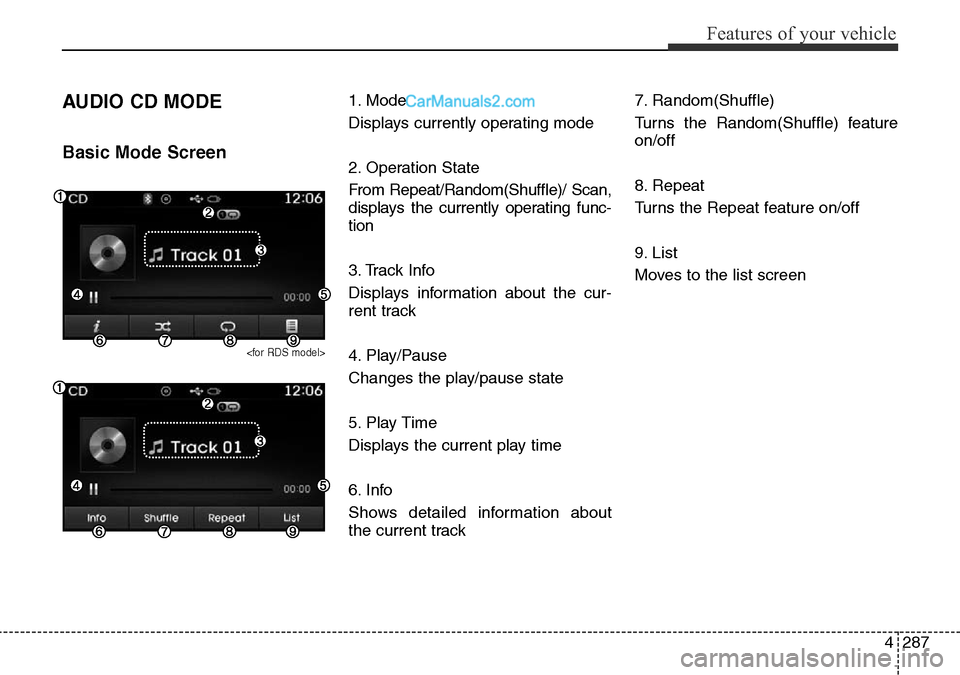
AUDIO CD MODE
Basic Mode Screen
1. Mode
Displays currently operating mode
2. Operation State
From Repeat/Random(Shuffle)/ Scan,
displays the currently operating func-
tion
3. Track Info
Displays information about the cur-
rent track
4. Play/Pause
Changes the play/pause state
5. Play Time
Displays the current play time
6. Info
Shows detailed information about
the current track7. Random(Shuffle)
Turns the Random(Shuffle) feature
on/off
8. Repeat
Turns the Repeat feature on/off
9. List
Moves to the list screen
Page 389 of 699
4291
Features of your vehicle
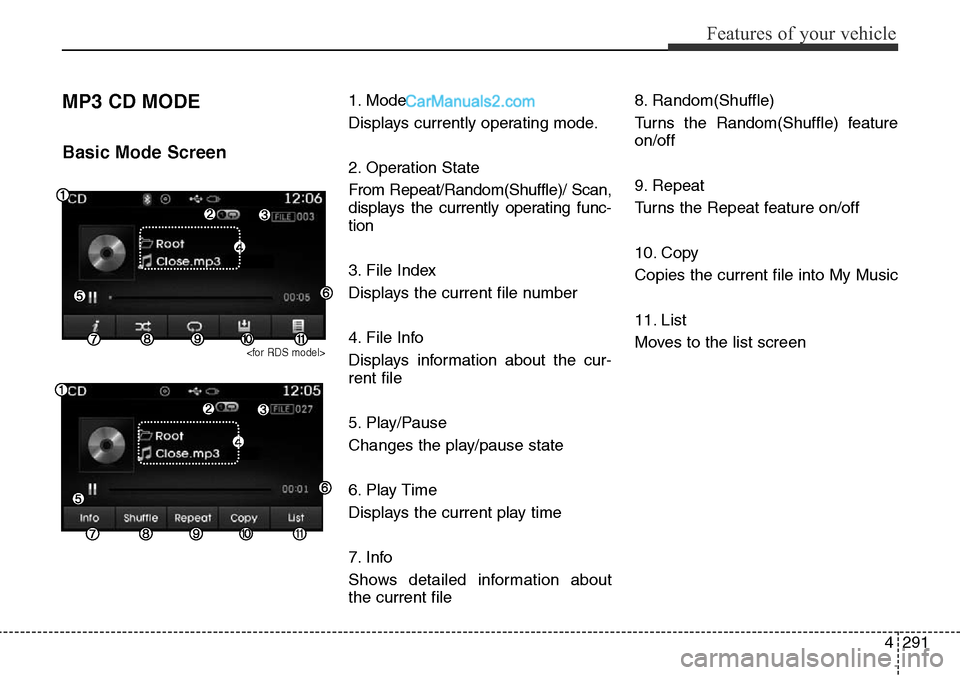
MP3 CD MODE
Basic Mode Screen
1. Mode
Displays currently operating mode.
2. Operation State
From Repeat/Random(Shuffle)/ Scan,
displays the currently operating func-
tion
3. File Index
Displays the current file number
4. File Info
Displays information about the cur-
rent file
5. Play/Pause
Changes the play/pause state
6. Play Time
Displays the current play time
7. Info
Shows detailed information about
the current file8. Random(Shuffle)
Turns the Random(Shuffle) feature
on/off
9. Repeat
Turns the Repeat feature on/off
10. Copy
Copies the current file into My Music
11. List
Moves to the list screen
Page 392 of 699
Features of your vehicle
294 4
Random(Shuffle)
Press the ( )button to play
files in random(Shuffle) order.
Each time the button is pressed, the
feature changes in order of Random
(Shuffle) Folder
➟ Random (Shuffle)
All
➟ Off.
• Random(Shuffle) Folder : Plays all
files within the current folder in
Random (Shuffle) order.
• Random(Shuffle) All : Plays all files
in Random(Shuffle) order.
Repeat
Press the ()button to
repeat the current file or folder.
Each time the button is pressed, the
feature changes in order of Repeat
➟Repeat Folder➟Off.
• Repeat: Repeats the current file.
• Repeat Folder: Repeats all files
within the current Folder.
Copying Files
Press the ()button to
copy the current file into My Music.
✽NOTICE
Selecting another feature during
copying will display a pop-up asking
whether you wish to cancel copying.
To cancel, select 'Yes’.
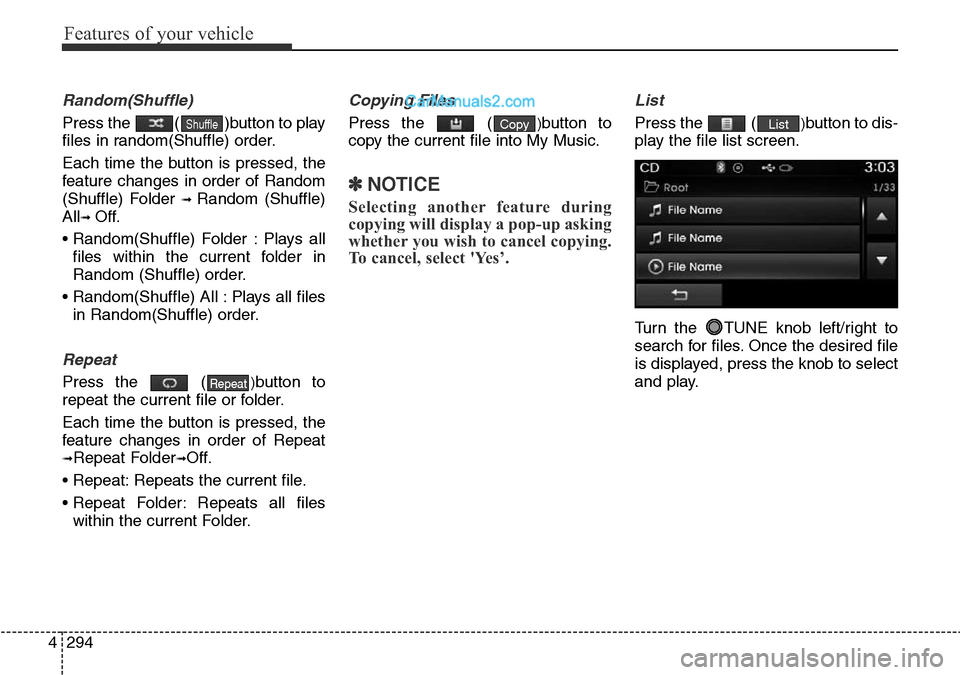
List
Press the ()button to dis-
play the file list screen.
Turn the TUNE knob left/right to
search for files. Once the desired file
is displayed, press the knob to select
and play.ListCopy
Repeat
Shuffle
Page 395 of 699
4297
Features of your vehicle
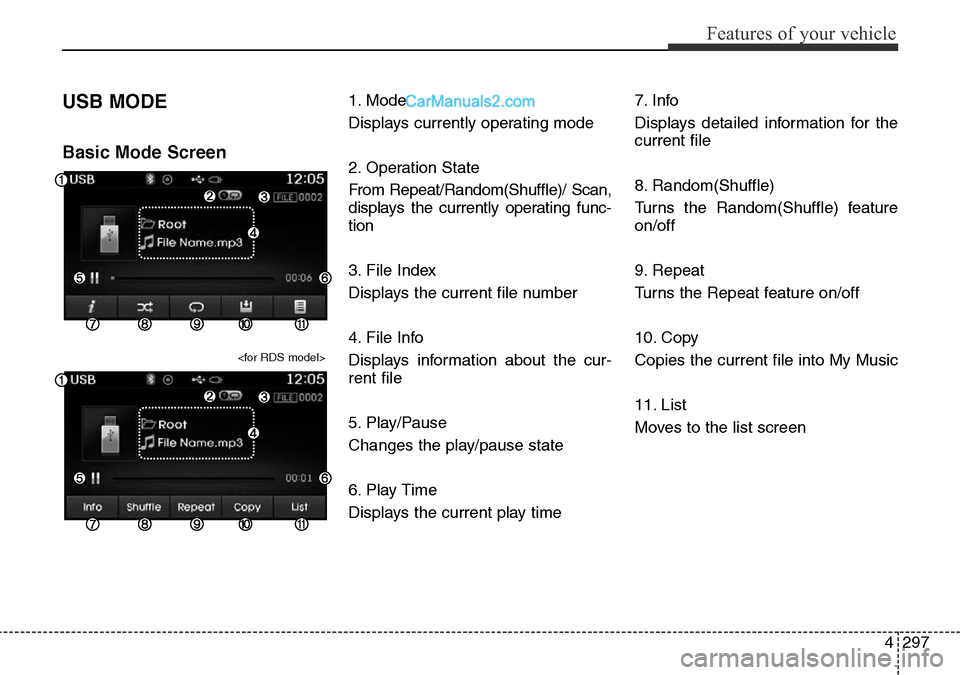
USB MODE
Basic Mode Screen
1. Mode
Displays currently operating mode
2. Operation State
From Repeat/Random(Shuffle)/ Scan,
displays the currently operating func-
tion
3. File Index
Displays the current file number
4. File Info
Displays information about the cur-
rent file
5. Play/Pause
Changes the play/pause state
6. Play Time
Displays the current play time7. Info
Displays detailed information for the
current file
8. Random(Shuffle)
Turns the Random(Shuffle) feature
on/off
9. Repeat
Turns the Repeat feature on/off
10. Copy
Copies the current file into My Music
11. List
Moves to the list screen
Page 398 of 699
Features of your vehicle
300 4
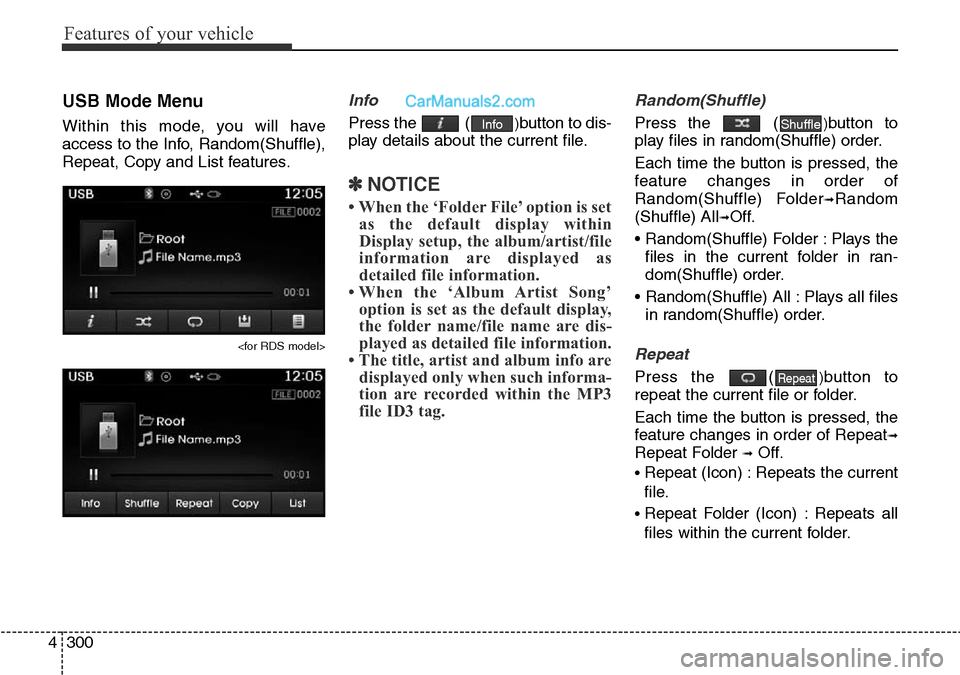
USB Mode Menu
Within this mode, you will have
access to the Info, Random(Shuffle),
Repeat, Copy and List features.
Info
Press the ()button to dis-
play details about the current file.
✽NOTICE
• When the ‘Folder File’ option is set
as the default display within
Display setup, the album/artist/file
information are displayed as
detailed file information.
• When the ‘Album Artist Song’
option is set as the default display,
the folder name/file name are dis-
played as detailed file information.
• The title, artist and album info are
displayed only when such informa-
tion are recorded within the MP3
file ID3 tag.
Random(Shuffle)
Press the ()button to
play files in random(Shuffle) order.
Each time the button is pressed, the
feature changes in order of
Random(Shuffle) Folder
➟Random
(Shuffle) All
➟Off.
• Random(Shuffle) Folder : Plays the
files in the current folder in ran-
dom(Shuffle) order.
• Random(Shuffle) All : Plays all files
in random(Shuffle) order.
Repeat
Press the ()button to
repeat the current file or folder.
Each time the button is pressed, the
feature changes in order of Repeat
➟
Repeat Folder ➟Off.
• Repeat (Icon) : Repeats the current
file.
• Repeat Folder (Icon) : Repeats all
files within the current folder.
Repeat
ShuffleInfo
Page 401 of 699
4303
Features of your vehicle
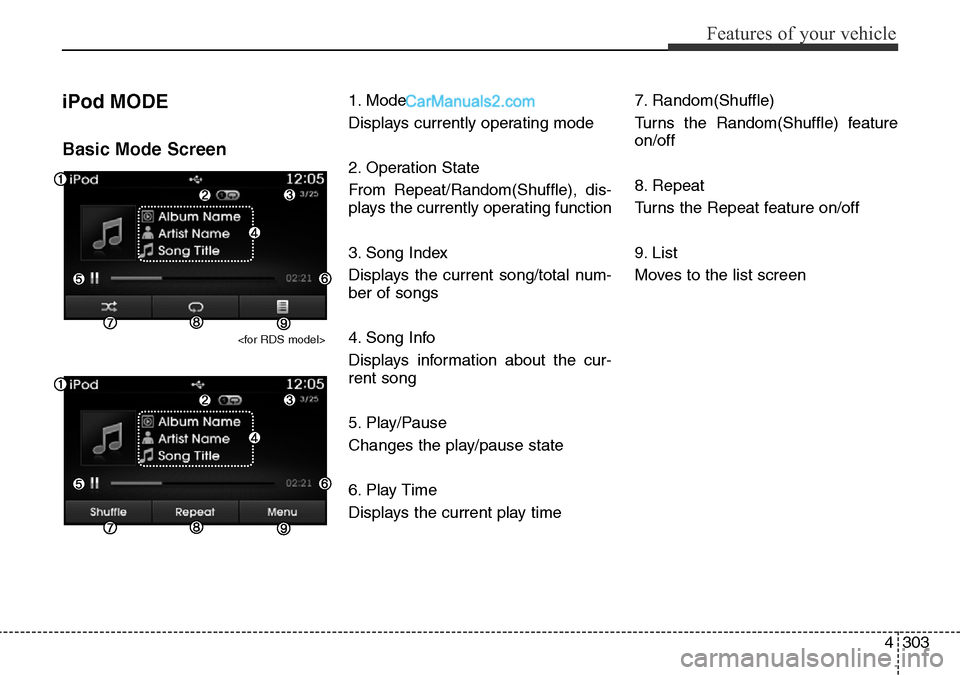
iPod MODE
Basic Mode Screen
1. Mode
Displays currently operating mode
2. Operation State
From Repeat/Random(Shuffle), dis-
plays the currently operating function
3. Song Index
Displays the current song/total num-
ber of songs
4. Song Info
Displays information about the cur-
rent song
5. Play/Pause
Changes the play/pause state
6. Play Time
Displays the current play time7. Random(Shuffle)
Turns the Random(Shuffle) feature
on/off
8. Repeat
Turns the Repeat feature on/off
9. List
Moves to the list screen
Page 404 of 699
Features of your vehicle
306 4
✽NOTICE
• If the search mode is accessed
while playing a song, the most
recently searched category is dis-
played.
• Search steps upon initial connec-
tion may differ depending on the
type of iPod device.
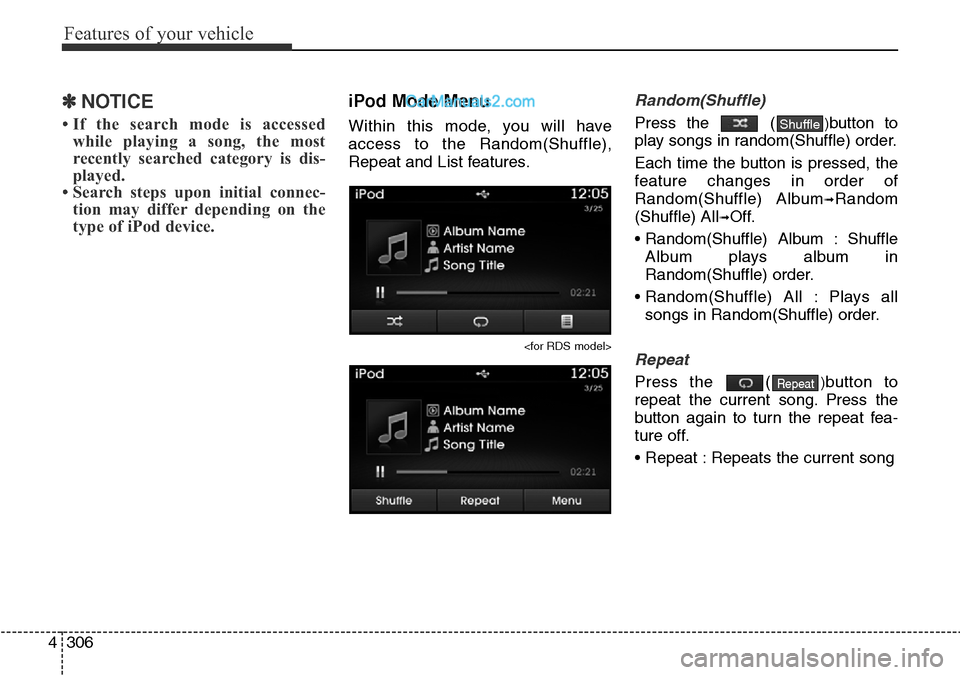
iPod Mode Menu
Within this mode, you will have
access to the Random(Shuffle),
Repeat and List features.
Random(Shuffle)
Press the ()button to
play songs in random(Shuffle) order.
Each time the button is pressed, the
feature changes in order of
Random(Shuffle) Album
➟Random
(Shuffle) All
➟Off.
• Random(Shuffle) Album : Shuffle
Album plays album in
Random(Shuffle) order.
• Random(Shuffle) All : Plays all
songs in Random(Shuffle) order.
Repeat
Press the ()button to
repeat the current song. Press the
button again to turn the repeat fea-
ture off.
• Repeat : Repeats the current songRepeat
Shuffle
Page 406 of 699
Features of your vehicle
308 4
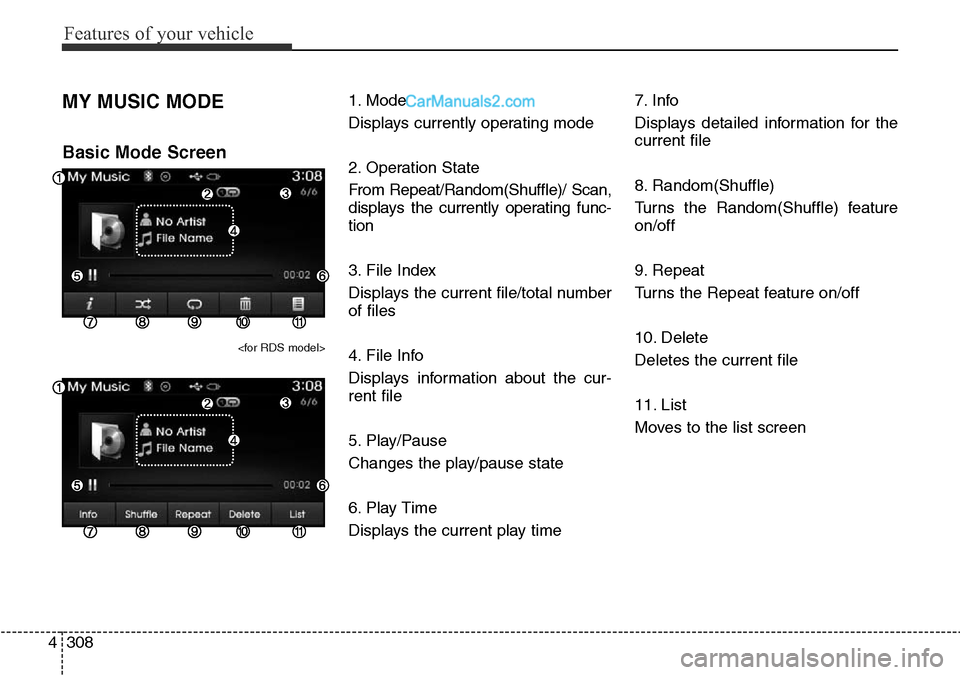
MY MUSIC MODE
Basic Mode Screen
1. Mode
Displays currently operating mode
2. Operation State
From Repeat/Random(Shuffle)/ Scan,
displays the currently operating func-
tion
3. File Index
Displays the current file/total number
of files
4. File Info
Displays information about the cur-
rent file
5. Play/Pause
Changes the play/pause state
6. Play Time
Displays the current play time7. Info
Displays detailed information for the
current file
8. Random(Shuffle)
Turns the Random(Shuffle) feature
on/off
9. Repeat
Turns the Repeat feature on/off
10. Delete
Deletes the current file
11. List
Moves to the list screen
Page 444 of 699
![Hyundai Santa Fe 2016 - RHD (UK, Australia) Owners Guide Features of your vehicle
346 4
Clock/Day Setting
Clock Setting
Press the key Select
[Clock/Day] Select [Clock Settings]
Use the , buttons to set the
Hour, Minutes and AM/PM setting.
✽NOTICE
Pres](/img/35/16332/w960_16332-443.png "Hyundai Santa Fe 2016 - RHD (UK, Australia) Owners Guide Features of your vehicle
346 4
Clock/Day Setting
Clock Setting
Press the key Select
[Clock/Day] Select [Clock Settings]
Use the , buttons to set the
Hour, Minutes and AM/PM setting.
✽NOTICE
Pres")
Features of your vehicle
346 4
Clock/Day Setting
Clock Setting
Press the key Select
[Clock/Day] Select [Clock Settings]
Use the , buttons to set the
Hour, Minutes and AM/PM setting.
✽NOTICE
Press and hold the key (over
0.8 seconds) to display the Clock/
Day screen.
Calendar Setting
Press the key Select
[Clock/Day] Select [Day Settings]
Use the , buttons to set the
Day, Month and Year setting.
Time Format
Press the key Select
[Clock/Day] Select [Time Format]
This feature is used to change the
clock format between 12hr or 24hr.SETUP SETUP
CLOCK
SETUP