warning Hyundai Santa Fe 2016 - RHD (UK, Australia) Repair Manual
[x] Cancel search | Manufacturer: HYUNDAI, Model Year: 2016, Model line: Santa Fe, Model: Hyundai Santa Fe 2016Pages: 699, PDF Size: 15.65 MB
Page 105 of 699
47
Features of your vehicle
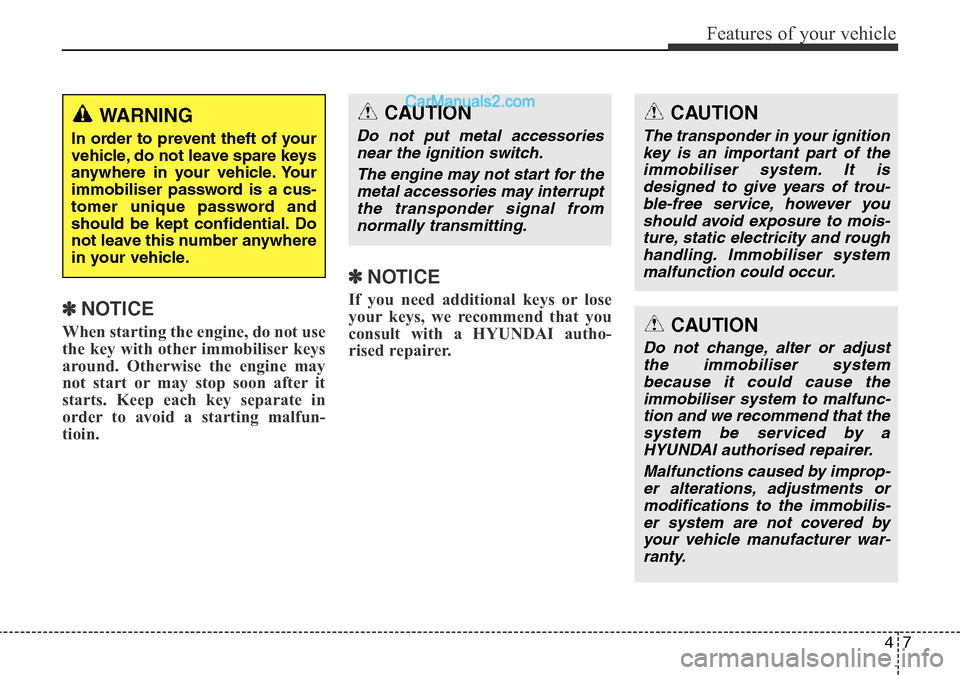
✽NOTICE
When starting the engine, do not use
the key with other immobiliser keys
around. Otherwise the engine may
not start or may stop soon after it
starts. Keep each key separate in
order to avoid a starting malfun-
tioin.
✽NOTICE
If you need additional keys or lose
your keys, we recommend that you
consult with a HYUNDAI autho-
rised repairer.
CAUTION
The transponder in your ignition
key is an important part of the
immobiliser system. It is
designed to give years of trou-
ble-free service, however you
should avoid exposure to mois-
ture, static electricity and rough
handling. Immobiliser system
malfunction could occur.
CAUTION
Do not change, alter or adjust
the immobiliser system
because it could cause the
immobiliser system to malfunc-
tion and we recommend that the
system be serviced by a
HYUNDAI authorised repairer.
Malfunctions caused by improp-
er alterations, adjustments or
modifications to the immobilis-
er system are not covered by
your vehicle manufacturer war-
ranty.
WARNING
In order to prevent theft of your
vehicle, do not leave spare keys
anywhere in your vehicle. Your
immobiliser password is a cus-
tomer unique password and
should be kept confidential. Do
not leave this number anywhere
in your vehicle.
CAUTION
Do not put metal accessories
near the ignition switch.
The engine may not start for the
metal accessories may interrupt
the transponder signal from
normally transmitting.
Page 107 of 699
49
Features of your vehicle
3. The hazard warning light will blink
once to indicate that all doors are
locked (the engine bonnet and tail-
gate must be closed).
Also, the outside rearview mirror
will automatically fold when the
outside rearview mirror folding
switch is in the AUTO position (if
equipped).
✽NOTICE
The doors will not lock if any door is
opened.
Unlock (2)
1. Press the unlock button.
2. The hazard warning lights will
blink twice to indicate that all
doors are unlocked. Also, the out-
side rearview mirror will automati-
cally unfold when the outside
rearview mirror folding switch is in
the AUTO position (if equipped).
✽NOTICE
After unlocking all doors, the doors
will lock automatically unless a door
is opened within 30 seconds.
Tailgate unlock (3)
1. Press the tailgate unlock button for
more than 1 second.
2. The hazard warning light will blink
twice to indicate the tailgate is
unlocked.
✽NOTICE
• After unlocking the tailgate, the
tailgate will lock automatically
unless it is opened within 30 sec-
onds.
• Once the tailgate is opened and
then closed, the tailgate will lock
automatically.
• The word "HOLD" is written on
the button to inform you that you
must press and hold the button.
Page 111 of 699
413
Features of your vehicle
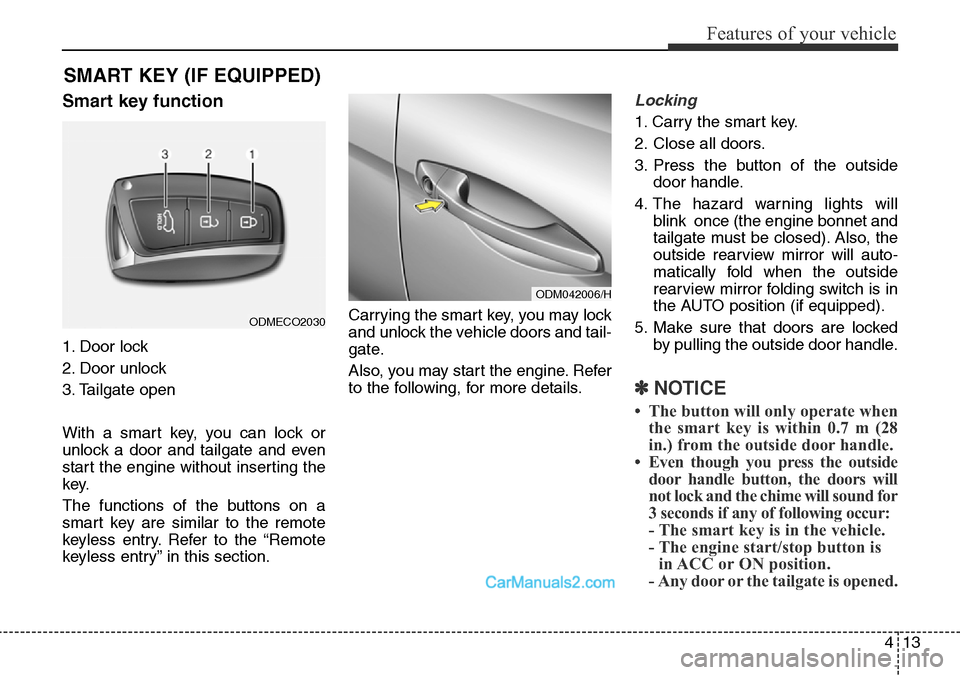
Smart key function
1. Door lock
2. Door unlock
3. Tailgate open
With a smart key, you can lock or
unlock a door and tailgate and even
start the engine without inserting the
key.
The functions of the buttons on a
smart key are similar to the remote
keyless entry. Refer to the “Remote
keyless entry” in this section.Carrying the smart key, you may lock
and unlock the vehicle doors and tail-
gate.
Also, you may start the engine. Refer
to the following, for more details.
Locking
1. Carry the smart key.
2. Close all doors.
3. Press the button of the outside
door handle.
4. The hazard warning lights will
blink once (the engine bonnet and
tailgate must be closed). Also, the
outside rearview mirror will auto-
matically fold when the outside
rearview mirror folding switch is in
the AUTO position (if equipped).
5. Make sure that doors are locked
by pulling the outside door handle.
✽NOTICE
• The button will only operate when
the smart key is within 0.7 m (28
in.) from the outside door handle.
• Even though you press the outside
door handle button, the doors will
not lock and the chime will sound for
3 seconds if any of following occur:
- The smart key is in the vehicle.
- The engine start/stop button is
in ACC or ON position.
- Any door or the tailgate is opened.
SMART KEY (IF EQUIPPED)
ODM042006/H
ODMECO2030
Page 112 of 699
Features of your vehicle
14 4
Unlocking
1. Carry the smart key.
2. Press the button of the front out-
side door handle.
3. All doors will unlock and the hazard
warning lights will blink twice. Also,
the outside rearview mirror will auto-
matically unfold when the outside
rearview mirror folding switch is in
the AUTO position (if equipped).
✽NOTICE
• The button will only operate when
the smart key is within 0.7 m (28
in.) from the outside door handle.
• When the smart key is recognized
in the area of 0.7 m (28 in.) from
the front outside door handle, other
people can also open the doors.
• After unlocking all doors, the
doors will lock automatically
unless a door is opened.
Tailgate unlocking
1.Carry the smart key.
2.Press the tailgate handle switch.
3.The tailgate will unlock.
✽NOTICE
• Once the tailgate is opened and
then closed, the tailgate will lock
automatically.
• The button will only operate when
the smart key is within 0.7 m (28
in.) from the tailgate handle.
Smart key precautions
✽NOTICE
• If, for some reason, you happen to
lose your smart key, you will not be
able to start the engine. Tow the
vehicle, if necessary, and we rec-
ommend that you contact a
HYUNDAI authorised repairer.
• A maximum of 2 smart keys can be
registered to a single vehicle. If you
lose a smart key, we recommend
that you take the vehicle and key to
your HYUNDAI authorised repair-
er to protect it from potential theft.
• The smart key will not work if any
of the following occurs:
- The smart key is close to a radio
transmitter such as a radio sta-
tion or an airport which can
interfere with normal operation
of the smart key.
- The smart key is near a mobile
two-way radio system or a
mobile phone.
- Another vehicle’s smart key is
being operated close to your
vehicle.
(Continued)
Page 115 of 699
417
Features of your vehicle
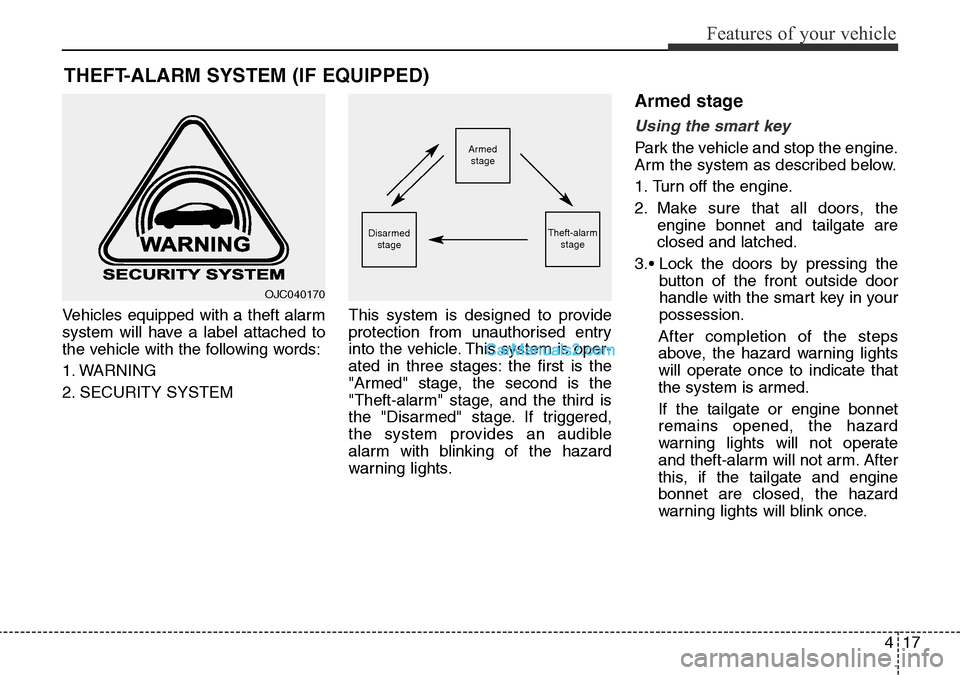
Vehicles equipped with a theft alarm
system will have a label attached to
the vehicle with the following words:
1. WARNING
2. SECURITY SYSTEMThis system is designed to provide
protection from unauthorised entry
into the vehicle. This system is oper-
ated in three stages: the first is the
"Armed" stage, the second is the
"Theft-alarm" stage, and the third is
the "Disarmed" stage. If triggered,
the system provides an audible
alarm with blinking of the hazard
warning lights.
Armed stage
Using the smart key
Park the vehicle and stop the engine.
Arm the system as described below.
1. Turn off the engine.
2. Make sure that all doors, the
engine bonnet and tailgate are
closed and latched.
3.• Lock the doors by pressing the
button of the front outside door
handle with the smart key in your
possession.
After completion of the steps
above, the hazard warning lights
will operate once to indicate that
the system is armed.
If the tailgate or engine bonnet
remains opened, the hazard
warning lights will not operate
and theft-alarm will not arm. After
this, if the tailgate and engine
bonnet are closed, the hazard
warning lights will blink once.
THEFT-ALARM SYSTEM (IF EQUIPPED)
Armed
stage
Theft-alarm
stageDisarmed
stage
OJC040170
Page 116 of 699
Features of your vehicle
18 4
• Lock the doors by pressing the
lock button on the smart key.
After completion of the steps
above, the hazard warning lights
will operate once to indicate that
the system is armed.
If any door, tailgate or engine bon-
net remains open, the hazard
warning lights won't operate and
theft-alarm will not arm. After this,
if all doors, tailgate and engine
bonnet are closed, the hazard
warning lights will blink once.Using the transmitter
Park the vehicle and stop the engine.
Arm the system as described below.
1.Turn off the engine and remove the
ignition key from the ignition switch.
2.Make sure that all doors, the
engine bonnet and tailgate are
closed and latched.
3.Lock the doors by pressing the lock
button on the transmitter.
After completion of the steps
above, the hazard warning lights
will blink once to indicate that the
system is armed.
If any door, tailgate or engine bon-
net remains opened, the hazard
warning lights will not operate and
theft-alarm will not arm. After this, if
all doors, tailgate and engine bon-
net are closed, the hazard warning
lights will blink once.• Do not arm the system until all
passengers have left the vehi-
cle. If the system is armed whilst
a passenger(s) remains in the
vehicle, the alarm may be acti-
vated when the remaining pas-
senger(s) leave the vehicle. If
any door, tailgate or engine bon-
net is opened within 30 seconds
after entering the armed stage,
the system is disarmed to pre-
vent unnecessary alarm.
Page 117 of 699
419
Features of your vehicle
Theft-alarm stage
The alarm will be activated if any of
the following occurs whilst the sys-
tem is armed.
• A front or rear door is opened with-
out using transmitter or smart key.
• The tailgate is opened without
using transmitter or smart key.
• The engine bonnet is opened.
The siren will sound and the hazard
warning lights will blink continuously
for 27 seconds, unless the system is
disarmed. To turn off the system,
unlock the doors with the transmitter
or smart key.
Disarmed stage
The system will be disarmed when:
Transmitter
- The door unlock button is pressed.
- The engine is started.
- The ignition switch is in the “ON”
position for 30 seconds or more.
Smart key
- The door unlock button is pressed.
- The button of the front outside door
is pressed whilst carrying the smart
key.
- The engine is started.
- The engine start/stop button is
turned to the ON position.
After the doors are unlocked, the haz-
ard warning lights will blink twice to
indicate that the system is disarmed.
After pressing the unlock button, if
any door (or tailgate) is not opened
within 30 seconds, the system will be
rearmed.
✽NOTICE
• Without smart key system
If the system is not disarmed with
the transmitter, insert the key into
the ignition switch and start the
engine. Then the system will be
disarmed.
• With smart key system
If the system is not disarmed with
the smart key, open the door with
the mechanical key and start the
engine. Then the system will be
disarmed.
• If you lose your keys, we recom-
mend that you consult with your
HYUNDAI authorised repairer.
CAUTION
Do not change, alter or adjust
the theft-alarm system because
it could cause the theft-alarm
system to malfunction and we
recommend that the system be
serviced by a HYUNDAI autho-
rised repairer.
Malfunctions caused by improp-
er alterations, adjustments or
modifications to the theft-alarm
system are not covered by your
vehicle manufacturer warranty.
Page 119 of 699
421
Features of your vehicle
Operating door locks from
inside the vehicle
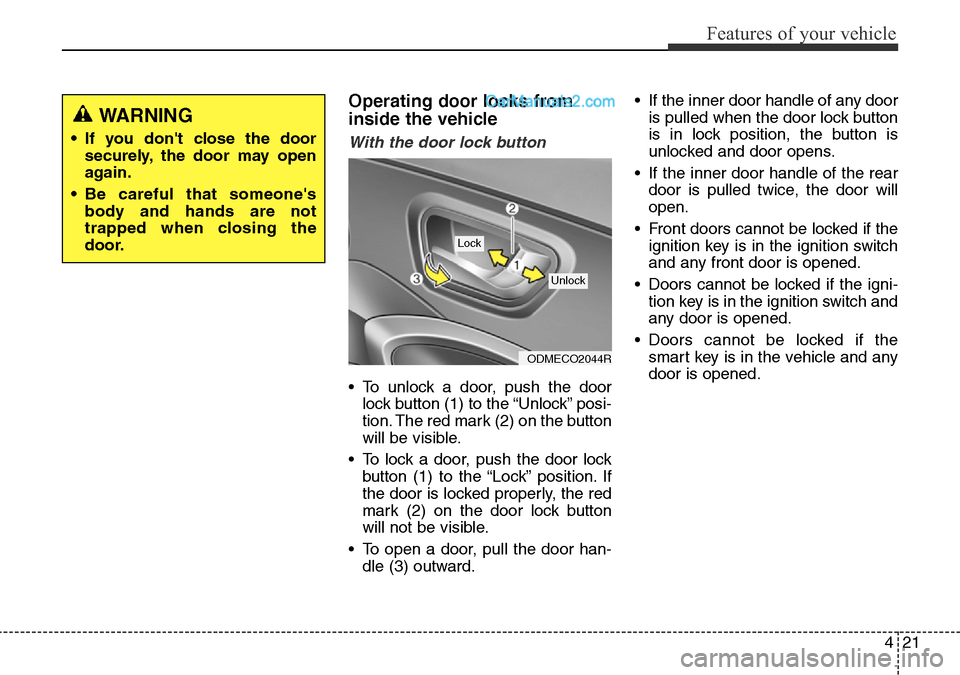
With the door lock button
• To unlock a door, push the door
lock button (1) to the “Unlock” posi-
tion. The red mark (2) on the button
will be visible.
• To lock a door, push the door lock
button (1) to the “Lock” position. If
the door is locked properly, the red
mark (2) on the door lock button
will not be visible.
• To open a door, pull the door han-
dle (3) outward.• If the inner door handle of any door
is pulled when the door lock button
is in lock position, the button is
unlocked and door opens.
• If the inner door handle of the rear
door is pulled twice, the door will
open.
• Front doors cannot be locked if the
ignition key is in the ignition switch
and any front door is opened.
• Doors cannot be locked if the igni-
tion key is in the ignition switch and
any door is opened.
• Doors cannot be locked if the
smart key is in the vehicle and any
door is opened.
ODMECO2044R
Lock
Unlock
WARNING
• If you don't close the door
securely, the door may open
again.
• Be careful that someone's
body and hands are not
trapped when closing the
door.
Page 120 of 699
Features of your vehicle
22 4
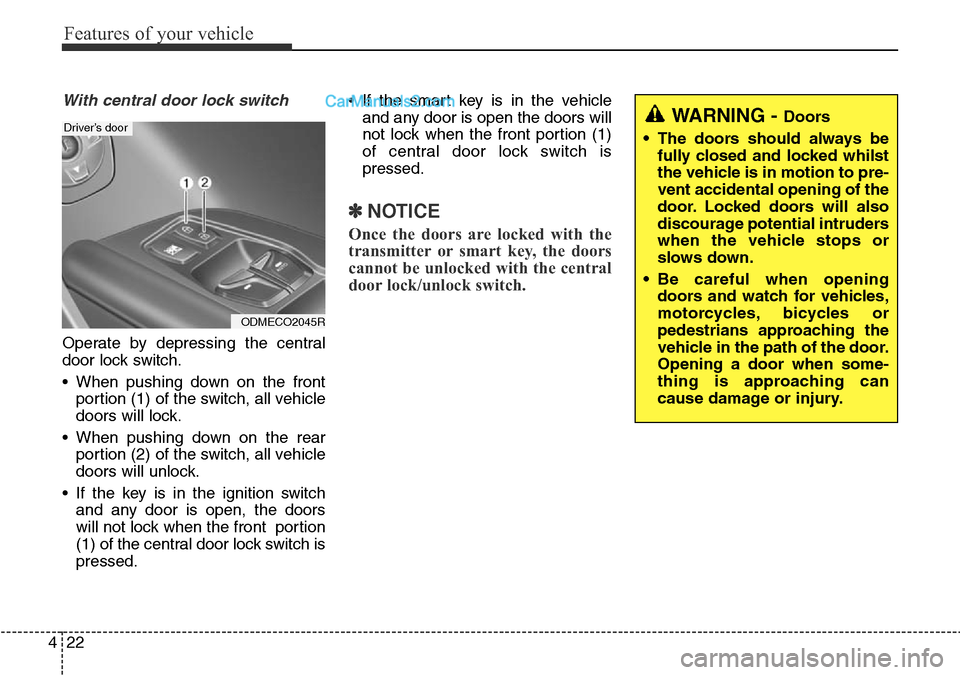
With central door lock switch
Operate by depressing the central
door lock switch.
• When pushing down on the front
portion (1) of the switch, all vehicle
doors will lock.
• When pushing down on the rear
portion (2) of the switch, all vehicle
doors will unlock.
• If the key is in the ignition switch
and any door is open, the doors
will not lock when the front portion
(1) of the central door lock switch is
pressed.• If the smart key is in the vehicle
and any door is open the doors will
not lock when the front portion (1)
of central door lock switch is
pressed.
✽NOTICE
Once the doors are locked with the
transmitter or smart key, the doors
cannot be unlocked with the central
door lock/unlock switch.
WARNING - Doors
• The doors should always be
fully closed and locked whilst
the vehicle is in motion to pre-
vent accidental opening of the
door. Locked doors will also
discourage potential intruders
when the vehicle stops or
slows down.
• Be careful when opening
doors and watch for vehicles,
motorcycles, bicycles or
pedestrians approaching the
vehicle in the path of the door.
Opening a door when some-
thing is approaching can
cause damage or injury.
ODMECO2045R
Driver’s door
Page 121 of 699
423
Features of your vehicle
Deadlocks (if equipped)
Some vehicles are equipped with a
deadlock system. Deadlocks prevent
opening of a door from either inside
or outside the vehicle once the dead-
locks have been activated providing
an additional measure of vehicle
security.
To lock the vehicle using the deadlock
function, the doors must be locked by
using the transmitter or smart key. To
unlock the vehicle, the transmitter or
smart key must be used again.
Door lock/unlock features
Impact sensing door unlock sys-
tem
All doors will automatically unlock
when an impact causes the air bags
to deploy.
Speed sensing door lock system
(if equipped)
All doors will automatically lock after
the vehicle speed exceeds 9 mph
(15 km/h).
You can activate or deactivate the
auto door lock/unlock features in the
vehicle. Refer to "User setting" in this
section.
WARNING
Do not lock the doors with the
transmitter or the smart key
with anybody left in the vehicle.
The passenger in the vehicle
cannot unlock the doors with
the door lock button. For exam-
ple, if the door is locked with
the transmitter, the passenger
in the vehicle cannot unlock the
door without the transmitter.
WARNING- Unlocked
vehicles
Leaving your vehicle unlocked
can invite theft or possible harm
to you or others from someone
hiding in your vehicle whilst
you are gone. Always remove
the ignition key, engage the
parking brake, close all win-
dows and lock all doors when
leaving your vehicle unattend-
ed.
WARNING- Unattended
children
An enclosed vehicle can
become extremely hot, causing
death or severe injury to unat-
tended children or animals who
cannot escape the vehicle.
Furthermore, children might
operate features of the vehicle
that could injure them, or they
could encounter other harm,
possibly from someone gaining
entry to the vehicle. Never leave
children or animals unattended
in your vehicle.