lane assist HYUNDAI SANTA FE 2021 User Guide
[x] Cancel search | Manufacturer: HYUNDAI, Model Year: 2021, Model line: SANTA FE, Model: HYUNDAI SANTA FE 2021Pages: 636, PDF Size: 81.2 MB
Page 394 of 636
Driver assistance system
7-12
• Your vehicle is being towed
• The surrounding is very bright
• The surrounding is very dark, such as
in a tunnel, etc.
• The brightness changes suddenly, for
example when entering or exiting a
tunnel
• The brightness outside is low, and the
headlamps are not on or are not bright
• Driving through steam, smoke or
shadow
• Only part of the vehicle, pedestrian or
cyclist is detected
• The vehicle in front is a bus, heavy
truck, truck with a unusually shaped
luggage, trailer, etc.
• The vehicle in front has no tail lights,
tail lights are located unusually, etc.
• The brightness outside is low, and the
tail lamps are not on or are not bright
• The rear of the front vehicle is small
or the vehicle does not look normal,
such as when the vehicle is tilted,
overturned, or the side of the vehicle
is visible, etc.
• The front vehicle’s ground clearance is
low or high
• A vehicle, pedestrian or cyclist
suddenly cuts in front
• The bumper around the front radar is
impacted, damaged or the front radar
is out of position
• The temperature around the front
radar is high or low •
Driving through a tunnel or iron bridge
• Driving in large areas where there are
few vehicles or structures (i.e. desert,
meadow, suburb, etc.)
• Driving near areas containing metal
substances, such as a construction
zone, railroad, etc.
• A material is near that reflects very
well on the front radar, such as a
guardrail, nearby vehicle, etc.
• The cyclist in front is on a bicycle
made of material that does not reflect
on the front radar
• The vehicle in front is detected late
• The vehicle in front is suddenly
blocked by a obstacle
• The vehicle in front suddenly changes
lane or suddenly reduces speed
• The vehicle in front is bent out of
shape
• The front vehicle’s speed is fast or
slow
• The vehicle in front steers in the
opposite direction of your vehicle to
avoid a collision
• With a vehicle in front, your vehicle
changes lane at low speed
• The vehicle in front is covered with
snow
• You are departing or returning to the
lane
• Unstable driving
• You are on a roundabout and the
vehicle in front is not detected
• You are continuously driving in a circle
• The vehicle in front has an unusual
shape
• The vehicle in front is driving uphill or
downhill
Page 396 of 636
Driver assistance system
7-14
WARNING
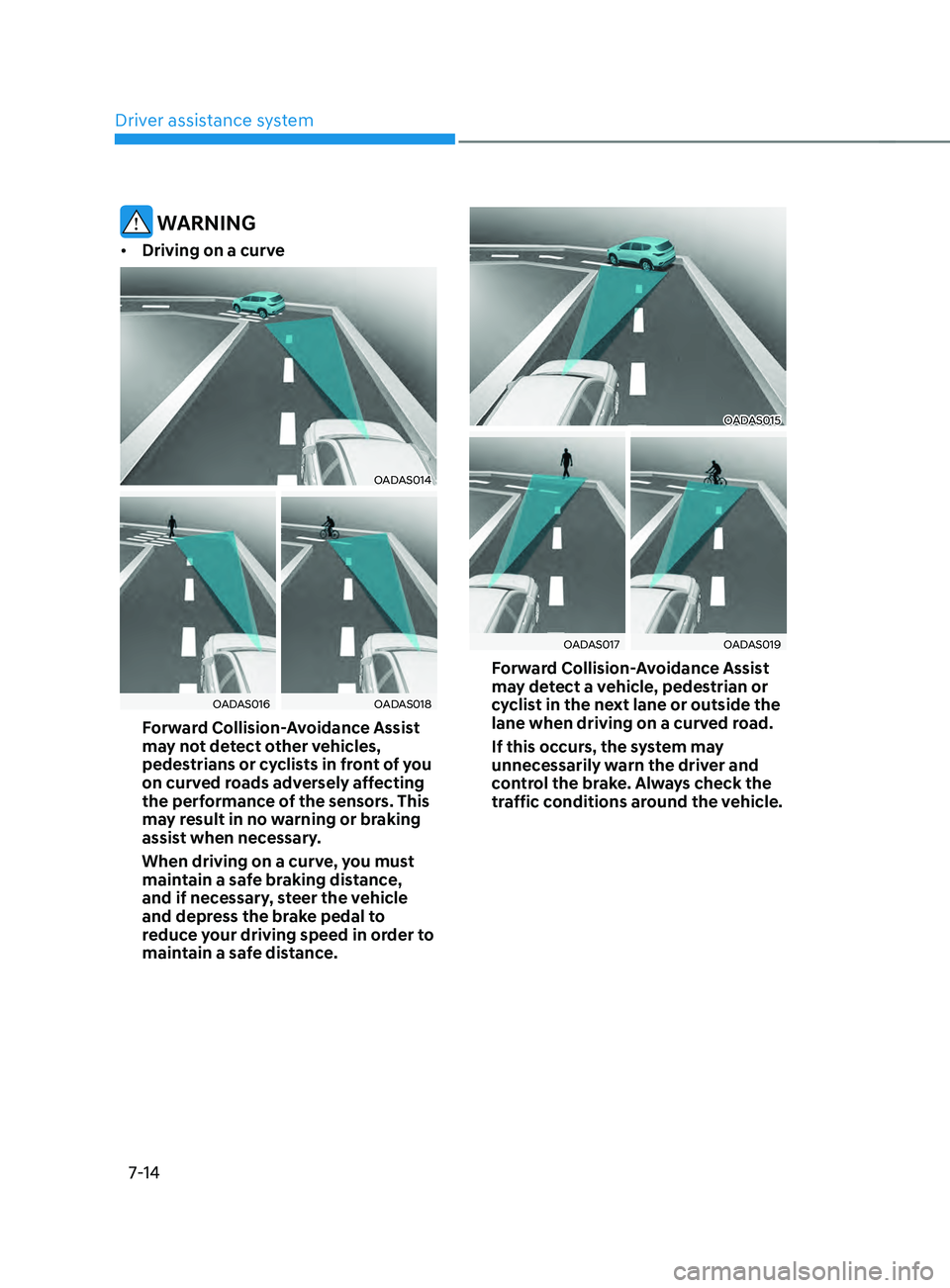
• Driving on a curve
OADAS014
OADAS016OADAS018
Forward Collision-Avoidance Assist
may not detect other vehicles,
pedestrians or cyclists in front of you
on curved roads adversely affecting
the performance of the sensors. This
may result in no warning or braking
assist when necessary.
When driving on a curve, you must
maintain a safe braking distance,
and if necessary, steer the vehicle
and depress the brake pedal to
reduce your driving speed in order to
maintain a safe distance.
OADAS015
OADAS017OADAS019
Forward Collision-Avoidance Assist
may detect a vehicle, pedestrian or
cyclist in the next lane or outside the
lane when driving on a curved road.
If this occurs, the system may
unnecessarily warn the driver and
control the brake. Always check the
traffic conditions around the vehicle.
Page 397 of 636
07
7-15
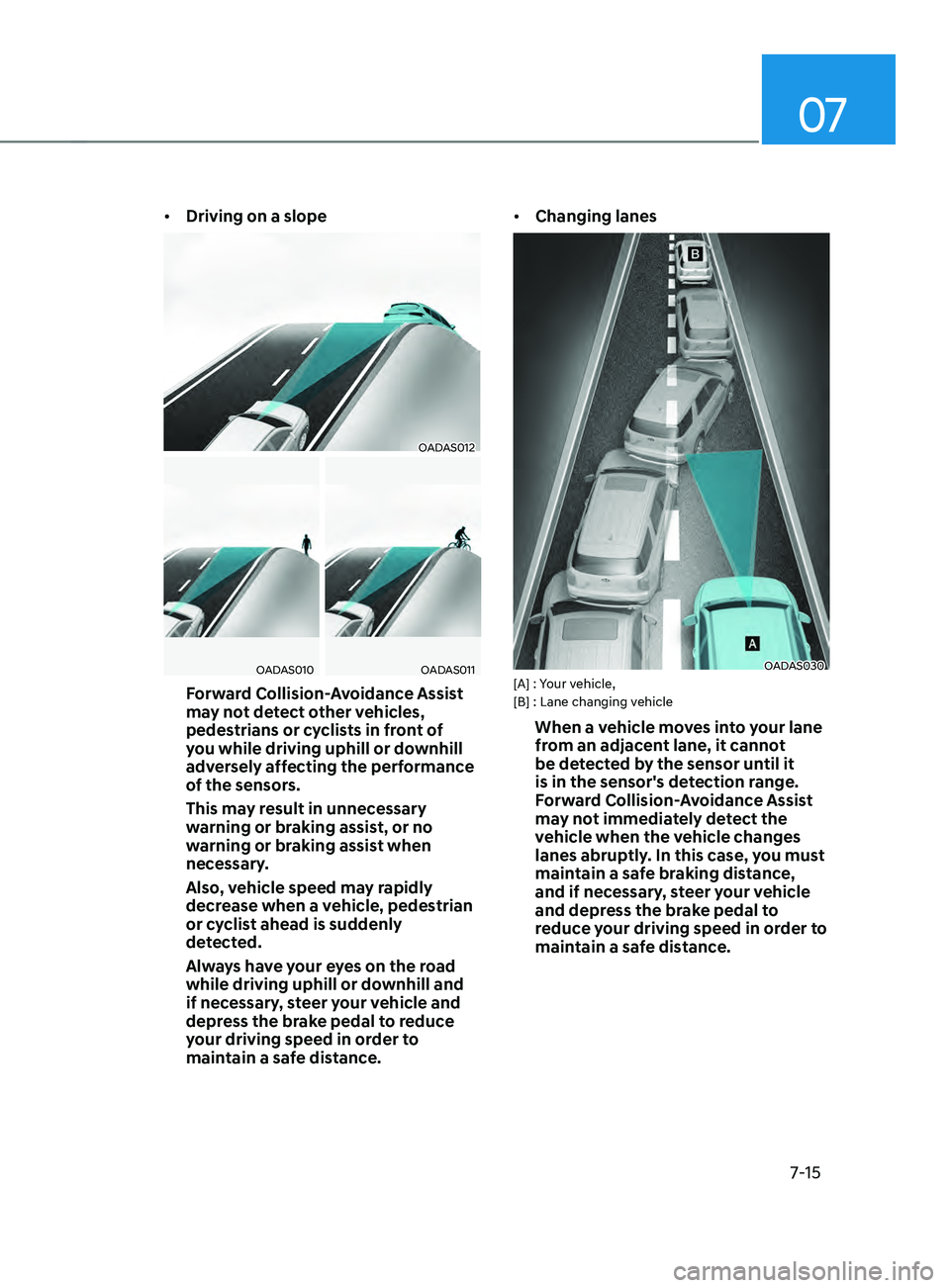
• Driving on a slope
OADAS012
OADAS010OADAS011
Forward Collision-Avoidance Assist
may not detect other vehicles,
pedestrians or cyclists in front of
you while driving uphill or downhill
adversely affecting the performance
of the sensors.
This may result in unnecessary
warning or braking assist, or no
warning or braking assist when
necessary.
Also, vehicle speed may rapidly
decrease when a vehicle, pedestrian
or cyclist ahead is suddenly
detected.
Always have your eyes on the road
while driving uphill or downhill and
if necessary, steer your vehicle and
depress the brake pedal to reduce
your driving speed in order to
maintain a safe distance. •
Changing lanes
OADAS030[A] : Your vehicle,
[B] : Lane changing vehicle
When a vehicle moves into your lane
from an adjacent lane, it cannot
be detected by the sensor until it
is in the sensor's detection range.
Forward Collision-Avoidance Assist
may not immediately detect the
vehicle when the vehicle changes
lanes abruptly. In this case, you must
maintain a safe braking distance,
and if necessary, steer your vehicle
and depress the brake pedal to
reduce your driving speed in order to
maintain a safe distance.
Page 398 of 636
![HYUNDAI SANTA FE 2021 User Guide Driver assistance system
7-16
OADAS031[A] : Your vehicle, [B] : Lane changing vehicle,
[C] : Same lane vehicle
When a vehicle in front of you
merges out of the lane, Forward
Collision-Avoidance Ass](/img/35/41163/w960_41163-397.png "HYUNDAI SANTA FE 2021 User Guide Driver assistance system
7-16
OADAS031[A] : Your vehicle, [B] : Lane changing vehicle,
[C] : Same lane vehicle
When a vehicle in front of you
merges out of the lane, Forward
Collision-Avoidance Ass")
Driver assistance system
7-16
OADAS031[A] : Your vehicle, [B] : Lane changing vehicle,
[C] : Same lane vehicle
When a vehicle in front of you
merges out of the lane, Forward
Collision-Avoidance Assist may not
immediately detect the vehicle that
is now in front of you. In this case,
you must maintain a safe braking
distance, and if necessary, steer your
vehicle and depress the brake pedal
to reduce your driving speed in order
to maintain a safe distance.•
Detecting vehicle
OTM070147
If the vehicle in front of you has
cargo that extends rearward from
the cab, or when the vehicle in front
of you has higher ground clearance,
additional special attention is
required. Forward Collision-
Avoidance Assist may not be able
to detect the cargo extending from
the vehicle. In these instances,
you must maintain a safe braking
distance from the rearmost object,
and if necessary, steer your vehicle
and depress the brake pedal to
reduce your driving speed in order to
maintain distance.
Page 400 of 636
Driver assistance system7-18
LAnE kEEpIng AssIsT (LkA)
Lane Keeping Assist is designed to help
detect lane markings (or road edges)
while driving over a certain speed. The
system will warn the driver if the vehicle
leaves the lane without using the turn
signal, or will automatically assist the
driver’s steering to help prevent the
vehicle from departing the lane.
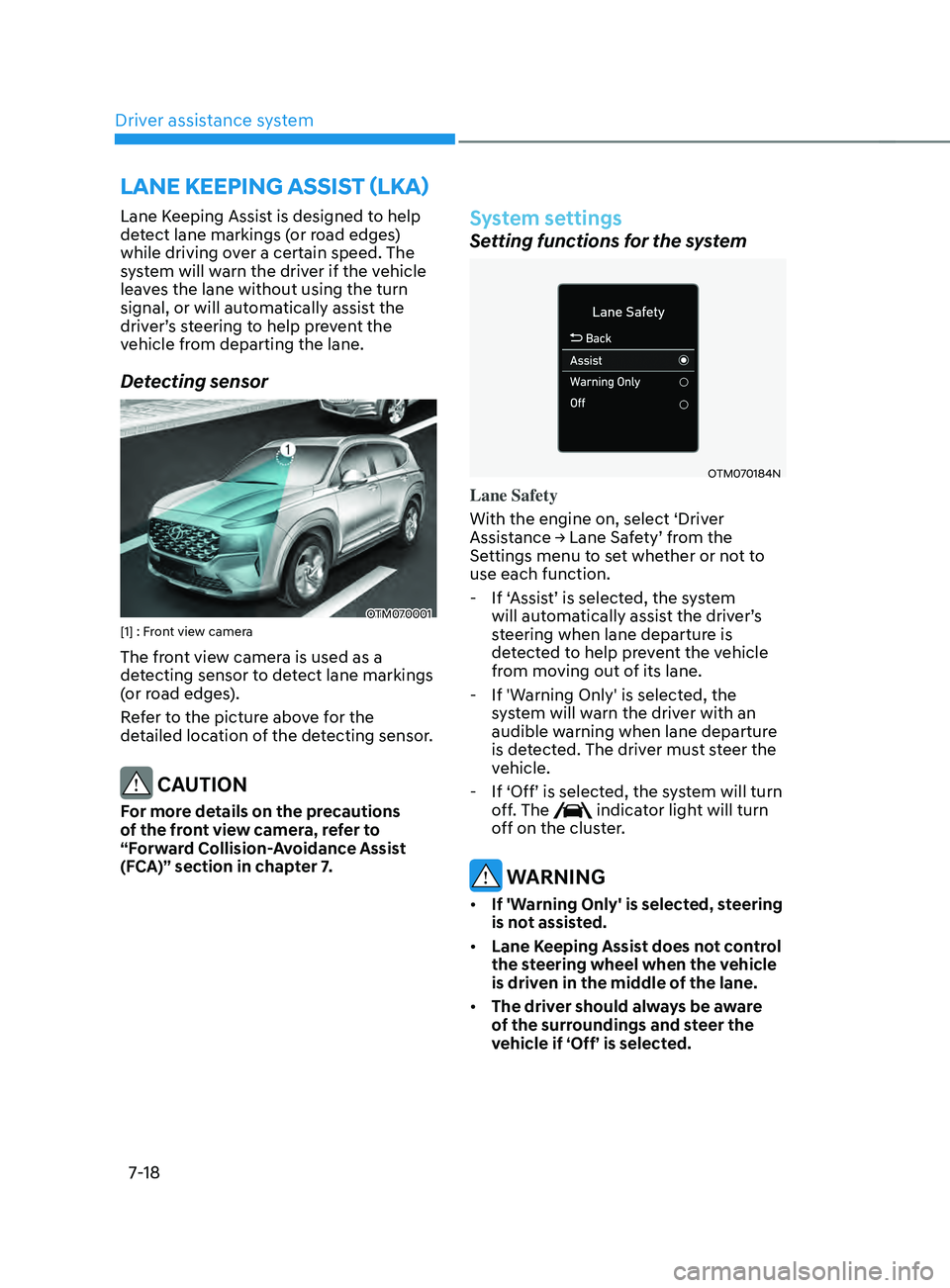
Detecting sensor
OTM070001[1] : Front view camera
The front view camera is used as a
detecting sensor to detect lane markings
(or road edges).
Refer to the picture above for the
detailed location of the detecting sensor.
CAUTION
For more details on the precautions
of the front view camera, refer to
“Forward Collision-Avoidance Assist
(FCA)” section in chapter 7.
System settings
Setting functions for the system
OTM070184N
Lane Safety
With the engine on, select ‘Driver
Assistance
→ Lane Sa
fety’
fr
om
the Settings menu t
o set whether or not to
use each function.
- If ‘Assis
t’ is selected, the system
will automatically assist the driver’s
steering when lane departure is
detected to help prevent the vehicle
from moving out of its lane.
- If 'Warning Only' is select
ed, the
system will warn the driver with an
audible warning when lane departure
is detected. The driver must steer the
vehicle.
- If ‘Off’ is selected, the s
ystem will turn
off. The
indicator light will turn
off on the cluster.
WARNING
• If 'Warning Only' is selected, steering
is not assisted.
• Lane Keeping Assist does not control
the steering wheel when the vehicle
is driven in the middle of the lane.
• The driver should always be aware
of the surroundings and steer the
vehicle if ‘Off’ is selected.
Page 401 of 636
07
7-19
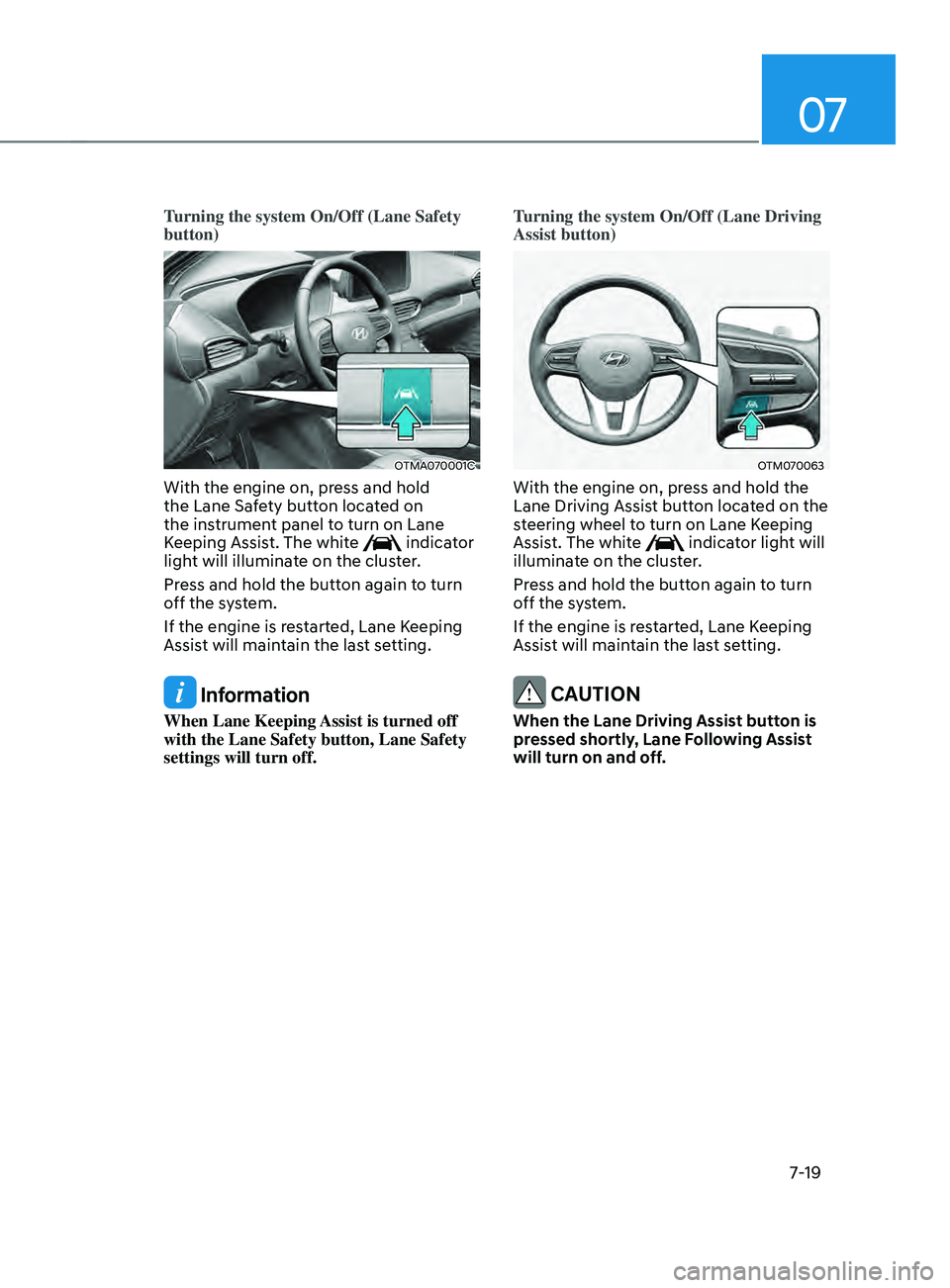
Turning the system On/Off (Lane Safety
button)
OTMA070001C
With the engine on, press and hold
the Lane Safety button located on
the instrument panel to turn on Lane
Keeping Assist. The white
indicator
light will illuminate on the cluster.
Press and hold the button again to turn
off the system.
If the engine is restarted, Lane Keeping
Assist will maintain the last setting.
Information
When Lane Keeping Assist is turned off
with the Lane Safety button, Lane Safety
settings will turn off. Turning the system On/Off (Lane Driving
Assist button)
OTM070063
With the engine on, press and hold the
Lane Driving Assist button located on the
steering wheel to turn on Lane Keeping
Assist. The white
indicator light will
illuminate on the cluster.
Press and hold the button again to turn
off the system.
If the engine is restarted, Lane Keeping
Assist will maintain the last setting.
CAUTION
When the Lane Driving Assist button is
pressed shortly, Lane Following Assist
will turn on and off.
Page 402 of 636
Driver assistance system
7-20
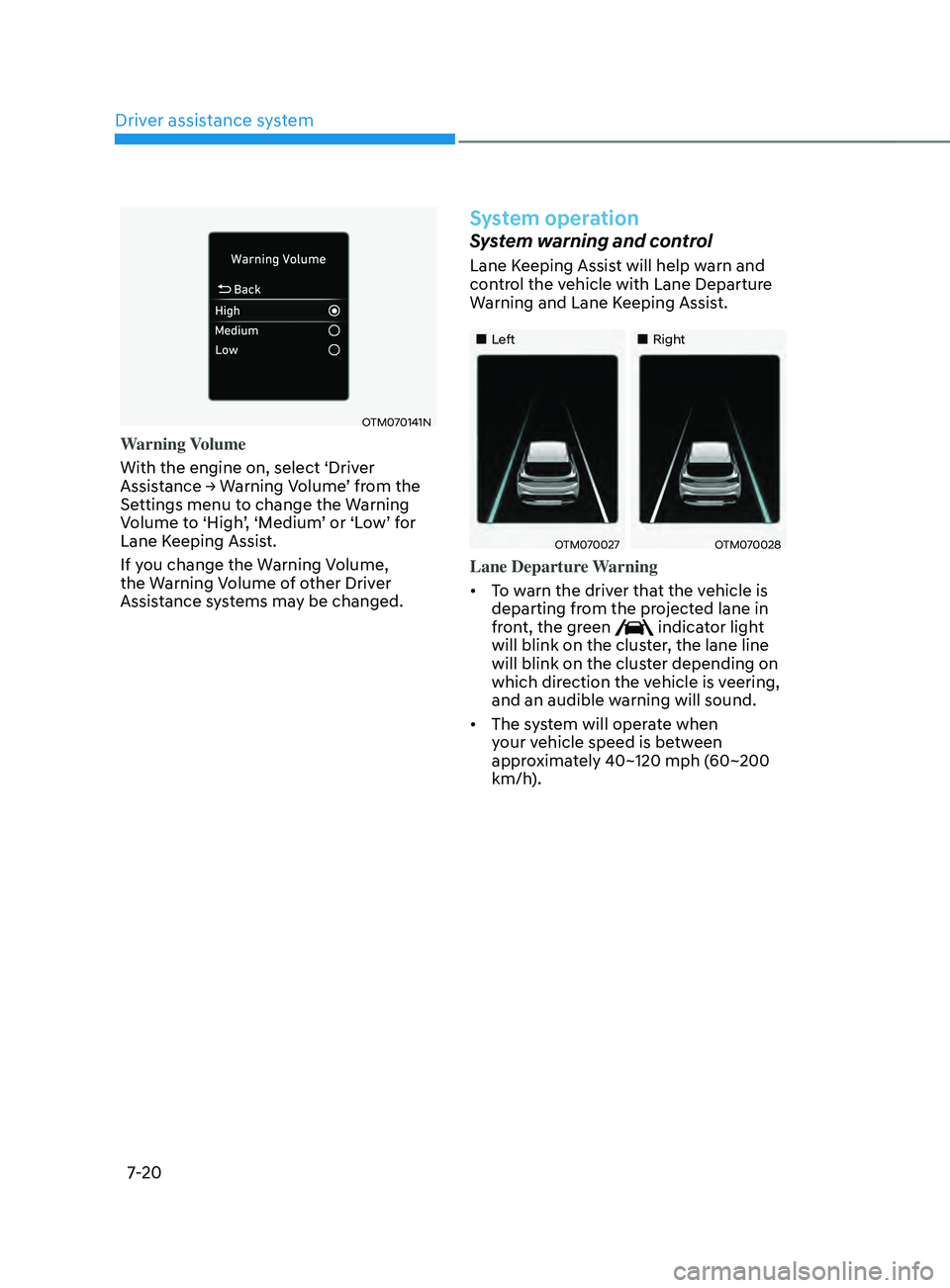
OTM070141N
Warning Volume
With the engine on, select ‘Driver
Assistance
→ W
arning
V
olume’
fr
om
the Settings menu t
o change the Warning
Volume to ‘High’, ‘Medium’ or ‘Low’ for
Lane Keeping Assist.
If you change the Warning Volume,
the Warning Volume of other Driver
Assistance systems may be changed.
System operation
System warning and control
Lane Keeping Assist will help warn and
control the vehicle with Lane Departure
Warning and Lane Keeping Assist.
„„Left „„Right
OTM070027OTM070028
Lane Departure Warning
• To warn the driver that the vehicle is
departing from the projected lane in
front, the green
indicator light
will blink on the cluster, the lane line
will blink on the cluster depending on
which direction the vehicle is veering,
and an audible warning will sound.
• The system will operate when
your vehicle speed is between
approximately 40~120 mph (60~200
km/h).
Page 403 of 636
07
7-21
Lane Keeping Assist
• To warn the driver that the vehicle
is departing from the projected lane
in front, the green
indicator
light will blink on the cluster, and the
steering wheel will make adjustments
to keep the vehicle inside the lane.
• The system will operate when
your vehicle speed is between
approximately 40~120 mph (60~200
km/h).
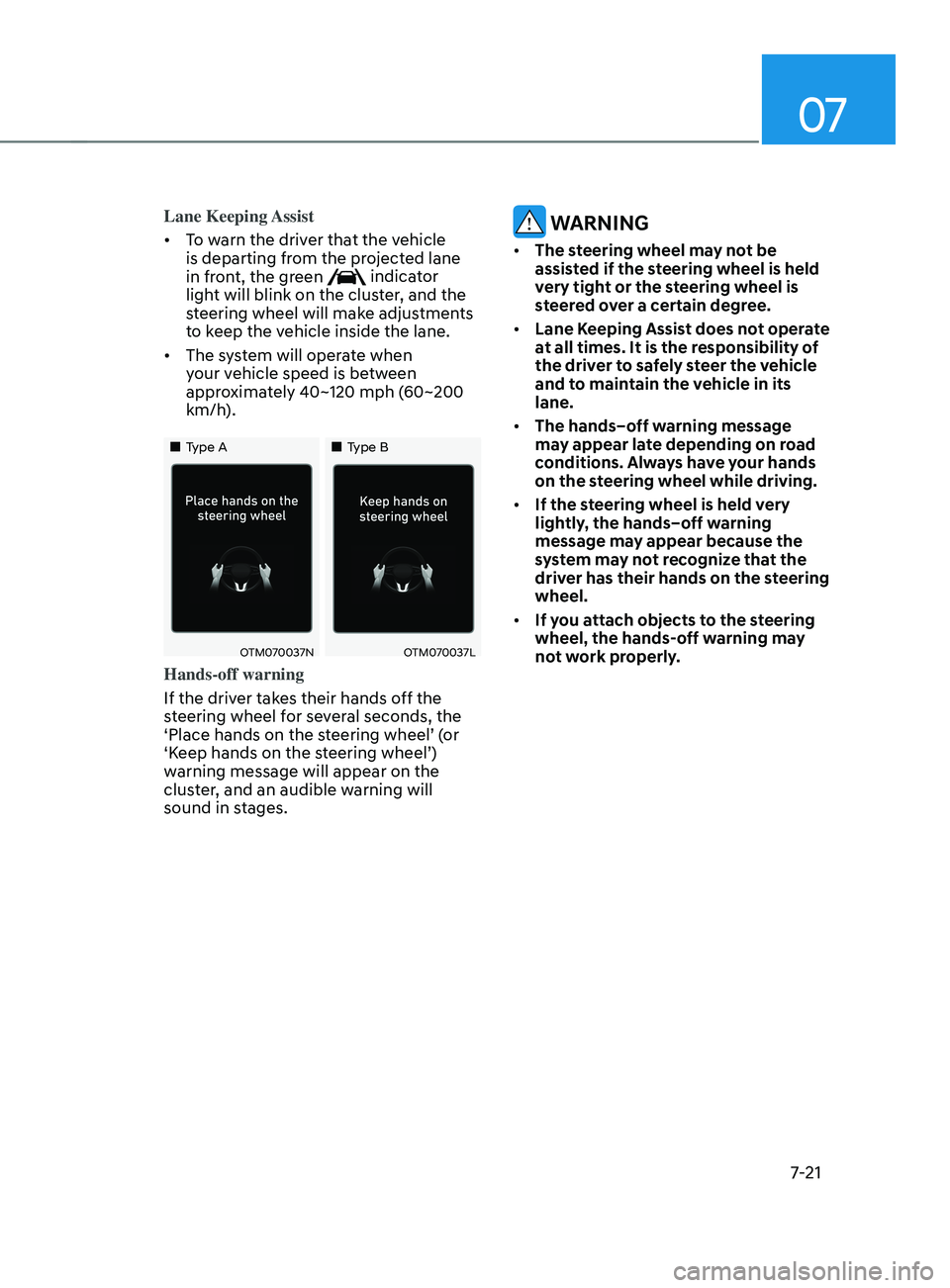
„„Type A „„Type B
OTM070037NOTM070037L
Hands-off warning
If the driver takes their hands off the
steering wheel for several seconds, the
‘Place hands on the steering wheel’ (or
‘Keep hands on the steering wheel’)
warning message will appear on the
cluster, and an audible warning will
sound in stages.
WARNING
• The steering wheel may not be
assisted if the steering wheel is held
very tight or the steering wheel is
steered over a certain degree.
• Lane Keeping Assist does not operate
at all times. It is the responsibility of
the driver to safely steer the vehicle
and to maintain the vehicle in its
lane.
• The hands–off warning message
may appear late depending on road
conditions. Always have your hands
on the steering wheel while driving.
• If the steering wheel is held very
lightly, the hands–off warning
message may appear because the
system may not recognize that the
driver has their hands on the steering
wheel.
• If you attach objects to the steering
wheel, the hands-off warning may
not work properly.
Page 404 of 636
Driver assistance system
7-22
Information
• You may change settings from the
instrument cluster (User Settings) or
infotainment system (Vehicle Settings),
whichever option that is provided with
your vehicle. For more details, see
"User Settings" section in chapter 4, or
"Vehicle Settings" section in supplied
Infotainment Manual.
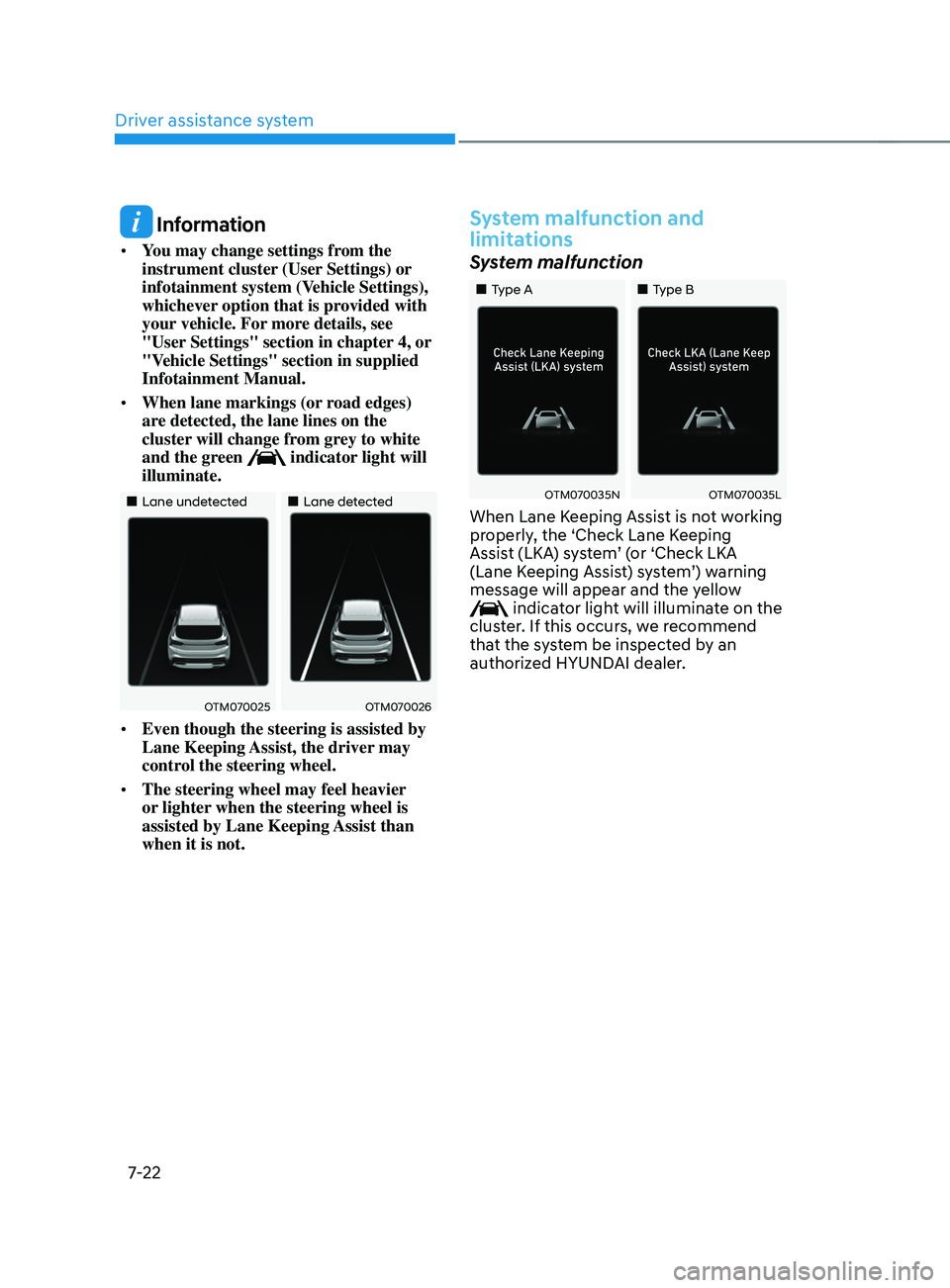
• When lane markings (or road edges)
are detected, the lane lines on the
cluster will change from grey to white
and the green
indicator light will
illuminate.
„„Lane undetected „„Lane detected
OTM070025OTM070026
• Even though the steering is assisted by
Lane Keeping Assist, the driver may
control the steering wheel.
• The steering wheel may feel heavier
or lighter when the steering wheel is
assisted by Lane Keeping Assist than
when it is not.
System malfunction and
limitations
System malfunction
„„Type A „„Type B
OTM070035NOTM070035L
When Lane Keeping Assist is not working
properly, the ‘Check Lane Keeping
Assist (LKA) system’ (or ‘Check LKA
(Lane Keeping Assist) system’) warning
message will appear and the yellow
indicator light will illuminate on the
cluster. If this occurs, we recommend
that the system be inspected by an
authorized HYUNDAI dealer.
Page 405 of 636
07
7-23
Limitations of the system
Lane Keeping Assist may not operate
normally or may operate unexpectedly
under the following circumstances:
• The lane is contaminated or difficult
to distinguish because,
- The lane markings (or r
oad edge)
is covered with rain, snow, dirt, oil,
etc.
- The color of the lane marking (
or
road edge) is not distinguishable
from the road
- There ar
e markings (or road edges)
on the road near the lane or the
markings (or road edges) on the
road looks similar to the lane
markings (or road edge)
- The lane marking (or r
oad edge) is
indistinct or damaged
- The shadow is on the lane marking (
or road edge) by a median strip,
trees, guardrail, noise barriers, etc.
• There are more than two lane
markings (or road edges) on the road
• The lane number increases or
decreases, or the lane markings (or
road edges) are crossing
• The lane markings (or road edges) are
complicated or a structure substitutes
for the lines, such as a construction
area
• There are road markings, such as
zigzag lanes, crosswalk markings and
road signs
• The lane suddenly disappears, such as
at the intersection
• The lane (or road width) is very wide
or narrow •
There is a road edge without a lane
• There is a boundary structure in the
roadway, such as a tollgate, sidewalk,
curb, etc.
• The distance to the front vehicle is
extremely short or the vehicle in front
is covering the lane marking (or road
edge)
For more details on the limitations
of the front view camera, refer to
“Forward Collision-Avoidance Assist
(FCA)” section in chapter 7.
WARNING
Take the following precautions when
using Lane Keeping Assist:
• The driver should hold the
responsibility to safely drive and
control the vehicle. Do not solely rely
on the system and drive dangerously.
• The operation of Lane Keeping
Assist can be cancelled or not
work properly depending on road
conditions and surroundings. Always
be cautious while driving.
• Refer to “Limitations of the System”
if the lane is not detected properly.
• When you are towing a trailer or
another vehicle, we recommend that
Lane Keeping Assist is turned off due
to safety reasons.
• If the vehicle is driven at high speed,
the steering wheel will not be
controlled. The driver must always
follow the speed limit when using
the system.