instrument cluster HYUNDAI SANTA FE 2021 Owner's Manual
[x] Cancel search | Manufacturer: HYUNDAI, Model Year: 2021, Model line: SANTA FE, Model: HYUNDAI SANTA FE 2021Pages: 636, PDF Size: 81.2 MB
Page 123 of 636
04
4-25
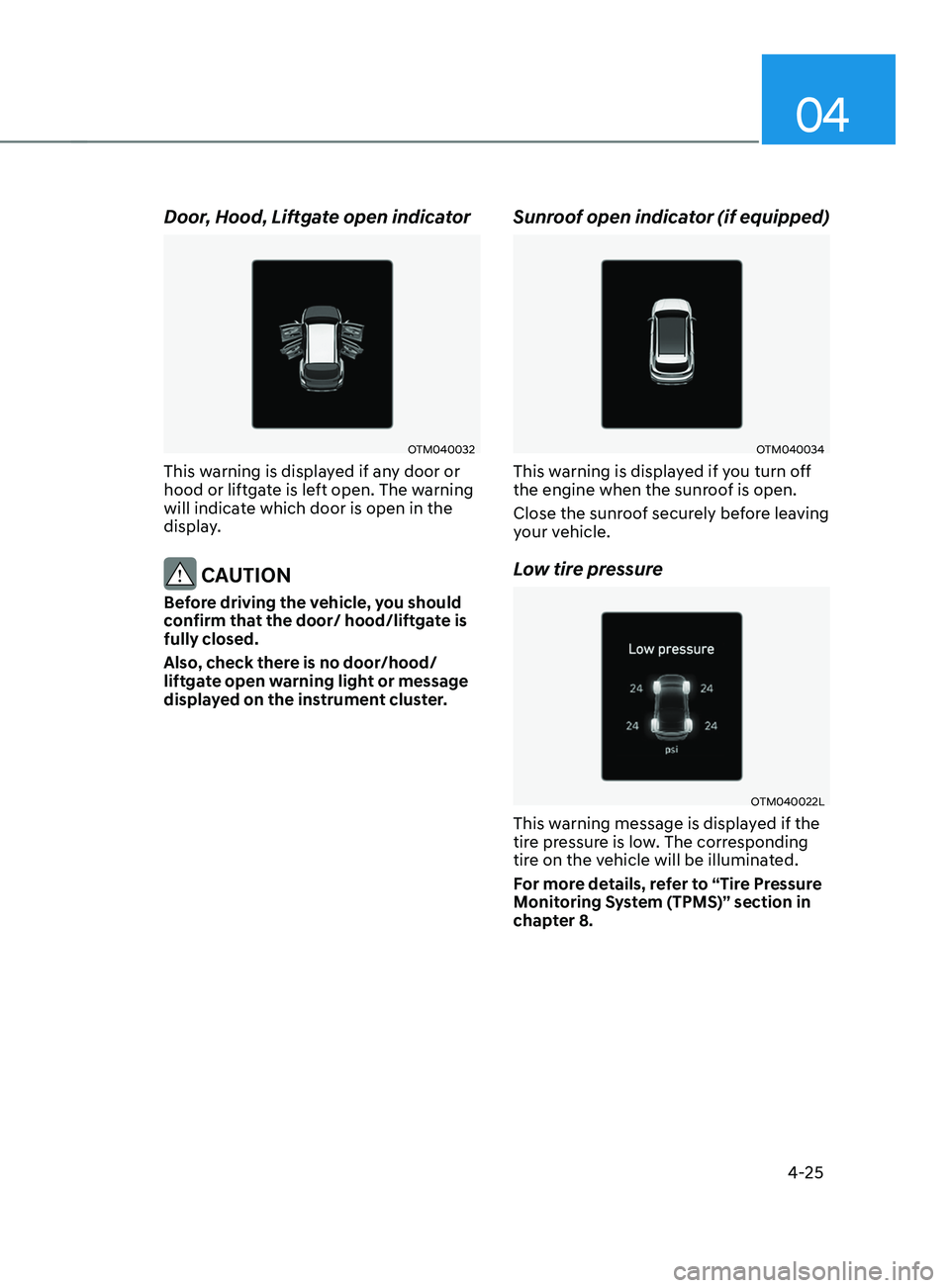
Door, Hood, Liftgate open indicator
OTM040032
This warning is displayed if any door or
hood or liftgate is left open. The warning
will indicate which door is open in the
display.
CAUTION
Before driving the vehicle, you should
confirm that the door/ hood/liftgate is
fully closed.
Also, check there is no door/hood/
liftgate open warning light or message
displayed on the instrument cluster.
Sunroof open indicator (if equipped)
OTM040034
This warning is displayed if you turn off
the engine when the sunroof is open.
Close the sunroof securely before leaving
your vehicle.
Low tire pressure
OTM040022L
This warning message is displayed if the
tire pressure is low. The corresponding
tire on the vehicle will be illuminated.
For more details, refer to “Tire Pressure
Monitoring System (TPMS)” section in
chapter 8.
Page 124 of 636
Instrument cluster
4-26
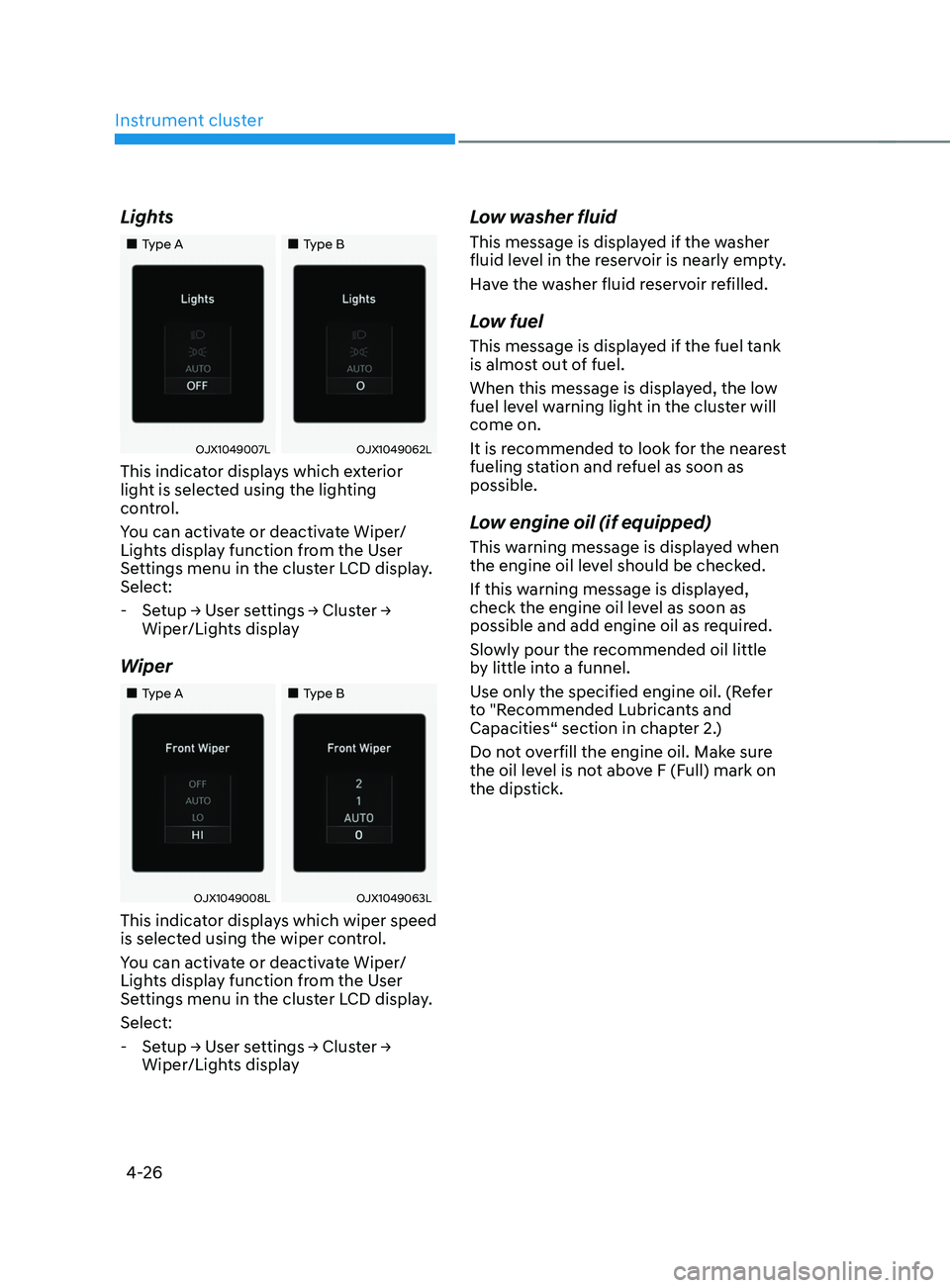
Lights
„„Type A„„Type B
OJX1049007LOJX1049062L
This indicator displays which exterior
light is selected using the lighting
control.
You can activate or deactivate Wiper/
Lights display function from the User
Settings menu in the cluster LCD display.
Select:
-Setup → U
ser
se
ttings
→ Clus
ter
→ Wiper/Lights displa
y
Wiper
„„Type A „„Type B
OJX1049008LOJX1049063L
This indicator displays which wiper speed
is selected using the wiper control.
You can activate or deactivate Wiper/
Lights display function from the User
Settings menu in the cluster LCD display.
Select:
-Setup → U
ser
se
ttings
→ Clus
ter
→ Wiper/Lights displa
y
Low washer fluid
This message is displayed if the washer
fluid level in the reservoir is nearly empty.
Have the washer fluid reservoir refilled.
Low fuel
This message is displayed if the fuel tank
is almost out of fuel.
When this message is displayed, the low
fuel level warning light in the cluster will
come on.
It is recommended to look for the nearest
fueling station and refuel as soon as
possible.
Low engine oil (if equipped)
This warning message is displayed when
the engine oil level should be checked.
If this warning message is displayed,
check the engine oil level as soon as
possible and add engine oil as required.
Slowly pour the recommended oil little
by little into a funnel.
Use only the specified engine oil. (Refer
to "Recommended Lubricants and
Capacities“ section in chapter 2.)
Do not overfill the engine oil. Make sure
the oil level is not above F (Full) mark on
the dipstick.
Page 126 of 636
Instrument cluster
4-28
Check Forward Collision-Avoidance
Assist system (if equipped)
This warning message is displayed
if there is a problem with Forward
Collision-Avoidance Assist. Have the
vehicle inspected by an authorized
HYUNDAI dealer.
For more details, refer to “Forward
Collision-Avoidance Assist (FCA)” in
chapter 6.
Check Lane Keeping Assist system (if
equipped)
This warning message is displayed if
there is a problem with Lane Keeping
Assist. Have the vehicle inspected by an
authorized HYUNDAI dealer.
For more details, refer to “Lane Keeping
Assist (LKA)” in chapter 6.
Check Blind-Spot Collision Warning
system (if equipped)
This warning message is displayed
if there is a problem with Blind-Spot
Collision Warning. Have the vehicle
inspected by an authorized HYUNDAI
dealer.
For more details, refer to “Blind-Spot
Collision Warning (BCW) ” in chapter 6.
Check Driver Attention Warning
system (if equipped)
This warning message is displayed if
there is a problem with Driver Attention
Warning. Have the vehicle inspected by
an authorized HYUNDAI dealer.
For more details, refer to “Driver
Attention Warning (DAW)” in chapter 6.
Check High Beam Assist system
(if equipped)
This warning message is displayed if
there is a problem with the High Beam
Assist. Have the vehicle inspected by an
authorized HYUNDAI dealer.
For more details, refer to “High Beam
Assist (HBA)” in chapter 5.
Check Smart Cruise Control system
(if equipped)
This warning message is displayed if
there is a problem with Smart Cruise
Control. Have the vehicle inspected by
an authorized HYUNDAI dealer.
For more details, refer to “Smart Cruise
Control (SCC)” in chapter 6.
Page 127 of 636
04
4-29
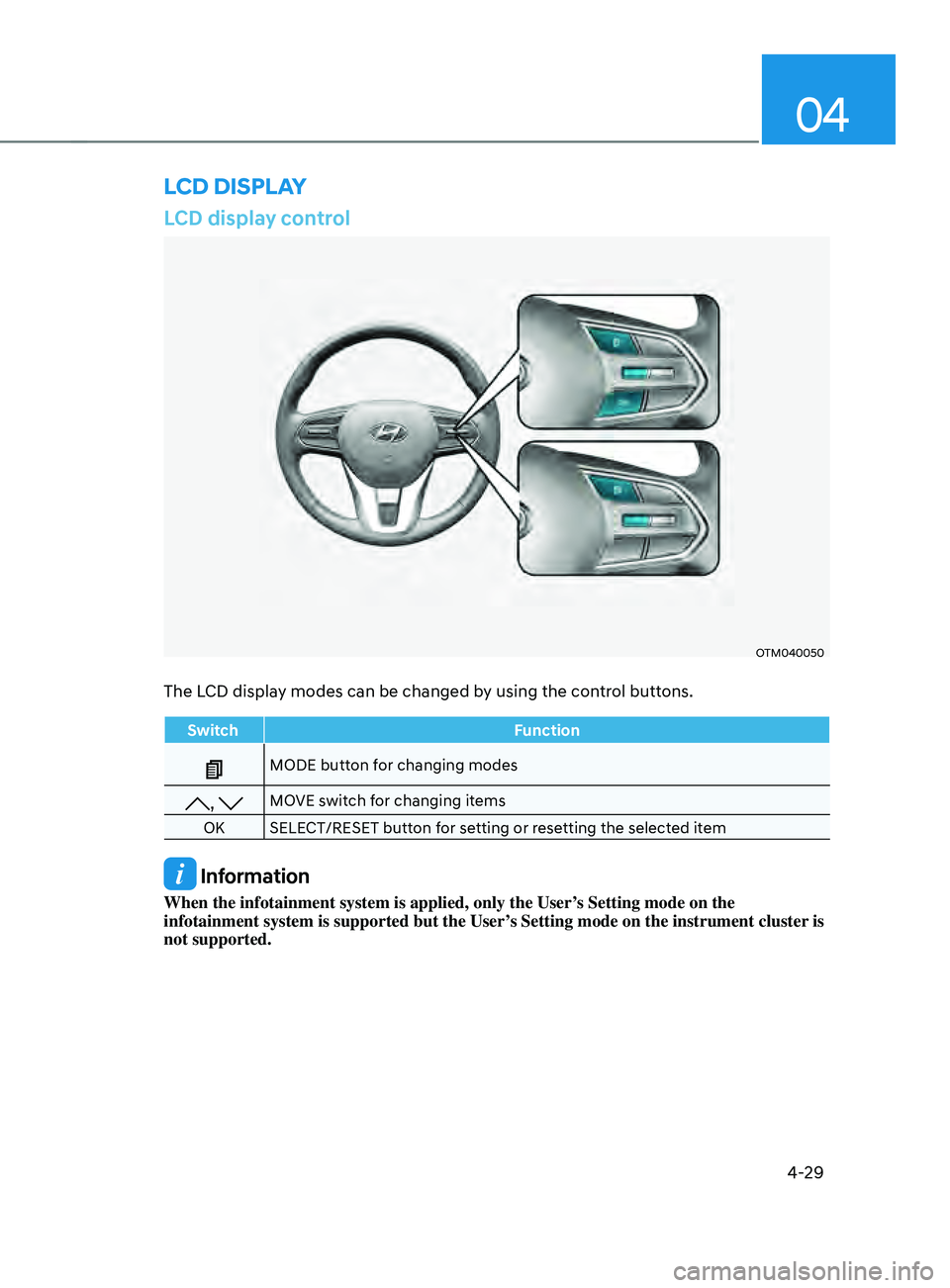
LCD display control
OTM040050
The LCD display modes can be changed by using the control buttons.
SwitchFunction
MODE button for changing modes
, MOVE switch for changing items
OK SELECT/RESET button for setting or resetting the selected item
Information
When the infotainment system is applied, only the User’s Setting mode on the
infotainment system is supported but the User’s Setting mode on the instrument cluster is
not supported.
LCD DISPLAY
Page 128 of 636
Instrument cluster4-30
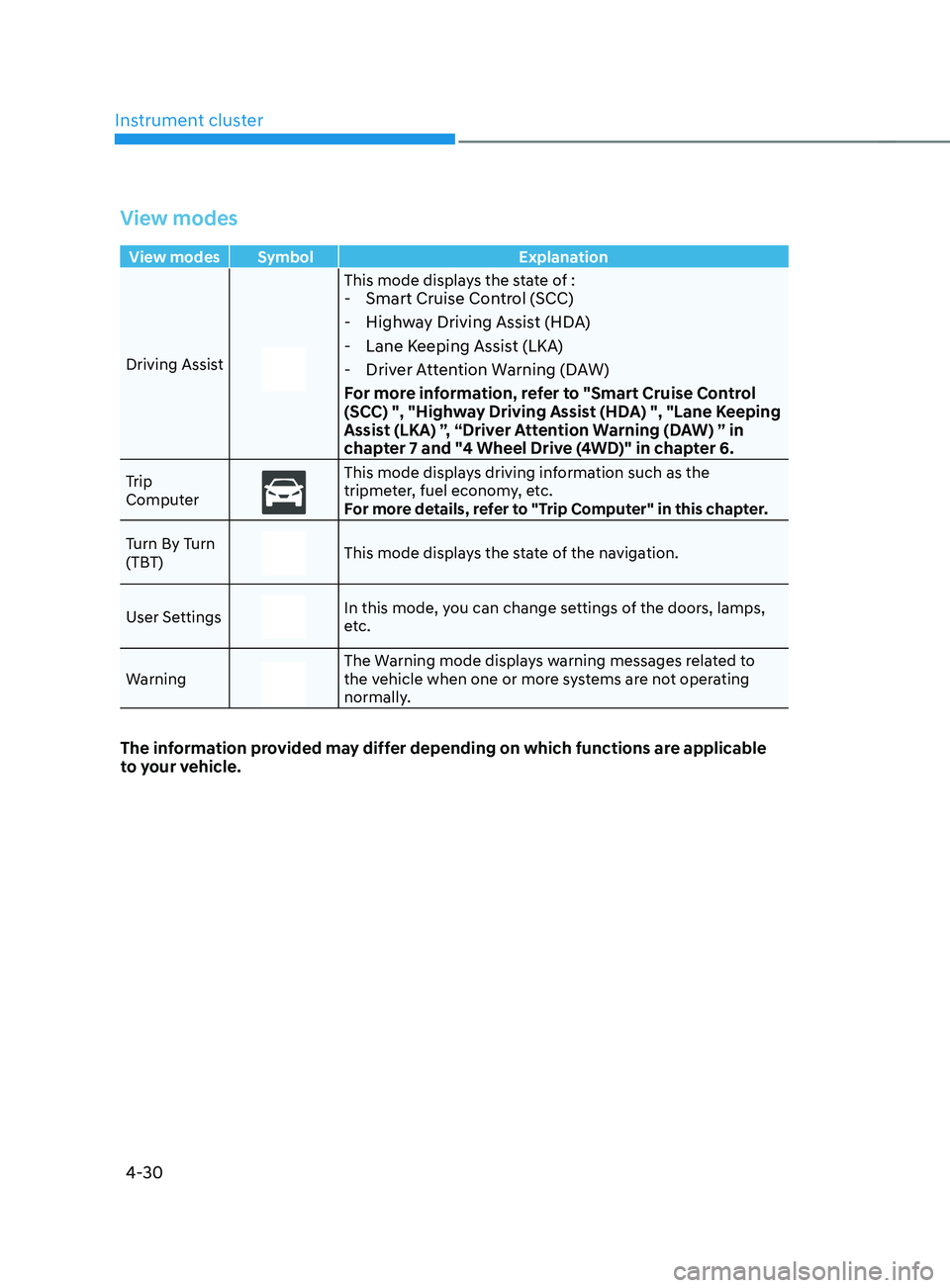
View modes
View modes Symbol Explanation
Driving Assist
This mode displays the state of : - Smart Cruise Control (SCC)
- Highway Driving Assist (HDA)
- Lane Keeping Assist (LKA)
- Driver Attention Warning (DAW)
For more information, refer to "Smart Cruise Control
(SCC) ", "Highway Driving Assist (HDA) ", "Lane Keeping
Assist (LKA) ”, “Driver Attention Warning (DAW) ” in
chapter 7 and "4 Wheel Drive (4WD)" in chapter 6.
Trip
ComputerThis mode displays driving information such as the
tripmeter, fuel economy, etc.
For more details, refer to "Trip Computer" in this chapter.
Turn By Turn
(TBT)
This mode displays the state of the navigation.
User Settings
In this mode, you can change settings of the doors, lamps,
etc.
Warning
The Warning mode displays warning messages related to
the vehicle when one or more systems are not operating
normally.
The information provided may differ depending on which functions are applicable
to your vehicle.
Page 130 of 636
Instrument cluster4-32
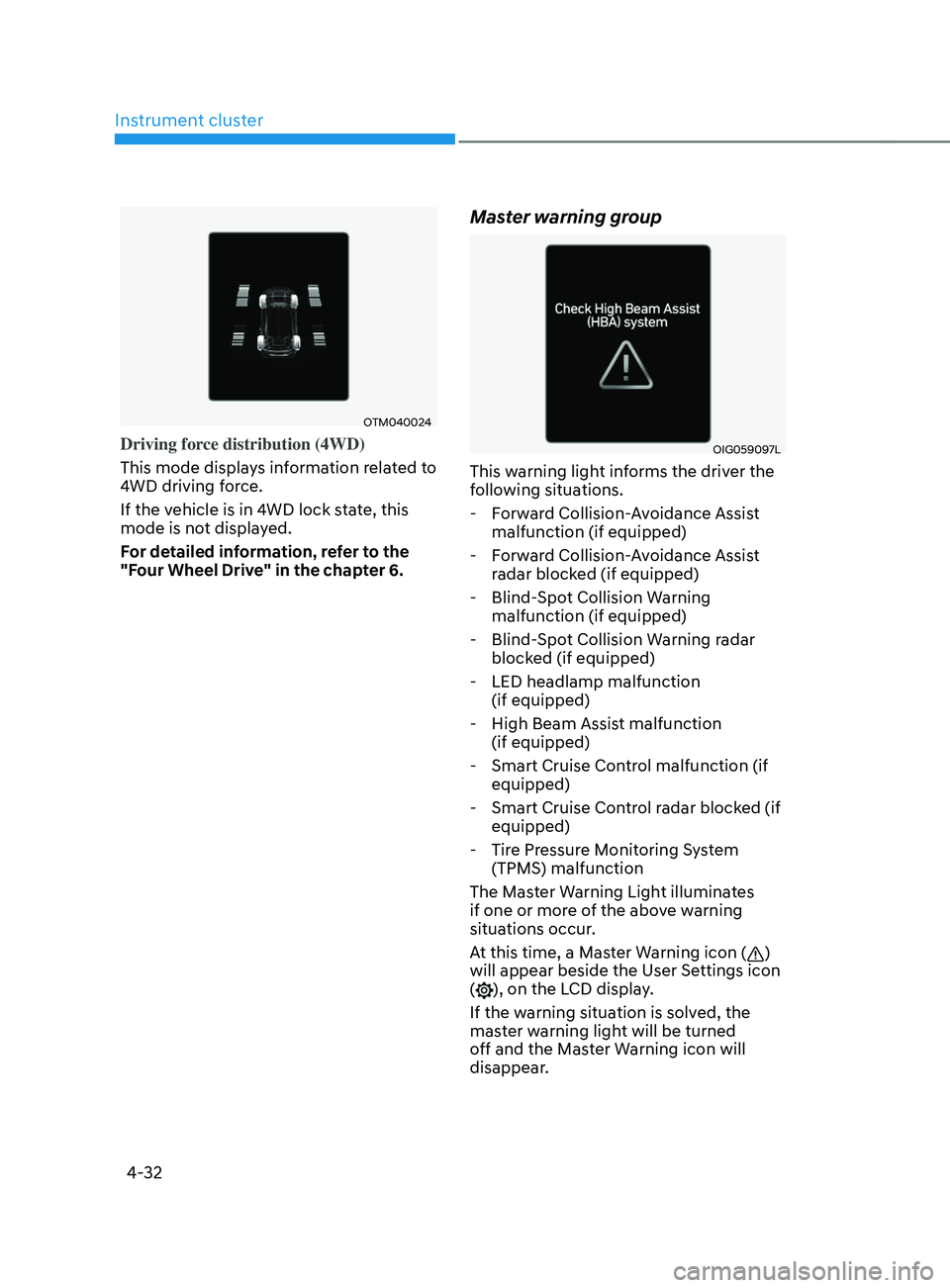
OTM040024
Driving force distribution (4WD)
This mode displays information related to
4WD driving force.
If the vehicle is in 4WD lock state, this
mode is not displayed.
For detailed information, refer to the
"Four Wheel Drive" in the chapter 6.
Master warning group
OIG059097L
This warning light informs the driver the
following situations. - Forward Collision-Avoidance Assist malfunction (if equipped)
- Forward Collision-Avoidance Assist radar blocked (if equipped)
- Blind-Spot Collision Warning malfunction (if equipped)
- Blind-Spot Collision Warning radar blocked (if equipped)
- LED headlamp malfunction (if equipped)
- High Beam Assist malfunction (if equipped)
- Smart Cruise Control malfunction (if equipped)
- Smart Cruise Control radar blocked (if equipped)
- Tire Pressure Monitoring System (TPMS) malfunction
The Master Warning Light illuminates
if one or more of the above warning
situations occur.
At this time, a Master Warning icon (
)
will appear beside the User Settings icon
(
), on the LCD display.
If the warning situation is solved, the
master warning light will be turned
off and the Master Warning icon will
disappear.
Page 131 of 636
04
4-33
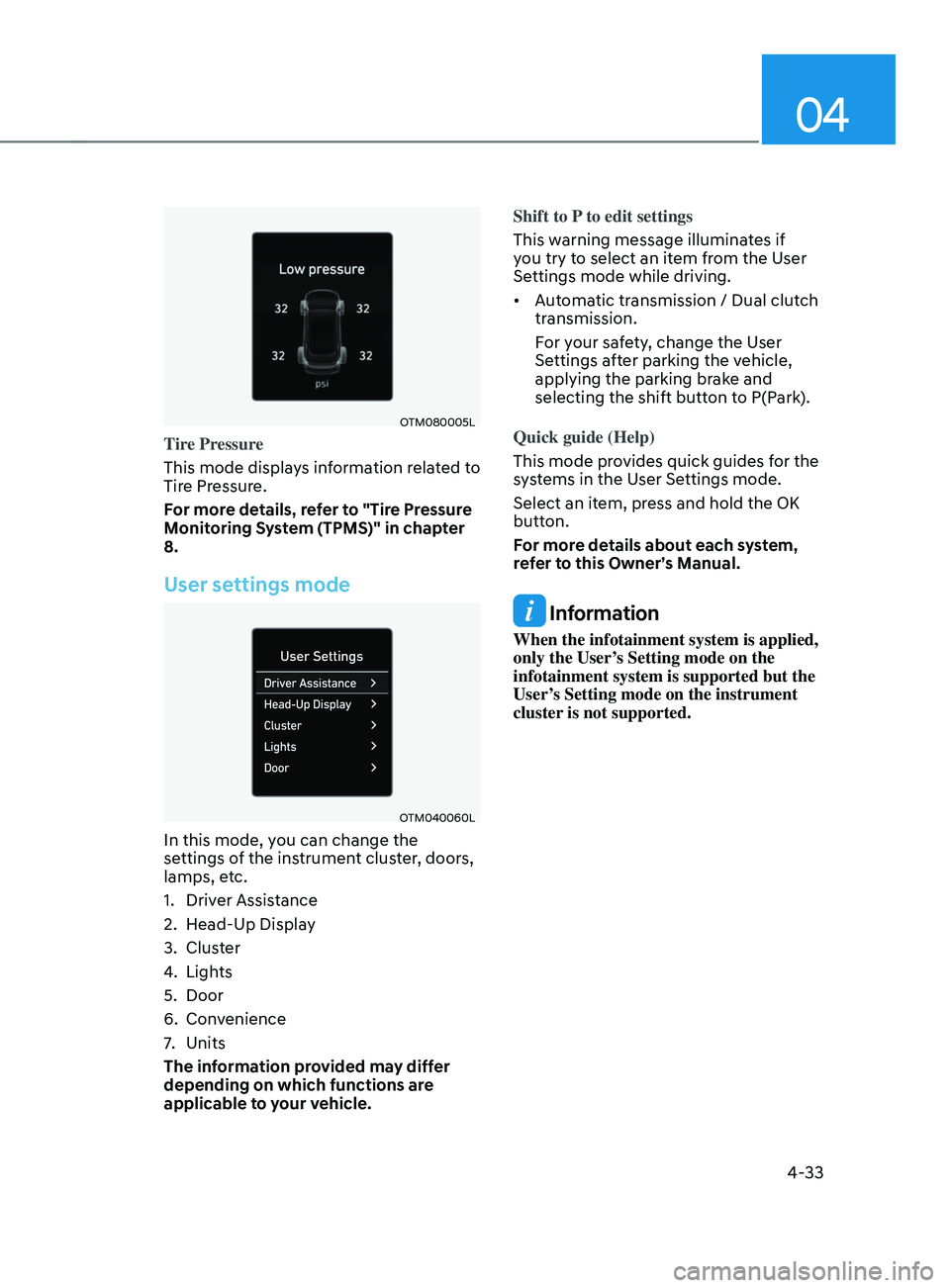
OTM080005L
Tire Pressure
This mode displays information related to
Tire Pressure.
For more details, refer to "Tire Pressure
Monitoring System (TPMS)" in chapter
8.
User settings mode
OTM040060L
In this mode, you can change the
settings of the instrument cluster, doors,
lamps, etc.
1.
Driver Assis
tance
2.
Head-Up Displa
y
3.
Clust
er
4.
Lights
5.
Door
6.
Conv
enience
7.
Units
The inf
ormation provided may differ
depending on which functions are
applicable to your vehicle. Shift to P to edit settings
This warning message illuminates if
you try to select an item from the User
Settings mode while driving.
•
Automatic transmission / Dual clutch
transmission.
For your safety, change the User
Settings after parking the vehicle,
applying the parking brake and
selecting the shift button to P(Park).
Quick guide (Help)
This mode provides quick guides for the
systems in the User Settings mode.
Select an item, press and hold the OK
button.
For more details about each system,
refer to this Owner’s Manual.
Information
When the infotainment system is applied,
only the User’s Setting mode on the
infotainment system is supported but the
User’s Setting mode on the instrument
cluster is not supported.
Page 132 of 636
Instrument cluster
4-34
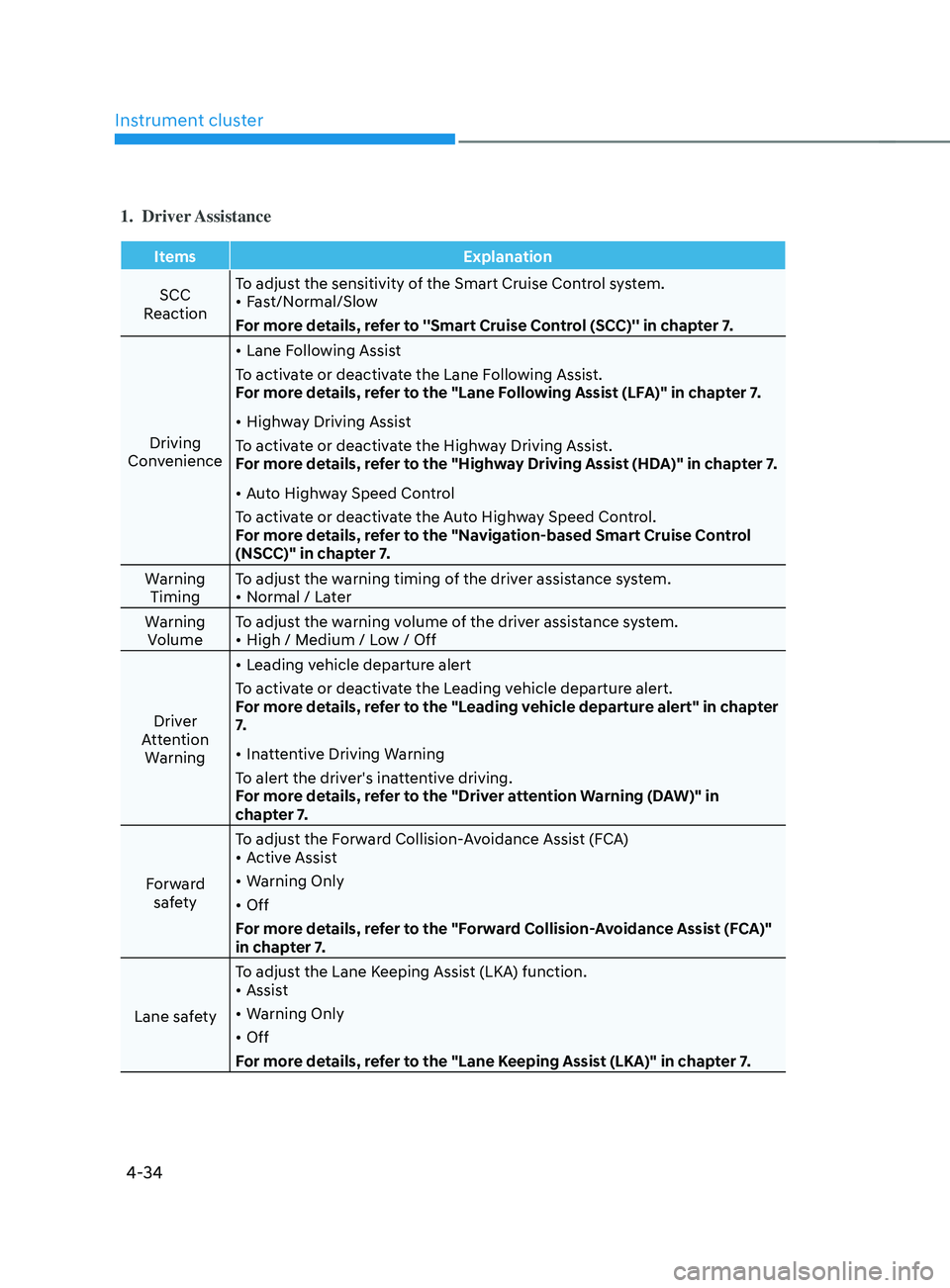
1. Driver Assistance
ItemsExplanation
SCC
Reaction To adjust the sensitivity of the Smart Cruise Control system.
•
Fast/Normal/Slow
For more details, refer to ''Smart Cruise Control (SCC)'' in chapter 7.
Driving
Convenience •
Lane Following Assist
To activate or deactivate the Lane Following Assist.
For more details, refer to the "Lane Following Assist (LFA)" in chapter 7.
• Highway Driving Assist
To activate or deactivate the Highway Driving Assist.
For more details, refer to the "Highway Driving Assist (HDA)" in chapter 7.
• Auto Highway Speed Control
To activate or deactivate the Auto Highway Speed Control.
For more details, refer to the "Navigation-based Smart Cruise Control
(NSCC)" in chapter 7.
Warning Timing To adjust the warning timing of the driver assistance system.
•
Normal / Later
Warning Volume To adjust the warning volume of the driver assistance system.
•
High / Medium / Low / Off
Driver
Attention Warning •
Leading vehicle departure alert
To activate or deactivate the Leading vehicle departure alert.
For more details, refer to the "Leading vehicle departure alert" in chapter
7.
• Inattentive Driving Warning
To alert the driver's inattentive driving.
For more details, refer to the "Driver attention Warning (DAW)" in
chapter 7.
Forward safety To adjust the Forward Collision-Avoidance Assist (FCA)
•
Active Assist
• Warning Only
• Off
For more details, refer to the "Forward Collision-Avoidance Assist (FCA)"
in chapter 7.
Lane safety To adjust the Lane Keeping Assist (LKA) function.
•
Assist
• Warning Only
• Off
For more details, refer to the "Lane Keeping Assist (LKA)" in chapter 7.
Page 134 of 636
Instrument cluster
4-36
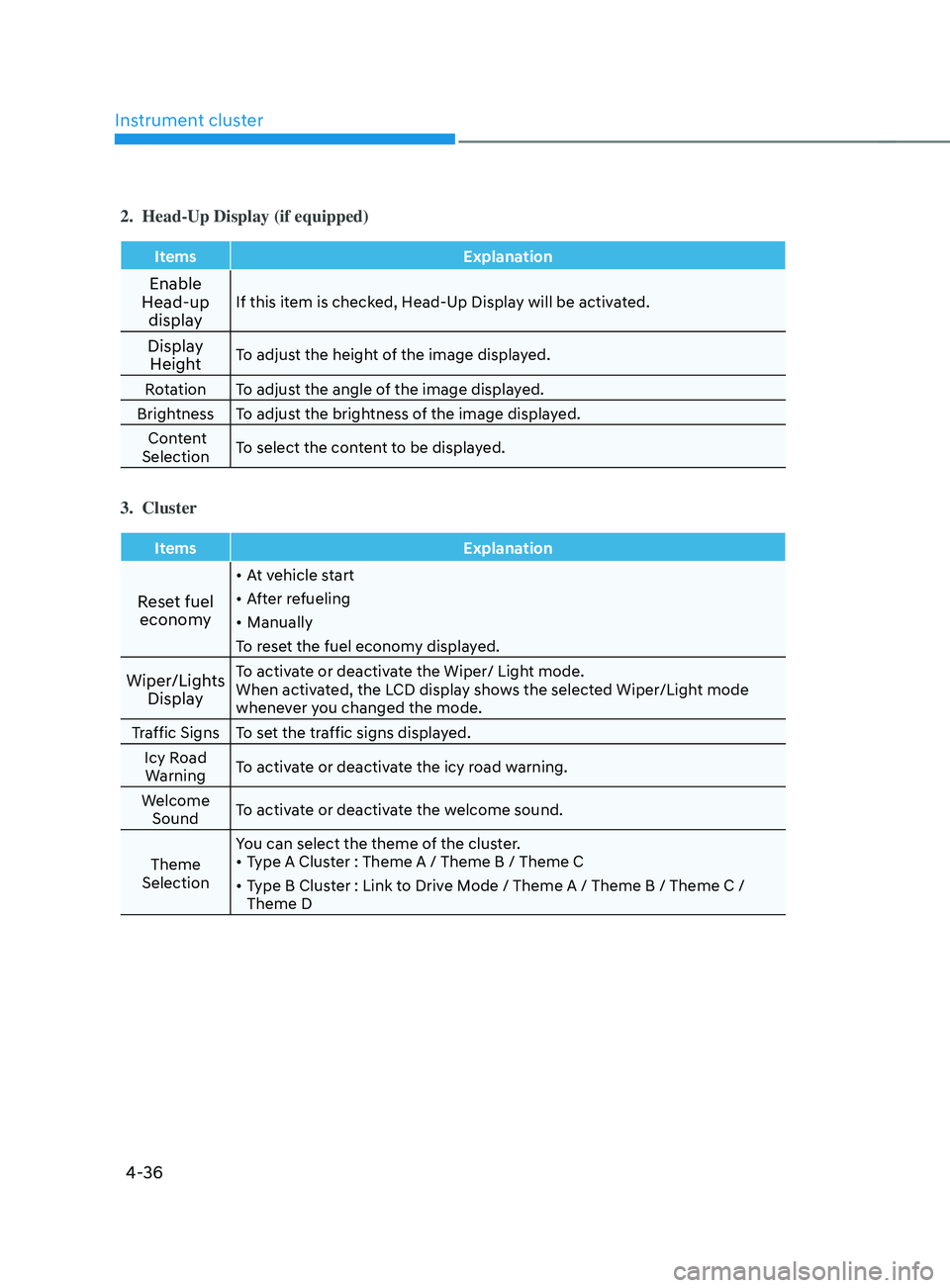
2. Head-Up Display (if equipped)
ItemsExplanation
Enable
Head-up display If this item is checked, Head-Up Display will be activated.
Display Height To adjust the height of the image displayed.
Rotation To adjust the angle of the image displayed.
Brightness To adjust the brightness of the image displayed. Content
Selection To select the content to be displayed.
3. Cluster
Items
Explanation
Reset fuel
economy
• At vehicle start
• After refueling
• Manually
To reset the fuel economy displayed.
Wiper/Lights DisplayTo activate or deactivate the Wiper/ Light mode.
When activated, the LCD display shows the selected Wiper/Light mode
whenever you changed the mode.
Traffic Signs To set the traffic signs displayed. Icy Road Warning To activate or deactivate the icy road warning.
Welcome Sound To activate or deactivate the welcome sound.
Theme
Selection You can select the theme of the cluster.
•
Type A Cluster : Theme A / Theme B / Theme C
• Type B Cluster : Link to Drive Mode / Theme A / Theme B / Theme C /
Theme D
Page 136 of 636
Instrument cluster
4-38
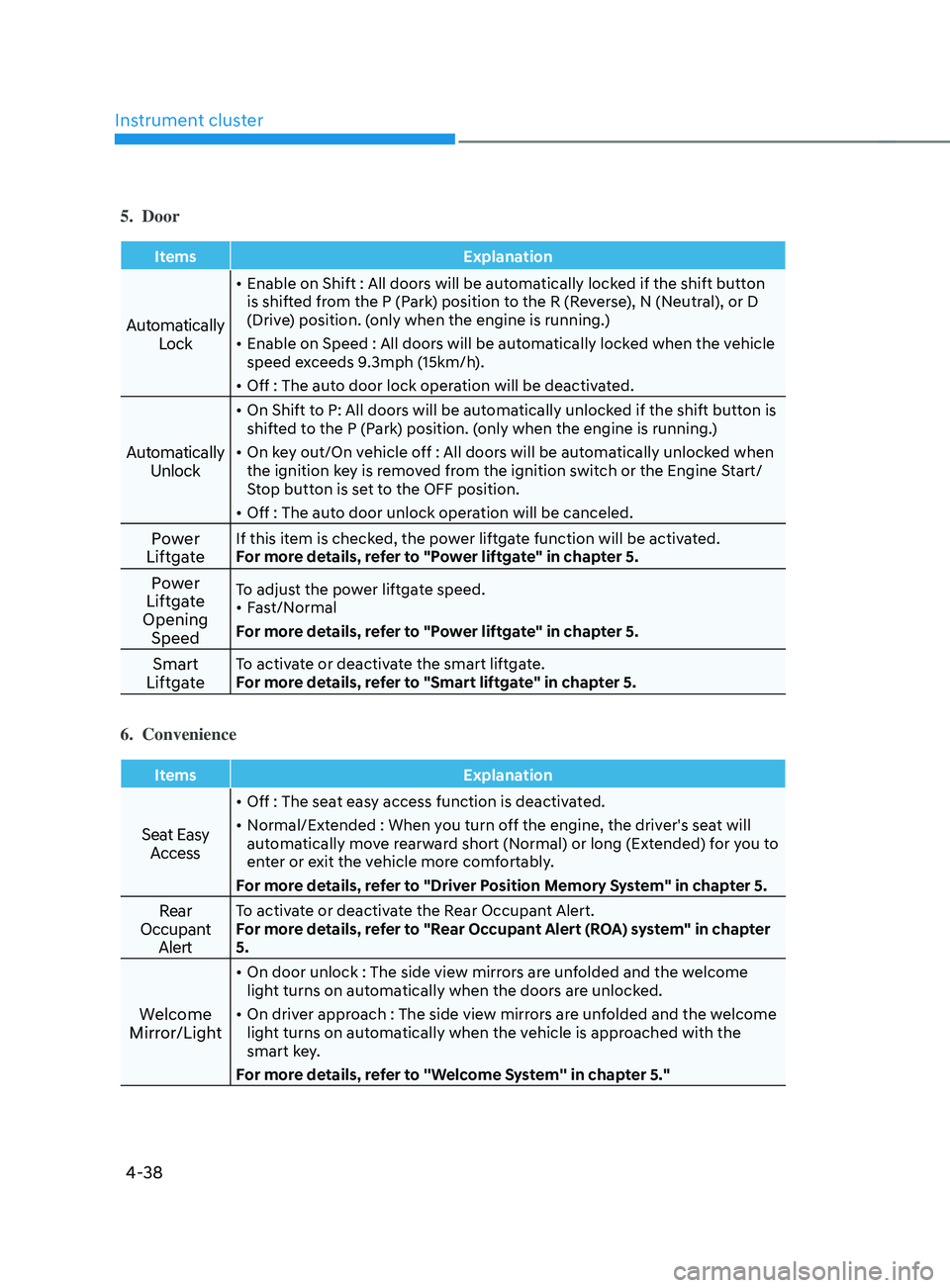
5. Door
ItemsExplanation
Automatically
Lock
• Enable on Shift : All doors will be automatically locked if the shift button
is shifted from the P (Park) position to the R (Reverse), N (Neutral), or D
(Drive) position. (only when the engine is running.)
• Enable on Speed : All doors will be automatically locked when the vehicle
speed exceeds 9.3mph (15km/h).
• Off : The auto door lock operation will be deactivated.
Automatically
Unlock
• On Shift to P: All doors will be automatically unlocked if the shift button is
shifted to the P (Park) position. (only when the engine is running.)
• On key out/On vehicle off : All doors will be automatically unlocked when
the ignition key is removed from the ignition switch or the Engine Start/
Stop button is set to the OFF position.
• Off : The auto door unlock operation will be canceled.
Power
LiftgateIf this item is checked, the power liftgate function will be activated.
For more details, refer to "Power liftgate" in chapter 5.
Power
Liftgate
Opening SpeedTo adjust the power liftgate speed.
• Fast/Normal
For more details, refer to "Power liftgate" in chapter 5.
Smart
LiftgateTo activate or deactivate the smart liftgate.
For more details, refer to "Smart liftgate" in chapter 5.
6. Convenience
Items Explanation
Seat Easy
Access
• Off : The seat easy access function is deactivated.
• Normal/Extended : When you turn off the engine, the driver's seat will
automatically move rearward short (Normal) or long (Extended) for you to
enter or exit the vehicle more comfortably.
For more details, refer to "Driver Position Memory System" in chapter 5.
Rear
Occupant AlertTo activate or deactivate the Rear Occupant Alert.
For more details, refer to "Rear Occupant Alert (ROA) system" in chapter
5.
Welcome
Mirror/Light
• On door unlock : The side view mirrors are unfolded and the welcome
light turns on automatically when the doors are unlocked.
• On driver approach : The side view mirrors are unfolded and the welcome
light turns on automatically when the vehicle is approached with the
smart key.
For more details, refer to ''Welcome System'' in chapter 5."