lane assist HYUNDAI SANTA FE 2021 Owner's Manual
[x] Cancel search | Manufacturer: HYUNDAI, Model Year: 2021, Model line: SANTA FE, Model: HYUNDAI SANTA FE 2021Pages: 636, PDF Size: 81.2 MB
Page 406 of 636
Driver assistance system
7-24
• If any other system’s warning
message is displayed or audible
warning is generated, Lane Keeping
Assist warning message may not be
displayed and audible warning may
not be generated.
• You may not hear the warning
sound of Lane Keeping Assist if the
surrounding is noisy.
• If you attach objects to the steering
wheel, steering may not be assisted
properly.
• Lane Keeping Assist may not operate
for 15 seconds after the vehicle is
started, or the front view camera is
initialized.
• Lane Keeping Assist will not operate
when:
-The turn signal or hazard w
arning
flasher is turned on
- The vehicle is no
t driven in the
center of the lane when the system
is turned on or right after changing
a lane
- ESC (Electronic S
tability Control)
or VSM (Vehicle Stability
Management) is activated
- The vehicle is driv
en on a sharp
curve
- 35 mph (55 km/h) or abo
ve 130
mph (210 km/h)
- The vehicle mak
es sharp lane
changes
- The vehicle br
akes suddenly
Page 407 of 636
07
7-25
bLInD-spOT COLLIsIOn-AVOIDAnCE A ssIsT (bC A) (IF
EQUI
ppED)
Blind-Spot Collision-Avoidance Assist
is designed to help detect and monitor
approaching vehicles in the driver’s
blind spot area and warn the driver
of a possible collision with a warning
message and audible warning.
In addition, if there is a risk of collision
when changing lanes or driving forward
out of a parking space, the system will
help avoid a collision by applying the
brake.
OJX1079256
Blind-Spot Collision-Avoidance Assist
helps detect and inform the driver that a
vehicle is in the blind spot.
CAUTION
The detecting range may vary
depending on the speed of your vehicle.
However, even if there is a vehicle in
the blind spot area, the system may
not warn you when you pass by at high
speeds.
OJX1079026
Blind-Spot Collision Assist helps detect
and informs the driver that a vehicle is
approaching at high speed from the blind
spot area.
CAUTION
Warning timing may vary depending on
the speed of the vehicle approaching at
high speed.
OJX1079027
When changing lanes by detecting
the lane ahead, if the system judges
that there is a collision risk with an
approaching vehicle in the blind spot,
the system will help avoid a collision by
applying the brake.
Page 412 of 636
Driver assistance system
7-30
Collision Warning
• Collision warning will operate when
the turn signal is turned on in the
direction of the detected vehicle.
• If ‘Warning Only’ is selected from the
Settings menu, the collision warning
will operate when your vehicle
approaches the lane the blind spot
vehicle is detected.
• To warn the driver of a collision, the
warning light on the side view mirror
and head-up display (if equipped) will
blink. At the same time, an audible
warning will sound.
• When the turn signal is turned off or
you move away from the lane, the
collision warning will be canceled
and the system will return to vehicle
detection state. WARNING
• The detecting range of the rear
corner radar is determined by a
standard road width, therefore, on a
narrow road, the system may detect
other vehicles in the next next lane
and warn you. In contrast, on a wide
road, the system may not be able to
detect a vehicle driving in the next
lane and may not warn you.
• When the hazard warning flasher is
on, the collision warning by the turn
signal will not operate.
Information
If the driver's seat is on the left side, the
collision warning may occur when you
turn left. Maintain a proper distance with
the vehicles in the left lane. If the driver's
seat is on the right side, the collision
warning may occur when you turn right.
Maintain a proper distance with the
vehicles in the right lane.
Page 413 of 636
07
7-31
OTM070017N
Collision-Avoidance Assist (while driving)
• To warn the driver of a collision, the
warning light on the side view mirror
will blink and a warning message will
appear on the cluster. At the same
time, an audible warning will sound
and warning light on the head-up
display (if equipped) will blink.
• The system will operate when your
vehicle speed is between 40~120
mph (60~200 km/h) and both lane
markings of the driving lane are
detected.
• Emergency braking will be assisted to
help prevent collision with the vehicle
in the blind spot area.
WARNING
• Collision-Avoidance Assist will
be canceled under the following
circumstances:
-Your v
ehicle enters the next lane
by a certain distance
- Your v
ehicle is away from the
collision risk
- The st
eering wheel is sharply
steered
- The brak
e pedal is depressed
-Forw
ard Collision-Avoidance Assist
is operating
• After system operation or lane
change, you must drive to the center
of the lane. The system will not
operate if the vehicle is not driven in
the center of the lane.
Page 418 of 636
Driver assistance system
7-36
Braking control may not work, driver’s
attention is required in the following
circumstances:
• The vehicle severely vibrates while
driving over a bumpy road, uneven
road or concrete patch
• Driving on a slippery surface due to
snow, water puddle, ice, etc.
• The tire pressure is low or a tire is
damaged
• The brake is reworked
• The vehicle makes abrupt lane
changes
For more details on the limitations
of the front view camera, refer to
“Forward Collision-Avoidance Assist
(FCA)” and “Lane Keeping Assist (LKA)”
section in chapter 7. WARNING
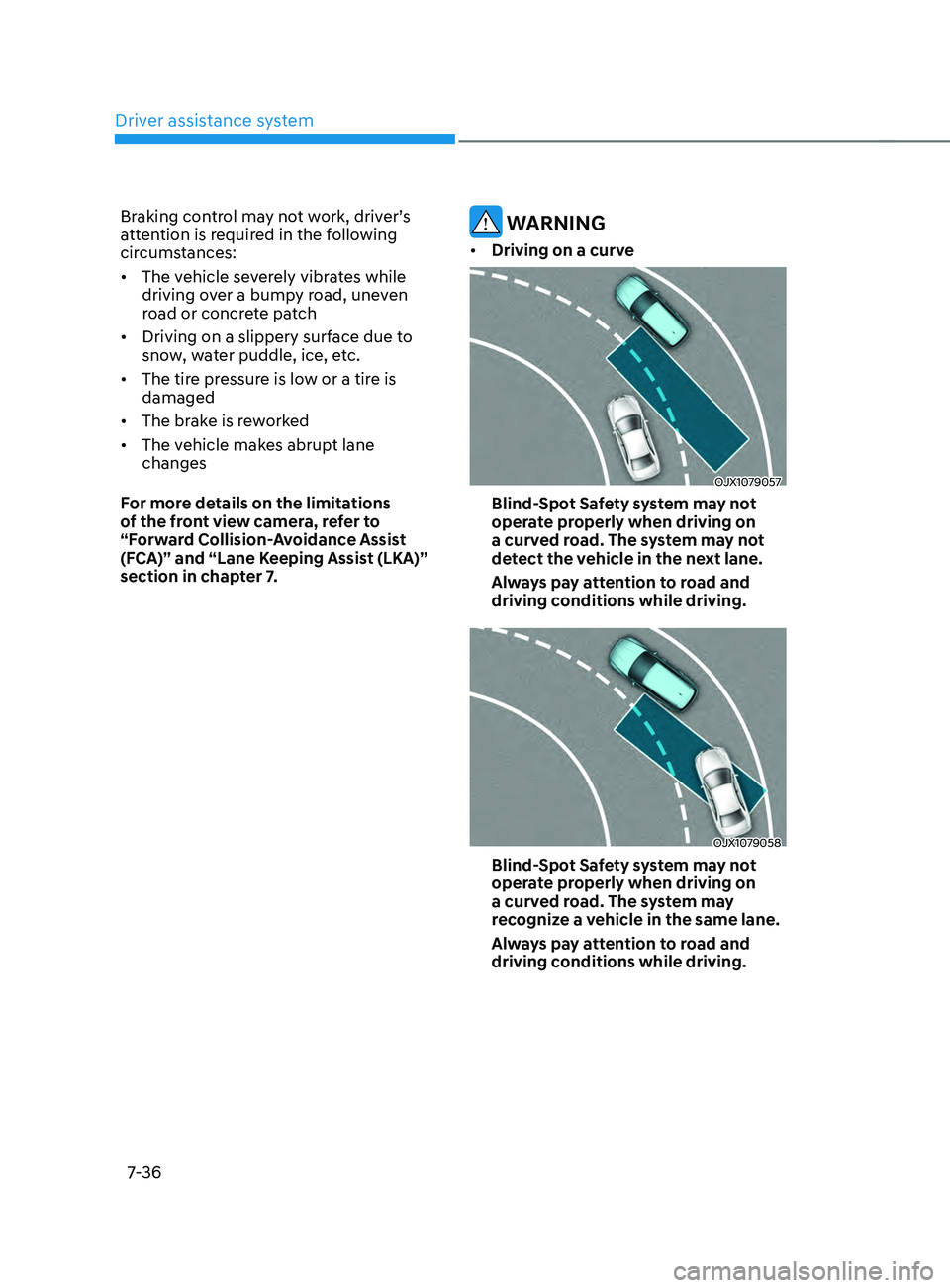
• Driving on a curve
OJX1079057
Blind-Spot Safety system may not
operate properly when driving on
a curved road. The system may not
detect the vehicle in the next lane.
Always pay attention to road and
driving conditions while driving.
OJX1079058
Blind-Spot Safety system may not
operate properly when driving on
a curved road. The system may
recognize a vehicle in the same lane.
Always pay attention to road and
driving conditions while driving.
Page 420 of 636
Driver assistance system
7-38
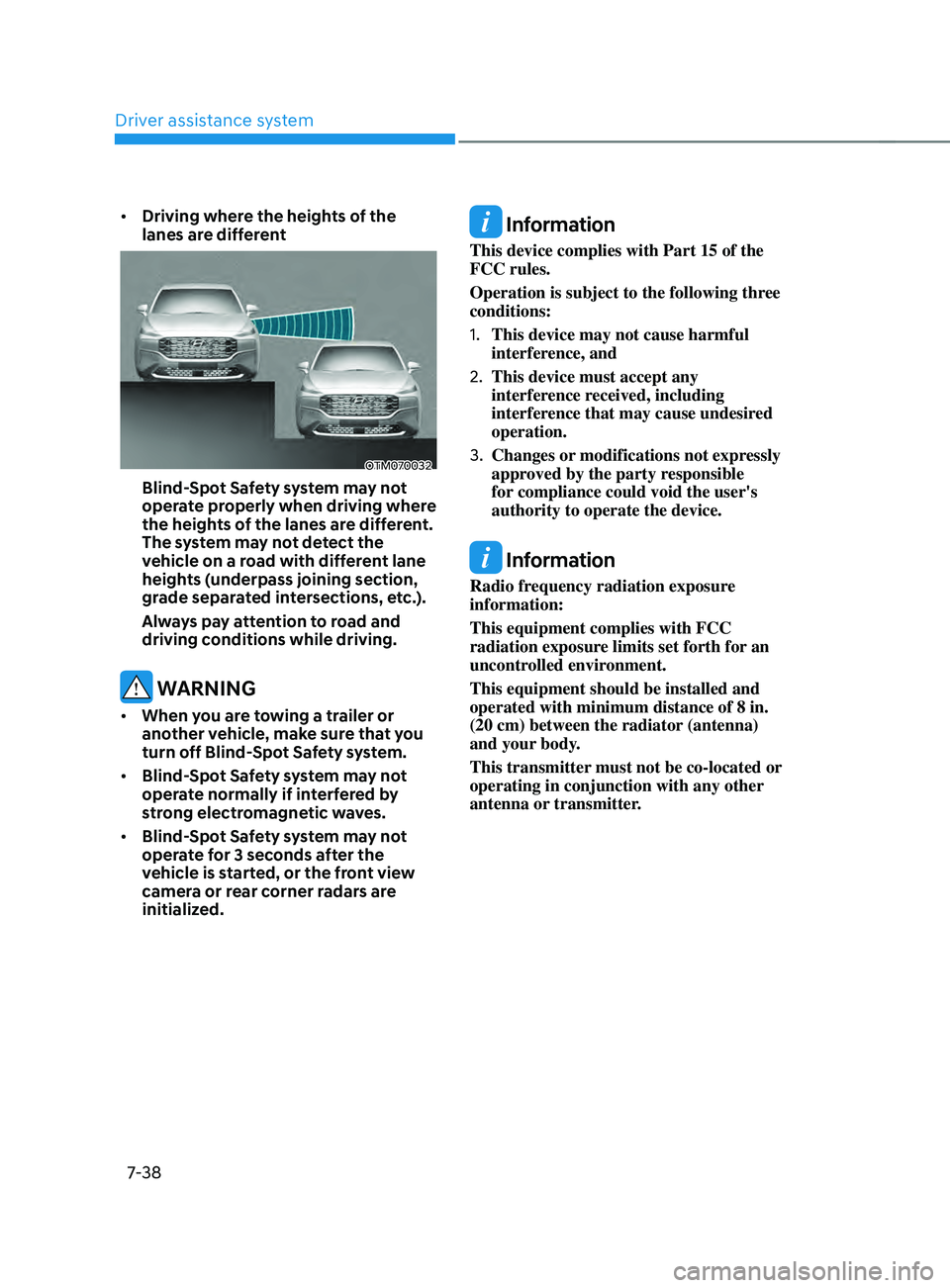
• Driving where the heights of the
lanes are different
OTM070032
Blind-Spot Safety system may not
operate properly when driving where
the heights of the lanes are different.
The system may not detect the
vehicle on a road with different lane
heights (underpass joining section,
grade separated intersections, etc.).
Always pay attention to road and
driving conditions while driving.
WARNING
• When you are towing a trailer or
another vehicle, make sure that you
turn off Blind-Spot Safety system.
• Blind-Spot Safety system may not
operate normally if interfered by
strong electromagnetic waves.
• Blind-Spot Safety system may not
operate for 3 seconds after the
vehicle is started, or the front view
camera or rear corner radars are
initialized.
Information
This device complies with Part 15 of the
FCC rules.
Operation is subject to the following three
conditions:
1.
This device may not cause harmful
interference, and
2.
This device must accept any
interference r
eceived, including
interference that may cause undesired
operation.
3.
Changes or modifications not expr
essly
approved by the party responsible
for compliance could void the user's
authority to operate the device.
Information
Radio frequency radiation exposure
information:
This equipment complies with FCC
radiation exposure limits set forth for an
uncontrolled environment.
This equipment should be installed and
operated with minimum distance of 8 in.
(20 cm) between the radiator (antenna)
and your body.
This transmitter must not be co-located or
operating in conjunction with any other
antenna or transmitter.
Page 430 of 636
Driver assistance system
7-48
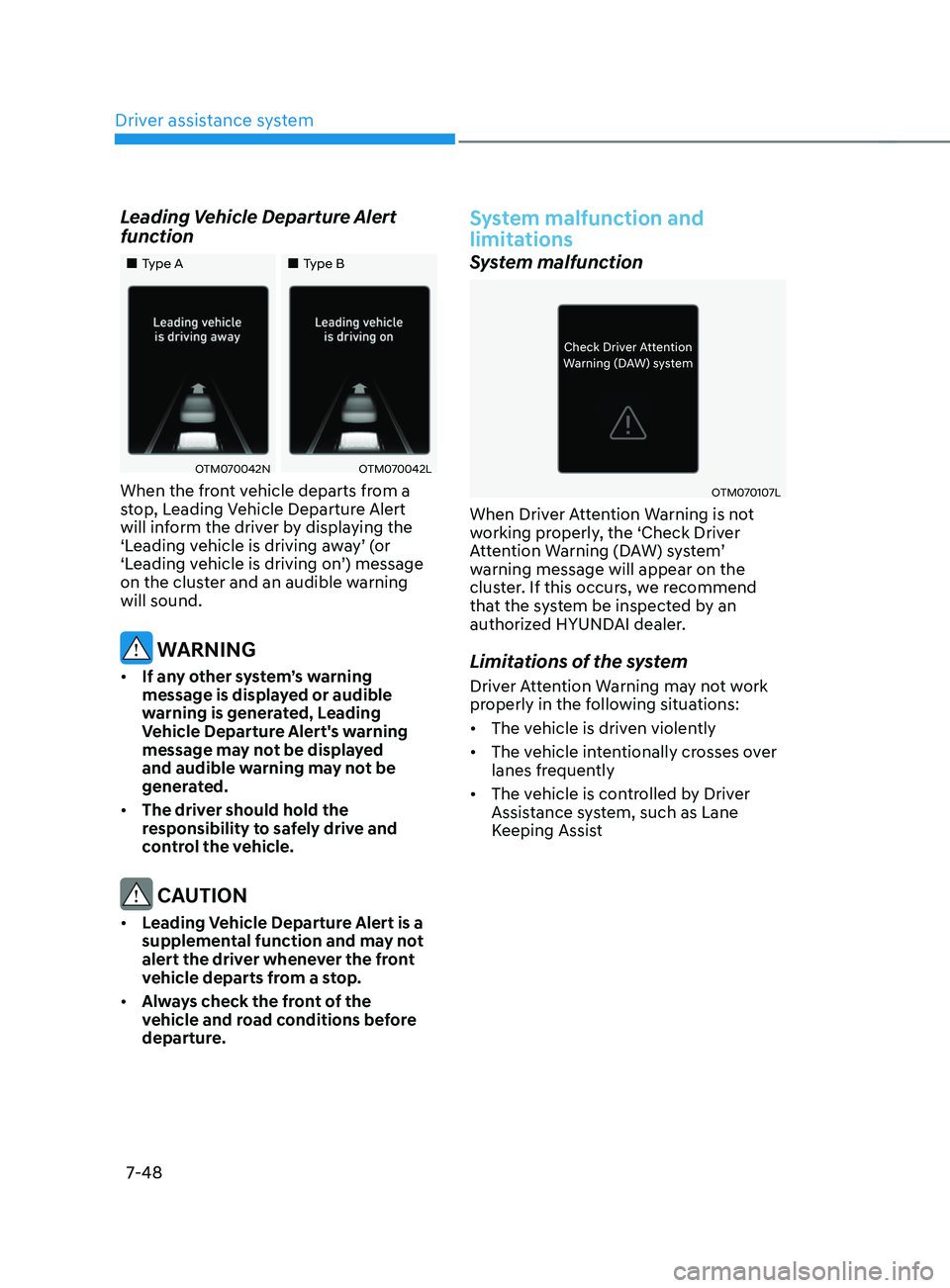
Leading Vehicle Departure Alert
function
„„Type A„„Type B
OTM070042NOTM070042L
When the front vehicle departs from a
stop, Leading Vehicle Departure Alert
will inform the driver by displaying the
‘Leading vehicle is driving away’ (or
‘Leading vehicle is driving on’) message
on the cluster and an audible warning
will sound.
WARNING
• If any other system’s warning
message is displayed or audible
warning is generated, Leading
Vehicle Departure Alert's warning
message may not be displayed
and audible warning may not be
generated.
• The driver should hold the
responsibility to safely drive and
control the vehicle.
CAUTION
• Leading Vehicle Departure Alert is a
supplemental function and may not
alert the driver whenever the front
vehicle departs from a stop.
• Always check the front of the
vehicle and road conditions before
departure.
System malfunction and
limitations
System malfunction
OTM070107L
When Driver Attention Warning is not
working properly, the ‘Check Driver
Attention Warning (DAW) system’
warning message will appear on the
cluster. If this occurs, we recommend
that the system be inspected by an
authorized HYUNDAI dealer.
Limitations of the system
Driver Attention Warning may not work
properly in the following situations:
• The vehicle is driven violently
• The vehicle intentionally crosses over
lanes frequently
• The vehicle is controlled by Driver
Assistance system, such as Lane
Keeping Assist
Page 432 of 636
Driver assistance system
7-50
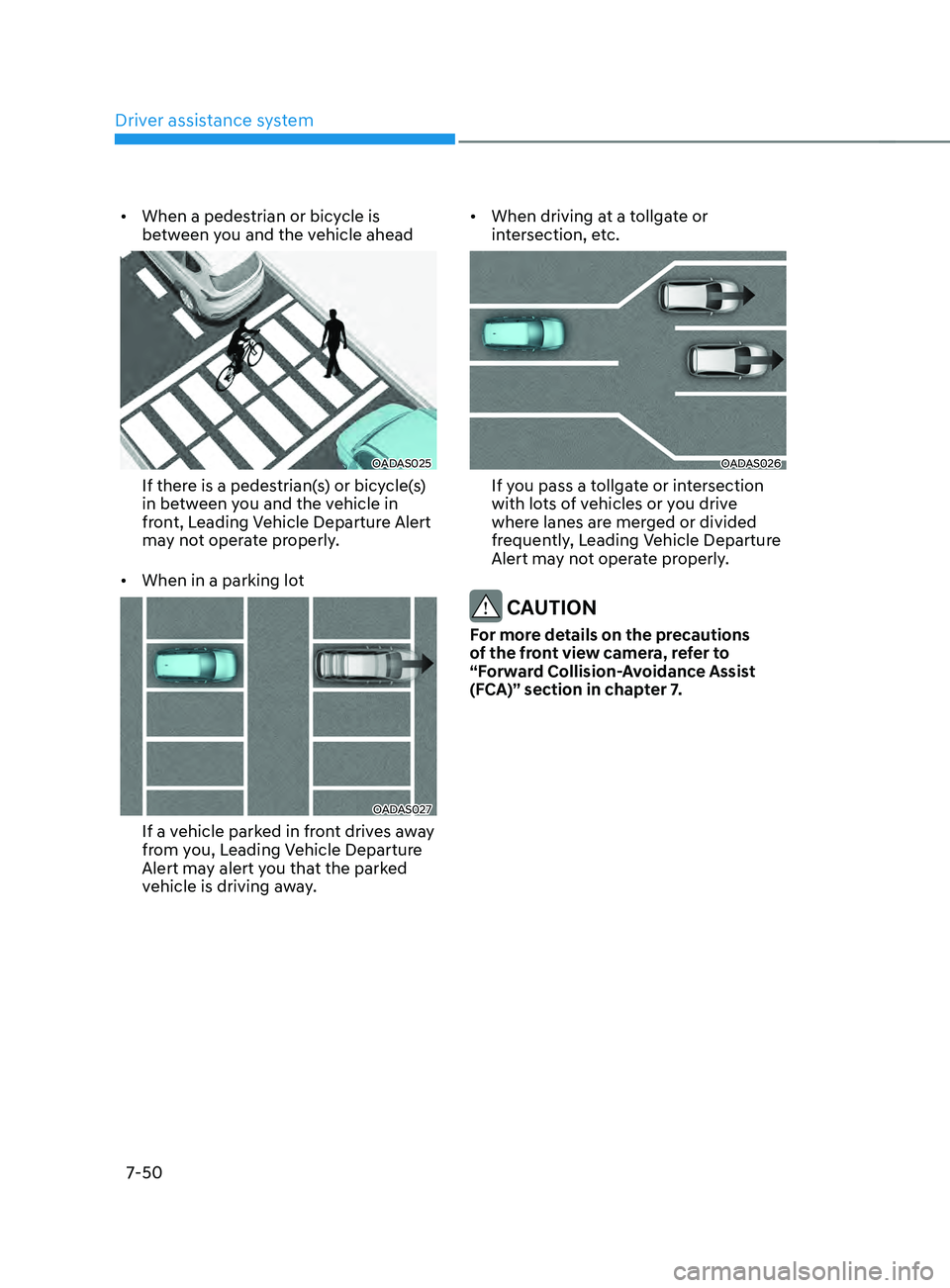
• When a pedestrian or bicycle is
between you and the vehicle ahead
OADAS025
If there is a pedestrian(s) or bicycle(s)
in between you and the vehicle in
front, Leading Vehicle Departure Alert
may not operate properly.
• When in a parking lot
OADAS027
If a vehicle parked in front drives away
from you, Leading Vehicle Departure
Alert may alert you that the parked
vehicle is driving away. •
When driving at a tollgate or
intersection, etc.
OADAS026
If you pass a tollgate or intersection
with lots of vehicles or you drive
where lanes are merged or divided
frequently, Leading Vehicle Departure
Alert may not operate properly.
CAUTION
For more details on the precautions
of the front view camera, refer to
“Forward Collision-Avoidance Assist
(FCA)” section in chapter 7.
Page 433 of 636
07
7-51
bLInD-spOT VIEW mOnITOR (bVm) (IF EQUIppED)
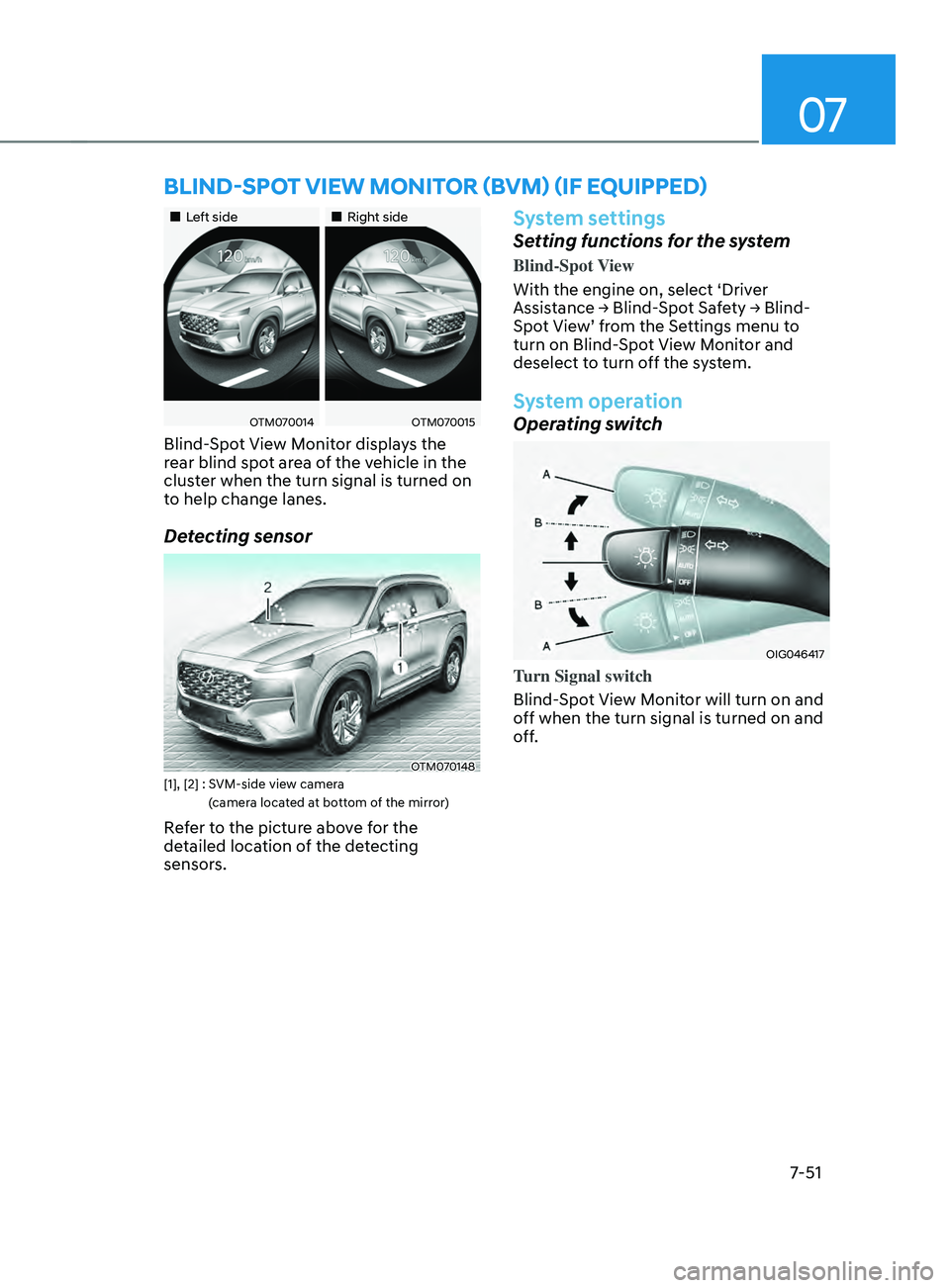
„„Left side„„Right side
OTM070014OTM070015
Blind-Spot View Monitor displays the
rear blind spot area of the vehicle in the
cluster when the turn signal is turned on
to help change lanes.
Detecting sensor
OTM070148[1], [2] : SVM-side view camera
(
camera located at bottom of the mirror)
Refer to the picture above for the
detailed location of the detecting
sensors.
System settings
Setting functions for the system
Blind-Spot View
With the engine on, select ‘Driver
Assistance
→ Blind-
Spot
Sa
fety
→ Blind-
Spo
t View’ from the Settings menu to
turn on Blind-Spot View Monitor and
deselect to turn off the system.
System operation
Operating switch
OIG046417
Turn Signal switch
Blind-Spot View Monitor will turn on and
off when the turn signal is turned on and
off.
Page 445 of 636
07
7-63
• When you are towing a trailer or
another vehicle, we recommend that
Smart Cruise Control is turned off
due to safety reasons.
• Turn off Smart Cruise Control when
your vehicle is being towed.
• Smart Cruise Control may not
operate normally if interfered by
strong electromagnetic waves.
• Smart Cruise Control may not
detect an obstacle in front and lead
to a collision. Always look ahead
cautiously to prevent unexpected
and sudden situations from
occurring.
• Vehicles moving in front of you with
a frequent lane change may cause
a delay in the system's reaction or
may cause the system to react to a
vehicle actually in an adjacent lane.
Always drive cautiously to prevent
unexpected and sudden situations
from occurring.
• Always be aware of the surroundings
and drive safely, even though a
warning message does not appear or
an audible warning does not sound.
• If any other system’s warning
message is displayed or warning
sound is generated, Smart Cruise
Control warning message may not
be displayed and warning sound may
not be generated.
• You may not hear the warning sound
of Forward Collision-Avoidance
Assist if the surrounding is noisy.
• The vehicle manufacturer is not
responsible for any traffic violation
or accidents caused by the driver.
• Always set the vehicle speed to the
speed limit in your country. Information
• Smart Cruise Control may not operate
for 15 seconds after the vehicle is
started or the front view camera or
front radar is initialized.
• You may hear a sound when the brake
is controlled by Smart Cruise Control.
System malfunction and
limitations
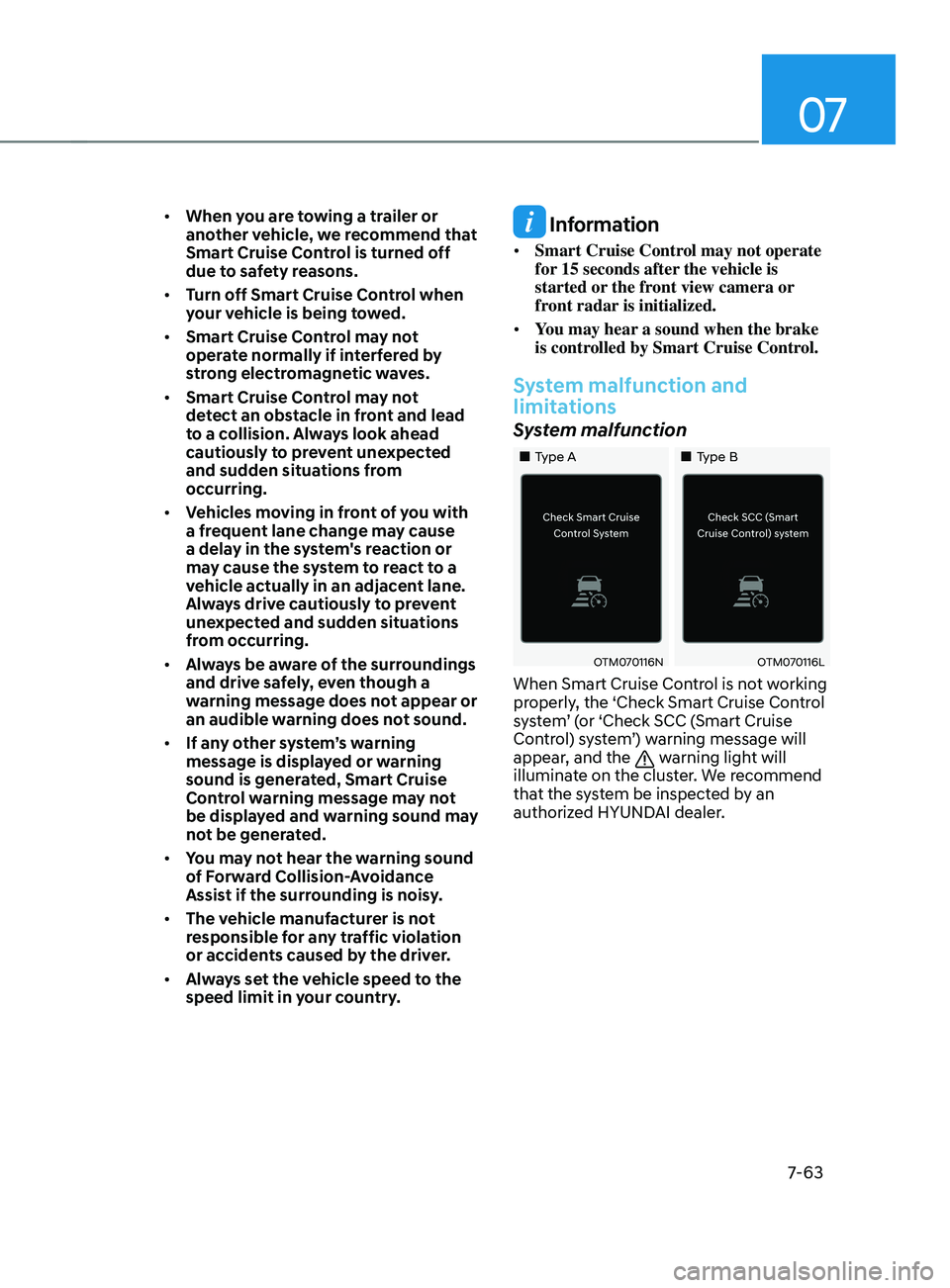
System malfunction
„„Type A „„Type B
OTM070116NOTM070116L
When Smart Cruise Control is not working
properly, the ‘Check Smart Cruise Control
system’ (or ‘Check SCC (Smart Cruise
Control) system’) warning message will
appear, and the
warning light will
illuminate on the cluster. We recommend
that the system be inspected by an
authorized HYUNDAI dealer.