sensor HYUNDAI SONATA HYBRID 2019 User Guide
[x] Cancel search | Manufacturer: HYUNDAI, Model Year: 2019, Model line: SONATA HYBRID, Model: HYUNDAI SONATA HYBRID 2019Pages: 546, PDF Size: 78.75 MB
Page 234 of 546
3-98
Convenient features of your vehicleL
L IIGG HH TT
Exterior Lights
Lighting control
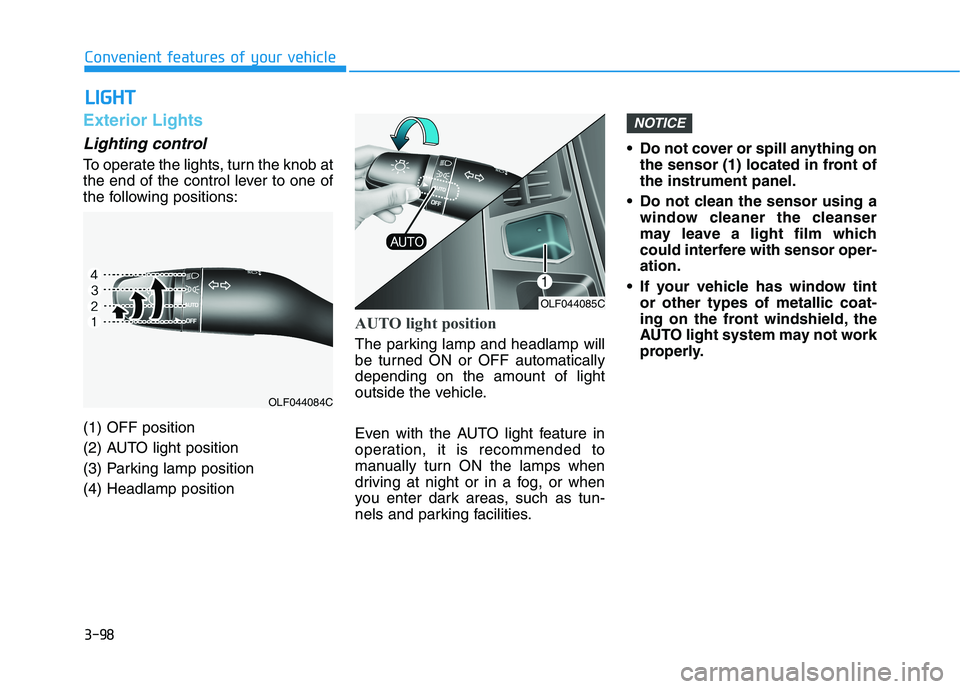
To operate the lights, turn the knob at
the end of the control lever to one of
the following positions: (1) OFF position
(2) AUTO light position
(3) Parking lamp position(4) Headlamp position
AUTO light position
The parking lamp and headlamp will
be turned ON or OFF automaticallydepending on the amount of light
outside the vehicle.
Even with the AUTO light feature in
operation, it is recommended to
manually turn ON the lamps when
driving at night or in a fog, or when
you enter dark areas, such as tun-
nels and parking facilities. Do not cover or spill anything on
the sensor (1) located in front ofthe instrument panel.
Do not clean the sensor using a window cleaner the cleanser
may leave a light film which
could interfere with sensor oper-ation.
If your vehicle has window tint or other types of metallic coat-
ing on the front windshield, the
AUTO light system may not work
properly.
NOTICE
OLF044085C
OLF044084C
Page 250 of 546
3-114
Convenient features of your vehicle
Rear parking assist system (if equipped)
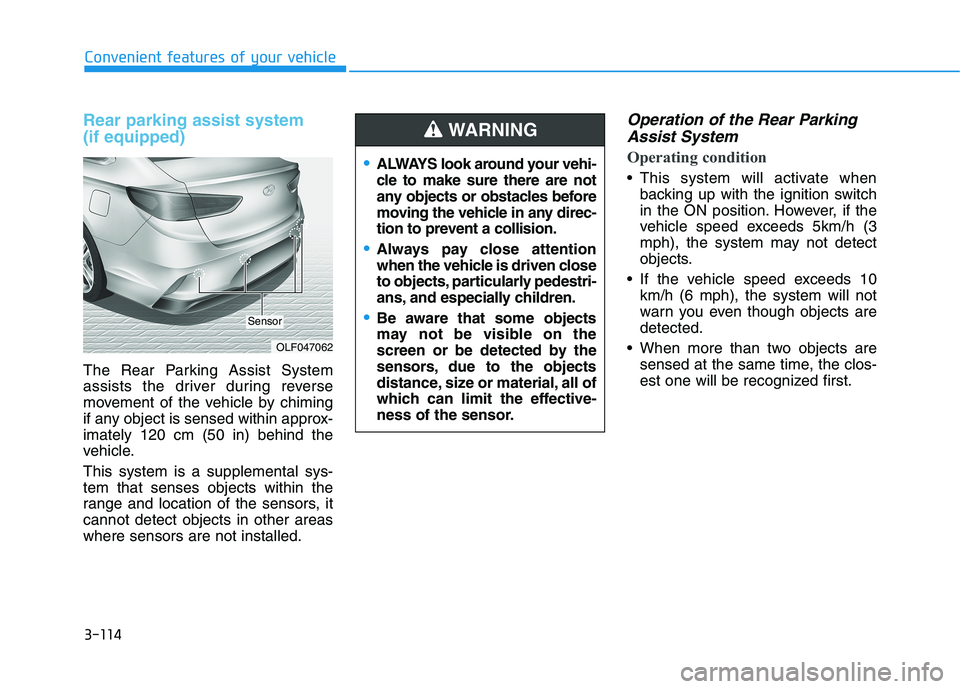
The Rear Parking Assist System
assists the driver during reverse
movement of the vehicle by chiming
if any object is sensed within approx-imately 120 cm (50 in) behind the
vehicle. This system is a supplemental sys- tem that senses objects within the
range and location of the sensors, itcannot detect objects in other areaswhere sensors are not installed.
Operation of the Rear ParkingAssist System
Operating condition
This system will activate when backing up with the ignition switch
in the ON position. However, if the
vehicle speed exceeds 5km/h (3
mph), the system may not detect
objects.
If the vehicle speed exceeds 10 km/h (6 mph), the system will not
warn you even though objects aredetected.
When more than two objects are sensed at the same time, the clos-
est one will be recognized first.
OLF047062
Sensor
ALWAYS look around your vehi-
cle to make sure there are not
any objects or obstacles before
moving the vehicle in any direc-
tion to prevent a collision.
Always pay close attention
when the vehicle is driven close
to objects, particularly pedestri-
ans, and especially children.
Be aware that some objects
may not be visible on the
screen or be detected by the
sensors, due to the objects
distance, size or material, all of
which can limit the effective-
ness of the sensor.
WARNING
Page 252 of 546
3-116
Convenient features of your vehicle
Non-operational conditions ofParking Assist System
The Rear Parking Assist System
may not operate normally when:
Moisture is frozen to the sensor.
The sensor is covered with dirt or debris such as snow or ice, or the
sensor cover is blocked.
There is a possibility of the Rear
Parking Assist System malfunction
when:
Driving on uneven road surfacessuch as unpaved roads, gravel,
bumps, or gradient.
Objects generating excessive noise such as vehicle horns, loud
motorcycle engines, or truck air
brakes can interfere with the sen-
sor.
Heavy rain or water spray is pres- ent.
Wireless transmitters or mobile phones are present near the sen-
sor.
The sensor is covered with snow.
Any non-factory equipment or accessories have been installed,
or if the vehicle bumper height orsensor installation has been modi-fied.
Detecting range may decrease
when:
Outside air temperature isextremely hot or cold.
Undetectable objects smaller than 1 m (40 inches) and narrower than
14 cm (6 inches) in diameter.
The following objects may not be
recognized by the sensor:
Sharp or slim objects such asropes, chains or small poles.
Objects, which tend to absorb sen- sor frequency such as clothes,
spongy material or snow.
Page 253 of 546
3-117
Convenient features of your vehicle
3
Rear parking assist system precautions
The rear parking assist systemmay not operate consistently in some circumstances depending on
the speed of the vehicle and theshapes of the objects detected.
The rear parking assist system may malfunction if the vehicle
bumper height or sensor installa-tion has been modified or dam-
aged. Any non-factory installed
equipment or accessories may
also interfere with the sensor per-
formance.
The sensor may not recognize objects less than 40 cm (15 in.)
from the sensor, or it may sense an
incorrect distance. Use caution.
When the sensor is blocked with snow, dirt, debris, or ice, the rear
parking assist system may be inop-
erative until the snow or ice melts,
or the debris is removed. Use a
soft cloth to wipe debris away from
the sensor. Do not push, scratch or strike the
sensor with any hard objects that
could damage the surface of the
sensor. Sensor damage could
occur.
Do not spray the sensors or its sur- rounding area directly with a high
pressure washer. Doing so may
cause the sensors to fail to operate
normally.
Your new vehicle warranty does
not cover any accidents or dam-
age to the vehicle or injuries toits occupants related to a Rear
Parking Assist System. Always
drive safely and cautiously.
WARNING
Page 257 of 546
3-121
Convenient features of your vehicle
3
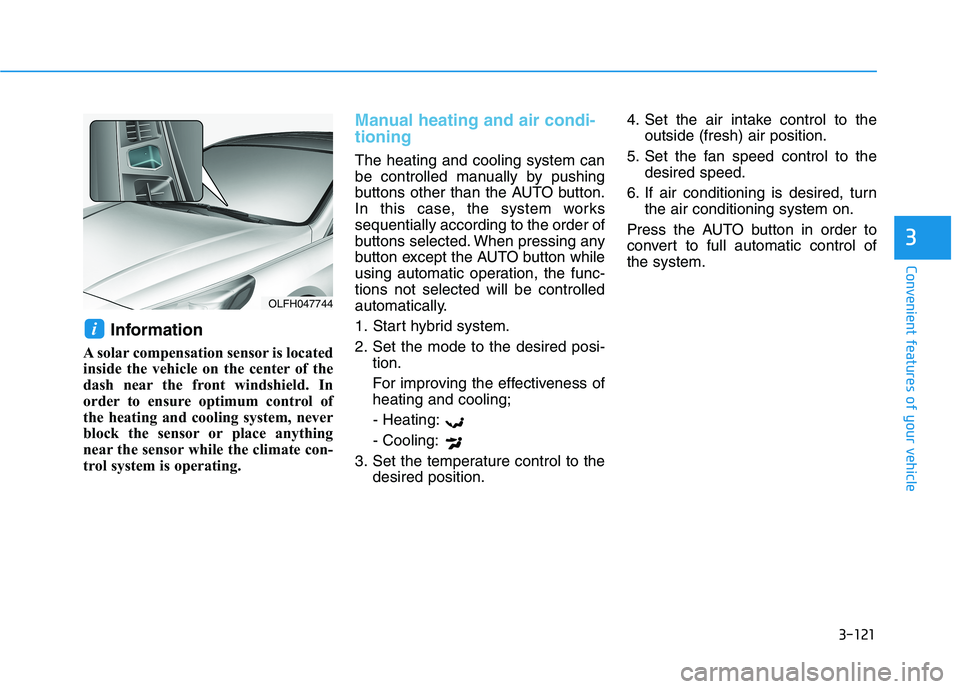
Information
A solar compensation sensor is located
inside the vehicle on the center of the
dash near the front windshield. In
order to ensure optimum control of
the heating and cooling system, never
block the sensor or place anything
near the sensor while the climate con-
trol system is operating.
Manual heating and air condi- tioning
The heating and cooling system can
be controlled manually by pushing
buttons other than the AUTO button.
In this case, the system workssequentially according to the order of
buttons selected. When pressing any
button except the AUTO button while
using automatic operation, the func-tions not selected will be controlled
automatically.
1. Start hybrid system.
2. Set the mode to the desired posi- tion.
For improving the effectiveness of heating and cooling;
- Heating: - Cooling:
3. Set the temperature control to the desired position. 4. Set the air intake control to the
outside (fresh) air position.
5. Set the fan speed control to the desired speed.
6. If air conditioning is desired, turn the air conditioning system on.
Press the AUTO button in order to
convert to full automatic control ofthe system.
i
OLFH047744
Page 291 of 546
Driving your vehicle
Before driving.........................................................5-4Before entering the vehicle ...........................................5-4
Before starting...................................................................5-4
Engine start/stop button ......................................5-5 Illuminated Engine Start/Stop button ..........................5-6
Engine Stop/Start button positions ..............................5-7
Starting the hybrid system .............................................5-9
Automatic transmission .......................................5-12 Automatic transmission operation ..............................5-12
Parking ...............................................................................5-17
Good driving practices ...................................................5-17
Braking system.....................................................5-19 Power brakes ...................................................................5-19
Disc brakes wear indicator ...........................................5-20
Foot parking brake .........................................................5-20
Electronic Parking Brake (EPB)...................................5-22
AUTO HOLD ......................................................................5-28
Anti-lock Brake System (ABS) ....................................5-32
Electronic Stability Control (ESC)................................5-34
Vehicle Stability Management (VSM).........................5-38
Hill-Start Assist Control (HAC) ....................................5-39
Good braking practices..................................................5-40 Drive mode integrated control system .............5-41
Hybrid vehicle ..................................................................5-41
Plug-in hybrid vehicle....................................................5-43
Blind Spot Detection system (BSD) ..................5-45 BSD (Blind Spot Detection) /
LCA (Lane Change Assist) .............................................5-46RCTA (Rear Cross Traffic Alert) ..................................5-49
Limitations of the system .............................................5-52
Lane Keeping Assist System (LKAS) .................5-53 LKAS operation ................................................................5-54
LKAS malfunction............................................................5-58
LKAS function change ...................................................5-60
Limitations of the System .............................................5-61
Driver Attention Alert system (DAA) ................5-62 System setting and activation......................................5-62
Resetting the system .....................................................5-64
System standby ...............................................................5-64
System malfunction ........................................................5-64
Automatic Emergency Braking (AEB) ...............5-67 System setting and activation......................................5-67
AEB warning message and system control ..............5-69
AEB front radar sensor .................................................5-72
System malfunction ........................................................5-73
Limitations of the system .............................................5-75
5
Page 292 of 546
5
Cruise control .......................................................5-79Cruise Control operation ...............................................5-79
Smart Cruise Control system..............................5-84 To adjust the sensitivity of Smart Cruise Control ..5-85
To convert to Cruise Control Mode ............................5-86
Smart Cruise Control speed ..........................................5-86
Smart Cruise Control vehicle-to-vehicle distance..5-91
SCC front radar sensor..................................................5-93
Limitations of the system .............................................5-95
Special driving conditions .................................5-100 Hazardous driving conditions ....................................5-100
Rocking the vehicle ......................................................5-100
Smooth cornering .........................................................5-101
Driving at night ..............................................................5-101
Driving in the rain .........................................................5-102
Driving in flooded areas..............................................5-102
Highway driving .............................................................5-103
Winter driving .....................................................5-104 Snow or icy conditions ................................................5-104
Winter Precautions .......................................................5-105
Vehicle load limit ................................................5-107 Tire loading information label ...................................5-108
Trailer towing .....................................................5-112
Page 335 of 546
5-45
Driving your vehicle
5
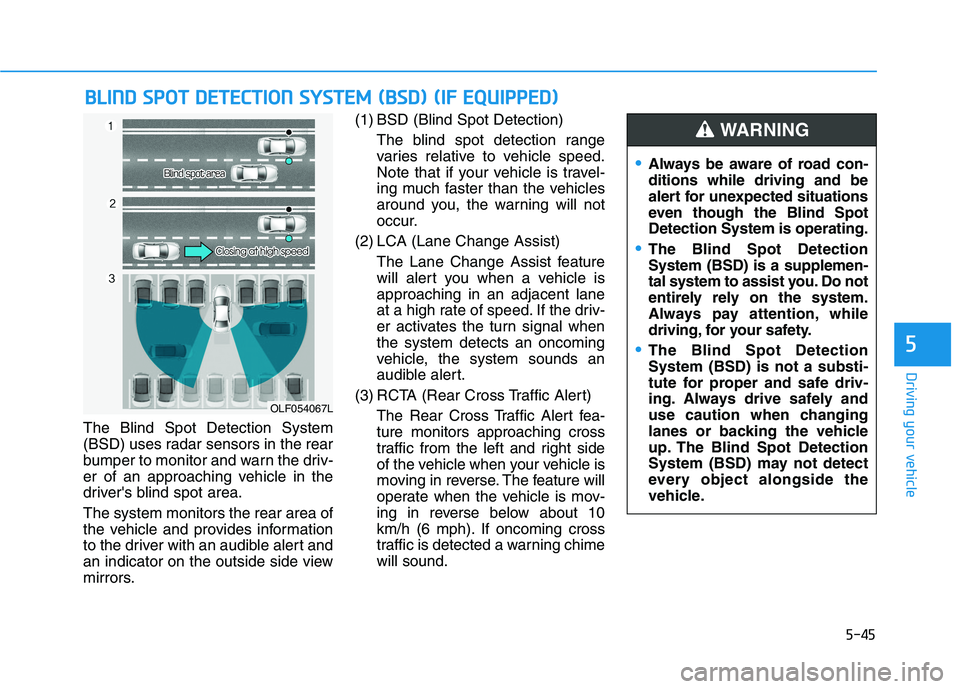
The Blind Spot Detection System
(BSD) uses radar sensors in the rear
bumper to monitor and warn the driv-
er of an approaching vehicle in the
driver's blind spot area. The system monitors the rear area of
the vehicle and provides information
to the driver with an audible alert and
an indicator on the outside side view
mirrors.(1) BSD (Blind Spot Detection)
The blind spot detection range
varies relative to vehicle speed.
Note that if your vehicle is travel-
ing much faster than the vehicles
around you, the warning will not
occur.
(2) LCA (Lane Change Assist) The Lane Change Assist feature
will alert you when a vehicle isapproaching in an adjacent lane
at a high rate of speed. If the driv-
er activates the turn signal whenthe system detects an oncoming
vehicle, the system sounds an
audible alert.
(3) RCTA (Rear Cross Traffic Alert) The Rear Cross Traffic Alert fea-ture monitors approaching cross
traffic from the left and right side
of the vehicle when your vehicle is
moving in reverse. The feature will
operate when the vehicle is mov-
ing in reverse below about 10
km/h (6 mph). If oncoming cross
traffic is detected a warning chimewill sound.
BBLLIINN DD SS PP OO TT DD EETT EECCTT IIOO NN SS YY SSTT EEMM (( BB SSDD )) (( IIFF EE QQ UUIIPP PPEEDD ))
OLF054067L
Always be aware of road con- ditions while driving and be
alert for unexpected situations
even though the Blind SpotDetection System is operating.
The Blind Spot Detection System (BSD) is a supplemen-
tal system to assist you. Do not
entirely rely on the system.
Always pay attention, while
driving, for your safety.
The Blind Spot Detection System (BSD) is not a substi-
tute for proper and safe driv-
ing. Always drive safely and
use caution when changing
lanes or backing the vehicle
up. The Blind Spot Detection
System (BSD) may not detect
every object alongside the
vehicle.
WARNING
Page 338 of 546
5-48
Driving your vehicle
The second stage alarm may bedeactivated.
- To deactivate the warning chime:
Go to the 'User Settings
Driving Assist and deselect 'BSD
Sound' on the LCD display.
- To activate the warning chime:
Go to the 'User Settings
Driving Assist and select 'BSD
Sound' on the LCD display.
Information
The warning chime function helps
alert the driver. Deactivate this func-
tion only when it is necessary.Detecting sensor
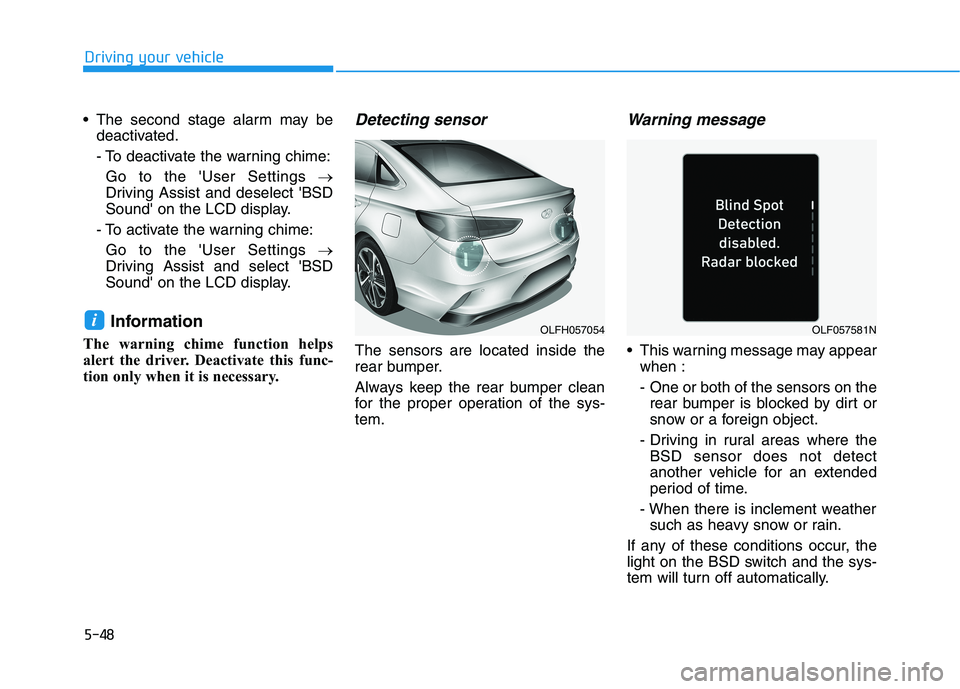
The sensors are located inside the
rear bumper.
Always keep the rear bumper clean
for the proper operation of the sys-tem.
Warning message
This warning message may appear when :
- One or both of the sensors on therear bumper is blocked by dirt or
snow or a foreign object.
- Driving in rural areas where the BSD sensor does not detect
another vehicle for an extended
period of time.
- When there is inclement weather such as heavy snow or rain.
If any of these conditions occur, the
light on the BSD switch and the sys-
tem will turn off automatically.
iOLFH057054OLF057581N
Page 339 of 546
5-49
Driving your vehicle
5
When the BSD cancelled warning
message is displayed in the cluster,
check to make sure that the rear
bumper is free from any dirt or snowin the areas where the sensor is
located. Remove any dirt, snow, or
foreign material that could interfere
with the radar sensors.
Once dirt or debris is removed, the
BSD system should operate normal-
ly after about 10 minutes of driving
the vehicle.
If the system still does not operate
normally have your vehicle inspected
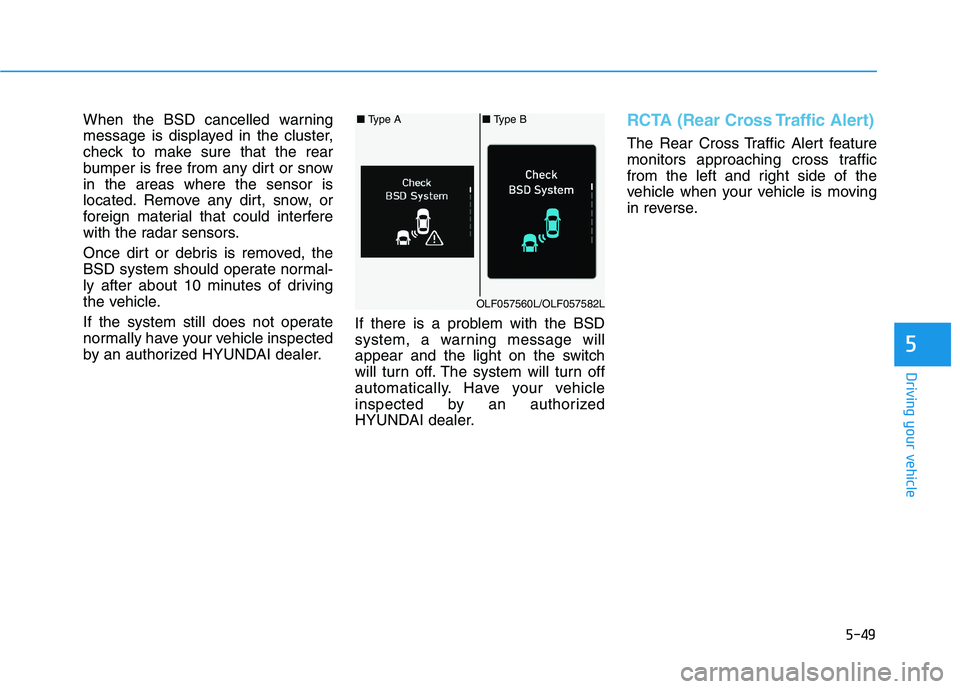
by an authorized HYUNDAI dealer.If there is a problem with the BSD
system, a warning message will
appear and the light on the switch
will turn off. The system will turn off
automatically. Have your vehicle
inspected by an authorized
HYUNDAI dealer.RCTA (Rear Cross Traffic Alert)
The Rear Cross Traffic Alert feature
monitors approaching cross traffic
from the left and right side of the
vehicle when your vehicle is moving
in reverse.
■
Type A■ Type B
OLF057560L/OLF057582L