light HYUNDAI SONATA HYBRID 2022 Workshop Manual
[x] Cancel search | Manufacturer: HYUNDAI, Model Year: 2022, Model line: SONATA HYBRID, Model: HYUNDAI SONATA HYBRID 2022Pages: 527, PDF Size: 64.14 MB
Page 191 of 527
05
5-43
Electrochromic mirror (ECM) with
HomeLink® system (if equipped)
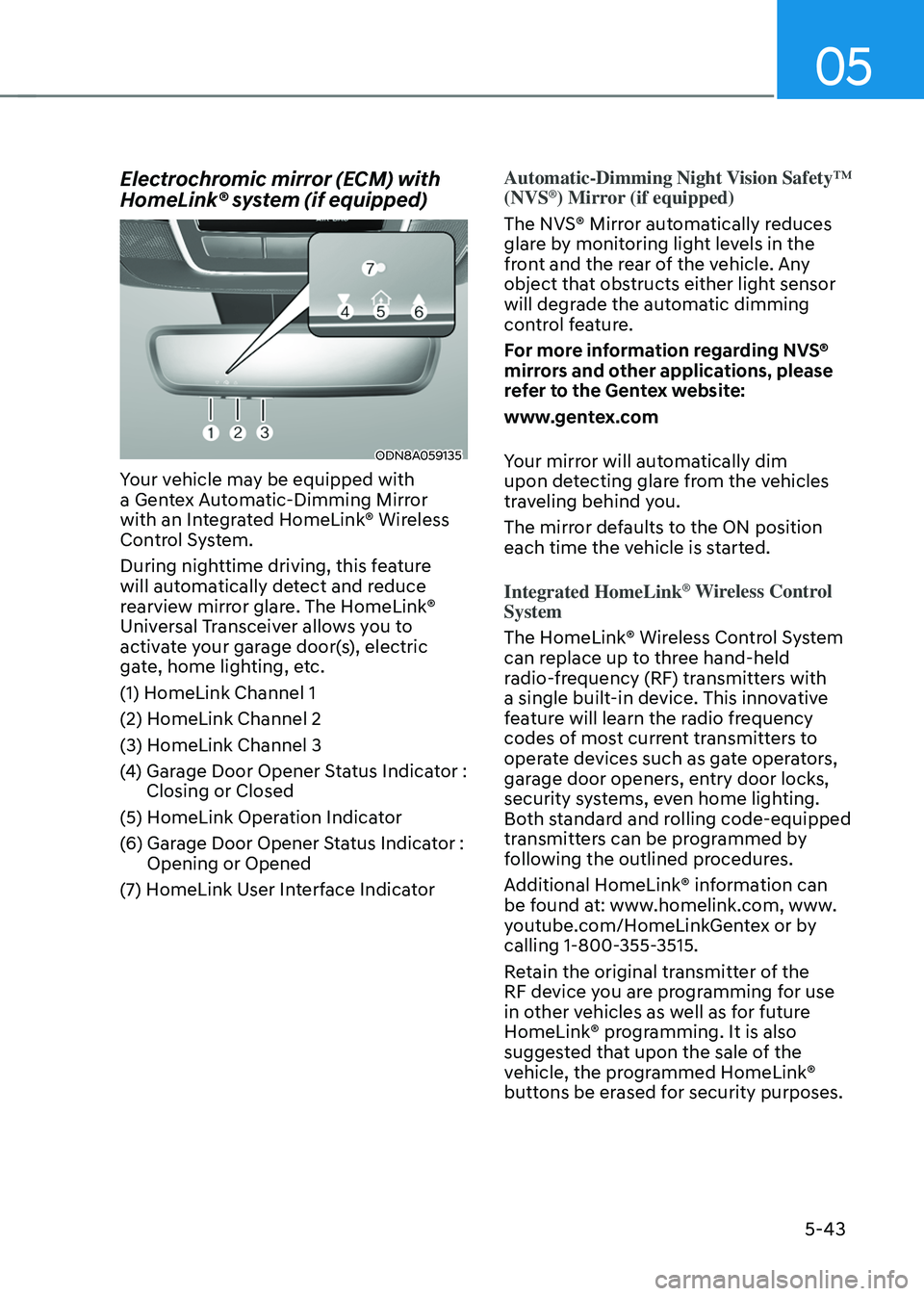
ODN8A059135
Your vehicle may be equipped with
a Gentex Automatic-Dimming Mirror
with an Integrated HomeLink® Wireless
Control System.
During nighttime driving, this feature
will automatically detect and reduce
rearview mirror glare. The HomeLink®
Universal Transceiver allows you to
activate your garage door(s), electric
gate, home lighting, etc.
(1) HomeLink Channel 1
(2) HomeLink Channel 2
(3) HomeLink Channel 3
(4) Garage Door Opener Status Indicator : Closing or Closed
(5) HomeLink Operation Indicator
(6) Garage Door Opener Status Indicator : Opening or Opened
(7) HomeLink User Interface Indicator
Automatic-Dimming Night Vision Safety™
(NVS®) Mirror (if equipped)
The NVS® Mirror automatically reduces
glare by monitoring light levels in the
front and the rear of the vehicle. Any
object that obstructs either light sensor
will degrade the automatic dimming
control feature.
For more information regarding NVS®
mirrors and other applications, please
refer to the Gentex website:
www.gentex.com
Your mirror will automatically dim
upon detecting glare from the vehicles
traveling behind you.
The mirror defaults to the ON position
each time the vehicle is started.
Integrated HomeLink
® Wireless Control
System
The HomeLink® Wireless Control System
can replace up to three hand-held
radio-frequency (RF) transmitters with
a single built-in device. This innovative
feature will learn the radio frequency
codes of most current transmitters to
operate devices such as gate operators,
garage door openers, entry door locks,
security systems, even home lighting.
Both standard and rolling code-equipped
transmitters can be programmed by
following the outlined procedures.
Additional HomeLink® information can
be found at: www.homelink.com, www.
youtube.com/HomeLinkGentex or by
calling 1-800-355-3515.
Retain the original transmitter of the
RF device you are programming for use
in other vehicles as well as for future
HomeLink® programming. It is also
suggested that upon the sale of the
vehicle, the programmed HomeLink®
buttons be erased for security purposes.
Page 194 of 527
Convenient Features
5-46
Gate operator & Canadian programming
During programming, your handheld
transmitter may automatically stop
transmitting. Continue to press the
Integrated HomeLink® Wireless Control
System button while you press and re-
press (“cycle”) your handheld transmitter
every two seconds until the frequency
signal has been learned. The indicator
light will flash slowly and then rapidly
after several seconds upon successful
training.
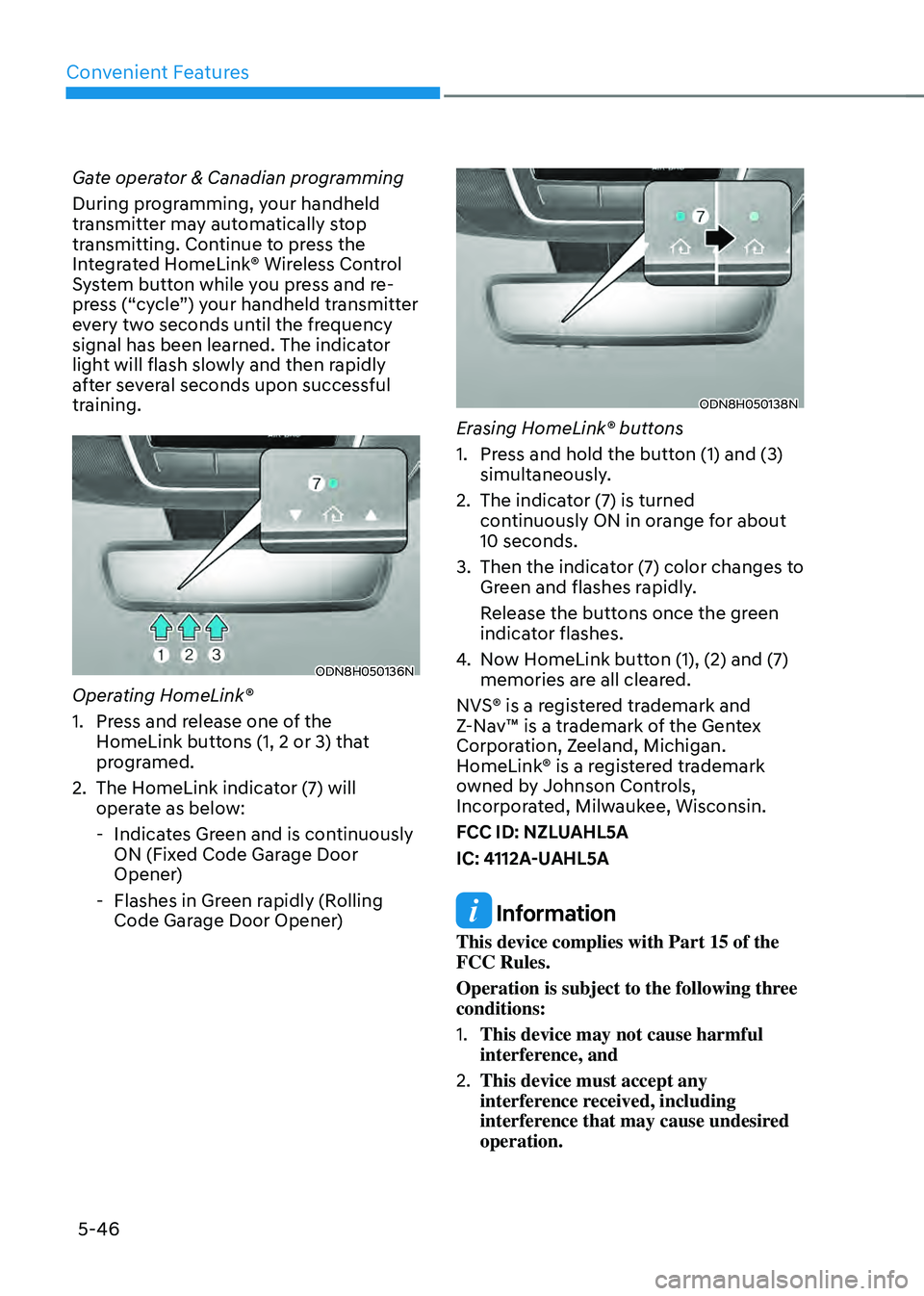
ODN8H050136N
Operating HomeLink®
1. Press and release one of the
HomeLink buttons (1, 2 or 3) that
programed.
2. The HomeLink indicator (7) will
operate as below:
-Indicates Green and is continuously
ON (Fixed Code Garage Door
Opener)
-Flashes in Green rapidly (Rolling
Code Garage Door Opener)
ODN8H050138N
Erasing HomeLink® buttons
1. Press and hold the button (1) and (3)
simultaneously.
2. The indicator (7) is turned
continuously ON in orange for about
10 seconds.
3. Then the indicator (7) color changes to
Green and flashes rapidly.
Release the buttons once the green
indicator flashes.
4. Now HomeLink button (1), (2) and (7)
memories are all cleared.
NVS® is a registered trademark and
Z-Nav™ is a trademark of the Gentex
Corporation, Zeeland, Michigan.
HomeLink® is a registered trademark
owned by Johnson Controls,
Incorporated, Milwaukee, Wisconsin.
FCC ID: NZLUAHL5A
IC: 4112A-UAHL5A
Information
This device complies with Part 15 of the
FCC Rules.
Operation is subject to the following three
conditions:
1. This device may not cause harmful
interference, and
2. This device must accept any
interference received, including
interference that may cause undesired
operation.
Page 200 of 527
Convenient Features
5-52
Power Windows
The ignition switch must be in the
ON position to be able to raise or
lower the windows. Each door has a
Power Window switch to control that
door’s window. The driver has a Power
Window Lock switch which can block
the operation of passenger windows.
The power windows will operate for
approximately 30 seconds after the
ignition switch is placed in the ACC or
LOCK/OFF position. However, if the front
doors are opened, the Power Windows
will not operate even within the 30
second period.
WARNING
To avoid serious injury or death, do not
extend your head, arms or body outside
the windows while driving.
Information
• In cold and wet climates, power
windows may not work properly due to
freezing conditions.
• While driving with the rear windows
down or with the sunroof (if equipped)
opened (or partially opened), your
vehicle may demonstrate a wind
buffeting or pulsation noise. This
noise is normal and can be reduced
or eliminated by taking the following
actions. If the noise occurs with one
or both of the rear windows down,
partially lower both front windows
approximately one inch. If you
experience the noise with the sunroof
open, slightly close the sunroof.
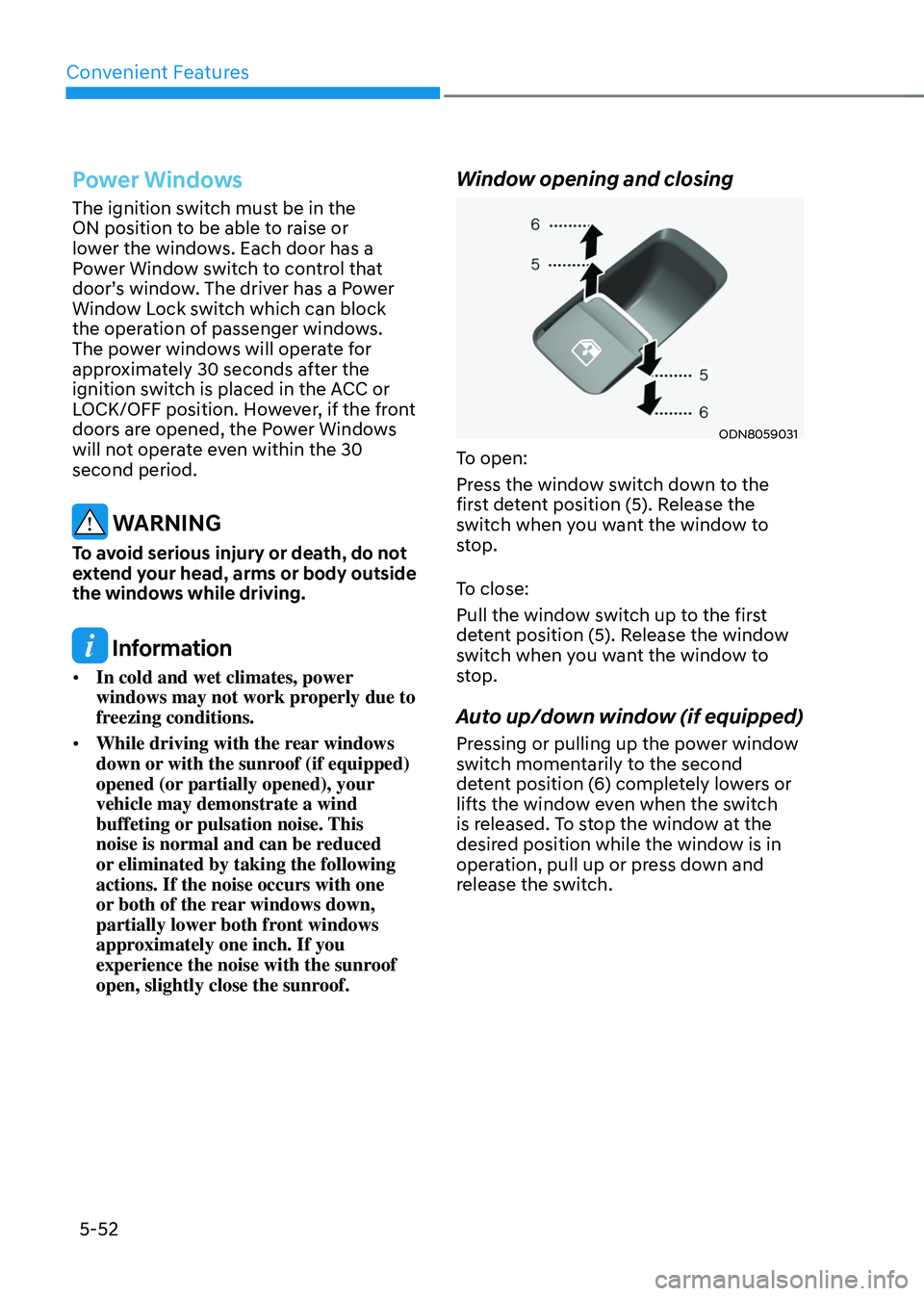
Window opening and closing
ODN8059031
To open:
Press the window switch down to the
first detent position (5). Release the
switch when you want the window to
stop.
To close:
Pull the window switch up to the first
detent position (5). Release the window
switch when you want the window to
stop.
Auto up/down window (if equipped)
Pressing or pulling up the power window
switch momentarily to the second
detent position (6) completely lowers or
lifts the window even when the switch
is released. To stop the window at the
desired position while the window is in
operation, pull up or press down and
release the switch.
Page 204 of 527
Convenient Features
5-56
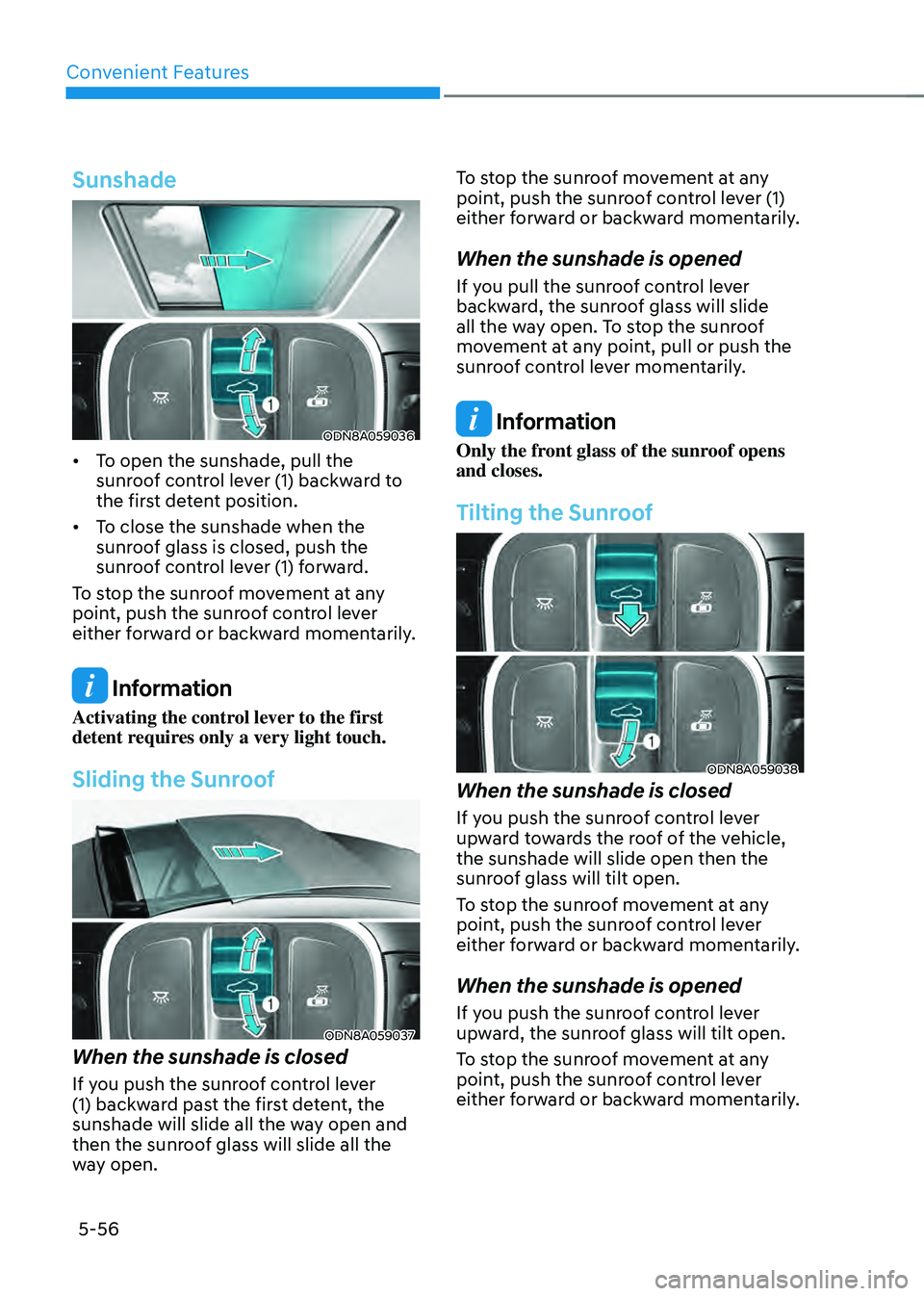
Sunshade
ODN8A059036
• To open the sunshade, pull the
sunroof control lever (1) backward to
the first detent position.
• To close the sunshade when the
sunroof glass is closed, push the
sunroof control lever (1) forward.
To stop the sunroof movement at any
point, push the sunroof control lever
either forward or backward momentarily.
Information
Activating the control lever to the first
detent requires only a very light touch.
Sliding the Sunroof
ODN8A059037
When the sunshade is closed
If you push the sunroof control lever
(1) backward past the first detent, the
sunshade will slide all the way open and
then the sunroof glass will slide all the
way open. To stop the sunroof movement at any
point, push the sunroof control lever (1)
either forward or backward momentarily.
When the sunshade is opened
If you pull the sunroof control lever
backward, the sunroof glass will slide
all the way open. To stop the sunroof
movement at any point, pull or push the
sunroof control lever momentarily.
Information
Only the front glass of the sunroof opens
and closes.
Tilting the Sunroof
ODN8A059038
When the sunshade is closed
If you push the sunroof control lever
upward towards the roof of the vehicle,
the sunshade will slide open then the
sunroof glass will tilt open.
To stop the sunroof movement at any
point, push the sunroof control lever
either forward or backward momentarily.
When the sunshade is opened
If you push the sunroof control lever
upward, the sunroof glass will tilt open.
To stop the sunroof movement at any
point, push the sunroof control lever
either forward or backward momentarily.
Page 206 of 527
Convenient Features
5-58
Resetting the Sunroof
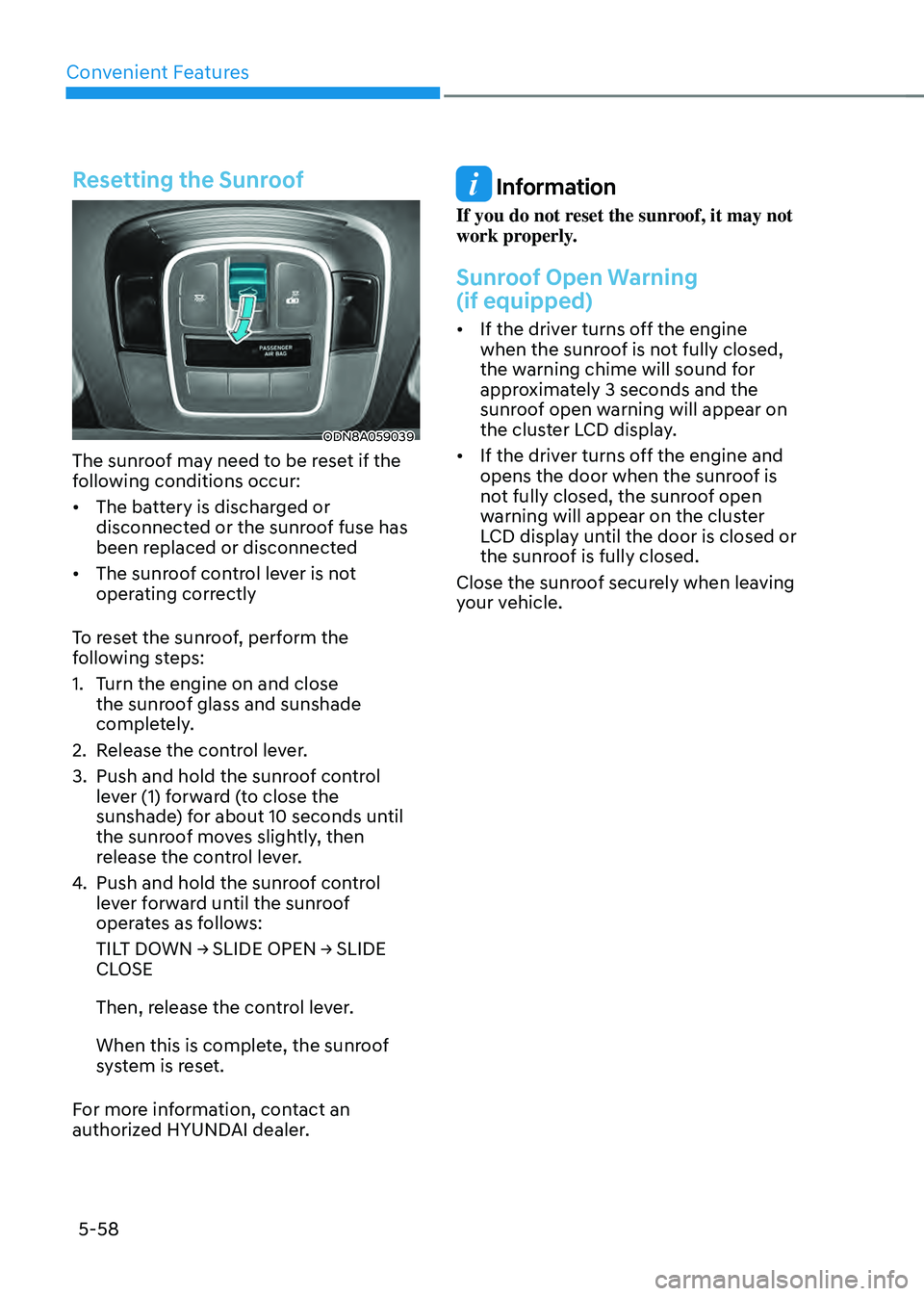
ODN8A059039
The sunroof may need to be reset if the
following conditions occur:
• The battery is discharged or
disconnected or the sunroof fuse has
been replaced or disconnected
• The sunroof control lever is not
operating correctly
To reset the sunroof, perform the
following steps:
1. Turn the engine on and close
the sunroof glass and sunshade
completely.
2. Release the control lever.
3. Push and hold the sunroof control
lever (1) forward (to close the
sunshade) for about 10 seconds until
the sunroof moves slightly, then
release the control lever.
4. Push and hold the sunroof control
lever forward until the sunroof
operates as follows:
TILT DOWN → SLIDE OPEN → SLIDE CLOSE
Then, release the control lever.
When this is complete, the sunroof
system is reset.
For more information, contact an
authorized HYUNDAI dealer.
Information
If you do not reset the sunroof, it may not
work properly.
Sunroof Open Warning
(if equipped)
• If the driver turns off the engine
when the sunroof is not fully closed,
the warning chime will sound for
approximately 3 seconds and the
sunroof open warning will appear on
the cluster LCD display.
• If the driver turns off the engine and
opens the door when the sunroof is
not fully closed, the sunroof open
warning will appear on the cluster
LCD display until the door is closed or
the sunroof is fully closed.
Close the sunroof securely when leaving
your vehicle.
Page 207 of 527
05
5-59
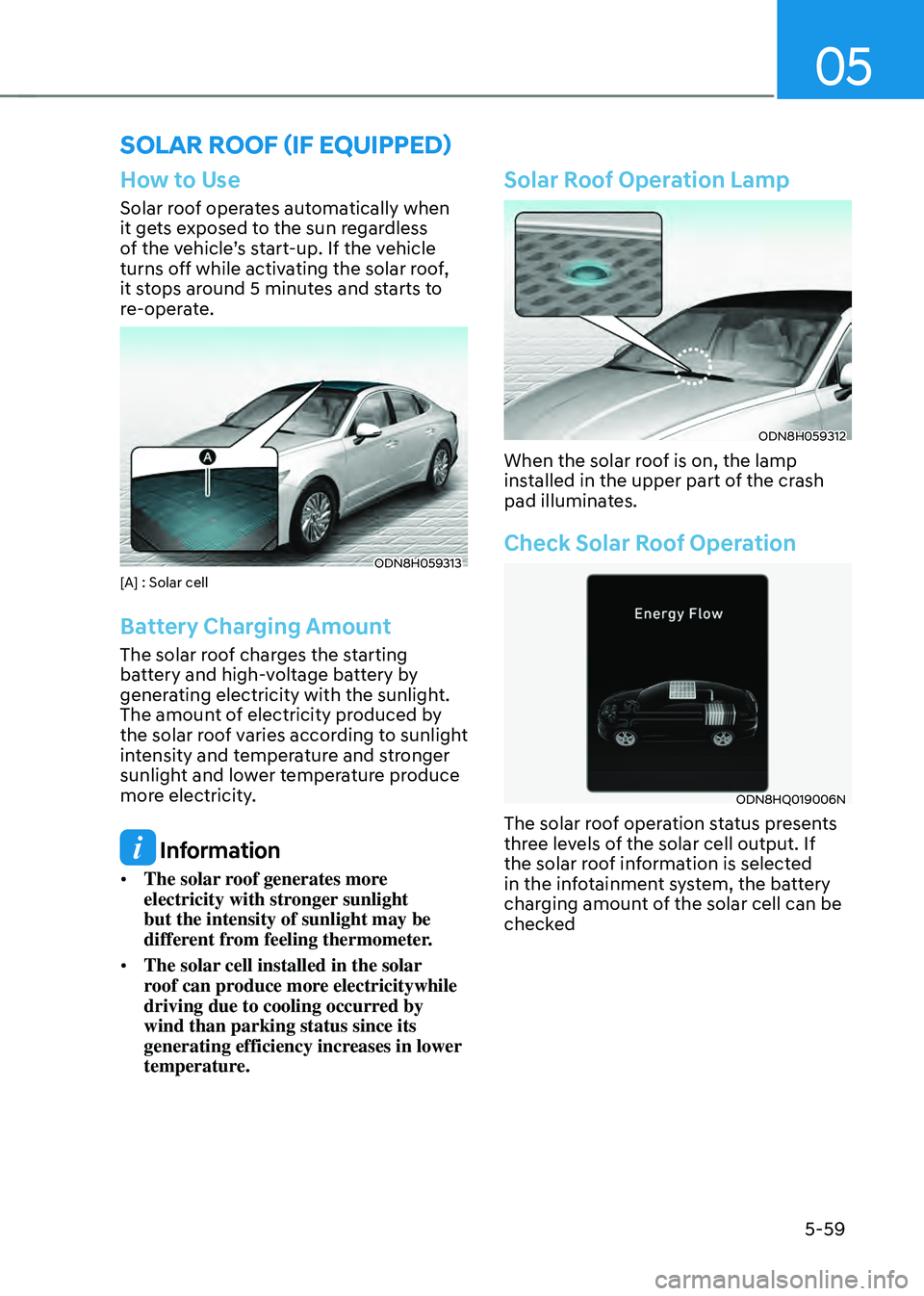
How to Use
Solar roof operates automatically when
it gets exposed to the sun regardless
of the vehicle’s start-up. If the vehicle
turns off while activating the solar roof,
it stops around 5 minutes and starts to
re-operate.
ODN8H059313[A] : Solar cell
Battery Charging Amount
The solar roof charges the starting
battery and high-voltage battery by
generating electricity with the sunlight.
The amount of electricity produced by
the solar roof varies according to sunlight
intensity and temperature and stronger
sunlight and lower temperature produce
more electricity.
Information
• The solar roof generates more
electricity with stronger sunlight
but the intensity of sunlight may be
different from feeling thermometer.
• The solar cell installed in the solar
roof can produce more electricitywhile
driving due to cooling occurred by
wind than parking status since its
generating efficiency increases in lower
temperature.
Solar Roof Operation Lamp
ODN8H059312
When the solar roof is on, the lamp
installed in the upper part of the crash
pad illuminates.
Check Solar Roof Operation
ODN8HQ019006N
The solar roof operation status presents
three levels of the solar cell output. If
the solar roof information is selected
in the infotainment system, the battery
charging amount of the solar cell can be
checked
SOLAR ROOF (IF EQUIPPED)
Page 208 of 527
Convenient Features
5-60
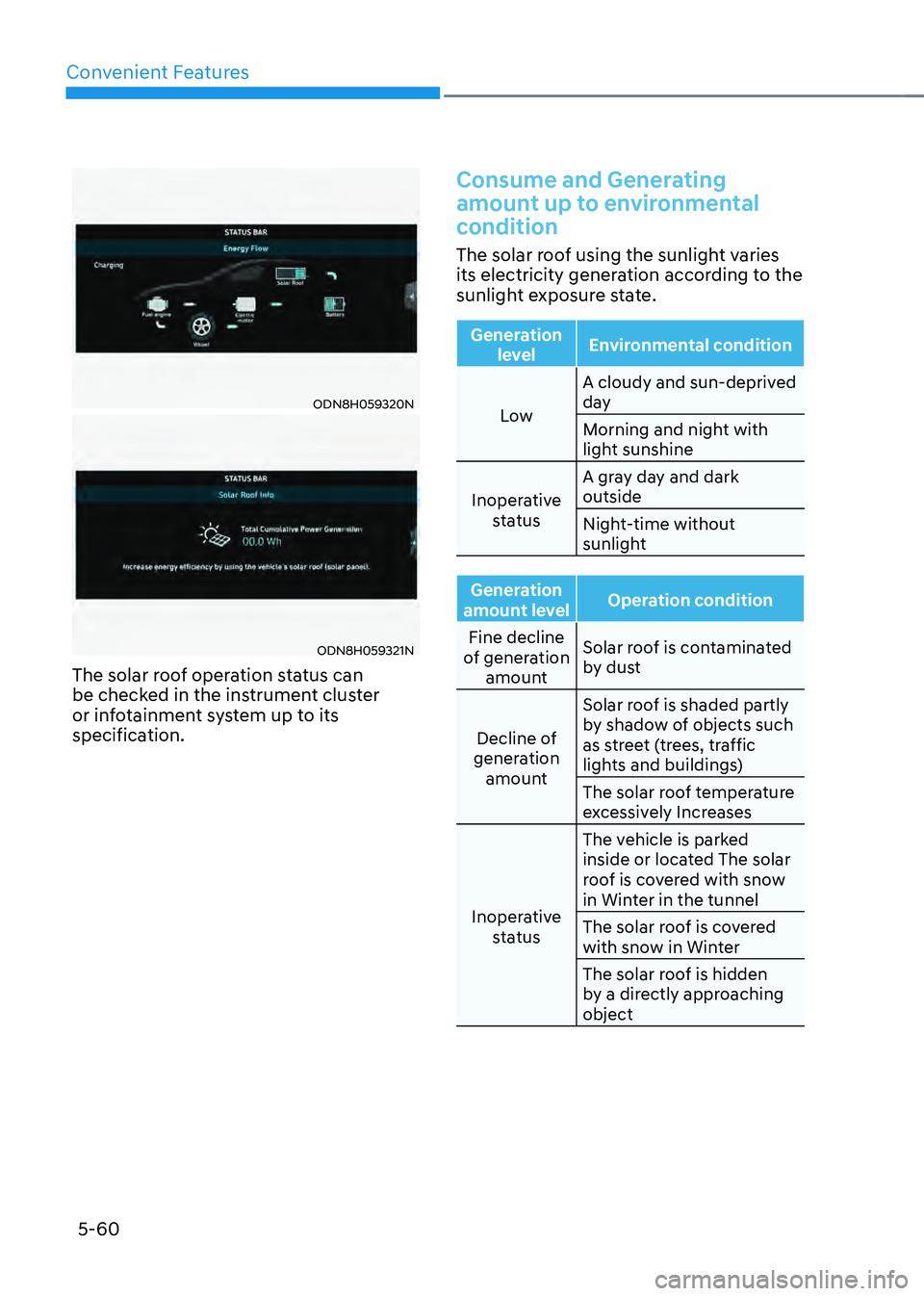
ODN8H059320N
ODN8H059321N
The solar roof operation status can
be checked in the instrument cluster
or infotainment system up to its
specification.
Consume and Generating
amount up to environmental
condition
The solar roof using the sunlight varies
its electricity generation according to the
sunlight exposure state.
Generation level Environmental condition
Low A cloudy and sun-deprived
day
Morning and night with
light sunshine
Inoperative status A gray day and dark
outside
Night-time without
sunlight
Generation
amount level Operation condition
Fine decline
of generation amount Solar roof is contaminated
by dust
Decline of
generation amount Solar roof is shaded partly
by shadow of objects such
as street (trees, traffic
lights and buildings)
The solar roof temperature
excessively Increases
Inoperative status The vehicle is parked
inside or located The solar
roof is covered with snow
in Winter in the tunnel
The solar roof is covered
with snow in Winter
The solar roof is hidden
by a directly approaching
object
Page 209 of 527
05
5-61
WARNING
High voltage electricity may flow in
the inner wire or controller when the
vehicle is exposed to sunlight even
though the vehicle turns off. If you
need to touch the inner controller or
wire, you should check the solar roof
operation lamp installed in the crash
pad.
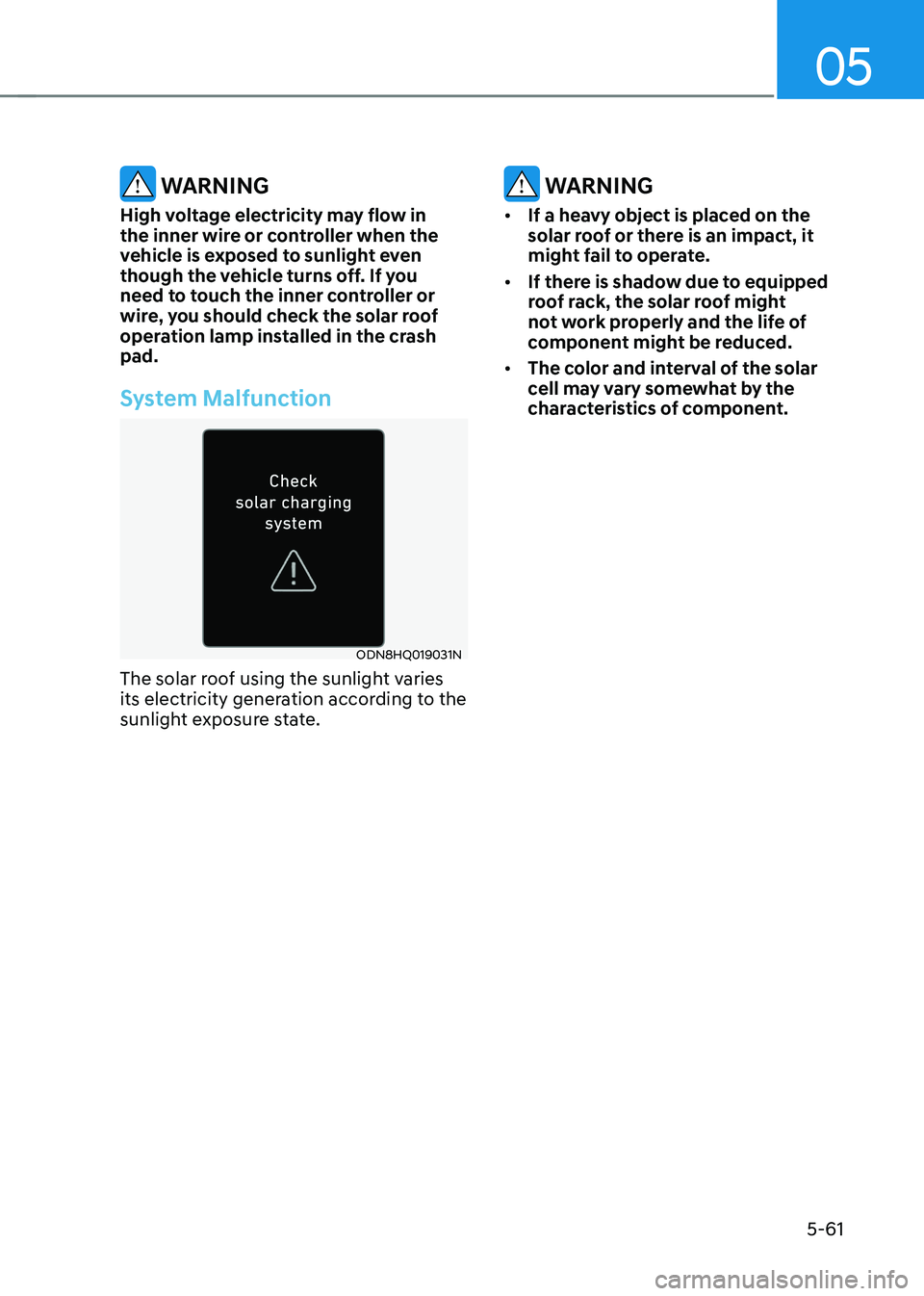
System Malfunction
ODN8HQ019031N
The solar roof using the sunlight varies
its electricity generation according to the
sunlight exposure state.
WARNING
• If a heavy object is placed on the
solar roof or there is an impact, it
might fail to operate.
• If there is shadow due to equipped
roof rack, the solar roof might
not work properly and the life of
component might be reduced.
• The color and interval of the solar
cell may vary somewhat by the
characteristics of component.
Page 210 of 527
Convenient Features
5-62
EXTERIOR FEATURES
Hood
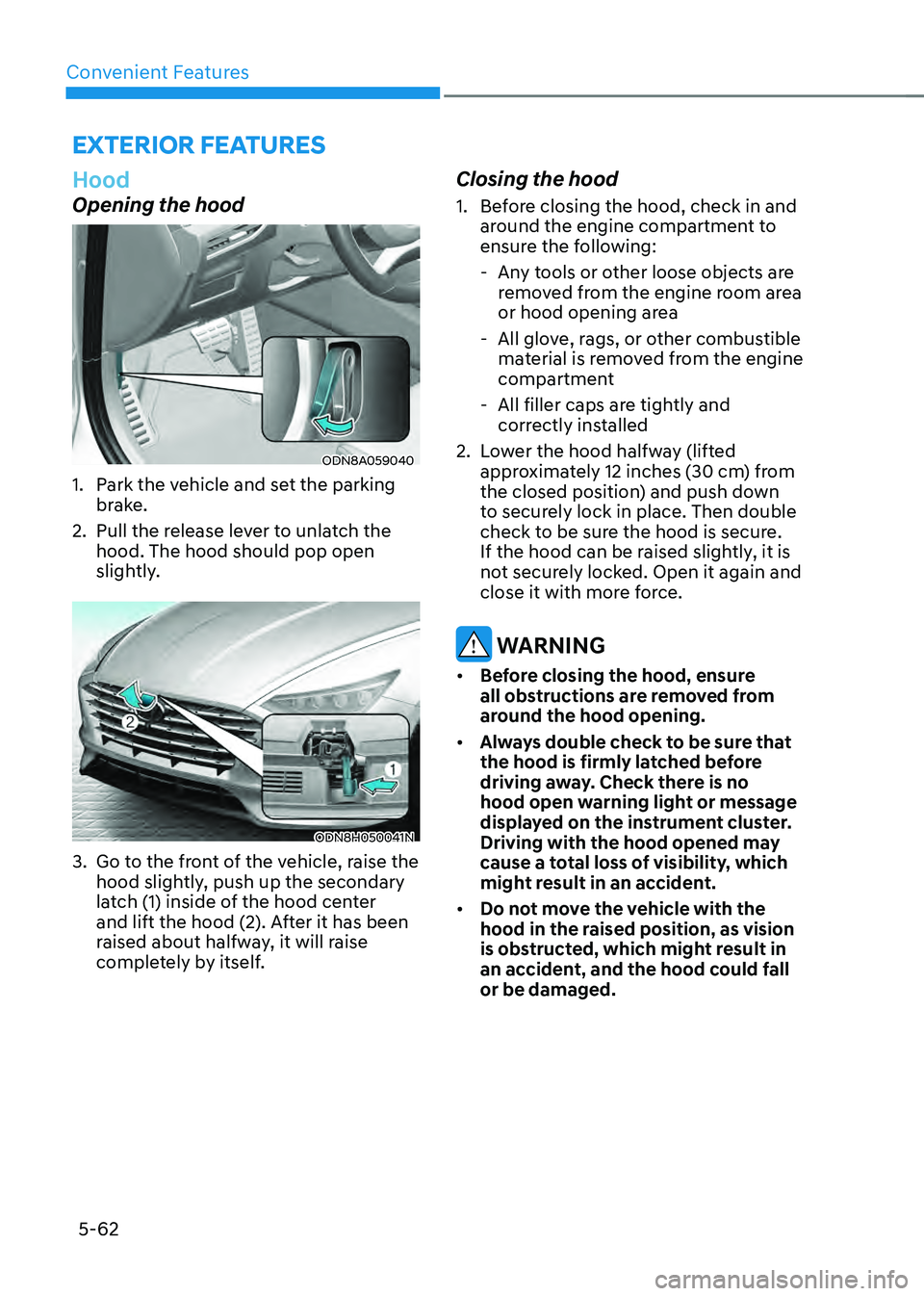
Opening the hood
ODN8A059040
1. Park the vehicle and set the parking
brake.
2. Pull the release lever to unlatch the
hood. The hood should pop open
slightly.
ODN8H050041N
3. Go to the front of the vehicle, raise the
hood slightly, push up the secondary
latch (1) inside of the hood center
and lift the hood (2). After it has been
raised about halfway, it will raise
completely by itself.
Closing the hood
1. Before closing the hood, check in and
around the engine compartment to
ensure the following:
-Any tools or other loose objects are
removed from the engine room area
or hood opening area
-All glove, rags, or other combustible
material is removed from the engine
compartment
-All filler caps are tightly and
correctly installed
2. Lower the hood halfway (lifted
approximately 12 inches (30 cm) from
the closed position) and push down
to securely lock in place. Then double
check to be sure the hood is secure.
If the hood can be raised slightly, it is
not securely locked. Open it again and
close it with more force.
WARNING
• Before closing the hood, ensure
all obstructions are removed from
around the hood opening.
• Always double check to be sure that
the hood is firmly latched before
driving away. Check there is no
hood open warning light or message
displayed on the instrument cluster.
Driving with the hood opened may
cause a total loss of visibility, which
might result in an accident.
• Do not move the vehicle with the
hood in the raised position, as vision
is obstructed, which might result in
an accident, and the hood could fall
or be damaged.
Page 213 of 527
05
5-65
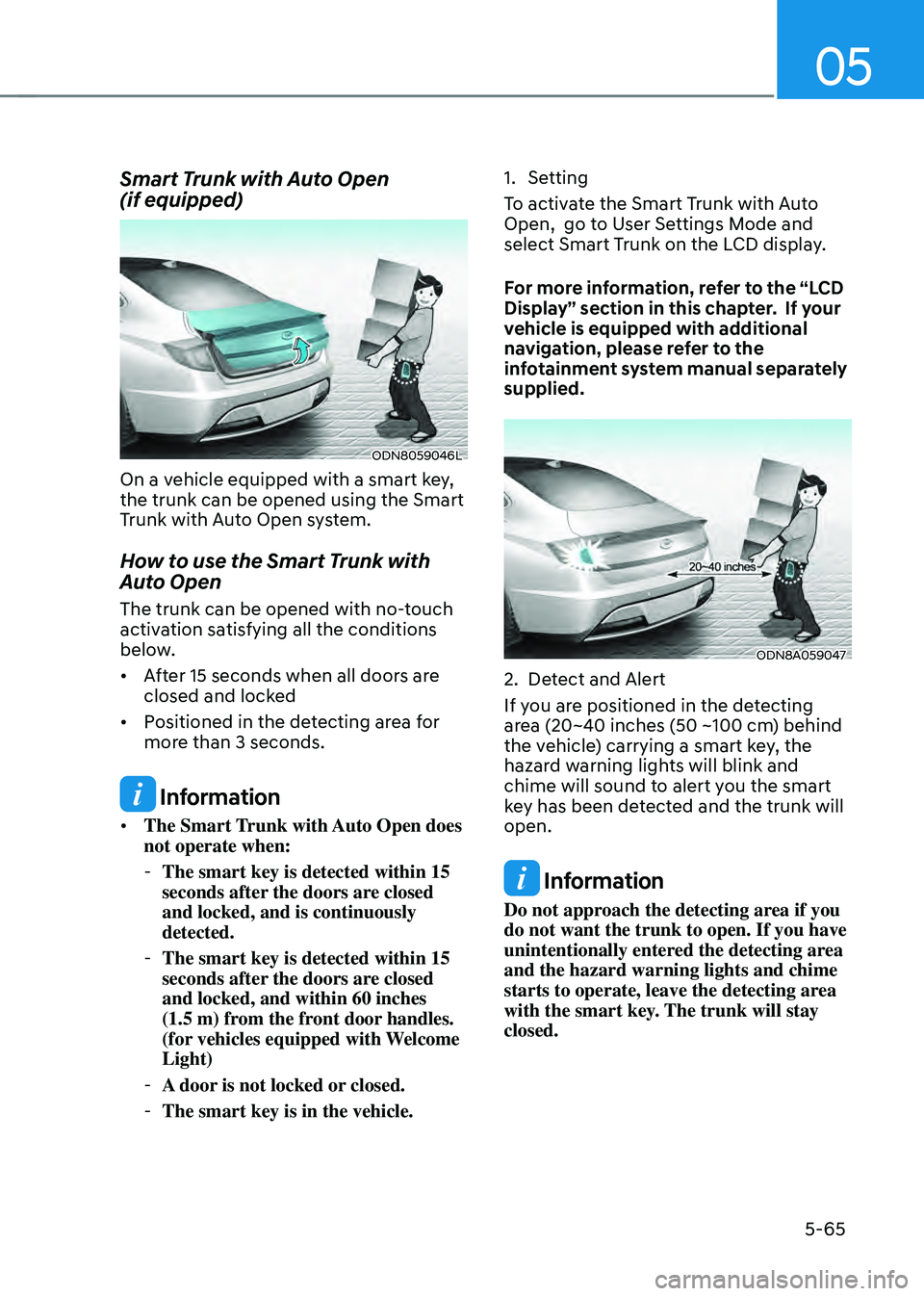
Smart Trunk with Auto Open
(if equipped)
ODN8059046L
On a vehicle equipped with a smart key,
the trunk can be opened using the Smart
Trunk with Auto Open system.
How to use the Smart Trunk with
Auto Open
The trunk can be opened with no-touch
activation satisfying all the conditions
below.
• After 15 seconds when all doors are
closed and locked
• Positioned in the detecting area for
more than 3 seconds.
Information
• The Smart Trunk with Auto Open does
not operate when:
-The smart key is detected within 15
seconds after the doors are closed
and locked, and is continuously
detected.
-The smart key is detected within 15
seconds after the doors are closed
and locked, and within 60 inches
(1.5 m) from the front door handles.
(for vehicles equipped with Welcome
Light)
-A door is not locked or closed.
-The smart key is in the vehicle.
1. Setting
To activate the Smart Trunk with Auto
Open, go to User Settings Mode and
select Smart Trunk on the LCD display.
For more information, refer to the “LCD
Display” section in this chapter. If your
vehicle is equipped with additional
navigation, please refer to the
infotainment system manual separately
supplied.
ODN8A059047
2. Detect and Alert
If you are positioned in the detecting
area (20~40 inches (50 ~100 cm) behind
the vehicle) carrying a smart key, the
hazard warning lights will blink and
chime will sound to alert you the smart
key has been detected and the trunk will
open.
Information
Do not approach the detecting area if you
do not want the trunk to open. If you have
unintentionally entered the detecting area
and the hazard warning lights and chime
starts to operate, leave the detecting area
with the smart key. The trunk will stay
closed.