park assist HYUNDAI SONATA HYBRID 2022 Owners Manual
[x] Cancel search | Manufacturer: HYUNDAI, Model Year: 2022, Model line: SONATA HYBRID, Model: HYUNDAI SONATA HYBRID 2022Pages: 527, PDF Size: 64.14 MB
Page 107 of 527

Check Hybrid system ........................................................................\
.......................4-23
Stop safely and check Hybrid system ....................................................................4-23
Check Hybrid system. Do not start engine ............................................................4-23
Stop safely and check power supply ......................................................................4-23
Check virtual engine sound system ........................................................................\
4-23
Refuel to prevent Hybrid battery damage
.............................................................4-23
Refill inverter coolant ........................................................................\
......................4-23
Park with engine On to charge battery ..................................................................4-23
Start engine to avoid battery discharge .................................................................4-23
LCD Display (TYPE A, B) ........................................................................\
..........4-24LCD Display Control ........................................................................\
...........................4-24
LCD Display Modes ........................................................................\
............................4-25
Trip computer mode ........................................................................\
........................4-26
Turn By Turn (TBT) mode ........................................................................\
................4-26
Driving Assist mode ........................................................................\
.........................4-26
Master warning mode ........................................................................\
.....................4-27
User settings mode ........................................................................\
..........................4-27
Trip Computer ........................................................................\
..................................... 4-36
Trip modes
........................................................................\
........................................4-36
Average fuel economy/Instant fuel economy .......................................................4-36
Accumulated Info display ........................................................................\
................4-37
Drive Info display
........................................................................\
.............................4-37
Digital speedometer ........................................................................\
........................4-38
Smart shift ........................................................................\
........................................4-38
Engine coolant temperature ........................................................................\
...........4-38
LCD display (type c) ........................................................................\
................4-39LCD Display Control ........................................................................\
...........................4-39
View Modes ........................................................................\
.......................................4-40
Utility View Mode ........................................................................\
...............................4-41
Utility Items ........................................................................\
......................................4-41
Driving Assist view mode ........................................................................\
................4-42
Turn By Turn (TBT) view mode ........................................................................\
........4-42
Parking Assist view mode ........................................................................\
................4-42
Other Information Display ........................................................................\
..............4-43
Option Menu ........................................................................\
......................................4-43
Warning message mode ........................................................................\
................. 4-44
User Settings Mode
........................................................................\
...........................4-44
4
Page 135 of 527
04
4-31
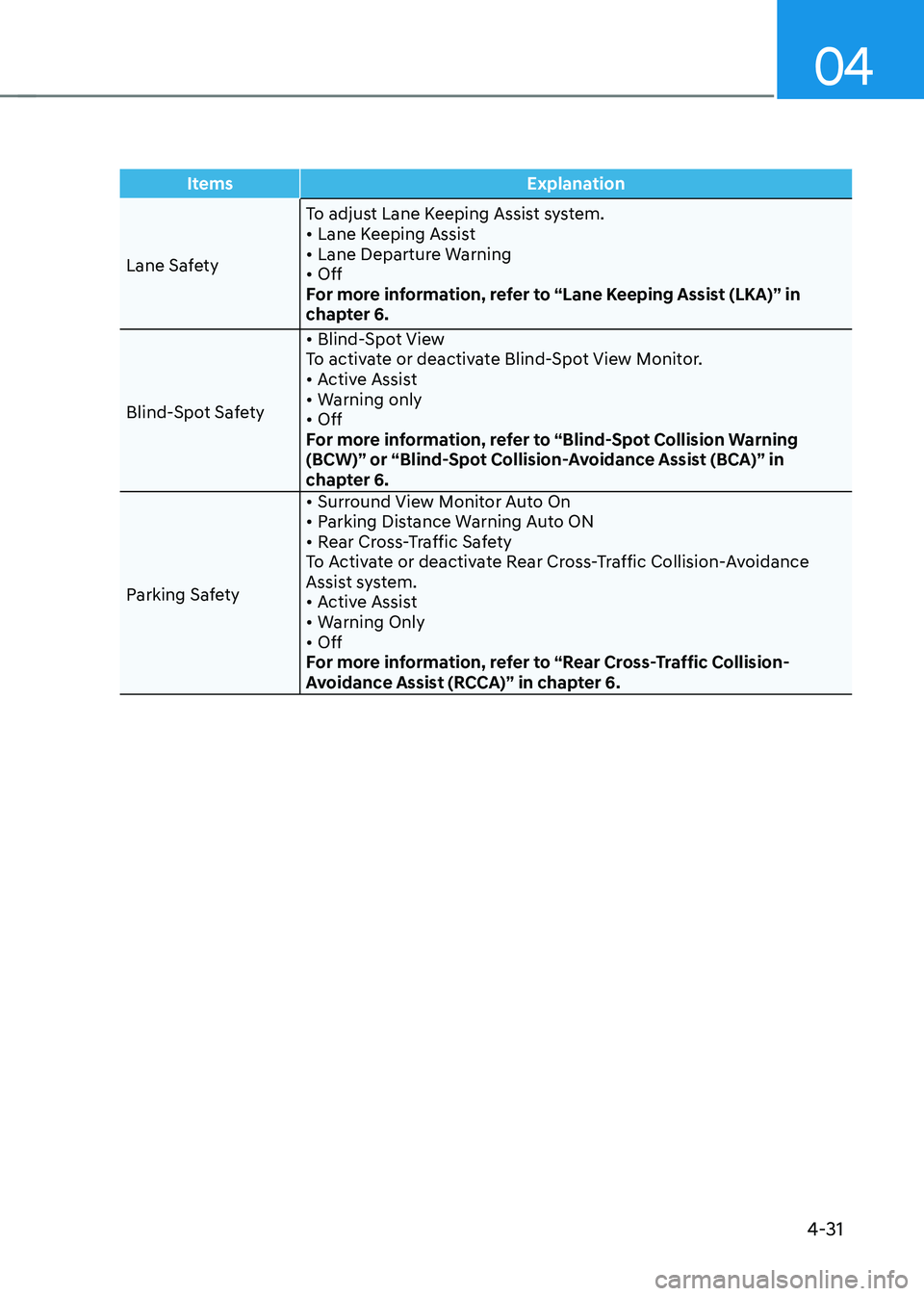
ItemsExplanation
Lane Safety To adjust Lane Keeping Assist system.
• Lane Keeping Assist• Lane Departure Warning• OffFor more information, refer to “Lane Keeping Assist (LKA)” in
chapter 6.
Blind-Spot Safety
• Blind-Spot ViewTo activate or deactivate Blind-Spot View Monitor.• Active Assist• Warning only• OffFor more information, refer to “Blind-Spot Collision Warning
(BCW)” or “Blind-Spot Collision-Avoidance Assist (BCA)” in
chapter 6.
Parking Safety
• Surround View Monitor Auto On• Parking Distance Warning Auto ON • Rear Cross-Traffic Safety To Activate or deactivate Rear Cross-Traffic Collision-Avoidance
Assist system.
• Active Assist• Warning Only• Off For more information, refer to “Rear Cross-Traffic Collision-
Avoidance Assist (RCCA)” in chapter 6.
Page 136 of 527
Instrument Cluster
4-32
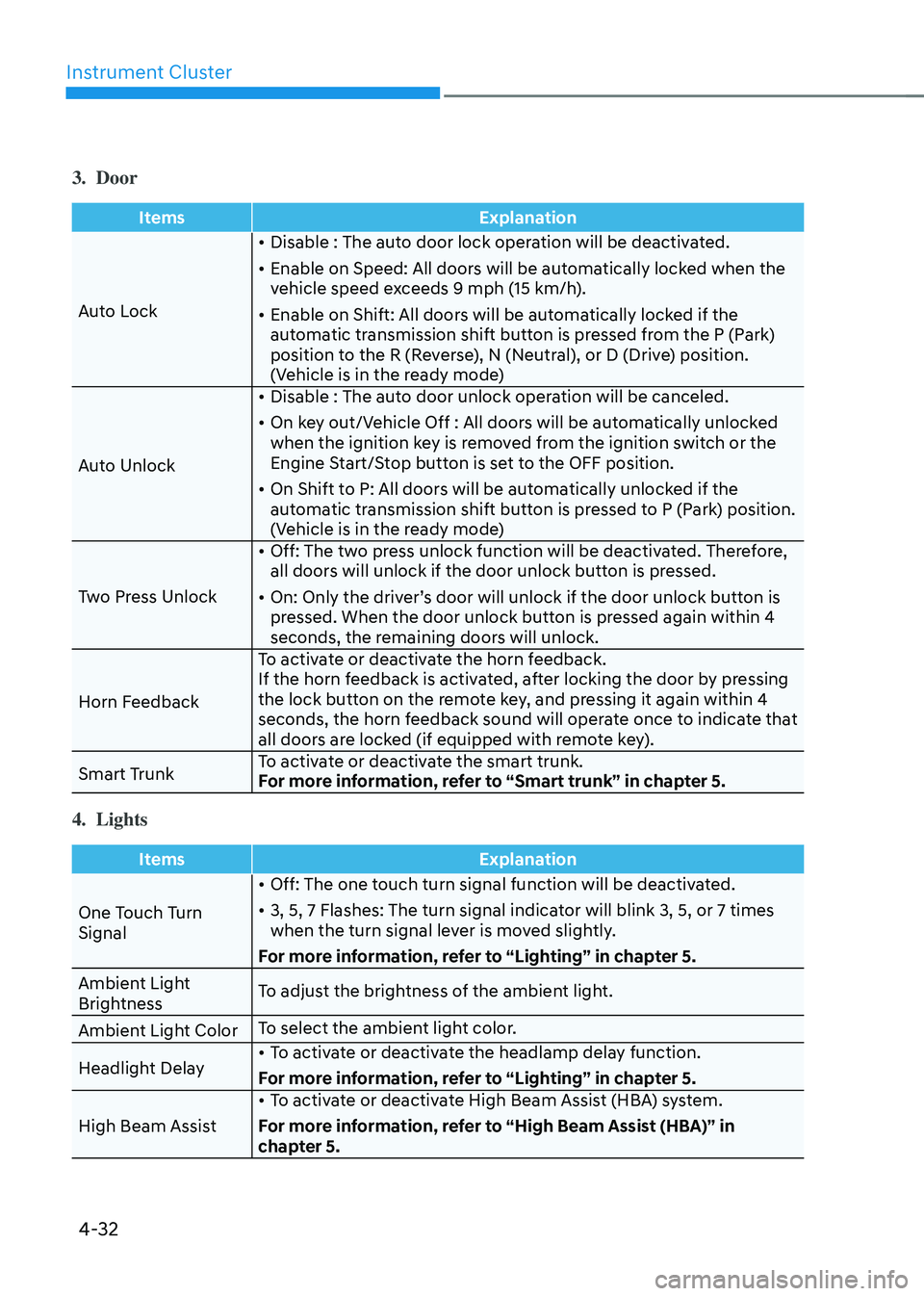
3. Door
ItemsExplanation
Auto Lock •
Disable : The auto door lock operation will be deactivated.
• Enable on Speed: All doors will be automatically locked when the
vehicle speed exceeds 9 mph (15 km/h).
• Enable on Shift: All doors will be automatically locked if the
automatic transmission shift button is pressed from the P (Park)
position to the R (Reverse), N (Neutral), or D (Drive) position.
(Vehicle is in the ready mode)
Auto Unlock •
Disable : The auto door unlock operation will be canceled.
• On key out/Vehicle Off : All doors will be automatically unlocked
when the ignition key is removed from the ignition switch or the
Engine Start/Stop button is set to the OFF position.
• On Shift to P: All doors will be automatically unlocked if the
automatic transmission shift button is pressed to P (Park) position.
(Vehicle is in the ready mode)
Two Press Unlock •
Off: The two press unlock function will be deactivated. Therefore,
all doors will unlock if the door unlock button is pressed.
• On: Only the driver’s door will unlock if the door unlock button is
pressed. When the door unlock button is pressed again within 4
seconds, the remaining doors will unlock.
Horn Feedback To activate or deactivate the horn feedback.
If the horn feedback is activated, after locking the door by pressing
the lock button on the remote key, and pressing it again within 4
seconds, the horn feedback sound will operate once to indicate that
all doors are locked (if equipped with remote key).
Smart Trunk To activate or deactivate the smart trunk.
For more information, refer to “Smart trunk” in chapter 5.
4. Lights
Items
Explanation
One Touch Turn
Signal •
Off: The one touch turn signal function will be deactivated.
• 3, 5, 7 Flashes: The turn signal indicator will blink 3, 5, or 7 times
when the turn signal lever is moved slightly.
For more information, refer to “Lighting” in chapter 5.
Ambient Light
Brightness To adjust the brightness of the ambient light.
Ambient Light Color To select the ambient light color.
Headlight Delay •
To activate or deactivate the headlamp delay function.
For more information, refer to “Lighting” in chapter 5.
High Beam Assist •
To activate or deactivate High Beam Assist (HBA) system.
For more information, refer to “High Beam Assist (HBA)” in
chapter 5.
Page 144 of 527
Instrument Cluster
4-40
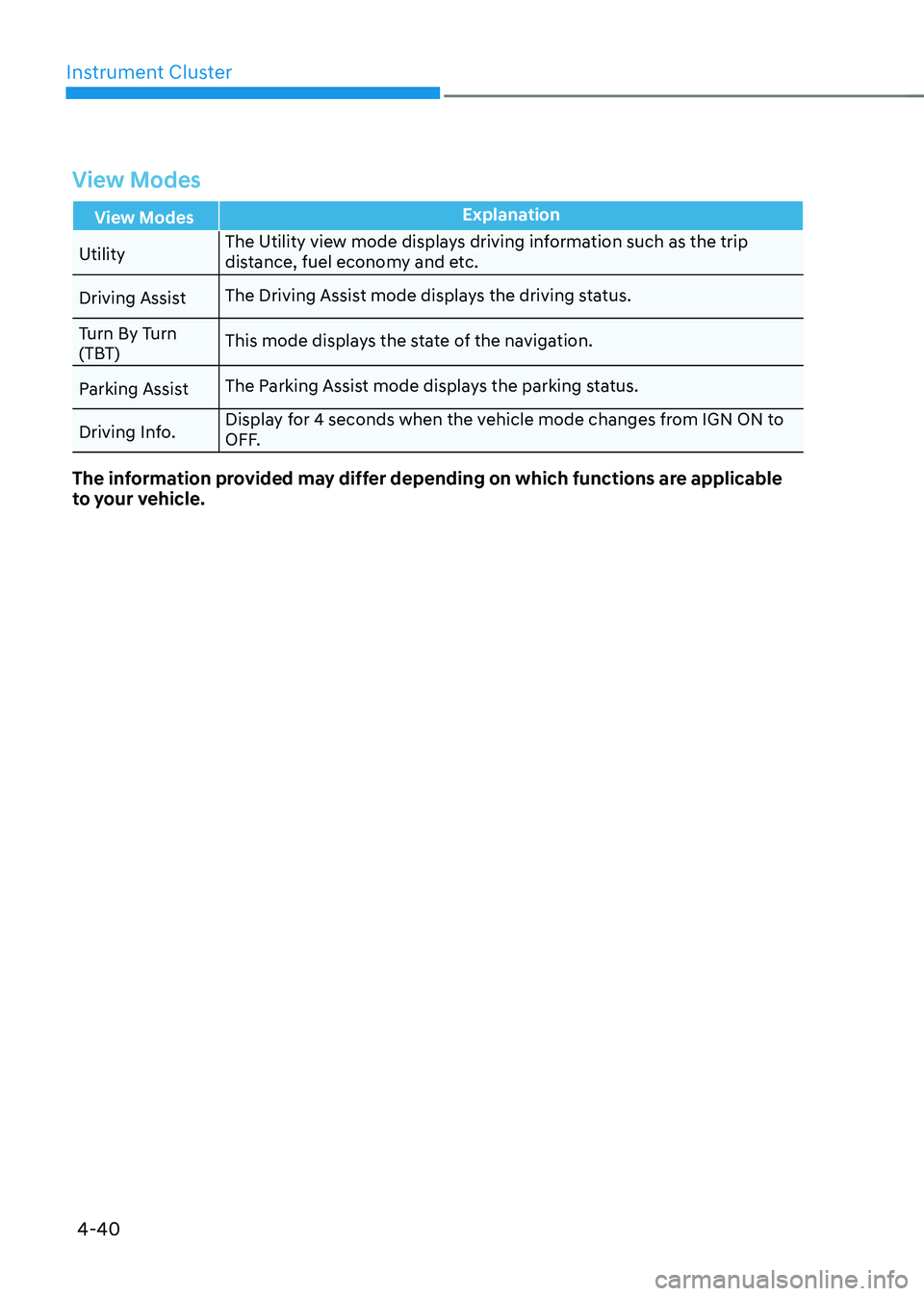
View Modes
View ModesExplanation
Utility The Utility view mode displays driving information such as the trip
distance, fuel economy and etc.
Driving Assist The Driving Assist mode displays the driving status.
Turn By Turn
(TBT) This mode displays the state of the navigation.
Parking Assist The Parking Assist mode displays the parking status.
Driving Info. Display for 4 seconds when the vehicle mode changes from IGN ON to
OFF.
The information provided may differ depending on which functions are applicable
to your vehicle.
Page 146 of 527
Instrument Cluster
4-42
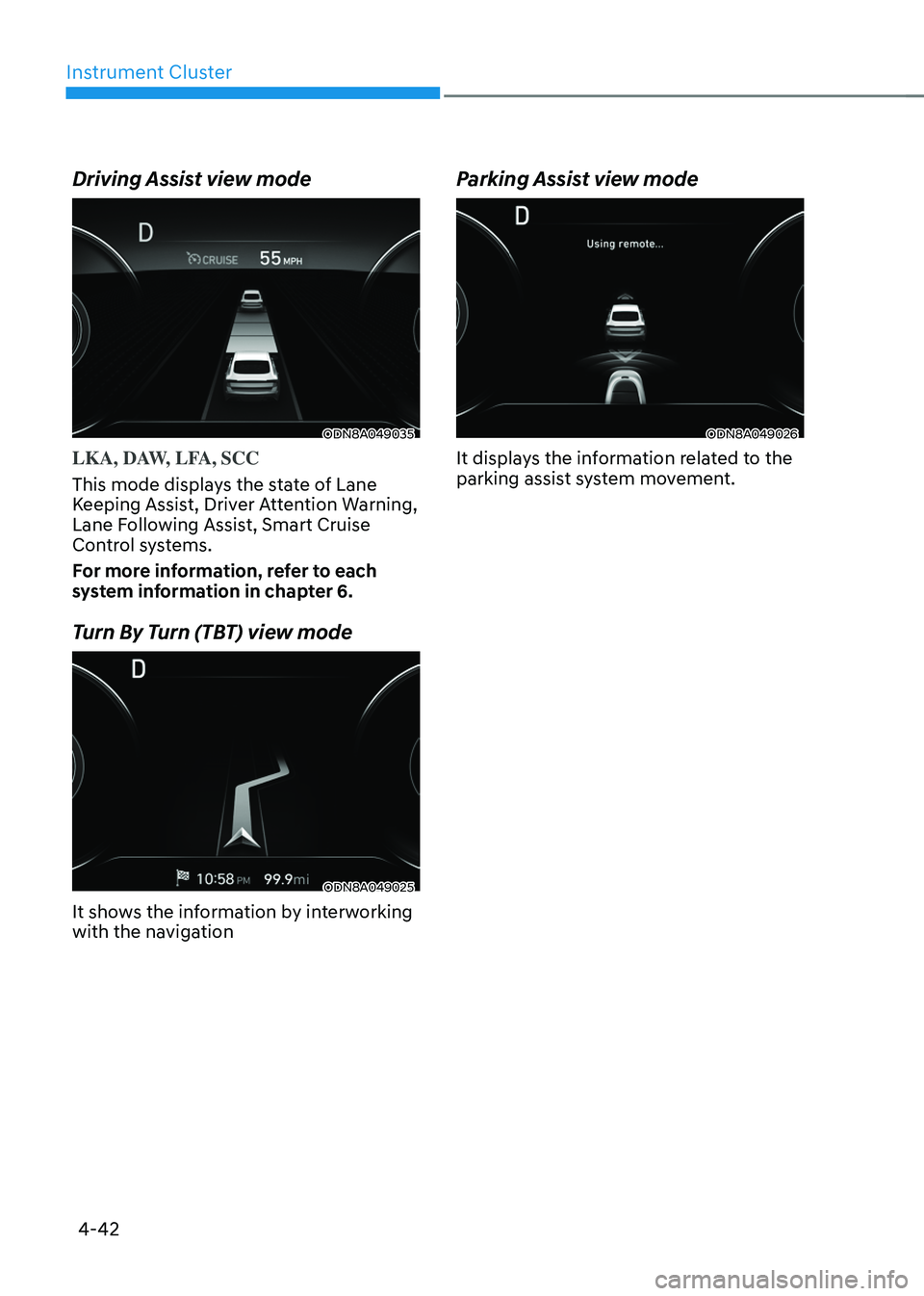
Driving Assist view mode
ODN8A049035
LKA, DAW, LFA, SCC
This mode displays the state of Lane
Keeping Assist, Driver Attention Warning,
Lane Following Assist, Smart Cruise
Control systems.
For more information, refer to each
system information in chapter 6.
Turn By Turn (TBT) view mode
ODN8A049025
It shows the information by interworking
with the navigation
Parking Assist view mode
ODN8A049026
It displays the information related to the
parking assist system movement.
Page 148 of 527
Instrument Cluster
4-44
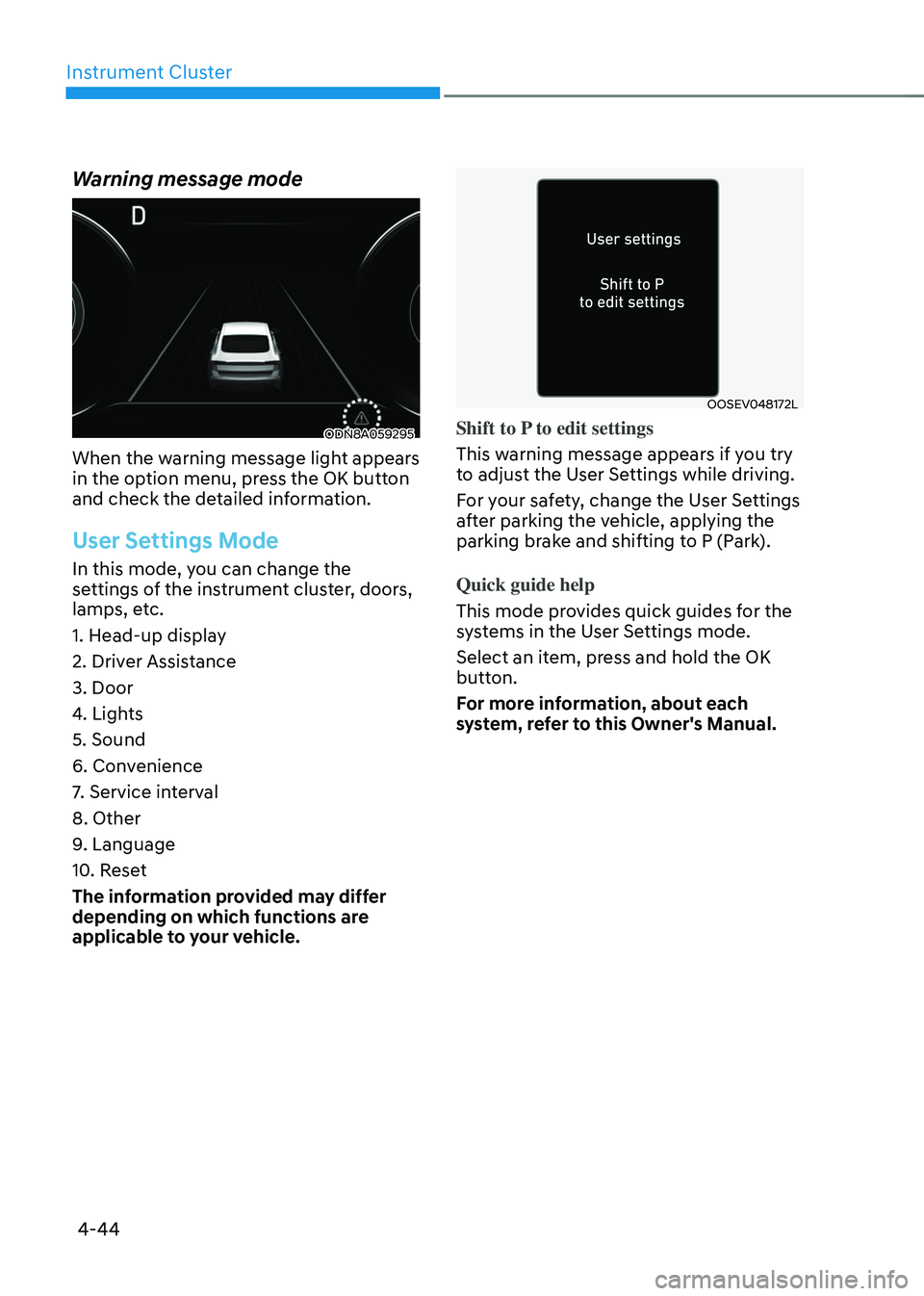
Warning message mode
ODN8A059295
When the warning message light appears
in the option menu, press the OK button
and check the detailed information.
User Settings Mode
In this mode, you can change the
settings of the instrument cluster, doors,
lamps, etc.
1. Head-up display
2. Driver Assistance
3. Door
4. Lights
5. Sound
6. Convenience
7. Service interval
8. Other
9. Language
10. Reset
The information provided may differ
depending on which functions are
applicable to your vehicle.
OOSEV048172L
Shift to P to edit settings
This warning message appears if you try
to adjust the User Settings while driving.
For your safety, change the User Settings
after parking the vehicle, applying the
parking brake and shifting to P (Park).
Quick guide help
This mode provides quick guides for the
systems in the User Settings mode.
Select an item, press and hold the OK
button.
For more information, about each
system, refer to this Owner's Manual.
Page 151 of 527
5
Forward/Reverse Parking Distance Warning (PDW) .....................................5-91Operation of Forward/Reverse Parking Distance Warning System ........................5-92
Non-Operational Conditions of Forward/
Reverse Parking Distance Warning System
.............................................................5-94
Forward/Reverse Parking Distance Warning System Precautions ........................5-94
Reverse Parking Collision-Avoidance Assist (PCA) .......................................5-95System Setting and Operation ........................................................................\
..........5-95
Warning and System Control ........................................................................\
............5-96
Detecting Sensor ........................................................................\
...............................5-98
System Malfunction ........................................................................\
..........................5-99
Limitations of the System ........................................................................\
.................5-99
Automatic Climate Control System ..............................................................5-101Automatic Heating and Air Conditioning ...............................................................5-102
Manual Temperature Control Mode ........................................................................\
5-103
System Operation ........................................................................\
.............................5-109
System Maintenance ........................................................................\
.........................5-111
Windshield Defrosting and Defogging ..........................................................5-113To Defog Inside Windshield ........................................................................\
..............5-113
To Defog Outside Windshield ........................................................................\
...........5-114
Defogging Logic ........................................................................\
................................5-114
Auto Defogging System ........................................................................\
....................5-115
Defroster ........................................................................\
............................................5-116
Climate Control Additional Features .............................................................5-117Sunroof Inside Air Recirculation ........................................................................\
.......5-117
Automatic Ventilation ........................................................................\
.......................5-117
Smart Seat Warmer/Air Ventilation Seat
(Automatic Control Interworking with the Driver’s Seat System)
..........................5-117
Washer Fluid Logic ........................................................................\
............................5-117
Storage Compartment ........................................................................\
...........5-118Center Console Storage ........................................................................\
....................5-118
Glove Box ........................................................................\
...........................................5-118
5. Convenient Features
Page 232 of 527
Convenient Features
5-84
Rear View Monitor system is a
supplemental system that shows the area
behind the vehicle on the infotainment
system screen to assist you when parking
or driving.
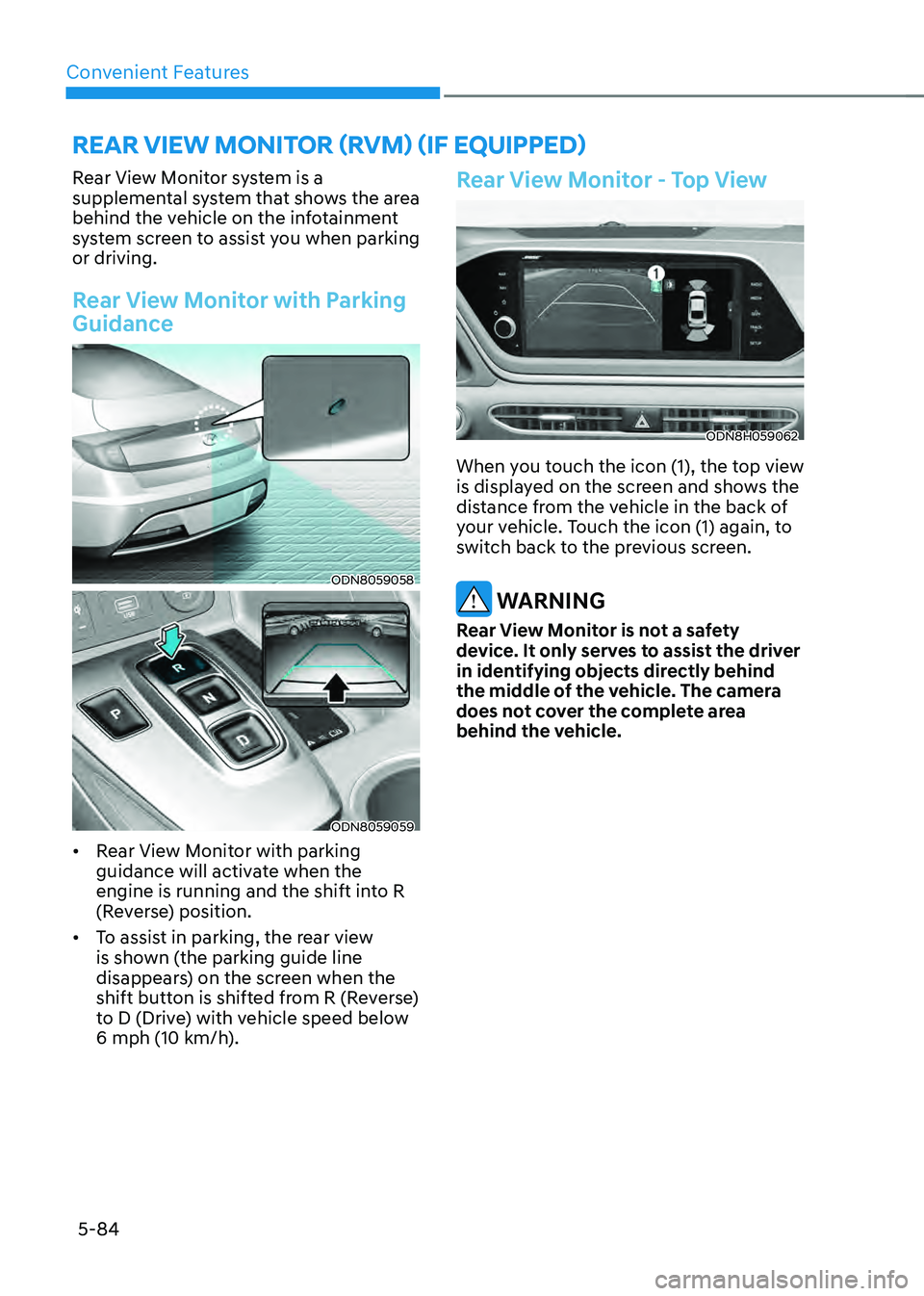
Rear View Monitor with Parking
Guidance
ODN8059058
ODN8059059
• Rear View Monitor with parking
guidance will activate when the
engine is running and the shift into R
(Reverse) position.
• To assist in parking, the rear view
is shown (the parking guide line
disappears) on the screen when the
shift button is shifted from R (Reverse)
to D (Drive) with vehicle speed below
6 mph (10 km/h).
Rear View Monitor - Top View
ODN8H059062
When you touch the icon (1), the top view
is displayed on the screen and shows the
distance from the vehicle in the back of
your vehicle. Touch the icon (1) again, to
switch back to the previous screen.
WARNING
Rear View Monitor is not a safety
device. It only serves to assist the driver
in identifying objects directly behind
the middle of the vehicle. The camera
does not cover the complete area
behind the vehicle.
REAR VIEW MONITOR (RVM) (IF EQUIPPED)
Page 234 of 527
Convenient Features
5-86
SURROUND VIEW MONITOR (SVM) (IF EQUIPPED)
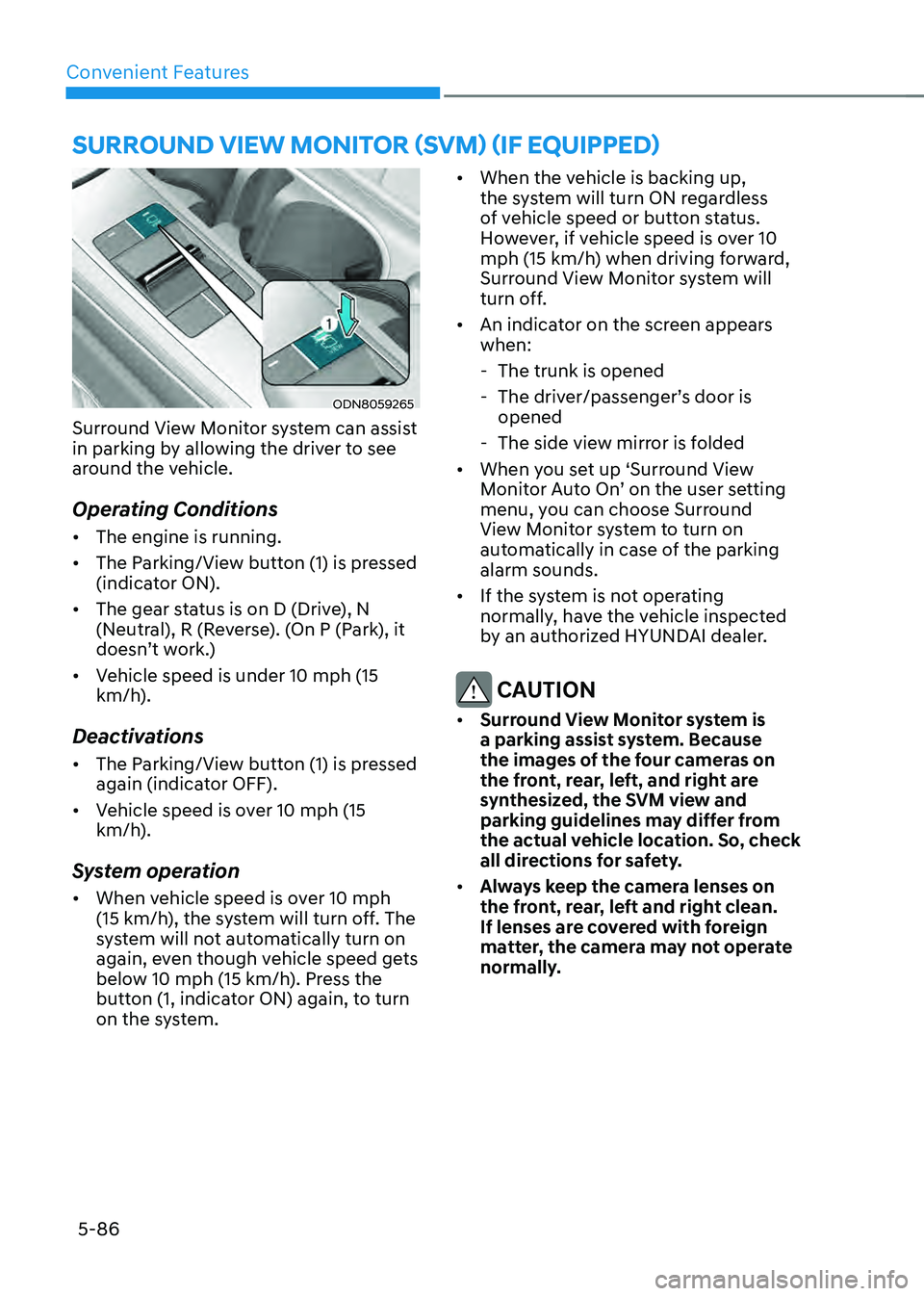
ODN8059265
Surround View Monitor system can assist
in parking by allowing the driver to see
around the vehicle.
Operating Conditions
• The engine is running.
• The Parking/View button (1) is pressed
(indicator ON).
• The gear status is on D (Drive), N
(Neutral), R (Reverse). (On P (Park), it
doesn’t work.)
• Vehicle speed is under 10 mph (15
km/h).
Deactivations
• The Parking/View button (1) is pressed
again (indicator OFF).
• Vehicle speed is over 10 mph (15
km/h).
System operation
• When vehicle speed is over 10 mph
(15 km/h), the system will turn off. The
system will not automatically turn on
again, even though vehicle speed gets
below 10 mph (15 km/h). Press the
button (1, indicator ON) again, to turn
on the system. •
When the vehicle is backing up,
the system will turn ON regardless
of vehicle speed or button status.
However, if vehicle speed is over 10
mph (15 km/h) when driving forward,
Surround View Monitor system will
turn off.
• An indicator on the screen appears
when:
-The trunk is opened
-The driver/passenger’s door is
opened
-The side view mirror is folded
• When you set up ‘Surround View
Monitor Auto On’ on the user setting
menu, you can choose Surround
View Monitor system to turn on
automatically in case of the parking
alarm sounds.
• If the system is not operating
normally, have the vehicle inspected
by an authorized HYUNDAI dealer.
CAUTION
• Surround View Monitor system is
a parking assist system. Because
the images of the four cameras on
the front, rear, left, and right are
synthesized, the SVM view and
parking guidelines may differ from
the actual vehicle location. So, check
all directions for safety.
• Always keep the camera lenses on
the front, rear, left and right clean.
If lenses are covered with foreign
matter, the camera may not operate
normally.
Page 235 of 527
![HYUNDAI SONATA HYBRID 2022 Owners Manual 05
5-87
ODN8A059056[A] : Rear Sensor
Reverse Parking Distance Warning
system assists the driver during reverse
movement of the vehicle by chiming if an
object is sensed within the distance of 48
i](/img/35/56188/w960_56188-234.png "HYUNDAI SONATA HYBRID 2022 Owners Manual 05
5-87
ODN8A059056[A] : Rear Sensor
Reverse Parking Distance Warning
system assists the driver during reverse
movement of the vehicle by chiming if an
object is sensed within the distance of 48
i")
05
5-87
ODN8A059056[A] : Rear Sensor
Reverse Parking Distance Warning
system assists the driver during reverse
movement of the vehicle by chiming if an
object is sensed within the distance of 48
in (120 cm) behind the vehicle.
This system is a supplemental system
that senses objects within the range and
location of the sensors, it cannot detect
objects in other areas where sensors are
not installed.
WARNING
• Always look around your vehicle to
make sure there are not any objects
or obstacles before moving the
vehicle in any direction to prevent a
collision.
• Always pay close attention when the
vehicle is driven close to objects,
particularly pedestrians, and
especially children.
• Be aware that some objects may
not be visible on the screen or be
detected by the sensors, due to the
objects distance, size or material, all
of which can limit the effectiveness
of the sensor.
Operation of Reverse Parking
Distance Warning System
Operating condition
• This system will activate when
backing up with the ignition switch in
the ON position. However, if vehicle
speed exceeds 3 mph (5 km/h), the
system may not detect objects.
• If vehicle speed exceeds 6 mph (10
km/h), the system will not warn you
even though objects are detected.
• When more than two objects are
sensed at the same time, the closest
one will be recognized first.
REVERSE PARKING DISTANCE WARNING (PDW)
(IF EQUIPPED)