charging Hyundai Sonata Plug-in Hybrid 2016 User Guide
[x] Cancel search | Manufacturer: HYUNDAI, Model Year: 2016, Model line: Sonata Plug-in Hybrid, Model: Hyundai Sonata Plug-in Hybrid 2016Pages: 685, PDF Size: 41.8 MB
Page 262 of 685
4-12
Multimedia System
(Continued)
• Some USB devices may not be sup-
ported due to compatibility issues.
• Avoid contact between the USB con-
nector with bodily parts or foreign
objects.
• Repeated connecting/disconnecting
of USB devices within short periods
of time may result in product mal-
function.
• A strange noise may occur when dis-
connecting the USB.
• Make sure to connect/disconnect
external USB devices with the audio
power turned off.
• The amount of time required to rec-
ognize the USB device may differ
depending on the type, size or file
formats stored in the USB. Such dif-
ferences in time are not indications
of malfunctions.
• The device only supports USB
devices used to play music files.
• USB images and videos are not sup-
ported.
(Continued)(Continued)
• Do not use the USB I/F to charge
batteries or USB accessories that
generate heat. Such acts may lead to
worsened performance or damage
to the device.
• The device may not recognize the
USB device if separately purchased
USB hubs and extension cables are
being used. Connect the USB direct-
ly with the multimedia terminal of
the vehicle.
• When using mass storage USB
devices with separate logical drives,
only files saved to the root drive can
be played.
• Files may not properly operate if
application programs are installed
to the USBs.
• The device may not operate normally
if MP3 Players, cellular phones, digi-
tal cameras, or other electronic
devices (USB devices not recognized
as portable disk drives) are connected
with the device.(Continued)
• Charging through the USB may not
work for some mobile devices.
• The device may not support normal
operation when using a USB memo-
ry type besides (Metal Cover Type)
USB Memory.
• The device may not support normal
operation when using formats such
as HDD Type, CF, or SD Memory.
• The device will not support files
locked by DRM (Digital Rights
Management.)
• USB memory sticks used by con-
necting an Adaptor (SD Type or CF
Type) may not be properly recog-
nized.
• The device may not operate properly
when using USB HDDs or USBs sub-
ject to connection failures caused by
vehicle vibrations. (e.g. i-stick type)
(Continued)
Page 264 of 685
4-14
(Continued)
• If your iPhone
®is connected to both
the Bluetooth®Wireless Technology
and USB, the sound may not be
properly played. In your iPhone
®,
select the Dock connector or
Bluetooth
®Wireless Technology to
change the sound output (source).
• iPod mode cannot be operated when
the iPod
®cannot be recognized due
to versions that do not support com-
munication protocols.
• For fifth generation iPod
®Nano
devices, the iPod®may not be recog-
nized when the battery level is low.
Please charge the iPod
®for use.
• Search/play orders shown within
the iPod
®device may differ with the
orders shown within the audio sys-
tem.
• If the iPod
®malfunctions due to an
iPod®device defect, reset the iPod®
and try again. (To learn more, refer to
your iPod®manual)
(Continued)(Continued)
• Some iPod
®s may not sync with the
System depending on its version. If
the Media is removed before the
Media is recognized, then the sys-
tem may not properly restore the
previously operated mode. (iPad
®
charging is not supported.)
Information - Using the AUX
device
• If an external device connector is
connected with the AUX terminal,
then AUX mode will automatically
operate. Once the connector is dis-
connected, the previous mode will
be restored.
• AUX mode can be used only when
an external audio player (cam-
corder, car VCR, etc.) has been con-
nected.
• The AUX volume can be controlled
separately from other audio modes.
• Connecting a connector jack to the
AUX terminal without an external
device will convert the system to
AUX mode, but only output noise.
When an external device is not
being used, also remove the connec-
tor jack.
• When the external device power is
connected to the power jack, play-
ing the external device may output
noise. In such cases, disconnect the
power connection before use.
• Fully insert the AUX cable to the
AUX jack upon use.i
Multimedia System
Page 455 of 685
5-7
Driving your vehicle
5
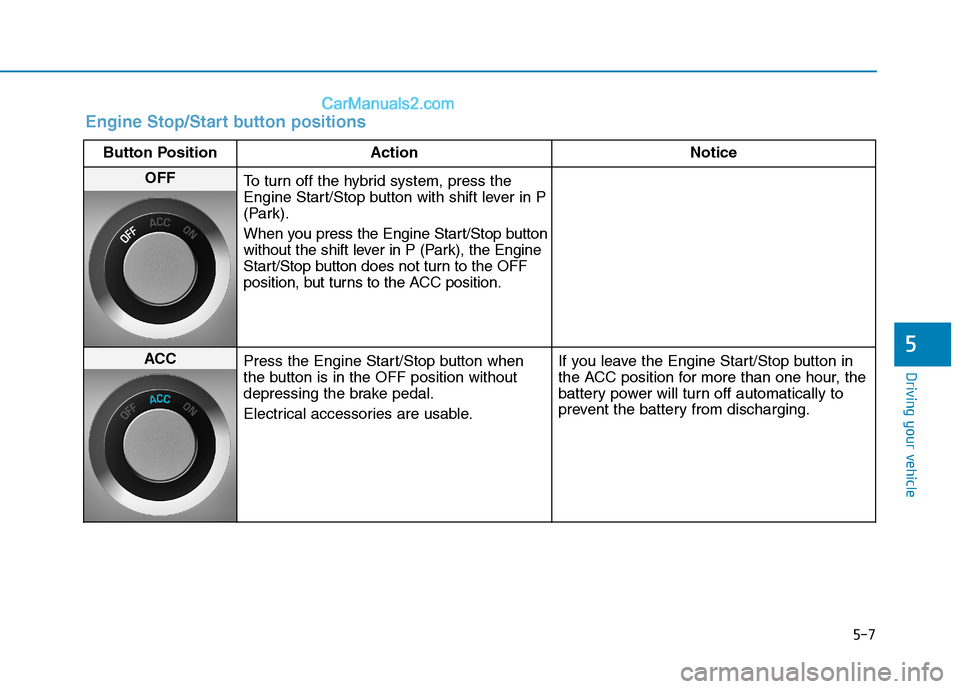
Engine Stop/Start button positions
Button Position Action Notice
OFF
To turn off the hybrid system, press the
Engine Start/Stop button with shift lever in P
(Park).
When you press the Engine Start/Stop button
without the shift lever in P (Park), the Engine
Start/Stop button does not turn to the OFF
position, but turns to the ACC position.
ACC
Press the Engine Start/Stop button when
the button is in the OFF position without
depressing the brake pedal.
Electrical accessories are usable.If you leave the Engine Start/Stop button in
the ACC position for more than one hour, the
battery power will turn off automatically to
prevent the battery from discharging.
Page 456 of 685
5-8
Driving your vehicle
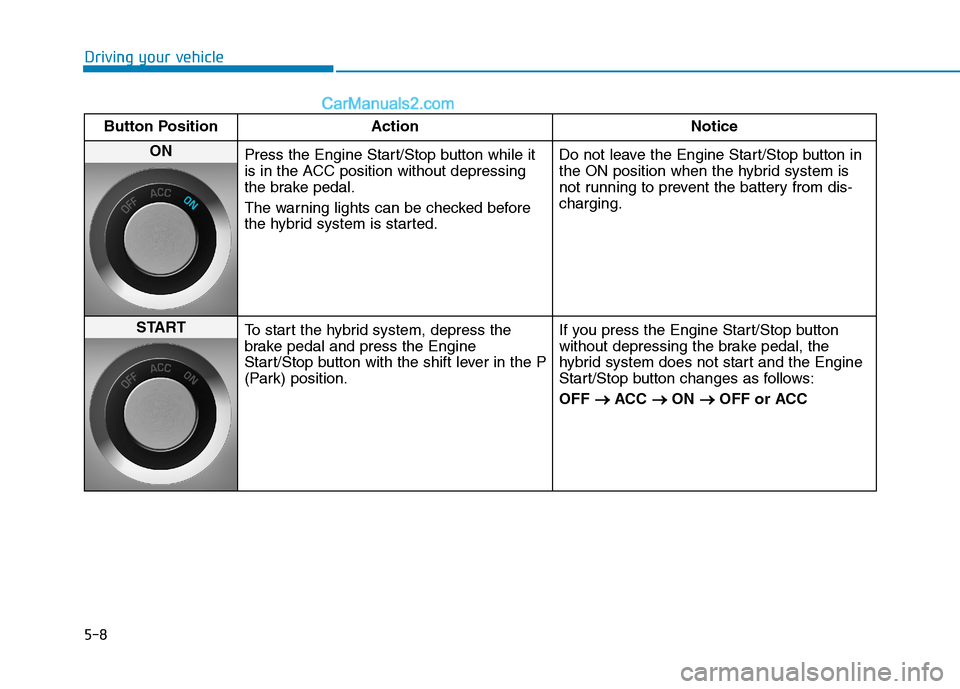
Button Position Action Notice
ON
Press the Engine Start/Stop button while it
is in the ACC position without depressing
the brake pedal.
The warning lights can be checked before
the hybrid system is started.Do not leave the Engine Start/Stop button in
the ON position when the hybrid system is
not running to prevent the battery from dis-
charging.
START
To start the hybrid system, depress the
brake pedal and press the Engine
Start/Stop button with the shift lever in the P
(Park) position.If you press the Engine Start/Stop button
without depressing the brake pedal, the
hybrid system does not start and the Engine
Start/Stop button changes as follows:
OFF → →
ACC → →
ON → →
OFF or ACC
Page 536 of 685

5-88
Driving your vehicle
Check battery and cables
The winter temperature increases
the battery consumption.Inspect
the battery and cables, as speci-
fied in the chapter 7.The battery
charging level can be checked by an
authorized HYUNDAI dealer or in a
service station.
Change to "winter weight" oil if
necessary
In some regions during winter, it is
recommended to use the "winter
weight" oil with lower viscosity. For
further information, refer to the chap-
ter 8. When you are not sure about a
type of winter weight oil, consult an
authorized HYUNDAI dealer.Check spark plugs and ignition
system
Inspect the spark plugs, as speci-
fied in the chapter 7.If necessary,
replace them. Also check all ignition
wirings and components for any
cracks, wear-out, and damage.
To prevent locks from freezing
To prevent the locks from being
frozen, spray approved de-icing fluid
or glycerin into key holes. When a
lock opening is already covered with
ice, spray approved de-icing fluid
over the ice to remove it. When an
internal part of a lock freezes, try to
thaw it with a heated key. Carefully
use the heated key to avoid an injury.Use approved window washer
anti-freeze solution in system
To prevent the window washer from
being frozen, add authorized window
washer anti-freeze solution, as spec-
ified on the window washer contain-
er. Window washer anti-freeze solu-
tion is available from an authorized
HYUNDAI dealer, and so are the
most vehicle accessory outlets. Do
not use engine coolant or other types
of anti-freeze solution to prevent any
damage to the vehicle paint.
Page 549 of 685
6-6
What to do in an emergency
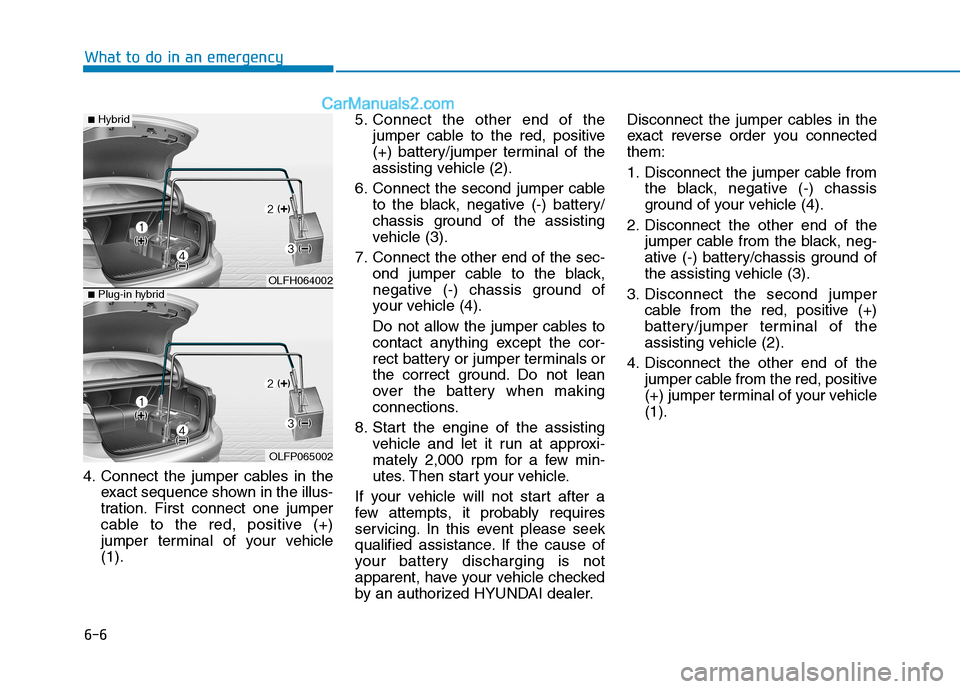
4. Connect the jumper cables in the
exact sequence shown in the illus-
tration. First connect one jumper
cable to the red, positive (+)
jumper terminal of your vehicle
(1).5. Connect the other end of the
jumper cable to the red, positive
(+) battery/jumper terminal of the
assisting vehicle (2).
6. Connect the second jumper cable
to the black, negative (-) battery/
chassis ground of the assisting
vehicle (3).
7. Connect the other end of the sec-
ond jumper cable to the black,
negative (-) chassis ground of
your vehicle (4).
Do not allow the jumper cables to
contact anything except the cor-
rect battery or jumper terminals or
the correct ground. Do not lean
over the battery when making
connections.
8. Start the engine of the assisting
vehicle and let it run at approxi-
mately 2,000 rpm for a few min-
utes. Then start your vehicle.
If your vehicle will not start after a
few attempts, it probably requires
servicing. In this event please seek
qualified assistance. If the cause of
your battery discharging is not
apparent, have your vehicle checked
by an authorized HYUNDAI dealer.Disconnect the jumper cables in the
exact reverse order you connected
them:
1. Disconnect the jumper cable from
the black, negative (-) chassis
ground of your vehicle (4).
2. Disconnect the other end of the
jumper cable from the black, neg-
ative (-) battery/chassis ground of
the assisting vehicle (3).
3. Disconnect the second jumper
cable from the red, positive (+)
battery/jumper terminal of the
assisting vehicle (2).
4. Disconnect the other end of the
jumper cable from the red, positive
(+) jumper terminal of your vehicle
(1).
OLFH064002
OLFP065002
■Hybrid
■Plug-in hybrid
Page 570 of 685
7
Maintenance
7
Maintenance
Engine compartment .............................................7-3
Maintenance services ...........................................7-4
Owner's responsibility ......................................................7-4
Owner maintenance precautions ..................................7-4
Owner maintenance ...............................................7-5
Owner maintenance schedule ........................................7-6
Scheduled maintenance services.........................7-8
Normal maintenance schedule .......................................7-9
Maintenance under severe usage conditions ..........7-22
Explanation of scheduled maintenance
items.......................................................................7-24
Engine oil ..............................................................7-27
Checking the engine oil level ................................7-27
Checking the engine oil and filter ..............................7-28
Engine coolant/inverter coolant .......................7-29
Checking the engine/inverter coolant level .............7-29
Changing engine coolant .............................................7-32
Hybrid starter & generator (HSG) belt.............7-32
Checking the hybrid starter &
generator (HSG) belt ......................................................7-32
Brake fluid ............................................................7-33
Checking the brake fluid level .....................................7-33
Washer fluid .........................................................7-34
Checking the washer fluid level ..................................7-34
Parking brake .......................................................7-34
Checking the parking brake .........................................7-34
Air cleaner ...........................................................7-35
Filter replacement ........................................................7-35
Climate control air filter .....................................7-37
Filter inspection ...............................................................7-37
Wiper blades .........................................................7-39
Blade inspection ..............................................................7-39
Blade replacement ..........................................................7-39
Battery...................................................................7-41
For best battery service................................................7-42
Battery recharging .........................................................7-42
Reset features .................................................................7-43
Tires and wheels ..................................................7-44
Tire care ............................................................................7-44
Recommended cold tire inflation pressures.............7-45
Check tire inflation pressure........................................7-46
Tire rotation .....................................................................7-47
Wheel alignment and tire balance ..............................7-48
Tire replacement .............................................................7-48
Wheel replacement .........................................................7-49
Tire traction ......................................................................7-49
Tire maintenance ............................................................7-50
Tire sidewall labeling ......................................................7-50
Tire terminology and definitions.................................7-54
7
Page 611 of 685
7-42
Maintenance
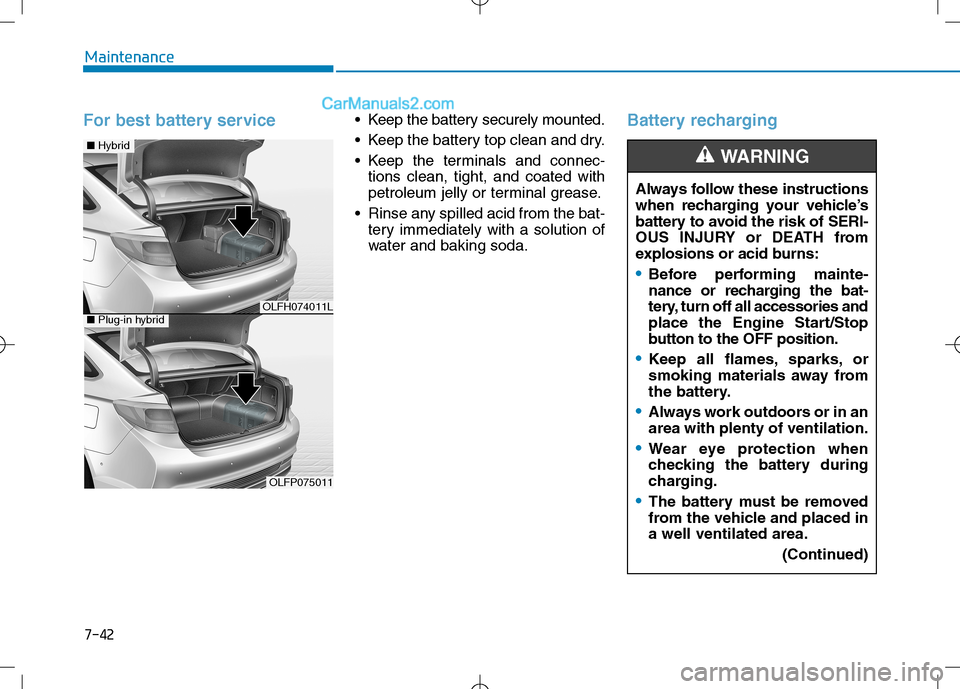
For best battery service • Keep the battery securely mounted.
Keep the battery top clean and dry.
Keep the terminals and connec-
tions clean, tight, and coated with
petroleum jelly or terminal grease.
Rinse any spilled acid from the bat-
tery immediately with a solution of
water and baking soda.Battery recharging
Always follow these instructions
when recharging your vehicle’s
battery to avoid the risk of SERI-
OUS INJURY or DEATH from
explosions or acid burns:
Before performing mainte-
nance or recharging the bat-
tery, turn off all accessories and
place the Engine Start/Stop
button to the OFF position.
Keep all flames, sparks, or
smoking materials away from
the battery.
Always work outdoors or in an
area with plenty of ventilation.
Wear eye protection when
checking the battery during
charging.
The battery must be removed
from the vehicle and placed in
a well ventilated area.
(Continued)
WARNING
OLFH074011L
OLFP075011
■Hybrid
■Plug-in hybrid
Page 612 of 685
7-43
7
Maintenance
By jump starting
After a jump start from a good bat-
tery, drive the vehicle for 20-30 min-
utes before it is shutoff. The vehicle
may not restart if you shut it off
before the battery had a chance to
adequately recharge. See “Jump
Starting” in chapter 6 for more infor-
mation on jump starting procedures.
Information
An inappropriately dis-posed battery can be
harmful to the environ-
ment and human health.
Dispose the battery according to
your local law(s) or regulation.
Reset features
Some items need to be reset after
the battery has been discharged or
the battery has been disconnected.
See chapter 3 for:
Power Windows
Trip Computer
Climate Control System
Clock
Audio System
Sunroof
i
(Continued)
Watch the battery during
charging, and stop or reduce
the charging rate if the battery
cells begin boiling violently.
The negative battery cable
must be removed first and
installed last when the battery
is disconnected. Disconnect
the battery charger in the fol-
lowing order:
(1) Turn off the battery charger main switch.
(2) Unhook the negative
clamp from the negative
battery terminal.
(3) Unhook the positive clamp from the positive battery
terminal.
Always use a genuine HYUNDAI
approved battery when you
replace the battery.