change time Hyundai Sonata Plug-in Hybrid 2016 Owner's Guide
[x] Cancel search | Manufacturer: HYUNDAI, Model Year: 2016, Model line: Sonata Plug-in Hybrid, Model: Hyundai Sonata Plug-in Hybrid 2016Pages: 685, PDF Size: 41.8 MB
Page 297 of 685
![Hyundai Sonata Plug-in Hybrid 2016 Owners Guide 4-47
Multimedia System
4
VOICE RECOGNITION
Using Voice Recognition
Starting Voice Recognition
Shortly press the key on the
steering wheel. Say a command.
If prompt feedback is in [ON], then
the sys](/img/35/19656/w960_19656-296.png "Hyundai Sonata Plug-in Hybrid 2016 Owners Guide 4-47
Multimedia System
4
VOICE RECOGNITION
Using Voice Recognition
Starting Voice Recognition
Shortly press the key on the
steering wheel. Say a command.
If prompt feedback is in [ON], then
the sys")
4-47
Multimedia System
4
VOICE RECOGNITION
Using Voice Recognition
Starting Voice Recognition
Shortly press the key on the
steering wheel. Say a command.
If prompt feedback is in [ON], then
the system will say “Please say a
command after the beep (BEEP)”
• If prompt feedback is in [OFF]
mode, then the system will only
say “(BEEP)”
• To change Prompt Feedback
[On]/[Off], go to [System]
[Prompt Feedback]
Information
For proper recognition, say the com-
mand after the voice instruction and
beep tone.
Contact List Best Practices
1) Do not store single-name entries
(e.g., “Bob”, “Mom”, “Kim”, etc.).
Instead, always use full names
(including first and last names) for
all contacts (e.g., use “Jacob
Stevenson” instead of “Dad”).
2) Do not use abbreviations (i.e., use
“Lieutenant” instead of “Lt.” or
“Sergeant” instead of “Sgt.”).
3) Do not use acronyms (i.e., use
“County Finance Department”
instead of “CFD”).
4) Do not use special characters
(e.g., “@”, “hyphen -”, “asterisk *”,
“ampersand &”).
5) If a name is not recognized from
the contact list, change it to a more
descriptive name (e.g., use
“Grandpa Joseph” instead of “Pa
Joe”).
Skipping Prompt Messages
While prompt message is being stat-
ed Shortly press the key on the
steering remote controller
The prompt message is immediately
ended and the beep tone will sound.
After the “beep”, say the voice com-
mand.
Re-starting Voice Recognition
While system waits for a command
Shortly press the key on the
steering remote controller
The command wait state is immedi-
ately ended and the beep ton will
sound. After the “beep”, say the voice
command.
i
SETUP
Page 304 of 685
4-54
Multimedia System
Information
iPod®is a registered trademark of
Apple Inc. iPod®mobile digital device
sold separately. The Bluetooth®word
mark and logos are registered trade-
marks owned by Bluetooth
®SIG, Inc.
and any use of such marks by
Hyundai is under license. SiriusXM
services require a subscription sold
separately, or as a package, by Sirius
XM Radio Inc. If you decide to con-
tinue service after your trial, the sub-
scription plan you choose will auto-
matically renew thereafter and you
will be charged according to your cho-
sen payment method at thencurrent
rates. Fees and taxes apply. To cancel
you must call SiriusXM at 1-866-635-
2349. See SiriusXM Customer
Agreement for complete terms at
www.siriusxm.com. SiriusXM U.S.
satellite and data services are avail-
able only in the 48 contiguous USA,
DC and PR (with coverage limita-
tions). SiriusXM satellite service is
also available in Canada; see www.sir-
iusxm.ca. All fees and programming
subject to change.
(Continued)(Continued)
Sirius, XM and all related marks and
logos are trademarks of Sirius XM
Radio Inc. Android™ is a trademark
of Google, Inc. BlackBerry is a regis-
tered trademark of Research In
Motion Limited (RIM). All other
marks, channel names and logos are
the property of their respective own-
ers. All rights reserved.
i
Page 305 of 685
4-55
Multimedia System
4
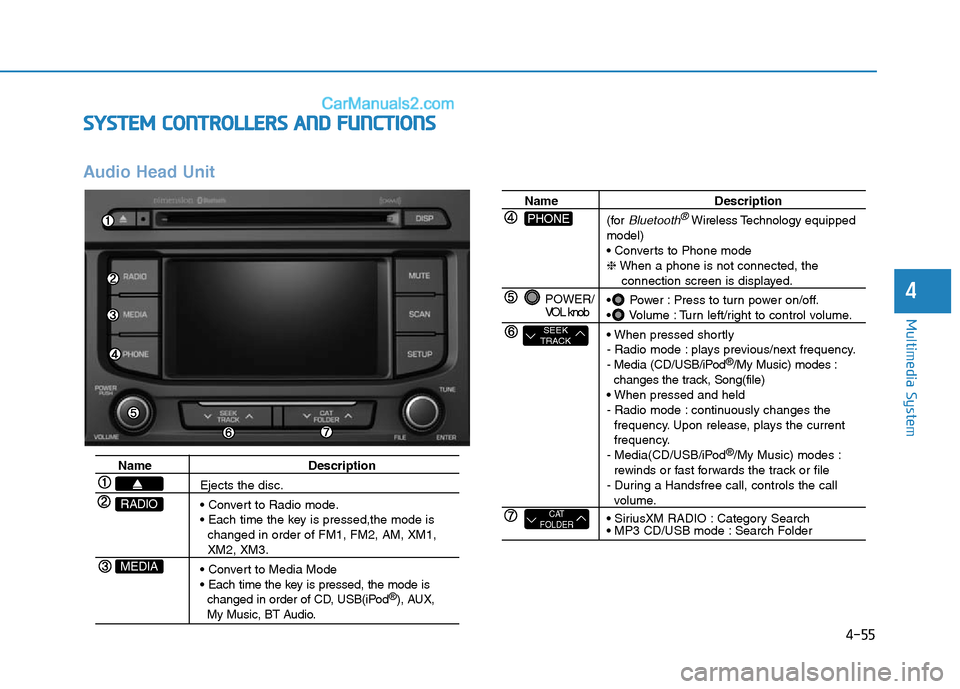
SYSTEM CONTROLLERS AND FUNCTIONS
Audio Head Unit
Name Description
Ejects the disc.
• Convert to Radio mode.
• Each time the key is pressed,the mode is
changed in order of FM1, FM2, AM, XM1,
XM2, XM3.
• Convert to Media Mode
• Each time the key is pressed, the mode is
changed in order of CD, USB(iPod
®), AUX, My Music, BT Audio.
MEDIA
RADIO
Name Description
(for
Bluetooth®Wireless Technologyequipped
model)
• Converts to Phone mode
❈When a phone is not connected, the
connection screen is displayed.
• Power : Press to turn power on/off.
• Volume : Turn left/right to control volume.
• When pressed shortly
- Radio mode : plays previous/next frequency.
- Media (CD/USB/iPod
®/My Music) modes :
changes the track, Song(file)
• When pressed and held
- Radio mode : continuously changes the
frequency. Upon release, plays the current
frequency.
- Media(CD/USB/iPod
®/My Music) modes :
rewinds or fast forwards the track or file
- During a Handsfree call, controls the call
volume.
• SiriusXM RADIO : Category Search
• MP3 CD/USB mode : Search Folder
POWER/
VOL knob
CAT
FOLDER
SEEK
TRACK
PHONE
Page 306 of 685
4-56
Multimedia System
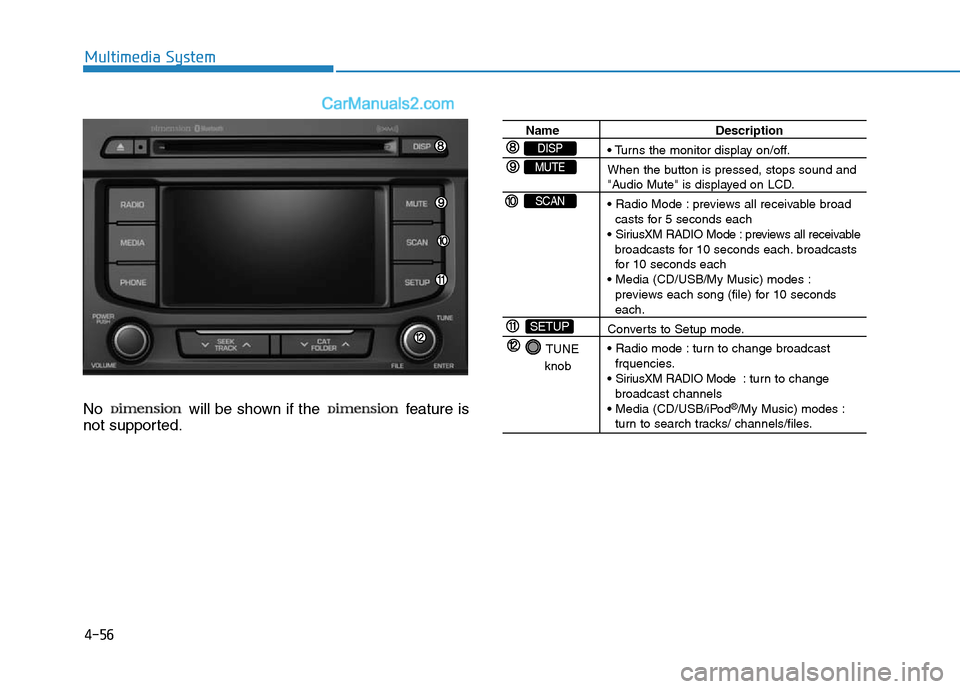
No will be shown if the feature is
not supported.
Name Description
• Turns the monitor display on/off.
When the button is pressed, stops sound and
"Audio Mute" is displayed on LCD.
• Radio Mode : previews all receivable broad
casts for 5 seconds each
• SiriusXM RADIO Mode : previews all receivable
broadcasts for 10 seconds each. broadcasts
for 10 seconds each
• Media (CD/USB/My Music) modes :
previews each song (file) for 10 seconds
each.
Converts to Setup mode.
• Radio mode : turn to change broadcast
frquencies.
• SiriusXM RADIO Mode : tur n to change
broadcast channels
• Media (CD/USB/iPod
®/My Music) modes :turn to search tracks/ channels/files.
TUNE
knob
SETUP
SCAN
MUTE
DISP
Page 307 of 685
4-57
Multimedia System
4
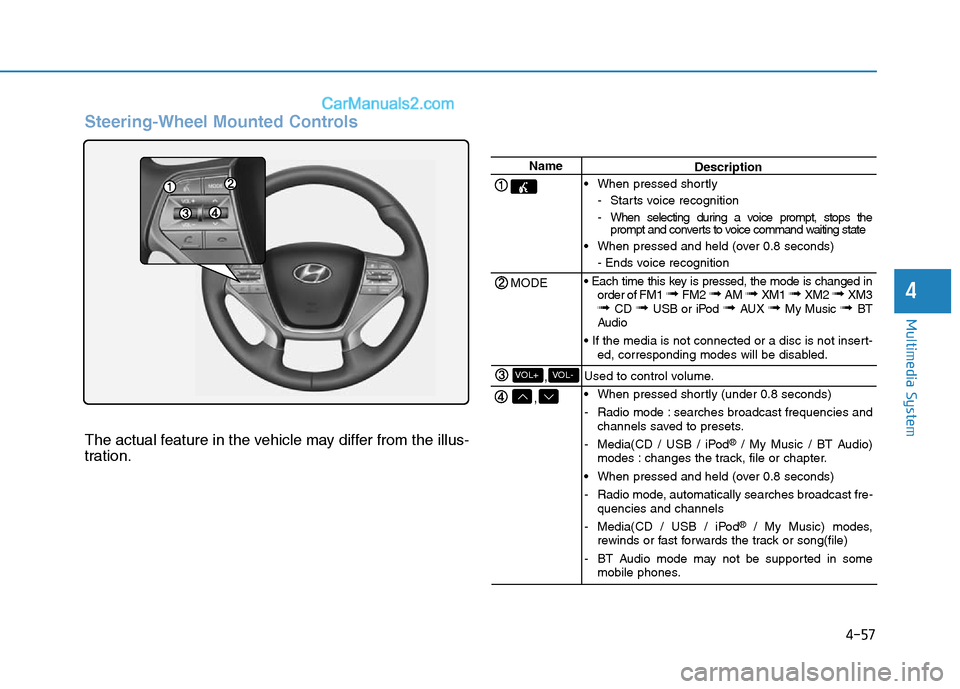
Steering-Wheel Mounted Controls
The actual feature in the vehicle may differ from the illus-
tration.
Name
MODE
,
,VOL-VOL+
Description
• When pressed shortly
- Starts voice recognition
- When selecting during a voice prompt, stops the
prompt and converts to voice command waiting state
• When pressed and held (over 0.8 seconds)
- Ends voice recognition
• Each time this key is pressed, the mode is changed in
order of FM1
➟ FM2 ➟ AM ➟ XM1 ➟ XM2 ➟ XM3➟ CD ➟ USB or iPod ➟ AUX ➟ My Music ➟ BT
Audio
• If the media is not connected or a disc is not insert-
ed, corresponding modes will be disabled.
Used to control volume.
• When pressed shortly (under 0.8 seconds)
- Radio mode : searches broadcast frequencies and
channels saved to presets.
- Media(CD / USB / iPod
®/ My Music / BT Audio)
modes : changes the track, file or chapter.
• When pressed and held (over 0.8 seconds)
- Radio mode, automatically searches broadcast fre-
quencies and channels
- Media(CD / USB / iPod
®/ My Music) modes,
rewinds or fast forwards the track or song(file)
- BT Audio mode may not be supported in some
mobile phones.
Page 309 of 685
4-59
Multimedia System
4
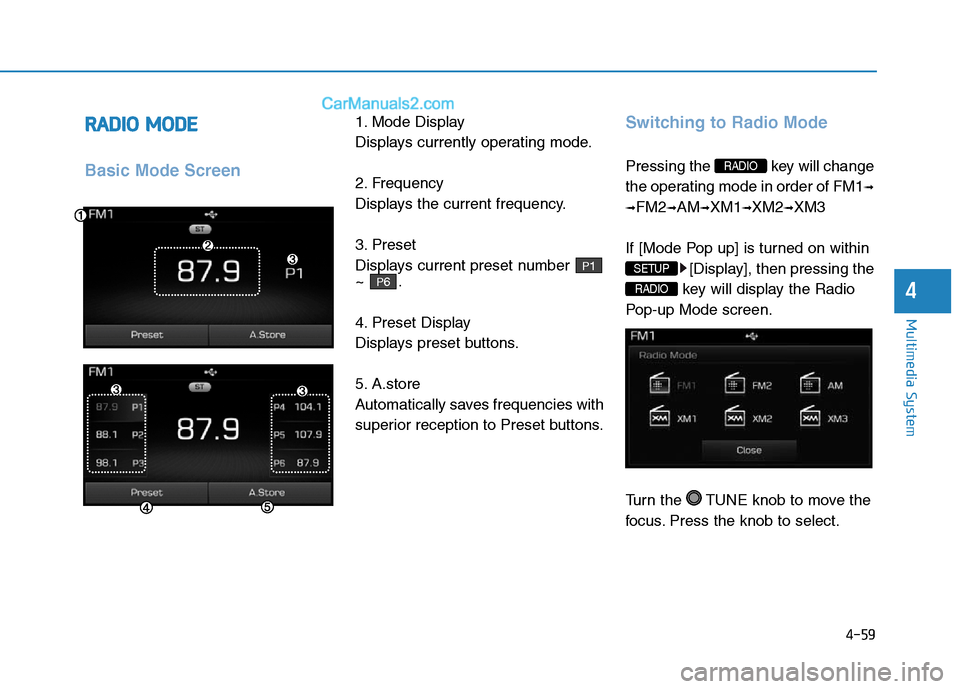
RADIO MODE
Basic Mode Screen
1. Mode Display
Displays currently operating mode.
2. Frequency
Displays the current frequency.
3. Preset
Displays current preset number
~ .
4. Preset Display
Displays preset buttons.
5. A.store
Automatically saves frequencies with
superior reception to Preset buttons.Switching to Radio Mode
Pressing the key will change
the operating mode in order of FM1
➟
➟
FM2➟AM➟XM1➟XM2➟XM3
If [Mode Pop up] is turned on within
[Display], then pressing the
key will display the Radio
Pop-up Mode screen.
Turn the TUNE knob to move the
focus. Press the knob to select.
RADIO
SETUP
RADIO
P6
P1
Page 312 of 685
4-62
Multimedia System
NOTE:
SiriusXM services require a sub-
scription sold separately, or as a
package, by Sirius XM Radio Inc. If
you decide to continue service
after your trial, the subscription
plan you choose will automatical-
ly renew thereafter and you will be
charged according to your chosen
payment method at then-current
rates. Fees and taxes apply. To
cancel you must call SiriusXM at
1-866-635-2349. See SiriusXM
Customer Agreement for com-
plete terms at www.siriusxm.com.
SiriusXM U.S. satellite and data
services are available only in the
48 contiguous USA, DC and PR
(with coverage limitations).
SiriusXM satellite service is also
available in Canada; see www.sir-
iusxm. ca. All fees and program-
ming subject to change. Sirius,
XM and all related marks and
logos are trademarks of Sirius XM
Radio Inc.
Page 313 of 685
4-63
Multimedia System
4
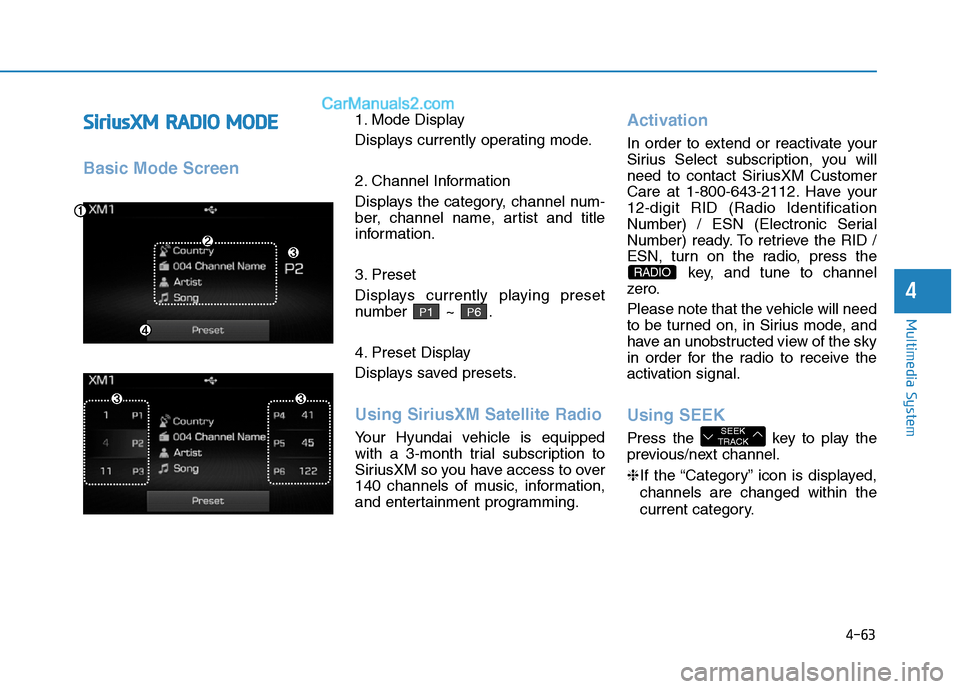
SiriusXMRADIO MODE
Basic Mode Screen
1. Mode Display
Displays currently operating mode.
2. Channel Information
Displays the category, channel num-
ber, channel name, artist and title
information.
3. Preset
Displays currently playing preset
number ~ .
4. Preset Display
Displays saved presets.
Using SiriusXM Satellite Radio
Your Hyundai vehicle is equipped
with a 3-month trial subscription to
SiriusXM so you have access to over
140 channels of music, information,
and entertainment programming.
Activation
In order to extend or reactivate your
Sirius Select subscription, you will
need to contact SiriusXM Customer
Care at 1-800-643-2112. Have your
12-digit RID (Radio Identification
Number) / ESN (Electronic Serial
Number) ready. To retrieve the RID /
ESN, turn on the radio, press the
key, and tune to channel
zero.
Please note that the vehicle will need
to be turned on, in Sirius mode, and
have an unobstructed view of the sky
in order for the radio to receive the
activation signal.
Using SEEK
Press the key to play the
previous/next channel.
❈If the “Category” icon is displayed,
channels are changed within the
current category.SEEK
TRACK
RADIO
P6P1
Page 314 of 685
4-64
Multimedia System
SCAN
Press the key to scan all
channels with superior reception for
5 seconds each.
Once scan is complete, the previous-
ly played channel will be restored.
During Scan, pressing the
key again will cancel the scan opera-
tion and restore the previously
played channel.
If the “Category” icon is displayed,
channels are changed within the cur-
rent category.
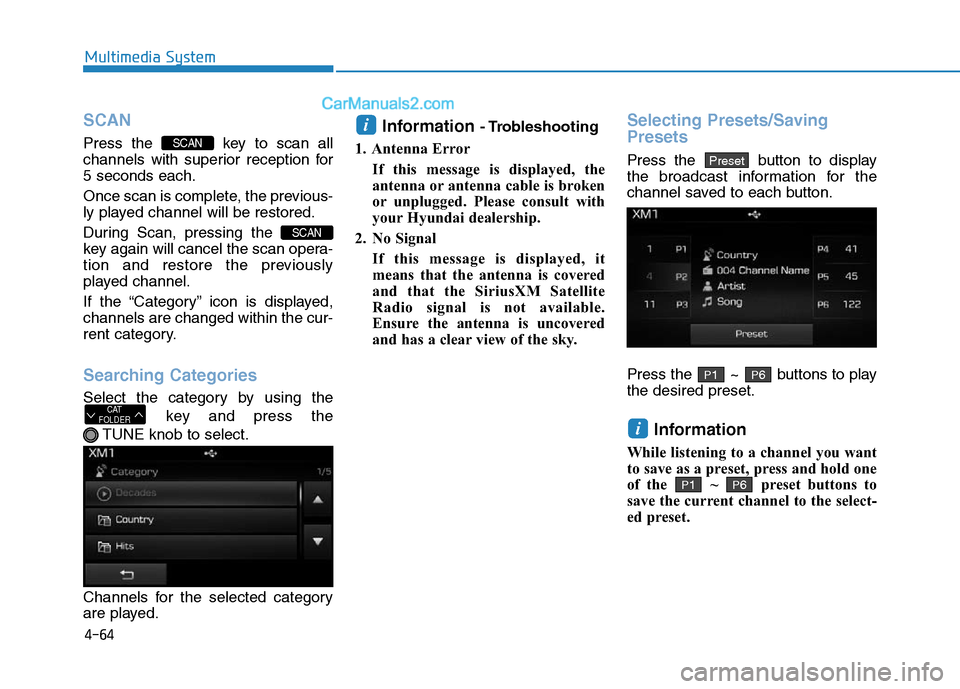
Searching Categories
Select the category by using the
key and press the
TUNE knob to select.
Channels for the selected category
are played.
Information - Trobleshooting
1. Antenna Error
If this message is displayed, the
antenna or antenna cable is broken
or unplugged. Please consult with
your Hyundai dealership.
2. No Signal
If this message is displayed, it
means that the antenna is covered
and that the SiriusXM Satellite
Radio signal is not available.
Ensure the antenna is uncovered
and has a clear view of the sky.Selecting Presets/Saving
Presets
Press the button to display
the broadcast information for the
channel saved to each button.
Press the ~ buttons to play
the desired preset.
Information
While listening to a channel you want
to save as a preset, press and hold one
of the ~ preset buttons to
save the current channel to the select-
ed preset.
P6P1
i
P6P1
Preset
i
CAT
FOLDER
SCAN
SCAN
Page 315 of 685
![Hyundai Sonata Plug-in Hybrid 2016 Owners Guide 4-65
Multimedia System
4
MEDIA MODE
Pressing the key will change
the operating mode in order of CD
➟
USB(iPod®) ➟ AUX ➟ My Music ➟BT
Audio.
If [Mode Pop up] is turned on within
[Display], t](/img/35/19656/w960_19656-314.png "Hyundai Sonata Plug-in Hybrid 2016 Owners Guide 4-65
Multimedia System
4
MEDIA MODE
Pressing the key will change
the operating mode in order of CD
➟
USB(iPod®) ➟ AUX ➟ My Music ➟BT
Audio.
If [Mode Pop up] is turned on within
[Display], t")
4-65
Multimedia System
4
MEDIA MODE
Pressing the key will change
the operating mode in order of CD
➟
USB(iPod®) ➟ AUX ➟ My Music ➟BT
Audio.
If [Mode Pop up] is turned on within
[Display], then pressing the
key will display the Media
Pop-up Mode screen.
Turn the TUNE knob to move the
focus. Press the knob to select.
Information
The media mode pop up screen can be
displayed only when there are two or
more media modes turned on.
Title Icon
When a Bluetooth®Wireless
Technology, iPod®, USB, or AUX
device is connected or a CD is
inserted, the corresponding mode
icon will be displayed.
Icon Title
Bluetooth®Wireless Technology
CD
iPod®
USB
AUX
i
MEDIA
SETUP
MEDIA