change time Hyundai Sonata Plug-in Hybrid 2016 Workshop Manual
[x] Cancel search | Manufacturer: HYUNDAI, Model Year: 2016, Model line: Sonata Plug-in Hybrid, Model: Hyundai Sonata Plug-in Hybrid 2016Pages: 685, PDF Size: 41.8 MB
Page 361 of 685
4-111
Multimedia System
4
SYSTEM CONTROLLERS AND FUNCTIONS
Audio Head Unit
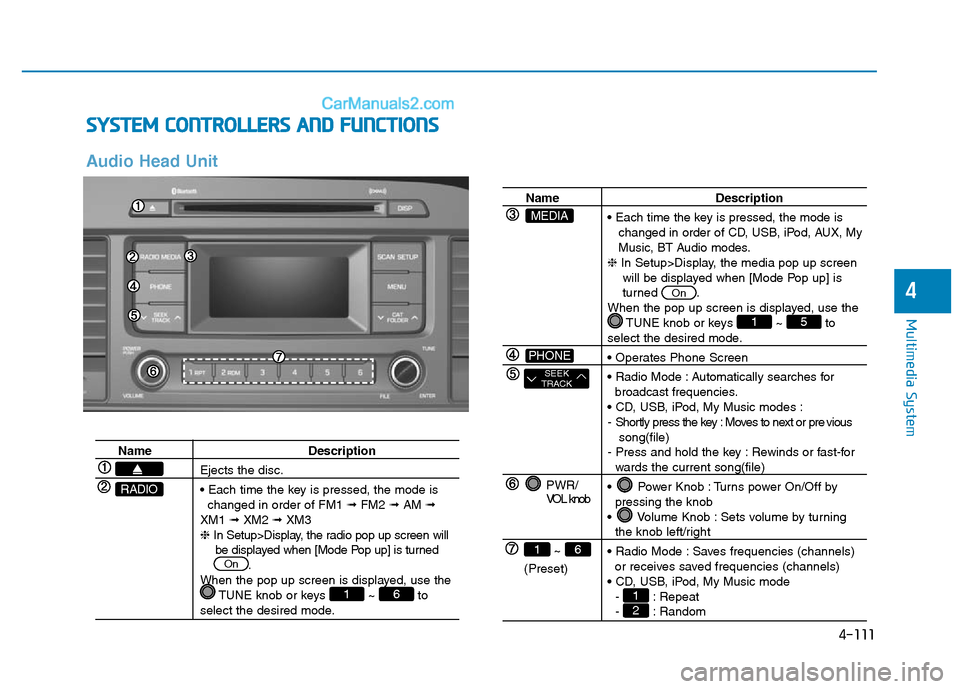
Name Description
Ejects the disc.
• Each time the key is pressed, the mode is
changed in order of FM1 ➟FM2 ➟AM ➟
XM1 ➟XM2 ➟XM3
❈In Setup>Display, the radio pop up screen will
be displayed when [Mode Pop up] is turned
.
When the pop up screen is displayed, use the
TUNE knob or keys ~ to
select the desired mode.
61
On
RADIO
Name Description
• Each time the key is pressed, the mode is
changed in order of CD, USB, iPod, AUX, My
Music, BT Audio modes.
❈In Setup>Display, the media pop up screen
will be displayed when [Mode Pop up] is
turned .
When the pop up screen is displayed, use the
TUNE knob or keys ~ to
select the desired mode.
• Operates Phone Screen
• Radio Mode : Automatically searches for
broadcast frequencies.
• CD, USB, iPod, My Music modes :
- Shortly press the key : Moves to next or pre vious
song(file)
- Press and hold the key : Rewinds or fast-for
wards the current song(file)
• Power Knob : Turns power On/Off by
pressing the knob
• Volume Knob : Sets volume by turning
the knob left/right
• Radio Mode : Saves frequencies (channels)
or receives saved frequencies (channels)
• CD, USB, iPod, My Music mode
- : Repeat
- : Random21
51
On
PWR/
VOL knob
~
(Preset)
61
SEEK
TRACK
PHONE
MEDIA
Page 362 of 685
4-112
Multimedia System
Name Description
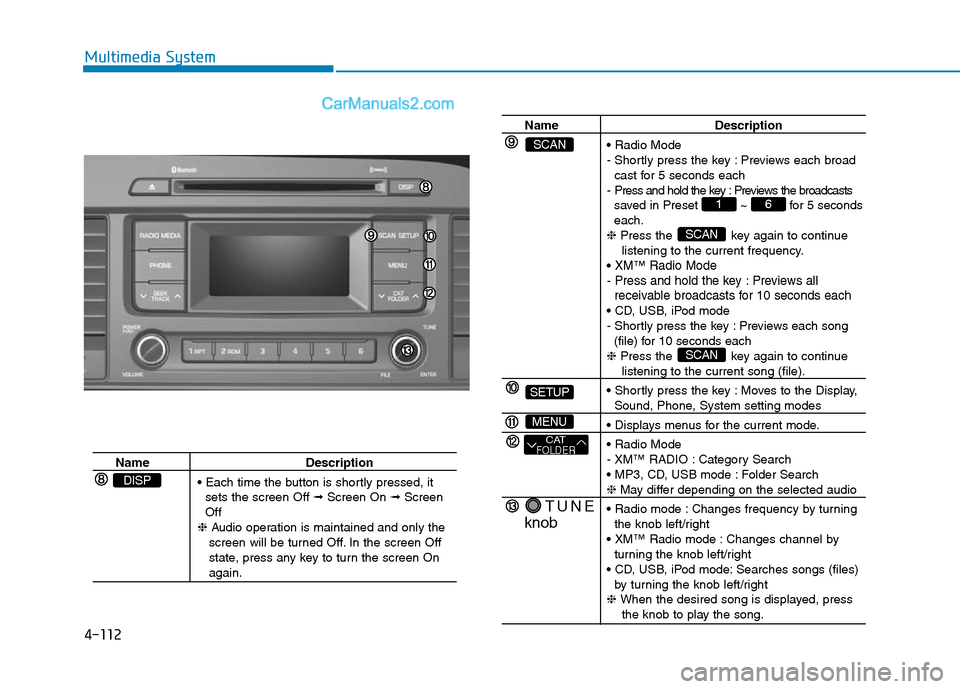
• Each time the button is shortly pressed, it
sets the screen Off ➟Screen On ➟Screen
Off
❈Audio operation is maintained and only the
screen will be turned Off. In the screen Off
state, press any key to turn the screen On
again.
DISP
Name Description
• Radio Mode
- Shortly press the key : Previews each broad
cast for 5 seconds each
- Press and hold the key : Previews the broadcasts
saved in Preset ~ for 5 seconds
each.
❈Press the key again to continue
listening to the current frequency.
•
XM™Radio Mode
- Press and hold the key : Previews all
receivable broadcasts for 10 seconds each
• CD, USB, iPod mode
- Shortly press the key : Previews each song
(file) for 10 seconds each
❈Press the key again to continue
listening to the current song (file).
• Shortly press the key : Moves to the Display,
Sound, Phone, System setting modes
• Displays menus for the current mode.
• Radio Mode
- XM™ RADIO : Category Search
• MP3, CD, USB mode : Folder Search
❈May differ depending on the selected audio
• Radio mode : Changes frequency by turning
the knob left/right
• XM™ Radio mode : Changes channel by
turning the knob left/right
• CD, USB, iPod mode: Searches songs (files)
by turning the knob left/right
❈ When the desired song is displayed, press
the knob to play the song.
SCAN
SCAN
61
TUNE
knob
CATFOLDER
MENU
SETUP
SCAN
Page 363 of 685
![Hyundai Sonata Plug-in Hybrid 2016 Workshop Manual 4-113
Multimedia System
4
SETUP
Display Settings
Press the key Select
[Display] through TUNE knob or
keyMode Pop up
[Mode Pop up] Changes
/
selection mode
• During On state, press the
or key to](/img/35/19656/w960_19656-362.png "Hyundai Sonata Plug-in Hybrid 2016 Workshop Manual 4-113
Multimedia System
4
SETUP
Display Settings
Press the key Select
[Display] through TUNE knob or
keyMode Pop up
[Mode Pop up] Changes
/
selection mode
• During On state, press the
or key to")
4-113
Multimedia System
4
SETUP
Display Settings
Press the key Select
[Display] through TUNE knob or
keyMode Pop up
[Mode Pop up] Changes
/
selection mode
• During On state, press the
or key to display the mode
change pop up screen.Media Display
When playing an MP3 file, select the
desired display info from ‘Folder/File’
or ‘Album/Artist/Song’.MEDIA
RADIO
OffOn
1
SETUP
Page 365 of 685
![Hyundai Sonata Plug-in Hybrid 2016 Workshop Manual 4-115
Multimedia System
4
System Settings
Press the key Select [System]
through tune knob or key
Memory Information
Displays currently used memory and
total system memory.
Select [Memory Information](/img/35/19656/w960_19656-364.png "Hyundai Sonata Plug-in Hybrid 2016 Workshop Manual 4-115
Multimedia System
4
System Settings
Press the key Select [System]
through tune knob or key
Memory Information
Displays currently used memory and
total system memory.
Select [Memory Information")
4-115
Multimedia System
4
System Settings
Press the key Select [System]
through tune knob or key
Memory Information
Displays currently used memory and
total system memory.
Select [Memory Information] OK
The currently used memory is dis-
played on the left side while the total
system memory is displayed on the
right side.
Prompt Feedback
This feature is used to change voice
command feedback between Normal
and Expert modes.
Select [Prompt Feedback] Set
through
TUNEknob
• Normal(On) : This mode is for
beginner users and provides
detailed instructions during voice
command operation.
• Expert(Off) :This mode is for expert
users and omits some information
during voice command operation.
(When using Expert mode, guid-
ance instructions can be heard
through the [Help] or [Menu] com-
mands.Language
This menu is used to set the display
and voice recognition language.
Select [Language] Set through TUNE
knob
❈The system will reboot after the
language is changed.
❈Language support by region
-
4
SETUP
Page 366 of 685
4-116
Multimedia System
RADIO : FM, AM
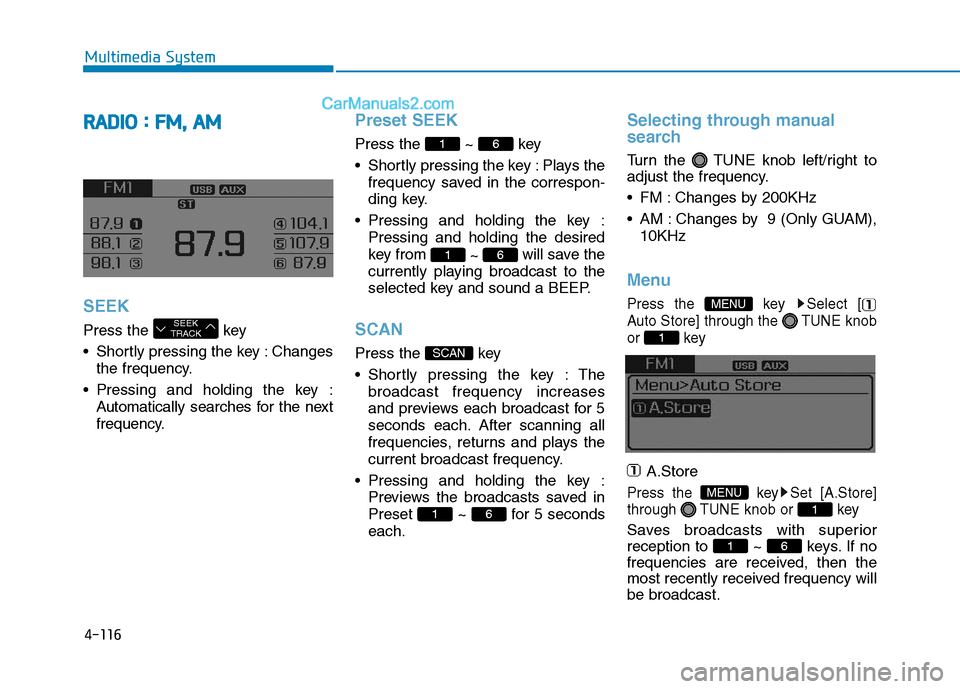
SEEK
Press the key
• Shortly pressing the key : Changes
the frequency.
• Pressing and holding the key :
Automatically searches for the next
frequency.
Preset SEEK
Press the ~ key
• Shortly pressing the key : Plays the
frequency saved in the correspon-
ding key.
• Pressing and holding the key :
Pressing and holding the desired
key from
~ will save the
currently playing broadcast to the
selected key and sound a BEEP.
SCAN
Press the key
• Shortly pressing the key : The
broadcast frequency increases
and previews each broadcast for 5
seconds each. After scanning all
frequencies, returns and plays the
current broadcast frequency.
• Pressing and holding the key :
Previews the broadcasts saved in
Preset ~ for 5 seconds
each.
Selecting through manual
search
Turn the TUNE knob left/right to
adjust the frequency.
• FM : Changes by 200KHz
• AM : Changes by 9 (Only GUAM),
10KHz
Menu
Press the key Select [
Auto Store] through the TUNE knob
or key
A.Store
Press the key Set [A.Store]
through TUNE knob or key
Saves broadcasts with superior
reception to ~ keys. If no
frequencies are received, then the
most recently received frequency will
be broadcast.61
1
MENU
1
MENU
61
SCAN
61
61
SEEK
TRACK
Page 367 of 685
4-117
Multimedia System
4
XMTMRADIO
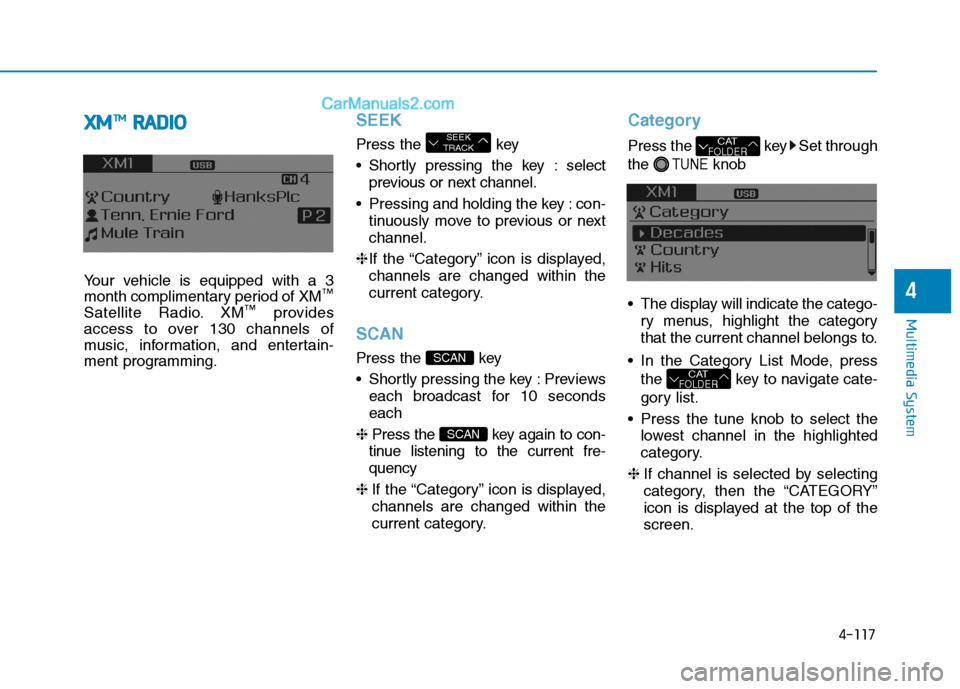
Your vehicle is equipped with a 3
month complimentary period of XM™
Satellite Radio. XM™provides
access to over 130 channels of
music, information, and entertain-
ment programming.
SEEK
Press the key
• Shortly pressing the key : select
previous or next channel.
• Pressing and holding the key : con-
tinuously move to previous or next
channel.
❈If the “Category” icon is displayed,
channels are changed within the
current category.
SCAN
Press the key
• Shortly pressing the key : Previews
each broadcast for 10 seconds
each
❈Press the key again to con-
tinue listening to the current fre-
quency
❈If the “Category” icon is displayed,
channels are changed within the
current category.
Category
Press the key Set through
the
TUNEknob
• The display will indicate the catego-
ry menus, highlight the category
that the current channel belongs to.
• In the Category List Mode, press
the key to navigate cate-
gory list.
• Press the tune knob to select the
lowest channel in the highlighted
category.
❈If channel is selected by selecting
category, then the “CATEGORY”
icon is displayed at the top of the
screen.
CATFOLDER
CATFOLDER
SCAN
SCAN
SEEK
TRACK
Page 374 of 685
![Hyundai Sonata Plug-in Hybrid 2016 Workshop Manual 4-124
Multimedia System
Delete All
Set [ Del.All] through the TUNE
knob or key.
Deletes all songs of My Music.
Delete Selection
Press the key Set [ Del.Sel]
through the TUNEknob or key.
Songs withi](/img/35/19656/w960_19656-373.png "Hyundai Sonata Plug-in Hybrid 2016 Workshop Manual 4-124
Multimedia System
Delete All
Set [ Del.All] through the TUNE
knob or key.
Deletes all songs of My Music.
Delete Selection
Press the key Set [ Del.Sel]
through the TUNEknob or key.
Songs withi")
4-124
Multimedia System
Delete All
Set [ Del.All] through the TUNE
knob or key.
Deletes all songs of My Music.
Delete Selection
Press the key Set [ Del.Sel]
through the TUNEknob or key.
Songs within My Music are selected
and deleted.
➀Select the songs you wish to
delete from the list.
➁After selecting, press the
key and select the delete menu.
AUX
AUX is used to play external MEDIA
currently connected with the AUX
terminal.
AUX mode will automatically start
when an external device is connect-
ed to the AUX terminal.
If an external device is connected,
you can also press the key to
change to AUX mode.
❈AUX mode cannot be started
unless there is an external device
connected to the AUX terminal.
MEDIA
MENU
6
MENU
5
Page 375 of 685
4-125
Multimedia System
4
Bluetooth®Wireless
Technology AUDIO
What is
Bluetooth®Wireless
Technology?
Bluetooth®Wireless Technology allows
devices to be connected in a short dis-
tance, including hands-free devices,
stereo headsets, wireless remote con-
trollers, etc. For more information, visit
the
Bluetooth®Wireless Technology
website
at www.Bluetooth.com
Before using Bluetooth®Wireless
Technology audio features
•
Bluetooth®Wireless Technology
audio may not be supported
depending on the compatibility of
your
Bluetooth®Wireless
Technology mobile phone.
• In order to use
Bluetooth®Wireless
Technology audio, you must first
pair and connect the
Bluetooth®
Wireless Technology mobile phone.•
Bluetooth®Wireless Technology
audio can be used only when the
[Audio Streaming] of Phone is
turned .
❈Setting
Bluetooth®Wireless
Technology Audio Streaming :
Press the key Select
[Phone] through the tune knob or
key Select [Audio
Streaming] through the TUNE
knob Set
/
Starting Bluetooth®Wireless
Technology Audio
• Press the key to change
the mode in order of CD ➟ USB ➟
AUX ➟ My Music ➟ BT Audio.
• If BT Audio is selected,
Bluetooth®
Wireless Technology audio will
start playing.
❈Audio may not automatically start
playing in some mobile phones.
Using the Bluetooth®Wireless
Technology audio features
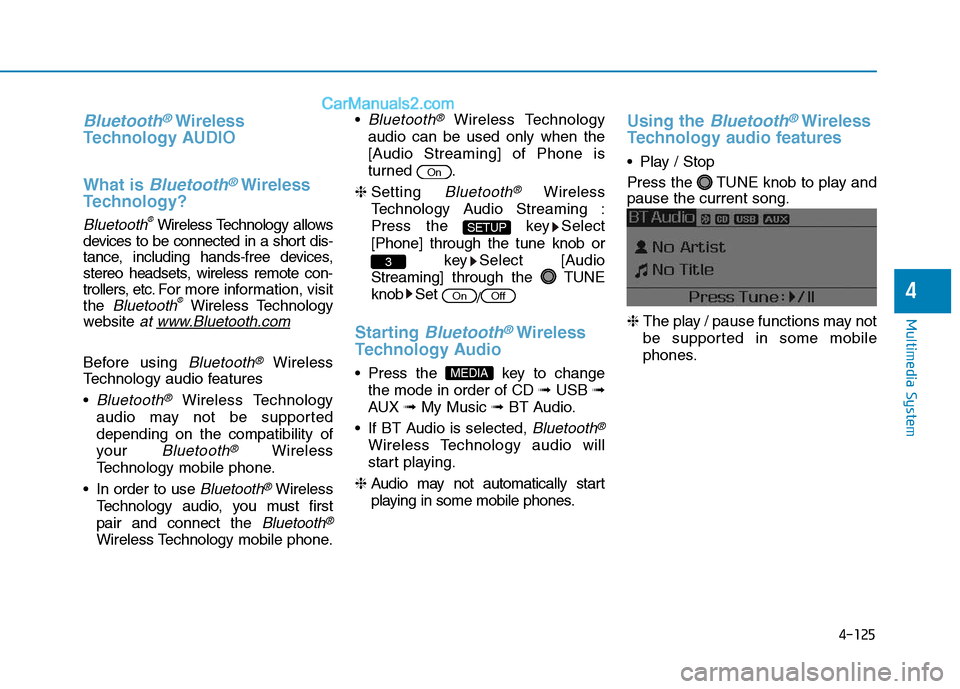
• Play / Stop
Press the TUNE knob to play and
pause the current song.
❈The play / pause functions may not
be supported in some mobile
phones.
MEDIA
OffOn
3
SETUP
On
Page 376 of 685
4-126
Multimedia System
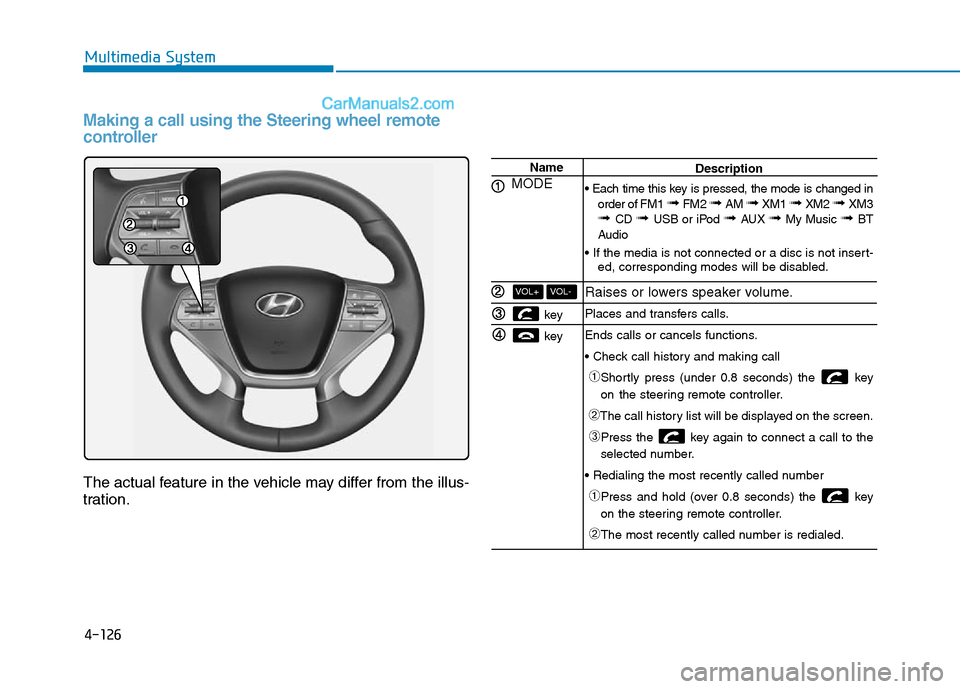
Making a call using the Steering wheel remote
controller
The actual feature in the vehicle may differ from the illus-
tration.
Name
MODE
key
key
VOL-VOL+
Description
• Each time this key is pressed, the mode is changed in
order of FM1
➟ FM2 ➟ AM ➟ XM1 ➟ XM2 ➟ XM3➟ CD ➟ USB or iPod ➟ AUX ➟ My Music ➟ BT
Audio
• If the media is not connected or a disc is not insert-
ed, corresponding modes will be disabled.
Raises or lowers speaker volume.
Places and transfers calls.
Ends calls or cancels functions.
• Check call history and making call
➀Shortly press (under 0.8 seconds) the key
on the steering remote controller.
➁The call history list will be displayed on the screen.
➂Press the key again to connect a call to the
selected number.
• Redialing the most recently called number
➀Press and hold (over 0.8 seconds) the key
on the steering remote controller.
➁The most recently called number is redialed.
Page 380 of 685
![Hyundai Sonata Plug-in Hybrid 2016 Workshop Manual 4-130
Multimedia System
Connecting a Device
Press the key Select
[Phone] Select [Phone List]
1) Connected Phone : Device that is
currently connected
2) Paired Phone : Device that is
paired but not c](/img/35/19656/w960_19656-379.png "Hyundai Sonata Plug-in Hybrid 2016 Workshop Manual 4-130
Multimedia System
Connecting a Device
Press the key Select
[Phone] Select [Phone List]
1) Connected Phone : Device that is
currently connected
2) Paired Phone : Device that is
paired but not c")
4-130
Multimedia System
Connecting a Device
Press the key Select
[Phone] Select [Phone List]
1) Connected Phone : Device that is
currently connected
2) Paired Phone : Device that is
paired but not connectedFrom the paired phone list, select the
device you want to connect and
select [Connect].Changing PriorityWhat is Priority?
It is possible to pair up to five
Bluetooth®Wireless Technology
devices with the car audio system.
The "Change Priority" feature is used
to set the connection priority of
paired phones.
Press the key Select
[Phone] Select [Phone List]
SETUP
SETUP