infotainment HYUNDAI TUCSON 2022 Service Manual
[x] Cancel search | Manufacturer: HYUNDAI, Model Year: 2022, Model line: TUCSON, Model: HYUNDAI TUCSON 2022Pages: 638, PDF Size: 82.3 MB
Page 482 of 638
07
7-119
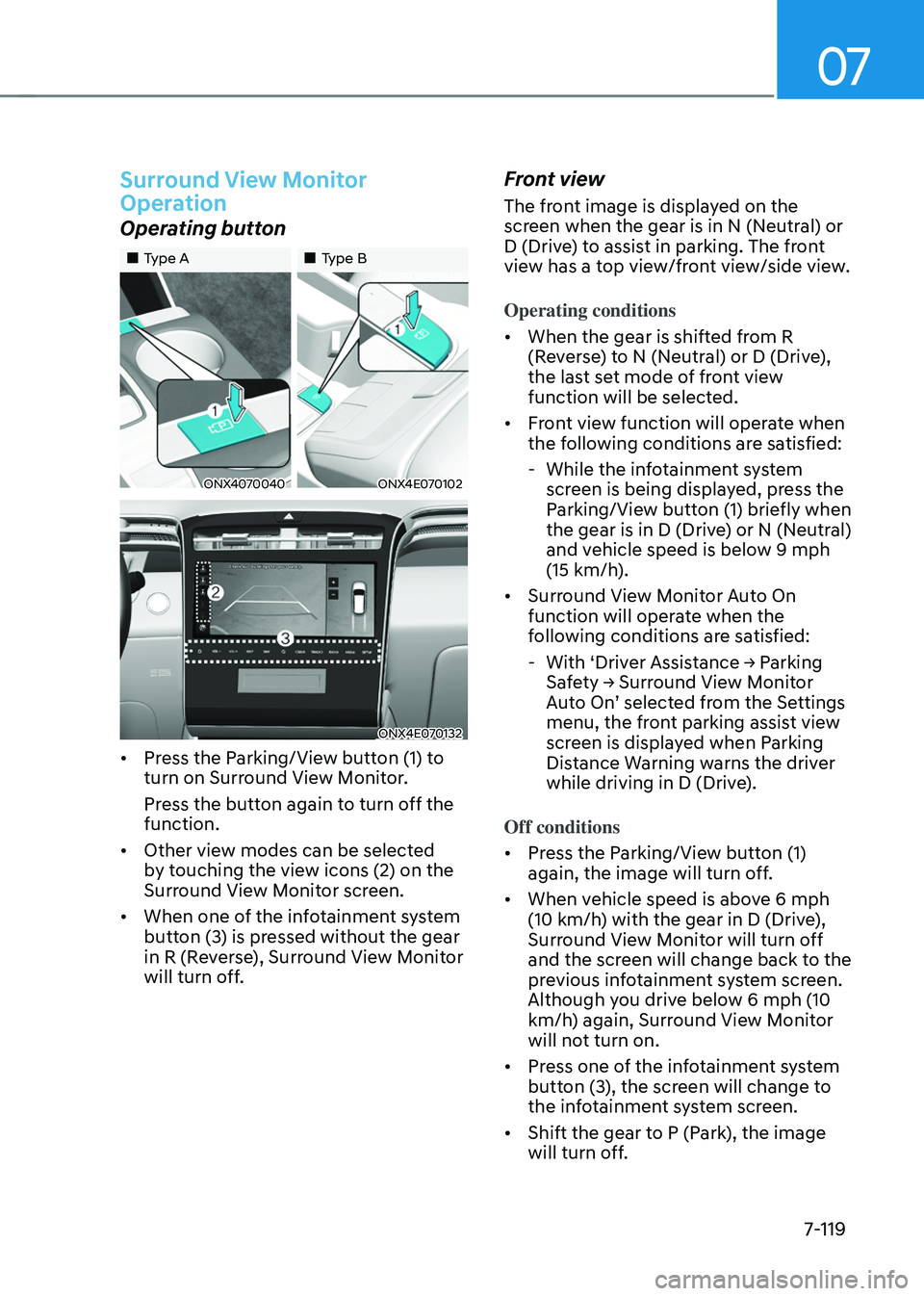
Surround View Monitor
Operation
Operating button
„„Type A„„Type B
ONX4070040ONX4E070102
ONX4E070132
• Press the Parking/View button (1) to
turn on Surround View Monitor.
Press the button again to turn off the
function.
• Other view modes can be selected
by touching the view icons (2) on the
Surround View Monitor screen.
• When one of the infotainment system
button (3) is pressed without the gear
in R (Reverse), Surround View Monitor
will turn off.
Front view
The front image is displayed on the
screen when the gear is in N (Neutral) or
D (Drive) to assist in parking. The front
view has a top view/front view/side view.
Operating conditions
• When the gear is shifted from R
(Reverse) to N (Neutral) or D (Drive),
the last set mode of front view
function will be selected.
• Front view function will operate when
the following conditions are satisfied:
-While the infotainment system
screen is being displayed, press the
Parking/View button (1) briefly when
the gear is in D (Drive) or N (Neutral)
and vehicle speed is below 9 mph
(15 km/h).
• Surround View Monitor Auto On
function will operate when the
following conditions are satisfied:
-With ‘Driver Assistance → Parking Safety → Surround View Monitor Auto On’ selected from the Settings menu, the front parking assist view
screen is displayed when Parking
Distance Warning warns the driver
while driving in D (Drive).
Off conditions
• Press the Parking/View button (1)
again, the image will turn off.
• When vehicle speed is above 6 mph
(10 km/h) with the gear in D (Drive),
Surround View Monitor will turn off
and the screen will change back to the
previous infotainment system screen.
Although you drive below 6 mph (10
km/h) again, Surround View Monitor
will not turn on.
• Press one of the infotainment system
button (3), the screen will change to
the infotainment system screen.
• Shift the gear to P (Park), the image
will turn off.
Page 487 of 638
Driver assistance system
7-124
OTM070141N
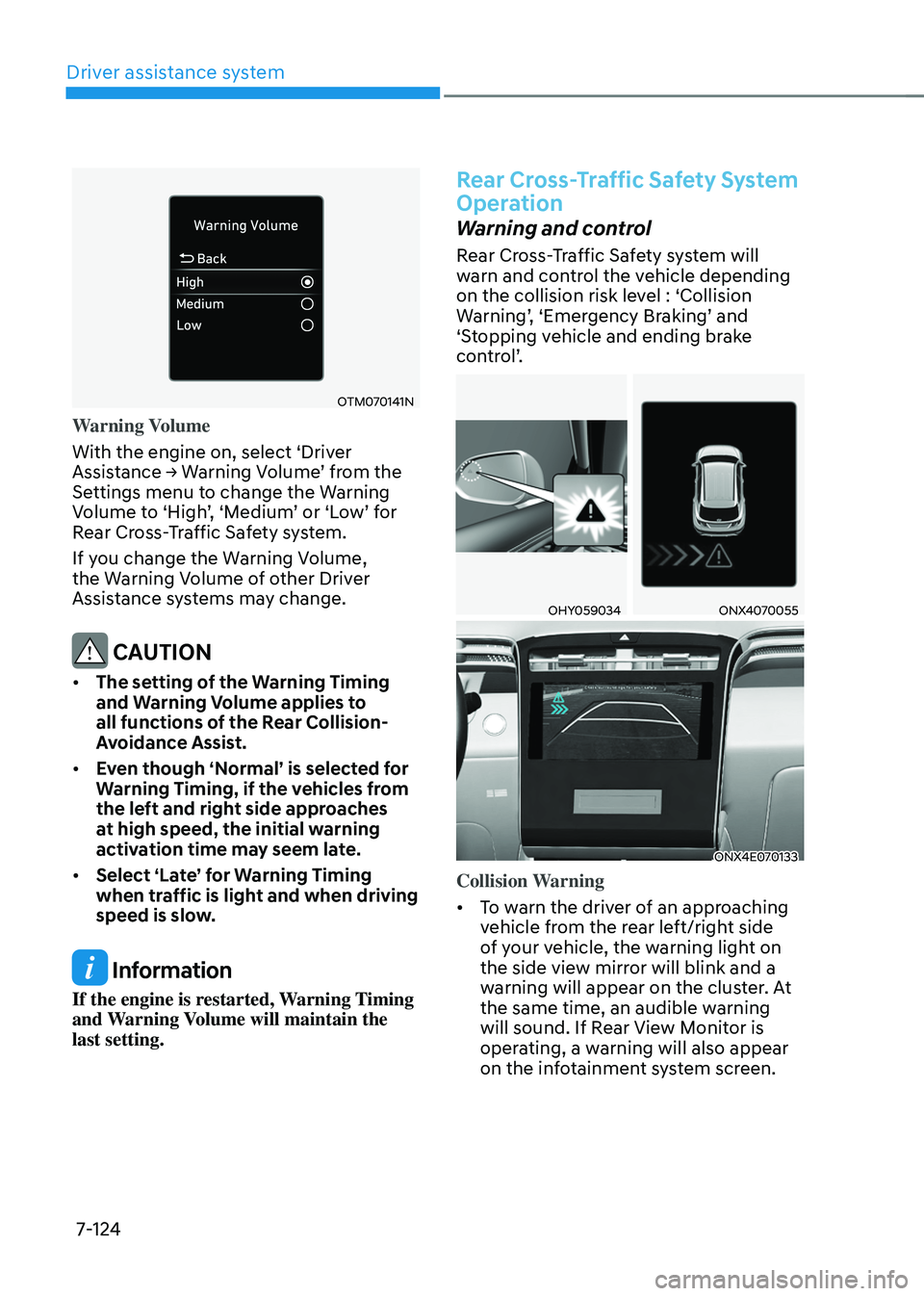
Warning Volume
With the engine on, select ‘Driver
Assistance → Warning Volume’ from the Settings menu to change the Warning Volume to ‘High’, ‘Medium’ or ‘Low’ for Rear Cross-Traffic Safety system.
If you change the Warning Volume,
the Warning Volume of other Driver
Assistance systems may change.
CAUTION
• The setting of the Warning Timing
and Warning Volume applies to
all functions of the Rear Collision-
Avoidance Assist.
• Even though ‘Normal’ is selected for
Warning Timing, if the vehicles from
the left and right side approaches
at high speed, the initial warning
activation time may seem late.
• Select ‘Late’ for Warning Timing
when traffic is light and when driving
speed is slow.
Information
If the engine is restarted, Warning Timing
and Warning Volume will maintain the
last setting.
Rear Cross-Traffic Safety System
Operation
Warning and control
Rear Cross-Traffic Safety system will
warn and control the vehicle depending
on the collision risk level : ‘Collision
Warning’, ‘Emergency Braking’ and ‘Stopping vehicle and ending brake
control’.
OHY059034ONX4070055
ONX4E070133
Collision Warning
• To warn the driver of an approaching
vehicle from the rear left/right side
of your vehicle, the warning light on
the side view mirror will blink and a
warning will appear on the cluster. At
the same time, an audible warning
will sound. If Rear View Monitor is
operating, a warning will also appear
on the infotainment system screen.
Page 488 of 638
07
7-125
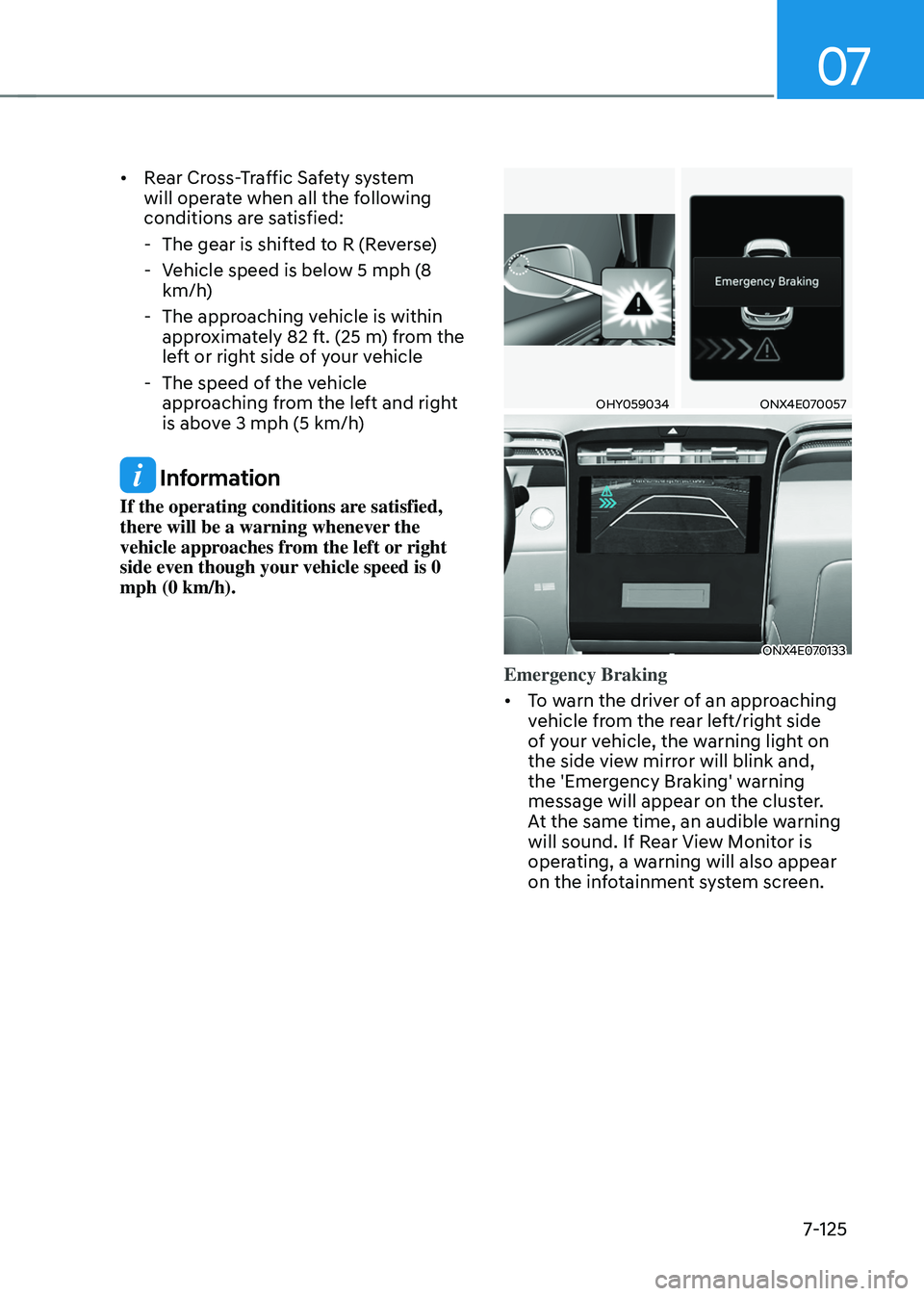
• Rear Cross-Traffic Safety system
will operate when all the following
conditions are satisfied:
-The gear is shifted to R (Reverse)
-Vehicle speed is below 5 mph (8
km/h)
-The approaching vehicle is within
approximately 82 ft. (25 m) from the
left or right side of your vehicle
-The speed of the vehicle
approaching from the left and right
is above 3 mph (5 km/h)
Information
If the operating conditions are satisfied,
there will be a warning whenever the
vehicle approaches from the left or right
side even though your vehicle speed is 0
mph (0 km/h).
OHY059034ONX4E070057
ONX4E070133
Emergency Braking
• To warn the driver of an approaching
vehicle from the rear left/right side
of your vehicle, the warning light on
the side view mirror will blink and,
the 'Emergency Braking' warning
message will appear on the cluster.
At the same time, an audible warning
will sound. If Rear View Monitor is
operating, a warning will also appear
on the infotainment system screen.
Page 496 of 638
07
7-133
REVERSE PARKING DISTANCE WARNING (PDW)
(IF EQUIPPED)
Reverse Parking Distance Warning will
help warn the driver if an obstacle is
detected within a certain distance when
the vehicle is moving in reverse at low
speeds.
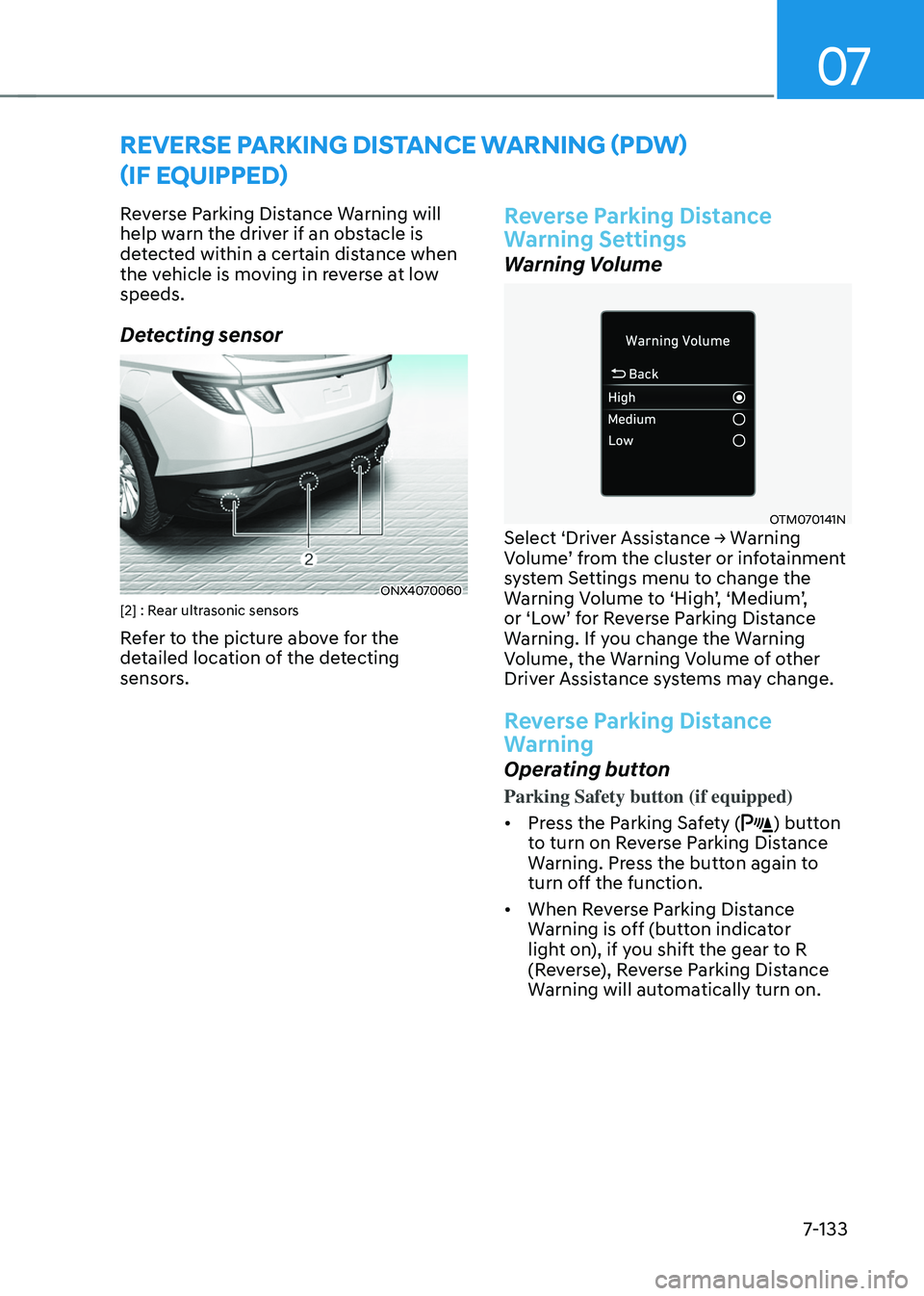
Detecting sensor
ONX4070060[2] : Rear ultrasonic sensors
Refer to the picture above for the
detailed location of the detecting
sensors.
Reverse Parking Distance
Warning Settings
Warning Volume
OTM070141NSelect ‘Driver Assistance → Warning Volume’ from the cluster or infotainment system Settings menu to change the Warning Volume to ‘High’, ‘Medium’, or ‘Low’ for Reverse Parking Distance Warning. If you change the Warning
Volume, the Warning Volume of other
Driver Assistance systems may change.
Reverse Parking Distance
Warning
Operating button
Parking Safety button (if equipped)
• Press the Parking Safety (
) button
to turn on Reverse Parking Distance
Warning. Press the button again to
turn off the function.
• When Reverse Parking Distance
Warning is off (button indicator
light on), if you shift the gear to R
(Reverse), Reverse Parking Distance
Warning will automatically turn on.
Page 499 of 638
Driver assistance system7-136
FORWARD/REVERSE PARKING DISTANCE WARNING (PDW)
(IF EQUIPPED)
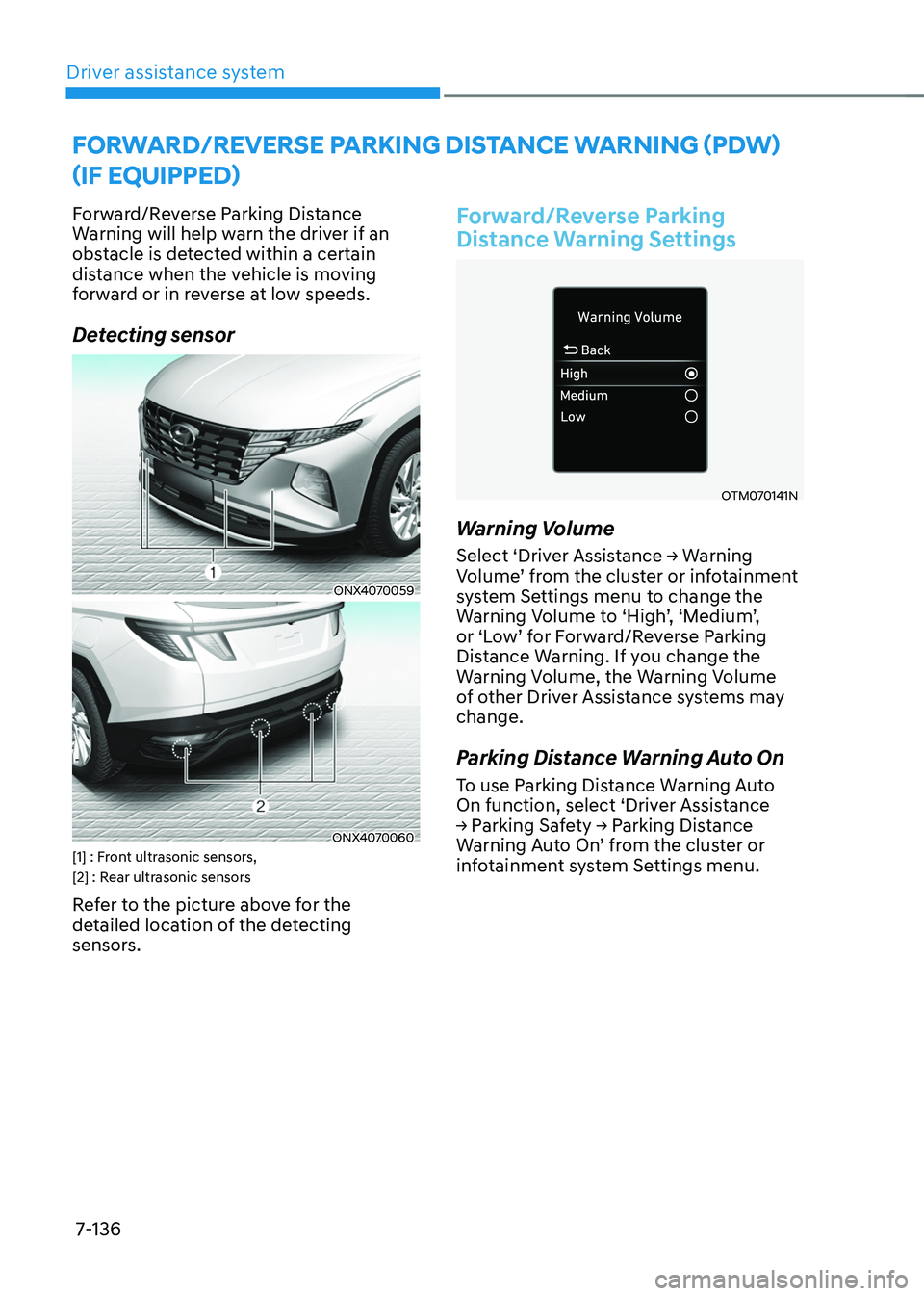
Forward/Reverse Parking Distance
Warning will help warn the driver if an
obstacle is detected within a certain
distance when the vehicle is moving
forward or in reverse at low speeds.
Detecting sensor
ONX4070059
ONX4070060[1] : Front ultrasonic sensors,
[2] : Rear ultrasonic sensors
Refer to the picture above for the
detailed location of the detecting
sensors.
Forward/Reverse Parking
Distance Warning Settings
OTM070141N
Warning Volume
Select ‘Driver Assistance → Warning Volume’ from the cluster or infotainment system Settings menu to change the Warning Volume to ‘High’, ‘Medium’, or ‘Low’ for Forward/Reverse Parking Distance Warning. If you change the
Warning Volume, the Warning Volume
of other Driver Assistance systems may
change.
Parking Distance Warning Auto On
To use Parking Distance Warning Auto
On function, select ‘Driver Assistance
→ Parking Safety → Parking Distance Warning Auto On’ from the cluster or infotainment system Settings menu.
Page 506 of 638
07
7-143
Reverse Parking Collision-
Avoidance Assist Operation
Operating conditions
If ‘Rear Active Assist’ or ‘Rear Warning Only’ is set from the Settings menu, Reverse Parking Collision-Avoidance
Assist will be in the ready status when
the following conditions are satisfied:
-The liftgate is closed
-The gear is shifted to R (Reverse)
-Vehicle speed is below 6 mph (10
km/h)
-Reverse Parking Collision-Avoidance
Assist components such as the rear
view camera and the rear ultrasonic
sensors are in normal conditions
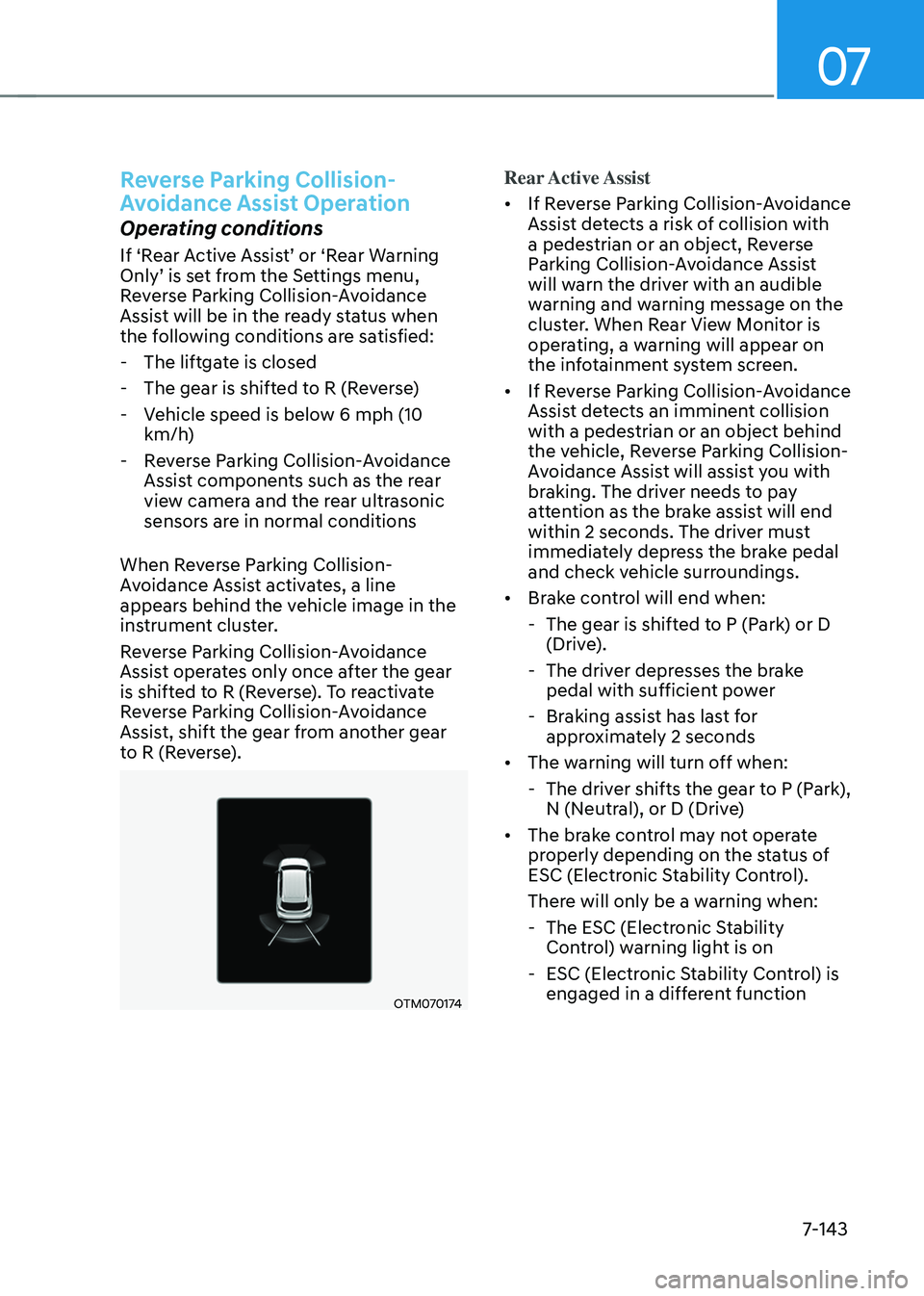
When Reverse Parking Collision-
Avoidance Assist activates, a line
appears behind the vehicle image in the
instrument cluster.
Reverse Parking Collision-Avoidance
Assist operates only once after the gear
is shifted to R (Reverse). To reactivate
Reverse Parking Collision-Avoidance
Assist, shift the gear from another gear
to R (Reverse).
OTM070174
Rear Active Assist
• If Reverse Parking Collision-Avoidance
Assist detects a risk of collision with
a pedestrian or an object, Reverse
Parking Collision-Avoidance Assist
will warn the driver with an audible
warning and warning message on the
cluster. When Rear View Monitor is
operating, a warning will appear on
the infotainment system screen.
• If Reverse Parking Collision-Avoidance
Assist detects an imminent collision
with a pedestrian or an object behind
the vehicle, Reverse Parking Collision-
Avoidance Assist will assist you with
braking. The driver needs to pay
attention as the brake assist will end
within 2 seconds. The driver must
immediately depress the brake pedal
and check vehicle surroundings.
• Brake control will end when:
-The gear is shifted to P (Park) or D
(Drive).
-The driver depresses the brake
pedal with sufficient power
-Braking assist has last for
approximately 2 seconds
• The warning will turn off when:
-The driver shifts the gear to P (Park),
N (Neutral), or D (Drive)
• The brake control may not operate
properly depending on the status of
ESC (Electronic Stability Control).
There will only be a warning when:
-The ESC (Electronic Stability
Control) warning light is on
-ESC (Electronic Stability Control) is
engaged in a different function
Page 507 of 638
Driver assistance system
7-144
Rear Warning Only
• If Reverse Parking Collision-Avoidance
Assist detects a risk of collision with
a pedestrian or an object, Reverse
Parking Collision-Avoidance Assist
will warn the driver with an audible
warning and warning message on the
cluster. When Rear View Monitor is
operating, a warning will appear on
the infotainment system screen.
•
If ‘Rear Warning Only’ is selected, braking will not be assisted.
• The warning will turn off when the
gear is shifted to P (Park), N (Neutral)
or D (Drive).
Reverse Parking Collision-
Avoidance Assist Malfunction
and Limitations
Reverse Parking Collision-
Avoidance Assist malfunction
OTM070173L
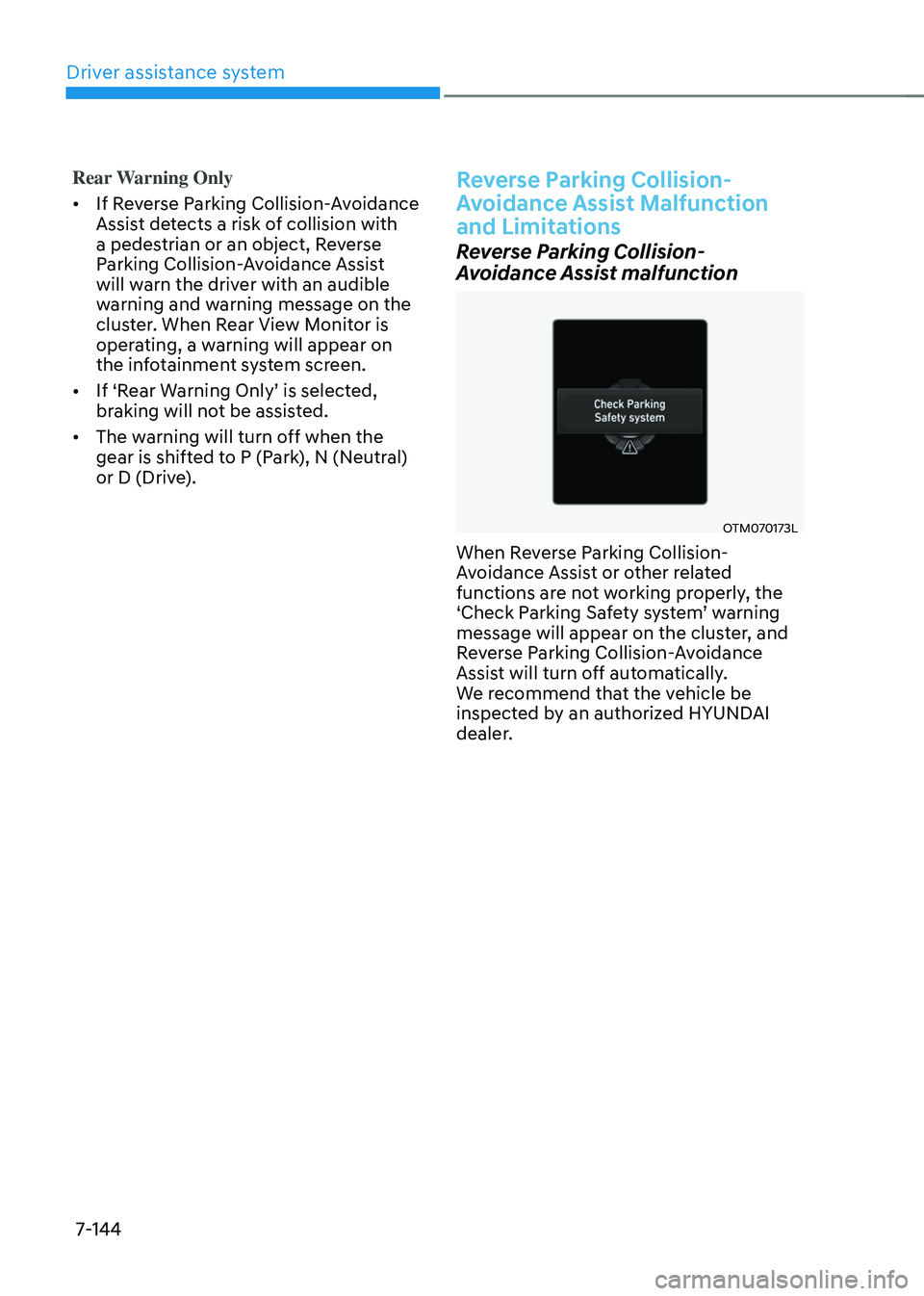
When Reverse Parking Collision-
Avoidance Assist or other related
functions are not working properly, the
‘Check Parking Safety system’ warning message will appear on the cluster, and
Reverse Parking Collision-Avoidance
Assist will turn off automatically.
We recommend that the vehicle be
inspected by an authorized HYUNDAI
dealer.
Page 516 of 638
07
7-153
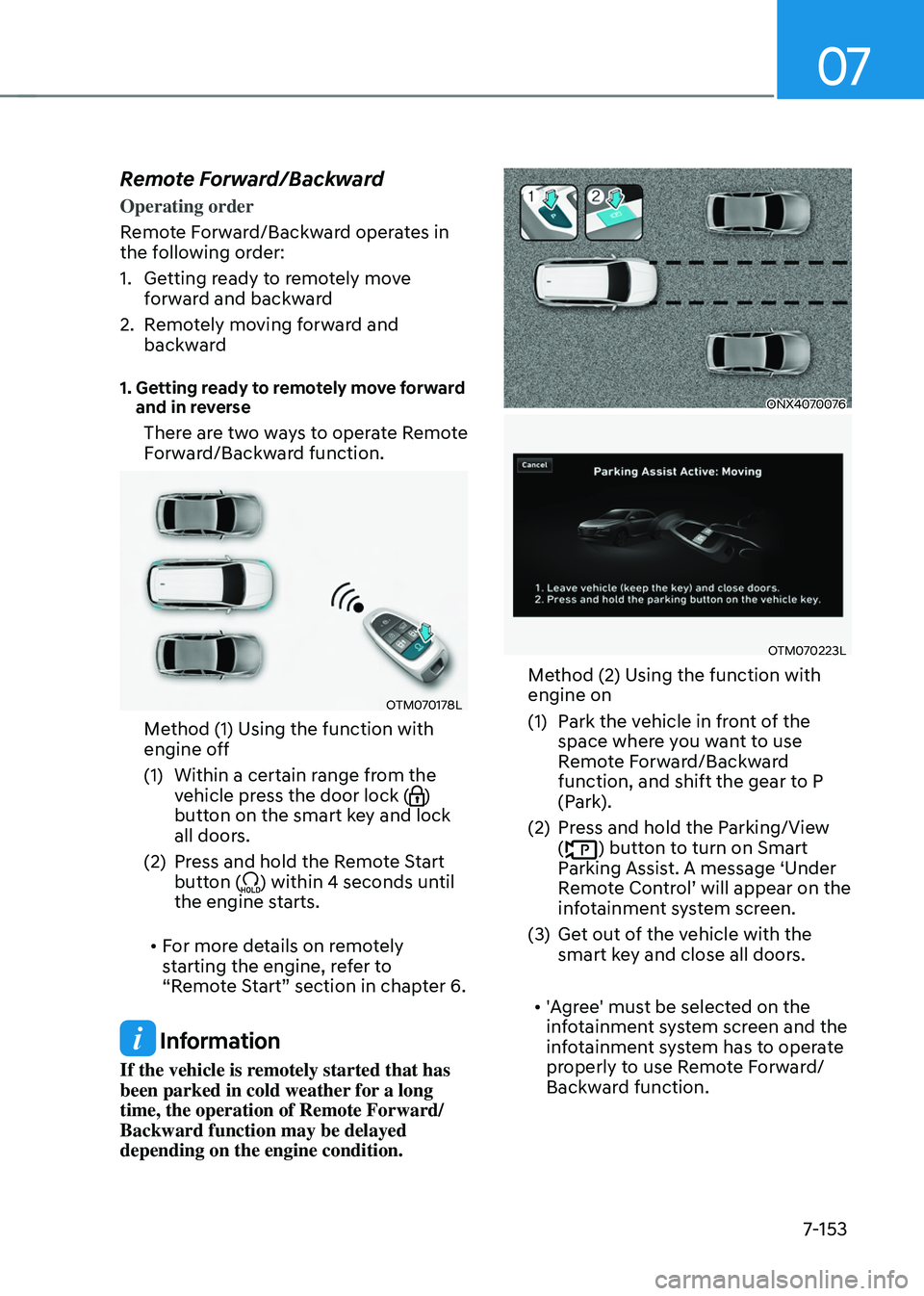
Remote Forward/Backward
Operating order
Remote Forward/Backward operates in
the following order:
1. Getting ready to remotely move
forward and backward
2. Remotely moving forward and
backward
1. Getting ready to remotely move forward and in reverse
There are two ways to operate Remote
Forward/Backward function.
OTM070178L
Method (1) Using the function with
engine off
(1) Within a certain range from the
vehicle press the door lock ()
button on the smart key and lock
all doors.
(2) Press and hold the Remote Start
button () within 4 seconds until
the engine starts.
• For more details on remotely
starting the engine, refer to
“Remote Start” section in chapter 6.
Information
If the vehicle is remotely started that has
been parked in cold weather for a long
time, the operation of Remote Forward/
Backward function may be delayed
depending on the engine condition.
ONX4070076
OTM070223L
Method (2) Using the function with
engine on
(1) Park the vehicle in front of the
space where you want to use
Remote Forward/Backward
function, and shift the gear to P
(Park).
(2) Press and hold the Parking/View
() button to turn on Smart
Parking Assist. A message ‘Under
Remote Control’ will appear on the infotainment system screen.
(3) Get out of the vehicle with the
smart key and close all doors.
• 'Agree' must be selected on the
infotainment system screen and the
infotainment system has to operate
properly to use Remote Forward/
Backward function.
Page 517 of 638
Driver assistance system
7-154
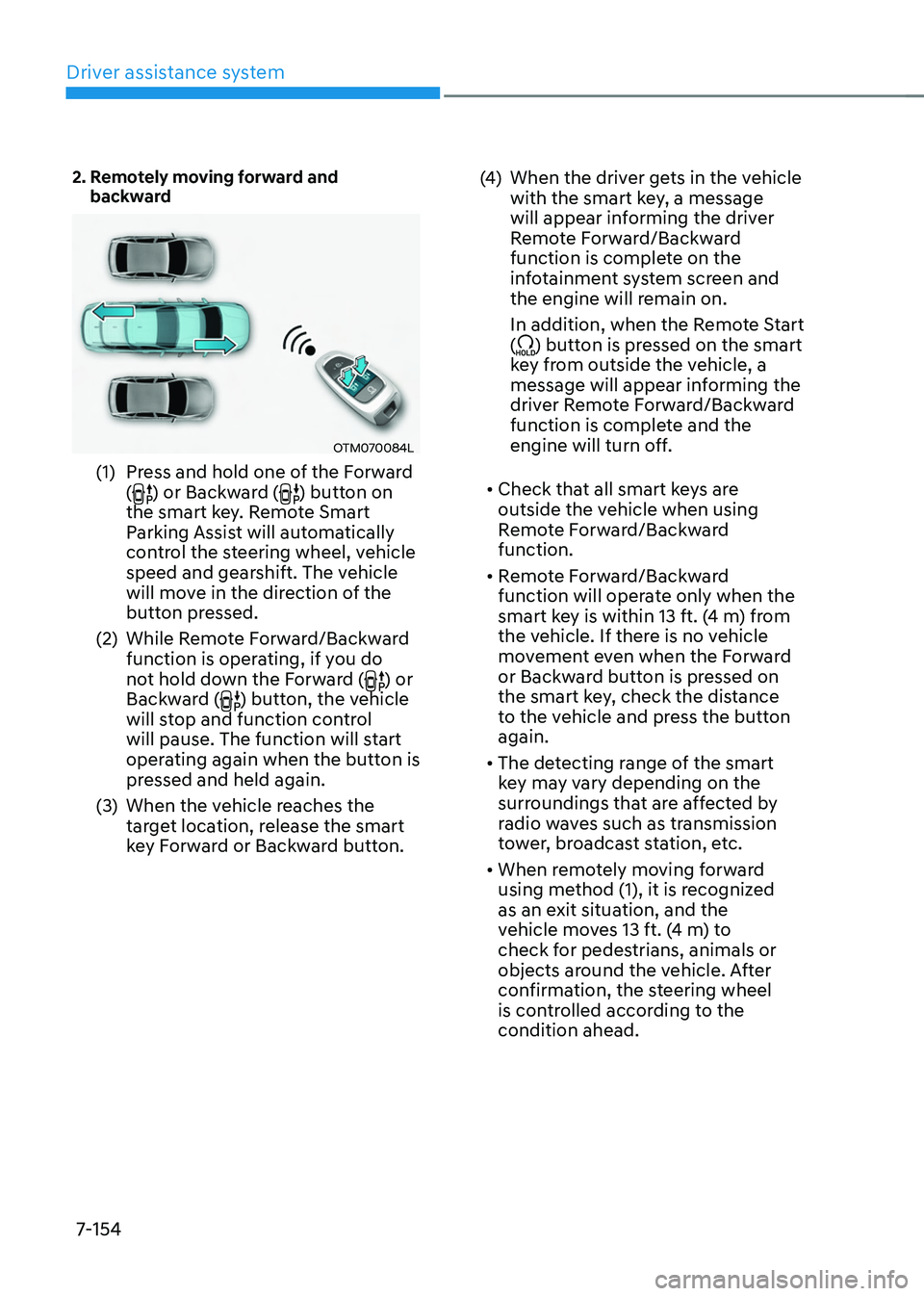
2. Remotely moving forward and backward
OTM070084L
(1) Press and hold one of the Forward
() or Backward () button on
the smart key. Remote Smart
Parking Assist will automatically
control the steering wheel, vehicle
speed and gearshift. The vehicle
will move in the direction of the
button pressed.
(2) While Remote Forward/Backward
function is operating, if you do
not hold down the Forward (
) or
Backward () button, the vehicle
will stop and function control
will pause. The function will start
operating again when the button is
pressed and held again.
(3) When the vehicle reaches the
target location, release the smart
key Forward or Backward button.
(4) When the driver gets in the vehicle
with the smart key, a message
will appear informing the driver
Remote Forward/Backward
function is complete on the
infotainment system screen and
the engine will remain on.
In addition, when the Remote Start
(
) button is pressed on the smart
key from outside the vehicle, a
message will appear informing the
driver Remote Forward/Backward
function is complete and the
engine will turn off.
• Check that all smart keys are
outside the vehicle when using
Remote Forward/Backward
function.
• Remote Forward/Backward
function will operate only when the
smart key is within 13 ft. (4 m) from
the vehicle. If there is no vehicle
movement even when the Forward
or Backward button is pressed on
the smart key, check the distance
to the vehicle and press the button
again.
• The detecting range of the smart
key may vary depending on the
surroundings that are affected by
radio waves such as transmission
tower, broadcast station, etc.
• When remotely moving forward
using method (1), it is recognized
as an exit situation, and the
vehicle moves 13 ft. (4 m) to
check for pedestrians, animals or
objects around the vehicle. After
confirmation, the steering wheel
is controlled according to the
condition ahead.
Page 519 of 638
Driver assistance system
7-156
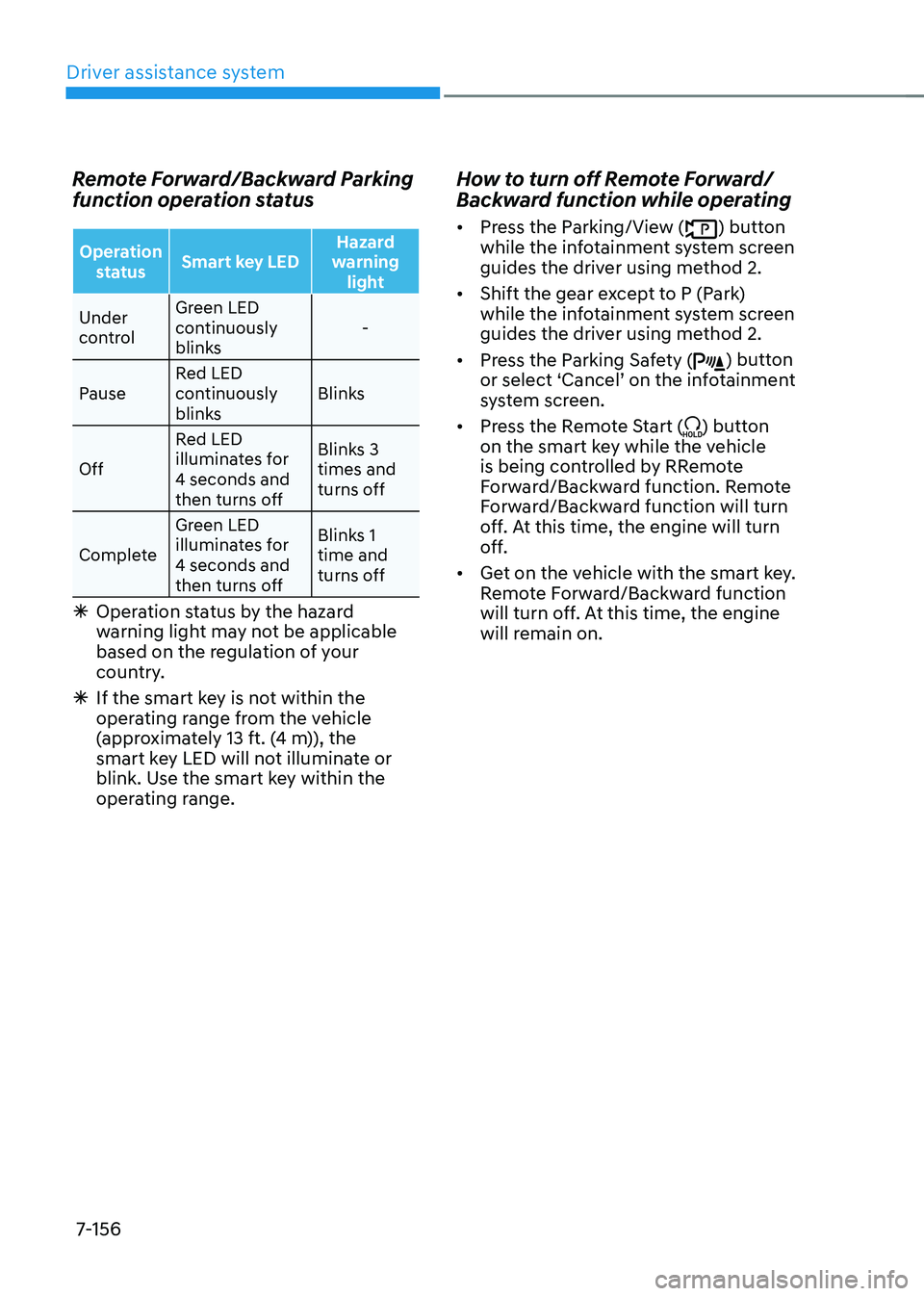
Remote Forward/Backward Parking
function operation status
Operation status Smart key LED Hazard
warning light
Under
control Green LED
continuously
blinks
-
Pause Red LED
continuously
blinks Blinks
Off Red LED
illuminates for
4 seconds and
then turns off Blinks 3
times and
turns off
Complete Green LED
illuminates for
4 seconds and
then turns off Blinks 1
time and
turns off
Ã
Operation status by the hazard
warning light may not be applicable
based on the regulation of your
country.
ÃIf the smart key is not within the
operating range from the vehicle
(approximately 13 ft. (4 m)), the
smart key LED will not illuminate or
blink. Use the smart key within the
operating range.
How to turn off Remote Forward/
Backward function while operating
• Press the Parking/View () button
while the infotainment system screen
guides the driver using method 2.
• Shift the gear except to P (Park)
while the infotainment system screen
guides the driver using method 2.
• Press the Parking Safety (
) button or select ‘Cancel’ on the infotainment system screen.
• Press the Remote Start (
) button
on the smart key while the vehicle
is being controlled by RRemote
Forward/Backward function. Remote
Forward/Backward function will turn
off. At this time, the engine will turn
off.
• Get on the vehicle with the smart key.
Remote Forward/Backward function
will turn off. At this time, the engine
will remain on.