brake sensor HYUNDAI TUCSON HYBRID 2023 Owners Manual
[x] Cancel search | Manufacturer: HYUNDAI, Model Year: 2023, Model line: TUCSON HYBRID, Model: HYUNDAI TUCSON HYBRID 2023Pages: 699, PDF Size: 8.78 MB
Page 165 of 699
03
3-63
ONX4030051
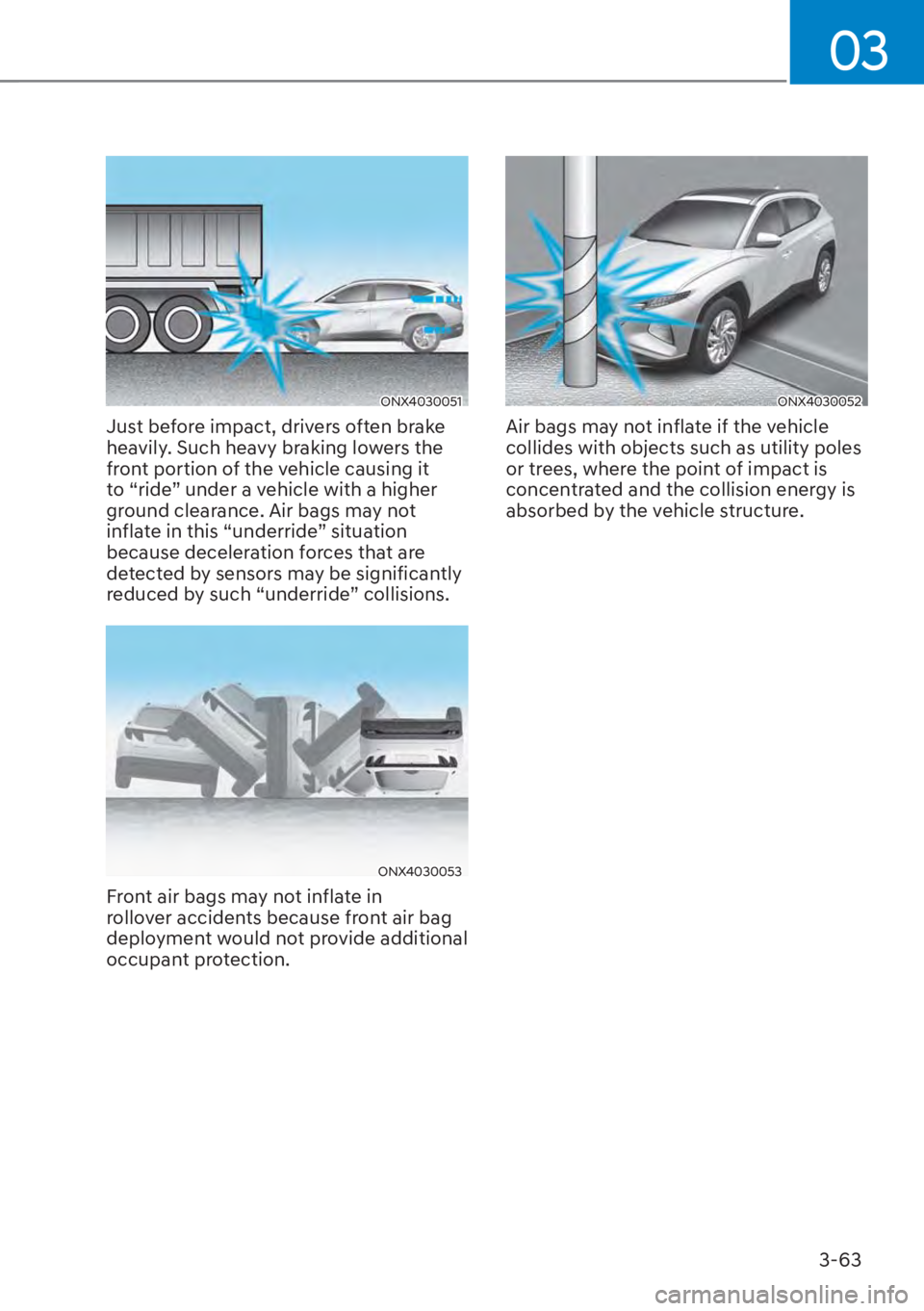
Just before impact, drivers often brake
heavily. Such heavy braking lowers the
front portion of the vehicle causing it
to “ride” under a vehicle with a higher
ground clearance. Air bags may not
inflate in this “underride” situation
because deceleration forces that are
detected by sensors may be significantly
reduced by such “underride” collisions.
ONX4030053
Front air bags may not inflate in
rollover accidents because front air bag
deployment would not provide additional
occupant protection.
ONX4030052
Air bags may not inflate if the vehicle
collides with objects such as utility poles
or trees, where the point of impact is
concentrated and the collision energy is
absorbed by the vehicle structure.
Page 309 of 699
Convenience Features5-84
LIGHTING
Exterior Lights
Lighting control
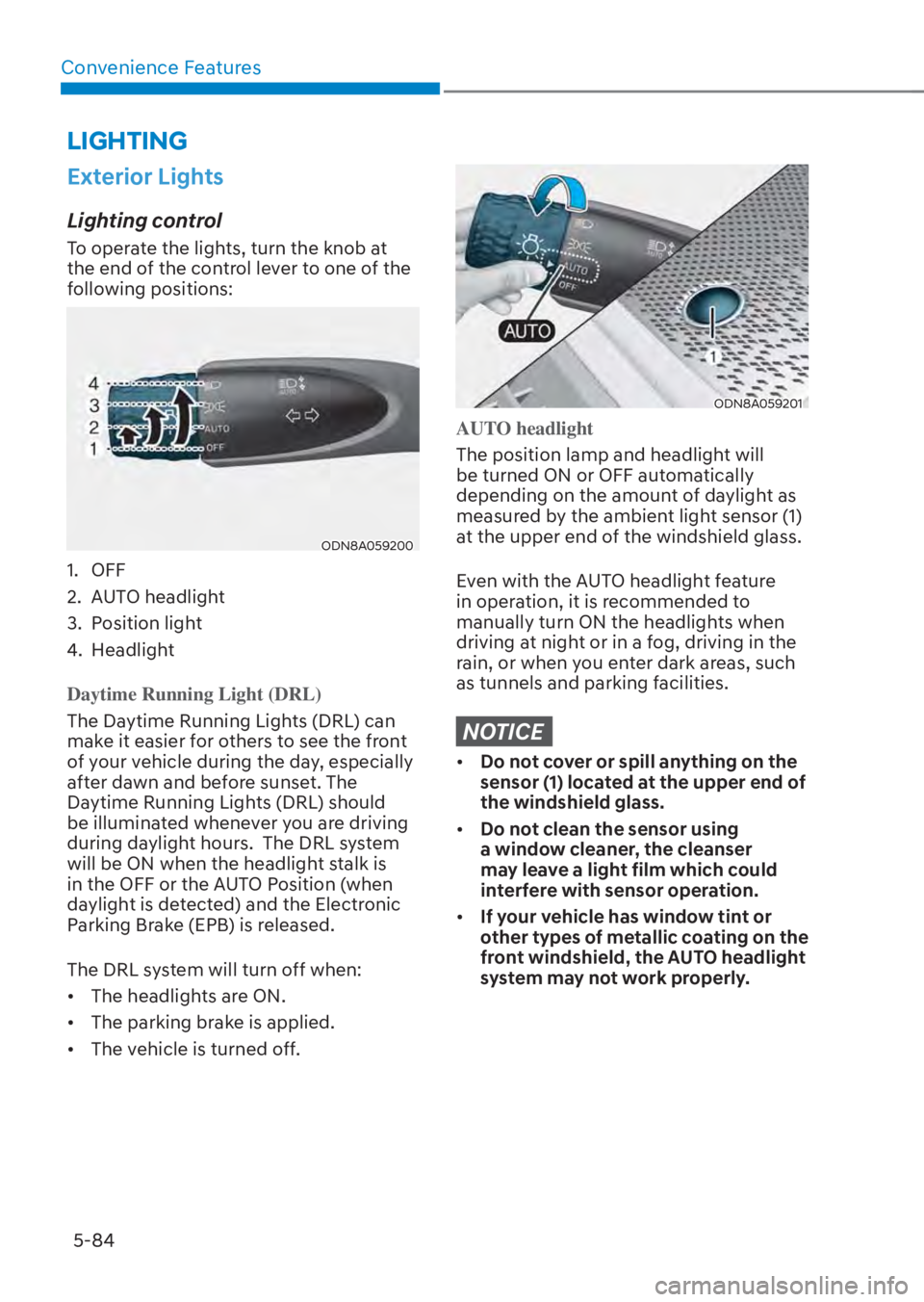
To operate the lights, turn the knob at
the end of the control lever to one of the
following positions:
ODN8A059200ODN8A059200
1. OFF
2. AUTO headlight
3. Position light
4. Headlight
Daytime Running Light (DRL)
The Daytime Running Lights (DRL) can
mak
e it easier for others to see the front
of your vehicle during the day, especially
after dawn and before sunset. The
Daytime Running Lights (DRL) should
be illuminated whenever you are driving
during daylight hours. The DRL system
will be ON when the headlight stalk is
in the OFF or the AUTO Position (when
daylight is detected) and the Electronic
Parking Brake (EPB) is released.
The DRL system will turn off when:
• The headlights are ON.
• The parking brake is applied.
• The vehicle is turned off.
ODN8A059201ODN8A059201
AUTO headlight
The position lamp and headlight will
be turned ON or OFF aut
omatically
depending on the amount of daylight as
measured by the ambient light sensor (1)
at the upper end of the windshield glass.
Even with the AUTO headlight feature
in operation, it is recommended to
manually turn ON the headlights when
driving at night or in a fog, driving in the
rain, or when you enter dark areas, such
as tunnels and parking facilities.
NOTICE
• Do not cover or spill anything on the
sensor (1) located at the upper end of
the windshield glass.
• Do not clean the sensor using
a window cleaner, the cleanser
may leave a light film which could
interfere with sensor operation.
• If your vehicle has window tint or
other types of metallic coating on the
front windshield, the AUTO headlight
system may not work properly.
Page 440 of 699
07
7-11
WARNING
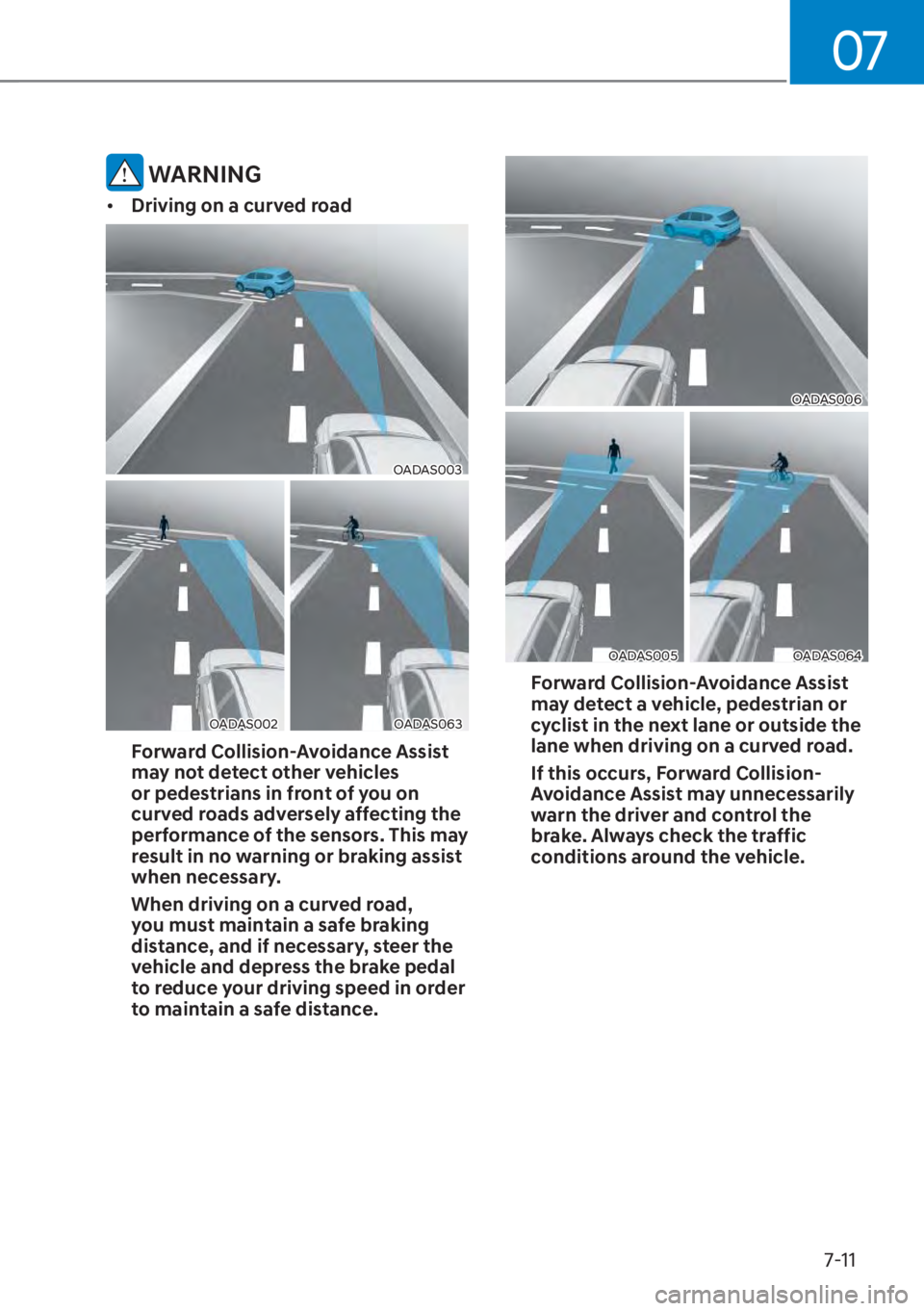
• Driving on a curved road
OADAS003OADAS003
OADAS002OADAS002OADAS063OADAS063
Forward Collision-Avoidance Assist
may not detect other vehicles
or pedestrians in front of you on
curved roads adversely affecting the
performance of the sensors. This may
result in no warning or braking assist
when necessary.
When driving on a curved road,
you must maintain a safe braking
distance, and if necessary, steer the
vehicle and depress the brake pedal
to reduce your driving speed in order
to maintain a safe distance.
OADAS006OADAS006
OADAS005OADAS005OADAS064OADAS064
Forward Collision-Avoidance Assist
may detect a vehicle, pedestrian or
cyclist in the next lane or outside the
lane when driving on a curved road.
If this occurs, Forward Collision-
Avoidance Assist may unnecessarily
warn the driver and control the
brake. Always check the traffic
conditions around the vehicle.
Page 441 of 699
Driver Assistance System7-12
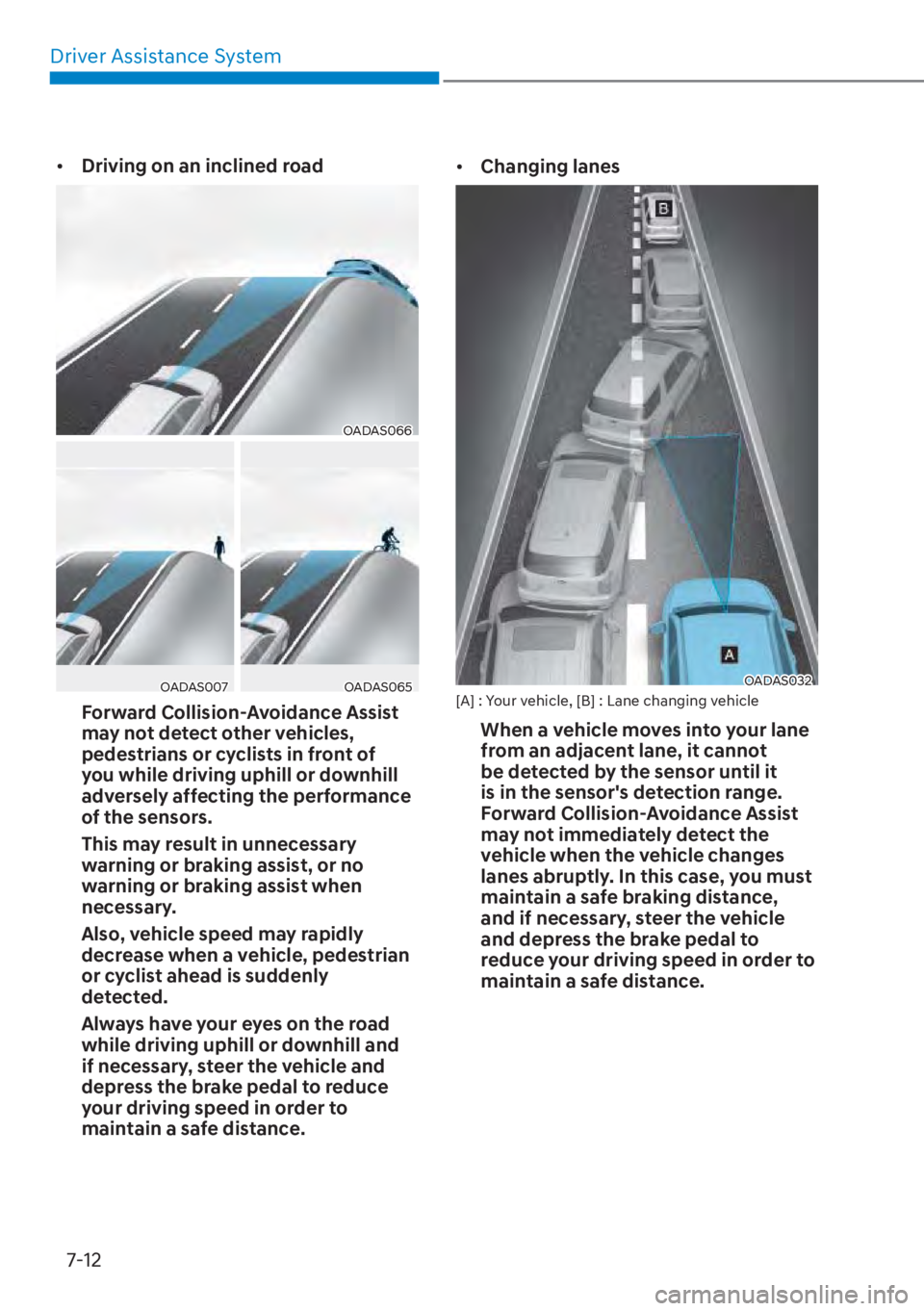
• Driving on an inclined road
OADAS066OADAS066
OADAS007OADAS007OADAS065OADAS065
Forward Collision-Avoidance Assist
may not detect other vehicles,
pedestrians or cyclists in front of
you while driving uphill or downhill
adversely affecting the performance
of the sensors.
This may result in unnecessary
warning or braking assist, or no
warning or braking assist when
necessary.
Also, vehicle speed may rapidly
decrease when a vehicle, pedestrian
or cyclist ahead is suddenly
detected.
Always have your eyes on the road
while driving uphill or downhill and
if necessary, steer the vehicle and
depress the brake pedal to reduce
your driving speed in order to
maintain a safe distance. •
Changing lanes
OADAS032OADAS032[A] : Your vehicle, [B] : Lane changing vehicle
When a vehicle moves into your lane
from an adjacent lane, it cannot
be detected by the sensor until it
is in the sensor's detection range.
Forward Collision-Avoidance Assist
may not immediately detect the
vehicle when the vehicle changes
lanes abruptly. In this case, you must
maintain a safe braking distance,
and if necessary, steer the vehicle
and depress the brake pedal to
reduce your driving speed in order to
maintain a safe distance.
Page 456 of 699
07
7-27
• The pedestrian or cyclist is wearing clothing that easily blends into the
background, making it difficult to
detect
• The pedestrian or cyclist is difficult to distinguish from the similar shaped
structure in the surroundings
• You are driving by a pedestrian, cyclist, traffic sign, structure, etc. near
the intersection
• Driving in a parking lot
• Driving through a tollgate, construction area, unpaved road,
partial paved road, uneven road,
speed bumps, etc.
• Driving on an inclined road, curved road, etc.
• Driving through a roadside with trees or streetlights
• The adverse road conditions cause excessive vehicle vibrations while
driving
• Your vehicle height is low or high due to heavy loads, abnormal tire
pressure, etc.
• Driving through a narrow road where trees or grass are overgrown
• There is interference by electromagnetic waves, such as
driving in an area with strong radio
waves or electrical noise WARNING
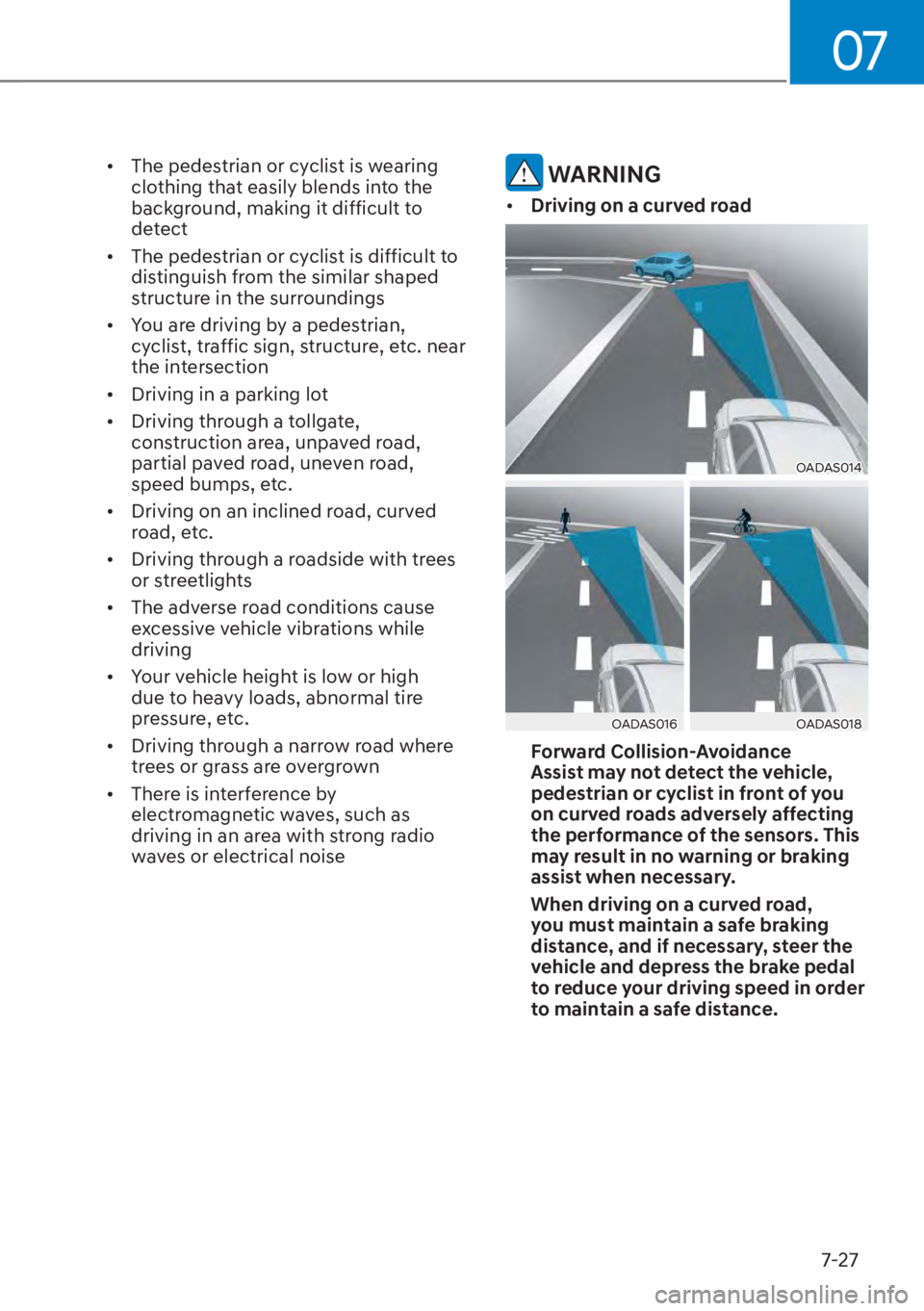
• Driving on a curved road
OADAS014OADAS014
OADAS016OADAS016OADAS018OADAS018
Forward Collision-Avoidance
Assist may not detect the vehicle,
pedestrian or cyclist in front of you
on curved roads adversely affecting
the performance of the sensors. This
may result in no warning or braking
assist when necessary.
When driving on a curved road,
you must maintain a safe braking
distance, and if necessary, steer the
vehicle and depress the brake pedal
to reduce your driving speed in order
to maintain a safe distance.
Page 457 of 699
Driver Assistance System7-28
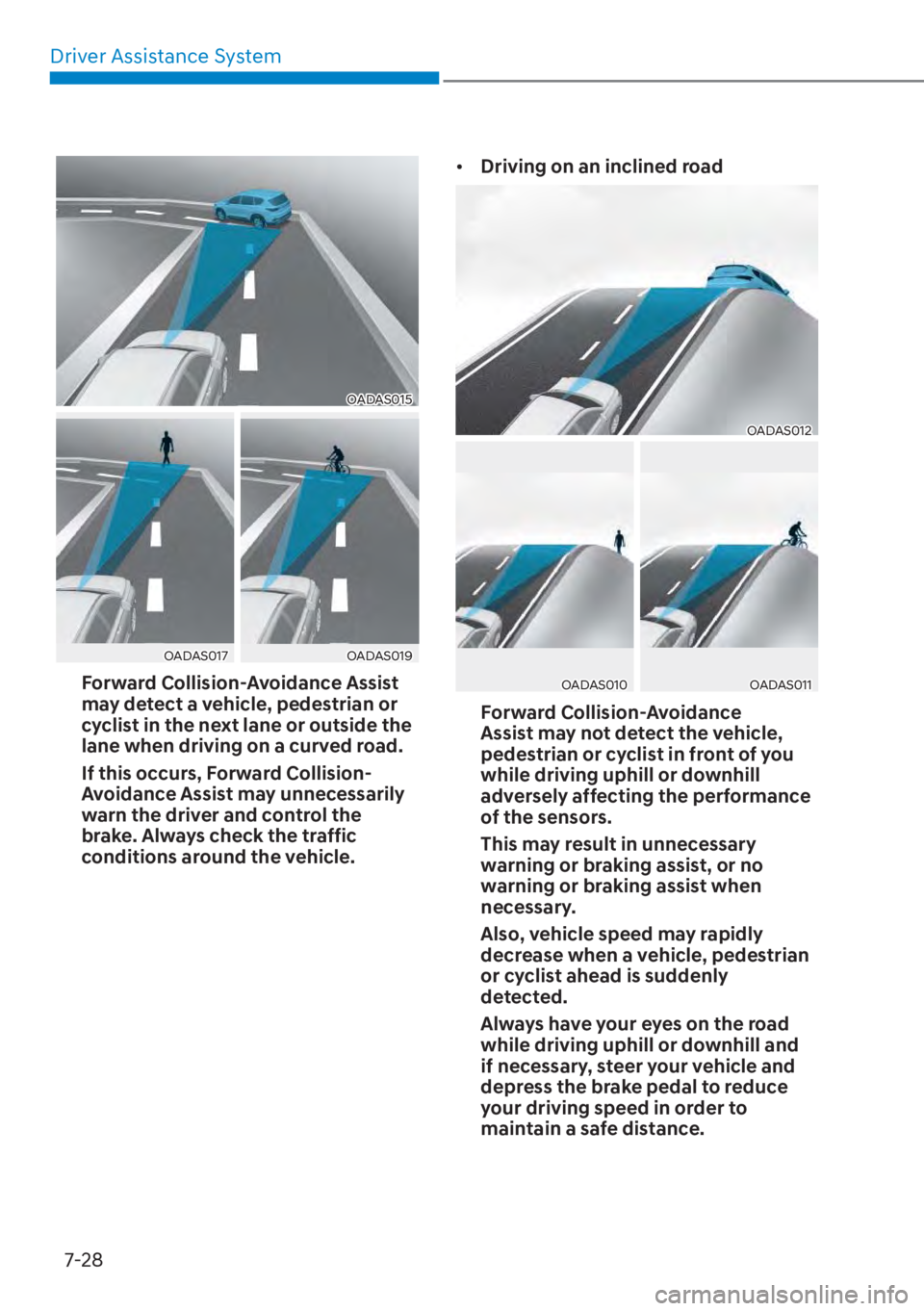
OADAS015OADAS015
OADAS017OADAS017OADAS019OADAS019
Forward Collision-Avoidance Assist
may detect a vehicle, pedestrian or
cyclist in the next lane or outside the
lane when driving on a curved road.
If this occurs, Forward Collision-
Avoidance Assist may unnecessarily
warn the driver and control the
brake. Always check the traffic
conditions around the vehicle. •
Driving on an inclined road
OADAS012OADAS012
OADAS010OADAS010OADAS011OADAS011
Forward Collision-Avoidance
Assist may not detect the vehicle,
pedestrian or cyclist in front of you
while driving uphill or downhill
adversely affecting the performance
of the sensors.
This may result in unnecessary
warning or braking assist, or no
warning or braking assist when
necessary.
Also, vehicle speed may rapidly
decrease when a vehicle, pedestrian
or cyclist ahead is suddenly
detected.
Always have your eyes on the road
while driving uphill or downhill and
if necessary, steer your vehicle and
depress the brake pedal to reduce
your driving speed in order to
maintain a safe distance.
Page 458 of 699
![HYUNDAI TUCSON HYBRID 2023 Owners Manual 07
7-29
• Changing lanes
OADAS030OADAS030[A] : Your vehicle, [B] : Lane changing vehicle
When a vehicle moves into your lane
from an adjacent lane, it cannot
be detected by the sensor until it
is](/img/35/58889/w960_58889-457.png "HYUNDAI TUCSON HYBRID 2023 Owners Manual 07
7-29
• Changing lanes
OADAS030OADAS030[A] : Your vehicle, [B] : Lane changing vehicle
When a vehicle moves into your lane
from an adjacent lane, it cannot
be detected by the sensor until it
is")
07
7-29
• Changing lanes
OADAS030OADAS030[A] : Your vehicle, [B] : Lane changing vehicle
When a vehicle moves into your lane
from an adjacent lane, it cannot
be detected by the sensor until it
is in the sensor's detection range.
Forward Collision-Avoidance Assist
may not immediately detect the
vehicle when the vehicle changes
lanes abruptly. In this case, you must
maintain a safe braking distance,
and if necessary, steer your vehicle
and depress the brake pedal to
reduce your driving speed in order to
maintain a safe distance.
OADAS031OADAS031[A] : Your vehicle, [B] : Lane changing vehicle,
[C] : Same lane vehicle
When a vehicle in front of you
merges out of the lane, Forward
Collision-Avoidance Assist may not
immediately detect the vehicle that
is now in front of you. In this case,
you must maintain a safe braking
distance, and if necessary, steer your
vehicle and depress the brake pedal
to reduce your driving speed in order
to maintain a safe distance.
Page 468 of 699
07
7-39
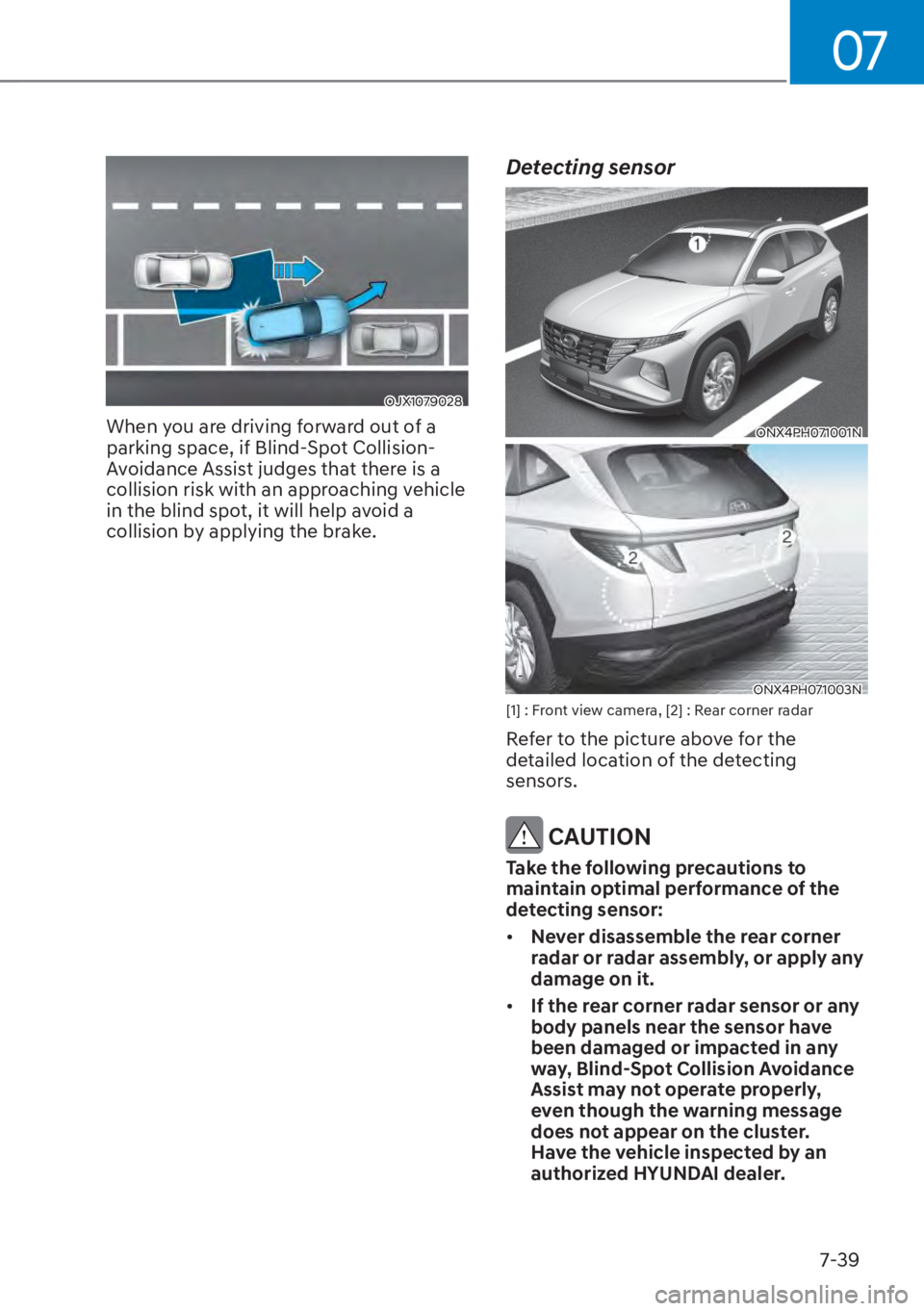
OJX1079028OJX1079028
When you are driving forward out of a
parking space, if Blind-Spot Collision-
Avoidance Assist judges that there is a
collision risk with an approaching vehicle
in the blind spot, it will help avoid a
collision by applying the brake.
Detecting sensor
ONX4PH071001NONX4PH071001N
ONX4PH071003NONX4PH071003N[1] : Front view camera, [2] : Rear corner radar
Refer to the picture above for the
detailed location of the detecting
sensors.
CAUTION
Take the following precautions to
maintain optimal performance of the
detecting sensor:
• Never disassemble the rear corner
radar or radar assembly, or apply any
damage on it.
• If the rear corner radar sensor or any
body panels near the sensor have
been damaged or impacted in any
way, Blind-Spot Collision Avoidance
Assist may not operate properly,
even though the warning message
does not appear on the cluster.
Have the vehicle inspected by an
authorized HYUNDAI dealer.
Page 518 of 699
07
7-89
Information
• Smart Cruise Control may not operate
for 15 seconds after the vehicle is
started or the front view camera or
front radar is initialized.
• You may hear a sound when the brake
is controlled by Smart Cruise Control.
Smart Cruise Control
Malfunction and Limitations
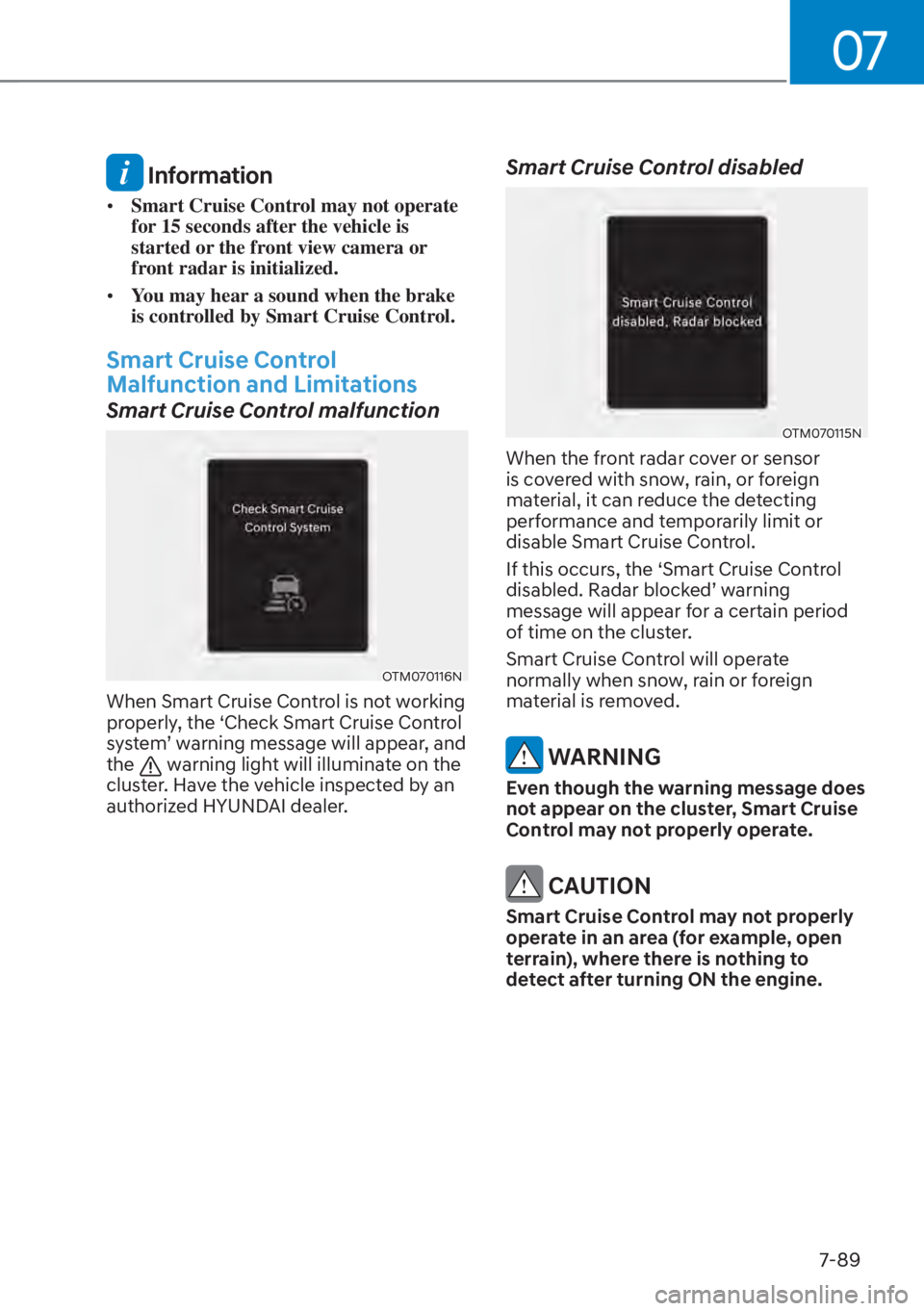
Smart Cruise Control malfunction
OTM070116NOTM070116N
When Smart Cruise Control is not working
properly, the ‘Check Smart Cruise Control
system’ warning message will appear, and
the
warning light will illuminate on the
cluster. Have the vehicle inspected by an
authorized HYUNDAI dealer.
Smart Cruise Control disabled
OTM070115NOTM070115N
When the front radar cover or sensor
is covered with snow, rain, or foreign
material, it can reduce the detecting
performance and temporarily limit or
disable Smart Cruise Control.
If this occurs, the ‘Smart Cruise Control
disabled. Radar blocked’ warning
message will appear for a certain period
of time on the cluster.
Smart Cruise Control will operate
normally when snow, rain or foreign
material is removed.
WARNING
Even though the warning message does
not appear on the cluster, Smart Cruise
Control may not properly operate.
CAUTION
Smart Cruise Control may not properly
operate in an area (for example, open
terrain), where there is nothing to
detect after turning ON the engine.
Page 521 of 699
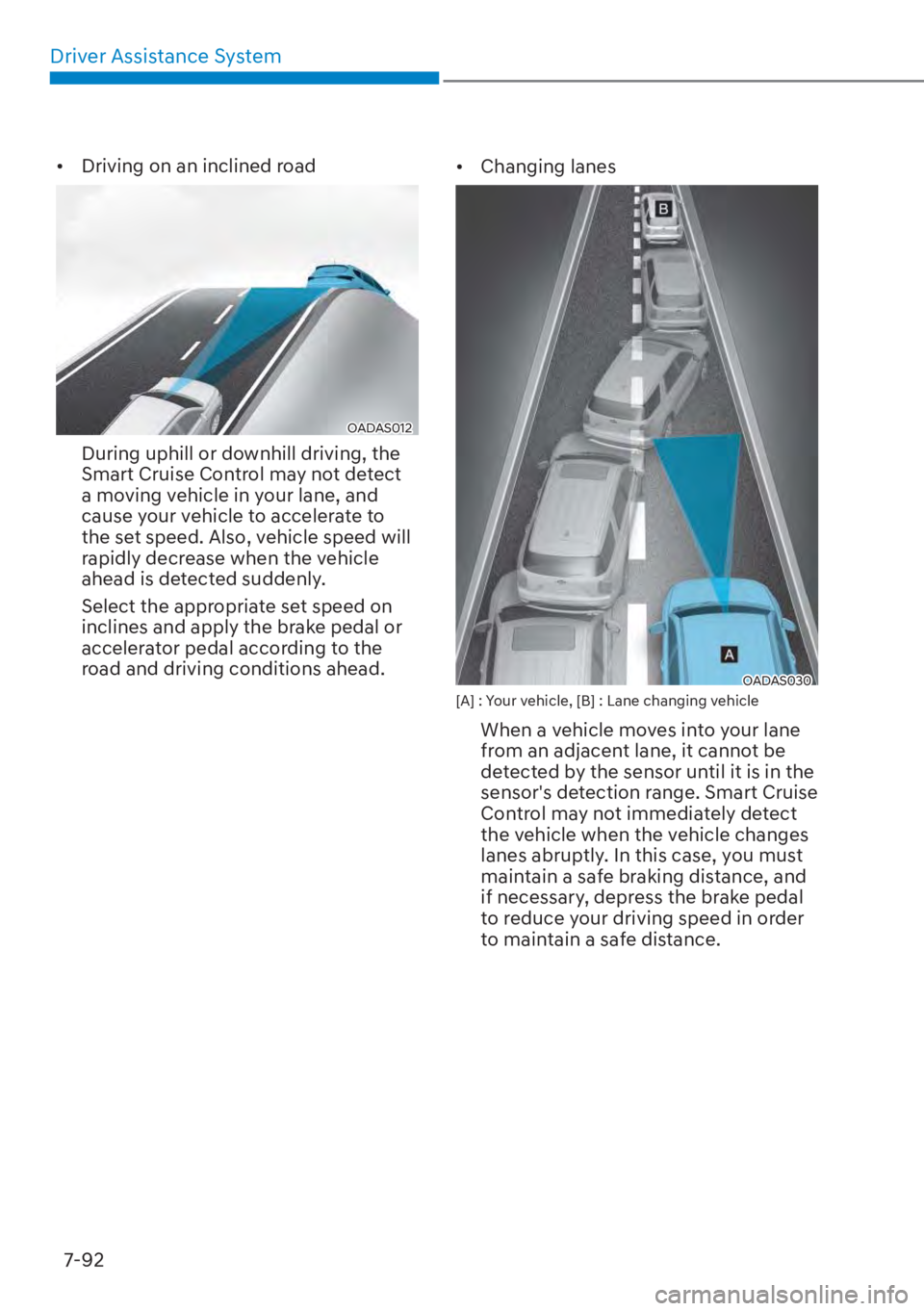
Driver Assistance System7-92
• Driving on an inclined road
OADAS012OADAS012
During uphill or downhill driving, the
Smart Cruise Control may not detect
a moving vehicle in your lane, and
cause your vehicle to accelerate to
the set speed. Also, vehicle speed will
rapidly decrease when the vehicle
ahead is detected suddenly.
Select the appropriate set speed on
inclines and apply the brake pedal or
accelerator pedal according to the
road and driving conditions ahead. • Changing lanes
OADAS030 OADAS030 [A] : Your vehicle, [B] : Lane changing vehicle
When a vehicle moves into your lane
from an adjacent lane, it cannot be
detected by the sensor until it is in the
sensor's detection range. Smart Cruise
Control may not immediately detect
the vehicle when the vehicle changes
lanes abruptly. In this case, you must
maintain a safe braking distance, and
if necessary, depress the brake pedal
to reduce your driving speed in order
to maintain a safe distance.