USB HYUNDAI VERACRUZ 2011 Owners Manual
[x] Cancel search | Manufacturer: HYUNDAI, Model Year: 2011, Model line: VERACRUZ, Model: HYUNDAI VERACRUZ 2011Pages: 419, PDF Size: 47.93 MB
Page 205 of 419
4127
Features of your vehicle
D300202AEN
MODE
Press the button to select Radio or CD (compact disc). D300204AEN
VOLUME (VOL +/-)
• Press the up button (+) to increase vol-ume.
Press the down button (-) to decrease volume.
D300205AEN
MUTE
Press the MUTE button to cancel the sound.
Press the MUTE button again to acti- vate the sound.
D300203AEN
SEEK/PRESET ( / )
If the SEEK/PRESET button is pressed
for 0.8 second or more, it will work as fol-
lows in each mode.
RADIO mode
It will function as the AUTO SEEK select
button. CDP mode
It will function as the FF/REW button.
CDC mode
It will function as the DISC UP/DOWN
button.
If the SEEK/PRESET button is pressed
for less than 0.8 second, it will work as
follows in each mode.
RADIO mode
It will function as the PRESET STATION
select buttons.
CDP mode
It will function as the TRACK UP/DOWN
button.
CDC mode
It will function as the TRACK UP/DOWN
button.
Detailed information for audio control
buttons is described in the followingpages in this section.
D300600AEN
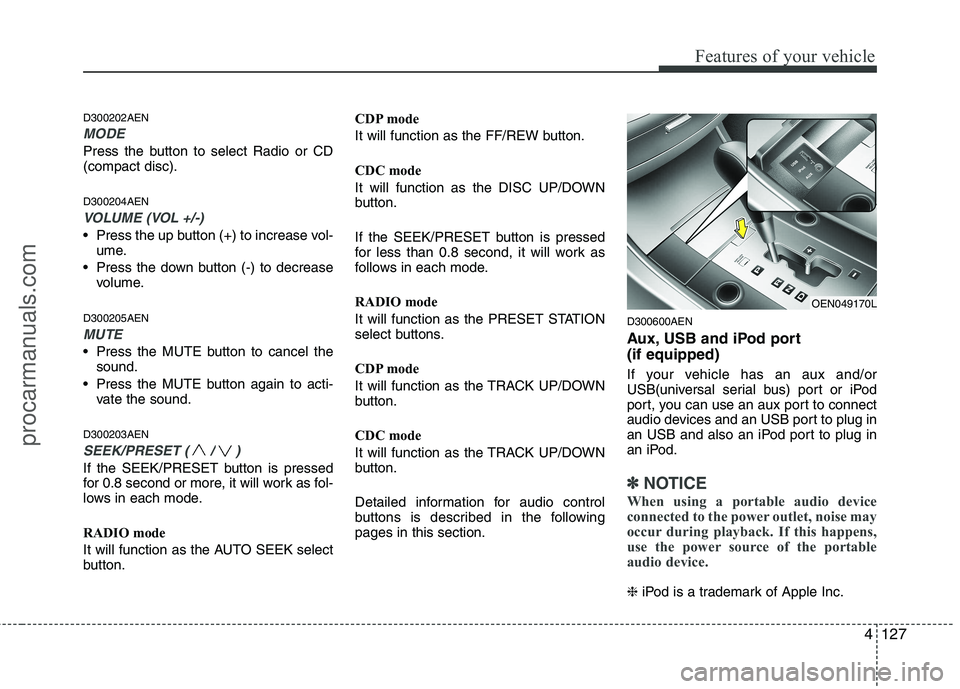
Aux, USB and iPod port (if equipped)
If your vehicle has an aux and/or
USB(universal serial bus) port or iPod
port, you can use an aux port to connect
audio devices and an USB port to plug in
an USB and also an iPod port to plug in
an iPod.
✽✽
NOTICE
When using a portable audio device
connected to the power outlet, noise may
occur during playback. If this happens,
use the power source of the portable
audio device.
❈ iPod is a trademark of Apple Inc.
OEN049170L
procarmanuals.com
Page 223 of 419
4145
Features of your vehicle
CAUTION - Using USBdevice
To use an external USB device,make sure the device is not con-
nected when starting up the vehi-cle and connect the device afterstarting up.
If you start the engine when the USB device is connected, it maydamage the USB device. (USBflashdrives are very sensitive to electric shock)
If the vehicle is started up or turned off while the external USBdevice is connected, the externalUSB device may not work.
It may not play inauthentic MP3 or WMA files.
1) It can only play MP3 files with the compression rate between8Kbps~320Kbps.
2) It can only play WMA music files with the compression rate
between 8Kbps~320Kbps.
Take precautions for static elec- tricity when connecting or dis-connecting the external USBdevice.
(Continued)
(Continued) An encoded MP3 PLAYER is not recognizable.
Depending on the condition of the external USB device, the con-
nected external USB device can be unrecognizable.
When the formatted byte/sector setting of External USB devices isnot either 512BYTE or 2048BYTE,
then the device will not be recog- nized.
Use only a USB device formatted to FAT 12/16/32.
USB devices without USB I/F authentication may not be recog-nizable.
Make sure the USB connection terminal does not come in con-tact with the human body or any
object.
If you repeatedly connecting or disconnecting USB device in ashort period of time, it may breakthe device.
You might hear a strange noise when connecting or disconnect-ing a USB device.
(Continued)(Continued) If you disconnect the external USB device during playback inUSB mode, the external USBdevice can be damaged or mal-
function. Therefore, disconnectthe external USB device when the audio is turned off or in another
mode.
Depending on the type and capacity of the external USBdevice or the type of the filesstored in the device, there is a dif-
ference in the time taken forrecognition of the device, but this is not an indicator of trouble andyou only have to wait.
Do not use the USB device for purpose other than playing musicfiles.
Use of USB accessories such as recharger or heater using USB I/F
may lower performance or cause trouble.
(Continued)
procarmanuals.com
Page 224 of 419
Features of your vehicle
146
4
(Continued)
If you use devices such as a USB hub you purchased separately,the vehicle’s audio system maynot recognize the USB device.
Connect the USB device directlyto the multimedia terminal of thevehicle.
If USB device is divided by logical drives, only the music files on thehighest-priority drive are recog-nized by car audio.
Devices such as MP3 Player/ Cellular phone/Digital camera
those are not recognizable bystandard USB I/F can be unrecog-nizable.
USB devices other than standard- ized goods (METAL COVER TYPEUSB) can be unrecognizable.
USB flash memory reader (such as CF, SD, microSD, etc.) or exter-nal-HDD type devices can be
unrecognizable.
Music files protected by DRM (DIGITAL RIGHTS MANAGE-MENT) are not recognizalbe.
(Continued)(Continued) The data in the USB memory may lost while using this AUDIO, It isrecommeded to back up impor-tant data on a personal.
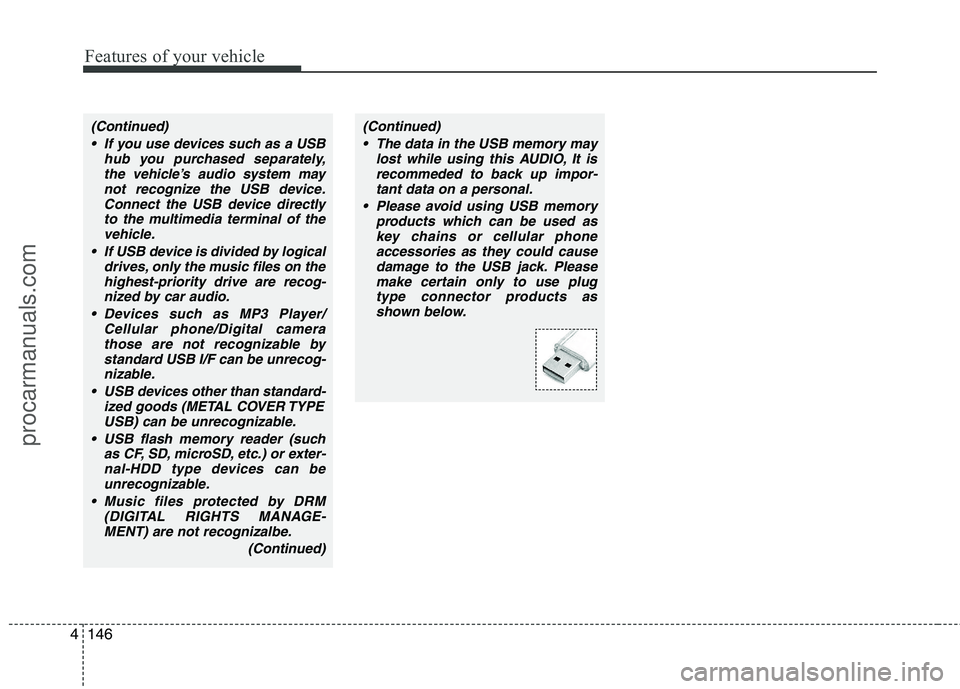
Please avoid using USB memory products which can be used askey chains or cellular phoneaccessories as they could cause
damage to the USB jack. Pleasemake certain only to use plugtype connector products as shown below.
procarmanuals.com
Page 225 of 419
4147
Features of your vehicle
A-200ENG
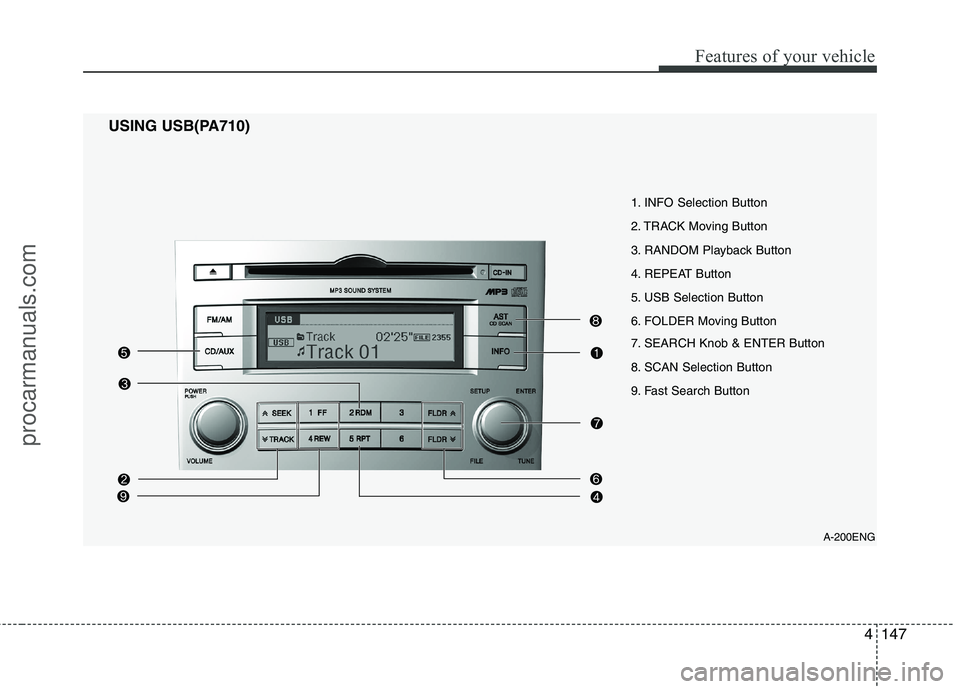
1. INFO Selection Button
2. TRACK Moving Button
3. RANDOM Playback Button
4. REPEAT Button
5. USB Selection Button
6. FOLDER Moving Button
7. SEARCH Knob & ENTER Button
8. SCAN Selection Button
9. Fast Search Button
USING USB(PA710)
procarmanuals.com
Page 226 of 419
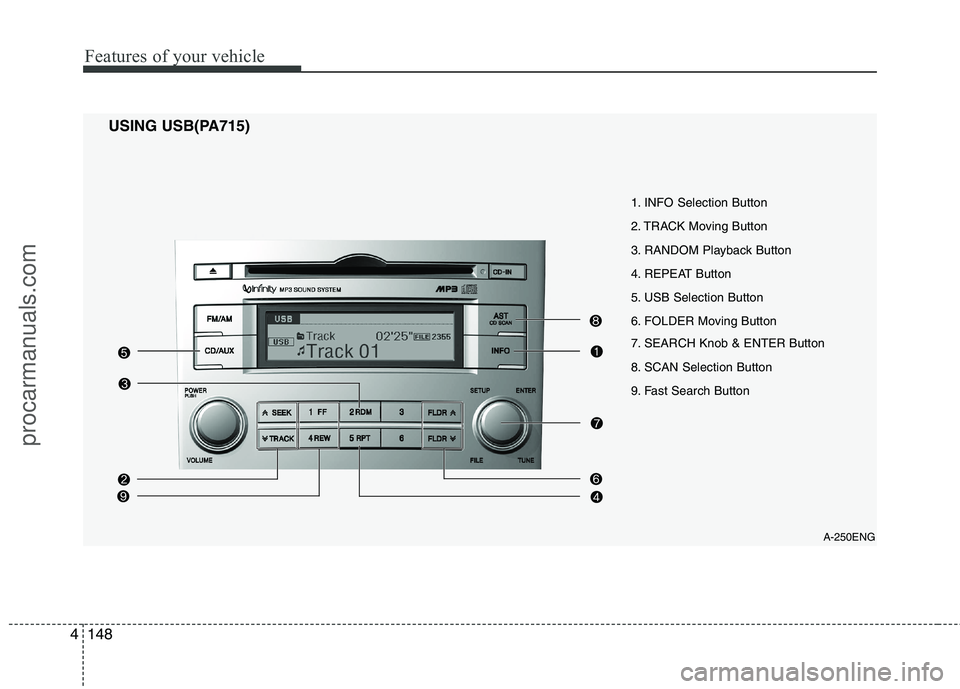
Features of your vehicle
148
4
A-250ENG
1. INFO Selection Button
2. TRACK Moving Button
3. RANDOM Playback Button
4. REPEAT Button
5. USB Selection Button
6. FOLDER Moving Button
7. SEARCH Knob & ENTER Button
8. SCAN Selection Button
9. Fast Search Button
USING USB(PA715)
procarmanuals.com
Page 227 of 419
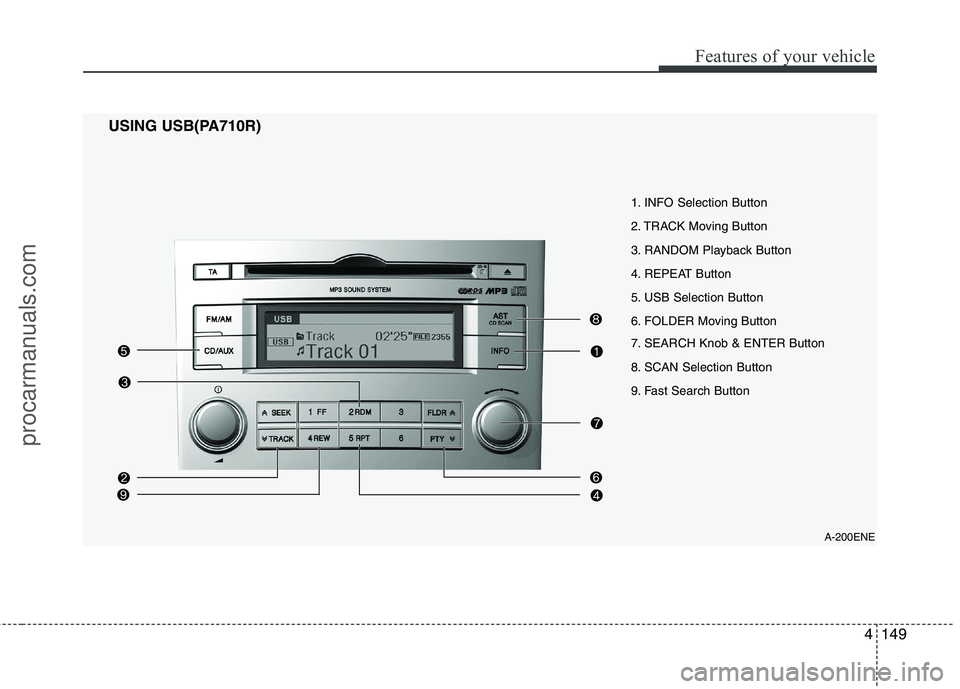
4149
Features of your vehicle
A-200ENE
1. INFO Selection Button
2. TRACK Moving Button
3. RANDOM Playback Button
4. REPEAT Button
5. USB Selection Button
6. FOLDER Moving Button
7. SEARCH Knob & ENTER Button
8. SCAN Selection Button
9. Fast Search Button
USING USB(PA710R)
procarmanuals.com
Page 228 of 419
Features of your vehicle
150
4
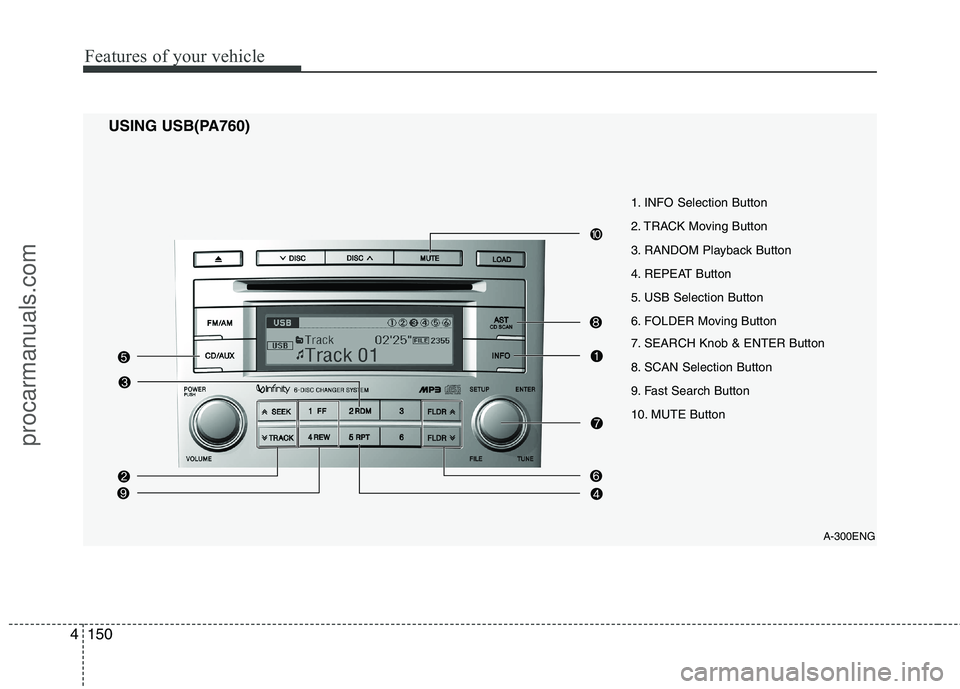
USING USB(PA760)
A-300ENG
1. INFO Selection Button
2. TRACK Moving Button
3. RANDOM Playback Button
4. REPEAT Button
5. USB Selection Button
6. FOLDER Moving Button
7. SEARCH Knob & ENTER Button
8. SCAN Selection Button
9. Fast Search Button
10. MUTE Button
procarmanuals.com
Page 229 of 419
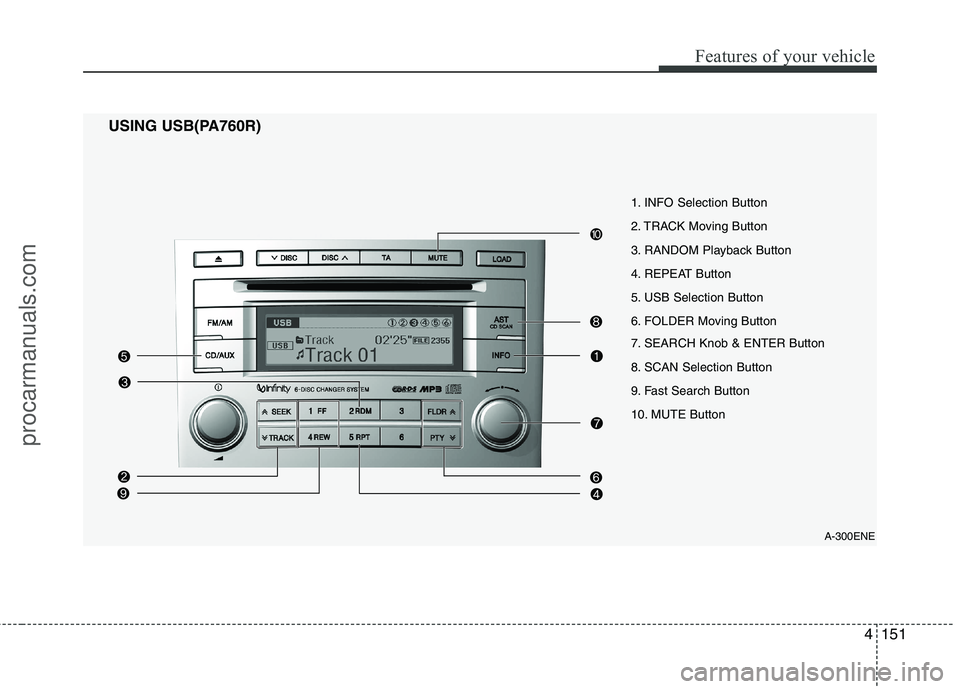
4151
Features of your vehicle
USING USB(PA760R) A-300ENE
1. INFO Selection Button
2. TRACK Moving Button
3. RANDOM Playback Button
4. REPEAT Button
5. USB Selection Button
6. FOLDER Moving Button
7. SEARCH Knob & ENTER Button
8. SCAN Selection Button
9. Fast Search Button
10. MUTE Button
procarmanuals.com
Page 230 of 419
Features of your vehicle
152
4
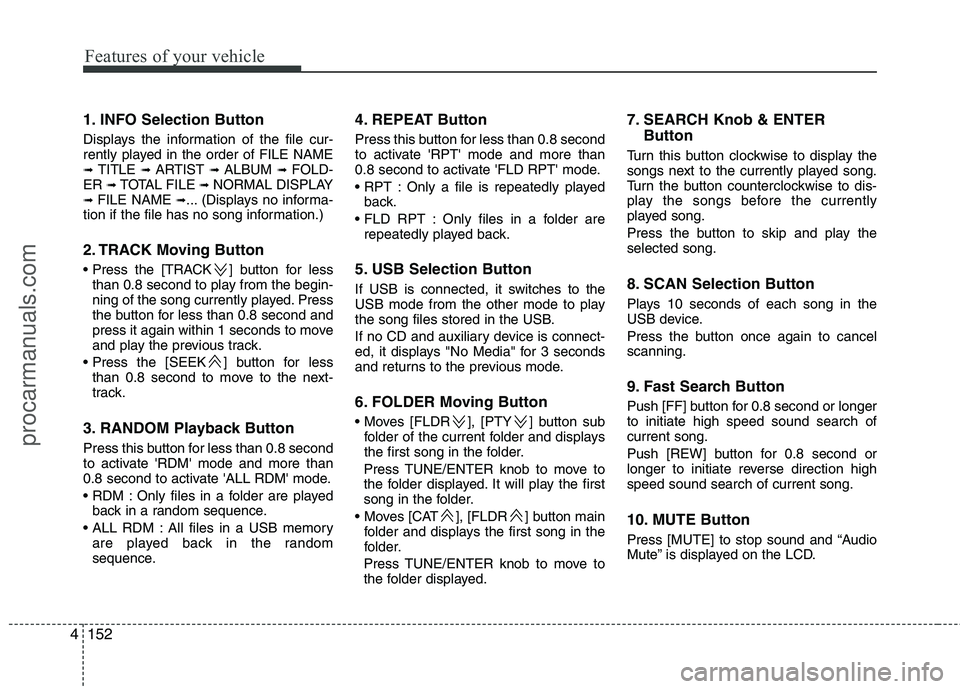
1. INFO Selection Button
Displays the information of the file cur-
rently played in the order of FILE NAME➟ TITLE ➟ ARTIST ➟ ALBUM ➟ FOLD-
ER ➟ TOTAL FILE ➟ NORMAL DISPLAY
➟ FILE NAME ➟... (Displays no informa-
tion if the file has no song information.)
2. TRACK Moving Button
] button for less than 0.8 second to play from the begin-
ning of the song currently played. Press
the button for less than 0.8 second and
press it again within 1 seconds to move
and play the previous track.
] button for less than 0.8 second to move to the next-
track.
3. RANDOM Playback Button
Press this button for less than 0.8 second
to activate 'RDM' mode and more than
0.8 second to activate 'ALL RDM' mode.
Only files in a folder are played back in a random sequence.
All files in a USB memory are played back in the random
sequence. 4. REPEAT Button
Press this button for less than 0.8 second
to activate 'RPT' mode and more than
0.8 second to activate 'FLD RPT' mode.
Only a file is repeatedly played
back.
Only files in a folder are repeatedly played back.
5. USB Selection Button
If USB is connected, it switches to the
USB mode from the other mode to play
the song files stored in the USB.
If no CD and auxiliary device is connect-
ed, it displays "No Media" for 3 seconds
and returns to the previous mode.
6. FOLDER Moving Button
], [PTY ] button sub folder of the current folder and displays
the first song in the folder.
Press TUNE/ENTER knob to move to
the folder displayed. It will play the first
song in the folder.
], [FLDR ] button main folder and displays the first song in the
folder.
Press TUNE/ENTER knob to move to
the folder displayed. 7. SEARCH Knob & ENTER
Button
Turn this button clockwise to display the
songs next to the currently played song.
Turn the button counterclockwise to dis-
play the songs before the currently
played song.
Press the button to skip and play the selected song.
8. SCAN Selection Button
Plays 10 seconds of each song in the
USB device.
Press the button once again to cancel scanning.
9. Fast Search Button
Push [FF] button for 0.8 second or longer to initiate high speed sound search ofcurrent song.
Push [REW] button for 0.8 second or
longer to initiate reverse direction highspeed sound search of current song.
10. MUTE Button
Press [MUTE] to stop sound and “Audio
Mute” is displayed on the LCD.
procarmanuals.com
Page 411 of 419
Index
2
I
Air bags ···········································································3-39
Air bag warning label................................................3-60
Air bag warning light ................................................3-42
Curtain air bag ..........................................................3-52
Driver's and passenger's front air bag ......................3-45
Side impact air bag....................................................3-51
Air cleaner·······································································7-38
Alarm system ··································································4-11
Antenna ·········································································4-125
Anti-lock brake system (ABS)········································5-24
Appearance care······························································7-76 Exterior care ······························································7-76
Interior care ·······························································7-81
Armrest ···········································································3-13
Ashtray ··········································································4-117
Audio system ································································4-125 Antenna ···································································4-125
Aux, USB and iPod ·················································4-127
Steering wheel audio control ··································4-126
Automatic climate control system ································4-101 Air conditioning ······················································4-107
Automatic heating and air conditioning··················4-102
Manual heating and air conditioning ······················4-103
Automatic transaxle ··························································5-9 Shift lock system ·······················································5-12
Sports mode·······························································5-11 Battery ·············································································7-44
Battery saver function ·····················································4-73
Before driving ···································································5-3
Bottle holders, see cup holders ·····································4-118
Brake system ···································································5-21
Anti-lock brake system (ABS) ··································5-24
Electronic stability program (ESP) ···························5-26
Parking brake·····························································5-22
Power brakes ·····························································5-21
Brakes fluid ·····································································7-34
Bulb replacement ····························································7-67 Front fog light bulb replacement·······························7-70
Headlight bulb replacement ······································7-68
High mounted stop light replacement ·······················7-74
Interior light bulb replacement··································7-75
License plate light bulb replacement ························7-74
Position light bulb replacement·································7-69
Puddle lamp and door courtesy lamp bulb replacement ···························································7-74
Rear combination light bulb replacement ·················7-71
Side repeater light bulb replacement·························7-70
Turn signal light bulb replacement ···························7-69
Bulb wattage ·····································································8-2
AB
procarmanuals.com