ignition INFINITI M 2010 Owner's Guide
[x] Cancel search | Manufacturer: INFINITI, Model Year: 2010, Model line: M, Model: INFINITI M 2010Pages: 445, PDF Size: 6.15 MB
Page 108 of 445

Headlight beam select
s1To select the low beam, put the lever in
the neutral position as shown.
s2To select the high beam, push the lever
forward while the switch is in the
position. Pull it back to select the low
beam.
s3Pulling the lever toward you will flash the headlight high beam even when the
headlight switch is in the OFF position.
Battery saver system
c When the headlight switch is in theor
position while the ignition switch is in the ON position, the lights will automatically
turn off 5 minutes after the ignition switch
has been pushed to the LOCK position.
c When the headlight switch remains in the
orposition after the lights
automatically turn off, the lights will turn on
when the ignition switch is pushed to the ON
position.
CAUTION
c When you turn on the headlight switch again
after the lights automatically turn off, the
lights will not turn off automatically. Be sure
to turn the light switch to the OFF position
when you leave the vehicle for extended pe-
riods of time, otherwise the battery will be
discharged.
c Never leave the light switch on when the
engine is not running for extended periods of
time even if the headlights turn off
automatically.
Daytime running light system
(Canada only)
The daytime running lights automatically illumi-
nate when the engine is started with the park-
ing brake released. The daytime running lights
operate with the headlight switch in the OFF position or in the
position. Turn the
headlight switch to the
position for full
illumination when driving at night.
If the parking brake is applied before the engine
is started, the daytime running lights do not
illuminate. The daytime running lights illumi-
nate once the parking brake is released. The
daytime running lights will remain on until the
ignition switch is pushed to the LOCK position.
WARNING
When the daytime running light system is ac-
tive, tail lights on your vehicle are not on. It is
necessary at dusk to turn on your headlights.
Failure to do so could cause an accident injur-
ing yourself and others.
Adaptive Front lighting System (AFS)
The Adaptive Front lighting System (AFS) will
automatically adjust the headlights (low beam)
toward the turning direction to improve the
driver's view. When the headlight switch is ON
and the driver operates the steering wheel in a
turn, the AFS system will be activated.
The AFS will operate:
c when the headlight switch is ON.
SIC2413
Instruments and controls2-31
wÐ
Ð
05/14/09Ðpattie
X
Page 109 of 445

cwhen the selector lever is in any position
other than P (Park) or R (Reverse).
c when the vehicle is driven at above 16 MPH
(25 km/h) for the left-side headlight. Note
that the right-side low beam headlight will
swivel but the left side will not swivel when
the vehicle is at a stop and the steering
wheel is turned. The vehicle must attain a
speed above 16 MPH (25 km/h) before AFS
activates the left-side headlight.
To turn the AFS off, push the OFF side of the AFS
switch. (The AFS OFF indicator light will illumi-
nate.) Push the ON side of the switch to turn the
system on again.
AFS will also adjust the headlight to a proper
axis automatically, depending on the number of
occupants in the vehicle, the load the vehicle is
carrying and the road conditions.
If the AFS OFF indicator light blinks after the
ignition switch has been pushed to the ON
position, this may indicate that the AFS is not
functioning properly. Have the system checked
by an INFINITI retailer. When the engine is
started, the headlights will vibrate to check the
system condition. This is not a malfunction.
Instrument brightness control
The instrument brightness control operates
when the light switch is in the AUTO (when
lighting),
orposition with the
ignition switch in the ON position.
Turn the control to the darkening direction
s1
or the brightening directions2to adjust the
brightness of instrument panel lights.
When the control is turned to the upper end, the
light intensity will be at maximum. When the
control is turned to the lower end, the light will
be turned off.
SIC2645SIC3554
2-32Instruments and controls
wÐ
Ð
05/14/09Ðpattie
X
Page 111 of 445

The flasher can be actuated with the ignition
switch in any position.
Some state laws may prohibit the use of the
hazard warning flasher switch while driving.To sound the horn, push the center pad area of
the steering wheel.
WARNING
Do not disassemble the horn. Doing so could
affect proper operation of the supplemental
front air bag system. Tampering with the
supplemental front air bag system may result
in serious personal injury.
CAUTION
cThe battery could run down if the seat heater
is operated while the engine is not running.
c Do not use the seat heater for extended pe-
riods or when no one is using the seat.
c Do not put anything on the seat which insu-
lates heat, such as a blanket, cushion, seat
cover, etc. Otherwise, the seat may become
overheated.
c Do not place anything hard or heavy on the
seat or pierce it with a pin or similar object.
This may result in damage to the heater.
c Any liquid spilled on the heated seat should
be removed immediately with a dry cloth.
c When cleaning the seat, never use gasoline,
thinner, or any similar materials.
c If any malfunctions are found or the heated
seat does not operate, turn the switch off
and have the system checked by an INFINITI
retailer.
SIC2769
HORN HEATED SEATS (rear seats) (if so
equipped)
2-34Instruments and controls
wÐ
Ð
05/14/09Ðpattie
X
Page 113 of 445
4. When the vehicle's interior is warmed orcooled, and/or before you leave the ve-
hicle, be sure to turn the control knob to
the OFF position (center). The indicator
light
sBon the control knob goes off at
the OFF position.
To check the air filter for the climate con-
trolled seat, contact an INFINITI retailer.
CAUTION
c The battery could run down if the climate
controlled seat is operated while the engine
is not running.
c Do not use the climate controlled seat for
extended periods or when no one is using
the seat.
c Do not put anything on the seat which insu-
lates heat, such as a blanket, cushion, seat
cover, etc. Otherwise, the seat may become
overheated.
c Do not place anything hard or heavy on the
seat or pierce it with a pin or similar object.
This may result in damage to the climate
controlled seat.
c Any liquid spilled on the seat should be re-
moved immediately with a dry cloth. c
The climate controlled seat has an air filter.
Do not operate climate controlled seat with-
out an air filter. This may result in damage to
the system.
c When cleaning the seat, never use gasoline,
thinner, or any similar materials.
c If any malfunctions are found or the climate
controlled seat does not operate, turn the
switch off and have the system checked by
an INFINITI retailer.
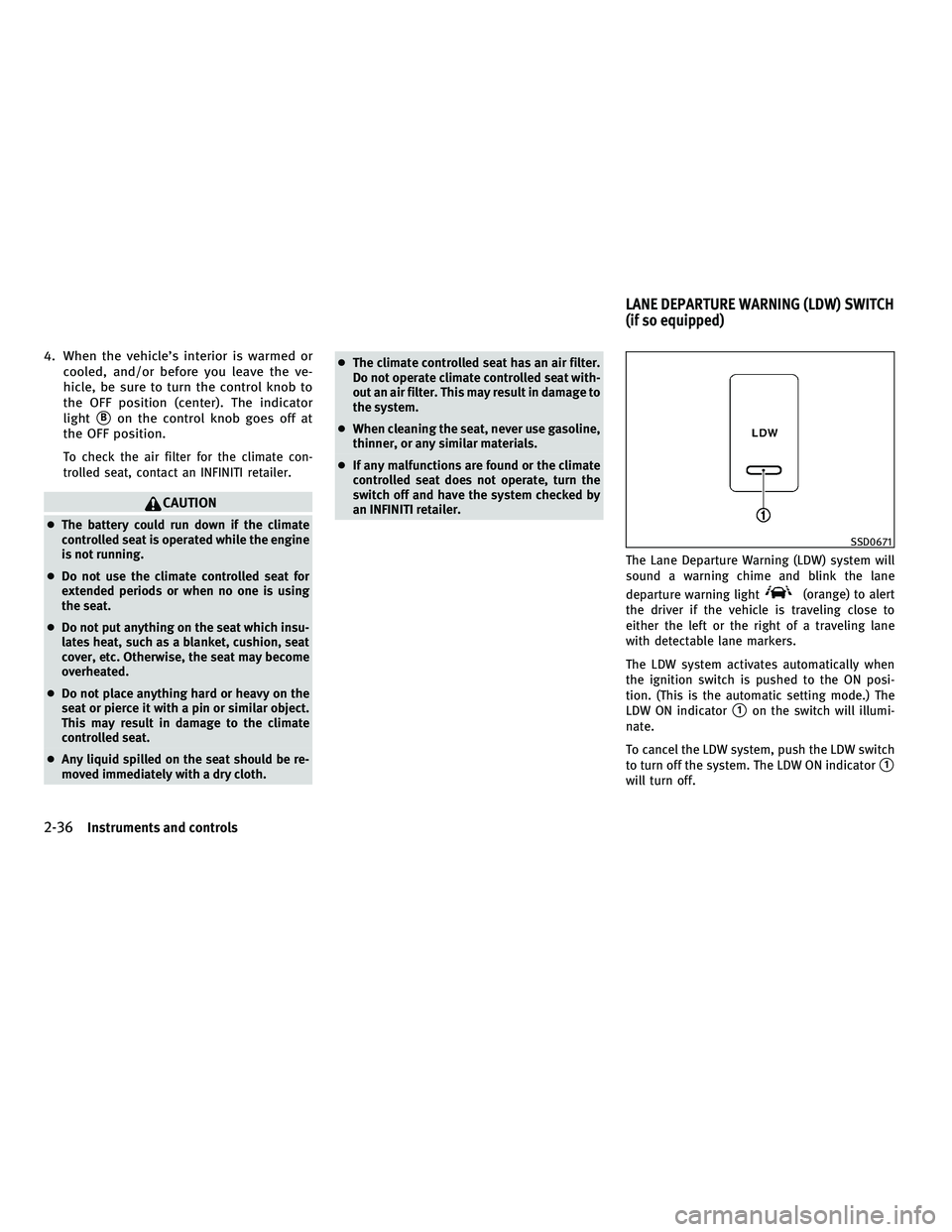
The Lane Departure Warning (LDW) system will
sound a warning chime and blink the lane
departure warning light
(orange) to alert
the driver if the vehicle is traveling close to
either the left or the right of a traveling lane
with detectable lane markers.
The LDW system activates automatically when
the ignition switch is pushed to the ON posi-
tion. (This is the automatic setting mode.) The
LDW ON indicator
s1on the switch will illumi-
nate.
To cancel the LDW system, push the LDW switch
to turn off the system. The LDW ON indicator
s1
will turn off.
SSD0671
LANE DEPARTURE WARNING (LDW) SWITCH
(if so equipped)
2-36Instruments and controls
wÐ
Ð
05/14/09Ðpattie
X
Page 116 of 445
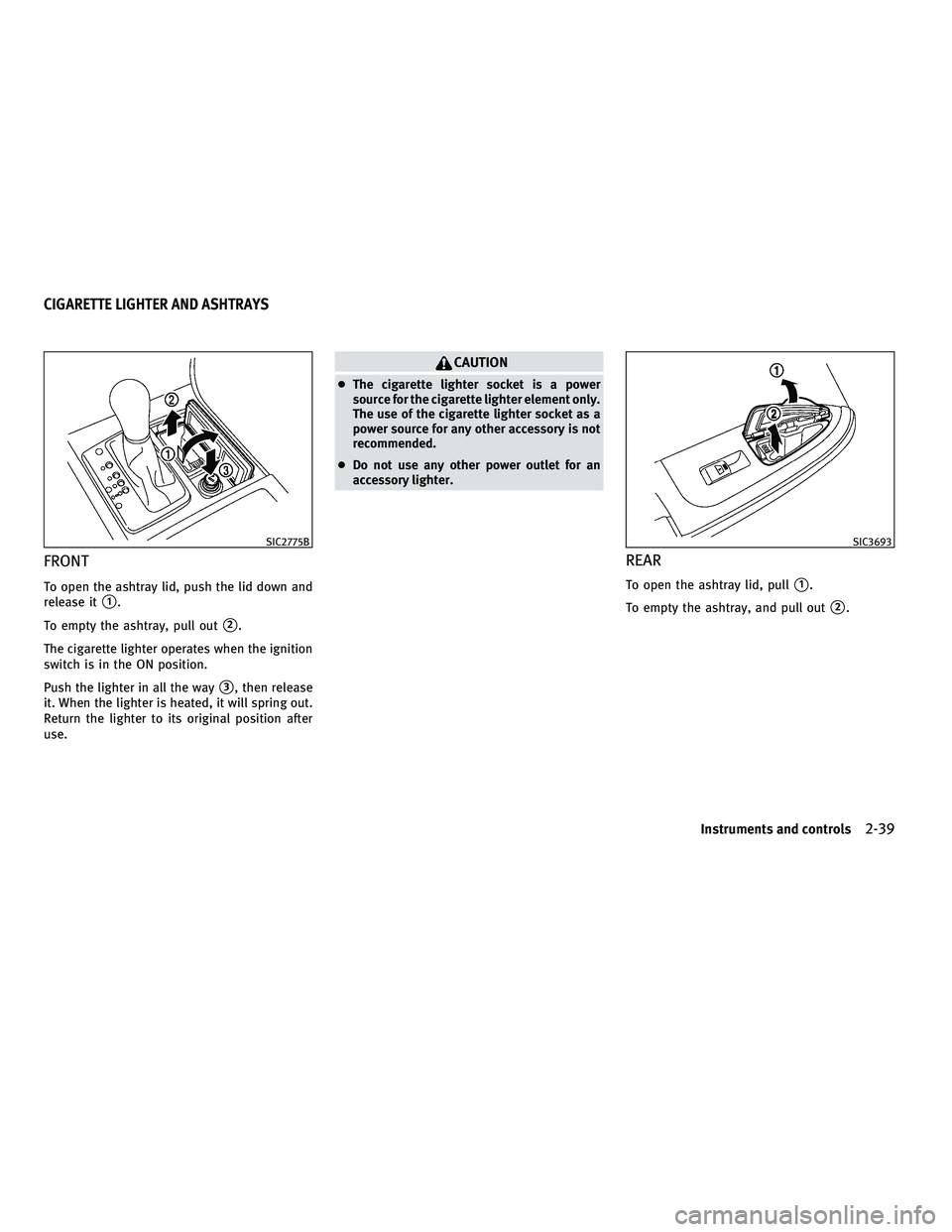
FRONT
To open the ashtray lid, push the lid down and
release it
s1.
To empty the ashtray, pull out
s2.
The cigarette lighter operates when the ignition
switch is in the ON position.
Push the lighter in all the way
s3, then release
it. When the lighter is heated, it will spring out.
Return the lighter to its original position after
use.
CAUTION
c The cigarette lighter socket is a power
source for the cigarette lighter element only.
The use of the cigarette lighter socket as a
power source for any other accessory is not
recommended.
c Do not use any other power outlet for an
accessory lighter.
REAR
To open the ashtray lid, pulls1.
To empty the ashtray, and pull out
s2.
SIC2775BSIC3693
CIGARETTE LIGHTER AND ASHTRAYS
Instruments and controls2-39
wÐ
Ð
05/14/09Ðpattie
X
Page 120 of 445

COAT HOOKS
The coat hooks are equipped beside the rear
personal lights.
To use the coat hook, push the hook
sAto
release.
CAUTION
Do not place items which are more than 2 lb (1
kg) on the hook.
CARGO NET (if so equipped)
The cargo net helps keep packages in the cargo
area from moving around while your vehicle is
driven.
To install the cargo net, attach the hooks to the
retainers
sA.
CAUTION
Avoid keeping heavy objects in the net.
POWER WINDOWS
WARNING
c Make sure that all passengers have their
hands, etc. inside the vehicle while it is in
motion and before closing the windows. Use
the window lock switch to prevent unex-
pected use of the power windows.
c Do not leave children unattended inside the
vehicle. They could unknowingly activate
switches or controls and become trapped in
the window. Unattended children could be-
come involved in serious accidents.
The power windows operate when the ignition
switch is in the ON position or for about 45
seconds after the ignition switch is pushed to
the LOCK position. If the driver's or front pas-
senger's door is opened during this period of
about 45 seconds, power to the windows is
canceled.
SIC2077ASIC2784
WINDOWS
Instruments and controls2-43
wÐ
Ð
05/14/09Ðpattie
X
Page 122 of 445

Automatic operation (for all door
windows)
To fully open or close the window, completely
push down or pull up the switch and release it;
it need not be held. The window will automati-
cally open or close all the way. To stop the
window, just push or lift the switch in the
opposite direction.
A light push or pull on the switch will cause the
window to open or close until the switch is
released.
Auto reverse function
WARNING
There are some small distances immediately
before the closed position which cannot be de-
tected. Make sure that all passengers have
their hands, etc., inside the vehicle before clos-
ing the window.
If the control unit detects something caught in
the window as it is closing, the window will be
immediately lowered.
The auto reverse function can be activated when
the window is closed by automatic operation
when the ignition switch is in the ON position or
for 45 seconds after the ignition switch is
pushed to the LOCK position.
Depending on the environment or driving condi-
tions, the auto reverse function may be activated
if an impact or load similar to something being
caught in the window occurs.
If the windows do not close
automatically
If the power window automatic function (closing
only) does not operate properly, perform the
following procedure to initialize the power win-
dow system.
1. Push the ignition switch to the ON posi- tion.
2. Close the door.
3. Open the window completely by operating the power window switch.
4. Pull the power window switch and hold it to close the window, and then hold the
switch more than 3 seconds after the
window is closed completely.
5. Release the power window switch. Oper- ate the window by the automatic function
to confirm the initialization is complete.
6. Perform steps 2 through 5 above for other windows.
If the power window automatic function does
not operate properly after performing the pro-
cedure above, have your vehicle checked by an
INFINITI retailer.
SIC3289
Instruments and controls2-45
wÐ
Ð
05/19/09Ðtbrooks
X
Page 123 of 445

WARNING
cIn an accident you could be thrown from the
vehicle through an open moonroof. Always
use seat belts and child restraints.
c Do not allow anyone to stand up or extend
any portion of their body out of the moonroof
opening while the vehicle is in motion or
while the moonroof is closing.
CAUTION
cRemove water drops, snow, ice or sand from
the moonroof before opening.
c Do not place any heavy object on the moon-
roof or surrounding area.
AUTOMATIC MOONROOF
The moonroof only operates when the ignition
switch is in the ON position.
The automatic moonroof is operational for
about 45 seconds, even if the ignition switch is
pushed to the LOCK position. If the driver's door
or the passenger's door is opened during this
period of about 45 seconds, power to the
moonroof is canceled.
Sunshade
The sunshade will open automatically when the
moonroof is opened. However, it must be
closed manually.
Tilting the moonroof
To tilt up, first close the moonroof, then push
the OPEN
s1side of the moonroof switch and
release it; it need not be held. To tilt down the
moonroof, push the CLOSE
s2side.
Sliding the moonroof
To fully open or close the moonroof, push the
OPEN
s1or CLOSEs2side of the moonroof
switch and release it; it need not be held. The
roof will automatically open or close all the way. To stop the roof, push the switch once more
while it is opening or closing.
Auto reverse function
WARNING
There are some small distances immediately
before the closed position which cannot be de-
tected. Make sure that all passengers have
their hands, etc., inside the vehicle before clos-
ing the moonroof.
If the control unit detects something caught in
the moonroof when it is closing, the moonroof
will be immediately opened.
The auto reverse function can be activated when
the moonroof is closed by automatic operation
when the ignition switch is in the ON position or
for about 45 seconds after the ignition switch is
pushed to the LOCK position.
If the moonroof cannot be closed automatically
when the auto reverse function activates due to
a malfunction, push and hold the CLOSE
s2
side of the moonroof switch.
Depending on the environment or driving condi-
tions, the auto reverse function may be activated
if an impact or load similar to something being
caught in the moonroof occurs.
SIC3888
MOONROOF
2-46Instruments and controls
wÐ
Ð
05/14/09Ðpattie
X
Page 125 of 445

The rear sunshade operates when the ignition
switch is in the ON position.
The rear sunshade switches are located on the
center console and inside the rear armrest.
To raise the screen, push the UP side of the
switch
s1.
To lower the screen, push the DOWN side of the
switch
s2. The switch need not be held.
CAUTION
c Do not place objects (such as newspapers,
handkerchiefs, etc.) on the screen inlet port.
Doing so may entangle these objects in the
screen when it is extending or retracting,
causing improper operation or damage to
the screen.
c Do not push the sunshade arm with your
hands, etc., as this may deform it. Improper
operation or damage to the screen may
result.
c Do not put any object into the screen inlet
port as this may result in improper operation
or damage the screen.
c Do not hang any object on the arm rail as this
may result in improper operation or damage
the screen.
c Do not forcefully pull the screen. Doing so
may elongate the screen. Improper opera-
tion or damage to the screen may result.
CAUTION
Do not use for extended periods of time with
the engine stopped. This could result in a dis-
charged battery.
SIC2787
INTERIOR LIGHTS
2-48Instruments and controls
wÐ
Ð
05/14/09Ðpattie
X
Page 126 of 445

MAP LIGHTS
Push the button as illustrated to turn the light
on or off.
PERSONAL LIGHTS
Rear
Push the button as illustrated to turn the light
on or off.
INTERIOR LIGHT CONTROL SWITCH
The interior light control switch has two posi-
tions: DOOR and OFF.
DOOR position
When the switch is in the DOOR positions1, the
map lights and rear personal lights will illumi-
nate under the following conditions:
c ignition switch is in the LOCK position
± remain on for about 15 seconds.
SIC3889SIC2789SIC3890
Instruments and controls2-49
wÐ
Ð
05/14/09Ðpattie
X