ignition INFINITI Q50 HYBRID 2014 Infiniti Intouch
[x] Cancel search | Manufacturer: INFINITI, Model Year: 2014, Model line: Q50 HYBRID, Model: INFINITI Q50 HYBRID 2014Pages: 274, PDF Size: 1.43 MB
Page 97 of 274
![INFINITI Q50 HYBRID 2014 Infiniti Intouch 6. Infiniti InTouch Apps
6-4
Available settings. [Vehicle Apps Manager]
Install, uninstall and update Vehicle
Apps.
. [App Garage Settings]
View apps information, manage apps,
customize shortcuts on t](/img/42/34966/w960_34966-96.png "INFINITI Q50 HYBRID 2014 Infiniti Intouch 6. Infiniti InTouch Apps
6-4
Available settings. [Vehicle Apps Manager]
Install, uninstall and update Vehicle
Apps.
. [App Garage Settings]
View apps information, manage apps,
customize shortcuts on t")
6. Infiniti InTouch Apps
6-4
Available settings. [Vehicle Apps Manager]
Install, uninstall and update Vehicle
Apps.
. [App Garage Settings]
View apps information, manage apps,
customize shortcuts on the Menu
screen and Set notifications.
. Available application list
Display the downloaded Vehicle Apps
and selected Mobile Apps.
When a listed application is selected,
the application will start.
App Garage Settings screen
You can use various application settings.
1. Push
Page 109 of 274

7. Monitor system
7-6
AROUND VIEW®MONITOR (AVM) (if so
equipped)
When you push the
INFINITI Controller or shift the shift lever
into the R (Reverse) position while the
ignition switch is in the ON position, the
Around View Monitor operates with the
sonar system. The upper touch screen
display (upper display) shows the view to
the Around View Monitor. The Around View
Monitor shows various views of the posi-
tion of the vehicle.
Available views:
. Bird-Eye View
The surrounding view of the vehicle.
. Front-Side View
The view around and ahead of the front
passenger’s side wheel.
. Front View
An approximately 150-degree view of
the front of the vehicle.
. Front-Wide View
An approximately 180-degree view of
the front of the vehicle. .
Rear View
An approximately 150-degree view of
the rear of the vehicle.
. Rear-Wide View
An approximately 180-degree view of
the rear of the vehicle.
AROUND VIEW MONITOR OPERA-
TION PRECAUTIONS
The system is designed as an aid to the
driver in situations such as slot parking or
parallel parking.
There are some areas where the system
will not show objects. When in the front or
the rear view display, an object below the
bumper or on the ground may not be
viewed
*1. When in the bird-eye view, a
tall object near the seam of the camera
viewing areas will not appear in the
monitor
*2.
WARNING!
. The Around View Monitor is a convenient
feature but it is not a substitute for
proper vehicle operation because it has
areas where objects cannot be viewed.
Always look out the windows and check
mirrors to be sure that it is safe to move.
The driver is always responsible for
safety during parking and other maneu-
vers.
. Do not use the Around View Monitor with
the outside mirror in the stored position,
and make sure that the trunk lid is
securely closed when operating the
vehicle using the Around View Monitor.
. The distance between objects viewed on
the Around View Monitor differs from the
actual distance.
Page 110 of 274

.The cameras are installed above the front
grille, the outside mirrors and above the
rear license plate. Do not put anything on
the cameras.
. When washing the vehicle with high-
pressure water, be sure not to spray it
around the cameras. Otherwise, water
may enter the camera unit causing water
condensation on the lens, a malfunction,
fire or an electric shock.
. Do not strike the cameras. They are
precision instruments. Doing so could
cause a malfunction or cause damage
resulting in a fire or an electric shock.
CAUTION!
Do not scratch the lens when cleaning dirt or
snow from the front of the camera.
AROUND VIEW MONITOR MAIN OP-
ERATION
Starting the system
To start the system, push
change the shift lever position into “R”
while the ignition switch is in the ON
position.
Switching views
Views on the AVM screen can be switched
by pushing
View] or by changing the shift lever
position.
Push
When
screen is displayed, Around View Monitor
operates and the front view and bird-eye
view are displayed. Push
switch the display to the front view and
front-side view screen or front-wide view
screen. Changing shift lever position:
When the shift lever is in the
“R”position,
the rear or rear-wide view is displayed.
When the shift lever is not in the “R”
position, the front or front-wide view is
displayed.
HOW TO VIEW AROUND VIEW
MONITOR SCREEN
Around view screen
7. Monitor system
7-7
Page 116 of 274

6 MPH (10 km/h). It is reactivated at lower
speeds.
Warning tone and indicator
As the vehicle approaches the detected
objects, the color of the warning indicator
and the tone will change from green to
yellow and then to red.
IndicatorTone
green
(blink slow) intermittent (slow)
yellow
(blink fast) intermittent (fast)
red
(no blinking) continuous
The intermittent tone will stop after three
seconds when an object is detected by
only the corner sonar and the distance
does not change.
The tone will stop when the object is away
from the vehicle.
Turning sonar system on/off
When the Sonar·MOD key is touched, the
indicator light on the key will turn off and
the sonar will turn off temporarily. The
Moving Object Detection (MOD) system will
also be turned off at the same time.
“Moving Object Detection (MOD)”
(page 7-13)
When the switch is touched again, the
indicator light will illuminate and the sonar
will turn back on.
In the cases below, the sonar will be turned
back on automatically: . When the shift lever is in the R
(Reverse) position.
. When
screen other than the camera view is
shown on the display.
. When the vehicle speed decreases
below approximately 6 MPH (10 km/h).
. When the ignition switch is placed in
the “OFF” position and turned back to
the “ON” position again.
. When the switch is selected, the MOD
function will also be turned off.
To prevent the sonar system from activat- ing altogether, change the status the
camera settings menu.
“Around View Monitor settings”
(page 7-16)
INFO:
Touching the sonar switch will also turn on/off
the sonar system temporarily.
MOVING OBJECT DETECTION (MOD)
The Moving Object Detection (MOD) system
informs the driver of any moving objects
surrounding the vehicle with images and a
chime when driving out of garages, man-
euvering into parking lots and in other
such instances.
The MOD system operates in the following
conditions when the camera view is
displayed:
. When the shift lever is in the P (Park) or
N (Neutral) position and the vehicle is
stopped, the MOD system detects the
moving objects in the bird-eye view.
The MOD system will not operate if the
outside mirror is moving in or out or if
either door is opened.
. When the shift lever is in the D (Drive)
position and the vehicle speed is below
7. Monitor system
7-13
Page 118 of 274
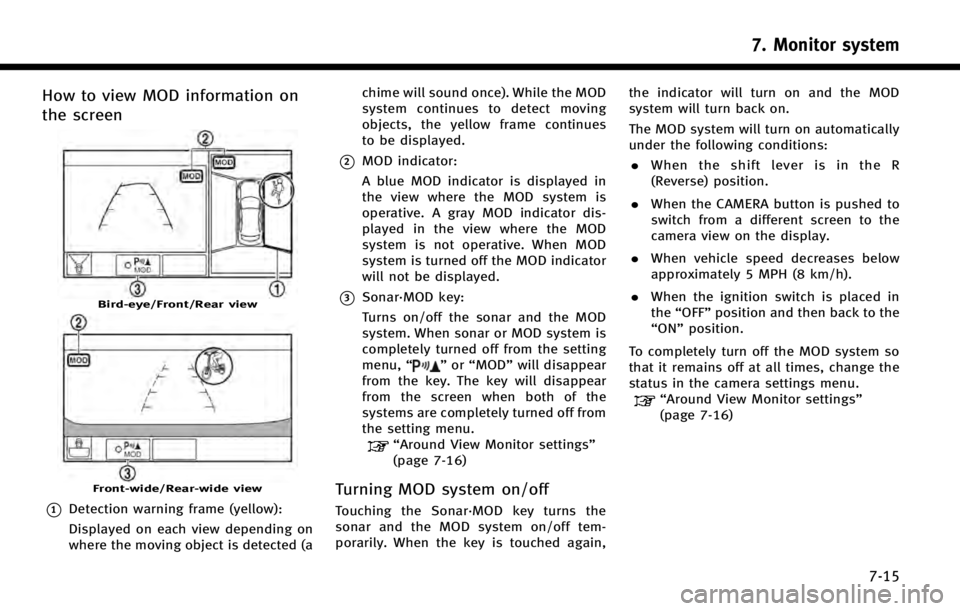
How to view MOD information on
the screen
Bird-eye/Front/Rear view
Front-wide/Rear-wide view
*1Detection warning frame (yellow):
Displayed on each view depending on
where the moving object is detected (achime will sound once). While the MOD
system continues to detect moving
objects, the yellow frame continues
to be displayed.
*2MOD indicator:
A blue MOD indicator is displayed in
the view where the MOD system is
operative. A gray MOD indicator dis-
played in the view where the MOD
system is not operative. When MOD
system is turned off the MOD indicator
will not be displayed.
*3Sonar·MOD key:
Turns on/off the sonar and the MOD
system. When sonar or MOD system is
completely turned off from the setting
menu,
“
”or “MOD” will disappear
from the key. The key will disappear
from the screen when both of the
systems are completely turned off from
the setting menu.
“Around View Monitor settings”
(page 7-16)
Turning MOD system on/off
Touching the Sonar·MOD key turns the
sonar and the MOD system on/off tem-
porarily. When the key is touched again, the indicator will turn on and the MOD
system will turn back on.
The MOD system will turn on automatically
under the following conditions:
. When the shift lever is in the R
(Reverse) position.
. When the CAMERA button is pushed to
switch from a different screen to the
camera view on the display.
. When vehicle speed decreases below
approximately 5 MPH (8 km/h).
. When the ignition switch is placed in
the “OFF” position and then back to the
“ON” position.
To completely turn off the MOD system so
that it remains off at all times, change the
status in the camera settings menu.
“Around View Monitor settings”
(page 7-16)
7. Monitor system
7-15
Page 119 of 274
![INFINITI Q50 HYBRID 2014 Infiniti Intouch 7. Monitor system
7-16
AROUND VIEW MONITOR SETTINGS
Around View Monitor settings can be changed with the following procedure.
1. Push<MENU>.
2. Touch [Settings].
3. Touch [Camera/Sonar].
Available set](/img/42/34966/w960_34966-118.png "INFINITI Q50 HYBRID 2014 Infiniti Intouch 7. Monitor system
7-16
AROUND VIEW MONITOR SETTINGS
Around View Monitor settings can be changed with the following procedure.
1. Push<MENU>.
2. Touch [Settings].
3. Touch [Camera/Sonar].
Available set")
7. Monitor system
7-16
AROUND VIEW MONITOR SETTINGS
Around View Monitor settings can be changed with the following procedure.
1. Push
Page 151 of 274
8. Information and settings
8-28
FULLY CUSTOMIZABLE DIGITAL ENVIR-
ONMENT
The system will automatically recognize
the user upon turning on the vehicle, after
Setting up the user information. There will
be a personalized welcome greeting and a
prompt to log-in.
This feature allows 3 drivers to use their
own registration, drive mode, driving posi-
tion, air conditioner and audio settings,
and memorizes these custom settings.
Log-in user can be changed from welcome
greeting screen or User List screen.
NOTE:
.
Vehicle Apps feature can not linked to the
Intelligent Keys.
.A maximum of four Intelligent Keys can be
registered to memorize settings for three
profiled users and one guest.
.When the ignition switch is pushed to the
“OFF” position, the user settings at that
point will be memorized by the Intelligent
Key that is used.
USER REGISTRATION
The driving position, navigation, and air
conditioner, etc., settings can be memorize
for each user. The settings can be restored
when deactivating the system.
Up to 3 settings can be registered.
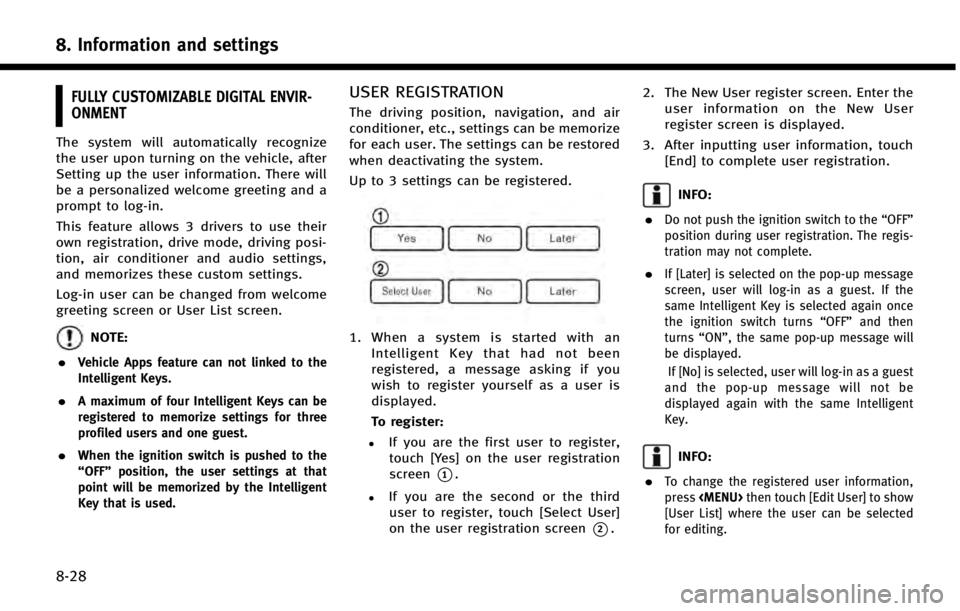
1. When a system is started with an
Intelligent Key that had not been
registered, a message asking if you
wish to register yourself as a user is
displayed.
To register:
.If you are the first user to register,touch [Yes] on the user registration
screen
*1.
.If you are the second or the third
user to register, touch [Select User]
on the user registration screen
*2. 2. The New User register screen. Enter the
user information on the New User
register screen is displayed.
3. After inputting user information, touch [End] to complete user registration.
INFO:
.
Do not push the ignition switch to the “OFF”
position during user registration. The regis-
tration may not complete.
.If [Later] is selected on the pop-up message
screen, user will log-in as a guest. If the
same Intelligent Key is selected again once
the ignition switch turns “OFF”and then
turns “ON”, the same pop-up message will
be displayed.
If [No] is selected, user will log-in as a guest
and the pop-up message will not be
displayed again with the same Intelligent
Key.
INFO:
.
To change the registered user information,
press
Page 152 of 274
EDITING USER INFORMATION
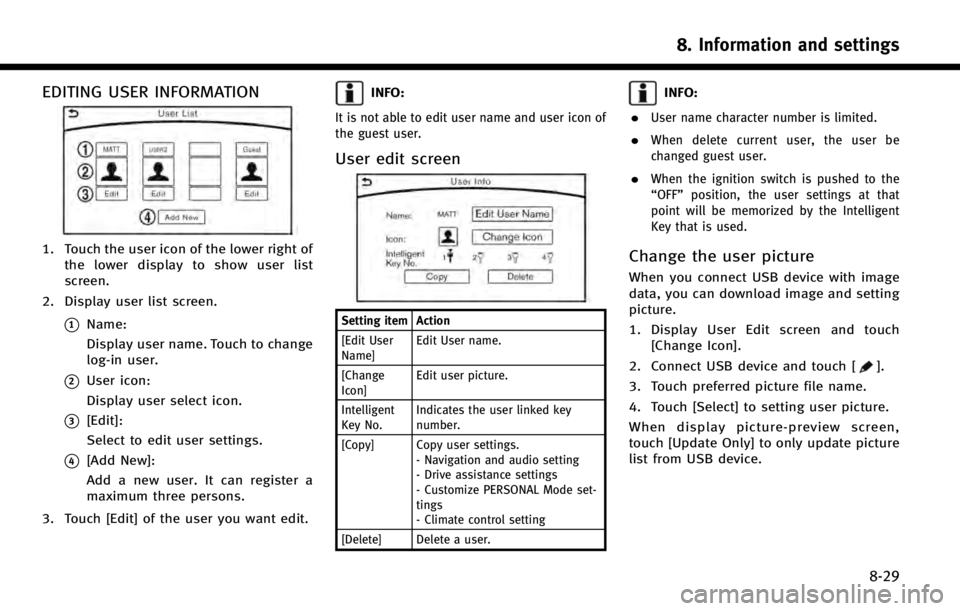
1. Touch the user icon of the lower right ofthe lower display to show user list
screen.
2. Display user list screen.
*1Name:
Display user name. Touch to change
log-in user.
*2User icon:
Display user select icon.
*3[Edit]:
Select to edit user settings.
*4[Add New]:
Add a new user. It can register a
maximum three persons.
3. Touch [Edit] of the user you want edit.
INFO:
It is not able to edit user name and user icon of
the guest user.
User edit screen
Setting item Action
[Edit User
Name] Edit User name.
[Change
Icon] Edit user picture.
Intelligent
Key No. Indicates the user linked key
number.
[Copy] Copy user settings. - Navigation and audio setting
- Drive assistance settings
- Customize PERSONAL Mode set-
tings
- Climate control setting
[Delete] Delete a user.
INFO:
.
User name character number is limited.
.When delete current user, the user be
changed guest user.
.When the ignition switch is pushed to the
“OFF” position, the user settings at that
point will be memorized by the Intelligent
Key that is used.
Change the user picture
When you connect USB device with image
data, you can download image and setting
picture.
1. Display User Edit screen and touch [Change Icon].
2. Connect USB device and touch [
].
3. Touch preferred picture file name.
4. Touch [Select] to setting user picture.
When display picture-preview screen,
touch [Update Only] to only update picture
list from USB device.
8. Information and settings
8-29
Page 158 of 274

SAFETY INFORMATION
The navigation system is primarily de-
signed to help you reach your destination.
However, you, the driver, must use the
system safely and properly. Information
concerning road conditions, traffic signs
and the availability of services may not
always be up to date. The system is not a
substitute for safe, proper, and legal
driving.
WARNING!
.Do not rely on route guidance alone.
Always be sure that all driving maneu-
vers are legal and safe in order to avoid
accidents.
MAP DATA AUTHENTICATION
When using a navigation system for the
first time, map data authentication is
necessary.
1. The system starts when the ignition
switch is pushed to the “ACC”or“ON”
position for the first time. The map data
authentication screen is displayed.
2. Enter the 16 alphanumeric characters in four parts containing four characters
each. Each of the four parts is dis-
played separately.
9. Navigation (if so equipped)
9-3
Page 216 of 274

*When the vehicle is traveling on a
continuous, slowly curving road.
*When the vehicle is traveling on a road
with repeating S-shaped curves.
*When the vehicle is on a loop bridge.
*When the vehicle is on a snow-covered
or unpaved road.
*When repeatedly turning left or right,
or driving in zigzags.
*When the vehicle is rotated on a
parking lot turntable while the ignition
switch is off.
9. Navigation (if so equipped)
9-61